# Upgrading to kernel version 6 from 5.10
**URL:** https://dietpi.com/forum/t/upgrading-to-kernel-version-6-from-5-10/20210
**Category:** General Discussion
**Created:** [28 May 2024 17:08 UTC](https://dietpi.com/forum/t/upgrading-to-kernel-version-6-from-5-10/20210 "2024-05-28T17:08:06Z")
**Posts on this page:** 20
**Page:** 2
### Author:  [@adamb](https://dietpi.com/forum/u/adamb)
#### Post date: [20 June 2024 02:45 UTC](https://dietpi.com/forum/t/upgrading-to-kernel-version-6-from-5-10/20210/21 "2024-06-20T02:45:29Z")
Okay, @MichaIng , let me just say sooo many kudos to you sir. I was able to boot off of a dietpi installer from the SD card slot, replace the symlinks just as you instructed, and, sure enough the system booted right up like nothing had ever happened. I know it’s probably very straightforward to you and something that’s old hat, but for someone like me it’s always a revelation when things like that at a very low level actually work as, generally speaking, it’s all very much voodoo to me in terms of what I know and am comfortable with.
I can’t thank you enough for taking the time to troubleshoot along with lil ole me and get me back up and running.
Now, the question is, as per usual because I’m a masochist at heart: do I attempt the kernel upgrade again and hope that there are no weird coincidences that cause any sort of i/o errors again?
You reported that it just works for you, and I’d like to be on kernel version 6 as I understand there are performance improvements. Further, the thing that initially prompted me to update is that I was trying to install support for ZFS, but was unable to complete install or load the kernel module because, I believe, I was missing the kernel headers needed. Would you think those headers would now be available to me using the version 6 kernel?
---
### Author:  [@adamb](https://dietpi.com/forum/u/adamb)
#### Post date: [20 June 2024 12:08 UTC](https://dietpi.com/forum/t/upgrading-to-kernel-version-6-from-5-10/20210/22 "2024-06-20T12:08:59Z")
Why would the output of uname -r not match what’s available via apt when it comes to the kernel?
```auto
$ # sudo uname -a
Linux xxxxxxxxxxxxx 5.10.160-legacy-rk35xx #1 SMP Wed May 15 03:04:45 UTC 2024 aarch64 GNU/Linux
```
```auto
$ # sudo apt install linux-{image,dtb}-vendor-rk35xx
Reading package lists... Done
Building dependency tree... Done
Reading state information... Done
linux-image-vendor-rk35xx is already the newest version (24.8.0-trunk-dietpi1).
linux-dtb-vendor-rk35xx is already the newest version (24.8.0-trunk-dietpi1).
0 upgraded, 0 newly installed, 0 to remove and 0 not upgraded.
```
Was the newer kernel version (6.1-xxx) removed from the apt repository? Or is there something else I’m missing? Why would the two mismatch? I know there used to be an update to version 6.1-xxxx.
---
### Author:  [@MichaIng](https://dietpi.com/forum/u/MichaIng)
#### Post date: [20 June 2024 13:39 UTC](https://dietpi.com/forum/t/upgrading-to-kernel-version-6-from-5-10/20210/23 "2024-06-20T13:39:12Z")
Great that it worked. Now that you have an SD card prepared for recovery when needed, you could just retry it. Reinstall the packages, and check whether there are I/O or filesystem errors thrown:
```sh
apt install --reinstall linux-{image,dtb}-vendor-rk35xx
dmesg -l 0,1,2,3
```
Also verify that the symlinks in `/boot` are consistently pointing to thr 6.1 vendor variants. If it fails again: probably SD card vs eMMC makes a difference. I can test it some time later, bit need the eMMC module for some other tests, currently. You could test the vendor upgrade on the SD card image. Still no prove, maybe there is another quirk/difference with the eMMC image.
For kernel headers:
```sh
apt install linux-headers-legacy-rk35xx
```
or with “vendor” respectively.
`uname -r` shows the currently loaded kernel version. Since you have two versions installed and adjusted the symlinks to point to the legacy one, this is what it shows.
---
### Author:  [@adamb](https://dietpi.com/forum/u/adamb)
#### Post date: [21 June 2024 02:02 UTC](https://dietpi.com/forum/t/upgrading-to-kernel-version-6-from-5-10/20210/24 "2024-06-21T02:02:29Z")
> [@MichaIng](#):
>
> `apt install --reinstall linux-{image,dtb}-vendor-rk35xx`
Worked like a charm this time with the --reinstall flag. Does that flag just like clear the apt cache or something?
And thank you again!
---
### Author:  [@Joulinar](https://dietpi.com/forum/u/Joulinar)
#### Post date: [21 June 2024 06:35 UTC](https://dietpi.com/forum/t/upgrading-to-kernel-version-6-from-5-10/20210/25 "2024-06-21T06:35:38Z")
> [@adamb](#):
>
> Does that flag just like clear the apt cache or something?
> **[apt-get(8) - Linux man page](https://linux.die.net/man/8/apt-get)**
>
> apt-get is the command-line tool for handling packages, and may be considered the user's "back-end" to other tools using the APT library.
> **–reinstall**
> Re-Install packages that are already installed and at the newest version.
The flag is going to force the reinstallation of a package.
---
### Author:  [@macrae](https://dietpi.com/forum/u/macrae)
#### Post date: [23 June 2024 12:52 UTC](https://dietpi.com/forum/t/upgrading-to-kernel-version-6-from-5-10/20210/26 "2024-06-23T12:52:05Z")
would you help to check what is the version of RKNPU driver in this kernel? Is it still 0.9.2 or already upgraded to 0.9.6?
---
### Author:  [@MichaIng](https://dietpi.com/forum/u/MichaIng)
#### Post date: [24 June 2024 20:39 UTC](https://dietpi.com/forum/t/upgrading-to-kernel-version-6-from-5-10/20210/27 "2024-06-24T20:39:15Z")
It is v0.9.6 already: [linux-rockchip/drivers/rknpu at rk-6.1-rkr1 · armbian/linux-rockchip · GitHub](https://github.com/armbian/linux-rockchip/tree/rk-6.1-rkr1/drivers/rknpu)
---
### Author:  [@macrae](https://dietpi.com/forum/u/macrae)
#### Post date: [29 June 2024 07:37 UTC](https://dietpi.com/forum/t/upgrading-to-kernel-version-6-from-5-10/20210/28 "2024-06-29T07:37:21Z")
ok many thanks, it is working now, but I have issue regarding the bluetooth. It is using RTL8852BE, the wifi is working fine, but unable to detect bluetooth. Is ther any missing steps here?
---
### Author:  [@adamb](https://dietpi.com/forum/u/adamb)
#### Post date: [9 July 2024 06:20 UTC](https://dietpi.com/forum/t/upgrading-to-kernel-version-6-from-5-10/20210/29 "2024-07-09T06:20:35Z")
Hi,
So, I’d switched to an armbian-based kernel per your instructions in order to be able to update the kernel from version 5 to version 6-based, which, after your guidance, has been working beautifully.
Now that 9.6.1 of Dietpi is out, and you’ve specifically moved to using your own apt repository, is there a way for me to get back on track with that latest Dietpi version? When I run dietpi-update, now, I get an error stating:
```auto
The following signatures couldn't be verified because the public key is not available: NO_PUBKEY 93D6889F9F0E78D5
Fetched 49.9 kB in 4s (12.3 kB/s)
Reading package lists...
W: An error occurred during the signature verification. The repository is not updated and the previous index files will be used. GPG error: https://mirrors.tuna.tsinghua.edu.cn/armbian bullseye InRelease: The following signatures couldn't be verified because the public key is not available: NO_PUBKEY 93D6889F9F0E78D5
E: Failed to fetch https://mirrors.tuna.tsinghua.edu.cn/armbian/dists/bullseye/InRelease The following signatures couldn't be verified because the public key is not available: NO_PUBKEY 93D6889F9F0E78D5
E: Some index files failed to download. They have been ignored, or old ones used instead.
```
My question is, is it safe to try and add that public key manually and then update, or is there a different repository that needs to be pointed to?
What is the best way for me to stay current with Dietpi releases at this juncture?
As always, your help is very much appreciated.
Thank you
- AB
---
### Author:  [@Joulinar](https://dietpi.com/forum/u/Joulinar)
#### Post date: [9 July 2024 08:47 UTC](https://dietpi.com/forum/t/upgrading-to-kernel-version-6-from-5-10/20210/30 "2024-07-09T08:47:53Z")
looks like an Armbian mirror. Let’s check if it is specified somewhere
```auto
for i in /etc/apt/sources.list{,.d/*.list}; do echo "$i:"; cat "$i"; done
```
---
### Author:  [@adamb](https://dietpi.com/forum/u/adamb)
#### Post date: [9 July 2024 09:07 UTC](https://dietpi.com/forum/t/upgrading-to-kernel-version-6-from-5-10/20210/31 "2024-07-09T09:07:07Z")
```auto
/etc/apt/sources.list.d/contrib.list:
/etc/apt/sources.list.d/dietpi.list:
deb https://dietpi.com/apt bookworm main
deb https://dietpi.com/apt all orangepi5plus
/etc/apt/sources.list.d/docker.list:
deb [arch=arm64 signed-by=/usr/share/keyrings/docker.gpg] https://download.docker.com/linux/debian bookworm stable
/etc/apt/sources.list.d/kopia.list:
deb [signed-by=/etc/apt/keyrings/kopia-keyring.gpg] http://packages.kopia.io/apt/ testing main
/etc/apt/sources.list.d/tailscale.list:
# Tailscale packages for debian bookworm
deb [signed-by=/usr/share/keyrings/tailscale-archive-keyring.gpg] https://pkgs.tailscale.com/stable/debian bookworm main
./test.sh: line 4: unexpected EOF while looking for matching ``'
```
---
### Author:  [@Joulinar](https://dietpi.com/forum/u/Joulinar)
#### Post date: [10 July 2024 08:20 UTC](https://dietpi.com/forum/t/upgrading-to-kernel-version-6-from-5-10/20210/32 "2024-07-10T08:20:51Z")
> [@adamb](#):
>
> `./test.sh: line 4: unexpected EOF while looking for matching ``'`
hmm you have created a `test.sh` file somewhere within `/etc/apt/`??
---
### Author:  [@adamb](https://dietpi.com/forum/u/adamb)
#### Post date: [10 July 2024 08:48 UTC](https://dietpi.com/forum/t/upgrading-to-kernel-version-6-from-5-10/20210/33 "2024-07-10T08:48:02Z")
Just in my home folder. That’s how I was attempting to run those commands you laid out…
---
### Author:  [@Joulinar](https://dietpi.com/forum/u/Joulinar)
#### Post date: [10 July 2024 09:10 UTC](https://dietpi.com/forum/t/upgrading-to-kernel-version-6-from-5-10/20210/34 "2024-07-10T09:10:55Z")
> [@adamb](#):
>
> test.sh
did you created that file to run my command.? It can be executed on CLI directly without creating a shell script
---
### Author:  [@adamb](https://dietpi.com/forum/u/adamb)
#### Post date: [10 July 2024 09:22 UTC](https://dietpi.com/forum/t/upgrading-to-kernel-version-6-from-5-10/20210/35 "2024-07-10T09:22:45Z")
I did, but only because I got an the following when trying to run your command directly from a prompt:
```auto
sudo for i in /etc/apt/sources.list{,.d/*.list}; do echo "$i:"; cat "$i"; done
-bash: syntax error near unexpected token `do'
```
---
### Author:  [@Joulinar](https://dietpi.com/forum/u/Joulinar)
#### Post date: [10 July 2024 09:57 UTC](https://dietpi.com/forum/t/upgrading-to-kernel-version-6-from-5-10/20210/36 "2024-07-10T09:57:02Z")
pls use user `root` to execute the command.
---
### Author:  [@adamb](https://dietpi.com/forum/u/adamb)
#### Post date: [10 July 2024 10:13 UTC](https://dietpi.com/forum/t/upgrading-to-kernel-version-6-from-5-10/20210/37 "2024-07-10T10:13:05Z")
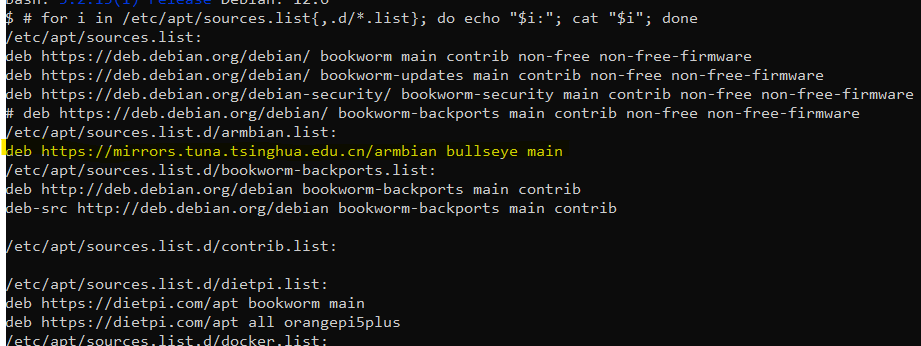
---
### Author:  [@Joulinar](https://dietpi.com/forum/u/Joulinar)
#### Post date: [10 July 2024 11:16 UTC](https://dietpi.com/forum/t/upgrading-to-kernel-version-6-from-5-10/20210/38 "2024-07-10T11:16:44Z")
did you create `/etc/apt/sources.list.d/armbian.list` manually?
Because our default on Orange Pi would be `/etc/apt/sources.list.d/dietpi-armbian.list`.
Next it is pointing to a dedicated mirror `mirrors.tuna.tsinghua.edu.cn` and not to global apt repository `apt.armbian.com`.
Furthermore, you have specified Debian `Bullseye` as source version, while the rest of your configuration is pointing to Debian `Bookworm`.
Best is to remove that list and create a new `/etc/apt/sources.list.d/dietpi-armbian.list` containing
```auto
deb https://apt.armbian.com/ bookworm main
```
---
### Author:  [@adamb](https://dietpi.com/forum/u/adamb)
#### Post date: [10 July 2024 23:20 UTC](https://dietpi.com/forum/t/upgrading-to-kernel-version-6-from-5-10/20210/39 "2024-07-10T23:20:23Z")
Remove that entire list? Or just the ’ `mirrors.tuna.tsinghua.edu.cn` entry, and then replace with ‘’ ```
deb [https://apt.armbian.com/](https://apt.armbian.com/) bookworm main
```auto
...??
```
---
### Author:  [@adamb](https://dietpi.com/forum/u/adamb)
#### Post date: [11 July 2024 05:31 UTC](https://dietpi.com/forum/t/upgrading-to-kernel-version-6-from-5-10/20210/40 "2024-07-11T05:31:45Z")
Okay, so here is my current output from your command:
```auto
$ # for i in /etc/apt/sources.list{,.d/*.list}; do echo "$i:"; cat "$i"; done
/etc/apt/sources.list:
deb https://deb.debian.org/debian/ bookworm main contrib non-free non-free-firmware
deb https://deb.debian.org/debian/ bookworm-updates main contrib non-free non-free-firmware
deb https://deb.debian.org/debian-security/ bookworm-security main contrib non-free non-free-firmware
# deb https://deb.debian.org/debian/ bookworm-backports main contrib non-free non-free-firmware
/etc/apt/sources.list.d/armbian.list:
# deb https://mirrors.tuna.tsinghua.edu.cn/armbian bullseye main
deb https://apt.armbian.com/ bookworm main
/etc/apt/sources.list.d/bookworm-backports.list:
deb http://deb.debian.org/debian bookworm-backports main contrib
deb-src http://deb.debian.org/debian bookworm-backports main contrib
/etc/apt/sources.list.d/contrib.list:
/etc/apt/sources.list.d/dietpi.list:
deb https://dietpi.com/apt bookworm main
deb https://dietpi.com/apt all orangepi5plus
/etc/apt/sources.list.d/docker.list:
deb [arch=arm64 signed-by=/usr/share/keyrings/docker.gpg] https://download.docker.com/linux/debian bookworm stable
/etc/apt/sources.list.d/kopia.list:
deb [signed-by=/etc/apt/keyrings/kopia-keyring.gpg] http://packages.kopia.io/apt/ testing main
/etc/apt/sources.list.d/tailscale.list:
# Tailscale packages for debian bookworm
deb [signed-by=/usr/share/keyrings/tailscale-archive-keyring.gpg] https://pkgs.tailscale.com/stable/debian bookworm main
```
[Previous page](https://dietpi.com/forum/t/upgrading-to-kernel-version-6-from-5-10/20210.md?page=1)
[Next page](https://dietpi.com/forum/t/upgrading-to-kernel-version-6-from-5-10/20210.md?page=3)