# Update 154 - 155 fails
**URL:** https://dietpi.com/forum/t/update-154-155-fails/1482
**Category:** Troubleshooting
**Created:** [4 September 2017 16:41 UTC](https://dietpi.com/forum/t/update-154-155-fails/1482 "2017-09-04T16:41:51Z")
**Posts on this page:** 11
**Page:** 1
### Author:  [@sofad](https://dietpi.com/forum/u/sofad)
#### Post date: [4 September 2017 16:41 UTC](https://dietpi.com/forum/t/update-154-155-fails/1482/1 "2017-09-04T16:41:51Z")
Hi,
i try to update my Raspberry Zero W from 154 to 155.
Updates from 152-154 worked flawless.
Update 155 is signaled.
> dietpi-update = Run now to update DietPi (from V154 to V155).
i can ping from the dietpi (154)
> root@DietPi:~# ping -c 1 [dietpi.com](http://dietpi.com)
> PING [dietpi.com](http://dietpi.com) (185.101.92.145) 56(84) bytes of data.
>
> root@DietPi:~# ping -c 1 [fuzon.co.uk](http://fuzon.co.uk)
> PING [fuzon.co.uk](http://fuzon.co.uk) (185.101.93.34) 56(84) bytes of data.
update process:
> DietPi-Services
> ─────────────────────────────────────────────────────
> Mode: stop
> Please wait…
>
> [Ok] cron
> [Ok] lighttpd
> [Ok] php5-fpm
> [Ok] dnsmasq
> [Ok] pihole-FTL
>
> % Total % Received % Xferd Average Speed Time Time Time Current
> Dload Upload Total Spent Left Speed
> 0 0 0 0 0 0 0 0 --:–:-- --:–:-- --:–:-- 0curl: (6) Could not resolve host: [dietpi.com](http://dietpi.com)
> [Failed] Download failed, unable to run update. Please try running dietpi-update again.
lighttpd is down
> > service lighttpd status
>
> Sep 04 18:16:58 DietPi systemd[1]: Stopped Lighttpd Daemon.
i have to restart the pi to get everything to work again.
What should i check to get this update to work?
Thank you!
---
### Author:  [@Fourdee](https://dietpi.com/forum/u/Fourdee)
#### Post date: [4 September 2017 18:11 UTC](https://dietpi.com/forum/t/update-154-155-fails/1482/2 "2017-09-04T18:11:04Z")
Hi,
Looks like a DNS issue. Might be due to PiHole service being stopped.
Whats the DNS server setting in dietpi-config \> Networking Options \> Ethernet?
---
### Author:  [@sofad](https://dietpi.com/forum/u/sofad)
#### Post date: [4 September 2017 21:02 UTC](https://dietpi.com/forum/t/update-154-155-fails/1482/3 "2017-09-04T21:02:45Z")
Hi Fourdee, thank you for replying so fast.
this is the setting for
Ethernet Adapter
```nohighlight
No Ethernet Hardware was found. You are most likely │
│ running a Pi Model A.
```
Wifi: Available | Enabled | Connected
```nohighlight
Current Details: │
│ - SSID = NAME | 65 Mbit | Strength: -28 dBm │
│ - KEY = PASSWORD │
│ - Mode = STATIC │
│ - Ip = 192.168.1.30 │
│ - Mask = 255.255.255.0 │
│ - DNS = 127.0.0.1
```
after the update stops ([Failed] Download failed, unable to run update)
i get this feedback in terminal:
```nohighlight
root@DietPi:~# pihole status
::: DNS service is NOT running
root@DietPi:~# pihole restartdns
root@DietPi:~# pihole status
::: DNS service is running
::: Pi-hole blocking is Enabled
root@DietPi:~# service lighttpd status
● lighttpd.service - Lighttpd Daemon
Loaded: loaded (/lib/systemd/system/lighttpd.service; disabled)
Active: inactive (dead)
Sep 04 18:22:12 DietPi systemd[1]: Starting Lighttpd Daemon...
Sep 04 18:22:13 DietPi lighttpd[1159]: Syntax OK
Sep 04 18:22:13 DietPi systemd[1]: Started Lighttpd Daemon.
Sep 04 22:56:00 DietPi systemd[1]: Stopping Lighttpd Daemon...
Sep 04 22:56:00 DietPi systemd[1]: Stopped Lighttpd Daemon.
```
I hope this contains something useful, thank you for your help.
---
### Author:  [@k-plan](https://dietpi.com/forum/u/k-plan)
#### Post date: [5 September 2017 16:17 UTC](https://dietpi.com/forum/t/update-154-155-fails/1482/4 "2017-09-05T16:17:34Z")
hi,
> Mode = STATIC
> Ip = 192.168.1.30
> Mask = 255.255.255.0 │
> DNS = 127.0.0.1
you need a propper working wifi network configuration, with correct default gatway and working dns server.
Go to dietpi-config \> Networking Options \> Wifi and set it correct for you LAN.
---
### Author:  [@sofad](https://dietpi.com/forum/u/sofad)
#### Post date: [5 September 2017 19:54 UTC](https://dietpi.com/forum/t/update-154-155-fails/1482/5 "2017-09-05T19:54:04Z")
Hi k-plan,
Wifi connection is working, im able to install via apt-get, ping [dietpi.com](http://dietpi.com), install pihole blocklist updates.
Dietpi 154 is working, the update to 155 fails…
Before i start dietpi-update i turned pihole off
---
### Author:  [@k-plan](https://dietpi.com/forum/u/k-plan)
#### Post date: [6 September 2017 16:18 UTC](https://dietpi.com/forum/t/update-154-155-fails/1482/6 "2017-09-06T16:18:19Z")
* * *
@Fourdee:
This is my last try, before I give up forever …
* * *
Hi sofad,
Dir ist aber schon klar, dass die IP: 127.0.0.1/8 ein spezielle IP Adresse ist?
Loclahost, Loopback-Device, localnet, wie auch immer du es nennen willst?
Wenn du per Hand pihole anhälst oder wenn dietpi-update VOR dem Update ALLE laufenden Dienste beendet via dietpi-service und somit auch pihole, hat dein Geräte KEINE funktionierende Namensauflösung (vallid DNS-Server) mehr.
Folglich kann dietpi-update nur fehlschlagen …
Du brauchst unter Wifi Network in dietpi-config, AUCH wenn du pihole installiert hast und besonders dann, eine funktionierende Netzwerk Konfiguration zu Beispiel:
```nohighlight
Static_IP=192.168.1.30
Static_Mask=255.255.255.0
Static_Gateway=192.168.1.1
Static_DNS=192.168.1.1, 8.8.8.8
```
Warum in alle Welt auch immer , dort jeder 127.0.0.1 eintragen will oder eingetragen hat, ist mir vollkommen schleierhaft … 🙄
---
### Author:  [@sofad](https://dietpi.com/forum/u/sofad)
#### Post date: [7 September 2017 09:50 UTC](https://dietpi.com/forum/t/update-154-155-fails/1482/7 "2017-09-07T09:50:48Z")
thank you k-plan
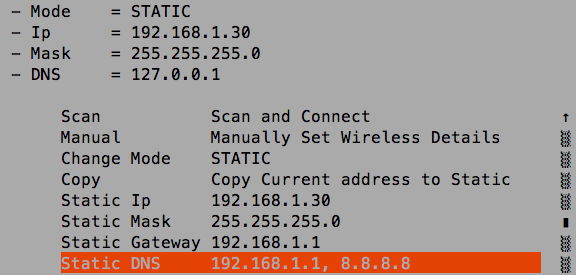
i tried to set static\_dns to
```nohighlight
Static_DNS=192.168.1.1, 8.8.8.8
```
i apply and save changes, restart networking
the static\_dns is still 127.0.0.1
//
after i uninstalled pihole the static\_dns is set to 8.8.8.8 and update is working
reinstalled pihole.
thanks for your help
---
### Author:  [@Fourdee](https://dietpi.com/forum/u/Fourdee)
#### Post date: [7 September 2017 17:23 UTC](https://dietpi.com/forum/t/update-154-155-fails/1482/8 "2017-09-07T17:23:13Z")
[https://github.com/Fourdee/DietPi/issues/1138#issue-256011758](https://github.com/Fourdee/DietPi/issues/1138#issue-256011758)
---
### Author:  [@tym](https://dietpi.com/forum/u/tym)
#### Post date: [21 October 2017 08:20 UTC](https://dietpi.com/forum/t/update-154-155-fails/1482/9 "2017-10-21T08:20:58Z")
Hi, still having exactly the same problem trying to update form 156 to 157
---
### Author:  [@tym](https://dietpi.com/forum/u/tym)
#### Post date: [23 October 2017 17:38 UTC](https://dietpi.com/forum/t/update-154-155-fails/1482/10 "2017-10-23T17:38:12Z")
The only way I could update was by uninstalling pihole, after that it worked without issues.
---
### Author:  [@ste](https://dietpi.com/forum/u/ste)
#### Post date: [26 October 2017 22:25 UTC](https://dietpi.com/forum/t/update-154-155-fails/1482/11 "2017-10-26T22:25:00Z")
Hi,
I had the same problem updating from V156 to V157.
I could avoid uninstalling pihole by adding # to the beginning the lines in the dietpi-update script, which stop the services, changing them to comments, so it didn’t stop the services during update.
Every thing works fine so far…