# Time Sync with NTPD - issue
**URL:** https://dietpi.com/forum/t/time-sync-with-ntpd-issue/1271
**Category:** Troubleshooting
**Created:** [22 May 2017 10:25 UTC](https://dietpi.com/forum/t/time-sync-with-ntpd-issue/1271 "2017-05-22T10:25:59Z")
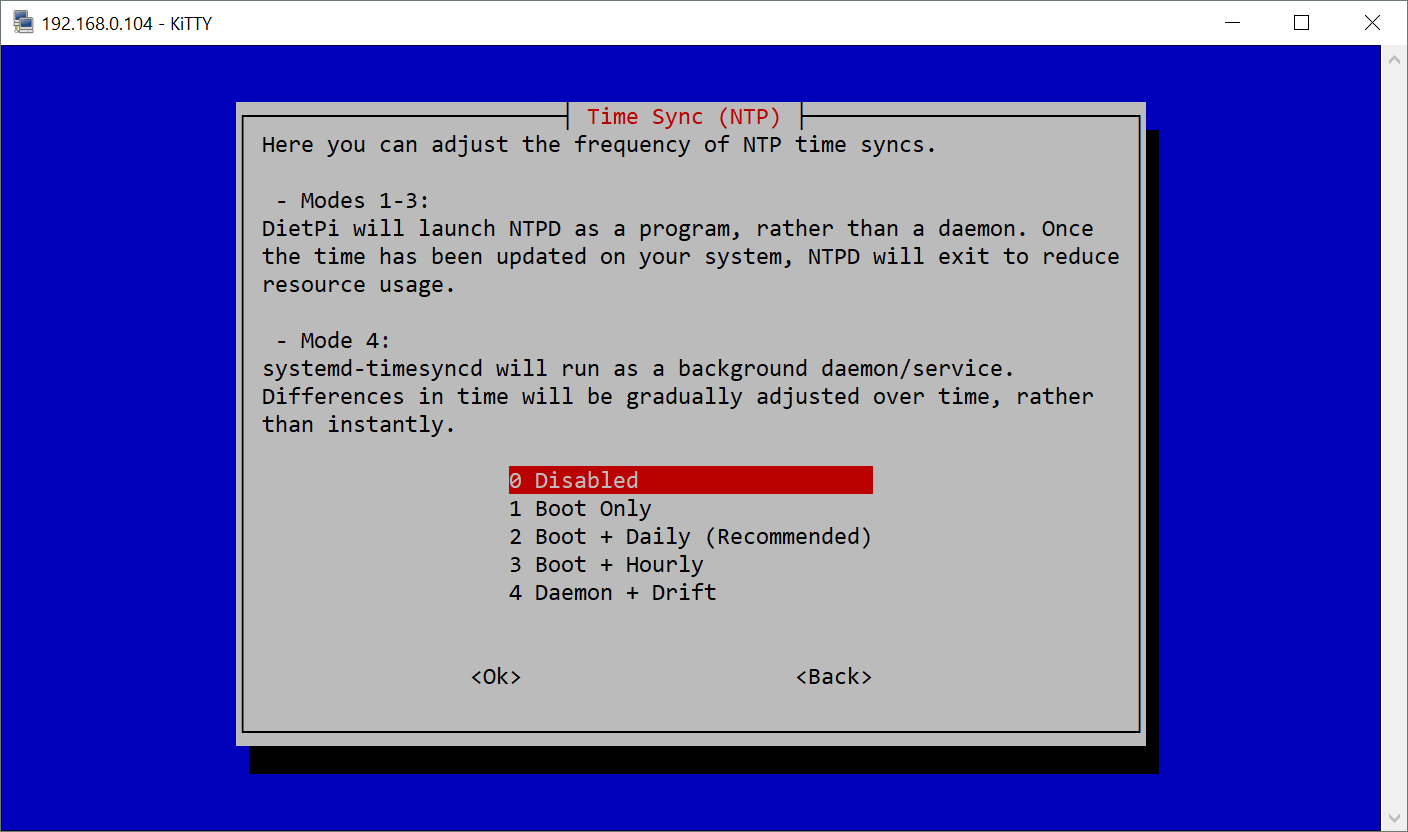
**Posts on this page:** 8
**Page:** 1
### Author:  [@nomax](https://dietpi.com/forum/u/nomax)
#### Post date: [22 May 2017 10:25 UTC](https://dietpi.com/forum/t/time-sync-with-ntpd-issue/1271/1 "2017-05-22T10:25:59Z")
all,
I have set up DietPi on my RPI2 and while I am trying to connect/log in I am receiving the following messages:
```nohighlight
NTPD: System time has not been synced/updated correctly. │
│ │
│ To prevent further issues with software installations, │
│ DietPi-Software will now exit. │
│ │
│ If problems persist, check the NTPD log: │
│ /var/log/ntpd.log │
│ │
│ To override this error, run the following command: │
│ echo 0 > /etc/dietpi/.ntpd_exit_status
```
Apparently the time can not be synced correctly. Even after reinstalling NTPD it does not change and I receive this message every time when I log in.
Any workaround available to this?
Thanks!!
---
### Author:  [@Fourdee](https://dietpi.com/forum/u/Fourdee)
#### Post date: [23 May 2017 11:02 UTC](https://dietpi.com/forum/t/time-sync-with-ntpd-issue/1271/2 "2017-05-23T11:02:26Z")
Hi,
Firstly, make sure you are running DietPi v150, as we fixed a known problem where NTPD wouldnt start in some cases.
Failing that, switch to SystemD-Timesync:
dietpi-config \> advanced \> time sync mode \> 4 Daemon + Drift
---
### Author:  [@johnvick](https://dietpi.com/forum/u/johnvick)
#### Post date: [1 March 2018 21:23 UTC](https://dietpi.com/forum/t/time-sync-with-ntpd-issue/1271/3 "2018-03-01T21:23:27Z")
Is this needed on devices that have RTC?
John
---
### Author:  [@k-plan](https://dietpi.com/forum/u/k-plan)
#### Post date: [3 March 2018 20:23 UTC](https://dietpi.com/forum/t/time-sync-with-ntpd-issue/1271/4 "2018-03-03T20:23:30Z")
@ johnvick
---
### Author:  [@Fourdee](https://dietpi.com/forum/u/Fourdee)
#### Post date: [3 March 2018 20:27 UTC](https://dietpi.com/forum/t/time-sync-with-ntpd-issue/1271/5 "2018-03-03T20:27:15Z")
> [@johnvick](#):
>
> Is this needed on devices that have RTC?
>
> John
Hi John,
Yes initially, to set the time. Also ensures the RTC does not drift out of time incorrectly over a period.
---
### Author:  [@MadHATR](https://dietpi.com/forum/u/MadHATR)
#### Post date: [17 May 2018 21:46 UTC](https://dietpi.com/forum/t/time-sync-with-ntpd-issue/1271/6 "2018-05-17T21:46:25Z")
How do I set the time on my Raspberry Pi with dietpi - NTPD does not work, it currently thinks the date is 02/04/2018.
reboot, retry, reinstall - nothing !
I’ve tried all the options in dietpi-config, I’ve tried the ntp server my mac uses (apple euro) I’ve tried the server my years old router uses 143.210.16.201 - nothing works.
How do i just get the bloody box to understand today’s date and time.
I’ve tried "date --set=“23 June 1988 10:00:00” format and that got ignored.
Please help - I have spent every night this week messing with this thing, but enough is enough - reply and you could save the life of my Pi - cos this weekend it will be no more !
---
### Author:  [@baz123](https://dietpi.com/forum/u/baz123)
#### Post date: [18 May 2018 19:46 UTC](https://dietpi.com/forum/t/time-sync-with-ntpd-issue/1271/7 "2018-05-18T19:46:51Z")
I have had this post on setting time on a Pi sitting in my blog drafts for a while (not done anything recently). [https://tech.borpin.co.uk/2018/05/18/keeping-time-on-a-pi/](https://tech.borpin.co.uk/2018/05/18/keeping-time-on-a-pi/)
I think you can simply use
```nohighlight
sntp -s time.google.com
```
to set the time. The issue is, if the time is too far out, NTP will not set it unless you force it to. Once set, it writes it to file then uses that as the starting point next time so it is only on initial install you get a significant problem. On boot on V6 instances, I regularly see an NTP could not be set type error when using the daemon + drift setting.
---
### Author:  [@MadHATR](https://dietpi.com/forum/u/MadHATR)
#### Post date: [30 May 2018 15:17 UTC](https://dietpi.com/forum/t/time-sync-with-ntpd-issue/1271/8 "2018-05-30T15:17:19Z")
Thanks,
I disabled the time sync in the end, found a different linux date command and set it that way.