### Author:  [@HyperCriSiS](https://dietpi.com/forum/u/HyperCriSiS)
#### Post date: [11 July 2022 19:02 UTC](https://dietpi.com/forum/t/strange-network-issues-rp4-only-lan-devices-are-reachable/13656/1 "2022-07-11T19:02:34Z")
Hi,
I am running Dietpi 8.6 on RPi 4 Model B (armv7l).
It happend before that I have suddenly strange network issues.
>
>
> \### Creating a bug report/issue
>
> \#### Required Information
> \- DietPi version
> …
> G\_DIETPI\_VERSION\_CORE=7
> G\_DIETPI\_VERSION\_SUB=1
> G\_DIETPI\_VERSION\_RC=0
> G\_GITBRANCH='beta'
> G\_GITOWNER='MichaIng'
>
> \- Distro version | buster
> \- Kernel version | Linux DarkPi 5.10.17-v7l+ #1414 SMP Fri Apr 30 13:20:47 BST 2021 armv7l GNU/Linx
> \- SBC model | RPi 4 Model B (armv7l)
>
> \- Power supply used | 5V 3.4A 17W
> \- SDcard used | SanDisk class 10
> \#### Additional Information
> \- Software title | Dietpi + Pi-Hole + Unbound
> \- I tried to update to latest version 7.1 final but it seems something went wrong, because it still says (beta).
> Afterwards I have heavy DNS issues. Most of the queries get "unknown" as answer.
> I can't start dietpi-software or dietpi-update again now, because the DNS queries do not resolve.
>
> I have no bug report as it can't be sent.
>
> Where do I start now to get this fixed?
>
> Thanks,
> Hyper
I use Pihole with unbound.
My RPi was running hot for a while so I deciced to uninstall Mate (caja was using much CPU) and install xfce. When I tried to install the network connection check failed.
Pings to devices in my LAN work but external pings fail and the strange thing is where they are sent from.

Something in the ethernet config got broken somehow but it looks good in ifconfig.
I can get a working connection via WLAN.
I installed Xfce via WLAN but now it gets even worse. XVNC seems to eat up all CPU.
Navigating on the Raspi with RealVNC is now nearly impossible. The grafics do not load properly.
Any ideas how I can fix my eth interface?
Thanks,
Hyper
Unfortunately I allowed to add only one picture to the post.
---
### Author:  [@Joulinar](https://dietpi.com/forum/u/Joulinar)
#### Post date: [11 July 2022 19:32 UTC](https://dietpi.com/forum/t/strange-network-issues-rp4-only-lan-devices-are-reachable/13656/2 "2022-07-11T19:32:28Z")
Can you share following
```auto
ip a
cat /etc/network/interfaces
```
Btw `ifconfig` depreciated on Linux world and has been replaced by `ip` command suite 😉
---
### Author:  [@HyperCriSiS](https://dietpi.com/forum/u/HyperCriSiS)
#### Post date: [12 July 2022 00:36 UTC](https://dietpi.com/forum/t/strange-network-issues-rp4-only-lan-devices-are-reachable/13656/3 "2022-07-12T00:36:46Z")
Sure!
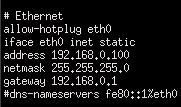
I can’t get ip -a to work, it shows the help then. But no idea how to use this new tool 😓
cat /etc/network/interfaces
---
### Author:  [@HyperCriSiS](https://dietpi.com/forum/u/HyperCriSiS)
#### Post date: [12 July 2022 00:39 UTC](https://dietpi.com/forum/t/strange-network-issues-rp4-only-lan-devices-are-reachable/13656/4 "2022-07-12T00:39:34Z")
When I start dietpi-config, there’s always this entry in the terminal:

No idea if this has to do with it.
---
### Author:  [@Joulinar](https://dietpi.com/forum/u/Joulinar)
#### Post date: [12 July 2022 01:09 UTC](https://dietpi.com/forum/t/strange-network-issues-rp4-only-lan-devices-are-reachable/13656/5 "2022-07-12T01:09:49Z")
Sorry typo. It’s `ip a`
---
### Author:  [@MichaIng](https://dietpi.com/forum/u/MichaIng)
#### Post date: [12 July 2022 05:21 UTC](https://dietpi.com/forum/t/strange-network-issues-rp4-only-lan-devices-are-reachable/13656/6 "2022-07-12T05:21:12Z")
Please also check:
```bash
dmesg -l emerg,alert,crit,err
```
---
### Author:  [@HyperCriSiS](https://dietpi.com/forum/u/HyperCriSiS)
#### Post date: [12 July 2022 17:07 UTC](https://dietpi.com/forum/t/strange-network-issues-rp4-only-lan-devices-are-reachable/13656/7 "2022-07-12T17:07:43Z")
Sorry, I forgot to mention that I also have PiVPN installed, which could be relevant.
Here is the IP which the ping is sent from:
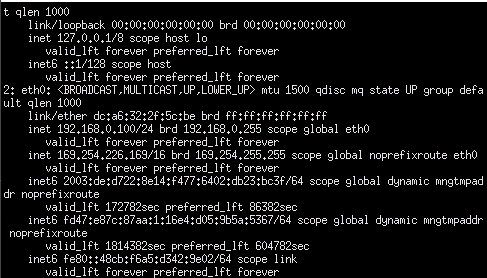
What does this mean?
---
### Author:  [@HyperCriSiS](https://dietpi.com/forum/u/HyperCriSiS)
#### Post date: [12 July 2022 17:09 UTC](https://dietpi.com/forum/t/strange-network-issues-rp4-only-lan-devices-are-reachable/13656/8 "2022-07-12T17:09:27Z")

Undervoltage 😄 I did not undervolt anything and the power supply should be very well.
---
### Author:  [@Joulinar](https://dietpi.com/forum/u/Joulinar)
#### Post date: [12 July 2022 17:22 UTC](https://dietpi.com/forum/t/strange-network-issues-rp4-only-lan-devices-are-reachable/13656/9 "2022-07-12T17:22:17Z")
The undervoltage message is critical and you should take it seriously. Did you have an external HDD connected? Probably without own PSU?
Can you share following?
```auto
cat /etc/network/interfaces
```
---
### Author:  [@HyperCriSiS](https://dietpi.com/forum/u/HyperCriSiS)
#### Post date: [12 July 2022 17:56 UTC](https://dietpi.com/forum/t/strange-network-issues-rp4-only-lan-devices-are-reachable/13656/10 "2022-07-12T17:56:05Z")
> [@Joulinar](#):
>
> `cat /etc/network/interfaces`
There is only a M2 SSD connected via USB.
The power supply has 5V 3.4A 17W. Should this not be more than enough?
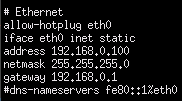
---
### Author:  [@HyperCriSiS](https://dietpi.com/forum/u/HyperCriSiS)
#### Post date: [12 July 2022 17:58 UTC](https://dietpi.com/forum/t/strange-network-issues-rp4-only-lan-devices-are-reachable/13656/11 "2022-07-12T17:58:59Z")
The IP 169.254.226.169 in the screenshot is the one where pings are sent from.
Does this entry maybe have to be deleted? And if yes, where could it come from…
---
### Author:  [@Joulinar](https://dietpi.com/forum/u/Joulinar)
#### Post date: [12 July 2022 18:09 UTC](https://dietpi.com/forum/t/strange-network-issues-rp4-only-lan-devices-are-reachable/13656/12 "2022-07-12T18:09:46Z")
USB ports of an RPi are not designed to power SSD or HDD. @MichaIng could explain the technical as well as physical limitations. We have seen quite a lot of cases where this caused data corruption. Therefore we highly recommend to use own power supply for everything lager than a pen stick.
---
### Author:  [@MichaIng](https://dietpi.com/forum/u/MichaIng)
#### Post date: [12 July 2022 18:27 UTC](https://dietpi.com/forum/t/strange-network-issues-rp4-only-lan-devices-are-reachable/13656/13 "2022-07-12T18:27:05Z")
Yes that may be the case, all USB ports share an overall 1.2A/6W max power, which is often not sufficient for the peak power consumption of 2.5" drives and SSDs during power up or I/O peaks, even when the manufacturer states a lower power consumption.
For the PSU, assure that it is not a charger, which isn’t designed to hold voltage tightly, but use a PSU designed for actually powering running devices. Also the USB/power cable alone can be the cause of undervoltage, when it’s too long or bad quality with too high voltage drop.
---
### Author:  [@HyperCriSiS](https://dietpi.com/forum/u/HyperCriSiS)
#### Post date: [13 July 2022 09:16 UTC](https://dietpi.com/forum/t/strange-network-issues-rp4-only-lan-devices-are-reachable/13656/14 "2022-07-13T09:16:56Z")
Ok shit. Strange that it ran well now for many months.
Do you have an idea whats the thing with the IP 169.254.226.169?
I have normal internet access if I enable WLAN, so something about the eth config must be faulty.
I use a short cable now to attach the m2 and the undervolt message is gone.
What is this other error message with the driver?
I must say, RP boards really suck. They get to hot and the shitty MicroSD cards produce so many issues.
This is why I attached an m2 SSD.
Which SMBs do you think are the best?
---
### Author:  [@Joulinar](https://dietpi.com/forum/u/Joulinar)
#### Post date: [13 July 2022 09:24 UTC](https://dietpi.com/forum/t/strange-network-issues-rp4-only-lan-devices-are-reachable/13656/15 "2022-07-13T09:24:14Z")
> [@HyperCriSiS](#):
>
> They get to hot and the shitty MicroSD cards produce so many issues
I’m using a USB3 micro USB stick to host my DietPi. No need to any SD card 🙂
---
### Author:  [@HyperCriSiS](https://dietpi.com/forum/u/HyperCriSiS)
#### Post date: [13 July 2022 09:26 UTC](https://dietpi.com/forum/t/strange-network-issues-rp4-only-lan-devices-are-reachable/13656/16 "2022-07-13T09:26:45Z")
That is indeed a good alternative!
---
### Author:  [@Joulinar](https://dietpi.com/forum/u/Joulinar)
#### Post date: [13 July 2022 11:30 UTC](https://dietpi.com/forum/t/strange-network-issues-rp4-only-lan-devices-are-reachable/13656/17 "2022-07-13T11:30:36Z")
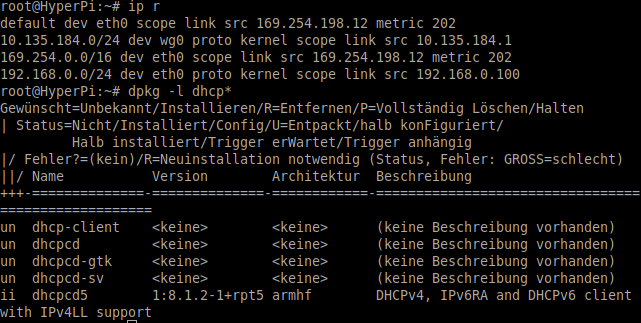
could you share following pls
```auto
ip r
dpkg -l dhcp*
```
---
### Author:  [@HyperCriSiS](https://dietpi.com/forum/u/HyperCriSiS)
#### Post date: [13 July 2022 15:05 UTC](https://dietpi.com/forum/t/strange-network-issues-rp4-only-lan-devices-are-reachable/13656/18 "2022-07-13T15:05:06Z")
---
### Author:  [@Joulinar](https://dietpi.com/forum/u/Joulinar)
#### Post date: [13 July 2022 15:25 UTC](https://dietpi.com/forum/t/strange-network-issues-rp4-only-lan-devices-are-reachable/13656/19 "2022-07-13T15:25:24Z")
The issue might be caused by the `dhcpcd5` package installed. Any sense for have it installed? Usually it should not be needed as you are having a STATIC IP. If not, I would recommend to purged the package.
---
### Author:  [@HyperCriSiS](https://dietpi.com/forum/u/HyperCriSiS)
#### Post date: [13 July 2022 16:17 UTC](https://dietpi.com/forum/t/strange-network-issues-rp4-only-lan-devices-are-reachable/13656/20 "2022-07-13T16:17:56Z")
WTF!! It works after I uninstalled this package. Is this a bug?
Whats with this 169.254 entry seen in “ip r”. is this normal?
Because this range was always displayed in pings that failed.
Thank you so much!
[Next page](https://dietpi.com/forum/t/strange-network-issues-rp4-only-lan-devices-are-reachable/13656.md?page=2)