# Static IP makes network unusable.
**URL:** https://dietpi.com/forum/t/static-ip-makes-network-unusable/5232
**Category:** Troubleshooting
**Created:** [20 April 2021 10:34 UTC](https://dietpi.com/forum/t/static-ip-makes-network-unusable/5232 "2021-04-20T10:34:29Z")
**Posts on this page:** 20
**Page:** 3
### Author:  [@maya95](https://dietpi.com/forum/u/maya95)
#### Post date: [21 April 2021 11:29 UTC](https://dietpi.com/forum/t/static-ip-makes-network-unusable/5232/41 "2021-04-21T11:29:58Z")
> Therefore it has something to do with the modem/router, not dietpi.
How? What would have causes this? I also tried to set different static IP to be sure there is no conflict.
---
### Author:  [@trendy](https://dietpi.com/forum/u/trendy)
#### Post date: [21 April 2021 12:13 UTC](https://dietpi.com/forum/t/static-ip-makes-network-unusable/5232/42 "2021-04-21T12:13:04Z")
Since it is not happening only on the device running the dietpi, but to the other one as well, I don’t see how is this connected to dietpi.
Most likely something to do with port security and dhcp snooping on the router.
---
### Author:  [@maya95](https://dietpi.com/forum/u/maya95)
#### Post date: [21 April 2021 12:50 UTC](https://dietpi.com/forum/t/static-ip-makes-network-unusable/5232/43 "2021-04-21T12:50:50Z")
> Since it is not happening only on the device running the dietpi, but to the other one as well, I don’t see how is this connected to dietpi.
It happens on the other PC is because I also run DietPi on that physical PC doing the same installation and test.
I put the VM behind VMware NAT adapter (so it’s double NAT and only one VMware’s DHCP server) and it exhibits the same behavior,
So there is no DHCP snooping behind that NAT network or any existing port security.
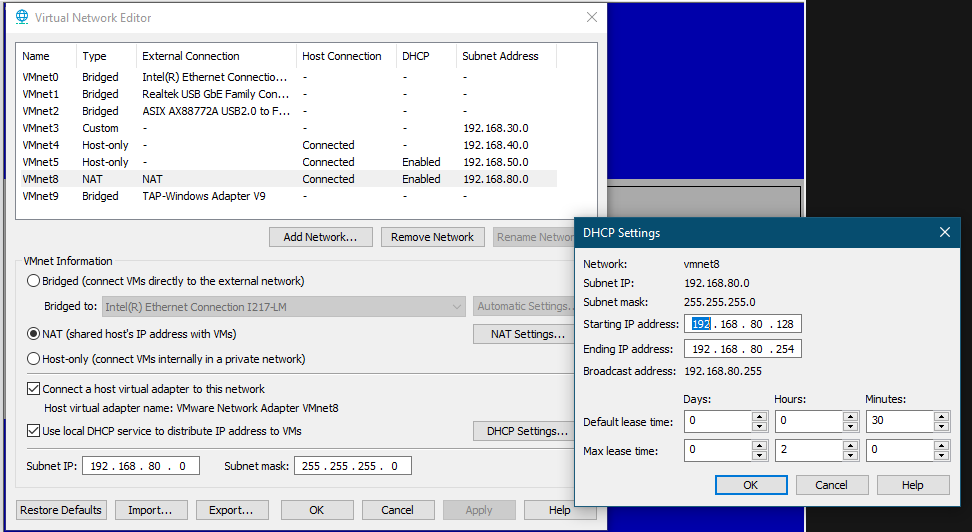
Anyway, I’m giving up.
---
### Author:  [@Joulinar](https://dietpi.com/forum/u/Joulinar)
#### Post date: [21 April 2021 13:25 UTC](https://dietpi.com/forum/t/static-ip-makes-network-unusable/5232/44 "2021-04-21T13:25:29Z")
for me this seems to be something local on your side as you are the only user having these issues. DietPi is doing nothing else to set values inside /etc/network/interfaces and /etc/resolv.conf. These are plain Debian functions.
Anyway to exclude issues on /etc/resolv.conf you could use the tool dig. For this you would need to install dnsutils package
```nohighlight
apt install dnsutils
```
Furthermore I did a test on VM running on my Synology NAS without issues.
**DHCP**
```nohighlight
root@DietPiVM1:~# cat /etc/network/interfaces
# Location: /etc/network/interfaces
# Please modify network settings via: dietpi-config
# Or create your own drop-ins in: /etc/network/interfaces.d/
# Drop-in configs
source interfaces.d/*
# Loopback
auto lo
iface lo inet loopback
# Ethernet
allow-hotplug eth0
iface eth0 inet dhcp
```
As you can see system is set to DHCP. A test to resolve [google.com](http://google.com) works fine using Cloudflare as upstream DNS server.
```nohighlight
root@DietPiVM1:~# dig @1.1.1.1 google.com
; <<>> DiG 9.11.5-P4-5.1+deb10u3-Debian <<>> @1.1.1.1 google.com
; (1 server found)
;; global options: +cmd
;; Got answer:
;; ->>HEADER<<- opcode: QUERY, status: NOERROR, id: 58429
;; flags: qr rd ra; QUERY: 1, ANSWER: 1, AUTHORITY: 0, ADDITIONAL: 1
;; OPT PSEUDOSECTION:
; EDNS: version: 0, flags:; udp: 1232
;; QUESTION SECTION:
;google.com. IN A
;; ANSWER SECTION:
google.com. 251 IN A 142.250.74.238
;; Query time: 36 msec
;; SERVER: 1.1.1.1#53(1.1.1.1)
;; WHEN: Wed Apr 21 15:16:17 CEST 2021
;; MSG SIZE rcvd: 55
root@DietPiVM1:~#
```
**STATIC**
```nohighlight
root@DietPiVM1:~# cat /etc/network/interfaces
# Location: /etc/network/interfaces
# Please modify network settings via: dietpi-config
# Or create your own drop-ins in: /etc/network/interfaces.d/
# Drop-in configs
source interfaces.d/*
# Ethernet
allow-hotplug eth0
iface eth0 inet static
```
As you can see system is set to STATIC. A test to resolve [google.com](http://google.com) works fine using Cloudflare as upstream DNS server.
```nohighlight
root@DietPiVM1:~# dig @1.1.1.1 google.com
; <<>> DiG 9.11.5-P4-5.1+deb10u3-Debian <<>> @1.1.1.1 google.com
; (1 server found)
;; global options: +cmd
;; Got answer:
;; ->>HEADER<<- opcode: QUERY, status: NOERROR, id: 45283
;; flags: qr rd ra; QUERY: 1, ANSWER: 1, AUTHORITY: 0, ADDITIONAL: 1
;; OPT PSEUDOSECTION:
; EDNS: version: 0, flags:; udp: 1232
;; QUESTION SECTION:
;google.com. IN A
;; ANSWER SECTION:
google.com. 206 IN A 142.250.74.238
;; Query time: 32 msec
;; SERVER: 1.1.1.1#53(1.1.1.1)
;; WHEN: Wed Apr 21 15:17:11 CEST 2021
;; MSG SIZE rcvd: 55
root@DietPiVM1:~#
```
---
### Author:  [@maya95](https://dietpi.com/forum/u/maya95)
#### Post date: [22 April 2021 13:24 UTC](https://dietpi.com/forum/t/static-ip-makes-network-unusable/5232/45 "2021-04-22T13:24:07Z")
The funny thing is the screen show my VMs DHCP IP is 192.168.0.104 when I move the VM to bridged adapter, not behind VMware NAT adapter
```nohighlight
DietPi v7.0.2 : 21:22 - Thu 04/22/21
─────────────────────────────────────────────────────
- Device model : Virtual Machine (x86_64)
- CPU temp : N/A
- LAN IP : 192.168.0.104 (eth0)
- MOTD : Spring in northern hemisphere: Do you know the tulip command?
Run "ss -tulp" to see which process listens on which TCP/UDP port.
─────────────────────────────────────────────────────
DietPi Team : MichaIng (lead), Daniel Knight (founder), Joulinar (support)
Image : DietPi Core Team (pre-image: Debian mini.iso)
Web : https://dietpi.com | https://twitter.com/DietPi_
Patreon Legends : Camry2731
Donate : https://dietpi.com/#donate
DietPi Hosting : Powered by https://myvirtualserver.com
dietpi-launcher : All the DietPi programs in one place.
dietpi-config : Feature rich configuration tool for your device.
dietpi-software : Select optimized software for installation.
htop : Resource monitor.
cpu : Shows CPU information and stats.
```
and if I execute cat /etc/network/interfaces command, this is what I got
no matter how many times I reboot
```nohighlight
root@DietPi:~# cat /etc/network/interfaces
# Location: /etc/network/interfaces
# Please modify network settings via: dietpi-config
# Or create your own drop-ins in: /etc/network/interfaces.d/
# Drop-in configs
source interfaces.d/*
# Ethernet
allow-hotplug eth0
iface eth0 inet dhcp
address 192.168.80.80
netmask 255.255.255.0
gateway 192.168.80.2
#dns-nameservers 9.9.9.9
# WiFi
#allow-hotplug wlan0
iface wlan0 inet dhcp
address 0.0.0.0
netmask 0.0.0.0
gateway 0.0.0.0
#dns-nameservers 0.0.0.0
wpa-conf /etc/wpa_supplicant/wpa_supplicant.conf
```
---
### Author:  [@Joulinar](https://dietpi.com/forum/u/Joulinar)
#### Post date: [22 April 2021 13:37 UTC](https://dietpi.com/forum/t/static-ip-makes-network-unusable/5232/46 "2021-04-22T13:37:35Z")
If you are running DHCP, IP settings in /etc/network/interfaces are not used as they will be provided by the DHCP server. The only important setting is the DHCP value. /etc/network/interfaces is more applicable on STATIC IP. Better to use ip a to show actual assigned IP
---
### Author:  [@maya95](https://dietpi.com/forum/u/maya95)
#### Post date: [22 April 2021 13:46 UTC](https://dietpi.com/forum/t/static-ip-makes-network-unusable/5232/47 "2021-04-22T13:46:52Z")
why a # sign in front of dns-nameservers 9.9.9.9 ?
#dns-nameservers 9.9.9.9
---
### Author:  [@Joulinar](https://dietpi.com/forum/u/Joulinar)
#### Post date: [22 April 2021 13:51 UTC](https://dietpi.com/forum/t/static-ip-makes-network-unusable/5232/48 "2021-04-22T13:51:42Z")
As I told on the post above. These settings are not used in case if DHCP as you will get these values from the DHCP server…
---
### Author:  [@maya95](https://dietpi.com/forum/u/maya95)
#### Post date: [23 April 2021 08:21 UTC](https://dietpi.com/forum/t/static-ip-makes-network-unusable/5232/49 "2021-04-23T08:21:15Z")
what’s the differences between /etc/resolv.conf and /etc/resolvconf/resolv.conf.d/\* ?
I don’t have the latter.
---
### Author:  [@maya95](https://dietpi.com/forum/u/maya95)
#### Post date: [23 April 2021 10:11 UTC](https://dietpi.com/forum/t/static-ip-makes-network-unusable/5232/50 "2021-04-23T10:11:34Z")
So while using static IP:
nslookup [dietpi.com](http://dietpi.com) works, but ping [dietpi.com](http://dietpi.com) doesn’t
```nohighlight
─────────────────────────────────────────────────────
DietPi v7.0.2 : 18:09 - Fri 04/23/21
─────────────────────────────────────────────────────
- Device model : Virtual Machine (x86_64)
- CPU temp : N/A
- LAN IP : 192.168.0.8 (eth0)
curl: (28) Resolving timed out after 3007 milliseconds
─────────────────────────────────────────────────────
DietPi Team : MichaIng (lead), Daniel Knight (founder), Joulinar (support)
Image : DietPi Core Team (pre-image: Debian mini.iso)
Web : https://dietpi.com | https://twitter.com/DietPi_
Patreon Legends : Camry2731
Donate : https://dietpi.com/#donate
DietPi Hosting : Powered by https://myvirtualserver.com
dietpi-launcher : All the DietPi programs in one place.
dietpi-config : Feature rich configuration tool for your device.
dietpi-software : Select optimized software for installation.
htop : Resource monitor.
cpu : Shows CPU information and stats.
root@DietPi:~#
root@DietPi:~# nslookup dietpi.com
Server: 9.9.9.9
Address: 9.9.9.9#53
Non-authoritative answer:
Name: dietpi.com
Address: 172.67.173.4
Name: dietpi.com
Address: 104.21.96.47
Name: dietpi.com
Address: 2606:4700:3035::ac43:ad04
Name: dietpi.com
Address: 2606:4700:3034::6815:602f
root@DietPi:~# ping dietpi.com
ping: dietpi.com: No address associated with hostname
```
---
### Author:  [@Joulinar](https://dietpi.com/forum/u/Joulinar)
#### Post date: [23 April 2021 10:16 UTC](https://dietpi.com/forum/t/static-ip-makes-network-unusable/5232/51 "2021-04-23T10:16:29Z")
what about ping [google.com](http://google.com) ?
---
### Author:  [@maya95](https://dietpi.com/forum/u/maya95)
#### Post date: [23 April 2021 10:34 UTC](https://dietpi.com/forum/t/static-ip-makes-network-unusable/5232/52 "2021-04-23T10:34:25Z")
ping any ip address or nslookup domain name works,
ping any domain name doesn’t
```nohighlight
root@DietPi:~# ping 1.1.1.1
PING 1.1.1.1 (1.1.1.1) 56(84) bytes of data.
64 bytes from 1.1.1.1: icmp_seq=1 ttl=60 time=15.3 ms
64 bytes from 1.1.1.1: icmp_seq=2 ttl=60 time=10.3 ms
^C
--- 1.1.1.1 ping statistics ---
2 packets transmitted, 2 received, 0% packet loss, time 3ms
rtt min/avg/max/mdev = 10.329/12.827/15.326/2.501 ms
root@DietPi:~# ping 8.8.8.8
PING 8.8.8.8 (8.8.8.8) 56(84) bytes of data.
64 bytes from 8.8.8.8: icmp_seq=1 ttl=120 time=11.4 ms
64 bytes from 8.8.8.8: icmp_seq=2 ttl=120 time=13.8 ms
^C
--- 8.8.8.8 ping statistics ---
2 packets transmitted, 2 received, 0% packet loss, time 3ms
rtt min/avg/max/mdev = 11.433/12.627/13.822/1.199 ms
root@DietPi:~# ping 9.9.9.9
PING 9.9.9.9 (9.9.9.9) 56(84) bytes of data.
64 bytes from 9.9.9.9: icmp_seq=1 ttl=56 time=138 ms
^C
--- 9.9.9.9 ping statistics ---
1 packets transmitted, 1 received, 0% packet loss, time 0ms
rtt min/avg/max/mdev = 138.369/138.369/138.369/0.000 ms
root@DietPi:~# ping google.com
ping: google.com: No address associated with hostname
root@DietPi:~# ping apple.com
ping: apple.com: No address associated with hostname
root@DietPi:~# ping amazon.com
ping: amazon.com: No address associated with hostname
root@DietPi:~# nslookup google.com
Server: 9.9.9.9
Address: 9.9.9.9#53
Non-authoritative answer:
Name: google.com
Address: 172.217.175.14
Name: google.com
Address: 2404:6800:4004:80b::200e
root@DietPi:~# nslookup apple.com
Server: 9.9.9.9
Address: 9.9.9.9#53
Non-authoritative answer:
Name: apple.com
Address: 17.253.144.10
```
---
### Author:  [@Joulinar](https://dietpi.com/forum/u/Joulinar)
#### Post date: [23 April 2021 10:38 UTC](https://dietpi.com/forum/t/static-ip-makes-network-unusable/5232/53 "2021-04-23T10:38:40Z")
can you do following and post the output
```nohighlight
dig @9.9.9.9 google.com
```
---
### Author:  [@maya95](https://dietpi.com/forum/u/maya95)
#### Post date: [23 April 2021 10:40 UTC](https://dietpi.com/forum/t/static-ip-makes-network-unusable/5232/54 "2021-04-23T10:40:28Z")
```nohighlight
; <<>> DiG 9.11.5-P4-5.1+deb10u3-Debian <<>> @9.9.9.9 google.com
; (1 server found)
;; global options: +cmd
;; Got answer:
;; ->>HEADER<<- opcode: QUERY, status: NOERROR, id: 43355
;; flags: qr rd ra; QUERY: 1, ANSWER: 1, AUTHORITY: 0, ADDITIONAL: 1
;; OPT PSEUDOSECTION:
; EDNS: version: 0, flags:; udp: 1232
;; QUESTION SECTION:
;google.com. IN A
;; ANSWER SECTION:
google.com. 200 IN A 172.217.26.46
;; Query time: 42 msec
;; SERVER: 9.9.9.9#53(9.9.9.9)
;; WHEN: Fri Apr 23 18:40:01 CST 2021
;; MSG SIZE rcvd: 55
```
---
### Author:  [@Joulinar](https://dietpi.com/forum/u/Joulinar)
#### Post date: [23 April 2021 10:48 UTC](https://dietpi.com/forum/t/static-ip-makes-network-unusable/5232/55 "2021-04-23T10:48:05Z")
ok DNS resolution is working in general if we ask the DNS server directly. Something seems to block the DNS request locally if we don’t ask the DNS server directly. Or the system doesn’t sent the request out. Quite a strange issue. We could have a look with tcpdump. Pls can you install it from dietpi-software (id 15). Once done open a 2nd SSH session and run tcpdump -i any -c500 -nn port 53. On the first window try to ping a domain. Usually tcpdump should collect the DNS packages now.
As well, can you share cat /etc/nsswitch.conf
PS: tcpdump will stop after 500 lines collected or once cancelled.
---
### Author:  [@maya95](https://dietpi.com/forum/u/maya95)
#### Post date: [23 April 2021 11:03 UTC](https://dietpi.com/forum/t/static-ip-makes-network-unusable/5232/56 "2021-04-23T11:03:55Z")
```nohighlight
root@DietPi:~# ping google.com
ping: google.com: No address associated with hostname
```
```nohighlight
root@DietPi:~# tcpdump -i any -c500 -nn port 53
tcpdump: verbose output suppressed, use -v or -vv for full protocol decode
listening on any, link-type LINUX_SLL (Linux cooked), capture size 262144 bytes
19:00:01.027715 IP 192.168.0.8.37884 > 9.9.9.9.53: 49309+ A? google.com. (28)
19:00:01.028097 IP 192.168.0.8.37884 > 9.9.9.9.53: 37046+ AAAA? google.com. (28)
19:00:06.031733 IP 192.168.0.8.37884 > 9.9.9.9.53: 49309+ A? google.com. (28)
19:00:06.032042 IP 192.168.0.8.37884 > 9.9.9.9.53: 37046+ AAAA? google.com. (28)
```
```nohighlight
root@DietPi:~# cat /etc/nsswitch.conf
# /etc/nsswitch.conf
#
# Example configuration of GNU Name Service Switch functionality.
# If you have the `glibc-doc-reference' and `info' packages installed, try:
# `info libc "Name Service Switch"' for information about this file.
passwd: files
group: files
shadow: files
gshadow: files
hosts: files dns mymachines
networks: files
protocols: db files
services: db files
ethers: db files
rpc: db files
netgroup: nis
```
---
### Author:  [@Joulinar](https://dietpi.com/forum/u/Joulinar)
#### Post date: [23 April 2021 11:07 UTC](https://dietpi.com/forum/t/static-ip-makes-network-unusable/5232/57 "2021-04-23T11:07:12Z")
as you can see on tcpdump, your system is sending our the DNS request
```nohighlight
root@DietPi:~# tcpdump -i any -c500 -nn port 53
tcpdump: verbose output suppressed, use -v or -vv for full protocol decode
listening on any, link-type LINUX_SLL (Linux cooked), capture size 262144 bytes
19:00:01.027715 IP 192.168.0.8.37884 > 9.9.9.9.53: 49309+ A? google.com. (28)
19:00:01.028097 IP 192.168.0.8.37884 > 9.9.9.9.53: 37046+ AAAA? google.com. (28)
19:00:06.031733 IP 192.168.0.8.37884 > 9.9.9.9.53: 49309+ A? google.com. (28)
19:00:06.032042 IP 192.168.0.8.37884 > 9.9.9.9.53: 37046+ AAAA? google.com. (28)
```
but did not get an answer back. Means the response is not transferred to your device. On the VM, do you use bridged or not for the interface?
---
### Author:  [@maya95](https://dietpi.com/forum/u/maya95)
#### Post date: [23 April 2021 11:12 UTC](https://dietpi.com/forum/t/static-ip-makes-network-unusable/5232/58 "2021-04-23T11:12:26Z")
bridged. but why DHCP IP works yet static IP doesn’t?
Being in the IT so many years, never encounter anything like this.
---
### Author:  [@Joulinar](https://dietpi.com/forum/u/Joulinar)
#### Post date: [23 April 2021 11:14 UTC](https://dietpi.com/forum/t/static-ip-makes-network-unusable/5232/59 "2021-04-23T11:14:44Z")
if you are running on DHCP, how do you set STATIC? Do you enter a complet new IP address or do you use the option to transfer DHCP IP to STATIC?
---
### Author:  [@maya95](https://dietpi.com/forum/u/maya95)
#### Post date: [23 April 2021 11:22 UTC](https://dietpi.com/forum/t/static-ip-makes-network-unusable/5232/60 "2021-04-23T11:22:37Z")
Isn’t it right here? Anytime I want to install new software, I have to switch back to DHCP to get a DHCP IP to get the software installed.
If I switch back to STATIC IP address, the ping command the Dietpi-Software execute does not pass test and will not allow me to proceed to install any software.

[Previous page](https://dietpi.com/forum/t/static-ip-makes-network-unusable/5232.md?page=2)
[Next page](https://dietpi.com/forum/t/static-ip-makes-network-unusable/5232.md?page=4)