# SSH - Never get to prompt !
**URL:** https://dietpi.com/forum/t/ssh-never-get-to-prompt/4651
**Category:** Troubleshooting
**Created:** [22 November 2020 18:39 UTC](https://dietpi.com/forum/t/ssh-never-get-to-prompt/4651 "2020-11-22T18:39:15Z")
**Posts on this page:** 20
**Page:** 1
### Author:  [@SimonFili](https://dietpi.com/forum/u/SimonFili)
#### Post date: [22 November 2020 18:39 UTC](https://dietpi.com/forum/t/ssh-never-get-to-prompt/4651/1 "2020-11-22T18:39:15Z")
Hi There,
A second issue on my DietPi. First one is TimeSync, not resolved yet!
If I ssh, from putty on a Win10 PC on the same network. I never get a prompt.
> login as: root
> [root@192.168.10.3](mailto:root@192.168.10.3)’s password:
> Linux DietPi 5.4.72+ #1356 Thu Oct 22 13:56:00 BST 2020 armv6l
>
> The programs included with the Debian GNU/Linux system are free software;
> the exact distribution terms for each program are described in the
> individual files in /usr/share/doc/\*/copyright.
>
> Debian GNU/Linux comes with ABSOLUTELY NO WARRANTY, to the extent
> permitted by applicable law.
> Last login: Sun Nov 22 13:24:49 2020
The message gets displayed around 30seconds after I enter the password, then no prompt.
At one point, putty will timeout.
journalctl -ex shows that the password is accepted and the session opened.
But no prompt… now after 7 minutes!
htop is showing my session and low cpu
Any thoughts?
---
### Author:  [@Joulinar](https://dietpi.com/forum/u/Joulinar)
#### Post date: [22 November 2020 18:47 UTC](https://dietpi.com/forum/t/ssh-never-get-to-prompt/4651/2 "2020-11-22T18:47:25Z")
Did you tried with a different SD card? Do you use WiFi or Ethernet? Can you check for kernel messages dmesg -l err,crit,alert,emerg
---
### Author:  [@SimonFili](https://dietpi.com/forum/u/SimonFili)
#### Post date: [22 November 2020 19:42 UTC](https://dietpi.com/forum/t/ssh-never-get-to-prompt/4651/3 "2020-11-22T19:42:13Z")
Thanks for reply,
Right after the creation of the SD card (second time), SSH worked ok, but after around 1 day, stopped working
The Pi zero W is connected to Wifi
Here’s the output of dmesg

I have not tried another SD card, only have one for now.
Running a check & repair disk with dietpi-drive\_manager and reboot… did not see any messages, unsure if it ran?
Did ran a 100MiB benchmark… The SD writes at 4 MiB/s and reads at 21 MiB/s.
---
### Author:  [@Joulinar](https://dietpi.com/forum/u/Joulinar)
#### Post date: [22 November 2020 19:45 UTC](https://dietpi.com/forum/t/ssh-never-get-to-prompt/4651/4 "2020-11-22T19:45:46Z")
you could check status of SSH server systemctl status dropbear.service
As well, can you check if your network connection is stable?
---
### Author:  [@SimonFili](https://dietpi.com/forum/u/SimonFili)
#### Post date: [22 November 2020 20:53 UTC](https://dietpi.com/forum/t/ssh-never-get-to-prompt/4651/5 "2020-11-22T20:53:50Z")
I’m running OpenBSD SSH and the status is OK
The network is stable and fast, testing with ping to and from Pi
Thanks
---
### Author:  [@Joulinar](https://dietpi.com/forum/u/Joulinar)
#### Post date: [22 November 2020 21:16 UTC](https://dietpi.com/forum/t/ssh-never-get-to-prompt/4651/6 "2020-11-22T21:16:27Z")
as OpenBSD SSH isn’t part of DietPi, you installed it yourself? correct? Did you stoppen and removed Dropbear before?
---
### Author:  [@SimonFili](https://dietpi.com/forum/u/SimonFili)
#### Post date: [22 November 2020 21:29 UTC](https://dietpi.com/forum/t/ssh-never-get-to-prompt/4651/7 "2020-11-22T21:29:51Z")
Here’s the output of journalctl
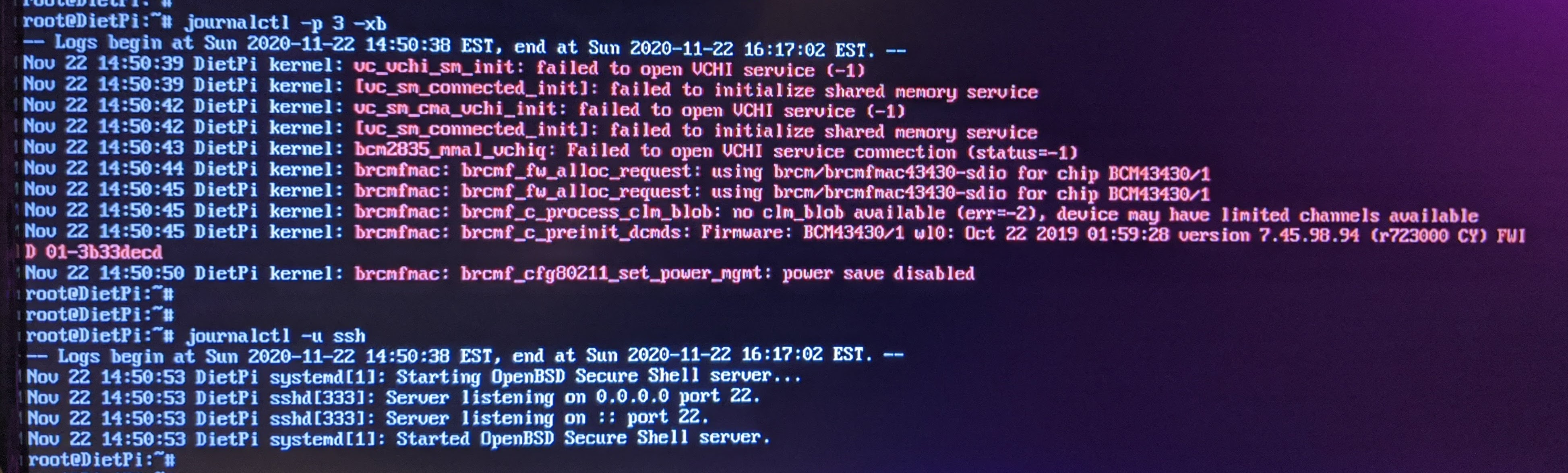
I installed DietPi in a Hyper-V VM… no issue with SSH and Time sync. A bit faster on my i7-32gig than a Pi zero!
Fun debug here!
---
### Author:  [@Joulinar](https://dietpi.com/forum/u/Joulinar)
#### Post date: [22 November 2020 21:42 UTC](https://dietpi.com/forum/t/ssh-never-get-to-prompt/4651/8 "2020-11-22T21:42:57Z")
well this is the output for ssh for which you open the other topic 😉
I will move it over
---
### Author:  [@Joulinar](https://dietpi.com/forum/u/Joulinar)
#### Post date: [22 November 2020 21:47 UTC](https://dietpi.com/forum/t/ssh-never-get-to-prompt/4651/9 "2020-11-22T21:47:18Z")
question: How does SSH behave if you stick to DietPi default Dropbear and did not change it towards OpenBSD SSH. If possible try with a fresh image.
---
### Author:  [@SimonFili](https://dietpi.com/forum/u/SimonFili)
#### Post date: [23 November 2020 00:02 UTC](https://dietpi.com/forum/t/ssh-never-get-to-prompt/4651/10 "2020-11-23T00:02:22Z")
I experienced the issue with a previous image + dropbear.
I will go back to dropbear on the new image and report
---
### Author:  [@SimonFili](https://dietpi.com/forum/u/SimonFili)
#### Post date: [23 November 2020 00:54 UTC](https://dietpi.com/forum/t/ssh-never-get-to-prompt/4651/11 "2020-11-23T00:54:57Z")
ok… I went through the change from openssh to dropbear using dietpi-config… rebooted
I cannot even connect to the IP on port 22…
htop show clearly : /usr/bin/dropbear -p22 -w 65536
- Maybe the bear went to hibernation!!! 😉
journalctl -f does not show any connection.
- I tested on the Hyper-V test image of DietPi…
Trying to verify everything through dietpi-software and I get stuck with the other issue (ntp timeout)
I will take a break from this before I put the whole thing in the garbage can!
Thanks for all the help Joulinar
---
### Author:  [@SimonFili](https://dietpi.com/forum/u/SimonFili)
#### Post date: [23 November 2020 01:07 UTC](https://dietpi.com/forum/t/ssh-never-get-to-prompt/4651/12 "2020-11-23T01:07:38Z")
I should mention that Node-Red and MQTT are running fine on the Pi zero without an issue and doing network monitoring and talking to Iot/ESP8266 devices on my local network.
---
### Author:  [@Joulinar](https://dietpi.com/forum/u/Joulinar)
#### Post date: [23 November 2020 01:36 UTC](https://dietpi.com/forum/t/ssh-never-get-to-prompt/4651/13 "2020-11-23T01:36:54Z")
strange your system 🤔
you could check what ist LISTEN on port 22
```nohighlight
ss -tulpn | grep LISTEN
```
---
### Author:  [@SimonFili](https://dietpi.com/forum/u/SimonFili)
#### Post date: [23 November 2020 12:45 UTC](https://dietpi.com/forum/t/ssh-never-get-to-prompt/4651/14 "2020-11-23T12:45:18Z")
What’s the expression… give it time it will work?
So after a good night sleep, I can this morning putty/ssh to the PI zero!
Here’s the output of ss:
root@DietPi:~# ss -tulpn | grep LISTEN
> tcp LISTEN 0 1000 0.0.0.0:22 0.0.0.0:\* users:((“dropbear”,pid=1545,fd=3))
> tcp LISTEN 0 511 0.0.0.0:1880 0.0.0.0:\* users:((“node-red”,pid=541,fd=22))
> tcp LISTEN 0 100 0.0.0.0:1883 0.0.0.0:\* users:((“mosquitto”,pid=536,fd=5))
> tcp LISTEN 0 1000 [::]:22 [::]:\* users:((“dropbear”,pid=1545,fd=4))
> tcp LISTEN 0 100 [::]:1883 [::]:\* users:((“mosquitto”,pid=536,fd=6))
I got to this point in the different iterations of updates, I will see this thing keep working over time!
Thanks for your help Joulinar Take care.
---
### Author:  [@trendy](https://dietpi.com/forum/u/trendy)
#### Post date: [23 November 2020 13:15 UTC](https://dietpi.com/forum/t/ssh-never-get-to-prompt/4651/15 "2020-11-23T13:15:31Z")
You have way too many bytes in Send-Q
> Send-Q The count of bytes not acknowledged by the remote host.
Run the command a few more times to verify if this was a glitch or the norm.
---
### Author:  [@Joulinar](https://dietpi.com/forum/u/Joulinar)
#### Post date: [23 November 2020 19:51 UTC](https://dietpi.com/forum/t/ssh-never-get-to-prompt/4651/16 "2020-11-23T19:51:25Z")
SimonFili
means you SSH access is working now?
---
### Author:  [@SimonFili](https://dietpi.com/forum/u/SimonFili)
#### Post date: [26 November 2020 12:22 UTC](https://dietpi.com/forum/t/ssh-never-get-to-prompt/4651/17 "2020-11-26T12:22:27Z")
trendy Here’s the output of ss with headers ran a few times after a fresh reboot
> root@DietPi:~# ss -tulpn
> Netid State Recv-Q Send-Q Local Address:Port Peer Address:Port
> tcp LISTEN 0 1000 0.0.0.0:22 0.0.0.0:\* users:((“dropbear”,pid=519,fd=3))
> tcp LISTEN 0 511 0.0.0.0:1880 0.0.0.0:\* users:((“node-red”,pid=538,fd=22))
> tcp LISTEN 0 100 0.0.0.0:1883 0.0.0.0:\* users:((“mosquitto”,pid=533,fd=5))
> tcp LISTEN 0 1000 [::]:22 [::]:\* users:((“dropbear”,pid=519,fd=4))
> tcp LISTEN 0 100 [::]:1883 [::]:\* users:((“mosquitto”,pid=533,fd=6))
Joulinar
Yes, SSH now works fine after a few days and reboots.
Unsure why 1) it was not working with dropbear on the first image 2) why openssh did not work on the second image then 3) dropbear took 12h to start working on the second image.
A very weird system like you said before. Now going to test why the NTP does not work and report on the other thread.
---
### Author:  [@trendy](https://dietpi.com/forum/u/trendy)
#### Post date: [26 November 2020 12:43 UTC](https://dietpi.com/forum/t/ssh-never-get-to-prompt/4651/18 "2020-11-26T12:43:04Z")
I would also check the interfaces for errors, cables, ports, switches etc. All these bytes in Send-Q are not normal.
---
### Author:  [@Joulinar](https://dietpi.com/forum/u/Joulinar)
#### Post date: [26 November 2020 16:41 UTC](https://dietpi.com/forum/t/ssh-never-get-to-prompt/4651/19 "2020-11-26T16:41:17Z")
trendy
To which data you are referring to?
---
### Author:  [@trendy](https://dietpi.com/forum/u/trendy)
#### Post date: [27 November 2020 13:00 UTC](https://dietpi.com/forum/t/ssh-never-get-to-prompt/4651/20 "2020-11-27T13:00:27Z")
Joulinar to the Send-Q bytes column.
[Next page](https://dietpi.com/forum/t/ssh-never-get-to-prompt/4651.md?page=2)