# Software Request: DNSCrypt-Proxy
**URL:** https://dietpi.com/forum/t/software-request-dnscrypt-proxy/495
**Category:** Requests
**Created:** [9 August 2016 12:20 UTC](https://dietpi.com/forum/t/software-request-dnscrypt-proxy/495 "2016-08-09T12:20:47Z")
**Posts on this page:** 20
**Page:** 1
### Author:  [@rainer](https://dietpi.com/forum/u/rainer)
#### Post date: [9 August 2016 12:20 UTC](https://dietpi.com/forum/t/software-request-dnscrypt-proxy/495/1 "2016-08-09T12:20:47Z")
Hello!
I’m quite new to this forum, I stumbled across dietpi, because I wanted to set up a PIHOLE, and there is the suggestion of installing Dietpi. I like the bistro very much.
So I’ve set up my Pihole in combination with a DNSCrypt-Proxy, following the instructions on this page:
[https://github.com/jedisct1/dnscrypt-proxy](https://github.com/jedisct1/dnscrypt-proxy)
I find it a quite good combination, so I guess there would be more people interested, but probably afraid of compiling from source.
By the way only obstacle I got with this setup is when I wanna update dietpi, I gotta set an 3rd party name server, because all services are shut down and so also dnscrypt-proxy.
By the way it would be great if somebody could give me a hint where and what to edit, so I see DNSCrypt Proxy start and stop in diet-pi routines, because as far as I observed it is stopped and restarted during software updates, …
Thanks, Rainer
---
### Author:  [@k-plan](https://dietpi.com/forum/u/k-plan)
#### Post date: [11 August 2016 18:43 UTC](https://dietpi.com/forum/t/software-request-dnscrypt-proxy/495/2 "2016-08-11T18:43:19Z")
Hi rainer,
> [@rainer](#):
>
> By the way it would be great if somebody could give me a hint where and what to edit, so I see DNSCrypt Proxy start and stop in diet-pi routines,
don’t know how you install and start dnscrypt.
But you can do:
- look with
```plaintext
htop
```
for the name of the running process
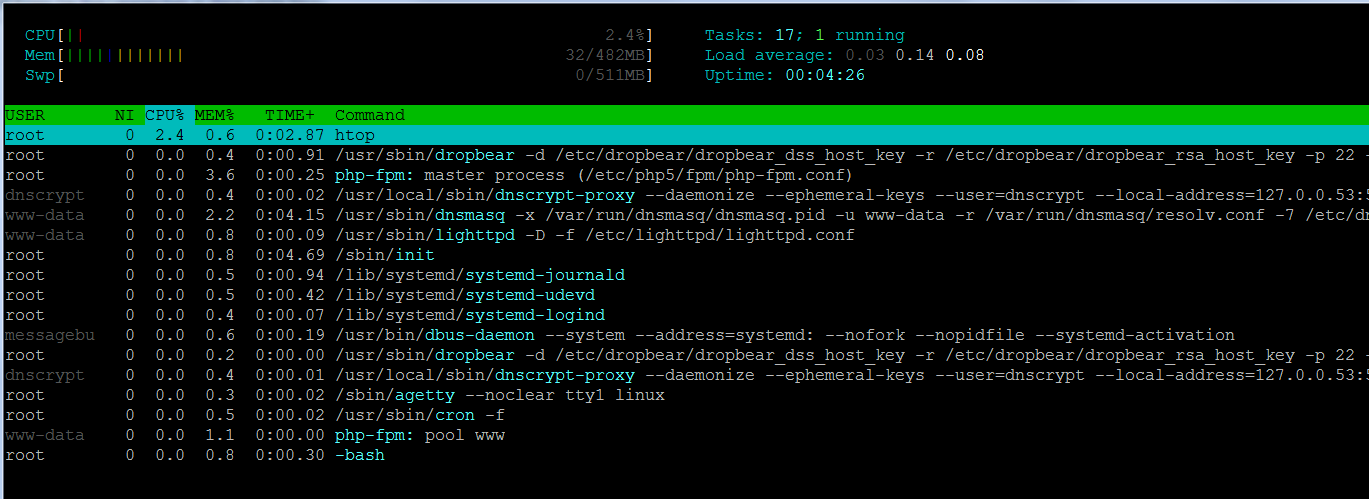
- look how dietpi start services: [DietPi/dietpi/dietpi-services at master · Fourdee/DietPi · GitHub](https://github.com/Fourdee/DietPi/blob/master/dietpi/dietpi-services#L24)
- edit:
```plaintext
:~# nano /DietPi/dietpi/dietpi-services
```
and add service name in quotes at the end of the list
- result (in my chase running pihole with dnsmasq and dnscrypt-proxy):

cu
k-plan
---
### Author:  [@screwdriver](https://dietpi.com/forum/u/screwdriver)
#### Post date: [16 May 2017 17:44 UTC](https://dietpi.com/forum/t/software-request-dnscrypt-proxy/495/3 "2017-05-16T17:44:56Z")
Sorry the necropost, but I just installed dnscrypt on my raspi with dietpi and pihole and wanted to share my experience to give feedback for:
[https://github.com/Fourdee/DietPi/issues/163](https://github.com/Fourdee/DietPi/issues/163)
First of all there is a nice howto on pihole wiki
> **[GitHub - pi-hole/pi-hole: A black hole for Internet advertisements](https://github.com/pi-hole/pi-hole)**
>
> A black hole for Internet advertisements. Contribute to pi-hole/pi-hole development by creating an account on GitHub.
but I find an easier way here
[https://blog.milne.it/2017/02/05/dnscrypt-proxy-alternative-install-method-for-debian-raspbian-jessie/](https://blog.milne.it/2017/02/05/dnscrypt-proxy-alternative-install-method-for-debian-raspbian-jessie/)
it’s really simple; just replace jessie with stretch in
```plaintext
sed -i 's/jessie/stretch/' /etc/apt/sources.list
apt-get update
apt-get install dnscrypt-proxy
sed -i 's/stretch/jessie/' /etc/apt/sources.list
apt-get update
```
it will install only three packages: _libltdl7 libsodium18 dnscrypt-proxy_
after that you can read the guide from pi-hole.
Because I used opennic dns I share my experiance
```plaintext
cp -t /etc/systemd/system/ -- /lib/systemd/system/dnscrypt-proxy.s*
```
edit the two files:
**dnscrypt-proxy.socket**
```plaintext
[Unit]
Description=dnscrypt-proxy listening socket
Documentation=man:dnscrypt-proxy(8)
Wants=dnscrypt-proxy-resolvconf.service
[Socket]
ListenStream=127.10.10.1:41
ListenDatagram=127.10.10.1:41
[Install]
WantedBy=sockets.target
```
because 53 was used by dnsmasq of pihole
**dnscrypt-proxy.service**
```plaintext
[Unit]
Description=DNSCrypt client proxy
Documentation=man:dnscrypt-proxy(8)
Requires=dnscrypt-proxy.socket
After=network.target
Before=nss-lookup.target
[Install]
Also=dnscrypt-proxy.socket
WantedBy=multi-user.target
[Service]
Type=simple
NonBlocking=true
User=_dnscrypt-proxy
ExecStart=/usr/sbin/dnscrypt-proxy /etc/dnscrypt-proxy/dnscrypt-proxy.conf
Restart=always
```
dnscrypt-proxy.service from /lib/systemd/system/ had more options
```plaintext
[Unit]
Description=DNSCrypt client proxy
Documentation=man:dnscrypt-proxy(8)
Requires=dnscrypt-proxy.socket
After=network.target
Before=nss-lookup.target
[Install]
Also=dnscrypt-proxy.socket
WantedBy=multi-user.target
[Service]
Type=notify
NonBlocking=true
User=_dnscrypt-proxy
ExecStart=/usr/sbin/dnscrypt-proxy /etc/dnscrypt-proxy/dnscrypt-proxy.conf
Restart=always
ProtectSystem=strict
ProtectHome=true
ProtectKernelModules=true
ProtectKernelTunables=true
ProtectControlGroups=true
MemoryDenyWriteExecute=true
RestrictRealtime=true
```
but probably because an old version of systemd they were not recognized.
**/etc/dnscrypt-proxy/dnscrypt-proxy.conf**
```plaintext
# A more comprehensive example config can be found in
# /usr/share/doc/dnscrypt-proxy/examples/dnscrypt-proxy.conf
## Manual settings, only for a custom resolver not present in the CSV file
## this DNS - https://servers.opennicproject.org/edit.php?srv=ns7.nh.nl.dns.opennic.glue
ProviderName 2.dnscrypt-cert.opennic.peer3.famicoman.phillymesh.net
ProviderKey B88F:4860:5517:3696:A3D2:BFE0:ECC7:6175:198F:E012:E101:B4FE:869C:1E9C:4C35:E74F
ResolverAddress 146.185.176.36:5353
#ResolverName random
## [NOT AVAILABLE ON WINDOWS] Start the process, bind the required ports, and
## run the server as a less-privileged system user.
## The value for this parameter is a user name.
#User _dnscrypt-proxy
```
For reason I don’t know _User_ option did’n work (some error about can’t access the $HOME, even if it was a valid directory with right permissions).
After that is just a
```plaintext
systemctl enable dnscrypt-proxy.service
systemctl start dnscrypt-proxy.service
```
and to check if it’s working
```plaintext
systemctl status dnscrypt-proxy.service
journalctl -u dnscrypt-proxy.service -b
```
Remember to change DNSMasq config as explained here
> **[GitHub - pi-hole/pi-hole: A black hole for Internet advertisements](https://github.com/pi-hole/pi-hole)**
>
> A black hole for Internet advertisements. Contribute to pi-hole/pi-hole development by creating an account on GitHub.
**Final consideration**
whene dietpi stretch will be released dnscrypt could be easily integrated or could be a replacement for pihole with its filtering capabilities
[Home · DNSCrypt/dnscrypt-proxy Wiki · GitHub](https://github.com/jedisct1/dnscrypt-proxy/wiki/Filtering) even if:
> Contrary to other systems, responses to blacklisted queries do not contain fake IP addresses, but use the standard REFUSED DNS error code.
---
### Author:  [@maput](https://dietpi.com/forum/u/maput)
#### Post date: [30 May 2017 03:44 UTC](https://dietpi.com/forum/t/software-request-dnscrypt-proxy/495/4 "2017-05-30T03:44:43Z")
Hi,
just finish install dnscrypt, but no luck. 🤔
dnscrypt is no running on startup, i have to run manually.
but dnscrypt is not creating 02-dnscrypt.conf on /etc/dnsmasq.d/ like usual.
i tried to edit /usr/local/etc/dnscrypt-proxy.conf
i got this error
```nohighlight
root@DietPi:~# systemctl status dnscrypt-proxy@d0wn-sg-ns1.service
● dnscrypt-proxy@d0wn-sg-ns1.service - DNSCrypt client proxy
Loaded: loaded (/lib/systemd/system/dnscrypt-proxy@.service; enabled)
Active: active (running) since Mon 2017-05-29 08:55:42 BST; 19h ago
Docs: man:dnscrypt-proxy(8)
Main PID: 545 (dnscrypt-proxy)
CGroup: /system.slice/system-dnscrypt\x2dproxy.slice/dnscrypt-proxy@d0wn-sg-ns1.service
└─545 /usr/local/sbin/dnscrypt-proxy --resolver-name=d0wn-sg-ns1 --user=dnscrypt
May 30 04:21:10 DietPi dnscrypt-proxy[545]: Tue May 30 04:21:10 2017 [INFO] Refetching server certificates
May 30 04:21:25 DietPi dnscrypt-proxy[545]: Tue May 30 04:21:25 2017 [ERROR] Unable to retrieve server certificates
May 30 04:26:25 DietPi dnscrypt-proxy[545]: Tue May 30 04:26:25 2017 [INFO] Refetching server certificates
May 30 04:26:40 DietPi dnscrypt-proxy[545]: Tue May 30 04:26:40 2017 [ERROR] Unable to retrieve server certificates
May 30 04:31:40 DietPi dnscrypt-proxy[545]: Tue May 30 04:31:40 2017 [INFO] Refetching server certificates
May 30 04:31:40 DietPi dnscrypt-proxy[545]: Tue May 30 04:31:40 2017 [INFO] Server certificate with serial #1496109361 received
May 30 04:31:40 DietPi dnscrypt-proxy[545]: Tue May 30 04:31:40 2017 [INFO] This certificate is valid
May 30 04:31:40 DietPi dnscrypt-proxy[545]: Tue May 30 04:31:40 2017 [INFO] Chosen certificate #1496109361 is valid fr...05-31]
May 30 04:31:40 DietPi dnscrypt-proxy[545]: Tue May 30 04:31:40 2017 [INFO] Server key fingerprint is 9A4D:EFA5:D33D:B...6:5E22
May 30 04:31:40 DietPi dnscrypt-proxy[545]: Tue May 30 04:31:40 2017 [NOTICE] Proxying from 127.10.10.1:41 to 128.199....05:443
```
i am following guide on piho-le wiki for dnscrypt guide.
Any helps really appreciate 😃
😃
---
### Author:  [@derebo](https://dietpi.com/forum/u/derebo)
#### Post date: [28 December 2017 22:52 UTC](https://dietpi.com/forum/t/software-request-dnscrypt-proxy/495/5 "2017-12-28T22:52:35Z")
Hello,
Is there any change DNSCrypt will become part of the DietPi software bundle?
I think the DietPi community would benefit. Even more, openvpn+dnscrypt seem to be the perfect match. Opinions are welcome, of course.
Thank you and regards,
---
### Author:  [@galgofa](https://dietpi.com/forum/u/galgofa)
#### Post date: [26 May 2023 12:18 UTC](https://dietpi.com/forum/t/software-request-dnscrypt-proxy/495/6 "2023-05-26T12:18:56Z")
Any update here ? I have installed DNSCrypt server Docker image but havу no idea how to settle to work Dietpi Pihole with docker DNSCrypt.
---
### Author:  [@Joulinar](https://dietpi.com/forum/u/Joulinar)
#### Post date: [26 May 2023 12:32 UTC](https://dietpi.com/forum/t/software-request-dnscrypt-proxy/495/7 "2023-05-26T12:32:01Z")
> [@galgofa](#):
>
> but havу no idea how to settle to work Dietpi Pihole with docker DNSCrypt.
You could need to specify port of DNSCrypt docker container as custom DNS server within PiHole DNS settings.
---
### Author:  [@galgofa](https://dietpi.com/forum/u/galgofa)
#### Post date: [26 May 2023 15:26 UTC](https://dietpi.com/forum/t/software-request-dnscrypt-proxy/495/8 "2023-05-26T15:26:12Z")
> [@Joulinar](#):
>
> You could need to specify port of DNSCrypt docker container as custom DNS server within PiHole DNS settings.
Thanks, port not working, 127.0.0.1:5443, either ip of the host#5443 or IP of the container, e.t.c.
---
### Author:  [@Joulinar](https://dietpi.com/forum/u/Joulinar)
#### Post date: [26 May 2023 15:51 UTC](https://dietpi.com/forum/t/software-request-dnscrypt-proxy/495/9 "2023-05-26T15:51:37Z")
> [@galgofa](#):
>
> 127.0.0.1:5443
Are you sure correct port is used? Can you check where DNSCrypt is LISTEN on?
```auto
ss -tulpn | grep LISTEN
```
---
### Author:  [@galgofa](https://dietpi.com/forum/u/galgofa)
#### Post date: [26 May 2023 16:42 UTC](https://dietpi.com/forum/t/software-request-dnscrypt-proxy/495/10 "2023-05-26T16:42:29Z")
Flw:
```auto
tcp LISTEN 0 4096 0.0.0.0:5443 0.0.0.0:* users:(("docker-proxy",pid=1152937,fd=4))
```
---
### Author:  [@Joulinar](https://dietpi.com/forum/u/Joulinar)
#### Post date: [26 May 2023 17:00 UTC](https://dietpi.com/forum/t/software-request-dnscrypt-proxy/495/11 "2023-05-26T17:00:24Z")
> [@galgofa](#):
>
> `0.0.0.0:5443 `
are you able to check DNSCrypt directly
```auto
dig @127.0.0.1 -p 5443 google.com
```
---
### Author:  [@galgofa](https://dietpi.com/forum/u/galgofa)
#### Post date: [26 May 2023 17:04 UTC](https://dietpi.com/forum/t/software-request-dnscrypt-proxy/495/12 "2023-05-26T17:04:32Z")
> [@Joulinar](#):
>
> are you able to check DNSCrypt directly
No
```auto
; <<>> DiG 9.16.37-Debian <<>> @127.0.0.1 -p 5443 google.com
; (1 server found)
;; global options: +cmd
;; connection timed out; no servers could be reached
```
---
### Author:  [@Joulinar](https://dietpi.com/forum/u/Joulinar)
#### Post date: [26 May 2023 17:05 UTC](https://dietpi.com/forum/t/software-request-dnscrypt-proxy/495/13 "2023-05-26T17:05:59Z")
looks like your container is not working. Which container image you used? Did you tried a manual installation directly from GitHub source?
---
### Author:  [@galgofa](https://dietpi.com/forum/u/galgofa)
#### Post date: [26 May 2023 17:07 UTC](https://dietpi.com/forum/t/software-request-dnscrypt-proxy/495/14 "2023-05-26T17:07:56Z")
Seems i broke everything, tried to return unbound 127.0.0.1#53 and it’s not working and Pihole return error:
```auto
DNSMASQ_WARN Warning in dnsmasq core:
ignoring nameserver 127.0.0.1 - local interface
Check out our documentation for further information.
```
---
### Author:  [@galgofa](https://dietpi.com/forum/u/galgofa)
#### Post date: [26 May 2023 17:09 UTC](https://dietpi.com/forum/t/software-request-dnscrypt-proxy/495/15 "2023-05-26T17:09:09Z")
> [@Joulinar](#):
>
> looks like your container is not working. Which container image you used? Did you tried a manual installation directly from GitHub source?
I use this one with example docker-compose.yml there
> **[GitHub - DNSCrypt/dnscrypt-server-docker: A Docker image for a non-censoring,...](https://github.com/DNSCrypt/dnscrypt-server-docker#usage-with-docker-compose)**
>
> A Docker image for a non-censoring, non-logging, DNSSEC-capable, DNSCrypt-enabled DNS resolver - GitHub - DNSCrypt/dnscrypt-server-docker: A Docker image for a non-censoring, non-logging, DNSSEC-ca...
---
### Author:  [@Joulinar](https://dietpi.com/forum/u/Joulinar)
#### Post date: [26 May 2023 17:21 UTC](https://dietpi.com/forum/t/software-request-dnscrypt-proxy/495/16 "2023-05-26T17:21:26Z")
the container is correctly up and running?
```auto
journalctl -u docker.service
```
---
### Author:  [@galgofa](https://dietpi.com/forum/u/galgofa)
#### Post date: [26 May 2023 17:27 UTC](https://dietpi.com/forum/t/software-request-dnscrypt-proxy/495/17 "2023-05-26T17:27:12Z")
> [@Joulinar](#):
>
> the container is correctly up and running?
Seems all ok:
```auto
[INFO] Dropping privileges
[INFO] State file [/opt/encrypted-dns/etc/keys/state/encrypted-dns.state] found; using existing provider key
[INFO] Public server address: 127.0.0.1:5443
[INFO] Provider public key: 123
[INFO] Provider name: 2.dnscrypt-cert.example.com
[INFO] DNS Stamp: sdns://......qhGzIuZG5zY3J5cHQtY2VydC5leGFtcGxlLmNvbQ
```
---
### Author:  [@Joulinar](https://dietpi.com/forum/u/Joulinar)
#### Post date: [26 May 2023 17:30 UTC](https://dietpi.com/forum/t/software-request-dnscrypt-proxy/495/18 "2023-05-26T17:30:26Z")
just a stupid question, what kind of system you are running?
```auto
echo $G_HW_MODEL_NAME
```
---
### Author:  [@galgofa](https://dietpi.com/forum/u/galgofa)
#### Post date: [26 May 2023 17:31 UTC](https://dietpi.com/forum/t/software-request-dnscrypt-proxy/495/19 "2023-05-26T17:31:14Z")
Native PC (x86\_64)
---
### Author:  [@Joulinar](https://dietpi.com/forum/u/Joulinar)
#### Post date: [26 May 2023 17:46 UTC](https://dietpi.com/forum/t/software-request-dnscrypt-proxy/495/20 "2023-05-26T17:46:03Z")
ahhh I guess I know what the issue might be. You need to use `dnscrypt-proxy` instead of `dnscrypt-server`
[Next page](https://dietpi.com/forum/t/software-request-dnscrypt-proxy/495.md?page=2)