# SabNZBD: Heavy load (\> 100%) when unraring files
**URL:** https://dietpi.com/forum/t/sabnzbd-heavy-load-100-when-unraring-files/4550
**Category:** Troubleshooting
**Created:** [18 October 2020 16:11 UTC](https://dietpi.com/forum/t/sabnzbd-heavy-load-100-when-unraring-files/4550 "2020-10-18T16:11:53Z")
**Posts on this page:** 20
**Page:** 1
### Author:  [@norrin](https://dietpi.com/forum/u/norrin)
#### Post date: [18 October 2020 16:11 UTC](https://dietpi.com/forum/t/sabnzbd-heavy-load-100-when-unraring-files/4550/1 "2020-10-18T16:11:53Z")
Hello,
after I upgraded to an Odroid N2 the unraring of files takes much longer than before (Udroid XU4).
That means that the Server is not usable while unraring.
☹
Any ideas?
(Made an update, no changes)
---
### Author:  [@WarHawk](https://dietpi.com/forum/u/WarHawk)
#### Post date: [19 October 2020 00:06 UTC](https://dietpi.com/forum/t/sabnzbd-heavy-load-100-when-unraring-files/4550/2 "2020-10-19T00:06:17Z")
I think it takes a ton of resources on SabNZBD to decompress files, even on my full UnRaid server running an Intel i5 w/ 16 gigs of RAM and it will even peg that out…
Have you checked swap usage during the decompress? Do you have ZRAM setup?
---
### Author:  [@norrin](https://dietpi.com/forum/u/norrin)
#### Post date: [19 October 2020 12:07 UTC](https://dietpi.com/forum/t/sabnzbd-heavy-load-100-when-unraring-files/4550/3 "2020-10-19T12:07:08Z")
Hi WarHawk,
i never had those issues with my odroid xu4 so i think there is something wrong with my configuration for the N2.
I had a look to htop and you are right.
There seems to be no swap at all.
Did i miss that during install?
I do not know what zram is, so i think i have an default installation of dietpi without zram.
😉
Regards
EDIT: Tried to activate swapfile in dietpi-config but it does not work
---
### Author:  [@Joulinar](https://dietpi.com/forum/u/Joulinar)
#### Post date: [19 October 2020 12:38 UTC](https://dietpi.com/forum/t/sabnzbd-heavy-load-100-when-unraring-files/4550/4 "2020-10-19T12:38:58Z")
what did you have done to activate the swap? By default swap is deactivated on systems with more than 2 GB phys ram. Anyway you would need watch htop during unrar to see what is going on. There you should see how much phys ram is used. And if CPU is on 100%, for sure you are stuck on your system. Where do you store your data? on an external drive?
---
### Author:  [@norrin](https://dietpi.com/forum/u/norrin)
#### Post date: [19 October 2020 15:09 UTC](https://dietpi.com/forum/t/sabnzbd-heavy-load-100-when-unraring-files/4550/5 "2020-10-19T15:09:43Z")
Yes, i set swap from 0 to 1 in the “drive manager”, but as i said, it did not wqork.
Btw the N2 has 4GB RAM, so maybe this should not be the propblem?
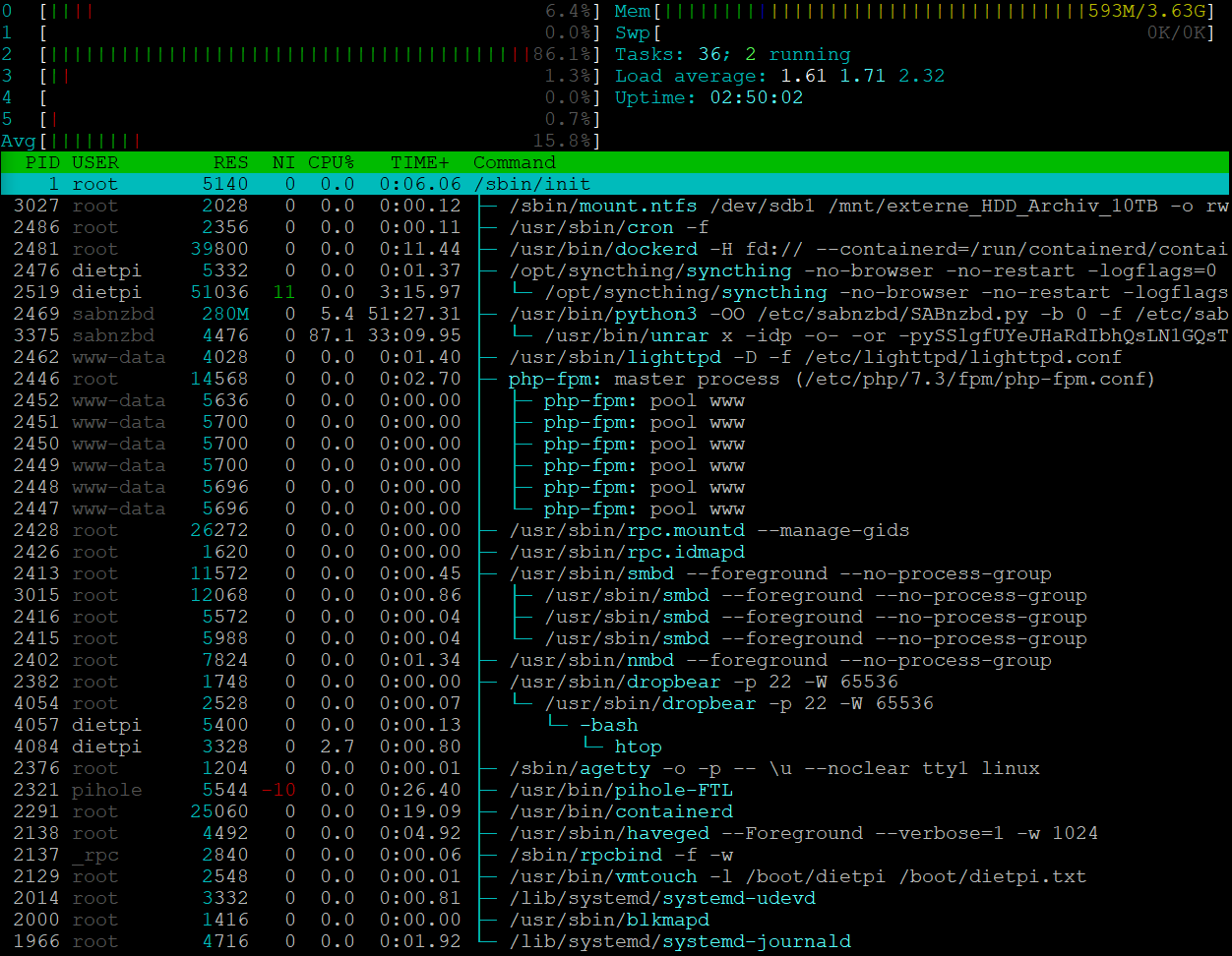
I have 6 cores (0 to 5) but only one seems to unrar with around 85% of that core.
Average is around 15%.
Used memory is 600MB from 3630 MB.
Swap is 0kB / okB.
And yes, data is stored on external drive.
Does this helps?
---
### Author:  [@Joulinar](https://dietpi.com/forum/u/Joulinar)
#### Post date: [19 October 2020 15:25 UTC](https://dietpi.com/forum/t/sabnzbd-heavy-load-100-when-unraring-files/4550/6 "2020-10-19T15:25:04Z")
ok CPU / memory doesn’t seems to be an issue. It’s using a single CPU only and still enough memory free.
Probably it’s the I/O from/to disk. What file system format you are using?
---
### Author:  [@norrin](https://dietpi.com/forum/u/norrin)
#### Post date: [19 October 2020 15:57 UTC](https://dietpi.com/forum/t/sabnzbd-heavy-load-100-when-unraring-files/4550/7 "2020-10-19T15:57:11Z")
EXT4
It is an external 1TB USB-hdd that i used with dietpi and the odroid xu4 before.
---
### Author:  [@Joulinar](https://dietpi.com/forum/u/Joulinar)
#### Post date: [19 October 2020 17:55 UTC](https://dietpi.com/forum/t/sabnzbd-heavy-load-100-when-unraring-files/4550/8 "2020-10-19T17:55:48Z")
for testing purposes, are you able to use internal storage? Just to see how it is behaving from performance point of view.
---
### Author:  [@WarHawk](https://dietpi.com/forum/u/WarHawk)
#### Post date: [20 October 2020 01:10 UTC](https://dietpi.com/forum/t/sabnzbd-heavy-load-100-when-unraring-files/4550/9 "2020-10-20T01:10:45Z")
It appears it might need it…even Archlinux needs it
[https://archlinuxarm.org/forum/viewtopic.php?t=5160](https://archlinuxarm.org/forum/viewtopic.php?t=5160)
ZRAM/ZSWAP setup with a gig or two would probably be the best bet…keep the swapping from even going to a drive and have it handle it in high speed RAM
I know they are talking about setting ZRAM stuff in new releases…but there should be a howto to enable it on an older build, it’s actually surprisingly easy
---
### Author:  [@norrin](https://dietpi.com/forum/u/norrin)
#### Post date: [20 October 2020 07:04 UTC](https://dietpi.com/forum/t/sabnzbd-heavy-load-100-when-unraring-files/4550/10 "2020-10-20T07:04:59Z")
> [@](#):
>
> It appears it might need it…even Archlinux needs it
>
> [Arch Linux ARM • View topic - Swap needed for SABNZBD? If so what size and where?](https://archlinuxarm.org/forum/viewtopic.php?t=5160)
>
> ZRAM/ZSWAP setup with a gig or two would probably be the best bet…keep the swapping from even going to a drive and have it handle it in high speed RAM
>
> I know they are talking about setting ZRAM stuff in new releases…but there should be a howto to enable it on an older build, it’s actually surprisingly easy
The Odroid N2 only uses less than 15% from the RAM.
Do you really think it depends on swap or zram?
Isnt’t it more strange that there is only one core working?
---
### Author:  [@norrin](https://dietpi.com/forum/u/norrin)
#### Post date: [20 October 2020 07:09 UTC](https://dietpi.com/forum/t/sabnzbd-heavy-load-100-when-unraring-files/4550/11 "2020-10-20T07:09:36Z")
> [@](#):
>
> for testing purposes, are you able to use internal storage? Just to see how it is behaving from performance point of view.
Oh, that’s not very simple to me.
There are around 13GB free on /.
(/dev/mmcblk1p2 15G 1,5G 13G 11% /)
So i would rar a file, copy it to / and try to unrar it from there, right?
---
### Author:  [@Joulinar](https://dietpi.com/forum/u/Joulinar)
#### Post date: [20 October 2020 07:45 UTC](https://dietpi.com/forum/t/sabnzbd-heavy-load-100-when-unraring-files/4550/12 "2020-10-20T07:45:02Z")
yes that would be the idea to use some space on your RootFS for testing.
Regarding the swap, yes you still have enough phys me free. But you could simple give it a try. Just do one og the following 2 options:
1. to create a normal 1GB swap file
```nohighlight
/boot/dietpi/func/dietpi-set_swapfile 1024
```
1. to create a 512MB compressed swap file
```nohighlight
/boot/dietpi/func/dietpi-set_swapfile 512 zram
```
To revert changes and to remove swap
```nohighlight
/boot/dietpi/func/dietpi-set_swapfile 0
```
Regarding the single core usage. That’s quite normal as you have just a single process running.
---
### Author:  [@norrin](https://dietpi.com/forum/u/norrin)
#### Post date: [20 October 2020 15:45 UTC](https://dietpi.com/forum/t/sabnzbd-heavy-load-100-when-unraring-files/4550/13 "2020-10-20T15:45:30Z")
Ok, here we go.
I successfully activated swap. Unrar uses unbelievable 4,5 MB of the whole swap-space and there is no difference at all.
🤣
I just unrared a 1379 MB file on the sdcard (internal).
It took 14:30 min…
Then i did the same on the external usb-hdd:
There it took 12:30 min
So, this seems to be no issue with the external hdd-drive.
---
### Author:  [@Joulinar](https://dietpi.com/forum/u/Joulinar)
#### Post date: [20 October 2020 17:34 UTC](https://dietpi.com/forum/t/sabnzbd-heavy-load-100-when-unraring-files/4550/14 "2020-10-20T17:34:25Z")
slowly I’m running out of ideas ☹
---
### Author:  [@WarHawk](https://dietpi.com/forum/u/WarHawk)
#### Post date: [21 October 2020 02:36 UTC](https://dietpi.com/forum/t/sabnzbd-heavy-load-100-when-unraring-files/4550/15 "2020-10-21T02:36:40Z")
What does
```nohighlight
cat /proc/swaps
```
show?
and
```nohighlight
free -m
```
---
### Author:  [@norrin](https://dietpi.com/forum/u/norrin)
#### Post date: [21 October 2020 15:14 UTC](https://dietpi.com/forum/t/sabnzbd-heavy-load-100-when-unraring-files/4550/16 "2020-10-21T15:14:26Z")
```nohighlight
dietpi@DietPi:~$ cat /proc/swaps
Filename Type Size Used Priority
/mnt/externe_HDD_1TB/.swapfile file 1048572 12928 -1
dietpi@DietPi:~$ free -m
total used free shared buff/cache available
Mem: 3713 510 22 15 3180 3148
Swap: 1023 12 1011
```
---
### Author:  [@Joulinar](https://dietpi.com/forum/u/Joulinar)
#### Post date: [21 October 2020 18:13 UTC](https://dietpi.com/forum/t/sabnzbd-heavy-load-100-when-unraring-files/4550/17 "2020-10-21T18:13:19Z")
How does it looks like if SabNZBD is running an unrar?
---
### Author:  [@norrin](https://dietpi.com/forum/u/norrin)
#### Post date: [22 October 2020 08:27 UTC](https://dietpi.com/forum/t/sabnzbd-heavy-load-100-when-unraring-files/4550/18 "2020-10-22T08:27:23Z")
> [@](#):
>
> How does it looks like if SabNZBD is running an unrar?
while downloading
```plaintext
dietpi@DietPi:~$ cat /proc/swaps
Filename Type Size Used Priority
/mnt/externe_HDD_1TB/.swapfile file 1048572 12968 -1
dietpi@DietPi:~$ free -m
total used free shared buff/cache available
Mem: 3713 560 43 15 3109 3097
Swap: 1023 12 1011
dietpi@DietPi:~$
```
while unraring
```plaintext
dietpi@DietPi:~$ cat /proc/swaps
Filename Type Size Used Priority
/mnt/externe_HDD_1TB/.swapfile file 1048572 13380 -1
dietpi@DietPi:~$ free -m
total used free shared buff/cache available
Mem: 3713 551 19 15 3141 3106
Swap: 1023 13 1010
dietpi@DietPi:~$
```
Is it possible, that the installation of dietpi went wrong?
NFS not working is another issue.
Is it possible to check if the installation of dietpi was “clean”?
---
### Author:  [@Joulinar](https://dietpi.com/forum/u/Joulinar)
#### Post date: [22 October 2020 09:41 UTC](https://dietpi.com/forum/t/sabnzbd-heavy-load-100-when-unraring-files/4550/19 "2020-10-22T09:41:06Z")
DietPi logs from first run are stored at /var/tmp/dietpi/logs. But if there are issues in initial setup, you would have been noticed before.
---
### Author:  [@WarHawk](https://dietpi.com/forum/u/WarHawk)
#### Post date: [23 October 2020 05:50 UTC](https://dietpi.com/forum/t/sabnzbd-heavy-load-100-when-unraring-files/4550/20 "2020-10-23T05:50:39Z")
Let’s try a hdparm
Howto here
> **[Disk Speed Test (Read/Write): HDD, SSD Performance in Linux - ShellHacks](https://www.shellhacks.com/disk-speed-test-read-write-hdd-ssd-perfomance-linux/)**
>
> How to test read/write disk speed (HDD, SSD, USB Flash Drive) from the Linux command line using "dd" and "hdparm". Disk performance and throughput tests.
> hdparm: Test HDD, SSD, USB Flash Drive’s Performance
> hdparm is a Linux command line utility that allows to set and view hardware parameters of hard disk drives.
> And it can also be used as a simple benchmarking tool that allows to quickly find out the READ speed of a disk.
>
> hdparm is available from standard repositories on the most Linux distributions.
>
> Install hdparm depending on your Linux distribution.
On Linux Mint, Ubuntu, Debian:
```plaintext
$ sudo apt-get install hdparm
```
Run hdparm as follows, to measure the READ speed of a storage drive device /dev/sda:
```plaintext
$ sudo hdparm -Tt /dev/sda
/dev/sda:
Timing cached reads: 16924 MB in 2.00 seconds = 8469.95 MB/sec
Timing buffered disk reads: 1386 MB in 3.00 seconds = 461.50 MB/sec
```
Whichever your external USB drive is mounted as…