# raspberry pi zero w no ssh possible
**URL:** https://dietpi.com/forum/t/raspberry-pi-zero-w-no-ssh-possible/4791
**Category:** Troubleshooting
**Created:** [28 December 2020 08:48 UTC](https://dietpi.com/forum/t/raspberry-pi-zero-w-no-ssh-possible/4791 "2020-12-28T08:48:53Z")
**Posts on this page:** 9
**Page:** 1
### Author:  [@Reindier](https://dietpi.com/forum/u/Reindier)
#### Post date: [28 December 2020 08:48 UTC](https://dietpi.com/forum/t/raspberry-pi-zero-w-no-ssh-possible/4791/1 "2020-12-28T08:48:53Z")
I have instaled DietPi\_RPi-ARMv6-Buster.img with balenaetcher when i run this i have to setup wifi on first boot, i put in my wifi details and test the connection everything works afther the instalation is complete it shows my local network ip adress but no ssh is possible to this adress?
also tried to edit dietpi tekst with the wifi enabled and land disabled and edited the wifi tekst same result
it has a internet connection to install everything except for ssh, also tried open ssh to instal same result no ssh possible.
hope sameone have a solution.
nice hollidays for everyone
Greets Reinier
---
### Author:  [@Joulinar](https://dietpi.com/forum/u/Joulinar)
#### Post date: [28 December 2020 10:17 UTC](https://dietpi.com/forum/t/raspberry-pi-zero-w-no-ssh-possible/4791/2 "2020-12-28T10:17:25Z")
Hi,
many thanks for your message. Which SSH you are running now? Did you removed Dropbear before installation of OpenSSH? Can you check if there is a SSH server running on LISTEN on port 22
```nohighlight
ss -tulpn | grep LISTEN
```
---
### Author:  [@Reindier](https://dietpi.com/forum/u/Reindier)
#### Post date: [28 December 2020 14:02 UTC](https://dietpi.com/forum/t/raspberry-pi-zero-w-no-ssh-possible/4791/3 "2020-12-28T14:02:28Z")
deufault its running dropbear, when i instald open ssh it removed dropbear automaticly…
what command do i have to give to sea if there is a open port on port 22?
greets Reinier
---
### Author:  [@Joulinar](https://dietpi.com/forum/u/Joulinar)
#### Post date: [28 December 2020 15:57 UTC](https://dietpi.com/forum/t/raspberry-pi-zero-w-no-ssh-possible/4791/4 "2020-12-28T15:57:27Z")
Use the command OI posted above to verify what is running on port 22
```nohighlight
ss -tulpn | grep LISTEN
```
---
### Author:  [@Reindier](https://dietpi.com/forum/u/Reindier)
#### Post date: [28 December 2020 16:04 UTC](https://dietpi.com/forum/t/raspberry-pi-zero-w-no-ssh-possible/4791/5 "2020-12-28T16:04:03Z")
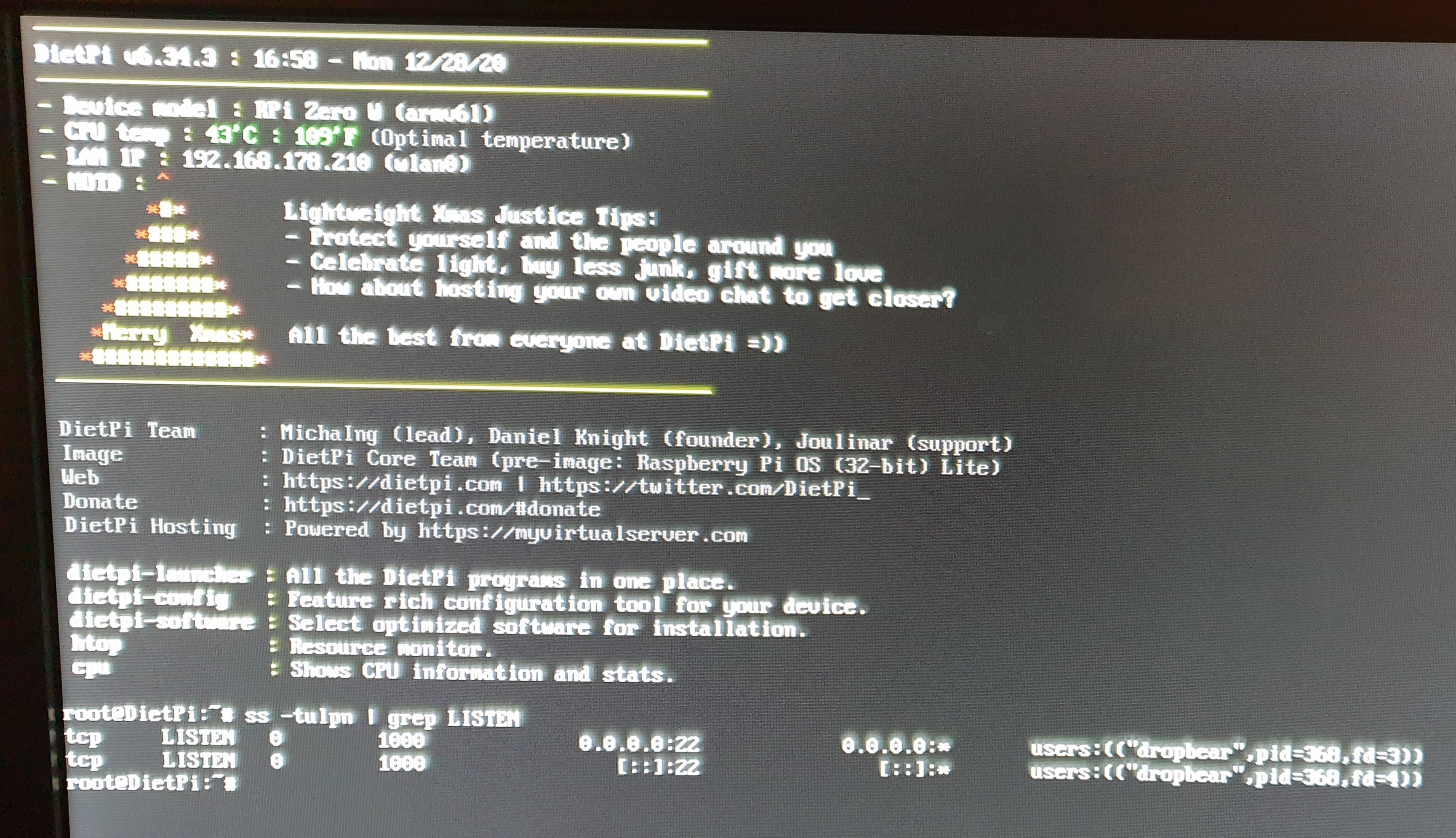
i am sorry i had not seen that the command was given in the previous post…
it tells dropbear but no connection is working, (i can ssh into my other rp4 with no problems)
---
### Author:  [@Joulinar](https://dietpi.com/forum/u/Joulinar)
#### Post date: [28 December 2020 16:27 UTC](https://dietpi.com/forum/t/raspberry-pi-zero-w-no-ssh-possible/4791/6 "2020-12-28T16:27:40Z")
that looks fine. Can you check Dropbear journal
```nohighlight
journalctl -u dropbear.service
```
---
### Author:  [@Reindier](https://dietpi.com/forum/u/Reindier)
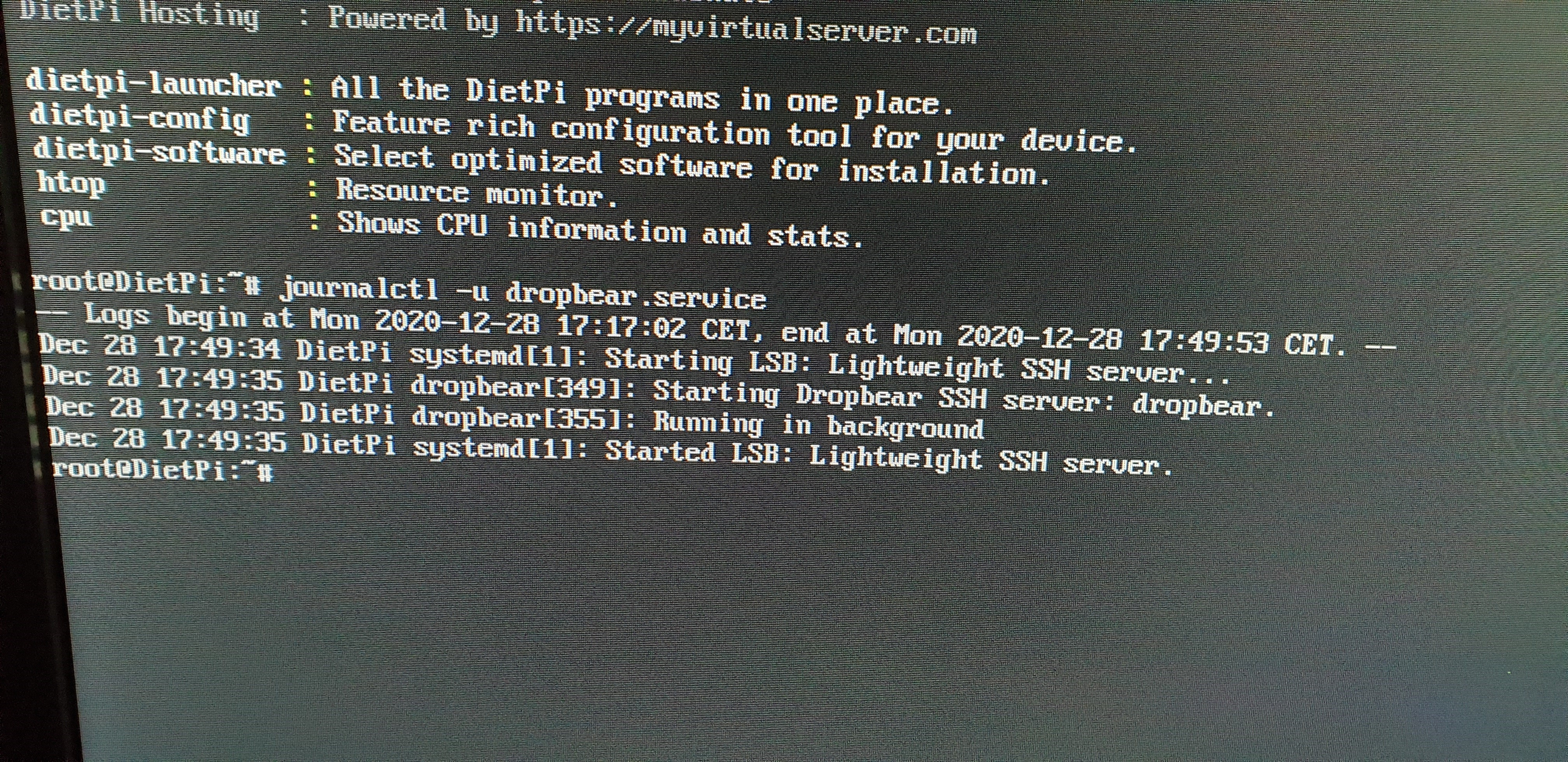
#### Post date: [28 December 2020 16:54 UTC](https://dietpi.com/forum/t/raspberry-pi-zero-w-no-ssh-possible/4791/7 "2020-12-28T16:54:12Z")
is running
---
### Author:  [@Reindier](https://dietpi.com/forum/u/Reindier)
#### Post date: [28 December 2020 17:02 UTC](https://dietpi.com/forum/t/raspberry-pi-zero-w-no-ssh-possible/4791/8 "2020-12-28T17:02:36Z")
a ping from my local pc to 192.168.178.210 does not work
from the dietpi to my local pc works well
afther a reboot suddenly it works with no reason… i tryed for more than 2 days and multiple installations…
glad it works but strange behavior!
thnx for the trips
Greets Reinier

---
### Author:  [@Joulinar](https://dietpi.com/forum/u/Joulinar)
#### Post date: [28 December 2020 17:36 UTC](https://dietpi.com/forum/t/raspberry-pi-zero-w-no-ssh-possible/4791/9 "2020-12-28T17:36:06Z")
good that it is working now. But the behavior reminds me on a case we had in the past. It took us quite some time to find out what the issue was and who blocked SSH access. At the an TP-LINK Access Point was preventing SSH access. If you have time, you can read through this post [https://dietpi.com/forum/t/ssh-never-get-to-prompt/4651/1](https://dietpi.com/forum/t/ssh-never-get-to-prompt/4651/1)
BTW. A successful SSH connection will looks like this on the logs
```nohighlight
root@DietPiProd:~# journalctl -u dropbear.service
-- Logs begin at Fri 2020-12-25 00:40:55 CET, end at Mon 2020-12-28 18:36:25 CET. --
Dec 25 00:41:51 DietPiProd systemd[1]: Starting LSB: Lightweight SSH server...
Dec 25 00:41:52 DietPiProd dropbear[610]: Starting Dropbear SSH server: dropbear.
Dec 25 00:41:52 DietPiProd systemd[1]: Started LSB: Lightweight SSH server.
Dec 25 00:41:52 DietPiProd dropbear[621]: Running in background
Dec 25 00:48:28 DietPiProd dropbear[1031]: Child connection from 192.168.0.31:59041
Dec 25 00:48:32 DietPiProd dropbear[1031]: Password auth succeeded for 'root' from 192.168.0.31:59041
Dec 25 01:03:58 DietPiProd dropbear[1031]: Exit (root): Exited normally
Dec 25 02:08:54 DietPiProd dropbear[3255]: Child connection from 192.168.0.31:62717
Dec 25 02:08:58 DietPiProd dropbear[3255]: Password auth succeeded for 'root' from 192.168.0.31:62717
Dec 25 02:10:16 DietPiProd dropbear[3255]: Exit (root): Exited normally
Dec 25 21:15:34 DietPiProd dropbear[13426]: Child connection from 192.168.0.134:54265
Dec 25 21:15:43 DietPiProd dropbear[13426]: Password auth succeeded for 'root' from 192.168.0.134:54265
Dec 25 21:16:06 DietPiProd dropbear[13426]: Exit (root): Exited normally
Dec 26 11:44:59 DietPiProd dropbear[22443]: Child connection from 192.168.0.31:49975
Dec 26 11:45:04 DietPiProd dropbear[22443]: Password auth succeeded for 'root' from 192.168.0.31:49975
Dec 26 11:47:02 DietPiProd dropbear[22443]: Exit (root): Exited normally
Dec 26 21:47:09 DietPiProd dropbear[27628]: Child connection from 192.168.0.134:50779
Dec 26 21:47:13 DietPiProd dropbear[27628]: Password auth succeeded for 'root' from 192.168.0.134:50779
Dec 26 21:47:18 DietPiProd dropbear[27628]: Exit (root): Exited normally
Dec 27 21:29:55 DietPiProd dropbear[8722]: Child connection from 192.168.0.31:55901
Dec 27 21:29:58 DietPiProd dropbear[8722]: Password auth succeeded for 'root' from 192.168.0.31:55901
Dec 27 21:30:29 DietPiProd dropbear[8722]: Exit (root): Exited normally
Dec 28 11:10:41 DietPiProd dropbear[15987]: Child connection from 192.168.0.134:55659
Dec 28 11:10:48 DietPiProd dropbear[15987]: Bad password attempt for 'root' from 192.168.0.134:55659
Dec 28 11:10:51 DietPiProd dropbear[15987]: Password auth succeeded for 'root' from 192.168.0.134:55659
Dec 28 11:18:49 DietPiProd dropbear[15987]: Exit (root): Exited normally
Dec 28 11:28:21 DietPiProd dropbear[16286]: Child connection from 192.168.0.134:56276
Dec 28 11:28:26 DietPiProd dropbear[16286]: Password auth succeeded for 'root' from 192.168.0.134:56276
Dec 28 11:32:14 DietPiProd dropbear[16286]: Exit (root): Exited normally
Dec 28 17:27:02 DietPiProd dropbear[21231]: Child connection from 192.168.0.134:51803
Dec 28 17:27:08 DietPiProd dropbear[21231]: Password auth succeeded for 'root' from 192.168.0.134:51803
Dec 28 17:31:19 DietPiProd dropbear[21231]: Exit (root): Exited normally
Dec 28 18:36:20 DietPiProd dropbear[21833]: Child connection from 192.168.0.134:50477
Dec 28 18:36:25 DietPiProd dropbear[21833]: Password auth succeeded for 'root' from 192.168.0.134:50477
root@DietPiProd:~#
```