# Quartz64 Model A: Very slow eth0 network
**URL:** https://dietpi.com/forum/t/quartz64-model-a-very-slow-eth0-network/25211
**Category:** Troubleshooting
**Created:** [14 May 2026 16:40 UTC](https://dietpi.com/forum/t/quartz64-model-a-very-slow-eth0-network/25211 "2026-05-14T16:40:19Z")
**Posts on this page:** 20
**Page:** 1
### Author:  [@Dietpi64](https://dietpi.com/forum/u/Dietpi64)
#### Post date: [14 May 2026 16:40 UTC](https://dietpi.com/forum/t/quartz64-model-a-very-slow-eth0-network/25211/1 "2026-05-14T16:40:19Z")
Hello eneryone.
I’m experiencing very weird network issues and after trying to understand and fix the problem, I hope you can help me out.
I put as much information I think as useful below. Don’t hesitate to ask if I missed something.
#### Expected behaviour
The SBC should be able to have 200Mb/s network speed
#### Actual behaviour
The SBC has very slow network speed between 0.2 and 7 Mb/s both for upload and download.
### Creating a bug report/issue
I have searched the existing open and closed issues
#### Required Information
- DietPi version | `cat /boot/dietpi/.version`
G\_DIETPI\_VERSION\_CORE=10
G\_DIETPI\_VERSION\_SUB=3
G\_DIETPI\_VERSION\_RC=3
G\_GITBRANCH=‘master’
G\_GITOWNER=‘MichaIng’
G\_LIVE\_PATCH\_STATUS[0]=‘applied’
G\_LIVE\_PATCH\_STATUS[1]=‘applied’
G\_LIVE\_PATCH\_STATUS[2]=‘applied’
- Distro version | `echo $G_DISTRO_NAME $G_RASPBIAN`
trixie
- Kernel version | `uname --all`
Linux DietPi 7.0.6 #1 SMP PREEMPT Mon May 11 14:37:29 UTC 2026 aarch64 GNU/Linux
- Architecture | `dpkg --print-architecture`
arm64
- SBC model | `echo $G_HW_MODEL_NAME` or (EG: RPi3)
Quartz64 (aarch64), manufacturer Pine64
- Power supply used | (EG: 5V 1A RAVpower)
Pine64 official power supply for Quartz64
- SD card used | (EG: SanDisk ultra)
No SD card, the main disk is an eMMC card. The SBC is connected tot 2 hard drives for data and backup storage
#### Additional Information (if applicable)
- The problem wasn’t there at the beginning (around 1,5 years ago) but began popping up around 5 months ago. At that time, restarting the network daemon with “systemctl restart networking” (sometimes 2 or 3 times) did the trick and the speed came back. Now it is always slow, no matter how many times I restart the daemon or the whole system.
- I test the network speed with the “speedtest-cli --secure” command
- The SBC is directly connected to my router with a gigabit ethernet cable. These cables work well with my laptop (which shows around 200Mb/s when tested with the same command)
- I used the “My traceroute” (mtr) while checking the regular causes and I noticed I have a quite big amount of lost packets:
---
### Author:  [@Jappe](https://dietpi.com/forum/u/Jappe)
#### Post date: [14 May 2026 17:06 UTC](https://dietpi.com/forum/t/quartz64-model-a-very-slow-eth0-network/25211/2 "2026-05-14T17:06:19Z")
Can you check the following:
```auto
ethtool eth0 | grep -E 'Speed|Duplex|Auto'
ip -s link show eth0
ethtool -S eth0 | grep -i error
dmesg | grep -Ei 'eth|stmmac|link|dma|timeout|reset'
```
And are you able to test the speed inside your LAN, for example with `iperf` or by copying something via SMB/NFS?
---
### Author:  [@Dietpi64](https://dietpi.com/forum/u/Dietpi64)
#### Post date: [14 May 2026 17:23 UTC](https://dietpi.com/forum/t/quartz64-model-a-very-slow-eth0-network/25211/3 "2026-05-14T17:23:07Z")
Hi,
Thanks for your help. Here are the results of the commands.
```auto
ethtool eth0 | grep -E 'Speed|Duplex|Auto'
Speed: 1000Mb/s
Duplex: Full
Auto-negotiation: on
```
```auto
ip -s link show eth0
```

```auto
ethtool -S eth0 | grep -i error
mmc_tx_underflow_error: 0
mmc_tx_carrier_error: 0
mmc_rx_crc_error: 0
mmc_rx_align_error: 0
mmc_rx_run_error: 0
mmc_rx_jabber_error: 0
mmc_rx_length_error: 0
mmc_rx_watchdog_error: 0
mmc_rx_error: 0
tx_payload_error: 0
tx_ip_header_error: 0
overflow_error: 0
ipc_csum_error: 0
rx_crc_errors: 0
fatal_bus_error_irq: 0
phy_eee_wakeup_error_n: 0
```
```auto
dmesg | grep -Ei 'eth|stmmac|link|dma|timeout|reset'
[0.000000] psci: probing for conduit method from DT.
[0.000000] DMA [mem 0x0000000000200000-0x00000000ffffffff]
[0.000000] DMA32 empty
[0.000000] On node 0, zone DMA: 512 pages in unavailable ranges
[0.045641] NET: Registered PF_NETLINK/PF_ROUTE protocol family
[0.047118] DMA: preallocated 1024 KiB GFP_KERNEL pool for atomic allocations
[0.047493] DMA: preallocated 1024 KiB GFP_KERNEL|GFP_DMA pool for atomic allocations
[0.047586] audit: initializing netlink subsys (disabled)
[0.868447] dma-pl330 fe530000.dma-controller: Loaded driver for PL330 DMAC-241330
[0.868506] dma-pl330 fe530000.dma-controller: DBUFF-128x8bytes Num_Chans-8 Num_Peri-32 Num_Events-16
[0.871686] dma-pl330 fe550000.dma-controller: Loaded driver for PL330 DMAC-241330
[0.871732] dma-pl330 fe550000.dma-controller: DBUFF-128x8bytes Num_Chans-8 Num_Peri-32 Num_Events-16
[1.046307] igb: Intel(R) Gigabit Ethernet Network Driver
[1.047403] Intel(R) 2.5G Ethernet Linux Driver
[1.052572] i40e: Intel(R) Ethernet Connection XL710 Network Driver
[1.053781] iavf: Intel(R) Ethernet Adaptive Virtual Function Network Driver
[1.054973] Intel(R) Ethernet Switch Host Interface Driver
[1.056289] ice: Intel(R) Ethernet Connection E800 Series Linux Driver
[1.087203] arm-scmi arm-scmi.0.auto: SCMI max-rx-timeout: 30ms / max-msg-size: 104bytes / max-msg: 20
[1.408779] mmc1: SDHCI controller on fe310000.mmc [fe310000.mmc] using ADMA
[1.655331] rockchip-dw-pcie 3c0000000.pcie: PCIe Gen.2 x1 link up
[1.687500] pci 0000:01:00.0: 4.000 Gb/s available PCIe bandwidth, limited by 5.0 GT/s PCIe x1 link at 0000:00:00.0 (capable of 7.876 Gb/s with 8.0 GT/s PCIe x1 link)
[1.710721] ahci 0000:01:00.0: controller can't do 64bit DMA, forcing 32bit
[1.724663] ata1: SATA max UDMA/133 abar m8192@0xf4210000 port 0xf4210100 irq 68 lpm-pol 1 ext
[1.725434] ata2: SATA max UDMA/133 abar m8192@0xf4210000 port 0xf4210180 irq 69 lpm-pol 1 ext
[1.756460] rk_gmac-dwmac fe010000.ethernet: IRQ sfty not found
[1.757717] rk_gmac-dwmac fe010000.ethernet: clock input or output? (input).
[1.758347] rk_gmac-dwmac fe010000.ethernet: TX delay(0x30).
[1.758850] rk_gmac-dwmac fe010000.ethernet: RX delay(0x10).
[1.759397] rk_gmac-dwmac fe010000.ethernet: integrated PHY? (no).
[1.759968] rk_gmac-dwmac fe010000.ethernet: clock input from PHY
[1.765520] rk_gmac-dwmac fe010000.ethernet: init for RGMII
[1.766316] rk_gmac-dwmac fe010000.ethernet: User ID: 0x30, Synopsys ID: 0x51
[1.766958] rk_gmac-dwmac fe010000.ethernet: DWMAC4/5
[1.767461] rk_gmac-dwmac fe010000.ethernet: DMA HW capability register supported
[1.768128] rk_gmac-dwmac fe010000.ethernet: Active PHY interface: RGMII (1)
[1.768754] rk_gmac-dwmac fe010000.ethernet: RX Checksum Offload Engine supported
[1.769416] rk_gmac-dwmac fe010000.ethernet: TX Checksum insertion supported
[1.770041] rk_gmac-dwmac fe010000.ethernet: Wake-Up On Lan supported
[1.770674] rk_gmac-dwmac fe010000.ethernet: TSO supported
[1.771169] rk_gmac-dwmac fe010000.ethernet: Enable RX Mitigation via HW Watchdog Timer
[1.771901] rk_gmac-dwmac fe010000.ethernet: Enabled RFS Flow TC (entries=10)
[1.772537] rk_gmac-dwmac fe010000.ethernet: TSO feature enabled
[1.773075] rk_gmac-dwmac fe010000.ethernet: Using 32/32 bits DMA host/device width
[1.945229] dwmmc_rockchip fe2b0000.mmc: IDMAC supports 32-bit address mode.
[1.945925] dwmmc_rockchip fe2b0000.mmc: Using internal DMA controller.
[1.946888] dwmmc_rockchip fe2c0000.mmc: IDMAC supports 32-bit address mode.
[1.946936] dwmmc_rockchip fe2c0000.mmc: Using internal DMA controller.
[3.763335] ata1: SATA link up 6.0 Gbps (SStatus 133 SControl 300)
[3.800880] ata1.00: ATA-10: ST2000DM008-2UB102, 0001, max UDMA/133
[3.871468] ata1.00: configured for UDMA/133
[4.363344] ata2: SATA link up 6.0 Gbps (SStatus 133 SControl 300)
[4.392343] ata2.00: ATA-10: ST2000DM008-2UB102, 0001, max UDMA/133
[4.462602] ata2.00: configured for UDMA/133
[5.356441] dw-apb-uart fe660000.serial: forbid DMA for kernel console
[9.470260] rk_gmac-dwmac fe010000.ethernet eth0: Register MEM_TYPE_PAGE_POOL RxQ-0
[9.474082] rk_gmac-dwmac fe010000.ethernet eth0: PHY [stmmac-0:00] driver [YT8511 Gigabit Ethernet] (irq=POLL)
[9.483572] rk_gmac-dwmac fe010000.ethernet eth0: No Safety Features support found
[9.484071] rk_gmac-dwmac fe010000.ethernet eth0: IEEE 1588-2008 Advanced Timestamp supported
[9.484425] rk_gmac-dwmac fe010000.ethernet eth0: registered PTP clock
[9.484446] rk_gmac-dwmac fe010000.ethernet eth0: configuring for phy/rgmii link mode
[12.548393] rk_gmac-dwmac fe010000.ethernet eth0: Link is Up - 1Gbps/Full - flow control rx/tx
[18.162278] Initializing XFRM netlink socket
[21.609793] br-375141c862f1: port 1(veth44206dd) entered blocking state
[21.609849] br-375141c862f1: port 1(veth44206dd) entered disabled state
[21.609896] veth44206dd: entered allmulticast mode
[21.610117] veth44206dd: entered promiscuous mode
[21.708819] br-375141c862f1: port 2(veth876b9df) entered blocking state
[21.708869] br-375141c862f1: port 2(veth876b9df) entered disabled state
[21.708930] veth876b9df: entered allmulticast mode
[21.709142] veth876b9df: entered promiscuous mode
[21.863702] br-375141c862f1: port 3(veth3aab174) entered blocking state
[21.863755] br-375141c862f1: port 3(veth3aab174) entered disabled state
[21.863799] veth3aab174: entered allmulticast mode
[21.864165] veth3aab174: entered promiscuous mode
[21.910956] br-375141c862f1: port 4(veth83a38af) entered blocking state
[21.911044] br-375141c862f1: port 4(veth83a38af) entered disabled state
[21.911084] veth83a38af: entered allmulticast mode
[21.911404] veth83a38af: entered promiscuous mode
[21.981748] br-375141c862f1: port 5(veth2c07b6d) entered blocking state
[21.982244] br-375141c862f1: port 5(veth2c07b6d) entered disabled state
[21.982379] veth2c07b6d: entered allmulticast mode
[21.982990] veth2c07b6d: entered promiscuous mode
[21.991810] eth0: renamed from veth7e07d2a
[21.998652] br-375141c862f1: port 1(veth44206dd) entered blocking state
[21.998685] br-375141c862f1: port 1(veth44206dd) entered forwarding state
[22.146430] eth0: renamed from veth19cb767
[22.212011] eth0: renamed from veth12d5f52
[22.492452] br-40734bf619eb: port 1(vethc612f8d) entered blocking state
[22.492488] br-40734bf619eb: port 1(vethc612f8d) entered disabled state
[22.492530] vethc612f8d: entered allmulticast mode
[22.492719] vethc612f8d: entered promiscuous mode
[22.493145] br-375141c862f1: port 2(veth876b9df) entered blocking state
[22.493193] br-375141c862f1: port 2(veth876b9df) entered forwarding state
[22.493350] br-375141c862f1: port 3(veth3aab174) entered blocking state
[22.493361] br-375141c862f1: port 3(veth3aab174) entered forwarding state
[22.622453] br-3c68bb9e370d: port 1(vethe1eefad) entered blocking state
[22.622507] br-3c68bb9e370d: port 1(vethe1eefad) entered disabled state
[22.622550] vethe1eefad: entered allmulticast mode
[22.622771] vethe1eefad: entered promiscuous mode
[22.628276] eth0: renamed from veth018047b
[22.636616] eth0: renamed from veth05a1340
[22.650887] br-375141c862f1: port 5(veth2c07b6d) entered blocking state
[22.650919] br-375141c862f1: port 5(veth2c07b6d) entered forwarding state
[22.661161] br-375141c862f1: port 4(veth83a38af) entered blocking state
[22.661225] br-375141c862f1: port 4(veth83a38af) entered forwarding state
[22.908862] br-4af34a3fd587: port 1(vethe1a7747) entered blocking state
[22.908922] br-4af34a3fd587: port 1(vethe1a7747) entered disabled state
[22.908960] vethe1a7747: entered allmulticast mode
[22.909287] vethe1a7747: entered promiscuous mode
[22.940026] br-f87d5de57574: port 1(veth9376d63) entered blocking state
[22.940218] br-f87d5de57574: port 1(veth9376d63) entered disabled state
[22.940399] veth9376d63: entered allmulticast mode
[22.942897] veth9376d63: entered promiscuous mode
[22.951784] br-375141c862f1: port 6(veth7caa4c2) entered blocking state
[22.951832] br-375141c862f1: port 6(veth7caa4c2) entered disabled state
[22.951873] veth7caa4c2: entered allmulticast mode
[22.952074] veth7caa4c2: entered promiscuous mode
[22.976533] br-40734bf619eb: port 2(veth2b2d4cb) entered blocking state
[22.976564] br-40734bf619eb: port 2(veth2b2d4cb) entered disabled state
[22.976840] veth2b2d4cb: entered allmulticast mode
[22.977443] veth2b2d4cb: entered promiscuous mode
[22.984021] br-96ae5d524308: port 1(veth264b73a) entered blocking state
[22.984053] br-96ae5d524308: port 1(veth264b73a) entered disabled state
[22.984095] veth264b73a: entered allmulticast mode
[22.984302] veth264b73a: entered promiscuous mode
[23.004720] eth0: renamed from veth07a2251
[23.007188] br-40734bf619eb: port 1(vethc612f8d) entered blocking state
[23.007256] br-40734bf619eb: port 1(vethc612f8d) entered forwarding state
[23.015759] eth0: renamed from vethcf17e5d
[23.022502] br-3c68bb9e370d: port 1(vethe1eefad) entered blocking state
[23.022535] br-3c68bb9e370d: port 1(vethe1eefad) entered forwarding state
[23.025542] br-033a402b583b: port 1(vethe7f5f28) entered blocking state
[23.025577] br-033a402b583b: port 1(vethe7f5f28) entered disabled state
[23.025619] vethe7f5f28: entered allmulticast mode
[23.025820] vethe7f5f28: entered promiscuous mode
[23.285587] br-375141c862f1: port 7(veth2e6fd97) entered blocking state
[23.285982] br-375141c862f1: port 7(veth2e6fd97) entered disabled state
[23.286884] veth2e6fd97: entered allmulticast mode
[23.288128] veth2e6fd97: entered promiscuous mode
[23.419855] eth0: renamed from veth2342bb0
[23.432075] br-375141c862f1: port 6(veth7caa4c2) entered blocking state
[23.432104] br-375141c862f1: port 6(veth7caa4c2) entered forwarding state
[23.475062] eth0: renamed from veth7fd699f
[23.485083] eth0: renamed from veth8b48910
[23.489492] eth0: renamed from veth90fdbf7
[23.504205] br-96ae5d524308: port 1(veth264b73a) entered blocking state
[23.504237] br-96ae5d524308: port 1(veth264b73a) entered forwarding state
[23.508501] br-40734bf619eb: port 2(veth2b2d4cb) entered blocking state
[23.508534] br-40734bf619eb: port 2(veth2b2d4cb) entered forwarding state
[23.520737] eth0: renamed from veth018a774
[23.527514] br-033a402b583b: port 1(vethe7f5f28) entered blocking state
[23.527548] br-033a402b583b: port 1(vethe7f5f28) entered forwarding state
[23.536534] br-4af34a3fd587: port 1(vethe1a7747) entered blocking state
[23.536568] br-4af34a3fd587: port 1(vethe1a7747) entered forwarding state
[23.538754] eth0: renamed from vethc4654f7
[23.545900] br-f87d5de57574: port 1(veth9376d63) entered blocking state
[23.545931] br-f87d5de57574: port 1(veth9376d63) entered forwarding state
[23.583073] eth0: renamed from veth04cf583
[23.585950] br-375141c862f1: port 7(veth2e6fd97) entered blocking state
[23.585983] br-375141c862f1: port 7(veth2e6fd97) entered forwarding state
[23.821999] br-afe64f1732ef: port 1(veth84a2ece) entered blocking state
[23.822053] br-afe64f1732ef: port 1(veth84a2ece) entered disabled state
[23.822168] veth84a2ece: entered allmulticast mode
[23.822386] veth84a2ece: entered promiscuous mode
[23.877168] eth1: renamed from vethcc74bac
[23.884754] br-afe64f1732ef: port 1(veth84a2ece) entered blocking state
[23.884786] br-afe64f1732ef: port 1(veth84a2ece) entered forwarding state
[208.382161] rk_gmac-dwmac fe010000.ethernet eth0: Link is Down
[208.779370] rk_gmac-dwmac fe010000.ethernet eth0: Register MEM_TYPE_PAGE_POOL RxQ-0
[208.781596] rk_gmac-dwmac fe010000.ethernet eth0: PHY [stmmac-0:00] driver [YT8511 Gigabit Ethernet] (irq=POLL)
[208.791382] rk_gmac-dwmac fe010000.ethernet eth0: No Safety Features support found
[208.791425] rk_gmac-dwmac fe010000.ethernet eth0: IEEE 1588-2008 Advanced Timestamp supported
[208.791771] rk_gmac-dwmac fe010000.ethernet eth0: registered PTP clock
[208.791786] rk_gmac-dwmac fe010000.ethernet eth0: configuring for phy/rgmii link mode
[211.844574] rk_gmac-dwmac fe010000.ethernet eth0: Link is Up - 1Gbps/Full - flow control rx/tx
[302.106581] rk_gmac-dwmac fe010000.ethernet eth0: Link is Down
[302.476065] rk_gmac-dwmac fe010000.ethernet eth0: Register MEM_TYPE_PAGE_POOL RxQ-0
[302.478059] rk_gmac-dwmac fe010000.ethernet eth0: PHY [stmmac-0:00] driver [YT8511 Gigabit Ethernet] (irq=POLL)
[302.487292] rk_gmac-dwmac fe010000.ethernet eth0: No Safety Features support found
[302.487331] rk_gmac-dwmac fe010000.ethernet eth0: IEEE 1588-2008 Advanced Timestamp supported
[302.487632] rk_gmac-dwmac fe010000.ethernet eth0: registered PTP clock
[302.487644] rk_gmac-dwmac fe010000.ethernet eth0: configuring for phy/rgmii link mode
[305.540906] rk_gmac-dwmac fe010000.ethernet eth0: Link is Up - 1Gbps/Full - flow control rx/tx
[423.475157] rk_gmac-dwmac fe010000.ethernet eth0: Link is Down
[423.843867] rk_gmac-dwmac fe010000.ethernet eth0: Register MEM_TYPE_PAGE_POOL RxQ-0
[423.846034] rk_gmac-dwmac fe010000.ethernet eth0: PHY [stmmac-0:00] driver [YT8511 Gigabit Ethernet] (irq=POLL)
[423.855375] rk_gmac-dwmac fe010000.ethernet eth0: No Safety Features support found
[423.855423] rk_gmac-dwmac fe010000.ethernet eth0: IEEE 1588-2008 Advanced Timestamp supported
[423.855801] rk_gmac-dwmac fe010000.ethernet eth0: registered PTP clock
[423.855817] rk_gmac-dwmac fe010000.ethernet eth0: configuring for phy/rgmii link mode
[426.916842] rk_gmac-dwmac fe010000.ethernet eth0: Link is Up - 1Gbps/Full - flow control rx/tx
[519.634450] rk_gmac-dwmac fe010000.ethernet eth0: Link is Down
[520.012007] rk_gmac-dwmac fe010000.ethernet eth0: Register MEM_TYPE_PAGE_POOL RxQ-0
[520.013911] rk_gmac-dwmac fe010000.ethernet eth0: PHY [stmmac-0:00] driver [YT8511 Gigabit Ethernet] (irq=POLL)
[520.023324] rk_gmac-dwmac fe010000.ethernet eth0: No Safety Features support found
[520.023364] rk_gmac-dwmac fe010000.ethernet eth0: IEEE 1588-2008 Advanced Timestamp supported
[520.023673] rk_gmac-dwmac fe010000.ethernet eth0: registered PTP clock
[520.023684] rk_gmac-dwmac fe010000.ethernet eth0: configuring for phy/rgmii link mode
[523.076860] rk_gmac-dwmac fe010000.ethernet eth0: Link is Up - 1Gbps/Full - flow control rx/tx
[229995.805581] rk_gmac-dwmac fe010000.ethernet eth0: Link is Down
[229996.198333] rk_gmac-dwmac fe010000.ethernet eth0: Register MEM_TYPE_PAGE_POOL RxQ-0
[229996.200344] rk_gmac-dwmac fe010000.ethernet eth0: PHY [stmmac-0:00] driver [YT8511 Gigabit Ethernet] (irq=POLL)
[229996.210313] rk_gmac-dwmac fe010000.ethernet eth0: No Safety Features support found
[229996.210355] rk_gmac-dwmac fe010000.ethernet eth0: IEEE 1588-2008 Advanced Timestamp supported
[229996.210697] rk_gmac-dwmac fe010000.ethernet eth0: registered PTP clock
[229996.210711] rk_gmac-dwmac fe010000.ethernet eth0: configuring for phy/rgmii link mode
[229999.267844] rk_gmac-dwmac fe010000.ethernet eth0: Link is Up - 1Gbps/Full - flow control rx/tx
[231269.725643] rk_gmac-dwmac fe010000.ethernet eth0: Link is Down
[231270.105973] rk_gmac-dwmac fe010000.ethernet eth0: Register MEM_TYPE_PAGE_POOL RxQ-0
[231270.108284] rk_gmac-dwmac fe010000.ethernet eth0: PHY [stmmac-0:00] driver [YT8511 Gigabit Ethernet] (irq=POLL)
[231270.118287] rk_gmac-dwmac fe010000.ethernet eth0: No Safety Features support found
[231270.118332] rk_gmac-dwmac fe010000.ethernet eth0: IEEE 1588-2008 Advanced Timestamp supported
[231270.118684] rk_gmac-dwmac fe010000.ethernet eth0: registered PTP clock
[231270.118697] rk_gmac-dwmac fe010000.ethernet eth0: configuring for phy/rgmii link mode
[231273.187853] rk_gmac-dwmac fe010000.ethernet eth0: Link is Up - 1Gbps/Full - flow control rx/tx
```
---
### Author:  [@Dietpi64](https://dietpi.com/forum/u/Dietpi64)
#### Post date: [14 May 2026 17:37 UTC](https://dietpi.com/forum/t/quartz64-model-a-very-slow-eth0-network/25211/4 "2026-05-14T17:37:50Z")
I did some tests between my desktop and my SBC both in the same local network.
When I do a test from my desktop (client) to the SBC (server), the result is nice and fast:
```auto
------------------------------------------------------------
Client connecting to 192.168.1.140, TCP port 5001
TCP window size: 16.0 KByte (default)
------------------------------------------------------------
[1] local 192.168.1.39 port 55542 connected with 192.168.1.140 port 5001
[ID] Interval Transfer Bandwidth
[1] 0.00-10.03 sec 1.09 GBytes 934 Mbits/sec
```
When I do a test from my SBC (client) to my desktop (server), the result is catastrophic:
```auto
------------------------------------------------------------
Client connecting to 192.168.1.39, TCP port 5001
TCP window size: 16.0 KByte (default)
------------------------------------------------------------
[1] local 192.168.1.140 port 52592 connected with 192.168.1.39 port 5001
[ID] Interval Transfer Bandwidth
[1] 0.0000-20.2429 sec 211 KBytes 85.3 Kbits/sec
```
Though in that test I noticed both machines are reporting different speeds. The above is from SBC and mentions a speed of 85.3 Kb/s. For that exact same test, the desktop reports a speed of 47.9:
```auto
------------------------------------------------------------
Server listening on TCP port 5001
TCP window size: 128 KByte (default)
------------------------------------------------------------
[1] local 192.168.1.39 port 5001 connected with 192.168.1.140 port 52592
[ID] Interval Transfer Bandwidth
[1] 0.00-36.03 sec 211 KBytes 47.9 Kbits/sec
```
I don’t understand why this is.
---
### Author:  [@Jappe](https://dietpi.com/forum/u/Jappe)
#### Post date: [14 May 2026 18:39 UTC](https://dietpi.com/forum/t/quartz64-model-a-very-slow-eth0-network/25211/5 "2026-05-14T18:39:12Z")
Ok this looks kinda “good” and narrows it down.
In the kernel logs you see a lot of
```auto
[211.844574] rk_gmac-dwmac fe010000.ethernet eth0: Link is Up - 1Gbps/Full - flow control rx/tx
[302.106581] rk_gmac-dwmac fe010000.ethernet eth0: Link is Down
```
and you see assymetric speeds, while one direction is normal the other directions is pretty bad (from SBC to dsektop).
The simplest test now would be to run the iperf test again with
- another cable
- another port on the router
If it’s still slow, there are a few other reasons why that might be the case, e.g. energy saving options or flow control bug (which could be introduced with some kernel update)
---
### Author:  [@Dietpi64](https://dietpi.com/forum/u/Dietpi64)
#### Post date: [14 May 2026 19:11 UTC](https://dietpi.com/forum/t/quartz64-model-a-very-slow-eth0-network/25211/6 "2026-05-14T19:11:58Z")
Jappe,
I changed the SBC to have another cable and to be connected to another port on the router (and gave it a reboot). The results of the iperf tests are the same, still fast (around 930 Mb/s) from desktop to SBC and still slow (40 to 100 Kb/s) the other way around.
To be sure I put my laptop on the cable and port the SBC was connected with and did the iperf tests (laptop \< - \> desktop) a few times in both directions. All the tests had speeds around 930Mb/s in both directions.
---
### Author:  [@Jappe](https://dietpi.com/forum/u/Jappe)
#### Post date: [15 May 2026 16:40 UTC](https://dietpi.com/forum/t/quartz64-model-a-very-slow-eth0-network/25211/7 "2026-05-15T16:40:23Z")
Alright, you can try now to
- disable flow control `ethtool -A eth0 rx off tx off`
- deactivate offloading `ethtool -K eth0 gro off gso off tso off`
- deactivate energy saving feature EEE `ethtool --set-eee eth0 eee off`
- reset PHY `ip link set eth0 down && sleep 2 && ip link set eth0 up`
---
### Author:  [@Dietpi64](https://dietpi.com/forum/u/Dietpi64)
#### Post date: [15 May 2026 20:26 UTC](https://dietpi.com/forum/t/quartz64-model-a-very-slow-eth0-network/25211/8 "2026-05-15T20:26:29Z")
I did the 4 commands (with some added sudo’s to have the rights to use ethtool and ip) and then I did the iperf tests again.
Same results as before the changes:
- desktop → SBC nice (930Mb/s)
- SBC → desktop not nice (100Kb/s)
But then I noticed something else, I cannot join the internet (I tried ping, curl etc always “Network is unreachable”).
So I redid the commands and checked the journal. Nothing on the first commands but when I set the eth0 down and up this is written:
```auto
[76549.946432] rk_gmac-dwmac fe010000.ethernet eth0: Link is Down
[76552.038750] rk_gmac-dwmac fe010000.ethernet eth0: Register MEM_TYPE_PAGE_POOL RxQ-0
[76552.040985] rk_gmac-dwmac fe010000.ethernet eth0: PHY [stmmac-0:00] driver [YT8511 Gigabit Ethernet] (irq=POLL)
[76552.050408] rk_gmac-dwmac fe010000.ethernet eth0: No Safety Features support found
[76552.050457] rk_gmac-dwmac fe010000.ethernet eth0: IEEE 1588-2008 Advanced Timestamp supported
[76552.053435] rk_gmac-dwmac fe010000.ethernet eth0: registered PTP clock
[76552.053471] rk_gmac-dwmac fe010000.ethernet eth0: configuring for phy/rgmii link mode
[76555.107286] rk_gmac-dwmac fe010000.ethernet eth0: Link is Up - 1Gbps/Full - flow control rx/tx
```
Is it normal that the last line mentions flow control when the first command should have disabled it?
---
### Author:  [@MichaIng](https://dietpi.com/forum/u/MichaIng)
#### Post date: [17 May 2026 15:48 UTC](https://dietpi.com/forum/t/quartz64-model-a-very-slow-eth0-network/25211/9 "2026-05-17T15:48:39Z")
Which exact Quartz64 model is it? A, B, or SOQuartz (if so which baseboard)?
Might be expected that disabling and re-enabling the interface resets settings. It is powered off entirely in this case. I am no expert in these regards, but might be worth to test each of the `ethtool` commands separately, without resetting the interface. Also, this can be used to check the status of the settings:
```sh
ethtool -a eth0
ethtool -k eth0
ethtool --show-eee eth0
```
---
### Author:  [@Dietpi64](https://dietpi.com/forum/u/Dietpi64)
#### Post date: [20 May 2026 21:23 UTC](https://dietpi.com/forum/t/quartz64-model-a-very-slow-eth0-network/25211/10 "2026-05-20T21:23:11Z")
It is a standalone Quartz64 model A with 8Gb memory.
ethtool -a eth0
```auto
Pause parameters for eth0:
Autonegotiate: on
RX: off
TX: off
RX negotiated: on
TX negotiated: on
```
ethtool -k eth0
```auto
Features for eth0:
rx-checksumming: on
tx-checksumming: on
tx-checksum-ipv4: on
tx-checksum-ip-generic: off [fixed]
tx-checksum-ipv6: on
tx-checksum-fcoe-crc: off [fixed]
tx-checksum-sctp: off [fixed]
scatter-gather: on
tx-scatter-gather: on
tx-scatter-gather-fraglist: off [fixed]
tcp-segmentation-offload: off
tx-tcp-segmentation: off
tx-tcp-ecn-segmentation: off [fixed]
tx-tcp-mangleid-segmentation: off
tx-tcp6-segmentation: off
tx-tcp-accecn-segmentation: off [fixed]
generic-segmentation-offload: off
generic-receive-offload: off
large-receive-offload: off [fixed]
rx-vlan-offload: on
tx-vlan-offload: off [fixed]
ntuple-filters: off [fixed]
receive-hashing: off [fixed]
highdma: on [fixed]
rx-vlan-filter: off [fixed]
vlan-challenged: off [fixed]
tx-gso-robust: off [fixed]
tx-fcoe-segmentation: off [fixed]
tx-gre-segmentation: off [fixed]
tx-gre-csum-segmentation: off [fixed]
tx-ipxip4-segmentation: off [fixed]
tx-ipxip6-segmentation: off [fixed]
tx-udp_tnl-segmentation: off [fixed]
tx-udp_tnl-csum-segmentation: off [fixed]
tx-gso-partial: off [fixed]
tx-tunnel-remcsum-segmentation: off [fixed]
tx-sctp-segmentation: off [fixed]
tx-esp-segmentation: off [fixed]
tx-udp-segmentation: on
tx-gso-list: off [fixed]
tx-nocache-copy: off
loopback: off [fixed]
rx-fcs: off [fixed]
rx-all: off [fixed]
tx-vlan-stag-hw-insert: off [fixed]
rx-vlan-stag-hw-parse: on [fixed]
rx-vlan-stag-filter: off [fixed]
l2-fwd-offload: off [fixed]
hw-tc-offload: on
esp-hw-offload: off [fixed]
esp-tx-csum-hw-offload: off [fixed]
rx-udp_tunnel-port-offload: off [fixed]
tls-hw-tx-offload: off [fixed]
tls-hw-rx-offload: off [fixed]
rx-gro-hw: off [fixed]
tls-hw-record: off [fixed]
rx-gro-list: off
macsec-hw-offload: off [fixed]
rx-udp-gro-forwarding: off
hsr-tag-ins-offload: off [fixed]
hsr-tag-rm-offload: off [fixed]
hsr-fwd-offload: off [fixed]
hsr-dup-offload: off [fixed]
```
ethtool --show-ee eth0
```auto
EEE settings for eth0:
EEE status: disabled
Tx LPI: 1000000 (us)
Supported EEE link modes: 100baseT/Full
1000baseT/Full
Advertised EEE link modes: 100baseT/Full
1000baseT/Full
Link partner advertised EEE link modes: Not reported
```
---
### Author:  [@MichaIng](https://dietpi.com/forum/u/MichaIng)
#### Post date: [20 May 2026 22:54 UTC](https://dietpi.com/forum/t/quartz64-model-a-very-slow-eth0-network/25211/11 "2026-05-20T22:54:31Z")
Hmm, on my Quartz64A 8 GB it seems to work as expected 🤔
```auto
root@quartz64a:~# iperf3 -c 192.168.1.3
Connecting to host 192.168.1.3, port 5201
[5] local 192.168.1.15 port 39258 connected to 192.168.1.3 port 5201
[ID] Interval Transfer Bitrate Retr Cwnd
[5] 0.00-1.00 sec 18.8 MBytes 157 Mbits/sec 111 8.48 KBytes
[5] 1.00-2.00 sec 18.2 MBytes 153 Mbits/sec 104 11.3 KBytes
[5] 2.00-3.00 sec 17.4 MBytes 146 Mbits/sec 96 21.2 KBytes
[5] 3.00-4.00 sec 15.6 MBytes 131 Mbits/sec 100 12.7 KBytes
[5] 4.00-5.00 sec 16.9 MBytes 142 Mbits/sec 105 11.3 KBytes
[5] 5.00-6.00 sec 16.2 MBytes 136 Mbits/sec 103 7.07 KBytes
[5] 6.00-7.00 sec 16.9 MBytes 142 Mbits/sec 111 11.3 KBytes
[5] 7.00-8.00 sec 18.0 MBytes 151 Mbits/sec 111 17.0 KBytes
[5] 8.00-9.00 sec 17.4 MBytes 146 Mbits/sec 125 15.6 KBytes
[5] 9.00-10.00 sec 17.4 MBytes 145 Mbits/sec 98 11.3 KBytes
- - - - - - - - - - - - - - - - - - - - - - - - -
[ID] Interval Transfer Bitrate Retr
[5] 0.00-10.00 sec 173 MBytes 145 Mbits/sec 1064 sender
[5] 0.00-10.01 sec 172 MBytes 144 Mbits/sec receiver
iperf Done.
root@quartz64a:~# iperf3 -s
-----------------------------------------------------------
Server listening on 5201 (test #1)
-----------------------------------------------------------
Accepted connection from 192.168.1.3, port 62044
[5] local 192.168.1.15 port 5201 connected to 192.168.1.3 port 62045
[ID] Interval Transfer Bitrate
[5] 0.00-1.00 sec 111 MBytes 928 Mbits/sec
[5] 1.00-2.00 sec 113 MBytes 949 Mbits/sec
[5] 2.00-3.00 sec 113 MBytes 949 Mbits/sec
[5] 3.00-4.00 sec 113 MBytes 949 Mbits/sec
[5] 4.00-5.00 sec 113 MBytes 950 Mbits/sec
[5] 5.00-6.00 sec 113 MBytes 949 Mbits/sec
[5] 6.00-7.00 sec 113 MBytes 949 Mbits/sec
[5] 7.00-8.00 sec 113 MBytes 949 Mbits/sec
[5] 8.00-9.00 sec 113 MBytes 949 Mbits/sec
[5] 9.00-10.00 sec 113 MBytes 950 Mbits/sec
[5] 10.00-10.03 sec 3.38 MBytes 950 Mbits/sec
- - - - - - - - - - - - - - - - - - - - - - - - -
[ID] Interval Transfer Bitrate
[5] 0.00-10.03 sec 1.11 GBytes 947 Mbits/sec receiver
-----------------------------------------------------------
Server listening on 5201 (test #2)
-----------------------------------------------------------
```
Not quite 200 Mbits TX speed, but it that is the theoretical/vendor value, the ~150 Mbits practical speed seems expected.
This is with EEE and checksumming enabled, i.e. nothing changed.
---
### Author:  [@Dietpi64](https://dietpi.com/forum/u/Dietpi64)
#### Post date: [28 May 2026 21:41 UTC](https://dietpi.com/forum/t/quartz64-model-a-very-slow-eth0-network/25211/12 "2026-05-28T21:41:32Z")
I’m still trying to understand the problem and I got a bit farther (I hope…).
I wanted to dig deeper into why the speed is so degraded, and I remembered the high amount of packet loss with MTR.
I did some fiddling with mtr and ping and captured the packets of both with TCPDump. Wireshark showed me the ICMP request and in approximately 30% of the cases, a message “no response found” on requests.
Capturing the packets of an iperf command proved to be more interesting. On one iperf run in the bad way (Quartz to desktop), I got the following:
- 250 packets total
- 41 are “TCP DUP ACK”
- 23 are “retransmission”
- 14 are “out of order”
- 4 “fast retransmission”
So my conclusion is: I have loss and/or congestion in the transfer. As previously tested, the problem is asymetric (from desktop → Quartz rocks but the other way is bad) so that would rule out the hardware (cables and plugs). Is that a correct conclusion?
Is it possible my router is provoking this? (I have a EdgeRouter-X-5-Port)
---
### Author:  [@Jappe](https://dietpi.com/forum/u/Jappe)
#### Post date: [29 May 2026 08:37 UTC](https://dietpi.com/forum/t/quartz64-model-a-very-slow-eth0-network/25211/13 "2026-05-29T08:37:13Z")
> [@Dietpi64](#):
>
> Is it possible my router is provoking this? (I have a EdgeRouter-X-5-Port)
No, if it’s was the router you would see effects in both directions.
I asked AI about it:
> Asymmetry does not rule out a hardware or driver issue. Your packet captures (DUP ACKs, retransmissions, out-of-order packets) indicate real loss or severe disruption in the TX path. Since RX performance is normal and only SBC → desktop is affected, this strongly points to a problem in the SBC’s NIC/driver stack (stmmac/PHY/DMA/offloading). A router issue would normally affect both directions equally, not just one host’s transmit direction.
---
### Author:  [@Dietpi64](https://dietpi.com/forum/u/Dietpi64)
#### Post date: [29 May 2026 16:55 UTC](https://dietpi.com/forum/t/quartz64-model-a-very-slow-eth0-network/25211/14 "2026-05-29T16:55:42Z")
When I try to check my driver/firmware I get the following (did an ‘ethtool -i eth0’)
```auto
driver: st_gmac
version: 7.0.6
firmware-version:
expansion-rom-version:
bus-info: fe010000.ethernet
supports-statistics: yes
supports-test: no
supports-eeprom-access: no
supports-register-dump: yes
supports-priv-flags: no
```
I don’t understand how I can miss the network firmware. So I tried finding it with ‘lshw -C network’:
```auto
*-network
description: Ethernet interface
physical id: f
logical name: eth0
serial: d2:0d:a3:69:4c:c8
size: 1Gbit/s
capacity: 1Gbit/s
capabilities: ethernet physical tp mii 10bt 10bt-fd 100bt 100bt-fd 1000bt-fd autonegotiation
configuration: autonegotiation=on broadcast=yes driver=st_gmac driverversion=7.0.6 duplex=full ip=192.168.1.140 link=yes multicast=yes port=twisted pair speed=1Gbit/s
```
Still no firmware (should be in the configuration value).
@MichaIng could you do one of both commands on your Quartz to check if me missing the information about my firmware could be normal?
---
### Author:  [@MichaIng](https://dietpi.com/forum/u/MichaIng)
#### Post date: [30 May 2026 15:31 UTC](https://dietpi.com/forum/t/quartz64-model-a-very-slow-eth0-network/25211/15 "2026-05-30T15:31:26Z")
There is not firmware listed in my case either. And this is pretty common. Ethernet drivers do not usually require firmware blobs. Only certain Realtek chips do.
---
### Author:  [@Dietpi64](https://dietpi.com/forum/u/Dietpi64)
#### Post date: [12 June 2026 23:33 UTC](https://dietpi.com/forum/t/quartz64-model-a-very-slow-eth0-network/25211/16 "2026-06-12T23:33:46Z")
Hey everyone.
Past few days I tried some things including but still not real lead or answer. I changed the location of the Quartz to be on my desk instead of its normal location. That has given some better results: now sometimes I get the 200Mb transferspeed. I just have to trigger the network configuration by restarting the networking daemon:
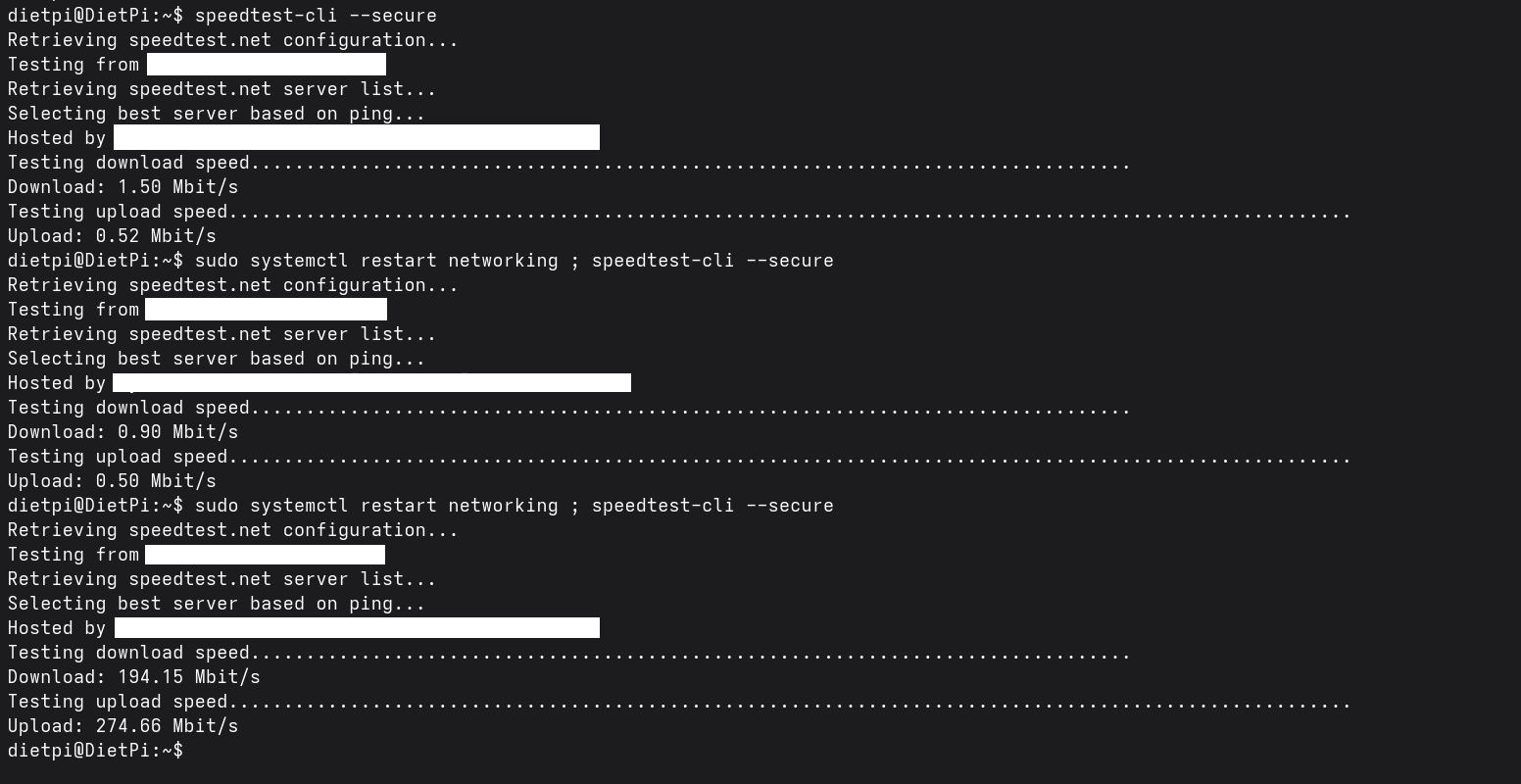
Where could be some logs in which I can find why this happens? I tried systemctl status networking but it isn’t very usefull.
Thanks for your help.
---
### Author:  [@Jappe](https://dietpi.com/forum/u/Jappe)
#### Post date: [13 June 2026 13:43 UTC](https://dietpi.com/forum/t/quartz64-model-a-very-slow-eth0-network/25211/17 "2026-06-13T13:43:26Z")
Could you check the kernel messages directly after a failed and a successful `restart networking` ?
```auto
journalctl -b | grep -Ei 'stmmac|rk_gmac|eth0|phy|link|reset|timeout|dma'
```
Also compare:
```auto
ethtool eth0
```
before and after restarting networking. If the link parameters change, it would be a strong hint that this is link/PHY negotiation rather than a routing issue.
---
### Author:  [@Dietpi64](https://dietpi.com/forum/u/Dietpi64)
#### Post date: [13 June 2026 22:50 UTC](https://dietpi.com/forum/t/quartz64-model-a-very-slow-eth0-network/25211/18 "2026-06-13T22:50:06Z")
Except a message about a timeout for ATA there is no difference in the journal:
```auto
Jun 13 22:33:12 DietPi kernel: ata2.00: qc timeout after 5000 msecs (cmd 0x27)
Jun 13 22:33:12 DietPi kernel: ata2: SATA link up 6.0 Gbps (SStatus 133 SControl 300)
```
Those lines were present at the “good” start and absent at the bad one. More interesting is the difference in ethtool.
In the “bad” start, the “master-slave-status” item had “slave” as value whereas that property is set to “master” in the good start.
---
### Author:  [@Jappe](https://dietpi.com/forum/u/Jappe)
#### Post date: [14 June 2026 00:41 UTC](https://dietpi.com/forum/t/quartz64-model-a-very-slow-eth0-network/25211/19 "2026-06-14T00:41:34Z")
> [@Dietpi64](#):
>
> In the “bad” start, the “master-slave-status” item had “slave” as value whereas that property is set to “master” in the good start.
That’s indeed interesting.
Can you try to force the master role, restart the interface and see if this changes anything.
```auto
ifdown eth0
sleep 2
ethtool -s eth0 master-slave master
ifup eth0
ethtool eth0 | grep -E 'Speed|Duplex|Master|Auto'
```
---
### Author:  [@Dietpi64](https://dietpi.com/forum/u/Dietpi64)
#### Post date: [14 June 2026 10:22 UTC](https://dietpi.com/forum/t/quartz64-model-a-very-slow-eth0-network/25211/20 "2026-06-14T10:22:34Z")
Unfortunately that didn’t work.
I tried your commands but the one to set the master-slave property returned an error “invalid value ‘master’”. So after some research I tried the following:
```auto
sudo ethtool -s eth0 master-slave preferred-master
```
But with that, computer still says no:
```auto
netlink error: master/slave configuration not supported by device (offset 36)
netlink error: Operation not supported
```
I brought the interface up and checked with ethtool and had the following values:
```auto
master-slave cfg: preferred slave
master-slave status: slave
```
Tried the speedtest-cli command and indeed still gave bad speeds.
[Next page](https://dietpi.com/forum/t/quartz64-model-a-very-slow-eth0-network/25211.md?page=2)