# Please help me, removed iproute2 now can't access Pi
**URL:** https://dietpi.com/forum/t/please-help-me-removed-iproute2-now-cant-access-pi/14985
**Category:** Troubleshooting
**Created:** [17 November 2022 13:16 UTC](https://dietpi.com/forum/t/please-help-me-removed-iproute2-now-cant-access-pi/14985 "2022-11-17T13:16:22Z")
**Posts on this page:** 18
**Page:** 1
### Author:  [@miguelpruivo](https://dietpi.com/forum/u/miguelpruivo)
#### Post date: [17 November 2022 13:16 UTC](https://dietpi.com/forum/t/please-help-me-removed-iproute2-now-cant-access-pi/14985/1 "2022-11-17T13:16:22Z")
Hi, I installed pihole and then removed it from the pi, however, when removing it, it suggested to remove some associated services, one of which, the iproute2. I pressed OK to remove it assuming it was just a pihole dependency (pardon my ignorance).
Turns out, I lost access to the pi completely (SSH), it’s a headless setup. I don’t have any attached monitor or whatsoever, I think I even have the HDMI output turned off in the settings of the pi.
I have physical access to the disk, what can I do? There should be a warning when removing the pihole regarding this for those that aren’t aware of the consequences. ☹
Thank you!
---
### Author:  [@Joulinar](https://dietpi.com/forum/u/Joulinar)
#### Post date: [17 November 2022 14:42 UTC](https://dietpi.com/forum/t/please-help-me-removed-iproute2-now-cant-access-pi/14985/2 "2022-11-17T14:42:00Z")
Don’t warry you are not the only one who tapped into this trap. Unfortunately, a downside of the official PiHole installer. We tried to convince PiHole guys to change this behavior but no luck so far. [Uninstaller package manangement is sub-optimal. · Issue #3929 · pi-hole/pi-hole · GitHub](https://github.com/pi-hole/pi-hole/issues/3929)
Do you remember what system you are running exactly? We could try to get monitor access back first and afterwards install missing packages manually.
---
### Author:  [@miguelpruivo](https://dietpi.com/forum/u/miguelpruivo)
#### Post date: [17 November 2022 15:02 UTC](https://dietpi.com/forum/t/please-help-me-removed-iproute2-now-cant-access-pi/14985/3 "2022-11-17T15:02:49Z")
I’m using the diet-pi. I already have access to the disk partition by setting up a SD card with another raspberry version (official) and mounted the HDD with the dietpi on there.
Now, I’m trying to find a way to get it back by installing the the iproute2 on the external (with dietpi) drive. Tried wget this one: [http://ftp.debian.org/debian/pool/main/i/iproute2/iproute2\_5.10.0-4\_armhf.deb](http://ftp.debian.org/debian/pool/main/i/iproute2/iproute2_5.10.0-4_armhf.deb) and then using `dpkg` and it installed but probably installed in the SD card instead of the SSD (which is where the dietpi is) because it’s still not working.
---
### Author:  [@Joulinar](https://dietpi.com/forum/u/Joulinar)
#### Post date: [17 November 2022 16:09 UTC](https://dietpi.com/forum/t/please-help-me-removed-iproute2-now-cant-access-pi/14985/4 "2022-11-17T16:09:13Z")
As stated above, let’s do this step by step. You can’t install packages on your HDD while running of SD card.
First point would be to get local access and disable the headless mode. For this you can connect your HDD to a Windows or MacOS computer. On the attached HDD, you should see the boot folder. There you would need to do 2 thinks:
```auto
Re-enabling HDMI requires a reboot. If you need emergency HDMI output, edit the following files on first partition
of the SDcard from external system:
- In config.txt, set "hdmi_ignore_hotplug=0" and comment/remove all (max_)framebuffer_(width/height) lines.
- In dietpi.txt, set "AUTO_SETUP_HEADLESS=1".
```
once this is working and you have local access, we can continue to install other packages. Please don’t install or download stuff you are not sure about.
---
### Author:  [@miguelpruivo](https://dietpi.com/forum/u/miguelpruivo)
#### Post date: [17 November 2022 16:57 UTC](https://dietpi.com/forum/t/please-help-me-removed-iproute2-now-cant-access-pi/14985/5 "2022-11-17T16:57:04Z")
I don’t have USB keyboards or mouses, unfortunately. Only bluetooth. Is there any way to do it without having to use HDMI? If not, what’s the next step after having HDMI access?
---
### Author:  [@Joulinar](https://dietpi.com/forum/u/Joulinar)
#### Post date: [17 November 2022 17:17 UTC](https://dietpi.com/forum/t/please-help-me-removed-iproute2-now-cant-access-pi/14985/6 "2022-11-17T17:17:43Z")
> [@miguelpruivo](#):
>
> If not, what’s the next step after having HDMI access?
getting a keyboard attached. Otherwise, you are not able to execute/type commands to install missing packages.
---
### Author:  [@miguelpruivo](https://dietpi.com/forum/u/miguelpruivo)
#### Post date: [17 November 2022 18:40 UTC](https://dietpi.com/forum/t/please-help-me-removed-iproute2-now-cant-access-pi/14985/7 "2022-11-17T18:40:46Z")
Are you sure it is AUTO\_SETUP\_HEADLES=1? Because that says that disables HDMI. Shouldn’t it be 0?
Edit: also, having a keyboard, what are the next steps?
---
### Author:  [@Joulinar](https://dietpi.com/forum/u/Joulinar)
#### Post date: [17 November 2022 19:06 UTC](https://dietpi.com/forum/t/please-help-me-removed-iproute2-now-cant-access-pi/14985/8 "2022-11-17T19:06:36Z")
> [@miguelpruivo](#):
>
> Are you sure it is AUTO\_SETUP\_HEADLES=1? Because that says that disables HDMI. Shouldn’t it be 0?
I copied the information from our configuration script. Might be a typo there. But indeed, it should be `AUTO_SETUP_HEADLESS=0`
> [@miguelpruivo](#):
>
> Edit: also, having a keyboard, what are the next steps?
Do you have local access to your system now? If yes we can continue.
---
### Author:  [@miguelpruivo](https://dietpi.com/forum/u/miguelpruivo)
#### Post date: [17 November 2022 19:20 UTC](https://dietpi.com/forum/t/please-help-me-removed-iproute2-now-cant-access-pi/14985/9 "2022-11-17T19:20:33Z")
Yes I have. What should I install now? (btw, the pihole uninstall probably failed IDK).
Edit: wow, looks like uninstalling pi-hole removed _A LOT_ of useful stuff, now even the ping command doesn’t work. How come such famous software do this kind of things in a uninstall?! This “breaks” a device.
---
### Author:  [@Joulinar](https://dietpi.com/forum/u/Joulinar)
#### Post date: [17 November 2022 19:37 UTC](https://dietpi.com/forum/t/please-help-me-removed-iproute2-now-cant-access-pi/14985/10 "2022-11-17T19:37:08Z")
> [@miguelpruivo](#):
>
> now even the ping command doesn’t work.
Yes it’s part of the network stack you removed.
> [@miguelpruivo](#):
>
> How come such famous software do this kind of things in a uninstall?! This “breaks” a device.
Feel free to ask PiHole guys on the GitHub issue I linked above.
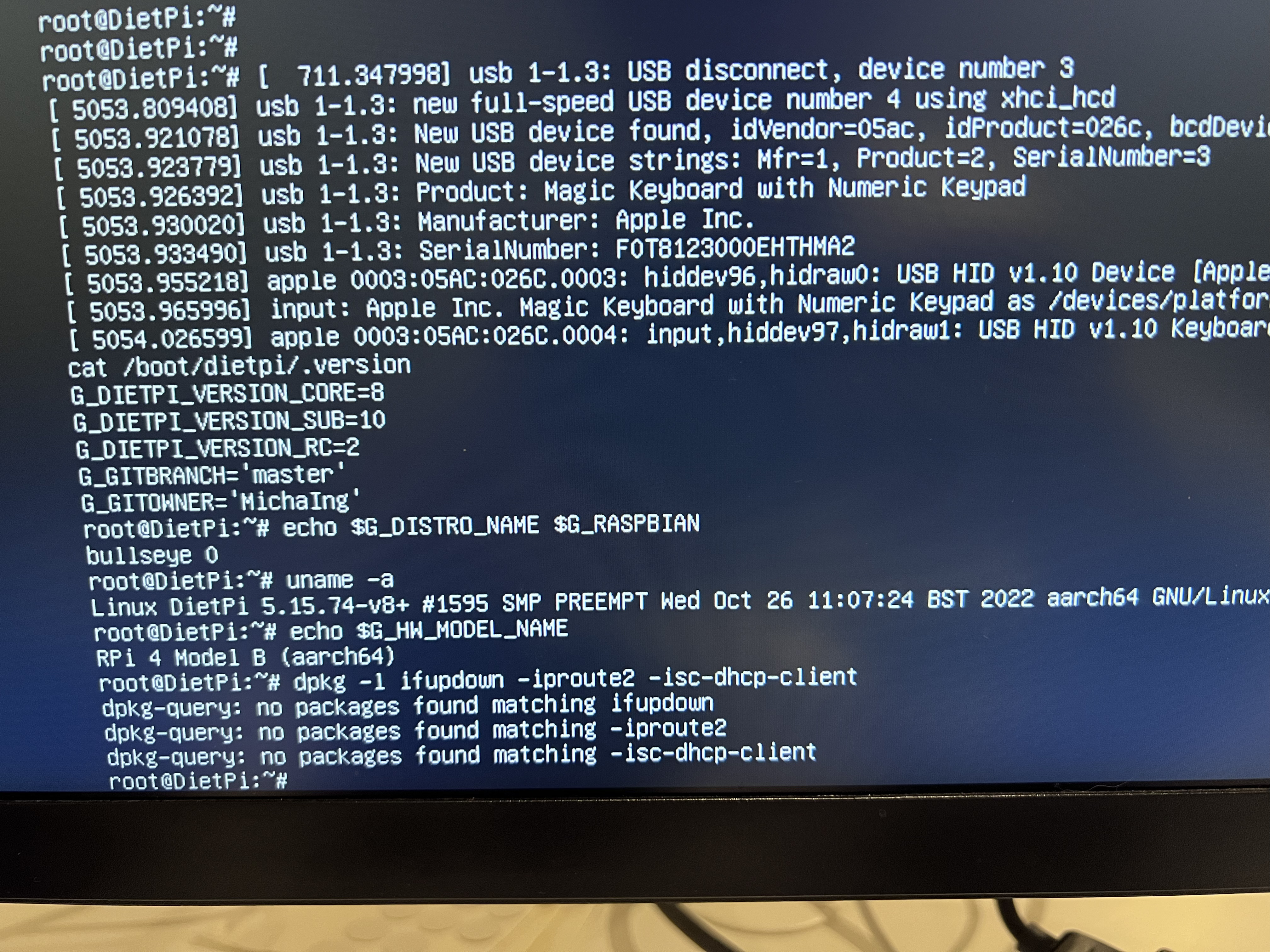
ok can you check following to verify missing packages. Once confirmed we will download them on a Windows/MacOS box.
- DietPi version | `cat /boot/dietpi/.version`
- Distro version | `echo $G_DISTRO_NAME $G_RASPBIAN`
- Kernel version | `uname -a`
- SBC model | `echo $G_HW_MODEL_NAME` or (EG: RPi3)
```auto
dpkg -l ifupdown iproute2 isc-dhcp-client
```
---
### Author:  [@miguelpruivo](https://dietpi.com/forum/u/miguelpruivo)
#### Post date: [17 November 2022 20:44 UTC](https://dietpi.com/forum/t/please-help-me-removed-iproute2-now-cant-access-pi/14985/11 "2022-11-17T20:44:30Z")
> [@Joulinar](#):
>
> cat /boot/dietpi/.version
Here you have it (sorry for sharing this way, it’s because I can’t copy paste from it):
---
### Author:  [@Joulinar](https://dietpi.com/forum/u/Joulinar)
#### Post date: [17 November 2022 21:20 UTC](https://dietpi.com/forum/t/please-help-me-removed-iproute2-now-cant-access-pi/14985/12 "2022-11-17T21:20:17Z")
ok a 64bit system. Download following packages on a different computer. Store the files on an additional USB pen drive. You could store it on the HDD directly as well.
```auto
http://ftp.debian.org/debian/pool/main/i/ifupdown/ifupdown_0.8.36_arm64.deb
http://ftp.debian.org/debian/pool/main/i/iproute2/iproute2_5.10.0-4_arm64.deb
http://ftp.debian.org/debian/pool/main/i/isc-dhcp/isc-dhcp-client_4.4.1-2.3_arm64.deb
```
Once done connect the drive to the RPi4 and navigate into the directory you stored files on. Installation can be done as follow:
```auto
dpkg -i *.deb
```
Reboot the system. Usually this should get your network connection back.
---
### Author:  [@miguelpruivo](https://dietpi.com/forum/u/miguelpruivo)
#### Post date: [17 November 2022 23:16 UTC](https://dietpi.com/forum/t/please-help-me-removed-iproute2-now-cant-access-pi/14985/13 "2022-11-17T23:16:20Z")
> [@Joulinar](#):
>
> `http://ftp.debian.org/debian/pool/main/i/isc-dhcp/isc-dhcp-client_4.4.1-2.3_arm64.deb`
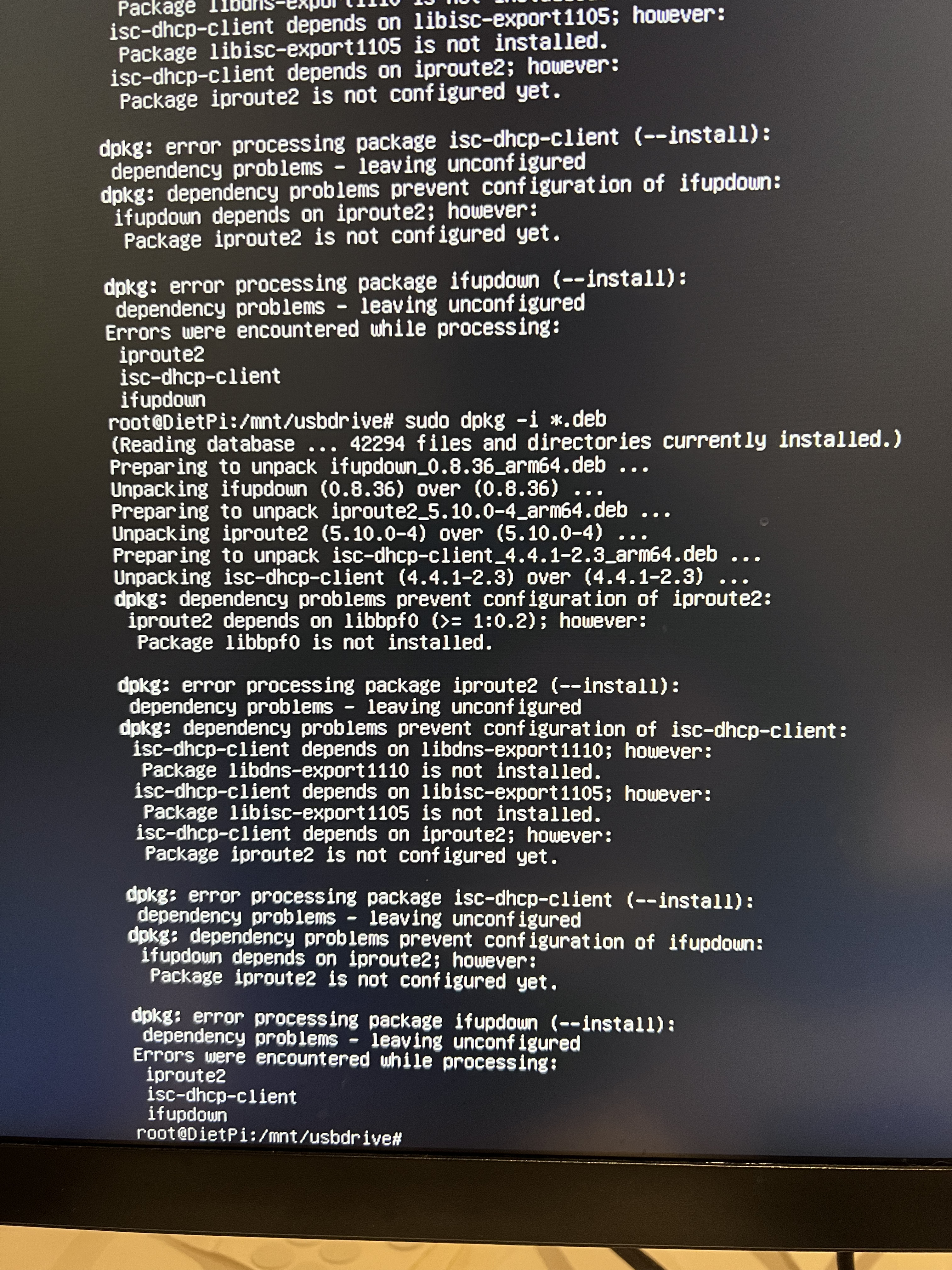
Well… I got errors in all of them. Check the attachment please (I’m so pissed with pihole because of all of this struggle).
---
### Author:  [@miguelpruivo](https://dietpi.com/forum/u/miguelpruivo)
#### Post date: [18 November 2022 03:14 UTC](https://dietpi.com/forum/t/please-help-me-removed-iproute2-now-cant-access-pi/14985/14 "2022-11-18T03:14:48Z")
All fixed, I searched the missing packages (the deb files) and installed them as well. Then I was able to fix it. Thank you.
---
### Author:  [@Joulinar](https://dietpi.com/forum/u/Joulinar)
#### Post date: [18 November 2022 07:56 UTC](https://dietpi.com/forum/t/please-help-me-removed-iproute2-now-cant-access-pi/14985/15 "2022-11-18T07:56:00Z")
> [@miguelpruivo](#):
>
> All fixed, I searched the missing packages (the deb files) and installed them as well.
yeah, that was correct procedure. A little bit of try and error to get all packages together. Good you are back online again.
---
### Author:  [@TBirth](https://dietpi.com/forum/u/TBirth)
#### Post date: [31 May 2023 19:12 UTC](https://dietpi.com/forum/t/please-help-me-removed-iproute2-now-cant-access-pi/14985/16 "2023-05-31T19:12:17Z")
This Post saved my A\*\* because i walked into the same Pihole removal trap.
In the end, i downloaded:
ifupdown\_0.8.36\_arm64.deb
iproute2\_5.10.0-4\_arm64.deb
libdns-export1110\_9.11.19+dfsg-2.1\_arm64.deb
libisc-export1105\_9.11.19+dfsg-2.1\_arm64.deb
libbpf0\_0.3-2\_arm64.deb
isc-dhcp-client\_4.4.1-2.3+deb11u2\_arm64.deb
from here:
[http://ftp.debian.org/debian/pool/main/i/](http://ftp.debian.org/debian/pool/main/i/)
and
[https://packages.debian.org/search?suite=default§ion=all&arch=any&searchon=names&keywords=libdns](https://packages.debian.org/search?suite=default§ion=all&arch=any&searchon=names&keywords=libdns)
as Stable. Moved anything into a Folder on a USB Drive. Mounted that drive on my Dietpi, searched the Folder and run
dpkg -i \*.deb
followed by a reboot.
Thank God, everything is working again.
---
### Author:  [@miguelpruivo](https://dietpi.com/forum/u/miguelpruivo)
#### Post date: [5 September 2023 17:09 UTC](https://dietpi.com/forum/t/please-help-me-removed-iproute2-now-cant-access-pi/14985/17 "2023-09-05T17:09:14Z")
@Joulinar bumping this because I’ve installed pi-hole again and now I need to uninstall and won’t fall again in the same trap. Because of that, these are the dependencies it suggests to remove:
```auto
[i] The following dependencies may have been added by the Pi-hole install:
git iproute2 dialog ca-certificates cron curl iputils-ping psmisc sudo unzip idn2 libcap2-bin dns-root-data libcap2 netcat-openbsd procps jq grep dnsutils
```
Since I’m going to say “no”, which of these are the leftovers I should manually remove?
---
### Author:  [@Joulinar](https://dietpi.com/forum/u/Joulinar)
#### Post date: [8 September 2023 08:55 UTC](https://dietpi.com/forum/t/please-help-me-removed-iproute2-now-cant-access-pi/14985/18 "2023-09-08T08:55:01Z")
it’s fine to keep these packages.