# Own cloud solution - nextcloud vs filecloud vs others
**URL:** https://dietpi.com/forum/t/own-cloud-solution-nextcloud-vs-filecloud-vs-others/19396
**Category:** General Discussion
**Created:** [23 February 2024 13:24 UTC](https://dietpi.com/forum/t/own-cloud-solution-nextcloud-vs-filecloud-vs-others/19396 "2024-02-23T13:24:56Z")
**Posts on this page:** 20
**Page:** 1
### Author:  [@Nick\_Scali](https://dietpi.com/forum/u/Nick_Scali)
#### Post date: [23 February 2024 13:24 UTC](https://dietpi.com/forum/t/own-cloud-solution-nextcloud-vs-filecloud-vs-others/19396/1 "2024-02-23T13:24:56Z")
Good morning all,
I’m looking into a cloud solution to be able to access my files remotely like a network share on my own NAS at home, when I’m working remotely.
I don’t really need all the extra features nextcloud offers, I’m more just after being able to have internet access to a network share on my NAS and open it and move files/folders to it just like a local drive on a Windows machine.
I’ve tried to get filecloud working via docker as it has this functionality I want, but I’m having an issue with my docker container instantly exiting the moment it runs.
I’ve been using the below guide on setting up filecloud.
I’ve timestamped the below link - I’m doing the on premises setup with docker at 23:33:
[ ](https://www.youtube.com/watch?v=xBIowQ0WaR8)
I’ve followed it up to the point of 25:28 minutes, and run the command seeing what docker containers are running.
But mine doesn’t run which is strange, they immediately exit.
```auto
CREATED STATUS PORTS NAMES
1603ae2f820c filecloud/filecloudsolr21.3:latest "sh /opt/solr/docker…32 seconds ago Exited (1) 22 seconds ago filecloud.solr
5018415cf8bb filecloud/filecloudserver23.1:latest "bash /usr/local/bin…3 weeks ago Exited (1) 20 seconds ago filecloud.server
0d514c7181e4 filecloud/filecloudpreview22.1:latest "/opt/libreoffice/in…3 weeks ago Exited (1) 22 seconds ago filecloud.preview
275008bbadca mongo:6.0.8 "docker-entrypoint.s…3 weeks ago Exited (132) 21 seconds ago filecloud.mongodb
```
Given I only want the very basics of network share over the internet to my NAS, is there other solutions, and something that can be installed with the dietpi-software functionality that comes with Diet-Pi? Everything from there generally works.
Thanks all
---
### Author:  [@Jappe](https://dietpi.com/forum/u/Jappe)
#### Post date: [23 February 2024 16:38 UTC](https://dietpi.com/forum/t/own-cloud-solution-nextcloud-vs-filecloud-vs-others/19396/2 "2024-02-23T16:38:51Z")
I tried once FileBrowser, really tiny solution to get remote access to files, has no unnecessary features:
[https://dietpi.com/docs/software/cloud/#file-browser](https://dietpi.com/docs/software/cloud/#file-browser)
---
### Author:  [@Joulinar](https://dietpi.com/forum/u/Joulinar)
#### Post date: [23 February 2024 16:53 UTC](https://dietpi.com/forum/t/own-cloud-solution-nextcloud-vs-filecloud-vs-others/19396/3 "2024-02-23T16:53:40Z")
> [@Nick\_Scali](#):
>
> `mongo:6.0.8`
MongoDB above version 4.something are not able to run on ARM SBC. You would need a lower version.
I’m not sure on the exact version it was. Last I know was 4.9.
---
### Author:  [@MichaIng](https://dietpi.com/forum/u/MichaIng)
#### Post date: [23 February 2024 17:19 UTC](https://dietpi.com/forum/t/own-cloud-solution-nextcloud-vs-filecloud-vs-others/19396/4 "2024-02-23T17:19:28Z")
Although, I would expect if someone publishes a Docker image for this architecture with with MongoDB version, that our works. Otherwise what is the purpose of a container which cannot work? 😄
Or it was just an architecture-independant Dockerfile?
---
### Author:  [@Joulinar](https://dietpi.com/forum/u/Joulinar)
#### Post date: [23 February 2024 17:38 UTC](https://dietpi.com/forum/t/own-cloud-solution-nextcloud-vs-filecloud-vs-others/19396/5 "2024-02-23T17:38:57Z")
well it migth work on RPi5 as it has a new arm chip architecture if I’m not mistaken.
---
### Author:  [@MichaIng](https://dietpi.com/forum/u/MichaIng)
#### Post date: [23 February 2024 18:19 UTC](https://dietpi.com/forum/t/own-cloud-solution-nextcloud-vs-filecloud-vs-others/19396/6 "2024-02-23T18:19:54Z")
Ah right, it was this ARMv8.2 or something like that. Then this would be a good explanation indeed.
---
### Author:  [@Nick\_Scali](https://dietpi.com/forum/u/Nick_Scali)
#### Post date: [24 February 2024 06:43 UTC](https://dietpi.com/forum/t/own-cloud-solution-nextcloud-vs-filecloud-vs-others/19396/7 "2024-02-24T06:43:30Z")
This is perfect,
However, is there a way to limit its access to one specific folder on my NAS?
Done the filebrowser install, works perfectly first try - awesome.
But it allows access to a lot of my system through filebrowser, is there a config file where I can limit it to show only one specific folder of my NAS?
It doesn’t seem to create a config file and using the web browser interface I’m not sure how I can limit its access to just one folder that I want it to see and share.
Using the filebrowser documentation, it shows a command to export a config file for it, but then it returns an error saying filebrowser command not found?
Thanks
EDIT: managed to figure it out, through the web interface.
```auto
-- Journal begins at Tue 2024-02-13 14:17:01 AEDT, ends at Sat 2024-02-24 17:39:30 AEDT. --
Feb 24 16:47:23 fcnas.ath.cx systemd[1]: Started File Browser (DietPi).
**Feb 24 16:47:23 fcnas.ath.cx filebrowser[134448]: 2024/02/24 16:47:23 No config file used**
Feb 24 16:47:23 fcnas.ath.cx filebrowser[134448]: 2024/02/24 16:47:23 Listening on [::]:8084
```
```auto
root@fcnas:~# filebrowser config export
-bash: filebrowser: command not found
```
---
### Author:  [@Nick\_Scali](https://dietpi.com/forum/u/Nick_Scali)
#### Post date: [24 February 2024 06:50 UTC](https://dietpi.com/forum/t/own-cloud-solution-nextcloud-vs-filecloud-vs-others/19396/8 "2024-02-24T06:50:59Z")
Oh, it was from the link in the tutorial video, that may be why it doesn’t work, it might not support RPi architecture like you’re saying if it includes this incompatible software.
---
### Author:  [@Jappe](https://dietpi.com/forum/u/Jappe)
#### Post date: [24 February 2024 12:29 UTC](https://dietpi.com/forum/t/own-cloud-solution-nextcloud-vs-filecloud-vs-others/19396/9 "2024-02-24T12:29:19Z")
```auto
root@fcnas:~# filebrowser config export
-bash: filebrowser: command not found
```
To edit it from CLI you would need to call `/opt/filebrowser/filebrowser` since it’s not in any `sbin`/`bin` directory.
# For future users who want to change config from CLI:
(in this example we change the root directory, which file browser will use. In this example we set it to `/mnt/NAS`.
To show all options, run `/opt/filebrowser/filebrowser --help` or have a look into [https://filebrowser.org/cli](https://filebrowser.org/cli))
```bash
systemctl stop filebrowser.service
/opt/filebrowser/filebrowser config set -r /mnt/NAS -d /mnt/dietpi_userdata/filebrowser/filebrowser.db
systemctl start filebrowser.service
```
_`-r` specifies the root path which the app will use_
_`-d` is the path to the database where the config is stored, the path shown is the default path on DietPi for File Browser’s config_
---
### Author:  [@Nick\_Scali](https://dietpi.com/forum/u/Nick_Scali)
#### Post date: [24 February 2024 12:50 UTC](https://dietpi.com/forum/t/own-cloud-solution-nextcloud-vs-filecloud-vs-others/19396/10 "2024-02-24T12:50:06Z")
Alright guys, got it working with remote access to my NAS through cloudflare tunnel,
However, apparently cloudflare tunnel has a 150mb file limit.
Which is a problem.
Is there a ‘safe’ way I can do this to get around 150mb limits from the cloudflare tunnel?
---
### Author:  [@Jappe](https://dietpi.com/forum/u/Jappe)
#### Post date: [24 February 2024 12:55 UTC](https://dietpi.com/forum/t/own-cloud-solution-nextcloud-vs-filecloud-vs-others/19396/11 "2024-02-24T12:55:06Z")
Chop it into several files, which are below the limit and then reconstrcut it on the server.
```auto
split -b 140M big_file big_file_part_
```
It will split it into serveral files named `big_file_part_aa`, `big_file_part_ab` etc..
Send these files through the tunnel.
Reconstruct them on the server back into the original `big_file`.
```auto
cat big_file_part_* > big_file
```
# edit:
no need for using tar, you can split every file with this method.
---
### Author:  [@Nick\_Scali](https://dietpi.com/forum/u/Nick_Scali)
#### Post date: [24 February 2024 12:59 UTC](https://dietpi.com/forum/t/own-cloud-solution-nextcloud-vs-filecloud-vs-others/19396/12 "2024-02-24T12:59:08Z")
Oh, I mean as in other services I can use without these arbitrary limits
---
### Author:  [@Jappe](https://dietpi.com/forum/u/Jappe)
#### Post date: [24 February 2024 13:01 UTC](https://dietpi.com/forum/t/own-cloud-solution-nextcloud-vs-filecloud-vs-others/19396/13 "2024-02-24T13:01:46Z")
On cloudflare you have to pay to get bigger file size limits:
[https://developers.cloudflare.com/workers/platform/limits/](https://developers.cloudflare.com/workers/platform/limits/#request-limits)
I don’t think you can get around these limits without switching the service or upgrading your cloudflare plan or do the splitting of files.
You can setup your own tunnel with e.g. [wireguard](https://dietpi.com/docs/software/vpn/#wireguard), then you control the tunnel and there are no limits.
What exactly is your use case?
---
### Author:  [@Nick\_Scali](https://dietpi.com/forum/u/Nick_Scali)
#### Post date: [24 February 2024 13:23 UTC](https://dietpi.com/forum/t/own-cloud-solution-nextcloud-vs-filecloud-vs-others/19396/14 "2024-02-24T13:23:25Z")
Engaging a contractor to do some video editing work for me remotely, they’ll need to access and edit large video files over the internet - 10GB+
I might need to set up my own tunnel, I’ve seen something called Tailscale being used, even if I can just use that to allow them to map my NAS as a network drive via a Samba share and they can move files in and out of it with explorer on their windows machine - that will do fine.
I need to limit the samba share to one particular folder as the NAS stores personal information too I don’t want them having access to, but one assumes I can limit that in config by creating a new user and only giving it access to that one folder.
---
### Author:  [@Joulinar](https://dietpi.com/forum/u/Joulinar)
#### Post date: [24 February 2024 14:33 UTC](https://dietpi.com/forum/t/own-cloud-solution-nextcloud-vs-filecloud-vs-others/19396/15 "2024-02-24T14:33:58Z")
Use a different VPN solution like Wireguard. Selfhosted without limitations.
---
### Author:  [@Jappe](https://dietpi.com/forum/u/Jappe)
#### Post date: [24 February 2024 22:53 UTC](https://dietpi.com/forum/t/own-cloud-solution-nextcloud-vs-filecloud-vs-others/19396/16 "2024-02-24T22:53:03Z")
You could also expose `File Browser` to the internet via a reverse proxy, to get access via HTTPS. Then you have also no file size limit.
---
### Author:  [@Nick\_Scali](https://dietpi.com/forum/u/Nick_Scali)
#### Post date: [11 March 2024 11:57 UTC](https://dietpi.com/forum/t/own-cloud-solution-nextcloud-vs-filecloud-vs-others/19396/17 "2024-03-11T11:57:44Z")
Good evening guys, we’ve had somewhat success using Tailscale to create a VPN and accessing the NAS over the internet - hooray.
We’re trying to do a compare to sync files across the internet, however it seems extremely slow doing a file compare?
I’ve attached some images below - it doesn’t use that much processor, it looks like a lot of files but it shouldn’t take 320 hours as there’s huge files:

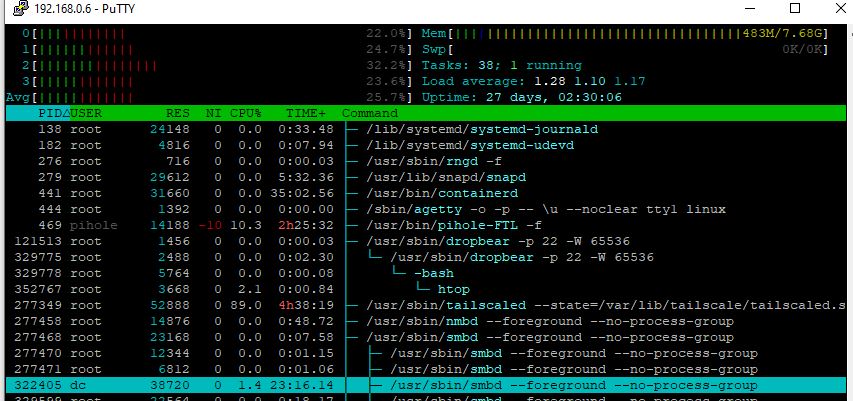
Its only using about 20% processor but its very slowly reading from the NAS for some reason - its connected to the Pi4B’s USB3 port, its a QNAP TR004 in RAID10 mode running a hardware RAID.
Transferring files to it locally, 113MB/s and it maxes out a gigabit LAN connection,
I’ve got a 100/20 internet connection, and the contractor has a 100/40 connection so its not like we’re using overly slow connections to do these operations either.
Any ideas?
Thanks
---
### Author:  [@Joulinar](https://dietpi.com/forum/u/Joulinar)
#### Post date: [11 March 2024 12:06 UTC](https://dietpi.com/forum/t/own-cloud-solution-nextcloud-vs-filecloud-vs-others/19396/18 "2024-03-11T12:06:39Z")
You could try another VPN solution like Wiregard. In the end, however, the limiting factor is your upload speed. It doesn’t matter how much download bandwidth you or the other side has.
---
### Author:  [@Nick\_Scali](https://dietpi.com/forum/u/Nick_Scali)
#### Post date: [11 March 2024 12:29 UTC](https://dietpi.com/forum/t/own-cloud-solution-nextcloud-vs-filecloud-vs-others/19396/19 "2024-03-11T12:29:27Z")
Wouldn’t they be uploading to me and me downloading?
Seems to be transferring at 1.5MB/s which is 12mbps - they’ve got 40mbps up and I’ve got 100mbps down, seems to be working at 50% of their speed
---
### Author:  [@Joulinar](https://dietpi.com/forum/u/Joulinar)
#### Post date: [11 March 2024 12:59 UTC](https://dietpi.com/forum/t/own-cloud-solution-nextcloud-vs-filecloud-vs-others/19396/20 "2024-03-11T12:59:43Z")
you need to calculate VPN overhead, as well communication might go into both directions. There still your upload could be limiting the connection.
[Next page](https://dietpi.com/forum/t/own-cloud-solution-nextcloud-vs-filecloud-vs-others/19396.md?page=2)