# Orange Pi 5B – NVMe stopped working after updating to kernel 6.18.45-current-rockchip64
**URL:** https://dietpi.com/forum/t/orange-pi-5b-nvme-stopped-working-after-updating-to-kernel-6-18-45-current-rockchip64/25484
**Category:** Troubleshooting
**Created:** [12 September 2026 01:20 UTC](https://dietpi.com/forum/t/orange-pi-5b-nvme-stopped-working-after-updating-to-kernel-6-18-45-current-rockchip64/25484 "2026-09-12T01:20:47Z")
**Posts on this page:** 13
**Page:** 1
### Author:  [@DFlexy](https://dietpi.com/forum/u/DFlexy)
#### Post date: [12 September 2026 01:20 UTC](https://dietpi.com/forum/t/orange-pi-5b-nvme-stopped-working-after-updating-to-kernel-6-18-45-current-rockchip64/25484/1 "2026-09-12T01:20:47Z")
**Orange Pi 5B – DietPi – NVMe regression after kernel update**
**Technical report / Relatório técnico**
Português + English
> **🇧🇷Portuguese Version**
>
> **🇧🇷 PORTUGUÊS**
>
> **Título**
>
> Orange Pi 5B – NVMe deixou de funcionar após atualização para o kernel 6.18.45-current-rockchip64
>
> **Resumo**
>
> Estou usando DietPi em um Orange Pi 5B, com o sistema operacional em /dev/mmcblk1p1 e um SSD NVMe utilizado para armazenamento em /media/SSD.
>
> Após uma atualização do kernel, o NVMe deixou de funcionar corretamente. O dispositivo continuava sendo detectado pelo hardware, porém a partição não podia ser acessada/montada normalmente.
>
> O problema foi resolvido fazendo downgrade do kernel:
> • Kernel com problema: 6.18.45-current-rockchip64
> • Pacote: linux-image-current-rockchip64 26.08.0-trunk-dietpi3
> • Kernel funcional: 6.18.37-current-rockchip64
> • Pacote: linux-image-current-rockchip64 26.08.0-trunk-dietpi2
>
> Após voltar para o dietpi2, o NVMe voltou a ser reconhecido e montado normalmente.
>
> **Hardware e configuração**
>
> • Orange Pi 5B
> • DietPi
> • Sistema em /dev/mmcblk1p1
> • SSD NVMe de aproximadamente 500 GB
> • Filesystem do NVMe: ext4
> • Mount point: /media/SSD
>
> **Sintoma**
>
> Antes da correção, o comando:
>
> df -h /media/SSD
>
> retornava:
>
> Filesystem Size Used Avail Use% Mounted on
> /dev/mmcblk1p1 58G 56G 0 100% /
>
> Isso revelou que /media/SSD não estava realmente montado no NVMe. O diretório estava dentro do filesystem raiz, fazendo com que os dados fossem gravados em /dev/mmcblk1p1 e o armazenamento principal chegasse a 100%.
>
> **DietPi Drive Manager**
>
> /dev/nvme0n1p1 : No filesystem / format required | Capacity: 474G
> /dev/mmcblk1p1 : / | ext4 | Capacity: 57.9G | Used: 55.7G (96%)
>
> O NVMe era detectado como dispositivo de aproximadamente 474 GB, mas sua partição não estava sendo utilizada/montada.
>
> **Teste do filesystem**
>
> Com o kernel novo, executei:
>
> fsck -n -f /dev/nvme0n1p1
>
> Resultado:
>
> fsck.ext2: Input/output error while trying to open /dev/nvme0n1p1
>
> Como o NVMe funcionava anteriormente e o problema começou depois da atualização do kernel, evitei formatar ou reparar o filesystem antes de investigar o kernel.
>
> **Kernel que apresentava o problema**
>
> O sistema estava usando:
>
> linux-image-current-rockchip64 26.08.0-trunk-dietpi3
>
> uname -r:
>
> 6.18.45-current-rockchip64
>
> **Downgrade**
>
> A versão anterior disponível era 26.08.0-trunk-dietpi2.
>
> Comando utilizado:
>
> apt download linux-image-current-rockchip64=26.08.0-trunk-dietpi2
>
> Depois:
>
> dpkg -i linux-image-current-rockchip64\_26.08.0-trunk-dietpi2\_arm64.deb
>
> O pacote fez downgrade de 26.08.0-trunk-dietpi3 para 26.08.0-trunk-dietpi2 e instalou o kernel 6.18.37-current-rockchip64.
>
> **Resultado após reiniciar**
>
> Após o reboot:
>
> uname -r
>
> 6.18.37-current-rockchip64
>
> E:
>
> lsblk -o NAME,SIZE,FSTYPE,MOUNTPOINTS
>
> NAME SIZE FSTYPE MOUNTPOINTS
> mmcblk1 58.9G
> └─mmcblk1p1 58.9G ext4 /
> nvme0n1 476.9G
> └─nvme0n1p1 474G ext4 /media/SSD
>
> O NVMe voltou a funcionar normalmente e foi montado em /media/SSD.
>
> **Conclusão**
>
> O downgrade permitiu isolar o problema. O mesmo hardware e SSD que apresentavam o problema com 6.18.45-current-rockchip64 voltaram a funcionar imediatamente com 6.18.37-current-rockchip64.
>
> Isso fornece uma forte evidência de uma regressão no kernel 6.18.45-current-rockchip64 / pacote dietpi3 relacionada ao funcionamento do NVMe no Orange Pi 5B.
>
> Não foi necessário formatar o SSD nem reparar o filesystem.
>
> **Bloqueio temporário do kernel**
>
> Para evitar que uma atualização automática reinstale o kernel problemático, apliquei:
>
> apt-mark hold linux-image-current-rockchip64
>
> Confirmação:
>
> apt-mark showhold
>
> linux-image-current-rockchip64
>
> Também testei:
>
> apt upgrade --dry-run
>
> Resultado:
>
> Not upgrading:
> linux-image-current-rockchip64
>
> Summary:
> Upgrading: 0, Installing: 0, Removing: 0, Not Upgrading: 1
>
> Por enquanto, o sistema permanece no kernel 6.18.37-current-rockchip64.
>
> **Pergunta para a comunidade**
>
> Alguém utilizando Orange Pi 5B + DietPi + NVMe conseguiu reproduzir esse problema com 6.18.45-current-rockchip64?
>
> Existe algum bug ou regressão conhecida nessa versão do kernel relacionada ao driver/controlador NVMe do Orange Pi 5B?
>
> Por enquanto, manterei o kernel 6.18.37-current-rockchip64 até existir uma versão corrigida.
**🇺🇸 ENGLISH**
**Title**
Orange Pi 5B – NVMe stopped working after updating to kernel 6.18.45-current-rockchip64
**Summary**
I am running DietPi on an Orange Pi 5B, with the operating system on /dev/mmcblk1p1 and an NVMe SSD used for storage at /media/SSD.
After a kernel update, the NVMe stopped working correctly. The device was still detected by the hardware, but its partition could no longer be accessed/mounted normally.
The issue was resolved by downgrading the kernel:
• Problematic kernel: `6.18.45-current-rockchip64`
• Package: `linux-image-current-rockchip64 26.08.0-trunk-dietpi3`
• Working kernel: `6.18.37-current-rockchip64`
• Package: `linux-image-current-rockchip64 26.08.0-trunk-dietpi2`
After reverting to dietpi2, the NVMe was detected and mounted normally again.
**Hardware and configuration**
• Orange Pi 5B
• DietPi
• OS on /dev/mmcblk1p1
• Approximately 500 GB NVMe SSD
• NVMe filesystem: ext4
• Mount point: /media/SSD
**Symptom**
Before the fix, the following command:
`df -h /media/SSD`
returned:
```auto
Filesystem Size Used Avail Use% Mounted on
/dev/mmcblk1p1 58G 56G 0 100% /
```
This showed that /media/SSD was not actually mounted on the NVMe. It was simply a directory on the root filesystem. As a result, data was being written to /dev/mmcblk1p1 and the main storage reached 100% usage.
**DietPi Drive Manager**
```auto
/dev/nvme0n1p1 : No filesystem / format required | Capacity: 474G
/dev/mmcblk1p1 : / | ext4 | Capacity: 57.9G | Used: 55.7G (96%)
```
The NVMe device was detected as approximately 474 GB, but its partition was not being used/mounted.
**Filesystem test**
With the newer kernel, I ran:
`fsck -n -f /dev/nvme0n1p1`
Result:
`fsck.ext2: Input/output error while trying to open /dev/nvme0n1p1`
Since the NVMe had worked previously and the problem started after the kernel update, I avoided formatting or repairing the filesystem before investigating the kernel.
**Problematic kernel**
The system was running:
`linux-image-current-rockchip64 26.08.0-trunk-dietpi3`
uname -r:
`6.18.45-current-rockchip64`
**Downgrade**
The previous version available was 26.08.0-trunk-dietpi2.
I downloaded it with:
`apt download linux-image-current-rockchip64=26.08.0-trunk-dietpi2`
Then installed it with:
`dpkg -i linux-image-current-rockchip64_26.08.0-trunk-dietpi2_arm64.deb`
The package downgraded 26.08.0-trunk-dietpi3 to 26.08.0-trunk-dietpi2 and installed kernel 6.18.37-current-rockchip64.
**Result after reboot**
After rebooting:
uname -r
`6.18.37-current-rockchip64`
And:
```auto
lsblk -o NAME,SIZE,FSTYPE,MOUNTPOINTS
NAME SIZE FSTYPE MOUNTPOINTS
mmcblk1 58.9G
└─mmcblk1p1 58.9G ext4 /
nvme0n1 476.9G
└─nvme0n1p1 474G ext4 /media/SSD
```
The NVMe started working normally again and was mounted at /media/SSD.
**Conclusion**
The downgrade isolated the issue. The same hardware and SSD that exhibited the problem with 6.18.45-current-rockchip64 immediately worked again with 6.18.37-current-rockchip64.
This provides strong evidence of a regression in kernel 6.18.45-current-rockchip64 / the dietpi3 package related to NVMe operation on the Orange Pi 5B.
There was no need to format the SSD or repair the filesystem.
**Temporary kernel hold**
To prevent an automatic update from reinstalling the problematic kernel, I placed the kernel package on hold:
`apt-mark hold linux-image-current-rockchip64`
Confirmation:
```auto
apt-mark showhold
linux-image-current-rockchip64
```
I also tested:
`apt upgrade --dry-run`
Result:
```auto
Not upgrading:
linux-image-current-rockchip64
Summary:
Upgrading: 0, Installing: 0, Removing: 0, Not Upgrading: 1
```
For now, the system remains on kernel 6.18.37-current-rockchip64.
**Question for the community**
Has anyone running Orange Pi 5B + DietPi + NVMe been able to reproduce this issue with 6.18.45-current-rockchip64?
Is there a known bug or regression in this kernel version related to the NVMe driver/controller on the Orange Pi 5B?
For now, I will keep kernel 6.18.37-current-rockchip64 installed until a fixed version is available.
---
### Author:  [@MichaIng](https://dietpi.com/forum/u/MichaIng)
#### Post date: [12 September 2026 16:43 UTC](https://dietpi.com/forum/t/orange-pi-5b-nvme-stopped-working-after-updating-to-kernel-6-18-45-current-rockchip64/25484/2 "2026-09-12T16:43:24Z")
Since the Orange Pi 5B has no M.2 slot, how did you attach the NVMe SSD?
---
### Author:  [@DFlexy](https://dietpi.com/forum/u/DFlexy)
#### Post date: [12 September 2026 17:59 UTC](https://dietpi.com/forum/t/orange-pi-5b-nvme-stopped-working-after-updating-to-kernel-6-18-45-current-rockchip64/25484/3 "2026-09-12T17:59:19Z")
The Orange Pi 5B actually has an M.2 slot on the board. I installed the NVMe SSD directly into the onboard M.2 slot, so no external adapter is needed.
---
### Author:  [@MichaIng](https://dietpi.com/forum/u/MichaIng)
#### Post date: [12 September 2026 18:21 UTC](https://dietpi.com/forum/t/orange-pi-5b-nvme-stopped-working-after-updating-to-kernel-6-18-45-current-rockchip64/25484/4 "2026-09-12T18:21:53Z")
Hmm, so [Xunlong’s product page](http://www.orangepi.org/html/hardWare/computerAndMicrocontrollers/details/Orange-Pi-5B.html) is wrong?
For the Orange Pi 5 (non-B), which does have an M.2 slot, the device tree enables the PCIe node explicitly: [https://git.kernel.org/pub/scm/linux/kernel/git/stable/linux.git/tree/arch/arm64/boot/dts/rockchip/rk3588s-orangepi-5.dts?h=linux-6.18.y](https://git.kernel.org/pub/scm/linux/kernel/git/stable/linux.git/tree/arch/arm64/boot/dts/rockchip/rk3588s-orangepi-5.dts?h=linux-6.18.y)
The one for the 5B enables the eMMC node instead, which also matches the product page, but leaves the PCIe node disabled: [https://git.kernel.org/pub/scm/linux/kernel/git/stable/linux.git/tree/arch/arm64/boot/dts/rockchip/rk3588s-orangepi-5b.dts?h=linux-6.18.y](https://git.kernel.org/pub/scm/linux/kernel/git/stable/linux.git/tree/arch/arm64/boot/dts/rockchip/rk3588s-orangepi-5b.dts?h=linux-6.18.y)
Armbian overrides the 5B device tree with one which enables the PCIe node, but for WiFi, which the 5B is supposed to have instead of the M.2 slot: [build/patch/kernel/archive/rockchip64-6.18/dt/rk3588s-orangepi-5b.dts at 7c1bb29eb0e7bd75b0703d86fe654b2680e646da · armbian/build · GitHub](https://github.com/armbian/build/blob/7c1bb29eb0e7bd75b0703d86fe654b2680e646da/patch/kernel/archive/rockchip64-6.18/dt/rk3588s-orangepi-5b.dts)
Are you sure that you do actually own the non-B variant? If you use the 5B device tree, the M.2 slot should have never worked. But possible that the non-B device tree is or was used:
```sh
cat /proc/device-tree/model
```
---
### Author:  [@DFlexy](https://dietpi.com/forum/u/DFlexy)
#### Post date: [13 September 2026 12:25 UTC](https://dietpi.com/forum/t/orange-pi-5b-nvme-stopped-working-after-updating-to-kernel-6-18-45-current-rockchip64/25484/5 "2026-09-13T12:25:34Z")
```sh
DietPi v10.6.2 : Update available
─────────────────────────────────────────────────────
dietpi-update : Run now to update DietPi from v10.6.2 to v10.7.2
root@Pihouse:/home/dietpi# cat /proc/device-tree/model
Xunlong Orange Pi 5B
root@Pihouse:/home/dietpi#
```
---
### Author:  [@DFlexy](https://dietpi.com/forum/u/DFlexy)
#### Post date: [13 September 2026 12:38 UTC](https://dietpi.com/forum/t/orange-pi-5b-nvme-stopped-working-after-updating-to-kernel-6-18-45-current-rockchip64/25484/6 "2026-09-13T12:38:26Z")
**Orange Pi 5B 16 GB — M.2 NVMe Interface Verification**
I performed a verification directly on my Orange Pi 5B 16 GB to determine how the NVMe SSD is connected.
**Detected SSD**
The command:
`lsblk -o NAME,SIZE,MODEL,TRAN`
returned:
```sh
NAME SIZE MODEL TRAN
mmcblk1 58.9G mmc
└─mmcblk1p1 58.9G mmc
nvme0n1 476.9G NXM-512 2242 nvme
└─nvme0n1p1 474G nvme
```
The system correctly detects the SSD as:
- Model: NXM-512 2242
- Detected capacity: 476.9 GB
- Interface: NVMe
**PCIe interface**
The dmesg output confirms that the NVMe drive is connected through PCIe:
`rockchip-dw-pcie a41000000.pcie: PCIe Gen.2 x1 link up`
This means the SSD is operating through:
**PCIe Gen 2 ×1**
The kernel also explicitly identifies the device as a PCIe NVMe endpoint:
```sh
pci 0004:41:00.0: \[1e4b:1202\] type 00 class 0x010802 PCIe Endpoint
nvme nvme0: pci function 0004:41:00.0
```
The kernel reports:
```sh
4.000 Gb/s available PCIe bandwidth,
limited by 5.0 GT/s PCIe x1 link
```
Therefore, the NVMe drive is working correctly, but the connection is limited to PCIe Gen 2 ×1.
**Conclusion**
This test performed directly on the system confirms that **my Orange Pi 5B 16 GB has an M.2 interface capable of connecting an NVMe SSD**.
The SSD is not connected through USB or an external adapter. It is detected by the Linux kernel as a PCIe NVMe device:
**Orange Pi 5B → PCIe Gen 2 ×1 → M.2 NVMe → NXM-512 2242**
This is also relevant because some Orange Pi documentation and product pages contain confusing or inconsistent information regarding the M.2 interface on the Orange Pi 5B.
On this specific board, the existence and operation of the NVMe interface can be directly verified through the Linux kernel logs.
---
### Author:  [@MichaIng](https://dietpi.com/forum/u/MichaIng)
#### Post date: [13 September 2026 13:13 UTC](https://dietpi.com/forum/t/orange-pi-5b-nvme-stopped-working-after-updating-to-kernel-6-18-45-current-rockchip64/25484/7 "2026-09-13T13:13:53Z")
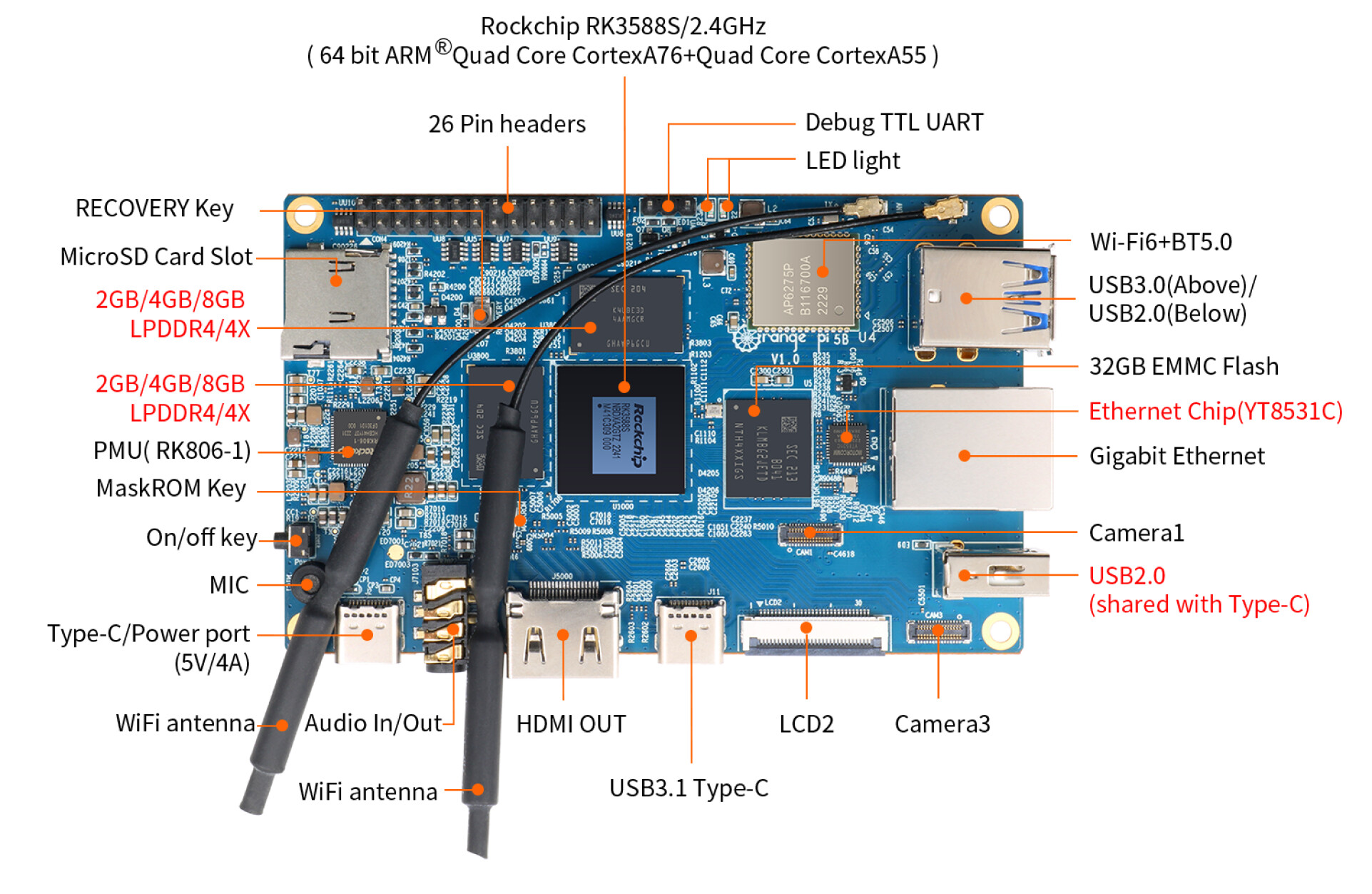
Okay, so this is indeed the one PCIe bus exposed as M.2 slot on the Orange Pi 5 non-B, but used for the onboard WiFi on the 5B. So your board hence does not have any onboard WiFi, right?
Is `/dev/mmcblk1` and SD card, or onboard eMMC?
---
### Author:  [@Jappe](https://dietpi.com/forum/u/Jappe)
#### Post date: [13 September 2026 14:00 UTC](https://dietpi.com/forum/t/orange-pi-5b-nvme-stopped-working-after-updating-to-kernel-6-18-45-current-rockchip64/25484/8 "2026-09-13T14:00:13Z")
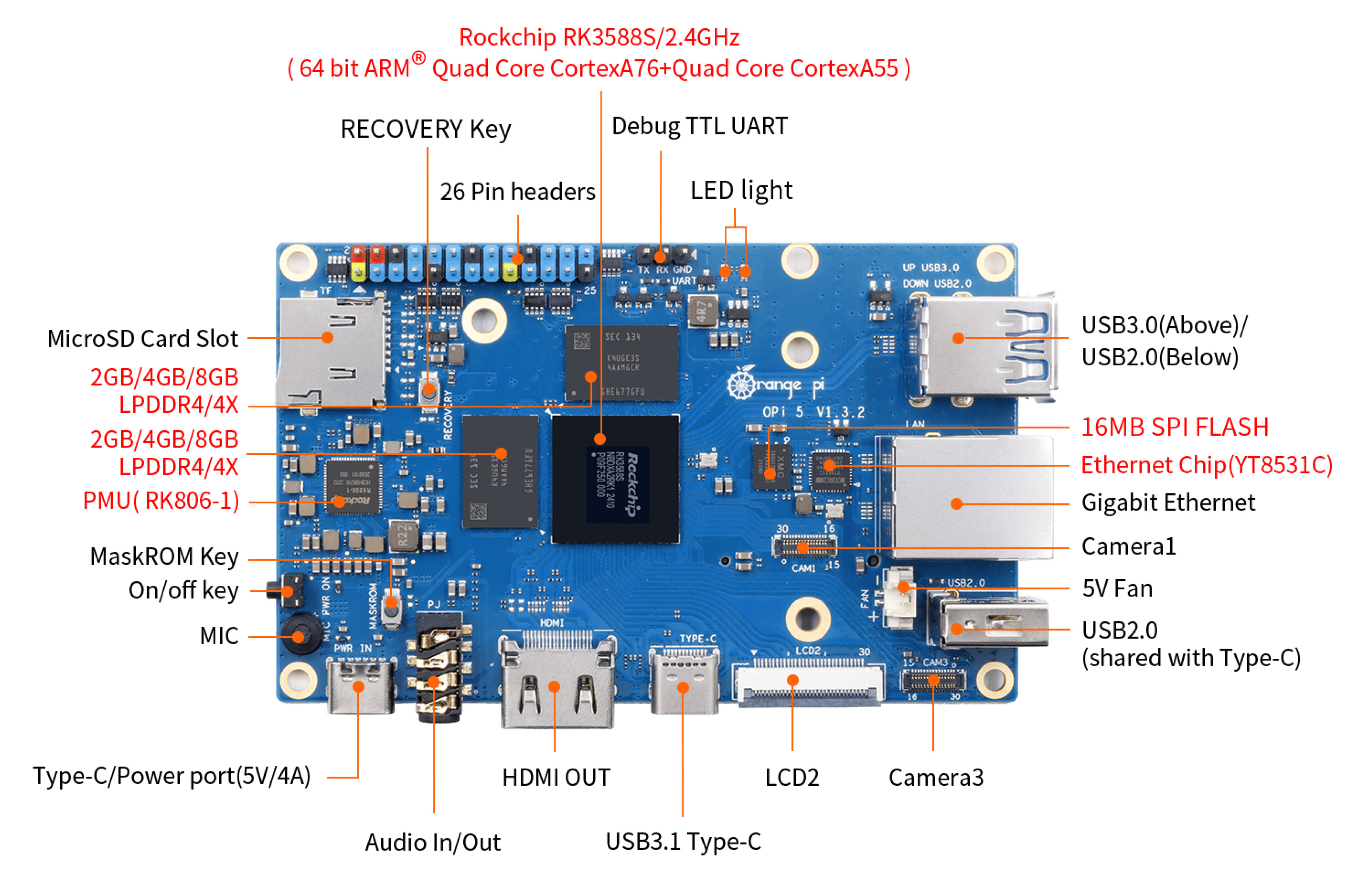
Really interesting, I wonder what is printed on the SBC, it’s right next to the USB port:
---
### Author:  [@DFlexy](https://dietpi.com/forum/u/DFlexy)
#### Post date: [13 September 2026 14:48 UTC](https://dietpi.com/forum/t/orange-pi-5b-nvme-stopped-working-after-updating-to-kernel-6-18-45-current-rockchip64/25484/9 "2026-09-13T14:48:26Z")
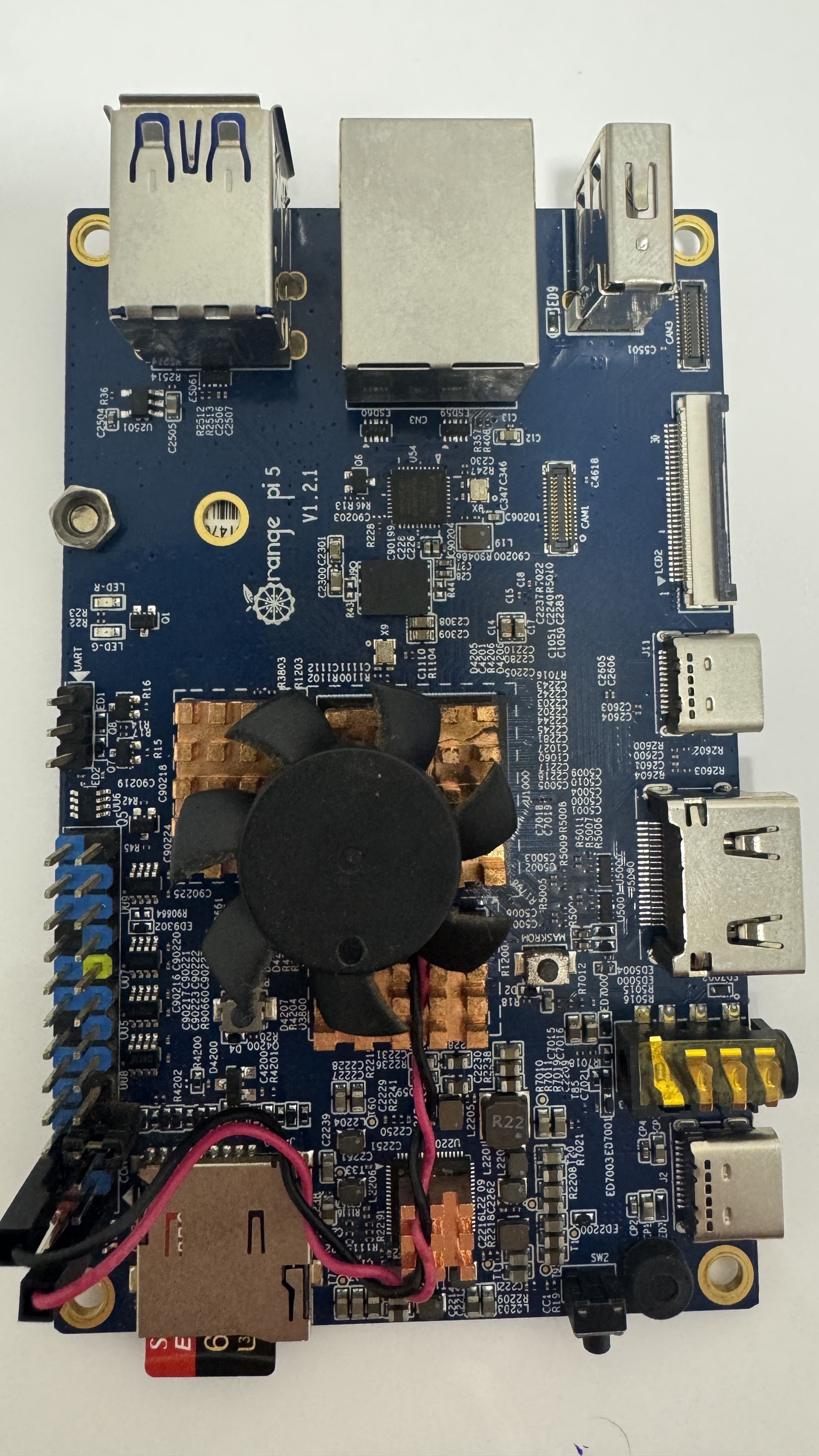
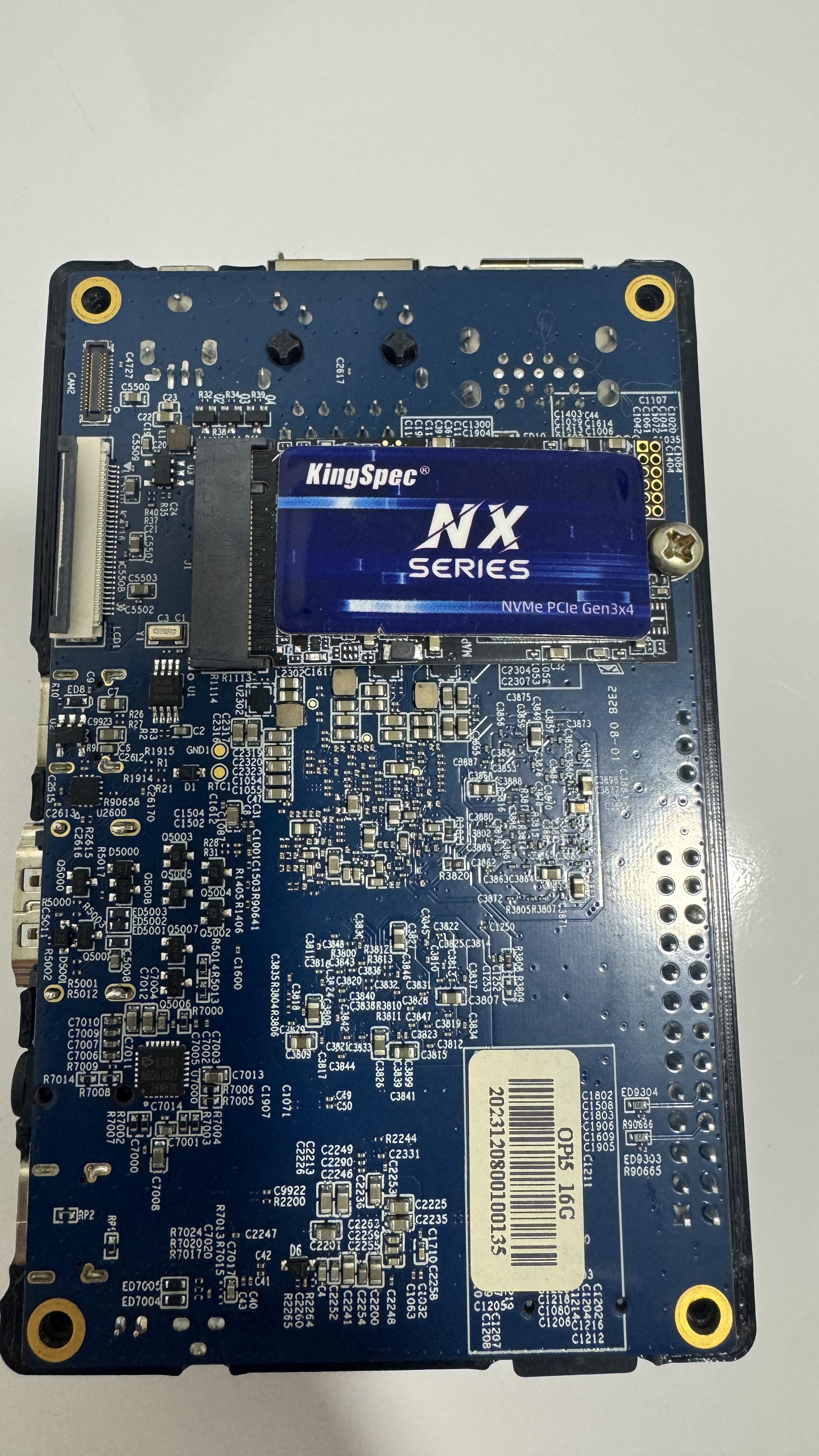
Due to the questions and doubts, I decided to physically inspect the board, and apparently it is actually an Orange Pi 5 16GB. It does not have the Wi-Fi modules.
What is strange, though, is that it was already running the Orange Pi 5B kernel, and I have no idea why.
Everything was working perfectly fine. I only identified the issue because of the change I mentioned above.
Please see the pictures I took with my phone.
---
### Author:  [@MichaIng](https://dietpi.com/forum/u/MichaIng)
#### Post date: [15 September 2026 13:56 UTC](https://dietpi.com/forum/t/orange-pi-5b-nvme-stopped-working-after-updating-to-kernel-6-18-45-current-rockchip64/25484/10 "2026-09-15T13:56:29Z")
This is what I though. The label on the PCB is the last source of truth.
So you only need to use the Orange Pi 5 non-B image, amd PCIe should work fine.
A question remains how it could work with the 5B image below. The commit I linked above to enable the WiFi module is actually a replacement for a prior patch, which added only the PCIe + regulator node to the upstream device tree. The PCIe node is identical, but the regulator node changed a bit.
Before:
```dts
vcc3v3_pcie20: regulator-vcc3v3-pcie20 {
compatible = "regulator-fixed";
enable-active-high;
gpios = <&gpio0 RK_PC5 GPIO_ACTIVE_HIGH>;
regulator-name = "vcc3v3_pcie20";
regulator-boot-on;
regulator-min-microvolt = <1800000>;
regulator-max-microvolt = <1800000>;
startup-delay-us = <50000>;
vin-supply = <&vcc5v0_sys>;
};
```
After:
```dts
vcc3v3_pcie20: regulator-vcc3v3-pcie20 {
compatible = "regulator-fixed";
regulator-name = "vcc3v3_pcie20";
regulator-boot-on;
regulator-always-on;
regulator-min-microvolt = <3300000>;
regulator-max-microvolt = <3300000>;
startup-delay-us = <50000>;
vin-supply = <&vcc_3v3_s3>;
};
```
Those are both weird mixes of the non-B upstream regulator node:
- Switch from gpio activation to always-on. non-B uses GPIO activation as well, it is the same GPIO used by the PCIe node, and WiFi on the 5B worked, so I am sure that was actually correct before. Always-on should however work as well.
- Switch from 1.8V to 3.3V. Now that is interesting, because the regulator name clearly states 3.3V. But not uncommon that M.2 slots are operated at 1.8V, especially when it is WiFi only, not an SSD. So for onboard WiFi, 1.8V is probably correct. Need to check the schematics. I cannot imagine how 3.3V could break SSD usage, rather the other way round.
- The input regulator changed. Both are enabled on both boards, but the 3.3V one is from the PMIC. The non-B dts uses the 5V one, like the 5B did before, so I guess this is what broke the M.2 port for you. And it might actually break onboard WiFi on the 5B as well. So far no report received, though.
I’ll check the schematics. To me it looks like the Armbian commit tried to align things for the Ampek PCIe WiFi module, which can be attachef as M.2 module to the non-B as well. But it is high likely that the internal PCIe is wired differently on the 5B, so that this alignment was wrong. The PR explicitly states that it was not tested on the 5B, and it was merged without anyone confirming functionality on thr 5B.
---
### Author:  [@DFlexy](https://dietpi.com/forum/u/DFlexy)
#### Post date: [16 September 2026 23:37 UTC](https://dietpi.com/forum/t/orange-pi-5b-nvme-stopped-working-after-updating-to-kernel-6-18-45-current-rockchip64/25484/11 "2026-09-16T23:37:04Z")
DietPi Orange Pi 5 – Trixie Boot Issue
I have an Orange Pi 5 16GB.
Initially, there was some confusion about the exact board model. After physically checking the PCB and the system information, I confirmed that the board is an Orange Pi 5, not an Orange Pi 5B.
After identifying the correct board, I did not immediately perform a clean installation. I continued using the existing installation to investigate the previous kernel/NVMe issue.
The existing installation was working with:
Kernel: 6.1.115-vendor-rk35xx
U-Boot: linux-u-boot-orangepi5-vendor
The board is correctly identified by the system as:
Orange Pi 5
rockchip,rk3588s-orangepi-5
rockchip,rk3588
I then decided to perform a clean installation using the official DietPi images.
First, I tried to write the images using Balena Etcher, but the writing process failed with an error.
I then used Raspberry Pi Imager, which successfully wrote the images.
Tests performed:
DietPi Bookworm: boots normally.
DietPi Trixie: does not boot and does not even reach the DietPi logo.
The image tested is:
DietPi\_OrangePi5-ARMv8-Trixie.img.xz
I also tested a different microSD card. Bookworm booted successfully on this card.
I am now testing Trixie on the same microSD card that successfully booted Bookworm, in order to rule out a possible SD card issue.
Current situation
Hardware: Orange Pi 5 16GB
Board: Confirmed as Orange Pi 5
Balena Etcher: Writing failed with an error
Raspberry Pi Imager: Writing completed successfully
Bookworm: Boots normally
Trixie: Does not boot and does not even show the DietPi logo
Clean installation: Performed only after correctly identifying the board model
I would like to know if there is currently any known issue with the DietPi Trixie image for Orange Pi 5, possibly related to the kernel, U-Boot, or Device Tree.
---
### Author:  [@MichaIng](https://dietpi.com/forum/u/MichaIng)
#### Post date: [17 September 2026 22:53 UTC](https://dietpi.com/forum/t/orange-pi-5b-nvme-stopped-working-after-updating-to-kernel-6-18-45-current-rockchip64/25484/12 "2026-09-17T22:53:03Z")
Yeah, BalenaEtcher has become a common source of issues. Not sure what changed, but after they were sold to some other company, things went downhill.
RPi Imager works. If you are on Windows, Rufus is my one and first recommendation, on Linux simply use `dd` with `bs=1M` … our images are small enough with minimal empty space, so that `dd` does not take so much longer compared to image flashing tools.
That the Trixie image does not boot is very surprising. Bookworm, Trixie, and Forky images all use the same bootloader, same kernel, same firmware. I wouldn’t know any way how one could boot and the other not, aside of data corruption.
If you can grasp some output from HDMI, or best from serial console via UART adapter, that would certainly help diagnose this.
I will likely not be able to test it on my own Orange Pi 5 until Monday.
---
### Author:  [@DFlexy](https://dietpi.com/forum/u/DFlexy)
#### Post date: [18 September 2026 00:18 UTC](https://dietpi.com/forum/t/orange-pi-5b-nvme-stopped-working-after-updating-to-kernel-6-18-45-current-rockchip64/25484/13 "2026-09-18T00:18:04Z")
I was testing with a monitor connected to the HDMI output.
Another thing I did was verify the image hash to make sure it wasn’t corrupted. I downloaded it about three times to check, but everything was fine. Since I had a Bookworm image, I tried using that one instead, and it worked without any issues.