# Odroid HC4 booting from SSD
**URL:** https://dietpi.com/forum/t/odroid-hc4-booting-from-ssd/6322
**Category:** Troubleshooting
**Created:** [12 February 2022 20:51 UTC](https://dietpi.com/forum/t/odroid-hc4-booting-from-ssd/6322 "2022-02-12T20:51:36Z")
**Posts on this page:** 20
**Page:** 1
### Author:  [@amibumpin](https://dietpi.com/forum/u/amibumpin)
#### Post date: [12 February 2022 20:51 UTC](https://dietpi.com/forum/t/odroid-hc4-booting-from-ssd/6322/1 "2022-02-12T20:51:36Z")
Hi,
I bought a new SSD to replace the actual microSD I am using on my Odroid, and I thought I could boot from SSD but I can´t.
I read many links like:
RaspberryPi4 RPi4 Upgrading from existing SD card setup to boot from SSD
[https://dietpi.com/forum/t/raspberrypi4-rpi4-upgrading-from-existing-sd-card-setup-to-boot-from-ssd/4555/1](https://dietpi.com/forum/t/raspberrypi4-rpi4-upgrading-from-existing-sd-card-setup-to-boot-from-ssd/4555/1)
How to make a duplicate of SD card with only Windows available ?
[https://dietpi.com/forum/t/how-to-make-a-duplicate-of-sd-card-with-only-windows-available/3584/1](https://dietpi.com/forum/t/how-to-make-a-duplicate-of-sd-card-with-only-windows-available/3584/1)
No longer booting from SSDTopic is solved
[https://dietpi.com/forum/t/no-longer-booting-from-ssd/5920/1](https://dietpi.com/forum/t/no-longer-booting-from-ssd/5920/1)
I made all the steps, and I always get a black screen when booting
I made a clone with Win32 Disk Imager, I flash it into the SSD, I boot, I select the partition to boot from SSD and then nothing.
I replicate the procedure with another microSD instead the SSD and it worked.
I can’t replace the microSD with an SSD on the Odroid??
The only way to use the ssd is to move RootFS with Drive Manager?
Thank you as always.
---
### Author:  [@Joulinar](https://dietpi.com/forum/u/Joulinar)
#### Post date: [12 February 2022 21:05 UTC](https://dietpi.com/forum/t/odroid-hc4-booting-from-ssd/6322/2 "2022-02-12T21:05:57Z")
The topics you linked are related to Raspberry Pi. But you are running a Odroid HC4, which I guess iw working differently in terms of USB mass storage boot. You would need to have a look on how to boot from USB in general on a Odroid HC4. I found a topic on Armbian forum that might be similar to you
[https://forum.armbian.com/topic/18241-boot-from-ssd-using-hardkernels-odroid-hc4/](https://forum.armbian.com/topic/18241-boot-from-ssd-using-hardkernels-odroid-hc4/)
---
### Author:  [@amibumpin](https://dietpi.com/forum/u/amibumpin)
#### Post date: [13 February 2022 14:21 UTC](https://dietpi.com/forum/t/odroid-hc4-booting-from-ssd/6322/3 "2022-02-13T14:21:25Z")
> [@](#):
>
> The topics you linked are related to Raspberry Pi. But you are running a Odroid HC4, which I guess iw working differently in terms of USB mass storage boot. You would need to have a look on how to boot from USB in general on a Odroid HC4. I found a topic on Armbian forum that might be similar to you
>
> [Boot from SSD using Hardkernel's Odroid HC4 - Odroid N2/N2+/HC4 - Armbian Community Forums](https://forum.armbian.com/topic/18241-boot-from-ssd-using-hardkernels-odroid-hc4/)
It seems a bit complecated…
I have moved RootFs through drive-manager, and it worked perfectly 👌
---
### Author:  [@amibumpin](https://dietpi.com/forum/u/amibumpin)
#### Post date: [23 September 2022 17:03 UTC](https://dietpi.com/forum/t/odroid-hc4-booting-from-ssd/6322/4 "2022-09-23T17:03:42Z")
Sorry, but I am getting crazy…, months ago I did succesfully the transfer o RootFs to an SSD. As I said on other post, I recently install the latest image for Odroid HC4 and after setting everything again, I was going to do the SSD thing, and I can’t see the option to transfer RootFs, I only see the user date option and swap…
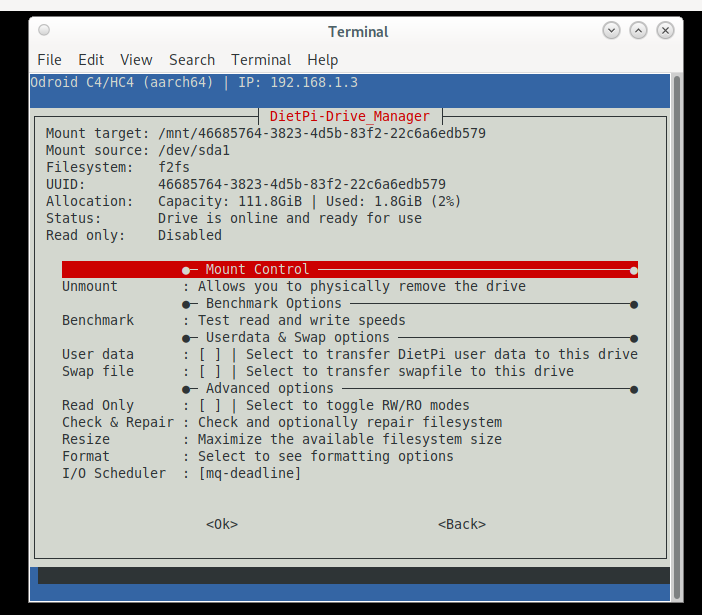
Thank you…
---
### Author:  [@Joulinar](https://dietpi.com/forum/u/Joulinar)
#### Post date: [23 September 2022 17:16 UTC](https://dietpi.com/forum/t/odroid-hc4-booting-from-ssd/6322/5 "2022-09-23T17:16:41Z")
The current Armbian based image has a single ext4 partition only. There is no dedicated boot and root file system anymore. Therefore you don’t see a rootFS partition.
---
### Author:  [@amibumpin](https://dietpi.com/forum/u/amibumpin)
#### Post date: [23 September 2022 17:20 UTC](https://dietpi.com/forum/t/odroid-hc4-booting-from-ssd/6322/7 "2022-09-23T17:20:24Z")
So there is no solution to use the ssd to not wear down the microSD??
---
### Author:  [@Joulinar](https://dietpi.com/forum/u/Joulinar)
#### Post date: [23 September 2022 19:00 UTC](https://dietpi.com/forum/t/odroid-hc4-booting-from-ssd/6322/8 "2022-09-23T19:00:46Z")
you could move user data directory to the HDD. This would reduce r/w operation for apps storing their data there.
---
### Author:  [@amibumpin](https://dietpi.com/forum/u/amibumpin)
#### Post date: [24 September 2022 16:11 UTC](https://dietpi.com/forum/t/odroid-hc4-booting-from-ssd/6322/9 "2022-09-24T16:11:28Z")
Yep if there isn’t more options… Althought most apps does not save data on dietpi user data
Maybe you guys can have a look at armbian script to se how they do to have only bootloader on SD:
> **[Boot from SSD using Hardkernel's Odroid HC4](https://forum.armbian.com/topic/18241-boot-from-ssd-using-hardkernels-odroid-hc4/#comment-125248)**
>
> My current HC4-setup consists of 1 SSD and 1 HDD. The SSD contains the most recent Armbian-image (Buster-based) (https://redirect.armbian.com/odroidhc4/Buster\_current). Long story short: it won't boot from SSD, and Google tells me it is because...
Thank you team as always!
EDIT: @Joulinar @MichaIng
I’m thinking this, and maybe I’m saying nonsense things… Is an option to install armbian, and do the script thing to move boot to sd, and then clone image the DietPi SD to an SSD and try to boot?
---
### Author:  [@MichaIng](https://dietpi.com/forum/u/MichaIng)
#### Post date: [30 September 2022 17:51 UTC](https://dietpi.com/forum/t/odroid-hc4-booting-from-ssd/6322/10 "2022-09-30T17:51:49Z")
I’m actually working on a patch to our /boot/boot.cmd to set fdtfile explicitly, which is missing when using the SPI petitboot bootloader. With this, it should be possible to boot from USB, at least in Odroid N2 it is.
---
### Author:  [@amibumpin](https://dietpi.com/forum/u/amibumpin)
#### Post date: [30 September 2022 18:25 UTC](https://dietpi.com/forum/t/odroid-hc4-booting-from-ssd/6322/11 "2022-09-30T18:25:26Z")
Great great news, thank you so much for your support!
---
### Author:  [@olehb007](https://dietpi.com/forum/u/olehb007)
#### Post date: [19 January 2023 08:58 UTC](https://dietpi.com/forum/t/odroid-hc4-booting-from-ssd/6322/12 "2023-01-19T08:58:01Z")
Hi Michal, any lack with USB? I’ve just bought HC4 and would like to help with feature development/testing.
---
### Author:  [@MichaIng](https://dietpi.com/forum/u/MichaIng)
#### Post date: [19 January 2023 17:34 UTC](https://dietpi.com/forum/t/odroid-hc4-booting-from-ssd/6322/13 "2023-01-19T17:34:04Z")
Check my post on Odroid forum about what to test: [ODROID HC4 install issues DietPi and Debian 11 - ODROID](https://forum.odroid.com/viewtopic.php?p=364237#p364237)
I edited it to cover C4/HC4. I can test on Odroid N2+.
---
### Author:  [@MichaIng](https://dietpi.com/forum/u/MichaIng)
#### Post date: [6 February 2023 14:59 UTC](https://dietpi.com/forum/t/odroid-hc4-booting-from-ssd/6322/14 "2023-02-06T14:59:40Z")
Btw, our recent Odroid N2 and C4 images support petitboot and that way also USB boot OOTB, without the need to reflash the SPI first 🙂.
---
### Author:  [@MichaIng](https://dietpi.com/forum/u/MichaIng)
#### Post date: [10 February 2023 21:13 UTC](https://dietpi.com/forum/t/odroid-hc4-booting-from-ssd/6322/15 "2023-02-10T21:13:55Z")
While it seems to work very well on Odroid N2, on Odroid HC4 we have a case where it does not work. If someone has tested it on an Odroid HC4, feedback would be great.
---
### Author:  [@amibumpin](https://dietpi.com/forum/u/amibumpin)
#### Post date: [13 February 2023 21:54 UTC](https://dietpi.com/forum/t/odroid-hc4-booting-from-ssd/6322/16 "2023-02-13T21:54:32Z")
Hi @MichaIng I ask for some help to tobetter on odroid forum, [https://forum.odroid.com/viewtopic.php?p=365753#p365753](https://forum.odroid.com/viewtopic.php?p=365753#p365753) maybe he could help. If you see you could add some of your knowledge if would be awesome.
Let’s get this 💪!
---
### Author:  [@amibumpin](https://dietpi.com/forum/u/amibumpin)
#### Post date: [14 February 2023 08:15 UTC](https://dietpi.com/forum/t/odroid-hc4-booting-from-ssd/6322/17 "2023-02-14T08:15:18Z")
Well yesterday looking for info I get to this armbian threads…
> **[HC4 doesn't see second SSD](https://forum.armbian.com/topic/24577-hc4-doesnt-see-second-ssd/)**
>
> Some time ago a I was desperate to have ZFS on an Odroid HC4 and after some trying found Armbian 21.05.8 Buster with Linux 5.10.57-meson64 on which I could compile ZFS module. Then I moved everything from the SD card to filesystems in a ZFS pool. It...
> **[HC4 doesn't see second SSD, again, no politics please](https://forum.armbian.com/topic/25139-hc4-doesnt-see-second-ssd-again-no-politics-please/)**
>
> As the original thread, which was closed by moderator for obvious reason, did attract attention of few peoples having the same problem as me, it would be a waste not to follow up on this, I think. Let me sum up: I have two HC4, one bought in 8.2021...
> **[Second (New) SSD Gone After Reboot](https://forum.armbian.com/topic/26289-second-new-ssd-gone-after-reboot/)**
>
> Hey, I have a very similar problem here to this and this thread. I rebooted as the HC4 was already bugging me for a while to reboot on the motd (unattended-upgrades). Since the reboot, /dev/sdb is gone. It's a new Samsung SSD 870 EVO as well as in...
This one has the same error the UUID doesn’t exists:
> **[odroid-hc4 is stuck in initramfs after upgrading to armbian bullseye 22.11](https://forum.armbian.com/topic/24828-odroid-hc4-is-stuck-in-initramfs-after-upgrading-to-armbian-bullseye-2211/)**
>
> Hi, i have armbian bullseye (headless) installed on my odroid-hc4. petitboot is disabled. The boot-partition lies on a sd-card while the root-partion is on a ssd. this configuration worked fine. After upgrading to armbian bullseye 22.11 the boot...
Apparently the problem is the SSD not being detected, one report that on previous kernel versions to 5.19 the ssd where being recognise, and maybe is that the problem I’m having.
I am going to test flashing the cloned image into a usb flash drive, and I going to ask you @MichaIng if I can downgrade kernel. I don’t know how i got the kernel version I have (6.1.7)… and seems 5.10.139 is the latest that those SSD were working.
---
### Author:  [@MichaIng](https://dietpi.com/forum/u/MichaIng)
#### Post date: [14 February 2023 19:47 UTC](https://dietpi.com/forum/t/odroid-hc4-booting-from-ssd/6322/18 "2023-02-14T19:47:52Z")
These issues are not related. Those are all about general USB drive detection, while in your case the USB drive is detected well when you boot from SD card, isn’t it? Armbian never supported petitboot and hence direct USB boot, in some of the linked cases it is about booting from SD card but then mounting the rootfs from USB, which is a different thing.
However, you should be able to downgrade the kernel, if you want to test. Check for available versions via:
```plaintext
apt-cache show -a linux-image-current-meson64 | grep ^Version
```
E.g. v5.10.147: [linux-5.10.147-meson64](https://apt.armbian.com/pool/main/l/linux-5.10.147-meson64/)
---
### Author:  [@amibumpin](https://dietpi.com/forum/u/amibumpin)
#### Post date: [14 February 2023 19:59 UTC](https://dietpi.com/forum/t/odroid-hc4-booting-from-ssd/6322/19 "2023-02-14T19:59:22Z")
I thought it were related…
Updates: I flashed new image 8.14 from website on a usb flash drive and on a 2.5’ usb hard drive, with the usb flash drive, petitboot does not detect any booteable system. On the 2.5 HD it’s detected but then same error as with the SSD… I don’t understand…
```auto
apt-cache show -a linux-image-current-meson64 | grep ^Version
```
This is the output
```auto
Version: 22.11.4
Version: 22.11.2
Version: 22.11.1
Version: 22.08.4
Version: 22.08.2
Version: 22.05.3
Version: 22.05.1
Version: 22.02.1
Version: 21.08.6
Version: 21.08.4
Version: 21.08.1
Version: 21.08
Version: 21.05.8
Version: 21.05.4
Version: 21.05.1
Version: 21.02.4
Version: 21.02.3
Version: 21.02.2
```
How do I install an specific version?
---
### Author:  [@MichaIng](https://dietpi.com/forum/u/MichaIng)
#### Post date: [14 February 2023 20:21 UTC](https://dietpi.com/forum/t/odroid-hc4-booting-from-ssd/6322/21 "2023-02-14T20:21:35Z")
Ah, package version string and kernel version string differ. Then you need to scroll the whole output:
```plaintext
apt show -a linux-image-current-meson64
```
---
### Author:  [@amibumpin](https://dietpi.com/forum/u/amibumpin)
#### Post date: [14 February 2023 20:27 UTC](https://dietpi.com/forum/t/odroid-hc4-booting-from-ssd/6322/22 "2023-02-14T20:27:26Z")
@MichaIng How do I install for example version `5.10.147-meson64`
```auto
root@DietPi:~# apt show -a linux-image-current-meson64
Package: linux-image-current-meson64
Version: 22.11.4
Status: install ok installed
Priority: optional
Section: kernel
Source: linux-6.1.7-meson64
Maintainer: Igor Pecovnik
Installed-Size: 90.1 MB
Provides: armbian-current, linux-image, linux-image-armbian
Homepage: https://www.kernel.org/
Download-Size: unknown
APT-Manual-Installed: yes
APT-Sources: /var/lib/dpkg/status
Description: Linux kernel, armbian version 6.1.7-meson64 current
This package contains the Linux kernel, modules and corresponding other
files, version: 6.1.7-meson64.
Package: linux-image-current-meson64
Version: 22.11.2
Priority: optional
Section: kernel
Source: linux-6.0.13-meson64
Maintainer: Igor Pecovnik
Installed-Size: 91.0 MB
Provides: armbian-current, linux-image, linux-image-armbian
Homepage: https://www.kernel.org/
Download-Size: 56.4 MB
APT-Sources: https://apt.armbian.com bullseye/main arm64 Packages
Description: Linux kernel, armbian version 6.0.13-meson64 current
This package contains the Linux kernel, modules and corresponding other
files, version: 6.0.13-meson64.
Package: linux-image-current-meson64
Version: 22.11.1
Priority: optional
Section: kernel
Source: linux-5.19.17-meson64
Maintainer: Igor Pecovnik
Installed-Size: 89.6 MB
Provides: armbian-current, linux-image, linux-image-armbian
Homepage: https://www.kernel.org/
Download-Size: 55.2 MB
APT-Sources: https://apt.armbian.com bullseye/main arm64 Packages
Description: Linux kernel, armbian version 5.19.17-meson64 current
This package contains the Linux kernel, modules and corresponding other
files, version: 5.19.17-meson64.
Package: linux-image-current-meson64
Version: 22.08.4
Priority: optional
Section: kernel
Source: linux-5.10.147-meson64
Maintainer: Igor Pecovnik
Installed-Size: 226 MB
Provides: armbian-current, linux-image, linux-image-armbian
Homepage: https://www.kernel.org/
Download-Size: 43.9 MB
APT-Sources: https://apt.armbian.com bullseye/main arm64 Packages
Description: Linux kernel, armbian version 5.10.147-meson64 current
This package contains the Linux kernel, modules and corresponding other
files, version: 5.10.147-meson64.
Package: linux-image-current-meson64
Version: 22.08.2
Priority: optional
Section: kernel
Source: linux-5.10.144-meson64
Maintainer: Igor Pecovnik
Installed-Size: 226 MB
Provides: armbian-current, linux-image, linux-image-armbian
Homepage: https://www.kernel.org/
Download-Size: 43.9 MB
APT-Sources: https://apt.armbian.com bullseye/main arm64 Packages
Description: Linux kernel, armbian version 5.10.144-meson64 current
This package contains the Linux kernel, modules and corresponding other
files, version: 5.10.144-meson64.
Package: linux-image-current-meson64
Version: 22.05.3
Priority: optional
Section: kernel
Source: linux-5.10.123-meson64
Maintainer: Igor Pecovnik
Installed-Size: 225 MB
Provides: armbian-current, linux-image, linux-image-armbian
Homepage: https://www.kernel.org/
Download-Size: 43.9 MB
APT-Sources: https://apt.armbian.com bullseye/main arm64 Packages
Description: Linux kernel, armbian version 5.10.123-meson64 current
This package contains the Linux kernel, modules and corresponding other
files, version: 5.10.123-meson64.
Package: linux-image-current-meson64
Version: 22.05.1
Priority: optional
Section: kernel
Source: linux-5.10.110-meson64
Maintainer: Igor Pecovnik
Installed-Size: 226 MB
Provides: armbian-current, linux-image, linux-image-armbian
Homepage: https://www.kernel.org/
Download-Size: 43.9 MB
APT-Sources: https://apt.armbian.com bullseye/main arm64 Packages
Description: Linux kernel, armbian version 5.10.110-meson64 current
This package contains the Linux kernel, modules and corresponding other
files, version: 5.10.110-meson64.
Package: linux-image-current-meson64
Version: 22.02.1
Priority: optional
Section: kernel
Source: linux-5.10.102-meson64
Maintainer: Igor Pecovnik
Installed-Size: 225 MB
Provides: armbian-current, linux-image, linux-image-armbian
Homepage: https://www.kernel.org/
Download-Size: 43.9 MB
APT-Sources: https://apt.armbian.com bullseye/main arm64 Packages
Description: Linux kernel, armbian version 5.10.102-meson64 current
This package contains the Linux kernel, modules and corresponding other
files, version: 5.10.102-meson64.
Package: linux-image-current-meson64
Version: 21.08.6
Priority: optional
Section: kernel
Source: linux-5.10.81-meson64
Maintainer: Igor Pecovnik
Installed-Size: 224 MB
Homepage: https://www.kernel.org/
Download-Size: 43.8 MB
APT-Sources: https://apt.armbian.com bullseye/main arm64 Packages
Description: Linux kernel, version 5.10.81-meson64
This package contains the Linux kernel, modules and corresponding other
files, version: 5.10.81-meson64.
Package: linux-image-current-meson64
Version: 21.08.4
Priority: optional
Section: kernel
Source: linux-5.10.79-meson64
Maintainer: Igor Pecovnik
Installed-Size: 224 MB
Homepage: https://www.kernel.org/
Download-Size: 43.8 MB
APT-Sources: https://apt.armbian.com bullseye/main arm64 Packages
Description: Linux kernel, version 5.10.79-meson64
This package contains the Linux kernel, modules and corresponding other
files, version: 5.10.79-meson64.
Package: linux-image-current-meson64
Version: 21.08.1
Priority: optional
Section: kernel
Source: linux-5.10.60-meson64
Maintainer: Igor Pecovnik
Installed-Size: 220 MB
Homepage: https://www.kernel.org/
Download-Size: 43.3 MB
APT-Sources: https://apt.armbian.com bullseye/main arm64 Packages
Description: Linux kernel, version 5.10.60-meson64
This package contains the Linux kernel, modules and corresponding other
files, version: 5.10.60-meson64.
Package: linux-image-current-meson64
Version: 21.08
Priority: optional
Section: kernel
Source: linux-5.10.60-meson64
Maintainer: Igor Pecovnik
Installed-Size: 220 MB
Homepage: https://www.kernel.org/
Download-Size: 43.3 MB
APT-Sources: https://apt.armbian.com bullseye/main arm64 Packages
Description: Linux kernel, version 5.10.60-meson64
This package contains the Linux kernel, modules and corresponding other
files, version: 5.10.60-meson64.
Package: linux-image-current-meson64
Version: 21.05.8
Priority: optional
Section: kernel
Source: linux-5.10.57-meson64
Maintainer: Igor Pecovnik
Installed-Size: 220 MB
Homepage: https://www.kernel.org/
Download-Size: 43.2 MB
APT-Sources: https://apt.armbian.com bullseye/main arm64 Packages
Description: Linux kernel, version 5.10.57-meson64
This package contains the Linux kernel, modules and corresponding other
files, version: 5.10.57-meson64.
Package: linux-image-current-meson64
Version: 21.05.4
Priority: optional
Section: kernel
Source: linux-5.10.43-meson64
Maintainer: Igor Pecovnik
Installed-Size: 214 MB
Homepage: https://www.kernel.org/
Download-Size: 42.6 MB
APT-Sources: https://apt.armbian.com bullseye/main arm64 Packages
Description: Linux kernel, version 5.10.43-meson64
This package contains the Linux kernel, modules and corresponding other
files, version: 5.10.43-meson64.
Package: linux-image-current-meson64
Version: 21.05.1
Priority: optional
Section: kernel
Source: linux-5.10.34-meson64
Maintainer: Igor Pecovnik
Installed-Size: 214 MB
Homepage: https://www.kernel.org/
Download-Size: 42.6 MB
APT-Sources: https://apt.armbian.com bullseye/main arm64 Packages
Description: Linux kernel, version 5.10.34-meson64
This package contains the Linux kernel, modules and corresponding other
files, version: 5.10.34-meson64.
Package: linux-image-current-meson64
Version: 21.02.4
Priority: optional
Section: kernel
Source: linux-5.10.27-meson64
Maintainer: Igor Pecovnik
Installed-Size: 214 MB
Homepage: https://www.kernel.org/
Download-Size: 42.6 MB
APT-Sources: https://apt.armbian.com bullseye/main arm64 Packages
Description: Linux kernel, version 5.10.27-meson64
This package contains the Linux kernel, modules and corresponding other
files, version: 5.10.27-meson64.
Package: linux-image-current-meson64
Version: 21.02.3
Priority: optional
Section: kernel
Source: linux-5.10.21-meson64
Maintainer: Igor Pecovnik
Installed-Size: 214 MB
Homepage: https://www.kernel.org/
Download-Size: 42.5 MB
APT-Sources: https://apt.armbian.com bullseye/main arm64 Packages
Description: Linux kernel, version 5.10.21-meson64
This package contains the Linux kernel, modules and corresponding other
files, version: 5.10.21-meson64.
Package: linux-image-current-meson64
Version: 21.02.2
Priority: optional
Section: kernel
Source: linux-5.10.16-meson64
Maintainer: Igor Pecovnik
Installed-Size: 212 MB
Homepage: https://www.kernel.org/
Download-Size: 42.0 MB
APT-Sources: https://apt.armbian.com bullseye/main arm64 Packages
Description: Linux kernel, version 5.10.16-meson64
This package contains the Linux kernel, modules and corresponding other
files, version: 5.10.16-meson64.
```
[Next page](https://dietpi.com/forum/t/odroid-hc4-booting-from-ssd/6322.md?page=2)