No sound card detected for Opi zero 2w

@Totof

I understand that the sound works if I make Master - Orange Pi Zero 2W, using i2s3: (Use alsamixer to adjust I2S3 Src to APBIF_TXDIF2, Github: GitHub - elkoni/Opi_Zero_3_I2S3_5.4: Orange Pi Zero 3 ( H618 ) I2S3 digital audio output),

PCM5102A works.

But if i connect ADAU1701, but you can hear clicks, and other sounds. Please see the video with sound.
Check out this video w sound clicks: https://vimeo.com/1100682023?share=copy

Most likely it is double clocking, two quartz are working. And most likely I need to use either Orange PI Zero 2W quartz or ADAU quartz. What can you tell me? Any information would be appreciated, thanks for your time.

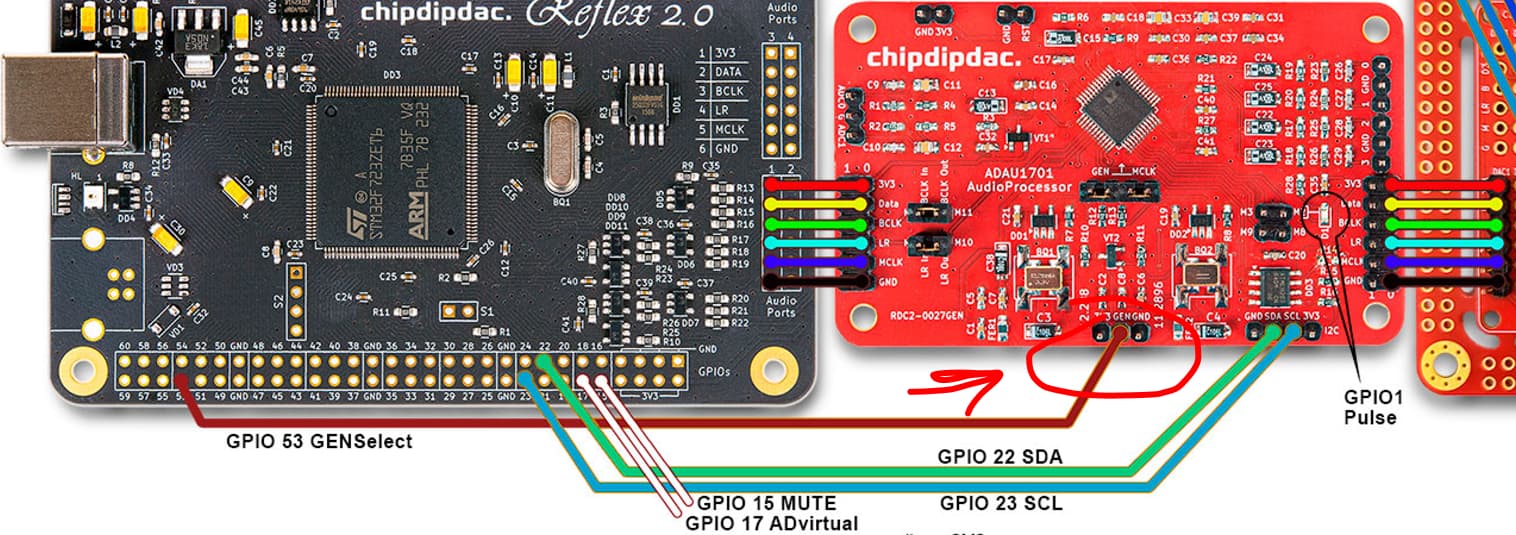
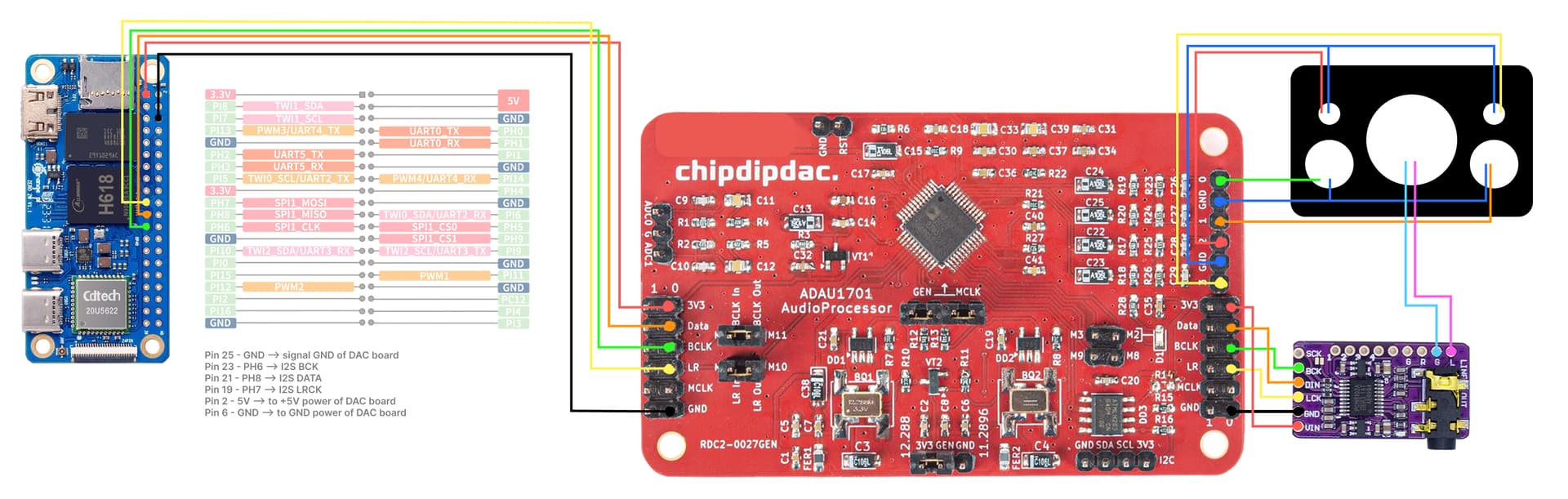
Full scheme:

Hello flothero

The PCM5102a works with normal i2s as slave , in fact with the clock provided by the OPI , i understand that the ADAU1701 work as master so you need to use “external” clock
In your github link for " sun50i-I2S-slave.patch" you find a way to test

Can you send the result of the command line

find /proc/device-tree/ -name status -exec echo -ne '\n{}: ' \; -exec cat {} \;

and

cat /sys/kernel/debug/pinctrl/300b000.pinctrl/pinmux-pins

With that we can see if your overlay are effective

The actual kernel with opi zero 2w is 6.12.30 :wink:

1 Like

Totof thanks for your answer, details here:

proc/device-tree

root@orangepizero2w:~# find /proc/device-tree/ -name status -exec echo -ne '\n{}: ’ ; -exec cat {} ;

/proc/device-tree/soc@3000000/spdif@5094000/status: disabled
/proc/device-tree/soc@3000000/spdif_mach/status: disabled
/proc/device-tree/soc@3000000/ehci1-controller@5200000/status: okay
/proc/device-tree/soc@3000000/ahub3_mach/status: okay
/proc/device-tree/soc@3000000/eth@5020000/status: disabled
/proc/device-tree/soc@3000000/ehci0-controller@5101000/status: okay
/proc/device-tree/soc@3000000/uart@5000c00/status: disabled
/proc/device-tree/soc@3000000/hdmi@6000000/status: okay
/proc/device-tree/soc@3000000/pwm0@300a010/status: disabled
/proc/device-tree/soc@3000000/pwm1@300a011/status: disabled
/proc/device-tree/soc@3000000/pwm2@300a012/status: disabled
/proc/device-tree/soc@3000000/codec_plat/status: okay
/proc/device-tree/soc@3000000/pwm3@300a013/status: disabled
/proc/device-tree/soc@3000000/dmic@5095000/status: disabled
/proc/device-tree/soc@3000000/pwm@300a000/status: okay
/proc/device-tree/soc@3000000/ahub_dam_plat@5097000/status: okay
/proc/device-tree/soc@3000000/usbc0@0/status: okay
/proc/device-tree/soc@3000000/pwm4@300a014/status: disabled
/proc/device-tree/soc@3000000/uart@5000000/status: okay
/proc/device-tree/soc@3000000/auto_print@54321/status: disabled
/proc/device-tree/soc@3000000/pwm5@300a015/status: okay
/proc/device-tree/soc@3000000/ohci3-controller@5311400/status: okay
/proc/device-tree/soc@3000000/keyboard@5070800/status: okay
/proc/device-tree/soc@3000000/ahub2_mach/status: okay
/proc/device-tree/soc@3000000/usbc3@0/status: okay
/proc/device-tree/soc@3000000/spdif_plat@5093000/status: disabled
/proc/device-tree/soc@3000000/gpadc@5070000/status: disabled
/proc/device-tree/soc@3000000/dmic_codec/status: disabled
/proc/device-tree/soc@3000000/ahub3_plat/status: okay
/proc/device-tree/soc@3000000/sounddmic/status: disabled
/proc/device-tree/soc@3000000/sdmmc@4021000/status: okay
/proc/device-tree/soc@3000000/eth@5030000/status: okay
/proc/device-tree/soc@3000000/codec@5096000/status: okay
/proc/device-tree/soc@3000000/ahub1_mach/status: okay
/proc/device-tree/soc@3000000/gpio_para/status: okay
/proc/device-tree/soc@3000000/ehci3-controller@5311000/status: okay
/proc/device-tree/soc@3000000/leds/status: okay
/proc/device-tree/soc@3000000/twi@5002800/status: disabled
/proc/device-tree/soc@3000000/ahub2_plat/status: disabled
/proc/device-tree/soc@3000000/addr_mgt/status: okay
/proc/device-tree/soc@3000000/ahub0_mach/status: disabled
/proc/device-tree/soc@3000000/tv0@6520000/status: disabled
/proc/device-tree/soc@3000000/twi@5003000/status: disabled
/proc/device-tree/soc@3000000/spi@5011000/status: disabled
/proc/device-tree/soc@3000000/rfkill/status: okay
/proc/device-tree/soc@3000000/usbc2@0/status: okay
/proc/device-tree/soc@3000000/s_cir@7040000/status: okay
/proc/device-tree/soc@3000000/deinterlace@1420000/status: okay
/proc/device-tree/soc@3000000/ahub1_plat/status: okay
/proc/device-tree/soc@3000000/twi@7081400/status: okay
/proc/device-tree/soc@3000000/uart@5001400/status: disabled
/proc/device-tree/soc@3000000/nand0@4011000/status: disabled
/proc/device-tree/soc@3000000/sdmmc@4020000/status: okay
/proc/device-tree/soc@3000000/twi@5002400/status: disabled
/proc/device-tree/soc@3000000/btlpm/status: okay
/proc/device-tree/soc@3000000/uart@5000800/status: disabled
/proc/device-tree/soc@3000000/ohci2-controller@5310400/status: okay
/proc/device-tree/soc@3000000/twi@5002c00/status: disabled
/proc/device-tree/soc@3000000/ahub0_plat/status: disabled
/proc/device-tree/soc@3000000/ahub_dam_mach/status: okay
/proc/device-tree/soc@3000000/uart@5001000/status: disabled
/proc/device-tree/soc@3000000/boot_init_gpio/status: okay
/proc/device-tree/soc@3000000/twi@5002000/eeprom@50/status: disabled
/proc/device-tree/soc@3000000/twi@5002000/status: disabled
/proc/device-tree/soc@3000000/ohci1-controller@5200400/status: okay
/proc/device-tree/soc@3000000/usbc1@0/status: okay
/proc/device-tree/soc@3000000/spi@5010000/flash@0/status: okay
/proc/device-tree/soc@3000000/spi@5010000/spi_board0/status: disabled
/proc/device-tree/soc@3000000/spi@5010000/status: okay
/proc/device-tree/soc@3000000/ohci0-controller@5101400/status: okay
/proc/device-tree/soc@3000000/codec_mach/status: okay
/proc/device-tree/soc@3000000/ehci2-controller@5310000/status: okay
/proc/device-tree/soc@3000000/soundspdif/status: disabled
/proc/device-tree/soc@3000000/ac200/status: okay
/proc/device-tree/soc@3000000/uart@5000400/status: okay
/proc/device-tree/soc@3000000/sdmmc@4022000/status: disabled

root@orangepizero2w:~#

pinmux-pins

root@orangepizero2w:~# cat /sys/kernel/debug/pinctrl/300b000.pinctrl/pinmux-pins
Pinmux settings per pin
Format: pin (name): mux_owner|gpio_owner (strict) hog?
pin 0 (PA0): device 5030000.eth function gmac1 group PA0
pin 1 (PA1): device 5030000.eth function gmac1 group PA1
pin 2 (PA2): device 5030000.eth function gmac1 group PA2
pin 3 (PA3): device 5030000.eth function gmac1 group PA3
pin 4 (PA4): device 5030000.eth function gmac1 group PA4
pin 5 (PA5): device 5030000.eth function gmac1 group PA5
pin 6 (PA6): device 5030000.eth function gmac1 group PA6
pin 7 (PA7): device 5030000.eth function gmac1 group PA7
pin 8 (PA8): device 5030000.eth function gmac1 group PA8
pin 9 (PA9): device 5030000.eth function gmac1 group PA9
pin 10 (PA10): UNCLAIMED
pin 11 (PA11): UNCLAIMED
pin 12 (PA12): UNCLAIMED
pin 64 (PC0): device 5010000.spi function spi0 group PC0
pin 65 (PC1): UNCLAIMED
pin 66 (PC2): device 5010000.spi function spi0 group PC2
pin 67 (PC3): device 5010000.spi function spi0 group PC3
pin 68 (PC4): device 5010000.spi function spi0 group PC4
pin 69 (PC5): UNCLAIMED
pin 70 (PC6): UNCLAIMED
pin 71 (PC7): UNCLAIMED
pin 72 (PC8): UNCLAIMED
pin 73 (PC9): UNCLAIMED
pin 74 (PC10): UNCLAIMED
pin 75 (PC11): UNCLAIMED
pin 76 (PC12): UNCLAIMED
pin 77 (PC13): GPIO 300b000.pinctrl:77
pin 78 (PC14): UNCLAIMED
pin 79 (PC15): GPIO 300b000.pinctrl:79
pin 80 (PC16): GPIO 300b000.pinctrl:80
pin 96 (PD0): UNCLAIMED
pin 97 (PD1): UNCLAIMED
pin 98 (PD2): UNCLAIMED
pin 99 (PD3): UNCLAIMED
pin 100 (PD4): UNCLAIMED
pin 101 (PD5): UNCLAIMED
pin 102 (PD6): UNCLAIMED
pin 103 (PD7): UNCLAIMED
pin 104 (PD8): UNCLAIMED
pin 105 (PD9): UNCLAIMED
pin 106 (PD10): UNCLAIMED
pin 107 (PD11): UNCLAIMED
pin 108 (PD12): UNCLAIMED
pin 109 (PD13): UNCLAIMED
pin 110 (PD14): UNCLAIMED
pin 111 (PD15): UNCLAIMED
pin 112 (PD16): UNCLAIMED
pin 113 (PD17): UNCLAIMED
pin 114 (PD18): UNCLAIMED
pin 115 (PD19): UNCLAIMED
pin 116 (PD20): UNCLAIMED
pin 117 (PD21): UNCLAIMED
pin 118 (PD22): UNCLAIMED
pin 119 (PD23): UNCLAIMED
pin 120 (PD24): UNCLAIMED
pin 121 (PD25): UNCLAIMED
pin 122 (PD26): UNCLAIMED
pin 123 (PD27): UNCLAIMED
pin 124 (PD28): UNCLAIMED
pin 128 (PE0): UNCLAIMED
pin 129 (PE1): UNCLAIMED
pin 130 (PE2): UNCLAIMED
pin 131 (PE3): UNCLAIMED
pin 132 (PE4): UNCLAIMED
pin 133 (PE5): UNCLAIMED
pin 134 (PE6): UNCLAIMED
pin 135 (PE7): UNCLAIMED
pin 136 (PE8): UNCLAIMED
pin 137 (PE9): UNCLAIMED
pin 138 (PE10): UNCLAIMED
pin 139 (PE11): UNCLAIMED
pin 140 (PE12): UNCLAIMED
pin 141 (PE13): UNCLAIMED
pin 142 (PE14): UNCLAIMED
pin 143 (PE15): UNCLAIMED
pin 144 (PE16): UNCLAIMED
pin 145 (PE17): UNCLAIMED
pin 146 (PE18): UNCLAIMED
pin 147 (PE19): UNCLAIMED
pin 148 (PE20): UNCLAIMED
pin 149 (PE21): UNCLAIMED
pin 150 (PE22): UNCLAIMED
pin 160 (PF0): device 4020000.sdmmc function sdc0 group PF0
pin 161 (PF1): device 4020000.sdmmc function sdc0 group PF1
pin 162 (PF2): device 4020000.sdmmc function sdc0 group PF2
pin 163 (PF3): device 4020000.sdmmc function sdc0 group PF3
pin 164 (PF4): device 4020000.sdmmc function sdc0 group PF4
pin 165 (PF5): device 4020000.sdmmc function sdc0 group PF5
pin 166 (PF6): GPIO 300b000.pinctrl:166
pin 192 (PG0): device 4021000.sdmmc function sdc1 group PG0
pin 193 (PG1): device 4021000.sdmmc function sdc1 group PG1
pin 194 (PG2): device 4021000.sdmmc function sdc1 group PG2
pin 195 (PG3): device 4021000.sdmmc function sdc1 group PG3
pin 196 (PG4): device 4021000.sdmmc function sdc1 group PG4
pin 197 (PG5): device 4021000.sdmmc function sdc1 group PG5
pin 198 (PG6): device 5000400.uart function uart1 group PG6
pin 199 (PG7): device 5000400.uart function uart1 group PG7
pin 200 (PG8): device 5000400.uart function uart1 group PG8
pin 201 (PG9): device 5000400.uart function uart1 group PG9
pin 202 (PG10): UNCLAIMED
pin 203 (PG11): UNCLAIMED
pin 204 (PG12): UNCLAIMED
pin 205 (PG13): UNCLAIMED
pin 206 (PG14): UNCLAIMED
pin 207 (PG15): GPIO 300b000.pinctrl:207
pin 208 (PG16): GPIO 300b000.pinctrl:208
pin 209 (PG17): UNCLAIMED
pin 210 (PG18): GPIO 300b000.pinctrl:210
pin 211 (PG19): GPIO 300b000.pinctrl:211
pin 224 (PH0): device 5000000.uart function uart0 group PH0
pin 225 (PH1): device 5000000.uart function uart0 group PH1
pin 226 (PH2): UNCLAIMED
pin 227 (PH3): UNCLAIMED
pin 228 (PH4): UNCLAIMED
pin 229 (PH5): device soc@3000000:ahub3_plat function gpio_in group PH5
pin 230 (PH6): device soc@3000000:ahub3_plat function gpio_in group PH6
pin 231 (PH7): device soc@3000000:ahub3_plat function gpio_in group PH7
pin 232 (PH8): device soc@3000000:ahub3_plat function gpio_in group PH8
pin 233 (PH9): device soc@3000000:ahub3_plat function gpio_in group PH9
pin 234 (PH10): device 7040000.s_cir function ir group PH10
pin 256 (PI0): UNCLAIMED
pin 257 (PI1): UNCLAIMED
pin 258 (PI2): UNCLAIMED
pin 259 (PI3): UNCLAIMED
pin 260 (PI4): UNCLAIMED
pin 261 (PI5): UNCLAIMED
pin 262 (PI6): UNCLAIMED
pin 263 (PI7): UNCLAIMED
pin 264 (PI8): UNCLAIMED
pin 265 (PI9): UNCLAIMED
pin 266 (PI10): UNCLAIMED
pin 267 (PI11): UNCLAIMED
pin 268 (PI12): UNCLAIMED
pin 269 (PI13): UNCLAIMED
pin 270 (PI14): UNCLAIMED
pin 271 (PI15): UNCLAIMED
pin 272 (PI16): UNCLAIMED
root@orangepizero2w:~#

aplay -l

root@orangepizero2w:~# aplay -l
**** List of PLAYBACK Hardware Devices ****
card 0: audiocodec [audiocodec], device 0: soc@3000000:codec_plat-5096000.codec 5096000.codec-0
Subdevices: 1/1
Subdevice #0: subdevice #0
card 2: ahubhdmi [ahubhdmi], device 0: ahub_plat-snd-soc-dummy-dai snd-soc-dummy-dai-0
Subdevices: 1/1
Subdevice #0: subdevice #0
card 3: ahubi2s3 [ahubi2s3], device 0: ahub_plat-snd-soc-dummy-dai snd-soc-dummy-dai-0
Subdevices: 1/1
Subdevice #0: subdevice #0

Hello flothero

So everything seems “okay” for the overlay for i2s3

If you have a look to the patch sun50i-I2S-slave.patch, the difference between
slave and master is the part “clock-source = “external”;” and "pinctrl-0 = <&i2s0_pins &i2sclk_pins>;

+/dts-v1/;
+/plugin/;
+
+/ {
+       compatible = "allwinner,sun50i-h5";
+
+       fragment@0 { 
+               target-path = "/"; 
+               __overlay__ { 
+                       pcm5102a: pcm5102a {
+                       #sound-dai-cells = <0>;
+                       compatible = "ti,pcm5102a";
+                       };
+               }; 
+       }; 
+
+       fragment@1 {
+               target = <&i2s0>;
+               __overlay__ {
+                       compatible = "allwinner,sun8i-h3-i2s-slave";
+                       status = "okay";
+                       pinctrl-0 = <&i2s0_pins &i2sclk_pins>;
+                       sound-dai = <&pcm5102a>;
+                       clock-source = "external";  
+                       clk-gpios = <&pio 0 6 1>, <&pio 6 6 1>, <&pio 6 7 1>;  /* PA6 , PG6 , PG7 */
+               };
+       };
+
+       fragment@2 {
+               target = <&pio>;
+               __overlay__ {
+                       i2sclk_pins: i2sclk_pins {  
+                               pins = "PA6", "PG6", "PG7";  
+                               function = "gpio_out";  
+                       };
+               };
+       };
+};
+

You need to adapt your overlay in this way
with the part “i2sclk_pins” define as gpio-out (master)

One other thing , in my script i apply some clock part in the ahubx-mach part

ahub0_mach: ahub0_mach {
				compatible = "allwinner,sunxi-snd-mach";
				soundcard-mach,name = "ahubi2s0";
				soundcard-mach,format = "i2s";
				soundcard-mach,frame-master = <&ahub0_cpu>;
			        soundcard-mach,bitclock-master = <&ahub0_cpu>;
			        soundcard-mach,slot-num = <2>;
			        soundcard-mach,slot-width = <32>;
				status = "okay";

				ahub0_cpu: soundcard-mach,cpu {
					sound-dai = <&ahub0_plat>;
					soundcard-mach,pll-fs = <4>;
				        soundcard-mach,mclk-fs = <0>;
				};

				soundcard-mach,codec {
				};
			};

the two line “soundcard-mach,pll-fs = <4>;” and “soundcard-mach,mclk-fs = <0>;”
perhaps try to implement the internal clock like this syntaxe in kernel 6.12.30
in the mach part of your ahub3-mach to have sound as slave with the pcm5102a

The PCM5102a work alone ?

Good luck :wink:

1 Like

One More
In Your schematic of ADAU1701
To be in master mode did you have connected the pin MCLK ?

1 Like

@Totof, Thanks!

MCLK pin is not connected. Should I connect it, and from which pin it should be taken on Orange Pi Zero 2W?

In theory i can connect ADAU1701 in Slave, then the GEN pin should be connected to the signal from the Orange Pi Zero 2W quartz, as far as I understand. (I’m not very good at this.)

Here is Gen pin:

The pcm5102a works, with this overlay (GitHub - elkoni/Opi_Zero_3_I2S3_5.4: Orange Pi Zero 3 ( H618 ) I2S3 digital audio output), without the SCK pin as in the schematic above, without slave.

Hello flothero
I have a look on your chipdip board and I understand that the adau1701 receive two analog input and four analog output, the adau1701 is contrôles via micro contrôleur with a bus i2c or spi, not i2s

So I don’t understand where is the command in Your project

And your overlay don’t have pin for MCLK

Without à clear scheme and the exact design you would do, it’s difficult to tell something

Give us more detail

@Totof Thanks for your message!

The Chipdip ADAU1701 board has two I2S inputs, two I2S outputs, two analog inputs (L/R), and four analog outputs (for 4 speakers).

I can connect the sound via both 3.5mm Jack and i2s bus, which is what I’m trying to do.

As you correctly mentioned, the ADAU1701 is controlled (programmed) via a programmer like the CY7C68013A, using the I2C or SPI bus. I use SigmaStudio to apply filters, adjust frequencies, and modify the audio signal in general.

I don’t have deep knowledge of low-level hardware, especially how clock crystals work.

As I understand it:

When the Orange Pi Zero 2W is in Master mode, it generates the clock.
But it can be switched to Slave mode, in which case it should use the clock from the ADAU1701 — is that correct?
What I want is to transmit audio at a 96,000 Hz sample rate.

My question is:
Since the ADAU1701 board has two high-precision switchable oscillators (12.288 MHz for the 48kHz family, and 11.2896 MHz for the 44.1kHz family), should I rely on those? Or can I just use the clock from the Orange Pi instead?

Switching between the two oscillators is handled by logic on the board depending on the selected sample rate.

I’m just not sure which clock source is better in terms of stability and compatibility when working with the Orange Pi Zero 2W in either master or slave mode.

There are no problems with the ADAU1701 firmware, I can put the ADAU1701 into Master/Slave. But there is no understanding what I need to do on linux to make it work.

Orange Pi can output any discredit frequency over i2s? Or is there a limit, like only 44100 or 48000?

I would like to apologize in advance for such a long post, thanks for still being in touch.

Could you please tell me “command in Your project” you mean?

Hello flothero

To stay simple the way to how you command your adau1701, with your last post it’s clear

For the clock the crystal give a clock frequency divided by a number to obtain the good frequency for the numeric treatment of the input signal , here in the format i2s
one pin for the clock, one pin to select R and L and one pin to send the data

The orange pi provide the clock in i2s mode as master you don’t need to use the external clock on the adau1701 board , and the clock of the orangepi zero 2w is 44.1khz

so if you can connect your board to the orangepi with the pin below
PI0 → I2S SCK–>pin29
PI1 → I2S BCK–>pin12
PI2 → I2S LCK–>pin35
PI3 → I2S DATA–>pin40
5V → to VIN power of DAC board–>pin4
GND → to GND power of DAC board–>pin6

you run my script and you have sound on your pcm5102a
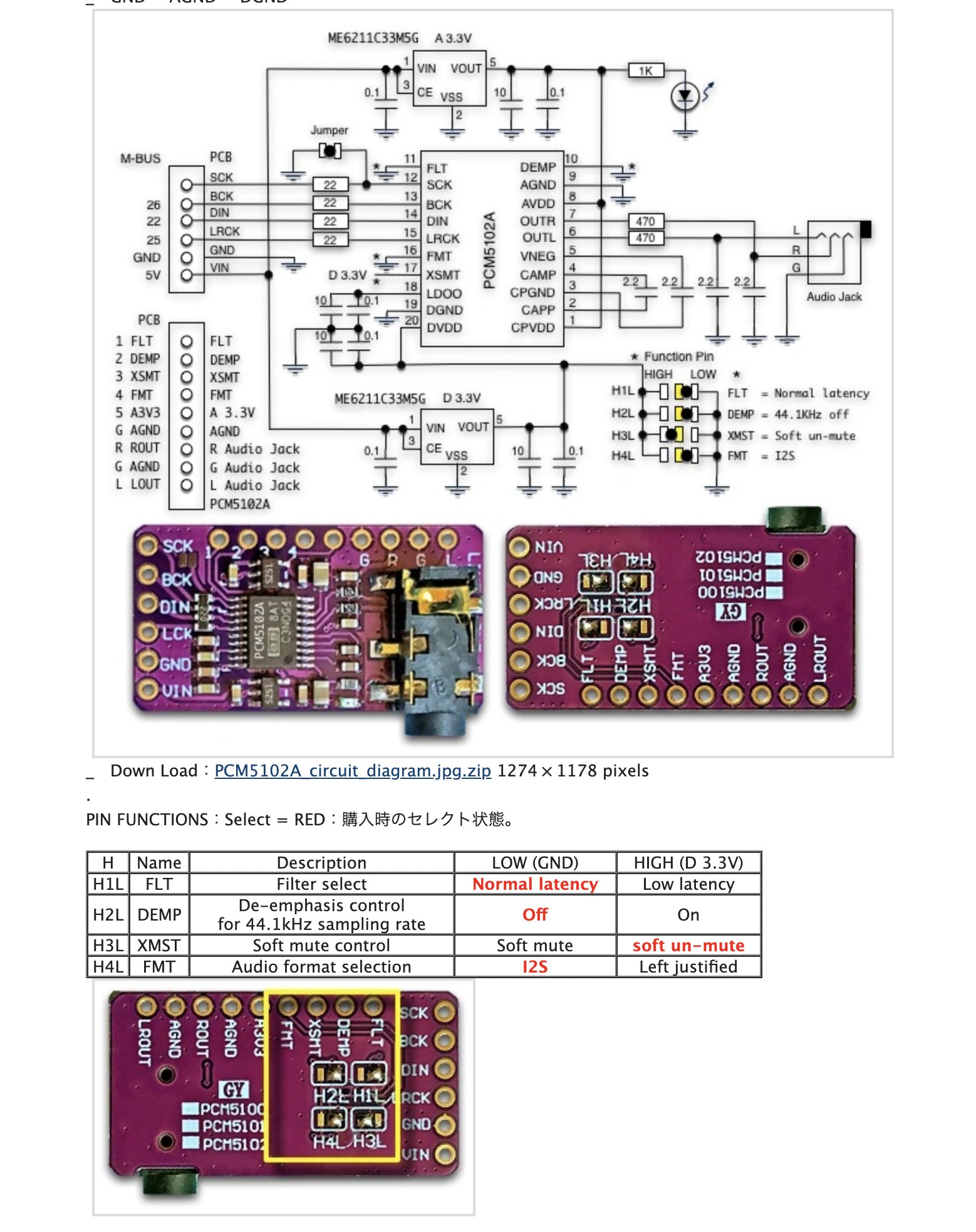
if your pcm are configured for the same i2s format

see picture

@Totof Glad to hear your message, will be back with a successfully connected PCM5102A to the Orange Pi.

Hello all

For your question about the gpu and i2s and sound i tested my script and it seems to work fine on my OPI zero 2w

With your fresh install of the last Dietpi 9.15.2 version

the script

# Create the directory for user overlays
mkdir -p /boot/overlay-user
cd /boot/overlay-user
# Create the overlay source file
cat << '_EOF_' > sound-hdmi-jack-i2s0-hat.dts
/dts-v1/;
/plugin/;
/ {
	compatible = "allwinner,sun50i-h618";
	fragment@0 {
		target = <&pio>;
		__overlay__ {
			ahub_daudio0_pins_d: ahub_daudio0_sleep {
				pins = "PI0", "PI1", "PI2", "PI3", "PI4";
				function = "gpio_in";
				drive-strength = <0x14>;
				bias-disable;
			};
			ahub_daudio0_pins_a: ahub_daudio0@0 {
				pins = "PI0", "PI1", "PI2";
				function = "i2s0";
				drive-strength = <0x14>;
				bias-disable;
			};
			ahub_daudio0_pins_b: ahub_daudio0@1 {
				pins = "PI3";
				function = "i2s0_dout0";
				drive-strength = <0x14>;
				bias-disable;
			};
			ahub_daudio0_pins_c: ahub_daudio0@2 {
				pins = "PI4";
				function = "i2s0_din0";
				drive-strength = <0x14>;
				bias-disable;
			};
		};
	};
	fragment@1 {
		target-path = "/soc";
		__overlay__ {
			ahub0_plat: ahub0_plat {
				#sound-dai-cells = <0>;
				compatible = "allwinner,sunxi-snd-plat-ahub";
				apb_num = <0>; /* for dma port 3 */
				dmas = <&dma 3>, <&dma 3>;
				dma-names = "tx", "rx";
				playback_cma = <128>;
				capture_cma = <128>;
				tx_fifo_size = <128>;
				rx_fifo_size = <128>;
				tdm_num         = <0>;
				tx_pin          = <0>;
				rx_pin          = <0>;
				pinctrl-names = "default", "sleep";
				pinctrl_used;
				pinctrl-0 = <&ahub_daudio0_pins_a>, <&ahub_daudio0_pins_b>, <&ahub_daudio0_pins_c>;
				pinctrl-1 = <&ahub_daudio0_pins_d>;
				status = "okay";
			};
			ahub0_mach: ahub0_mach {
				compatible = "allwinner,sunxi-snd-mach";
				soundcard-mach,name = "ahubi2s0";
				soundcard-mach,format = "i2s";
				soundcard-mach,frame-master = <&ahub0_cpu>;
			        soundcard-mach,bitclock-master = <&ahub0_cpu>;
			        soundcard-mach,slot-num = <2>;
			        soundcard-mach,slot-width = <32>;
				status = "okay";

				ahub0_cpu: soundcard-mach,cpu {
					sound-dai = <&ahub0_plat>;
					soundcard-mach,pll-fs = <4>;
				        soundcard-mach,mclk-fs = <0>;
				};

				soundcard-mach,codec {
				};
			};
		};
	};
	fragment@2 {
		target-path = "/soc";
		__overlay__ {
			codec: codec {
			                       compatible = "allwinner,sun50i-h616-codec";
			                       status = "okay";
			                       allwinner,audio-routing = "Line Out", "LINEOUT";
			                       };
			 };
	};
	fragment@3 {
		target-path = "/soc";
		__overlay__ {
			ahub_dam_plat: ahub_dam_plat {
			                       compatible = "allwinner,sunxi-snd-plat-ahub_dam";
			                       status = "okay";
			                       };
			 };
	};
	fragment@4 {
		target-path = "/soc";
		__overlay__ {
			ahub1_plat: ahub1_plat {
			                       compatible = "allwinner,sunxi-snd-plat-ahub";
			                       #sound-dai-cells = <0x00>;
			                       status = "okay";
			                       };
			 };
	};
	fragment@5 {
		target-path = "/soc";
		__overlay__ {
			ahub1_mach: ahub1_mach {
			                       compatible = "allwinner,sunxi-snd-mach";
			                       soundcard-mach,name = "HDMI";
			                       soundcard-mach,format = "i2s";
			                       status = "okay";
			                       
			                       soundcard-mach,cpu {
					           sound-dai = <&ahub1_plat>;
				                   };

				               soundcard-mach,codec {
				                   };
			                       };
			 };
	};
	fragment@6 {
		target-path = "/soc";
		__overlay__ {
			gpu: gpu {
			                       compatible = "allwinner,sun50i-h616-mali", "arm,mali-bifrost";
			                       status = "okay";
			                       };
			 };
	};
};
_EOF_
# Install the device tree compiler
apt install device-tree-compiler
# Compile the overlay binary file
dtc -I dts -O dtb -o sound-hdmi-jack-i2s0-hat.dtbo -@ sound-hdmi-jack-i2s0-hat.dts
# To see the result of the compiler uncommit next line
#fdtdump sound-hdmi-jack-i2s0-hat.dtbo
# Enable the user overlay via U-Boot environment file
#G_CONFIG_INJECT 'user_overlays=' 'user_overlays=sound-hdmi-jack-i2s0-hat' /boot/dietpiEnv.txt

In a terminal just a few command when you are connected

sudo nano sound.sh

Copy and past the script

Ctrl+o to write the line and Ctrl+x to save and exit

Run the script

sh sound.sh

Inject the user-overlay

G_CONFIG_INJECT 'user_overlays=' 'user_overlays=sound-hdmi-jack-i2s0-hat' /boot/dietpiEnv.txt

And reboot

That’s all :wink:

1 Like

@Totof Thank you for providing the neat script for enabling GPU, HDMI audio, and 3.5mm jack audio on the expansion board. As far as I can tell, it has been applied successfully.

However, I’ve tried to test sound output from the 3.5mm jack on the expansion board but I only hear one short quiet pop sound once right at the very start of the speaker-test command and then no sound. I tried using a desk speaker and a pair of headphones, the result is the same.

Here is a listing of the sound devices from aplay -L:

null
    Discard all samples (playback) or generate zero samples (capture)
lavrate
    Rate Converter Plugin Using Libav/FFmpeg Library
samplerate
    Rate Converter Plugin Using Samplerate Library
speexrate
    Rate Converter Plugin Using Speex Resampler
jack
    JACK Audio Connection Kit
oss
    Open Sound System
pulse
    PulseAudio Sound Server
speex
    Plugin using Speex DSP (resample, agc, denoise, echo, dereverb)
upmix
    Plugin for channel upmix (4,6,8)
vdownmix
    Plugin for channel downmix (stereo) with a simple spacialization
hw:CARD=audiocodec,DEV=0
    audiocodec, CDC PCM Codec-0
    Direct hardware device without any conversions
plughw:CARD=audiocodec,DEV=0
    audiocodec, CDC PCM Codec-0
    Hardware device with all software conversions
sysdefault:CARD=audiocodec
    audiocodec, CDC PCM Codec-0
    Default Audio Device
dmix:CARD=audiocodec,DEV=0
    audiocodec, CDC PCM Codec-0
    Direct sample mixing device
usbstream:CARD=audiocodec
    audiocodec
    USB Stream Output
hw:CARD=ahubi2s0,DEV=0
    ahubi2s0, ahub_plat-snd-soc-dummy-dai snd-soc-dummy-dai-0
    Direct hardware device without any conversions
plughw:CARD=ahubi2s0,DEV=0
    ahubi2s0, ahub_plat-snd-soc-dummy-dai snd-soc-dummy-dai-0
    Hardware device with all software conversions
sysdefault:CARD=ahubi2s0
    ahubi2s0, ahub_plat-snd-soc-dummy-dai snd-soc-dummy-dai-0
    Default Audio Device
dmix:CARD=ahubi2s0,DEV=0
    ahubi2s0, ahub_plat-snd-soc-dummy-dai snd-soc-dummy-dai-0
    Direct sample mixing device
usbstream:CARD=ahubi2s0
    ahubi2s0
    USB Stream Output
hw:CARD=HDMI,DEV=0
    HDMI, ahub_plat-i2s-hifi i2s-hifi-0
    Direct hardware device without any conversions
plughw:CARD=HDMI,DEV=0
    HDMI, ahub_plat-i2s-hifi i2s-hifi-0
    Hardware device with all software conversions
sysdefault:CARD=HDMI
    HDMI, ahub_plat-i2s-hifi i2s-hifi-0
    Default Audio Device
dmix:CARD=HDMI,DEV=0
    HDMI, ahub_plat-i2s-hifi i2s-hifi-0
    Direct sample mixing device
usbstream:CARD=HDMI
    HDMI
    USB Stream Output

I believe the 3.5mm jack device is named audiocodec, is that correct?

I’ve been trying to test sound output with variations of the command speaker-test -c 2 -t sine -p 1 -D <DEVICE> where <DEVICE> is sysdefault:audiocodec , hw:audiocodec, or plughw:audiocodec.

The output from speaker-test appears successful but no audio was actually emitted. This is the same result for all three of the above devices.

speaker-test 1.2.14

Playback device is plughw:audiocodec
Stream parameters are 48000Hz, S16_LE, 2 channels
Sine wave rate is 440.0000Hz
Rate set to 48000Hz (requested 48000Hz)
Buffer size range from 32 to 131072
Period size range from 16 to 65536
Requested period time 1 us
Periods = 4
was set period_size = 16
was set buffer_size = 64
 0 - Front Left
 1 - Front Right
Time per period = 5.998108
 0 - Front Left
 1 - Front Right
Time per period = 4.747744
<snip, repeats>

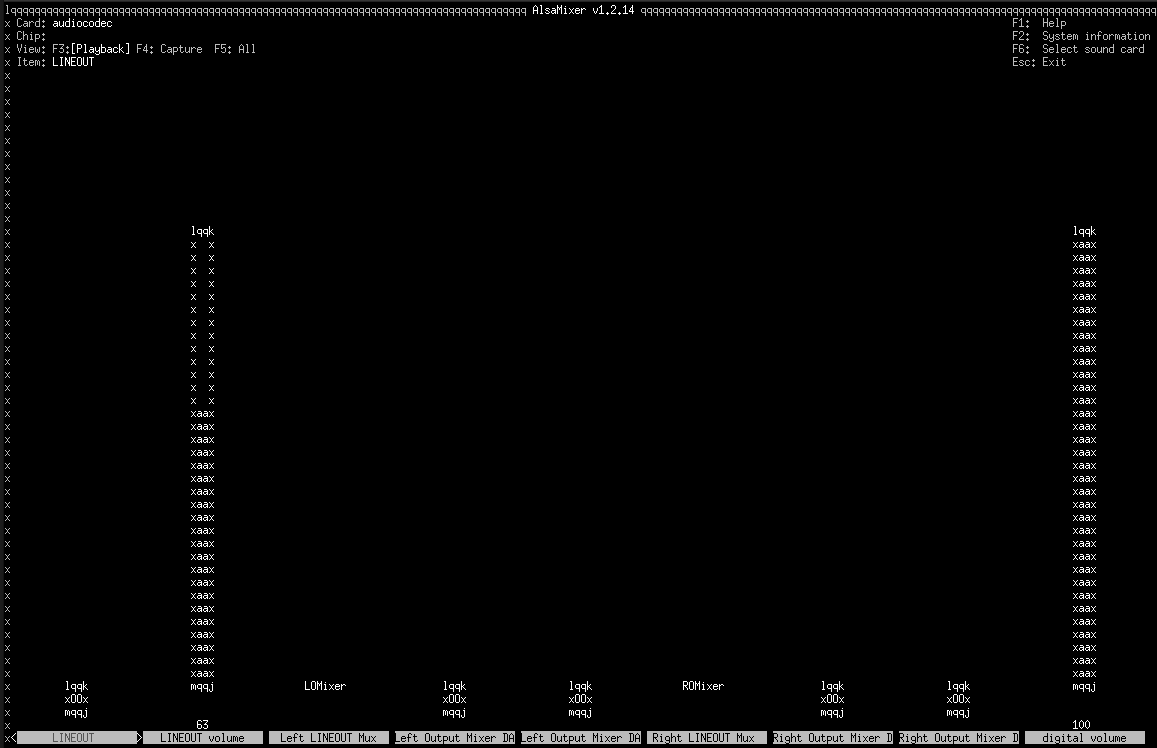
Here is a screenshot of alsamixer, for audiocodec device.

Have you been able to get sound output from the 3.5mm jack on the expansion board?

Hello dacto

yess i’ve sound on the jack connector of the expansion board

You run the last script and test the jack , there is sound but not in the good format
so you modified your asound.conf to correct it and after you can play music in your earphone
You edit with nano the asound.conf file like this

nano /etc/asound.conf
pcm.device{
        format S16_LE
        rate 44100
        type hw
        card 0
        device 0
}

pcm.!default {
        type plug
        slave.pcm "device"
}

ctl.!default {
        type hw
        card 0
}

That’s good , the sound must work

To test it use hw0.0

aplay -D hw:0,0 /usr/share/sounds/alsa/Front_Right.wav
aplay -D hw:0,0 /usr/share/sounds/alsa/Front_Left.wav

the selection of te card 2 if it exist modify the asound.conf !!!
so if you change your card you need to re-edit your asound.conf

Tell me if it’s good for you :wink:

Hey @Totof , I appreciate the suggestions!

Unfortunately, I still only hear the same first “pop” sound then nothing.


Here are details of what I tried:

I’ve updated /etc/asound.conf to the following as you advised then rebooted.

cat /etc/asound.conf

pcm.device {
        format S16_LE
        rate 44100
        type hw
        card 0
        device 0
}

pcm.!default {
        type plug
        slave.pcm "device"
}

ctl.!default {
        type hw
        card 0
}

After reboot, tried aplay:

aplay -D hw:0,0 /usr/share/sounds/alsa/Front_Left.wav

Playing WAVE '/usr/share/sounds/alsa/Front_Left.wav' : Signed 16 bit Little Endian, Rate 48000 Hz, Mono

Only hear the same “pop” sound at the very beginning then no sound.

Same result with the Front_Right.wav.

I’ve also tried with these amixer settings, but same result.

amixer -D hw:0 -c 0 set 'Left Output Mixer DACL' 100% unmute

Simple mixer control ‘Left Output Mixer DACL’,0
Capabilities: pswitch pswitch-joined
Playback channels: Mono
Mono: Playback [on]

amixer -D hw:0 -c 0 set 'Left Output Mixer DACR' 100% unmute

Simple mixer control ‘Left Output Mixer DACR’,0
Capabilities: pswitch pswitch-joined
Playback channels: Mono
Mono: Playback [on]

amixer -D hw:0 -c 0 set 'Right Output Mixer DACL' 100% unmute

Simple mixer control ‘Right Output Mixer DACL’,0
Capabilities: pswitch pswitch-joined
Playback channels: Mono
Mono: Playback [on]

amixer -D hw:0 -c 0 set 'Right Output Mixer DACR' 100% unmute

Simple mixer control ‘Right Output Mixer DACR’,0
Capabilities: pswitch pswitch-joined
Playback channels: Mono
Mono: Playback [on]

amixer -D hw:0 -c 0 set 'LINEOUT volume' 100% unmute

Simple mixer control ‘LINEOUT volume’,0
Capabilities: volume volume-joined
Playback channels: Mono
Capture channels: Mono
Limits: 0 - 31
Mono: 31 [100%] [1.50dB]

amixer -D hw:0 -c 0 set 'digital volume' 100% unmute

Simple mixer control ‘digital volume’,0
Capabilities: volume volume-joined
Playback channels: Mono
Capture channels: Mono
Limits: 0 - 63
Mono: 63 [100%] [41214.60dB]
Hello dacto

Are you sure of your hardware part ?
The ribbon is correctly installed ?
The usb work ?

Have a good day and tell us

Hello dacto

I re-read your first post and found some question :smiling_face:

Which version of Dietpi and which version of alsa have you installed ?

Why your log mentionned jack oss and pulseaudio ?

Hey Totof,

I think the expansion board is installed correctly. I have been using USB and Ethernet from it.
I re-seated the ribbon, just to double check but no changes in 3.5mm audio.

DietPi: v9.17.2
alsa-tools: 1.2.14-1
main board: v1.1.1 (from silkscreen)
extension board: v1.0 (from silkscreen)

I installed pulseaudio originally to try and resolve on my own but it didnt help.
I’ve removed it now:

aplay -L

null
    Discard all samples (playback) or generate zero samples (capture)
default
hw:CARD=audiocodec,DEV=0
    audiocodec, CDC PCM Codec-0
    Direct hardware device without any conversions
plughw:CARD=audiocodec,DEV=0
    audiocodec, CDC PCM Codec-0
    Hardware device with all software conversions
sysdefault:CARD=audiocodec
    audiocodec, CDC PCM Codec-0
    Default Audio Device
dmix:CARD=audiocodec,DEV=0
    audiocodec, CDC PCM Codec-0
    Direct sample mixing device
hw:CARD=ahubi2s0,DEV=0
    ahubi2s0, ahub_plat-snd-soc-dummy-dai snd-soc-dummy-dai-0
    Direct hardware device without any conversions
plughw:CARD=ahubi2s0,DEV=0
    ahubi2s0, ahub_plat-snd-soc-dummy-dai snd-soc-dummy-dai-0
    Hardware device with all software conversions
sysdefault:CARD=ahubi2s0
    ahubi2s0, ahub_plat-snd-soc-dummy-dai snd-soc-dummy-dai-0
    Default Audio Device
dmix:CARD=ahubi2s0,DEV=0
    ahubi2s0, ahub_plat-snd-soc-dummy-dai snd-soc-dummy-dai-0
    Direct sample mixing device
hw:CARD=HDMI,DEV=0
    HDMI, ahub_plat-i2s-hifi i2s-hifi-0
    Direct hardware device without any conversions
plughw:CARD=HDMI,DEV=0
    HDMI, ahub_plat-i2s-hifi i2s-hifi-0
    Hardware device with all software conversions
sysdefault:CARD=HDMI
    HDMI, ahub_plat-i2s-hifi i2s-hifi-0
    Default Audio Device
dmix:CARD=HDMI,DEV=0
    HDMI, ahub_plat-i2s-hifi i2s-hifi-0
    Direct sample mixing device

After reboot and try to play Front_Left.wav, still no sound except the first “pop” sound.

Hello dacto

What return aplay -l and have you install Alsa via dietpi-software ?

Is there a powersave mode for the audio device?

The archwiki mentions that a “pop” sound could be related to powersave? Just an idea. Advanced Linux Sound Architecture/Troubleshooting - ArchWiki

I’ve installed alsa initially through dietpi-config → Audio Options → prompt to install alsa.

aplay -l

**** List of PLAYBACK Hardware Devices ****
card 0: audiocodec [audiocodec], device 0: CDC PCM Codec-0 [CDC PCM Codec-0]
  Subdevices: 1/1
  Subdevice #0: subdevice #0
card 1: ahubi2s0 [ahubi2s0], device 0: ahub_plat-snd-soc-dummy-dai snd-soc-dummy-dai-0 [ahub_plat-snd-soc-dummy-dai snd-soc-dummy-dai-0]
  Subdevices: 1/1
  Subdevice #0: subdevice #0
card 2: HDMI [HDMI], device 0: ahub_plat-i2s-hifi i2s-hifi-0 [ahub_plat-i2s-hifi i2s-hifi-0]
  Subdevices: 1/1
  Subdevice #0: subdevice #0

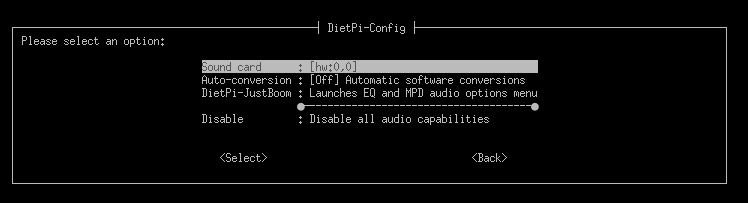
Here is what dietpi-config → Audio Options currently shows:

dmesg has this pretty early in boot:

[    0.663503] Advanced Linux Sound Architecture Driver Initialized.
<snip>
[    1.744409] ALSA device list:
[    1.744423]   No soundcards found.