# Nextcloud problems / questions
**URL:** https://dietpi.com/forum/t/nextcloud-problems-questions/15415
**Category:** Troubleshooting
**Created:** [29 December 2022 13:30 UTC](https://dietpi.com/forum/t/nextcloud-problems-questions/15415 "2022-12-29T13:30:27Z")
**Posts on this page:** 20
**Page:** 1
### Author:  [@hemertje](https://dietpi.com/forum/u/hemertje)
#### Post date: [29 December 2022 13:30 UTC](https://dietpi.com/forum/t/nextcloud-problems-questions/15415/1 "2022-12-29T13:30:27Z")
> **[DietPi.com Docs - Cloud and Backup Systems Software Options](https://dietpi.com/docs/software/cloud/#nextcloud)**
>
> Description of DietPi software options related to cloud and backup systems
You can configure Nextcloud via CLI from command line.
To simplify this, DietPi has added a shortcut to the otherwise necessary
```auto
sudo -u www-data php /var/www/nextcloud/occ
```
Simply run `ncc` from your console:
```auto
ncc list
```
```auto
root@DietPi:~# sudo -u www-data php /var/www/nextcloud/occ
Nextcloud 25.0.2
Usage:
command [options] [arguments]
Options:
-h, --help Display this help message
-q, --quiet Do not output any message
-V, --version Display this application version
--ansi Force ANSI output
--no-ansi Disable ANSI output
-n, --no-interaction Do not ask any interactive question
--no-warnings Skip global warnings, show command output only
-v|vv|vvv, --verbose Increase the verbosity of messages: 1 for normal output, 2 for more verbose output and 3 for debug
Available commands:
check check dependencies of the server environment
help Display help for a command
list List commands
status show some status information
upgrade run upgrade routines after installation of a new release. The release has to be installed before.
activity
activity:send-mails Sends the activity notification mails
app
app:disable disable an app
app:enable enable an app
app:getpath Get an absolute path to the app directory
app:install install an app
app:list List all available apps
app:remove remove an app
app:update update an app or all apps
background
background:ajax Use ajax to run background jobs
background:cron Use cron to run background jobs
background:webcron Use webcron to run background jobs
background-job
background-job:execute Execute a single background job manually
background-job:list List background jobs
broadcast
broadcast:test test the SSE broadcaster
circles
circles:check Checking your configuration
circles:maintenance Clean stuff, keeps the app running
circles:manage:config edit config/type of a Circle
circles:manage:create create a new circle
circles:manage:destroy destroy a circle by its ID
circles:manage:details get details about a circle by its ID
circles:manage:edit edit displayName or description of a Circle
circles:manage:join emulate a user joining a Circle
circles:manage:leave simulate a user joining a Circle
circles:manage:list listing current circles
circles:manage:setting edit setting for a Circle
circles:members:add Add a member to a Circle
circles:members:details get details about a member by its ID
circles:members:level Change the level of a member from a Circle
circles:members:list listing Members from a Circle
circles:members:remove remove a member from a circle
circles:members:search Change the level of a member from a Circle
circles:memberships index and display memberships for local and federated users
circles:remote remote features
circles:shares:files listing shares files
circles:sync Sync Circles and Members
circles:test testing some features
config
config:app:delete Delete an app config value
config:app:get Get an app config value
config:app:set Set an app config value
config:import Import a list of configs
config:list List all configs
config:system:delete Delete a system config value
config:system:get Get a system config value
config:system:set Set a system config value
dav
dav:create-addressbook Create a dav addressbook
dav:create-calendar Create a dav calendar
dav:delete-calendar Delete a dav calendar
dav:list-calendars List all calendars of a user
dav:move-calendar Move a calendar from an user to another
dav:remove-invalid-shares Remove invalid dav shares
dav:retention:clean-up
dav:send-event-reminders Sends event reminders
dav:sync-birthday-calendar Synchronizes the birthday calendar
dav:sync-system-addressbook Synchronizes users to the system addressbook
db
db:add-missing-columns Add missing optional columns to the database tables
db:add-missing-indices Add missing indices to the database tables
db:add-missing-primary-keys Add missing primary keys to the database tables
db:convert-filecache-bigint Convert the ID columns of the filecache to BigInt
db:convert-mysql-charset Convert charset of MySQL/MariaDB to use utf8mb4
db:convert-type Convert the Nextcloud database to the newly configured one
encryption
encryption:change-key-storage-root Change key storage root
encryption:decrypt-all Disable server-side encryption and decrypt all files
encryption:disable Disable encryption
encryption:enable Enable encryption
encryption:encrypt-all Encrypt all files for all users
encryption:list-modules List all available encryption modules
encryption:migrate-key-storage-format Migrate the format of the keystorage to a newer format
encryption:set-default-module Set the encryption default module
encryption:show-key-storage-root Show current key storage root
encryption:status Lists the current status of encryption
federation
federation:sync-addressbooks Synchronizes addressbooks of all federated clouds
files
files:cleanup cleanup filecache
files:recommendations:recommend
files:repair-tree Try and repair malformed filesystem tree structures
files:scan rescan filesystem
files:scan-app-data rescan the AppData folder
files:transfer-ownership All files and folders are moved to another user - outgoing shares and incoming user file shares (optionally) are moved as well.
group
group:add Add a group
group:adduser add a user to a group
group:delete Remove a group
group:info Show information about a group
group:list list configured groups
group:removeuser remove a user from a group
integrity
integrity:check-app Check integrity of an app using a signature.
integrity:check-core Check integrity of core code using a signature.
integrity:sign-app Signs an app using a private key.
integrity:sign-core Sign core using a private key.
l10n
l10n:createjs Create javascript translation files for a given app
log
log:file manipulate logging backend
log:manage manage logging configuration
log:tail Tail the nextcloud logfile
log:watch Watch the nextcloud logfile
maintenance
maintenance:data-fingerprint update the systems data-fingerprint after a backup is restored
maintenance:mimetype:update-db Update database mimetypes and update filecache
maintenance:mimetype:update-js Update mimetypelist.js
maintenance:mode set maintenance mode
maintenance:repair repair this installation
maintenance:repair-share-owner repair invalid share-owner entries in the database
maintenance:theme:update Apply custom theme changes
maintenance:update:htaccess Updates the .htaccess file
notification
notification:generate Generate a notification for the given user
notification:test-push Generate a notification for the given user
preview
preview:repair distributes the existing previews into subfolders
preview:reset-rendered-texts Deletes all generated avatars and previews of text and md files
recognize
recognize:classify Classify all files with the current settings in one go (will likely take a long time)
recognize:cleanup-tags Delete all tags that have no files associated with them anymore
recognize:download-models Download the necessary machine learning models
recognize:recrawl Go through all files again
recognize:remove-legacy-tags Remove tags set by old recognize versions
recognize:reset-faces Remove all face detections from previously classified files
recognize:reset-tags Remove all tags from previously classified files
security
security:bruteforce:reset resets bruteforce attemps for given IP address
security:certificates list trusted certificates
security:certificates:import import trusted certificate in PEM format
security:certificates:remove remove trusted certificate
serverinfo
serverinfo:update-storage-statistics Triggers an update of the counts related to storages used in serverinfo
sharing
sharing:cleanup-remote-storages Cleanup shared storage entries that have no matching entry in the shares_external table
sharing:expiration-notification Notify share initiators when a share will expire the next day.
support
support:report Generate a system report
tag
tag:add Add new tag
tag:delete delete a tag
tag:edit edit tag attributes
tag:list list tags
text
text:reset Reset a text document
theming
theming:config Set theming app config values
trashbin
trashbin:cleanup Remove deleted files
trashbin:expire Expires the users trashbin
trashbin:restore Restore all deleted files
trashbin:size Configure the target trashbin size
twofactorauth
twofactorauth:cleanup Clean up the two-factor user-provider association of an uninstalled/removed provider
twofactorauth:disable Disable two-factor authentication for a user
twofactorauth:enable Enable two-factor authentication for a user
twofactorauth:enforce Enabled/disable enforced two-factor authentication
twofactorauth:state Get the two-factor authentication (2FA) state of a user
update
update:check Check for server and app updates
user
user:add adds a user
user:add-app-password Add app password for the named user
user:delete deletes the specified user
user:disable disables the specified user
user:enable enables the specified user
user:info show user info
user:lastseen shows when the user was logged in last time
user:list list configured users
user:report shows how many users have access
user:resetpassword Resets the password of the named user
user:setting Read and modify user settings
versions
versions:cleanup Delete versions
versions:expire Expires the users file versions
workflows
workflows:list Lists configured workflows
root@DietPi:~# ncc
-bash: ncc: command not found
root@DietPi:~# ncc list
-bash: ncc: command not found
root@DietPi:~#
```
---
### Author:  [@Joulinar](https://dietpi.com/forum/u/Joulinar)
#### Post date: [29 December 2022 13:44 UTC](https://dietpi.com/forum/t/nextcloud-problems-questions/15415/2 "2022-12-29T13:44:43Z")
did you reboot the system after installation of NC?
---
### Author:  [@hemertje](https://dietpi.com/forum/u/hemertje)
#### Post date: [29 December 2022 13:51 UTC](https://dietpi.com/forum/t/nextcloud-problems-questions/15415/3 "2022-12-29T13:51:06Z")
yes , now did it again and was working 😉
---
### Author:  [@hemertje](https://dietpi.com/forum/u/hemertje)
#### Post date: [29 December 2022 19:51 UTC](https://dietpi.com/forum/t/nextcloud-problems-questions/15415/4 "2022-12-29T19:51:51Z")
Got some other Nextcloud / Nginx problem
Nextcloud gives me the warning
The “Strict-Transport-Security” HTTP header is not set to at least “15552000” seconds. For enhanced security, it is recommended to enable HSTS as described in the security tips ↗.
So I enabled HSTS in dietpi-letsencrypt
But in the file /etc/nginx/sites-available/default
`includeSubdomains"`
isn’t included as I expected from the Certbot?
The line should be?
`add_header Strict-Transport-Security: max-age=31536000; includeSubdomains" always; # managed by Certbot`
I tried to edit it manual but now Nextcloud / Nginx isn’t running at all !?
---
### Author:  [@hemertje](https://dietpi.com/forum/u/hemertje)
#### Post date: [29 December 2022 20:06 UTC](https://dietpi.com/forum/t/nextcloud-problems-questions/15415/5 "2022-12-29T20:06:43Z")
other question:
Can Certbot handle subdomains?
How to give in in the dietpi-letsencrypt?
\*.yourdomain.com ?
---
### Author:  [@Joulinar](https://dietpi.com/forum/u/Joulinar)
#### Post date: [29 December 2022 20:12 UTC](https://dietpi.com/forum/t/nextcloud-problems-questions/15415/6 "2022-12-29T20:12:48Z")
Wildcards are not supported by default. You need to enter each domain, sub domain individually.
---
### Author:  [@hemertje](https://dietpi.com/forum/u/hemertje)
#### Post date: [29 December 2022 21:27 UTC](https://dietpi.com/forum/t/nextcloud-problems-questions/15415/7 "2022-12-29T21:27:59Z")
Tried to re-install Nextcloud
Didn’t work to get Nextcloud running again !?
Any idea how to solve this?
Regarding the Cert
Domain and subdomain separated with a comma and run the Certbot?
[Yourdomain.com](http://Yourdomain.com), [sub.yourdomail.com](http://sub.yourdomail.com)
?
---
### Author:  [@Joulinar](https://dietpi.com/forum/u/Joulinar)
#### Post date: [29 December 2022 21:31 UTC](https://dietpi.com/forum/t/nextcloud-problems-questions/15415/8 "2022-12-29T21:31:41Z")
just revert the changes you did on Nginx configuration. NC is not a separat app. It’s based on web server. You need to get Nginx back running.
---
### Author:  [@hemertje](https://dietpi.com/forum/u/hemertje)
#### Post date: [29 December 2022 22:50 UTC](https://dietpi.com/forum/t/nextcloud-problems-questions/15415/9 "2022-12-29T22:50:59Z")
Forgot to note the original line
Where to find it?
---
### Author:  [@Joulinar](https://dietpi.com/forum/u/Joulinar)
#### Post date: [29 December 2022 23:11 UTC](https://dietpi.com/forum/t/nextcloud-problems-questions/15415/10 "2022-12-29T23:11:47Z")
```auto
add_header Strict-Transport-Security "max-age=31536000" always; # managed by Certbot
```
---
### Author:  [@hemertje](https://dietpi.com/forum/u/hemertje)
#### Post date: [30 December 2022 07:39 UTC](https://dietpi.com/forum/t/nextcloud-problems-questions/15415/11 "2022-12-30T07:39:38Z")
Thank you, it’s working again!
**Warning by Nextcloud**
The “Strict-Transport-Security” HTTP header is not set to at least “15552000” seconds.
For enhanced security, it is recommended to enable HSTS as described in the security tips ↗.
See [HTTP Strict Transport Security (HSTS) and NGINX - NGINX](https://www.nginx.com/blog/http-strict-transport-security-hsts-and-nginx/)
Setting the Strict Transport Security (STS) response header in NGINX and NGINX Plus is relatively straightforward:
`nano /etc/nginx/sites-available/default`
Search the original line
`add_header Strict-Transport-Security "max-age=31536000" always; # managed by Certbot`
and replace with
`add_header Strict-Transport-Security "max-age=31536000; includeSubDomains" always; # managed by Certbot`
---
### Author:  [@hemertje](https://dietpi.com/forum/u/hemertje)
#### Post date: [30 December 2022 07:47 UTC](https://dietpi.com/forum/t/nextcloud-problems-questions/15415/12 "2022-12-30T07:47:56Z")
Should the add 'includeSubDomains" ’ not automaticly be done by the Certbot or the installation of Nextcloud?
---
### Author:  [@hemertje](https://dietpi.com/forum/u/hemertje)
#### Post date: [30 December 2022 08:07 UTC](https://dietpi.com/forum/t/nextcloud-problems-questions/15415/13 "2022-12-30T08:07:48Z")
> [@hemertje](#):
>
> Regarding the Cert
> Domain and subdomain separated with a comma and run the Certbot?
>
> [Yourdomain.com](http://Yourdomain.com), [sub.yourdomail.com](http://sub.yourdomail.com)
>
> ?
Do I need to run the Certbot multiple times after each other for the main domain and seperate for the wanted subdomain?
Or run it just once with the main domain and wanted subdomain seperated by , or ; ?
I get this error running the Certbot by DietPi-LetsEncrypt ‘[nextcloud.YourDomain.com](http://nextcloud.YourDomain.com)’
```auto
[FAILED] Setting was found multiple times
The pattern $1
server_name[[:blank:]] was found multiple times in file $3 /etc/nginx/sites-available/default
7: server_name YourDomain.com;
49: server_name YourDomain.com;
Either the pattern $1 needs to be more specific or the desired setting can appear multiple times by design and it cannot be predicted which instance to edit.
Please retry with more specific parameter $1 or apply the setting manually:
server_name nextcloud.YourDomain.com;
```
?
---
### Author:  [@hemertje](https://dietpi.com/forum/u/hemertje)
#### Post date: [30 December 2022 08:42 UTC](https://dietpi.com/forum/t/nextcloud-problems-questions/15415/14 "2022-12-30T08:42:09Z")
`nano /etc/nginx/sites-available/default`
```auto
# /etc/nginx/sites-available/default
server {
root /var/www;
index index.php index.html index.htm index.nginx-debian.html;
server_name YourDomain.com;
include /etc/nginx/sites-dietpi/*.conf;
location / {
try_files $uri $uri/ =404;
}
location ~ \.php(?:$|/) {
include snippets/fastcgi-php.conf;
fastcgi_pass php;
}
listen [::]:443 ssl ipv6only=on; # managed by Certbot
listen 443 ssl; # managed by Certbot
ssl_certificate /etc/letsencrypt/live/YourDomain.com/fullchain.pem; # managed by Certbot
ssl_certificate_key /etc/letsencrypt/live/YourDomain.com/privkey.pem; # managed by Certbot
include /etc/letsencrypt/options-ssl-nginx.conf; # managed by Certbot
ssl_dhparam /etc/letsencrypt/ssl-dhparams.pem; # managed by Certbot
ssl_trusted_certificate /etc/letsencrypt/live/YourDomain.com/chain.pem; # managed by Certbot
ssl_stapling on; # managed by Certbot
ssl_stapling_verify on; # managed by Certbot
add_header Strict-Transport-Security "max-age=31536000; includeSubDomains" always; # managed by Certbot
}
server {
if ($host = YourDomain.com) {
return 301 https://$host$request_uri;
} # managed by Certbot
listen 80 default_server;
listen [::]:80 default_server;
server_name YourDomain.com;
return 404; # managed by Certbot
}
server {
if ($host = YourDomain.com) {
return 301 https://$host$request_uri;
} # managed by Certbot
server_name nextcloud.YourDomain.com; # managed by Certbot
return 404; # managed by Certbot
listen [::]:443 ssl; # managed by Certbot
listen 443 ssl; # managed by Certbot
ssl_certificate /etc/letsencrypt/live/nextcloud.YourDomain.com/fullchain.pem; # managed by Certbot
ssl_certificate_key /etc/letsencrypt/live/nextcloud.YourDomain.com/privkey.pem; # managed by Certbot
include /etc/letsencrypt/options-ssl-nginx.conf; # managed by Certbot
ssl_dhparam /etc/letsencrypt/ssl-dhparams.pem; # managed by Certbot
add_header Strict-Transport-Security "max-age=31536000" always; # managed by Certbot
ssl_trusted_certificate /etc/letsencrypt/live/nextcloud.YourDomain.com/chain.pem; # managed by Certbot
ssl_stapling on; # managed by Certbot
ssl_stapling_verify on; # managed by Certbot
}
server {
if ($host = nextcloud.YourDomain.com) {
return 301 https://$host$request_uri;
} # managed by Certbot
if ($host = YourDomain.com) {
return 301 https://$host$request_uri;
} # managed by Certbot
listen 80 ;
listen [::]:80 ;
server_name nextcloud.YourDomain.com; # managed by Certbot
return 404; # managed by Certbot
}
```
?
---
### Author:  [@hemertje](https://dietpi.com/forum/u/hemertje)
#### Post date: [30 December 2022 09:01 UTC](https://dietpi.com/forum/t/nextcloud-problems-questions/15415/15 "2022-12-30T09:01:41Z")
Another question:
My personal info isn’t saved
https:///nextcloud/u/admin
Items like
- Phone number
- Website
Profile visibility of the items is set to Hide
I get the Authentocation required notification , fill in my password but after leaving the page it isn’t saved with the Checkmark and I don’t see a save button!?
- Website solution \> https:// needs to be included before www. [https://www.YourDomain.com](https://www.YourDomain.com))
- Phone number solution \> Seems the config /var/www/nextcloud/config/config.php is missing:
‘default\_phone\_region’ =\> ‘optional’,
I have stumbled across a not-so-great solution, but it worked for me.
Simply open up some type of notepad, type the number there and copy and then paste it to the phone number field.
It actually worked for me, i would imagine others who are experiencing this issue.
For you more advanced technical wizards, i believe that the data entry times out for some reason, as i could only manually type a few digits before the Checkmark was to appear.
---
### Author:  [@hemertje](https://dietpi.com/forum/u/hemertje)
#### Post date: [30 December 2022 09:35 UTC](https://dietpi.com/forum/t/nextcloud-problems-questions/15415/16 "2022-12-30T09:35:18Z")
Security & setup warnings
- You have not set or verified your email server configuration, yet. Please head over to the Basic settings in order to set them. Afterwards, use the “Send email” button below the form to verify your settings.
Having a Gmail address I havent been able to set the server settings
Have tried all ‘solutions’ I found regarding Nextcloud mail settings
A problem occurred while sending the email. Please revise your settings. (Error: Failed to authenticate on SMTP server with username “hemertje” using 1 possible authenticators. Authenticator LOGIN returned Expected response code 235 but got code “535”, with message "535-5.7.8 Username and Password not accepted. Learn more at 535 5.7.8 [Check Gmail through other email platforms - Gmail Help](https://support.google.com/mail/?p=BadCredentials) 19-20020a170906329300b007bc8ef7416asm9433234ejw.25 - gsmtp ".)
---
### Author:  [@hemertje](https://dietpi.com/forum/u/hemertje)
#### Post date: [30 December 2022 09:43 UTC](https://dietpi.com/forum/t/nextcloud-problems-questions/15415/17 "2022-12-30T09:43:46Z")
Security & setup warnings
- You are currently running PHP 7.4.33. Upgrade your PHP version to take advantage of [performance and security updates provided by the PHP Group ↗](https://secure.php.net/supported-versions.php) as soon as your distribution supports it.
[https://www.php.net/supported-versions.php](https://www.php.net/supported-versions.php)
**Branch 7.4 is End of Life and his Security Updates by januari 1 2023**
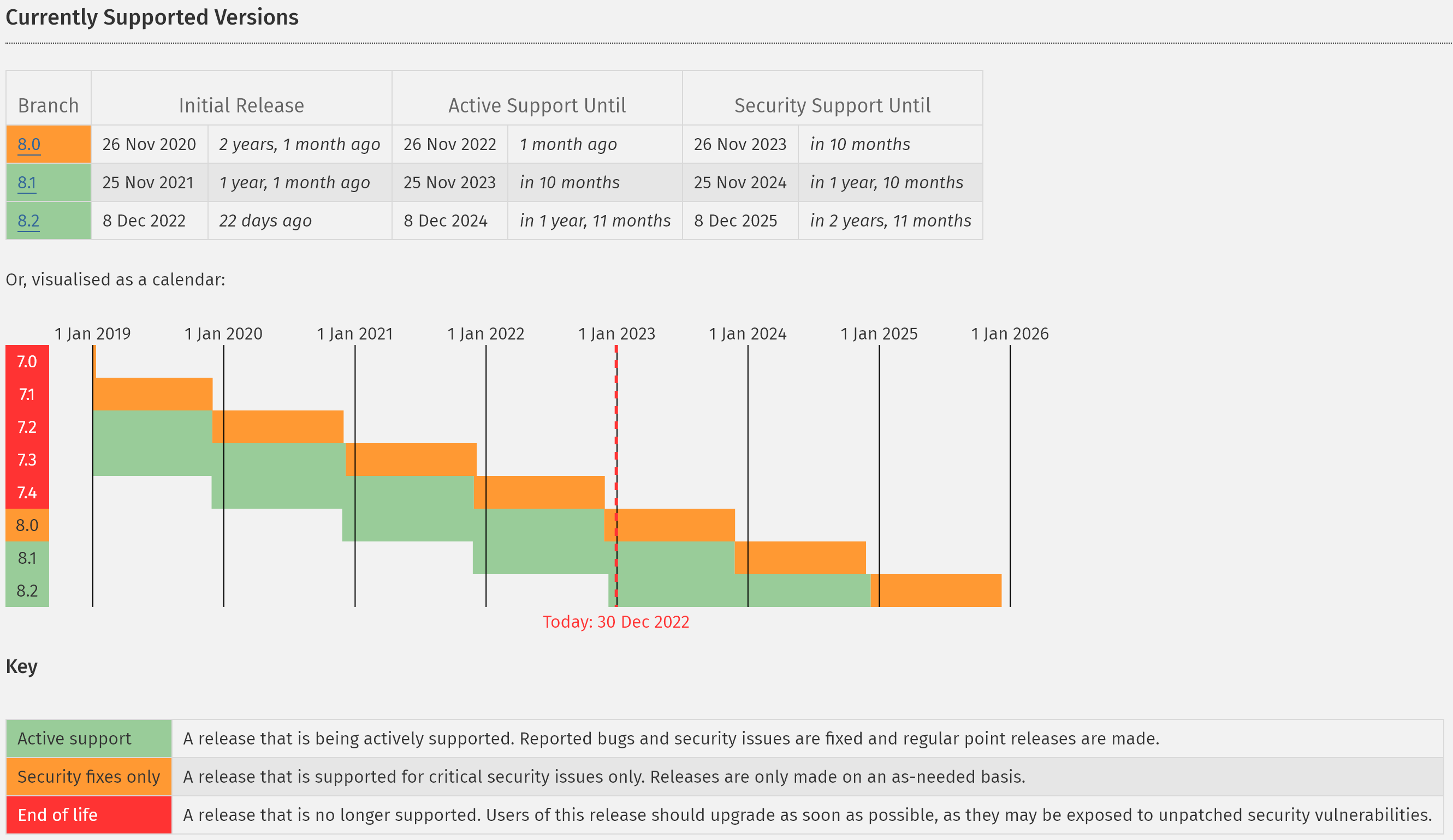
How to update to PHP version 8.1 or 8.2?
---
### Author:  [@hemertje](https://dietpi.com/forum/u/hemertje)
#### Post date: [30 December 2022 09:49 UTC](https://dietpi.com/forum/t/nextcloud-problems-questions/15415/18 "2022-12-30T09:49:57Z")
Security & setup warnings
- The PHP module “imagick” is not enabled although the theming app is. For favicon generation to work correctly, you need to install and enable this module.
Is this the proper way to install and enable this module?
```auto
cd /var/www/nextcloud
sudo -u www-data php occ db:add-missing-indices
```
---
### Author:  [@hemertje](https://dietpi.com/forum/u/hemertje)
#### Post date: [30 December 2022 09:54 UTC](https://dietpi.com/forum/t/nextcloud-problems-questions/15415/19 "2022-12-30T09:54:08Z")
Security & setup warnings
- The PHP modules “gmp” and/or “bcmath” are not enabled. If you use WebAuthn passwordless authentication, these modules are required.
If I’m correct these last two messages on my system can be ignored?
Imagick is deprecated?
I don’t use passwordless webauth, so I don’t need gmp / bcmath.
---
### Author:  [@Joulinar](https://dietpi.com/forum/u/Joulinar)
#### Post date: [30 December 2022 11:20 UTC](https://dietpi.com/forum/t/nextcloud-problems-questions/15415/20 "2022-12-30T11:20:58Z")
> [@hemertje](#):
>
> The PHP modules “gmp” and/or “bcmath” are not enabled
These modules could be ignored if not needed.
> [@hemertje](#):
>
> How to update to PHP version 8.1 or 8.2?
You need to wait on the release of Debian Bookworm Summer 2023 or go with a 3rd party installation of PHP.
[Next page](https://dietpi.com/forum/t/nextcloud-problems-questions/15415.md?page=2)