# Manually underclocking
**URL:** https://dietpi.com/forum/t/manually-underclocking/2207
**Category:** General Discussion
**Created:** [26 April 2018 17:03 UTC](https://dietpi.com/forum/t/manually-underclocking/2207 "2018-04-26T17:03:43Z")
**Posts on this page:** 5
**Page:** 1
### Author:  [@jencelo](https://dietpi.com/forum/u/jencelo)
#### Post date: [26 April 2018 17:03 UTC](https://dietpi.com/forum/t/manually-underclocking/2207/1 "2018-04-26T17:03:43Z")
Hi,
I want to underclock my RPi3 (I only use openhome player and only stream to Tidal, nothing else).
I edited the dietpi/config.txt (boot cannot be edited but when I check boot/config.txt after things seem change except arm\_freq) but although I see the \*below edited text, when I do CPU command I still see 600mhz. Everyhing changes and being added except arm-freq. Where am I doing wrong?
#-------Overclock-------
temp\_limit=65
initial\_turbo=0
force\_turbo=0
#over\_voltage=-4
#arm\_freq=600
#core\_freq=400
#sdram\_freq=400
#over\_voltage\_sdram=-4
#gpu\_mem=16
#gpu\_freq=300
#arm\_freq\_min=600
#core\_freq\_min=250
#sdram\_freq\_min=400
---
### Author:  [@WarHawk](https://dietpi.com/forum/u/WarHawk)
#### Post date: [27 April 2018 03:22 UTC](https://dietpi.com/forum/t/manually-underclocking/2207/2 "2018-04-27T03:22:47Z")
```nohighlight
dietpi-config
```
There should be an option in there under performance to limit the maximum CPU clock speed
---
### Author:  [@jencelo](https://dietpi.com/forum/u/jencelo)
#### Post date: [27 April 2018 16:23 UTC](https://dietpi.com/forum/t/manually-underclocking/2207/3 "2018-04-27T16:23:06Z")
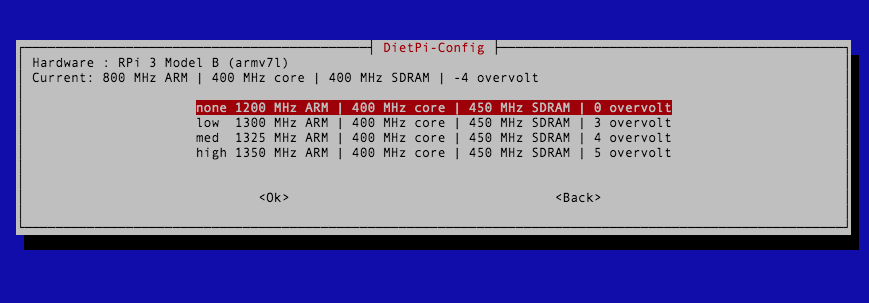
I did take out the SD card and edited the file under Mac Text Editor. Current shows like it works. Not too sure how to check the others to see if they work too.
---
### Author:  [@jencelo](https://dietpi.com/forum/u/jencelo)
#### Post date: [28 April 2018 12:05 UTC](https://dietpi.com/forum/t/manually-underclocking/2207/4 "2018-04-28T12:05:36Z")
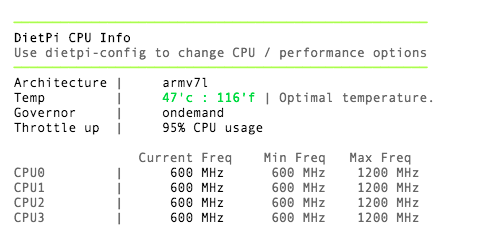
Although it is set to 800mhz. Why don’t I see 800mhz when I do CPU command?
---
### Author:  [@Fourdee](https://dietpi.com/forum/u/Fourdee)
#### Post date: [29 April 2018 11:26 UTC](https://dietpi.com/forum/t/manually-underclocking/2207/5 "2018-04-29T11:26:01Z")
jencelo
Hi,
We disabled underclocking feature in dietpi-config, below the min frequency (600MHz) as we found it was unstable on RPi devices:
[https://github.com/Fourdee/DietPi/issues/73#issuecomment-144103885](https://github.com/Fourdee/DietPi/issues/73#issuecomment-144103885)
Above and including 600MHz, the RPi only supports 600MHz and 1200MHz steps, 800MHz cannot be used.