Replacing the file makes no difference if the error has already occurred. Just tried it out.
It is visual only, some kernel thread waits for an answer from a kernel module (actually it waits until another kernel module queries the GPU firmware, as far as I understand), which is not loaded by default on DietPi. It is interpreted as if it would cause CPU load while waiting, but actually it is not, hence this is visual only.
The related upstream developer could replicate it and wrote he will try to fix it, but no further message since a month: Making sure you're not a bot!
If someone wants to narrow down which modules cause this, comment blacklists in those two files:
/etc/modprobe.d/dietpi-disable_rpi_codec.conf/etc/modprobe.d/dietpi-disable_rpi_camera.conf
They are related to the RPi codec and camera settings in dietpi-config. One could also enable the codecs there, but enabling the camera implies the legacy camera driver, which is not wanted. I really need to migrate this to use the modern one …
If unblocking/loading those modules does not help, try to set the GPU memory to 32 MiB or the default value 76 MiB, which is needed for some of the GPU features to work. With below 32 MiB, a cut-down firmware is loaded, which makes some of the GPU features unusable. I don’t believe those are responsible for the newly hanging thread, but who knows.
Exact the same situtation in my case. Only difference i use an Raspi 3B.
As you can see from the Linux mailing list, it affects all RPi models.
Possibly lightest solution:
sudo modprobe vc_sm_cma
Check whether this normalizes average CPU load as seen in e.g. uptime. If so, to make it permanent:
sudo rm /etc/modprobe.d/dietpi-disable_vcsm.conf
echo vc_sm_cma | sudo tee /etc/modules-load.d/vc_sm_cma.conf
If less than 32 MiB GPU memory are applied (default on DietPi is 16 MiB, which is also the possible minimum), this kernel driver fails to load. You will see the related errors it in dmesg:
[  847.480096] vc_sm_cma: module is from the staging directory, the quality is unknown, you have been warned.
[  847.481448] bcm2835_vc_sm_cma_probe: Videocore shared memory driver
[  847.481491] [vc_sm_connected_init]: start
[  847.484262] vc_sm_cma_vchi_init: failed to open VCHI service (-22)
[  847.484297] [vc_sm_connected_init]: failed to initialize shared memory service
Hence we blacklist in that case, and allow it to load only if 32 MiB or higher GPU memory is applied. However, the driver contacts this VCHI communication node, and that way releases the kernel thread that is waiting for such, causing this higher load average. At least if KMS/DRM is disabled, the driver does not load by default. Hence, removing the blacklist is not enough in that case, but it needs to be loaded actively, which is assured with the second command.
Yes this seems to be working well
yes, this is surviving a reboot 
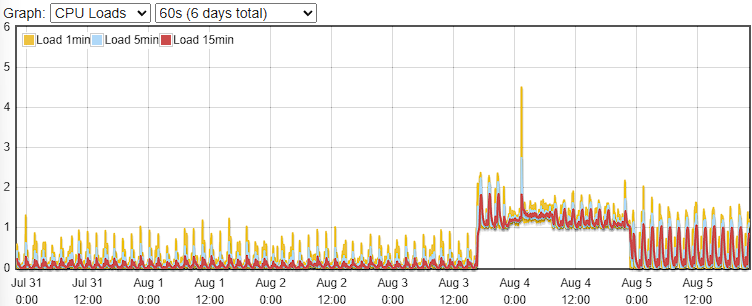
I was running into the same issue with my Raspberry Pi Zero 2 W. After updating from DietPi 9.12 (?) to 9.15 on August 4th load had increased from 0.2 to 1.2. Because a lot of compute time was spent on the processkworker/u21:0-brcmf_wq/mmc1:0001:1 I thought it was related to the wifi driver.
I got a hint that the high load might be related to this topic. And it was. After applying the workaround provided by @MichaIng on August 5th load has fallen to somewhere between 0.2 and 1. Interestingly that is not as low as before the update but lower than without the patch. But thanks for that!
Now I wonder whether the workaround will be provided as patch in one of the next updates or whether the workaround is the final solution.
That one is the WiFi driver indeed, and seems expected to have relatively high load. But this is unrelated to the 1.0 base usage caused by the hanging thread: kworker/u9:0-brcmf_wq/mmc1:0001:1 High CPU on WIFI usage. · Issue #5934 · raspberrypi/linux · GitHub
If you have the time, maybe you can compare the load of other processes or kernel threads when downgrading the kernel. On RPi Zero 2 W I guess you use this one:
apt policy linux-image-rpi-v8
Since it is visual only, while loading that kernel module (if otherwise unused) causes real higher memory usage, I am not keen to ship this workaround to all RPi systems. Let’s hope it is fixed soon in kernel sources.
No change to high load in Dietpi 9.16. Everyone getting by with the vc_sm_cma approach?
This has nothing to do with DietPi and can’t be fixed by DietPi as described above.
Anyway, RPI guys released a new kernel version for Trixie. Unfortunately it’s still missing on the Bookworm repository.