# Lighttpd how to configure for folder acces
**URL:** https://dietpi.com/forum/t/lighttpd-how-to-configure-for-folder-acces/19732
**Category:** Troubleshooting
**Tags:** lighttpd
**Created:** [24 March 2024 17:22 UTC](https://dietpi.com/forum/t/lighttpd-how-to-configure-for-folder-acces/19732 "2024-03-24T17:22:58Z")
**Posts on this page:** 20
**Page:** 1
### Author:  [@bilal](https://dietpi.com/forum/u/bilal)
#### Post date: [24 March 2024 17:22 UTC](https://dietpi.com/forum/t/lighttpd-how-to-configure-for-folder-acces/19732/1 "2024-03-24T17:22:58Z")
infos
- DietPi version
G\_DIETPI\_VERSION\_CORE=9
G\_DIETPI\_VERSION\_SUB=2
G\_DIETPI\_VERSION\_RC=1
G\_GITBRANCH=‘master’
G\_GITOWNER=‘MichaIng’
- Distro version | `bookworm 0`
- Kernel version | Linux DietPi 6.1.21-v8+ #1642 SMP PREEMPT Mon Apr 3 17:24:16 BST 2023 aarch64 GNU/Linux
was a fresh install
on my Raspberry pi 3a+
i just installed software via dietpi-software installer
I testet a lot arround the last days. Now i come to you and want to ask for help,
i read all the treads in this forum and googled a lot was on the lighttpd page and on stack overflow .
never come to an conclusion.
- Software title lighttpd
- was a fresh install just together with the chromium kiosk mode from dietpi-software and dietpi-config
- Can this issue be replicated on a fresh installation of DietPi?
yes i think it is more of a question for others seems to be normal
### yes i also made a link for 10-userdir.conf to → /etc/lighttpd/conf-enabled
so it looks now like :
* * *
```auto
salahtimer@DietPi:/etc/lighttpd/conf-enabled$ ls
10-dir-listing.conf 10-userdir.conf 99-dir-list-folders.conf
10-fastcgi.conf 15-fastcgi-php-fpm.conf 99-unconfigured.conf
```
* * *
my 10-userdir.conf
```auto
##############################
GNU nano 7.2 10-userdir.conf
The userdir module provides a simple way to link user-based directories into
the global namespace of the webserver.
/usr/share/doc/lighttpd/userdir.txt
server.modules += ( "mod_userdir" )
the subdirectory of a user's home dir which should be accessible
under http://$host/~$user
userdir.path = "public_html"
The users whose home directories should not be accessible
userdir.exclude-user = ( "root", "postmaster" )
#########################################
```
#### how to reproduce the failure :
1. … install lighttpd via dietpi-software
2. … create new folder under /var/www/ like → files
3. put an file inside like test.php an echo world
and you will get an 404 Not Found error if you
#### Expected behaviour
- show my html or php site
#### Actual behaviour
- i get an : 404 Not Found
error
---
### Author:  [@Jappe](https://dietpi.com/forum/u/Jappe)
#### Post date: [24 March 2024 18:43 UTC](https://dietpi.com/forum/t/lighttpd-how-to-configure-for-folder-acces/19732/2 "2024-03-24T18:43:27Z")
Hello,
I’m not quite sure if I understand what you are trying to do.
You can just create a folder and put any php/html file inside, you don’t need to create another config file for this.
I made a quick test on my RPi (which also runs lighttpd), I just created a folder inside `/var/www` and created a index.php with an echo command:
[https://jappevpn.ddns.net/test\_for\_bilal/](https://jappevpn.ddns.net/test_for_bilal/)
This works also for non-index files, like test.php:
[https://jappevpn.ddns.net/test\_for\_bilal/test.php](https://jappevpn.ddns.net/test_for_bilal/test.php)
---
### Author:  [@Jappe](https://dietpi.com/forum/u/Jappe)
#### Post date: [24 March 2024 18:49 UTC](https://dietpi.com/forum/t/lighttpd-how-to-configure-for-folder-acces/19732/3 "2024-03-24T18:49:25Z")
Ah ok I think you wanna create for every user it’s own namespace, right?
So when you use `Mod_userdir` you link a path from the users home directory into the namespace of the server.
So for example, you request `http://www.example.org/~jan/index.html` then there must be an `index.html` in `/home/jan/public_html/` (when `userdir.path = "public_html"` is set).
So serving a file from a subfolder and using `mod_userdir` are two different things.
---
### Author:  [@Joulinar](https://dietpi.com/forum/u/Joulinar)
#### Post date: [24 March 2024 19:01 UTC](https://dietpi.com/forum/t/lighttpd-how-to-configure-for-folder-acces/19732/4 "2024-03-24T19:01:37Z")
And you might need to install PHP if you like to serve php file. Actually I’m not sure if it is part of web server installation
---
### Author:  [@bilal](https://dietpi.com/forum/u/bilal)
#### Post date: [24 March 2024 19:01 UTC](https://dietpi.com/forum/t/lighttpd-how-to-configure-for-folder-acces/19732/5 "2024-03-24T19:01:57Z")
Thanks for your fast reply
Yes my problem is as you right mentioned.
i can create a folder and also put a file with contend in it. also done via multiple ways. (samba - sftp -or via nano paste and save ).
my problem is, if i want to connect to the lighttpd server via brower 192.168.17x.x/
on root folder i can open my /index.php /index.html file.
But on next level /folder /script /test or /files i have no acces always is a 404 error responding
---
### Author:  [@bilal](https://dietpi.com/forum/u/bilal)
#### Post date: [24 March 2024 19:03 UTC](https://dietpi.com/forum/t/lighttpd-how-to-configure-for-folder-acces/19732/6 "2024-03-24T19:03:50Z")
thx Joulinar but my index.php testfile runns on /index.php it shows php contend
but on /files/index.php there is no acces.
---
### Author:  [@Jappe](https://dietpi.com/forum/u/Jappe)
#### Post date: [24 March 2024 19:06 UTC](https://dietpi.com/forum/t/lighttpd-how-to-configure-for-folder-acces/19732/7 "2024-03-24T19:06:05Z")
can you run
```auto
lighttpd -tt -f /etc/lighttpd/lighttpd.conf
```
this will test your config (also the ones in `conf-enabled`) for errors.
---
### Author:  [@bilal](https://dietpi.com/forum/u/bilal)
#### Post date: [24 March 2024 19:11 UTC](https://dietpi.com/forum/t/lighttpd-how-to-configure-for-folder-acces/19732/8 "2024-03-24T19:11:32Z")
thanks jappe for your reply
no i dont want to create a link to my users/home/ folder i just want it as a bare /var/www/ root server with folders in it like so 🙂
/var/www/index.php → is ok
/var/www/files/index.php -| 404 Not Found
/var/www/js/ -| 404 Not Found
/var/www/test/ -| 404 Not Found
---
### Author:  [@Jappe](https://dietpi.com/forum/u/Jappe)
#### Post date: [24 March 2024 19:14 UTC](https://dietpi.com/forum/t/lighttpd-how-to-configure-for-folder-acces/19732/9 "2024-03-24T19:14:57Z")
Did you create any custom configs, which could maybe be responsible for this?
If you want you can share your whole config and I can have a look.
So a rule like the following could create a 404 error for every sub-directory.
```auto
$HTTP["url"] =~ "^($|/)" {
url.access-deny = ("")
```
Command to show the whole lighttpd config:
```auto
cat /etc/lighttpd/lighttpd.conf && cat /etc/lighttpd/conf-enabled/*
```
---
### Author:  [@bilal](https://dietpi.com/forum/u/bilal)
#### Post date: [24 March 2024 19:15 UTC](https://dietpi.com/forum/t/lighttpd-how-to-configure-for-folder-acces/19732/10 "2024-03-24T19:15:54Z")
```auto
lighttpd -tt -f /etc/lighttpd/lighttpd.conf
```
do`s nothing ;\
i dont know why ?
---
### Author:  [@Jappe](https://dietpi.com/forum/u/Jappe)
#### Post date: [24 March 2024 19:16 UTC](https://dietpi.com/forum/t/lighttpd-how-to-configure-for-folder-acces/19732/11 "2024-03-24T19:16:35Z")
If there is no reply then there is no error in your config 🙂
Let’s try what I wrote in [https://dietpi.com/forum/t/lighttpd-how-to-configure-for-folder-acces/19732/9?u=jappe](https://dietpi.com/forum/t/lighttpd-how-to-configure-for-folder-acces/19732/9), if you want.
---
### Author:  [@bilal](https://dietpi.com/forum/u/bilal)
#### Post date: [24 March 2024 19:18 UTC](https://dietpi.com/forum/t/lighttpd-how-to-configure-for-folder-acces/19732/12 "2024-03-24T19:18:53Z")
```auto
server.modules = (
"mod_indexfile",
"mod_access",
"mod_alias",
"mod_redirect",
)
server.document-root = "/var/www/html/"
server.upload-dirs = ( "/var/cache/lighttpd/uploads" )
server.errorlog = "/var/log/lighttpd/error.log"
server.pid-file = "/run/lighttpd.pid"
server.username = "www-data"
server.groupname = "www-data"
server.port = 80
# features
#https://redmine.lighttpd.net/projects/lighttpd/wiki/Server_feature-flagsDetails
server.feature-flags += ("server.h2proto" => "enable")
server.feature-flags += ("server.h2c" => "enable")
server.feature-flags += ("server.graceful-shutdown-timeout" => 5)
#server.feature-flags += ("server.graceful-restart-bg" => "enable")
# strict parsing and normalization of URL for consistency and security
# https://redmine.lighttpd.net/projects/lighttpd/wiki/Server_http-parseoptsDetails
# (might need to explicitly set "url-path-2f-decode" = "disable"
# if a specific application is encoding URLs inside url-path)
server.http-parseopts = (
"header-strict" => "enable",# default
"host-strict" => "enable",# default
"host-normalize" => "enable",# default
"url-normalize-unreserved"=> "enable",# recommended highly
"url-normalize-required" => "enable",# recommended
"url-ctrls-reject" => "enable",# recommended
"url-path-2f-decode" => "enable",# recommended highly (unless breaks app)
#"url-path-2f-reject" => "enable",
"url-path-dotseg-remove" => "enable",# recommended highly (unless breaks app)
#"url-path-dotseg-reject" => "enable",
#"url-query-20-plus" => "enable",# consistency in query string
)
index-file.names = ( "index.php", "index.html" )
url.access-deny = ( "~", ".inc" )
static-file.exclude-extensions = ( ".php", ".pl", ".fcgi" )
# default listening port for IPv6 falls back to the IPv4 port
include_shell "/usr/share/lighttpd/use-ipv6.pl " + server.port
include_shell "/usr/share/lighttpd/create-mime.conf.pl"
include "/etc/lighttpd/conf-enabled/*.conf"
#server.compat-module-load = "disable"
server.modules += (
"mod_dirlisting",
"mod_staticfile",
)
dir-listing.encoding = "utf-8"
server.dir-listing = "enable"
# /usr/share/doc/lighttpd/fastcgi.txt.gz
# http://redmine.lighttpd.net/projects/lighttpd/wiki/Docs:ConfigurationOptions#mod_fastcgi-fastcgi
server.modules += ( "mod_fastcgi" )
## The userdir module provides a simple way to link user-based directories into
## the global namespace of the webserver.
##
# /usr/share/doc/lighttpd/userdir.txt
server.modules += ( "mod_userdir" )
## the subdirectory of a user's home dir which should be accessible
## under http://$host/~$user
userdir.path = "public_html"
## The users whose home directories should not be accessible
userdir.exclude-user = ( "root", "postmaster" )
# -*- depends: fastcgi -*-
# -*- conflicts: fastcgi-php -*-
# /usr/share/doc/lighttpd/fastcgi.txt.gz
# http://redmine.lighttpd.net/projects/lighttpd/wiki/Docs:ConfigurationOptions#mod_fastcgi-fastcgi
## Use PHP-FPM service for PHP via FastCGI
fastcgi.server += ( ".php" =>
((
"socket" => "/run/php/php-fpm.sock",
"broken-scriptfilename" => "enable"
))
)
$HTTP["url"] =~ "^/html($|/)" { server.dir-listing = "enable" }
$HTTP["url"] =~ "^/html($|/)" {
dir-listing.activate = "enable"
}
# override prior index-file.name directive
# to fall back to default index.lighttpd.html
index-file.names := ( "index.php", "index.html", "index.lighttpd.html" )
```
sorry have done reedit because of mistake before . thanks
---
### Author:  [@bilal](https://dietpi.com/forum/u/bilal)
#### Post date: [24 March 2024 19:26 UTC](https://dietpi.com/forum/t/lighttpd-how-to-configure-for-folder-acces/19732/13 "2024-03-24T19:26:36Z")
i will do a new → fresh fresh = install on an other sd card.
it will be the same failure i guess, because i do this a while now.
also by raspberry pi os i think
alright i have to upload as normal my files and folders to
/var/www/ myfolder / myfiles
---
### Author:  [@Jappe](https://dietpi.com/forum/u/Jappe)
#### Post date: [24 March 2024 19:31 UTC](https://dietpi.com/forum/t/lighttpd-how-to-configure-for-folder-acces/19732/14 "2024-03-24T19:31:21Z")
> [@bilal](#):
>
> `server.document-root = "/var/www/html/"`
I think this is your problem, so your sub paths should be in `/var/www/html/*`
Is this the config which came with dietpi or did you change it?
On installation via `dietpi-software` it should be changed to `/var/www` (see [https://github.com/MichaIng/DietPi/blob/e87e1ddd6e525da2128b509ac11fc1ab01882297/dietpi/dietpi-software#L3614](https://github.com/MichaIng/DietPi/blob/e87e1ddd6e525da2128b509ac11fc1ab01882297/dietpi/dietpi-software#L3614))
I’m also wondering about the plain text inside your configs, or did you remove the hash tags `#`, which comment out a line?
---
### Author:  [@Jappe](https://dietpi.com/forum/u/Jappe)
#### Post date: [24 March 2024 19:33 UTC](https://dietpi.com/forum/t/lighttpd-how-to-configure-for-folder-acces/19732/15 "2024-03-24T19:33:32Z")
If you do a reinstallation then you would probably also need to remove your old config file because on installation the old config is migrated.
---
### Author:  [@bilal](https://dietpi.com/forum/u/bilal)
#### Post date: [24 March 2024 19:34 UTC](https://dietpi.com/forum/t/lighttpd-how-to-configure-for-folder-acces/19732/16 "2024-03-24T19:34:57Z")
yes sorry i have reedit my post from before i had removed # because i havent put my code in
````auto
``` ```
````
sorry my failure i updatet it
---
### Author:  [@bilal](https://dietpi.com/forum/u/bilal)
#### Post date: [24 March 2024 19:39 UTC](https://dietpi.com/forum/t/lighttpd-how-to-configure-for-folder-acces/19732/17 "2024-03-24T19:39:01Z")
ok wait i will checkt this
yes i experimented before, the software comes by it self originally with /var/www/
i have done /var/www/html/ and vice versa experiments i will correct it.
and will do a new fresh install just a little bit.
iam not the fastet 😉
---
### Author:  [@Jappe](https://dietpi.com/forum/u/Jappe)
#### Post date: [24 March 2024 19:41 UTC](https://dietpi.com/forum/t/lighttpd-how-to-configure-for-folder-acces/19732/18 "2024-03-24T19:41:10Z")
Yea no worries, the thread got a bit mixed up 🙂
Just back up / rename your `/etc/lighttpd/lighttpd.conf` before reinstallation, so you get a “fresh” one.
---
### Author:  [@Joulinar](https://dietpi.com/forum/u/Joulinar)
#### Post date: [25 March 2024 11:02 UTC](https://dietpi.com/forum/t/lighttpd-how-to-configure-for-folder-acces/19732/19 "2024-03-25T11:02:52Z")
ok I did a test install of `Lighttpd` and `PHP`, plus I created a simple php demo file
```auto
dietpi-software install 34 84 89
mkdir /var/www/test
nano /var/www/test/index.php
```
add something like [this](https://gist.githubusercontent.com/SalmanRavoof/f45777c6363c17436225f8a256cf2664/raw/3a0b166b4555f348fb6fd1e488067a097418079d/test.php)
save & exit
```auto
chown www-data:www-data -R /var/www/test/
systemctl restart lighttpd.service
```
open a web browser and go to URL `http://192.168.x.x/test/`
It will result in
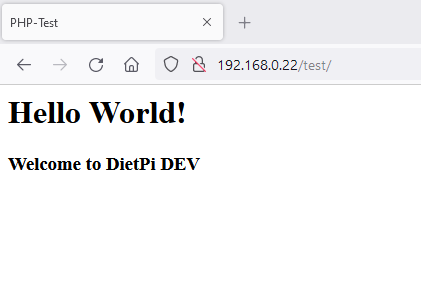
No further configuration changes done on `Lighttpd`
---
### Author:  [@Jappe](https://dietpi.com/forum/u/Jappe)
#### Post date: [25 March 2024 11:07 UTC](https://dietpi.com/forum/t/lighttpd-how-to-configure-for-folder-acces/19732/20 "2024-03-25T11:07:24Z")
Works even without the the owner-change, if you just read files from the folder.
[Next page](https://dietpi.com/forum/t/lighttpd-how-to-configure-for-folder-acces/19732.md?page=2)