canabino
Lets check one-by-one:
cd /tmp
wget https://dietpi.com/downloads/binaries/all/libssl1.0.0_1.0.1t-1+deb8u7_arm64.deb
dpkg -i libssl1.0.0_1.0.1t-1+deb8u7_arm64.deb
Which error message does that show?
canabino
Lets check one-by-one:
cd /tmp
wget https://dietpi.com/downloads/binaries/all/libssl1.0.0_1.0.1t-1+deb8u7_arm64.deb
dpkg -i libssl1.0.0_1.0.1t-1+deb8u7_arm64.deb
Which error message does that show?
Hi MichaIng Thanks for responding.
It is able to download the package but comes up with errors on dpkg.
Saving to: ‘libssl1.0.0_1.0.1t-1+deb8u7_arm64.deb’
libssl1.0.0_1.0.1t-1+deb8u7_arm64.d 100%[===================================================================>] 844.46K 429KB/s in 2.0s
2019-06-09 07:46:47 (429 KB/s) - ‘libssl1.0.0_1.0.1t-1+deb8u7_arm64.deb’ saved [864732/864732]
root@DietPi:/tmp# dpkg -i libssl1.0.0_1.0.1t-1+deb8u7_arm64.deb
dpkg: > error > processing archive libssl1.0.0_1.0.1t-1+deb8u7_arm64.deb (–install):
package architecture (arm64) does not match system (armhf)
Errors > were encountered while processing:
libssl1.0.0_1.0.1t-1+deb8u7_arm64.deb
root@DietPi:/tmp#
I have uninstalled and installed several times and it will work for a day or two then fail.
This is the error msg I receive. I have uninstalled it for now:
n 08 10:50:52 DietPi systemd[1]: Started Jackett Daemon (DietPi).
Jun 08 10:50:53 DietPi jackett[1529]: 06-08 10:50:53 Info Starting Jackett v0.11.391.0
Jun 08 10:50:53 DietPi jackett[1529]: Unhandled Exception: System.BadImageFormatException: Could not load file or assembly 'Newtonsoft.Json, Version=12.0.0.0, Culture=neutral, P
ublicKeyToken=30ad4fe6b2a6aeed'. The module was expected to contain an assembly manifest.
Jun 08 10:50:53 DietPi jackett[1529]:    at Jackett.Common.Services.ConfigurationService.BuildServerConfig(RuntimeSettings runtimeSettings)
Jun 08 10:50:53 DietPi jackett[1529]:    at Jackett.Server.Program.Main(String[] args) in /home/appveyor/projects/jackett/src/Jackett.Server/Program.cs:line 120
Jun 08 10:50:53 DietPi systemd[1]: jackett.service: Main process exited, code=killed, status=6/ABRT
Jun 08 10:50:53 DietPi systemd[1]: jackett.service: Unit entered failed state.
Jun 08 10:50:53 DietPi systemd[1]: jackett.service: Failed with result 'signal'.
Jun 08 10:50:58 DietPi systemd[1]: jackett.service: Service hold-off time over, scheduling restart.
Jun 08 10:50:58 DietPi systemd[1]: Stopped Jackett Daemon (DietPi).
Jun 08 10:50:58 DietPi systemd[1]: Started Jackett Daemon (DietPi).
Jun 08 10:50:58 DietPi jackett[1541]: 06-08 10:50:58 Info Starting Jackett v0.11.391.0
Jun 08 10:50:58 DietPi jackett[1541]: Unhandled Exception: System.BadImageFormatException: Could not load file or assembly 'Newtonsoft.Json, Version=12.0.0.0, Culture=neutral, P
ublicKeyToken=30ad4fe6b2a6aeed'. The module was expected to contain an assembly manifest.
Jun 08 10:50:58 DietPi jackett[1541]:    at Jackett.Common.Services.ConfigurationService.BuildServerConfig(RuntimeSettings runtimeSettings)
Jun 08 10:50:58 DietPi jackett[1541]:    at Jackett.Server.Program.Main(String[] args) in /home/appveyor/projects/jackett/src/Jackett.Server/Program.cs:line 120
Jun 08 10:50:58 DietPi systemd[1]: jackett.service: Main process exited, code=killed, status=6/ABRT
Jun 08 10:50:58 DietPi systemd[1]: jackett.service: Unit entered failed state.
Jun 08 10:50:58 DietPi systemd[1]: jackett.service: Failed with result 'signal'.
Jun 08 10:51:03 DietPi systemd[1]: jackett.service: Service hold-off time over, scheduling restart.
Jun 08 10:51:03 DietPi systemd[1]: Stopped Jackett Daemon (DietPi).
hd888
AFAIK there is still an open issue with the auto updater that makes Jackett service fail.
Is it possible to disable the internal auto updater and update checker?
dietpi-software reinstall 147 at least is the slightly shorter method to solve it the hard way.
Check out: https://github.com/MichaIng/DietPi/issues/2593
canabino
Sorry seams like I missed your answer. I gave you commands for the wrong architecture accidentally, please try instead (if issue still persists):
cd /tmp
wget https://dietpi.com/downloads/binaries/all/libssl1.0.0_1.0.1t-1+deb8u7_armhf.deb
dpkg -i libssl1.0.0_1.0.1t-1+deb8u7_armhf.deb
MichaIng
I followed your instructions and libssl installed correctly. I then rebooted but Jackett still didn’t work.
I then ran
dietpi-software reinstall 147
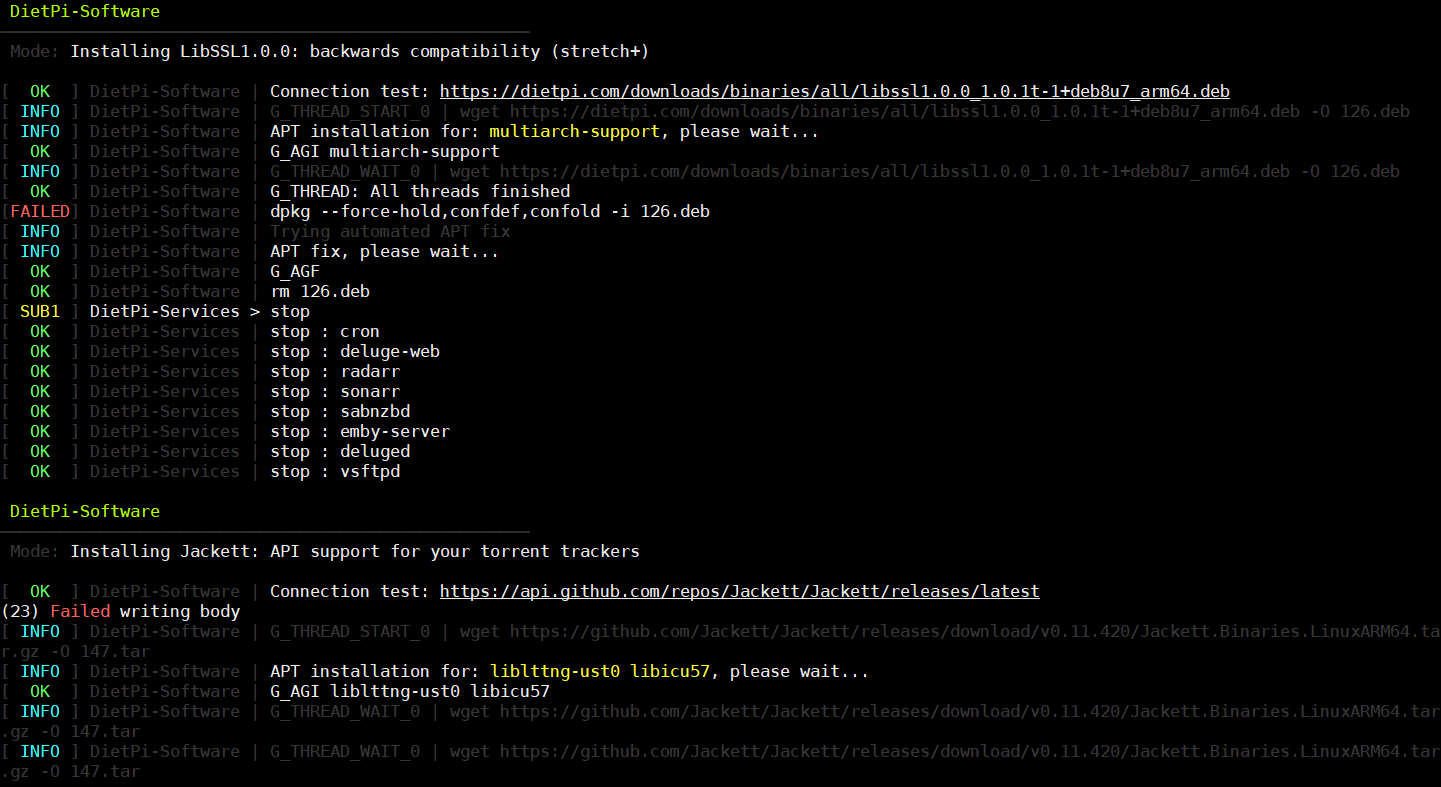
The same errors appeared during install. See pic. And Jackett still won’t start.
canabino
Okay now I am confused. Which SBC device do you use?
DietPi-Software identifies it as ARMv8/arm64 and (attempts to) installs libssl1.0.0 and Jackett accordingly. But when manually attempting this DPKG said: package architecture (arm64) does not match system (armhf)
Please paste:
echo $G_HW_MODEL_DESCRIPTION
uname -a
MichaIng
I use the ROCK PI 4 from RADXA.
Here is the result for the code
root@DietPi:~# echo $G_HW_MODEL_DESCRIPTION
Generic Device (aarch64)
root@DietPi:~# uname -a
Linux DietPi 4.4.154.c83-00028-gaeed0d91c4a7 #17 SMP Thu Apr 18 14:28:51 CDT 2019 aarch64 GNU/Linux
root@DietPi:~#
MichaIng
Here are the results.
root@DietPi:~# dpkg -l | grep ':arm64' | wc -l
195
root@DietPi:~# dpkg -l | grep ':armhf' | wc -l
0
MichaIng
I got Jackett working again on RADXA’s Armbian image.
I am running on RADXA’s ROCK PI 4 from this post
I converted their Debian stretch image to DietPi.
I got this from their forum:
Radxa’s apt repository is a mess, many of their “stretch ARM64” debs were built on Ubuntu, they will break Debian ARM64 if you run “sudo apt upgrade” without any protection.
I installed their Armbian image and converted it to DietPi and now Jacket is working. But my NordVPN which I have 3 years subscription isn’t working.
If I have to choose I would choose NordVPN to work because Sonarr can add RARBG as a tracker without Jackett, I won’t have the other torrent sites.
Here is another result for Jackett
root@DietPi:~# tail -20 /opt/jackett/Jackett/log.txt
2019-06-23 21:32:45.5100 Info Loading Cardigann definition /opt/jackett/Definitions/sukebeinyaasi.yml
2019-06-23 21:32:45.5172 Info Loading Cardigann definition /opt/jackett/Definitions/gaytorrentru.yml
2019-06-23 21:32:45.5283 Info Loading Cardigann definition /opt/jackett/Definitions/zamundanet.yml
2019-06-23 21:32:45.5387 Info Loading Cardigann definition /opt/jackett/Definitions/hdchina.yml
2019-06-23 21:32:45.5509 Info Loading Cardigann definition /opt/jackett/Definitions/torrentslocal.yml
2019-06-23 21:32:45.6744 Info Loading Cardigann definition /opt/jackett/Definitions/mteamtp.yml
2019-06-23 21:32:45.6867 Info Loading Cardigann definition /opt/jackett/Definitions/p2pbg.yml
2019-06-23 21:32:45.7021 Info Loading Cardigann definition /opt/jackett/Definitions/bithumen.yml
2019-06-23 21:32:45.7133 Info Loading Cardigann definition /opt/jackett/Definitions/hdbitscom.yml
2019-06-23 21:32:45.7190 Info Loading Cardigann definition /opt/jackett/Definitions/mvgroupmain.yml
2019-06-23 21:32:45.7273 Info Loading Cardigann definition /opt/jackett/Definitions/diablotorrent.yml
2019-06-23 21:32:45.7381 Info Loading Cardigann definition /opt/jackett/Definitions/nethd.yml
2019-06-23 21:32:45.7442 Info Loading Cardigann definition /opt/jackett/Definitions/chdbits.yml
2019-06-23 21:32:45.7510 Info Loading Cardigann definition /opt/jackett/Definitions/tapochek.yml
2019-06-23 21:32:45.8229 Info Loading Cardigann definition /opt/jackett/Definitions/insanetracker.yml
2019-06-23 21:32:45.8334 Info Loading Cardigann definition /opt/jackett/Definitions/sktorrent.yml
2019-06-23 21:32:45.8462 Info Loading Cardigann definition /opt/jackett/Definitions/gfxnews.yml
2019-06-23 21:32:45.8890 Info Adding aggregate indexer
2019-06-23 21:32:46.2767 Warn No XML encryptor configured. Key {ac545dcb-bb84-4ef1-84e3-c4dfb0f4ff7c} may be persisted to storage in unencrypted form.
2019-06-23 21:32:46.2767 Warn No XML encryptor configured. Key {ac545dcb-bb84-4ef1-84e3-c4dfb0f4ff7c} may be persisted to storage in unencrypted form.
MichaIng
Everything is working now, Jackett and NordVPN 

On RADXA’s site, there was a new community created image, I just converted it to a DietPi system and everything is working.
Would you like me to create the system image from the community created image? or their Debian or Armbian?
canabino
Ah yeah just had the other topic opened .
Okay so all this matches, saying it’s indeed ARMv8, of course the ROCK Pi 4 with RK3399 is  !
!
But the question is now why APT/dpkg wants to install armhf packages. Lets check which other packages from which architecture are installed already:
dpkg -l | grep ':arm64' | wc -l
dpkg -l | grep ':armhf' | wc -l
I will also check the image you mentioned in the other topic.
Okay as of the other topic, the issue is an armhf image on an ARMv8 chip, which I never faced before.
You could try to hardcode ARMv7 as well into DietPi:
sed -i '/G_HW_ARCH_DESCRIPTION=/c\G_HW_ARCH_DESCRIPTION=armv7l' /DietPi/dietpi/func/dietpi-globals
sed -i '/G_HW_ARCH_DESCRIPTION=/c\G_HW_ARCH_DESCRIPTION=armv7l' /DietPi/dietpi/func/dietpi-obtain_hw_model
/DietPi/dietpi/func/dietpi-obtain_hw_model
. /DietPi/dietpi/func/dietpi-globals
dietpi-software reinstall 147
Ah and while I write you were faster. Can you link the image you finally used? But again, lets switch to GitHub to not further force off-topic here : https://github.com/MichaIng/DietPi/issues/2445