# Installation Snowflake?
**URL:** https://dietpi.com/forum/t/installation-snowflake/6566
**Category:** Troubleshooting
**Created:** [27 April 2022 20:18 UTC](https://dietpi.com/forum/t/installation-snowflake/6566 "2022-04-27T20:18:09Z")
**Posts on this page:** 16
**Page:** 1
### Author:  [@Klola](https://dietpi.com/forum/u/Klola)
#### Post date: [27 April 2022 20:18 UTC](https://dietpi.com/forum/t/installation-snowflake/6566/1 "2022-04-27T20:18:09Z")
Hey,
I am trying to install Snowflake under 8.3.1 Bullseye according to the [following instructions.](https://www.kuketz-blog.de/raspberry-pi-menschen-mit-snowflake-helfen-internet-zensur-zu-umgehen/)
```nohighlight
sudo apt-get update
sudo apt-get upgrade
sudo apt-get install git
sudo apt-get install golang
cd
git clone https://git.torproject.org/pluggable-transports/snowflake.git
cd snowflake/proxy
go build
```
I can’t get any further here, I get an error message with “directory not found”.
Is this due to /home/pi?
```nohighlight
nohup /home/pi/snowflake/proxy/proxy > /home/pi/snowflake/proxy/snowflake.log 2>&1 &
```
Thanks
---
### Author:  [@Joulinar](https://dietpi.com/forum/u/Joulinar)
#### Post date: [27 April 2022 20:32 UTC](https://dietpi.com/forum/t/installation-snowflake/6566/2 "2022-04-27T20:32:50Z")
of course directory /home/pi/ did not exist on DietPi as the entire user pi did not exist. If such a user is required, it would need to be created manually.
---
### Author:  [@Klola](https://dietpi.com/forum/u/Klola)
#### Post date: [27 April 2022 20:52 UTC](https://dietpi.com/forum/t/installation-snowflake/6566/3 "2022-04-27T20:52:02Z")
k, found something else 🙂
//Edit: New Link [Install Tor Snowflake on the Raspberry Pi with DietPi.](https://nickwasused.com/2022-03-12-tor-snowflake)
---
### Author:  [@MichaIng](https://dietpi.com/forum/u/MichaIng)
#### Post date: [2 May 2022 19:18 UTC](https://dietpi.com/forum/t/installation-snowflake/6566/4 "2022-05-02T19:18:21Z")
Btw, the latest version of Go can be installed via DietPi-Software:
```nohighlight
apt autopurge golang
dietpi-software install 188
```
This pulls the latest upstream build while the Debian package is several versions older 🙂.
As alternative to /home/pi you could use /home/dietpi. Latest Raspberry Pi OS doesn’t ship with the pi user anymore either, but one is offered to create a custom login user now on first boot. Something we wanted to do with DietPi as well when time allows.
---
### Author:  [@Klola](https://dietpi.com/forum/u/Klola)
#### Post date: [2 May 2022 20:31 UTC](https://dietpi.com/forum/t/installation-snowflake/6566/5 "2022-05-02T20:31:18Z")
Thanks, I currently have go1.15.15 installed.
Snowflake should now run according to the tutorial from my second link.
Let’s see, I will look again in the next days for the golang update 🙂
---
### Author:  [@Klola](https://dietpi.com/forum/u/Klola)
#### Post date: [3 May 2022 13:18 UTC](https://dietpi.com/forum/t/installation-snowflake/6566/6 "2022-05-03T13:18:25Z")
MichaIng
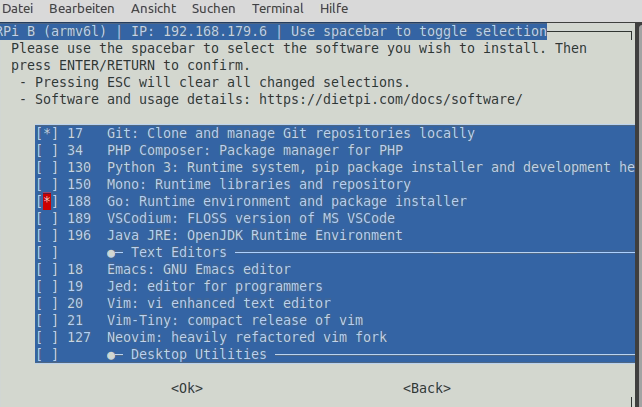
Had now installed it again via DietPi-software 188 → but I still have go1.15.15 linux/arm.
Do i have to uninstall the old version before i install the 188 again?
by the way: root@Snowflake:~# tail -f /var/log/snowflake/snowflake.log
May 3 14:39:45 Snowflake snowflake[20734]: 2022/05/03 12:39:45 In the last 1h0m0s, there were 6 connections. Traffic Relayed ↑ 59 MB, ↓ 4 MB.

---
### Author:  [@MichaIng](https://dietpi.com/forum/u/MichaIng)
#### Post date: [3 May 2022 14:13 UTC](https://dietpi.com/forum/t/installation-snowflake/6566/7 "2022-05-03T14:13:05Z")
Have you purged the APT package and rebuilt snowflake?
Also restart the shell (logout+login) to update the Go paths in the environment.
---
### Author:  [@Klola](https://dietpi.com/forum/u/Klola)
#### Post date: [4 May 2022 12:19 UTC](https://dietpi.com/forum/t/installation-snowflake/6566/8 "2022-05-04T12:19:41Z")
first uninstalled it via dietpi-software.
then again.
sudo apt-get remove golang-go
sudo apt-get remove --auto-remove golang-go
Paths remained, but version is now up to date. Thanks
---
### Author:  [@MichaIng](https://dietpi.com/forum/u/MichaIng)
#### Post date: [4 May 2022 16:20 UTC](https://dietpi.com/forum/t/installation-snowflake/6566/9 "2022-05-04T16:20:23Z")
Great. Now I see that your second link contains this way of installing Go from upstream builds as well. There is also a step to add the Go paths. If you followed this, that care that paths are not set doubled: dietpi-software adds them for all users via /etc/bashrc.d/dietpi-go.sh, if I’m not mistaken (currently on the road).
---
### Author:  [@envious\_jag](https://dietpi.com/forum/u/envious_jag)
#### Post date: [31 October 2022 07:40 UTC](https://dietpi.com/forum/t/installation-snowflake/6566/10 "2022-10-31T07:40:38Z")
I too wanted to set up the snowflake proxy on my fresh dietpi install. Ran into some difficulties with the go install via dietpi-software. It seems that like there could still be something amiss with the [Go paths set via dietpi-software](https://github.com/MichaIng/DietPi/pull/5738)
I manually had to add the GOPATH to my .bashrc. This did work when running go directly from the cli. However, when trying to build the snowflake proxy, go was not found on my system.
My current workaround is to uninstall go and install golang via apt.
– Edit
I set up a clean install once more and installed go via dietpi-software. Sadly no bueno on the paths being added on install.
---
### Author:  [@MichaIng](https://dietpi.com/forum/u/MichaIng)
#### Post date: [31 October 2022 14:55 UTC](https://dietpi.com/forum/t/installation-snowflake/6566/11 "2022-10-31T14:55:16Z")
GOPATH isn’t set intentionally. It defaults to `~/go` and hence now is consistent with upstream and Debian install.
The Go compiler and tools however should be available in any interactive bash session. Please show:
```bash
echo "$PATH"
cat /etc/bashrc.d/go.sh
```
---
### Author:  [@envious\_jag](https://dietpi.com/forum/u/envious_jag)
#### Post date: [1 November 2022 09:29 UTC](https://dietpi.com/forum/t/installation-snowflake/6566/12 "2022-11-01T09:29:42Z")
Alright, this is after a fresh install, having only adguard&unbound, and snowflake build via golang running. I then proceeded to install go via ‘sudo dietpi-software install 188’.
$ echo “$PATH”
/usr/local/bin:/usr/bin:/bin:/usr/local/games:/usr/games
$ cat /etc/bashrc.d/go.sh
cat: /etc/bashrc.d/go.sh: Datei oder Verzeichnis nicht gefunden
I did notice this output on my screen after installation.
```auto
DietPi-Software
─────────────────────────────────────────────────────
Step: Installing Go: Runtime environment and package installer
[OK] DietPi-Software | cd /tmp/DietPi-Software
[OK] DietPi-Software | curl -sSfL https://golang.org/dl/go1.19.2.linux-arm64.tar.gz -o go1.19.2.linux-arm64.tar.gz
[OK] DietPi-Software | tar xf go1.19.2.linux-arm64.tar.gz --one-top-level=/usr/local
[OK] DietPi-Software | rm go1.19.2.linux-arm64.tar.gz
export PATH="$PATH:/usr/local/go/bin" /etc/bashrc.d/go.sh
/boot/dietpi/dietpi-software: line 3204: /etc/bashrc.d/go.sh: No such file or directory
```
---
### Author:  [@Joulinar](https://dietpi.com/forum/u/Joulinar)
#### Post date: [1 November 2022 11:00 UTC](https://dietpi.com/forum/t/installation-snowflake/6566/13 "2022-11-01T11:00:13Z")
> [@envious\_jag](#):
>
> ```auto
> export PATH="$PATH:/usr/local/go/bin" /etc/bashrc.d/go.sh
> /boot/dietpi/dietpi-software: line 3204: /etc/bashrc.d/go.sh: No such file or directory
>
> ```
probably a bug on our install script. we will have a look
---
### Author:  [@envious\_jag](https://dietpi.com/forum/u/envious_jag)
#### Post date: [1 November 2022 11:03 UTC](https://dietpi.com/forum/t/installation-snowflake/6566/14 "2022-11-01T11:03:05Z")
Seems like it. Checking dietpi-software on GitHub shows, that the previous creation of go.sh is missing entirely. Also, I just double checked, /mnt/dietpi\_userdata/go is not created.
---
### Author:  [@Joulinar](https://dietpi.com/forum/u/Joulinar)
#### Post date: [1 November 2022 11:05 UTC](https://dietpi.com/forum/t/installation-snowflake/6566/15 "2022-11-01T11:05:39Z")
RP up: [DietPi-Software | Go by Joulinar · Pull Request #5852 · MichaIng/DietPi · GitHub](https://github.com/MichaIng/DietPi/pull/5852)
---
### Author:  [@MichaIng](https://dietpi.com/forum/u/MichaIng)
#### Post date: [1 November 2022 16:01 UTC](https://dietpi.com/forum/t/installation-snowflake/6566/16 "2022-11-01T16:01:51Z")
As mentioned in the PR, `/mnt/dietpi_userdata/go` isn’t used anymore on fresh installs, but projects/modules/crates are created in `~/go` now by default, to align with official and Debian Go installs. But GOPATH can still be set of course to overwrite the default.