# Install DietPi on Proxmox BASH script
**URL:** https://dietpi.com/forum/t/install-dietpi-on-proxmox-bash-script/15679
**Category:** Community Tutorials
**Created:** [21 January 2023 23:26 UTC](https://dietpi.com/forum/t/install-dietpi-on-proxmox-bash-script/15679 "2023-01-21T23:26:54Z")
**Posts on this page:** 20
**Page:** 1
### Author:  [@dazeb](https://dietpi.com/forum/u/dazeb)
#### Post date: [21 January 2023 23:26 UTC](https://dietpi.com/forum/t/install-dietpi-on-proxmox-bash-script/15679/1 "2023-01-21T23:26:54Z")
I made a basic script that installs DietPi on Proxmox as I use it for lots of VM’s. This just helps get it booted up and online quicker.
Git Repo [GitHub - dazeb/proxmox-dietpi-installer: A Proxmox Helper Script to install DietPi in Proxmox](https://github.com/dazeb/proxmox-dietpi-installer)
The installer just needs to know where to store the VM disk and the storage type. The rest is automatic.
EDIT: The script has now been updated to support more storage pools including BTRFS and ZFS.
---
### Author:  [@Joulinar](https://dietpi.com/forum/u/Joulinar)
#### Post date: [22 January 2023 09:04 UTC](https://dietpi.com/forum/t/install-dietpi-on-proxmox-bash-script/15679/2 "2023-01-22T09:04:40Z")
Ping @StephanStS @HolgerTB as you both use Proxmox quite heavily 🙂
---
### Author:  [@HolgerTB](https://dietpi.com/forum/u/HolgerTB)
#### Post date: [22 January 2023 15:20 UTC](https://dietpi.com/forum/t/install-dietpi-on-proxmox-bash-script/15679/3 "2023-01-22T15:20:31Z")
I have tested the script. After make it executable I could run the script.
But the RAM was 512 MB, CPU only 1 core. As far as I can see in the script the variable RAM=$ and CORES=$ are not used when creating the vm.
I added these lines to the script and it worked:
qm set $ID --cores “$CORES”
qm set $ID --memory “$RAM”
Maybe there are some things to add to improve the script:
- ability to enter the Proxomox VM ID
- ability to provide a VM Name
And it would be perfect!
Thanks for sharing!!
---
### Author:  [@StephanStS](https://dietpi.com/forum/u/StephanStS)
#### Post date: [23 January 2023 11:53 UTC](https://dietpi.com/forum/t/install-dietpi-on-proxmox-bash-script/15679/4 "2023-01-23T11:53:41Z")
I have made some templates for my environment:
CPU, RAM, disk size as well as regional settings, disable IPv6 in my VMs etc set. Made all updates and then converted it to a template for further cloning.
Did this for a headless and two GUI based machines.
But your script is a nice starter for using the VMs initially.
I also am working at a LXC DietPi container. I generate them with a script from a VM.
---
### Author:  [@dazeb](https://dietpi.com/forum/u/dazeb)
#### Post date: [23 January 2023 14:09 UTC](https://dietpi.com/forum/t/install-dietpi-on-proxmox-bash-script/15679/5 "2023-01-23T14:09:18Z")
thanks, yea its just a starter script really, everything is commented so that it should be easily editable by beginners.
---
### Author:  [@dazeb](https://dietpi.com/forum/u/dazeb)
#### Post date: [23 January 2023 14:14 UTC](https://dietpi.com/forum/t/install-dietpi-on-proxmox-bash-script/15679/6 "2023-01-23T14:14:48Z")
When you run the script it will now ask you for how much RAM and how many cores.
Default values for RAM and CPU set at 2048MB and x2 cores.
Thanks for testing!
---
### Author:  [@HolgerTB](https://dietpi.com/forum/u/HolgerTB)
#### Post date: [23 January 2023 15:33 UTC](https://dietpi.com/forum/t/install-dietpi-on-proxmox-bash-script/15679/7 "2023-01-23T15:33:34Z")
Great, but your script is still missing the qm set commands:
qm set $ID --net0 “virtio,bridge=vmbr0”
qm set $ID --scsi0 “$STORAGE:vm-$ID-disk-0”
qm set $ID --boot order=‘scsi0’
qm set $ID --scsihw virtio-scsi-pci
you need to add
qm set $ID --cores “$CORES”
qm set $ID --memory “$RAM”
---
### Author:  [@dazeb](https://dietpi.com/forum/u/dazeb)
#### Post date: [23 January 2023 16:01 UTC](https://dietpi.com/forum/t/install-dietpi-on-proxmox-bash-script/15679/8 "2023-01-23T16:01:21Z")
> [@HolgerTB](#):
>
> qm set $ID --cores “$CORES”
> qm set $ID --memory “$RAM”
Wow i can’t believe i missed that, i removed it while testing as initially i had the ram and cores set as a variable
```auto
RAM=1024
CORES=2
```
I used a oneliner `qm create` at first to create the machine but that didn’t work out without errors.
It’s now fixed with the `qm set $ID --cores “$CORES”` and `qm set $ID --memory “$RAM”`
Thanks again!
---
### Author:  [@dazeb](https://dietpi.com/forum/u/dazeb)
#### Post date: [15 February 2023 16:26 UTC](https://dietpi.com/forum/t/install-dietpi-on-proxmox-bash-script/15679/9 "2023-02-15T16:26:33Z")
The script has been updated with patch 2 with some help from @MichaIng.
Thank you!
---
### Author:  [@fow0ryl](https://dietpi.com/forum/u/fow0ryl)
#### Post date: [25 August 2023 22:02 UTC](https://dietpi.com/forum/t/install-dietpi-on-proxmox-bash-script/15679/10 "2023-08-25T22:02:14Z")
Did not work for me on PVE 7.4-3 …
I have to change this line
```auto
qm set "$ID" --scsi0 "$STORAGE:vm-$ID-disk-0"
```
to
```auto
qm set "$ID" --scsi0 "$STORAGE:$ID/vm-$ID-disk-0.raw"
```
---
### Author:  [@dazeb](https://dietpi.com/forum/u/dazeb)
#### Post date: [26 August 2023 08:01 UTC](https://dietpi.com/forum/t/install-dietpi-on-proxmox-bash-script/15679/11 "2023-08-26T08:01:43Z")
Thanks for letting us know, I’ll test and update the script today.
EDIT:
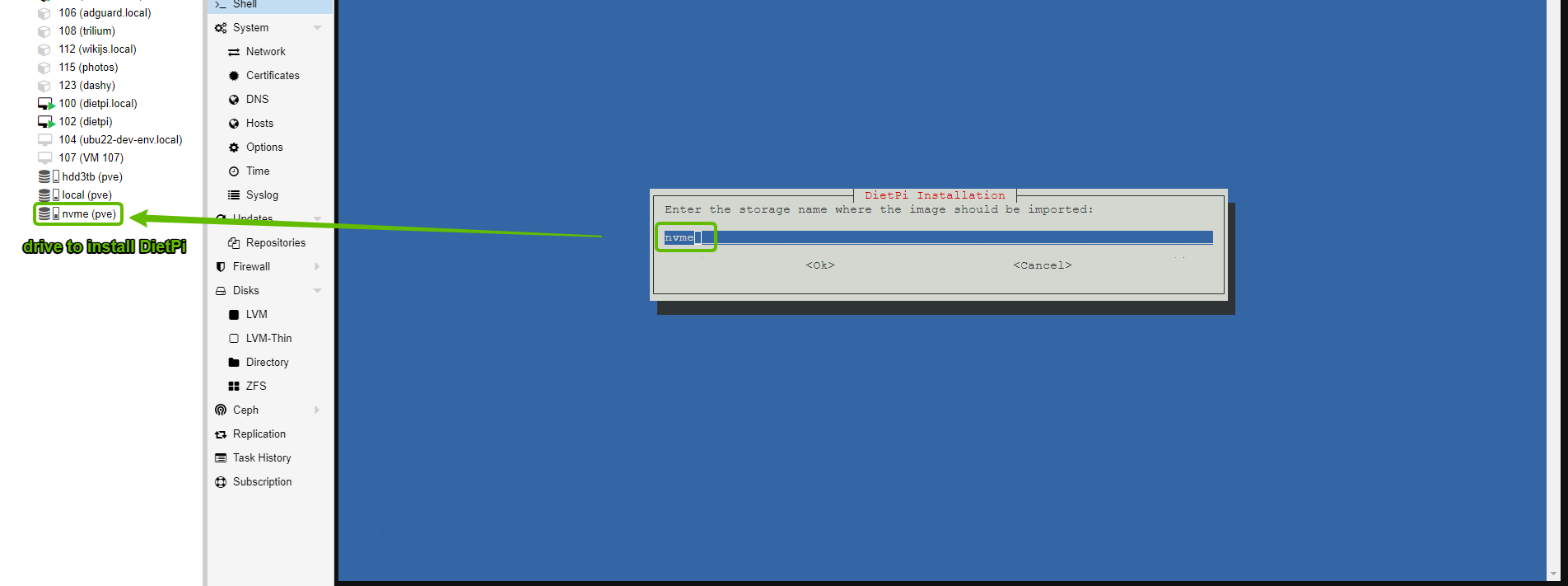
Currently tested for 7.4-16 all working as expected. Pls make sure to type your storage name when asked. eg,
---
### Author:  [@fow0ryl](https://dietpi.com/forum/u/fow0ryl)
#### Post date: [3 September 2023 12:36 UTC](https://dietpi.com/forum/t/install-dietpi-on-proxmox-bash-script/15679/12 "2023-09-03T12:36:22Z")
Of course I had typed the correct storage name. With empty or incorrect storage name I got other errors.
Maybe that the underlaying filesystem makes a difference. I’m using BTRFS-Raid-0 for performance reasons on my SSD’s. I would prefer ZFS over BTRFS. But it is very very slow on my hardware. So I decided to use ZFS-Raid with HDD’s only.
---
### Author:  [@dazeb](https://dietpi.com/forum/u/dazeb)
#### Post date: [3 September 2023 17:11 UTC](https://dietpi.com/forum/t/install-dietpi-on-proxmox-bash-script/15679/13 "2023-09-03T17:11:17Z")
I get what you’re saying now, I will see if I can add BTRFS. Maybe by asking the user which filesystem type to store as the storage variable. Apologies for the confusion and thanks for letting me know I’ll get on it as soon as possible.
---
### Author:  [@dazeb](https://dietpi.com/forum/u/dazeb)
#### Post date: [3 September 2023 17:46 UTC](https://dietpi.com/forum/t/install-dietpi-on-proxmox-bash-script/15679/14 "2023-09-03T17:46:10Z")
I have added an option to use BTRFS, please could you switch to the testing branch on github and try that version and let me know how it goes as I cannot test BTRFS filesystem right now.
> **[GitHub - dazeb/proxmox-dietpi-installer at testing](https://github.com/dazeb/proxmox-dietpi-installer/tree/testing)**
>
> testing
---
### Author:  [@fow0ryl](https://dietpi.com/forum/u/fow0ryl)
#### Post date: [5 September 2023 11:07 UTC](https://dietpi.com/forum/t/install-dietpi-on-proxmox-bash-script/15679/15 "2023-09-05T11:07:18Z")
@dazeb
Works perfect 🙂
---
### Author:  [@dazeb](https://dietpi.com/forum/u/dazeb)
#### Post date: [6 September 2023 14:28 UTC](https://dietpi.com/forum/t/install-dietpi-on-proxmox-bash-script/15679/16 "2023-09-06T14:28:30Z")
Sweet, thanks for getting back to me.
Hopefully ill get the changes moved to the main branch soon.
---
### Author:  [@MichaIng](https://dietpi.com/forum/u/MichaIng)
#### Post date: [6 September 2023 17:57 UTC](https://dietpi.com/forum/t/install-dietpi-on-proxmox-bash-script/15679/17 "2023-09-06T17:57:57Z")
Does anyone know whether this naming scheme is the same for mdadm RAIDs? And in case of Btrfs it is probably only when using its RAID/volume features but not when just formatting a single drive with a single Btrfs partition, is it?
---
### Author:  [@dazeb](https://dietpi.com/forum/u/dazeb)
#### Post date: [6 September 2023 19:01 UTC](https://dietpi.com/forum/t/install-dietpi-on-proxmox-bash-script/15679/18 "2023-09-06T19:01:22Z")
@MichaIng looking into this
---
### Author:  [@g1gop](https://dietpi.com/forum/u/g1gop)
#### Post date: [8 September 2023 17:23 UTC](https://dietpi.com/forum/t/install-dietpi-on-proxmox-bash-script/15679/19 "2023-09-08T17:23:38Z")
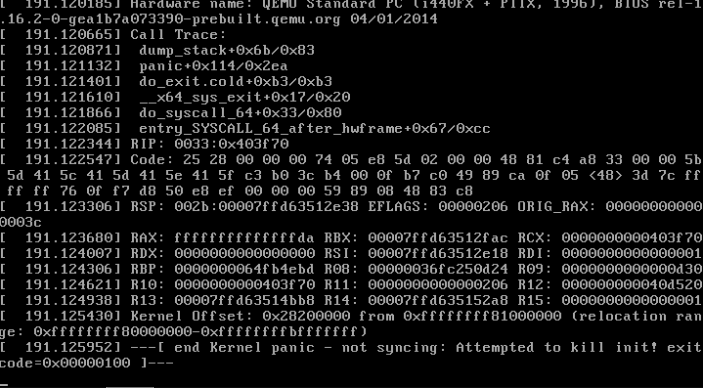
New to this (dietpi) tried the script and on #proxmox 8.0.4 and it says all ok but when the vm starts, it crashes.
Any ideas?
---
### Author:  [@dazeb](https://dietpi.com/forum/u/dazeb)
#### Post date: [8 September 2023 17:27 UTC](https://dietpi.com/forum/t/install-dietpi-on-proxmox-bash-script/15679/20 "2023-09-08T17:27:17Z")
What filesystem are you installing DietPi on? Are you using BTRFS, RAID, Thin Provisioning etc?
To be honest I never even thought of Proxmox 8 yet lol maybe they changed some stuff ill look into it.
[Next page](https://dietpi.com/forum/t/install-dietpi-on-proxmox-bash-script/15679.md?page=2)