# I cannot see my PI400 with DietPi into my LAN
**URL:** https://dietpi.com/forum/t/i-cannot-see-my-pi400-with-dietpi-into-my-lan/18092
**Category:** Troubleshooting
**Created:** [12 October 2023 05:27 UTC](https://dietpi.com/forum/t/i-cannot-see-my-pi400-with-dietpi-into-my-lan/18092 "2023-10-12T05:27:59Z")
**Posts on this page:** 20
**Page:** 1
### Author:  [@gsolina](https://dietpi.com/forum/u/gsolina)
#### Post date: [12 October 2023 05:27 UTC](https://dietpi.com/forum/t/i-cannot-see-my-pi400-with-dietpi-into-my-lan/18092/1 "2023-10-12T05:27:59Z")
Hello everybody.
I am new at DietPi and my English is not perfect.
I’ve downloaded and installed last version available in this moment for PI400. Image file is
DietPi\_RPi-ARMv8-Bookworm.img
The SD card for DietPi is a 64GB from Samsung.
I can install DietPi, setup the Italian keybord and install Samba server and Amiberry.
I can ping my PI400 when I connect it to my wired local network.
I have an Ubuntu pc and a Windows 10 pc in local network.
Ubuntu is Ubuntu 22.04.3 LTS. Windows 10 is most updated.
DietPi can ping both the other two computers. Both Ubuntu and Windows computer can ping DietPi.
I have some folders with Amiga releted files into my Ubuntu pc and I need to move them into my DietPi.
Unfortunately I cannot see the name DietPi into network windows in Ubuntu and Windows.
I have done some settings in DietPi like changing password to root user for samba and editing the smb.conf file.
Unfortunately I can ping only.
Also I have tried to create a shared folder in DietPi but I desn’t work. I can only ping the PI400.
sudo smbpasswd -a root
mkdir mysharedfolder
chmod -R a+rwx mysharedfolder
nano /etc/samba/smb.conf
security=share
[SHARED]
comment = Folder for Amiga files
path = /home/mysharedfolder
browseable = yes
guest account = nobody
guest ok = yes
write ok = yes
writable=yes
read only=no
Will you please help me ?
Thank you very much for your time
Best regards
Giuseppe
---
### Author:  [@Jappe](https://dietpi.com/forum/u/Jappe)
#### Post date: [12 October 2023 05:58 UTC](https://dietpi.com/forum/t/i-cannot-see-my-pi400-with-dietpi-into-my-lan/18092/2 "2023-10-12T05:58:58Z")
You need to install wsdd for this:
`apt install wsdd`
But you can also connect by just typing the IP into explorer window (dunno if this will work in Ubuntu, bit it does on windows), with a syntax like: `ftp://ip_to_your_pi/share_name`
---
### Author:  [@gsolina](https://dietpi.com/forum/u/gsolina)
#### Post date: [12 October 2023 06:23 UTC](https://dietpi.com/forum/t/i-cannot-see-my-pi400-with-dietpi-into-my-lan/18092/3 "2023-10-12T06:23:33Z")
Ok thank you very much.
I will read what wsdd is and give it a try.
Be back later by today.
Best regards
Giuseppe
---
### Author:  [@Joulinar](https://dietpi.com/forum/u/Joulinar)
#### Post date: [12 October 2023 06:54 UTC](https://dietpi.com/forum/t/i-cannot-see-my-pi400-with-dietpi-into-my-lan/18092/4 "2023-10-12T06:54:04Z")
Something to read about 😃
> **[DietPi-Software | WSDD · MichaIng/DietPi · Discussion #5244](https://github.com/MichaIng/DietPi/discussions/5244#discussioncomment-6602690)**
>
> Hi, quite a nice tool that could be installed in addition to SAMBA Server. This enables (Samba) hosts, like a local DietPi device, to be found by Web Service Discovery Clients like Windows. Some ba...
---
### Author:  [@gsolina](https://dietpi.com/forum/u/gsolina)
#### Post date: [12 October 2023 08:45 UTC](https://dietpi.com/forum/t/i-cannot-see-my-pi400-with-dietpi-into-my-lan/18092/5 "2023-10-12T08:45:17Z")
Ok thank you all for your support.
I will check it later by today.
Anyway I have a question. Why Ubuntu cannot show DietPi in the network overview?
I am not an expert but I would love to learn about this subject.
I mean Samba is ON. Shared fonlder exists. Chmod is done. I know username and password. About the file smb.conf the username is correct, browsable is YES, writeable is YES, read only is NO.
Ping works.
Then why Ubuntu cannot show DietPi in the network overview?
I wish I could move the Amiga files from Ubuntu to Dietpi browsing the folder of Amiberry into DietPi and make copy&paste.
Once again thank you.
Regards
Giuseppe
---
### Author:  [@Joulinar](https://dietpi.com/forum/u/Joulinar)
#### Post date: [12 October 2023 08:48 UTC](https://dietpi.com/forum/t/i-cannot-see-my-pi400-with-dietpi-into-my-lan/18092/6 "2023-10-12T08:48:31Z")
DietPi is not going to broadcast the availability of a SAMBA share in a default installation. This is done by tool like WSDD. However you should be able to connect to SAMBA directly using IP address of DietPi system.
---
### Author:  [@gsolina](https://dietpi.com/forum/u/gsolina)
#### Post date: [12 October 2023 08:53 UTC](https://dietpi.com/forum/t/i-cannot-see-my-pi400-with-dietpi-into-my-lan/18092/7 "2023-10-12T08:53:52Z")
IP addres works if I connect from Windows only. Ubuntu does not work.
---
### Author:  [@Joulinar](https://dietpi.com/forum/u/Joulinar)
#### Post date: [12 October 2023 09:04 UTC](https://dietpi.com/forum/t/i-cannot-see-my-pi400-with-dietpi-into-my-lan/18092/8 "2023-10-12T09:04:18Z")
I don’t use Ubuntu, but I guess it should be similar. Maybe some samba client software needs to be installed (smbclient)??
---
### Author:  [@gsolina](https://dietpi.com/forum/u/gsolina)
#### Post date: [12 October 2023 09:22 UTC](https://dietpi.com/forum/t/i-cannot-see-my-pi400-with-dietpi-into-my-lan/18092/9 "2023-10-12T09:22:55Z")
I was wondering the same. Smbclient who knows.
Anyway I’ve been watching many video tutorials on Youtube and people can share DietPi folder in 5 seconds. They just install Samba, set the password for user root, make few changes in smb.conf
That’s it.
This is frustraing hehehehehehe 5 seconds vs 2 days on my side 🙂
To be honest those tutorial are 2 or 3 years old. Then the release for DitPi is quite different and even the smb.conf does look different.
---
### Author:  [@Joulinar](https://dietpi.com/forum/u/Joulinar)
#### Post date: [12 October 2023 10:06 UTC](https://dietpi.com/forum/t/i-cannot-see-my-pi400-with-dietpi-into-my-lan/18092/10 "2023-10-12T10:06:02Z")
we did not change anything on SAMBA for years. At least for Windows it should work ootb (except showing up on network). But using IP should be fine. Maybe I need to setup an Ubuntu test VM to verify.
---
### Author:  [@Joulinar](https://dietpi.com/forum/u/Joulinar)
#### Post date: [12 October 2023 11:33 UTC](https://dietpi.com/forum/t/i-cannot-see-my-pi400-with-dietpi-into-my-lan/18092/11 "2023-10-12T11:33:49Z")
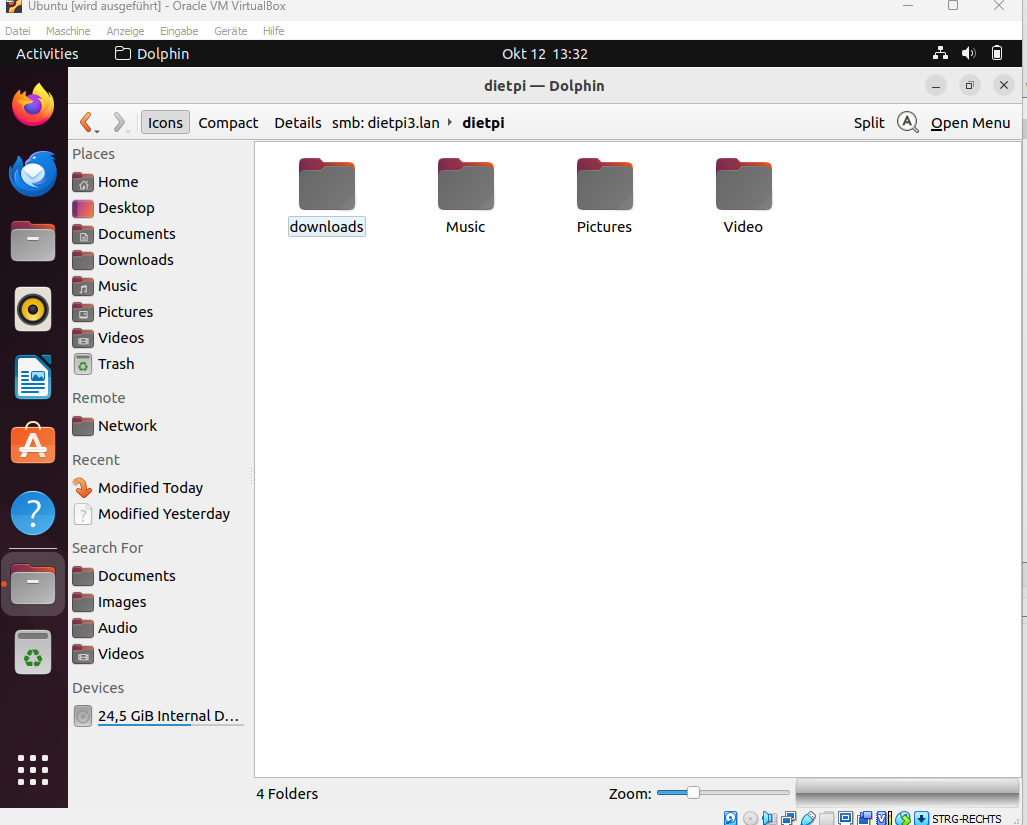
In addition, did some testing and using Dolphin app is working ootb
---
### Author:  [@gsolina](https://dietpi.com/forum/u/gsolina)
#### Post date: [12 October 2023 14:41 UTC](https://dietpi.com/forum/t/i-cannot-see-my-pi400-with-dietpi-into-my-lan/18092/12 "2023-10-12T14:41:07Z")
Ok I went home for lunch and my Windows PC didn’t work… probably my child touched something 🙂
Well I will give it a try tonight when my child is sleeping.
By the way you used a virtual machine for Ubuntu and plugged an SD card with DietPi, correct?
You’ve found DietPi in the network overview.
You didn’t install wsdd.
Correct?
---
### Author:  [@Joulinar](https://dietpi.com/forum/u/Joulinar)
#### Post date: [12 October 2023 15:01 UTC](https://dietpi.com/forum/t/i-cannot-see-my-pi400-with-dietpi-into-my-lan/18092/13 "2023-10-12T15:01:11Z")
> [@gsolina](#):
>
> Correct?
Nope.
Ubuntu was running within Oracle Virtual Box
DietPi was hosted on a RPI3B+
And my physical Windows desktop
---
### Author:  [@gsolina](https://dietpi.com/forum/u/gsolina)
#### Post date: [12 October 2023 16:29 UTC](https://dietpi.com/forum/t/i-cannot-see-my-pi400-with-dietpi-into-my-lan/18092/14 "2023-10-12T16:29:56Z")
Ok I am in the office.
I am working on a PC with Zorin OS which comes from Ubuntu and a Windows 10 PC too.
I have installed Virtual Box on Zorin OS and downloaded a DietPi imagine for Virtual Box.
Now I have DietPi in the office running on Virtual Box.
The 3 computers can ping each other.
I can see DietPi in Windows 10 (I mean the network overview). Unfortunately I cannot see DietPi in Zorin OS.
As to Zorin OS, I cannot open/access to DietPi and 192.168.1.14 (IP address for DietPi running under Virtual Box).
Now I am going to install Amiberry. Then I will try to paste some Amiga file from Windows 10 into DietPi.
I will be right back.
Thank you very much for you cooperation.
---
### Author:  [@Jappe](https://dietpi.com/forum/u/Jappe)
#### Post date: [12 October 2023 16:30 UTC](https://dietpi.com/forum/t/i-cannot-see-my-pi400-with-dietpi-into-my-lan/18092/15 "2023-10-12T16:30:51Z")
@gsolina what desktop environment do you use?
Depending on that (and the default file browser which comes with this DE) you may need some extra packages like `gvfs-smb` or so.
I can also confirm that connecting via IP (`smb://IP/name_of_share`) worked for me with thunar on Fedora. But I can’t see any network devices in thunar, not sure which package is missing 😅
---
### Author:  [@gsolina](https://dietpi.com/forum/u/gsolina)
#### Post date: [12 October 2023 16:52 UTC](https://dietpi.com/forum/t/i-cannot-see-my-pi400-with-dietpi-into-my-lan/18092/16 "2023-10-12T16:52:58Z")
OK Amiberry is installed in DietPi is running on Virtual Box.
I can access DietPi and Amiberry folders from Windows 10 and Zorin OS too (finally!!!).
I cannot see DietPi in network overview in Zorin OS yet but I can access typing sms://192.168.1.14
I can see DietPi in network overview in Windows 10.
Unfortunately I am not able to create new folders into DietPi yet. I get a warning regarding with permissions and users (both Windows 10 and Zorin OS).
I entered DietPi from lan with user dietpi. I added user root to samba but it didn’t work. Maybe I have to check into smb.conf ?
Anyway I can write new files into the folder kickstarts of Amiberry. Then I think I can paste my Amiga files into kickstarts folder and the make some arrangements (I mean creating folders and moving the files when I am typing on the terminal in DierPi).
Does it make a sense?
Thank you very much
Regards - Giuseppe
---
### Author:  [@Joulinar](https://dietpi.com/forum/u/Joulinar)
#### Post date: [12 October 2023 16:54 UTC](https://dietpi.com/forum/t/i-cannot-see-my-pi400-with-dietpi-into-my-lan/18092/17 "2023-10-12T16:54:25Z")
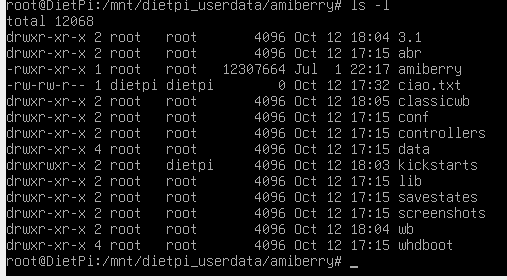
Have a look to file system permissions on target folder. What is the target on DietPi?
---
### Author:  [@gsolina](https://dietpi.com/forum/u/gsolina)
#### Post date: [12 October 2023 16:59 UTC](https://dietpi.com/forum/t/i-cannot-see-my-pi400-with-dietpi-into-my-lan/18092/18 "2023-10-12T16:59:56Z")
Target is
Dietpi/mnt/dietpi\_userdata/amiberry/kickstarts (for Amiga kickstart - it exists)
Dietpi/mnt/dietpi\_userdata/amiberry/adf (for Amiga games - I will create this folder)
Dietpi/mnt/dietpi\_userdata/amiberry/workbench (for Amiga workbench installation files - I will create this folder)
Dietpi/mnt/dietpi\_userdata/amiberry/3.1 (for Amiga workbench 3.1 - I will create this folder)
Dietpi/mnt/dietpi\_userdata/amiberryclassicwb (for Amiga Classic Workbench - I will create this folder)
---
### Author:  [@Joulinar](https://dietpi.com/forum/u/Joulinar)
#### Post date: [12 October 2023 17:13 UTC](https://dietpi.com/forum/t/i-cannot-see-my-pi400-with-dietpi-into-my-lan/18092/19 "2023-10-12T17:13:48Z")
As you can see, root user is owning all of these folders. Therefore he is the only one able to write into them.
---
### Author:  [@gsolina](https://dietpi.com/forum/u/gsolina)
#### Post date: [12 October 2023 17:25 UTC](https://dietpi.com/forum/t/i-cannot-see-my-pi400-with-dietpi-into-my-lan/18092/20 "2023-10-12T17:25:36Z")
Yes… I see.
I think I can type something into samba.conf (I mean changing the user from dietpi to root).
Btw I’ve got this now…
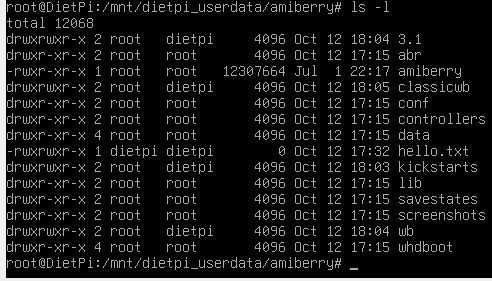
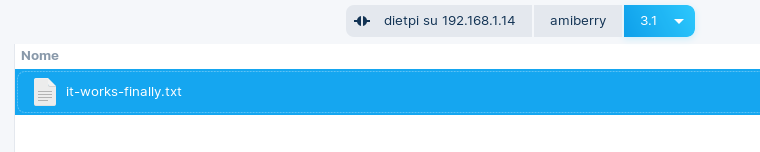
I hope I will be able to make it right at home.
Thank you very much for your support.
Best regards - Giuseppe
[Next page](https://dietpi.com/forum/t/i-cannot-see-my-pi400-with-dietpi-into-my-lan/18092.md?page=2)