# How to troubleshoot Raspberry Pi crashes
**URL:** https://dietpi.com/forum/t/how-to-troubleshoot-raspberry-pi-crashes/22251
**Category:** Troubleshooting
**Tags:** raspberry-pi-4
**Created:** [22 December 2024 21:14 UTC](https://dietpi.com/forum/t/how-to-troubleshoot-raspberry-pi-crashes/22251 "2024-12-22T21:14:09Z")
**Posts on this page:** 5
**Page:** 1
### Author:  [@keithellis](https://dietpi.com/forum/u/keithellis)
#### Post date: [22 December 2024 21:14 UTC](https://dietpi.com/forum/t/how-to-troubleshoot-raspberry-pi-crashes/22251/1 "2024-12-22T21:14:10Z")
### Long time running headless Pi has started crashing, how to troubleshoot
I have searched the existing open and closed issues
#### Required Information
- DietPi version | `cat /boot/dietpi/.version`
`kellis@DietPi:~$ cat /boot/dietpi/.version G_DIETPI_VERSION_CORE=9 G_DIETPI_VERSION_SUB=8 G_DIETPI_VERSION_RC=0 G_GITBRANCH='master' G_GITOWNER='MichaIng'`
- Distro version | `echo $G_DISTRO_NAME $G_RASPBIAN`
```auto
bullseye 0
```
- Kernel version | `uname --all`
```auto
Linux DietPi 6.1.21-v8+ #1642 SMP PREEMPT Mon Apr 3 17:24:16 BST 2023 aarch64 GNU/Linux
```
- Architecture | `dpkg --print-architecture`
```auto
arm64
```
- SBC model | `echo $G_HW_MODEL_NAME` or (EG: RPi3)
```auto
RPi 4 Model B (aarch64)
```
- Power supply used | (EG: 5V 1A RAVpower)
```auto
Raspberry Pi Official supply 5v 3A
```
- SD card used | (EG: SanDisk ultra)
```auto
No SD card, booting directly from SSD
```
#### Additional Information (if applicable)
- Software title | (EG: Nextcloud)
Docker/Portainer with Monitoring stack including Prometheus, Grafana, Cadvisor, alert manager, node exporter, postgres’s-exportor
SSH tunnel to a remote system pulling node\_exportor stats
Pl
plus some other stuff installed via diet pi-software, such as Fail2Ban LEMP, Tailscale, Nextcloud (not used), CUPS (for AirPrint) Open SSH, SAMBA, MC, FFMPEG, MariaDB, Regis, Asahi-Daemon, Python3, `
- Was the software title installed freshly or updated/migrated?
The system has been running for quite a while and probably has quite a bit of unused software installed. Particularly related to NextCloud
- Can this issue be replicated on a fresh installation of DietPi?
Not tried, I would like to avoid a reinstall.
#### Steps to reproduce
1. System has been running great for years. In recent weeks system has crashed twice. Each time the system responds to ping, but I am unable to SSH in and my docker containers are in accessible. The only way to restore is to pull the power and re-apply.
How can I trouble-shoot this, what logs are best to look at?
---
### Author:  [@keithellis](https://dietpi.com/forum/u/keithellis)
#### Post date: [22 December 2024 21:40 UTC](https://dietpi.com/forum/t/how-to-troubleshoot-raspberry-pi-crashes/22251/2 "2024-12-22T21:40:35Z")
Just a bit more information, looking at the Node Exporter Data that this Raspberry Pi recorded for itself before it became unresponsive, it looks like there was a spike in Disk IOps, specifically disk writes to SDA which is the / and /boot directories.
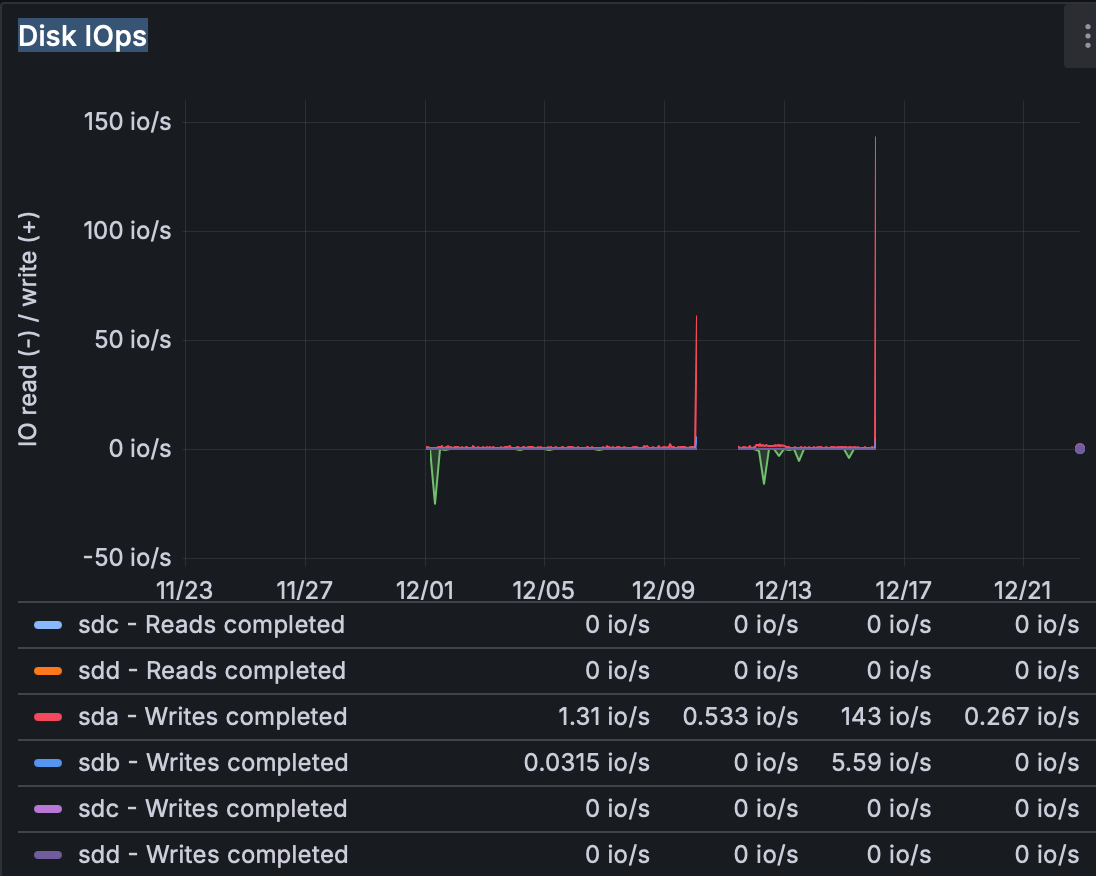
And also some Memory Page Faults:
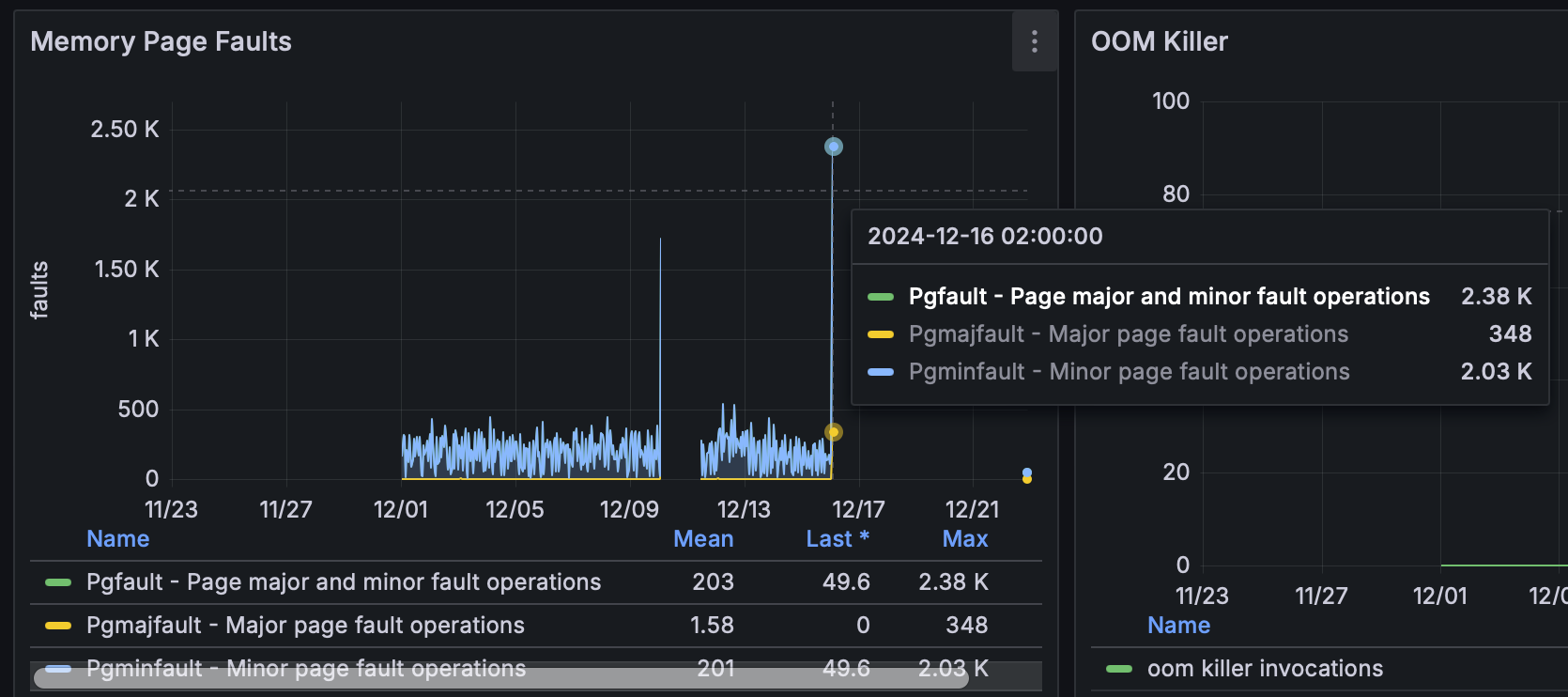
How can I track down if this is the problem and what might be causing it?
---
### Author:  [@Joulinar](https://dietpi.com/forum/u/Joulinar)
#### Post date: [22 December 2024 21:53 UTC](https://dietpi.com/forum/t/how-to-troubleshoot-raspberry-pi-crashes/22251/3 "2024-12-22T21:53:40Z")
you could enable persistent logging to have some log after next reboot
```auto
persistent system logs:
[code]
dietpi-software uninstall 103 # uninstalls DIetPi-RAMlog
mkdir /var/log/journal # triggers systemd-journald logs to disk
reboot # required to finalise the RAMlog uninstall
[/code]
Then you can check system logs via:
[code]journalctl[/code]
which will then show as well logs from previous boot sessions. To limit the size, you can additionally e.g. apply the following:
[code]
mkdir -p /etc/systemd/journald.conf.d
cat << '_EOF_' > /etc/systemd/journald.conf.d/99-custom.conf
[Journal]
SystemMaxFiles=2
MaxFileSec=7day
_EOF_
[/code]
This will limit logs to 14 days split across two journal files, so that with rotation you will always have between 7 and 14 days of logs available.
```
if possible, have a look to memory usage. Probably your system is running out of physical memory, causing system to swap. At least an explanation for disk usage and paging.
---
### Author:  [@keithellis](https://dietpi.com/forum/u/keithellis)
#### Post date: [22 December 2024 21:58 UTC](https://dietpi.com/forum/t/how-to-troubleshoot-raspberry-pi-crashes/22251/4 "2024-12-22T21:58:16Z")
Thank you. I’ll start here.
---
### Author:  [@system](https://dietpi.com/forum/u/system)
#### Post date: [19 June 2025 09:58 UTC](https://dietpi.com/forum/t/how-to-troubleshoot-raspberry-pi-crashes/22251/5 "2025-06-19T09:58:55Z")
This topic was automatically closed 178 days after the last reply. New replies are no longer allowed.