# Feature request - cloudshell XU4
**URL:** https://dietpi.com/forum/t/feature-request-cloudshell-xu4/647
**Category:** Requests
**Created:** [25 October 2016 04:21 UTC](https://dietpi.com/forum/t/feature-request-cloudshell-xu4/647 "2016-10-25T04:21:21Z")
**Posts on this page:** 20
**Page:** 1
### Author:  [@johnvick](https://dietpi.com/forum/u/johnvick)
#### Post date: [25 October 2016 04:21 UTC](https://dietpi.com/forum/t/feature-request-cloudshell-xu4/647/1 "2016-10-25T04:21:21Z")
Hi Fourdee,
Would it be possible to extend the cloudshell display to include the stats from more than two drives? I have a 32 GB eMMC, a 16GB USB flash for backup and a 120 GB SSD but only the former two appear on the display. My coding skills are not up to the job 🙂
John
---
### Author:  [@Fourdee](https://dietpi.com/forum/u/Fourdee)
#### Post date: [25 October 2016 19:28 UTC](https://dietpi.com/forum/t/feature-request-cloudshell-xu4/647/2 "2016-10-25T19:28:54Z")
> [@johnvick](#):
>
> Hi Fourdee,
>
> Would it be possible to extend the cloudshell display to include the stats from more than two drives? I have a 32 GB eMMC, a 16GB USB flash for backup and a 120 GB SSD but only the former two appear on the display. My coding skills are not up to the job 🙂
>
> John
Hi John,
Yep, no worries, i’ll take a look. Will have to wait until after v135 is released (stacked up), but heres the ticket for tracking: [https://github.com/Fourdee/DietPi/issues/582](https://github.com/Fourdee/DietPi/issues/582)
---
### Author:  [@johnvick](https://dietpi.com/forum/u/johnvick)
#### Post date: [25 October 2016 22:02 UTC](https://dietpi.com/forum/t/feature-request-cloudshell-xu4/647/3 "2016-10-25T22:02:15Z")
Thanks Fourdee look forward to it - the reason for the request is the SSD somehow became disconnected/unmounted and it took a while for me to realise that was the reason for some errors.
---
### Author:  [@Fourdee](https://dietpi.com/forum/u/Fourdee)
#### Post date: [26 October 2016 17:23 UTC](https://dietpi.com/forum/t/feature-request-cloudshell-xu4/647/4 "2016-10-26T17:23:56Z")
> [@johnvick](#):
>
> SSD somehow became disconnected/unmounted
Hi John,
Bizzare, did this occur when the device was powered on, or, after reboot? Might be worth checking dmesg after this occurs again, last entries should give some info, or paste here and i’ll take a look.
---
### Author:  [@johnvick](https://dietpi.com/forum/u/johnvick)
#### Post date: [27 October 2016 09:04 UTC](https://dietpi.com/forum/t/feature-request-cloudshell-xu4/647/5 "2016-10-27T09:04:06Z")
Hi Fourdee,
Not really sure when it happened but the three devices I have running DietPi are on 24/7 (Banana M1, Raspberry 3, XU4) and are are only rebooted if necessary. I’ll watch for it happening again and check the logs.
John
---
### Author:  [@johnvick](https://dietpi.com/forum/u/johnvick)
#### Post date: [1 November 2016 06:07 UTC](https://dietpi.com/forum/t/feature-request-cloudshell-xu4/647/6 "2016-11-01T06:07:00Z")
Hi Fourdee,
It happened again - the SSD failed. I suspect overheating - the XU4 was simultaneously updating Emby databases on several devices but the files are on the eMMC not the SSD. Anyhow the SSD felt very warm. A software reboot went into emergency mode. Rather than attach a monitor I powered down and left to cool and started again and all is well.
This is from dmesg - it goes on like this so just a selection
[74747.214943] ASC=0x3a ASCQ=0x0
[74747.216052] [c0] sd 1:0:0:0: [sdb] CDB:
[74747.217154] cdb[0]=0x2a: 2a 00 00 00 00 00 00 00 08 00
[74747.219081] [c0] Buffer I/O error on device sdb, logical block 0
[74747.220726] [c0] lost page write due to I/O error on sdb
[74747.251678] [c4] sd 1:0:0:0: [sdb] Device not ready
[74747.252321] [c4] sd 1:0:0:0: [sdb]
[74747.252802] Result: hostbyte=0x00 driverbyte=0x08
[74747.253239] [c4] sd 1:0:0:0: [sdb]
[74747.253646] Sense Key : 0x2 [current]
[74747.254082] [c4] sd 1:0:0:0: [sdb]
[74747.254491] ASC=0x3a ASCQ=0x0
[74747.254911] [c4] sd 1:0:0:0: [sdb] CDB:
[74747.255330] cdb[0]=0x28: 28 00 05 00 00 80 00 00 08 00
[74747.256120] [c5] EXT4-fs error (device sdb): ext4\_read\_inode\_bitmap:175: comm syncthing: Cannot read inode bitmap - block\_group = 320, inode\_bitmap = 10485776
[74747.257711] [c5] EXT4-fs (sdb): previous I/O error to superblock detected
[74747.259505] [c5] sd 1:0:0:0: [sdb] Device not ready
[74747.260127] [c5] sd 1:0:0:0: [sdb]
[74747.260590] Result: hostbyte=0x00 driverbyte=0x08
[74747.261022] [c5] sd 1:0:0:0: [sdb]
[74747.261447] Sense Key : 0x2 [current]
[74747.261899] [c5] sd 1:0:0:0: [sdb]
[74747.262326] ASC=0x3a ASCQ=0x0
[74747.262795] [c5] sd 1:0:0:0: [sdb] CDB:
[74747.263235] cdb[0]=0x2a: 2a 00 00 00 00 00 00 00 08 00
[74747.263966] [c5] Buffer I/O error on device sdb, logical block 0
[74747.264574] [c5] lost page write due to I/O error on sdb
[74747.266811] [c5] sd 1:0:0:0: [sdb] Device not ready
[74747.267493] [c5] sd 1:0:0:0: [sdb]
[74747.267911] Result: hostbyte=0x00 driverbyte=0x08
[74747.268346] [c5] sd 1:0:0:0: [sdb]
[74747.268759] Sense Key : 0x2 [current]
[74747.269202] [c5] sd 1:0:0:0: [sdb]
[74747.269613] ASC=0x3a ASCQ=0x0
[74747.270041] [c5] sd 1:0:0:0: [sdb] CDB:
[74747.270453] cdb[0]=0x28: 28 00 05 00 00 80 00 00 08 00
[74747.271230] [c6] EXT4-fs error (device sdb): ext4\_read\_inode\_bitmap:175: comm syncthing: Cannot read inode bitmap - block\_group = 320, inode\_bitmap = 10485776
[74747.272815] [c6] EXT4-fs (sdb): previous I/O error to superblock detected
[74747.274672] [c6] sd 1:0:0:0: [sdb] Device not ready
[74747.275309] [c6] sd 1:0:0:0: [sdb]
[74747.275739] Result: hostbyte=0x00 driverbyte=0x08
---
### Author:  [@Fourdee](https://dietpi.com/forum/u/Fourdee)
#### Post date: [1 November 2016 19:41 UTC](https://dietpi.com/forum/t/feature-request-cloudshell-xu4/647/7 "2016-11-01T19:41:33Z")
Hi John,
Had to reserve v136 for some bug fixes. So nudged your request to v137 and will take a look in the next few days.
HDD temps:
You might be able to read the HDD temps by running:
```nohighlight
apt-get install hddtemp
hddtemp /dev/sdb
```
It reads from SMART info directly on the drive, so if its not available, possibly the cloudshell USB \<\> SATA converter doesnt support it. In which case, have to go by touch, or IR temp gun.
Usually, operating temps for SSD’s are 0-70’c, is it possible yours is running hotter than this?
---
### Author:  [@Fourdee](https://dietpi.com/forum/u/Fourdee)
#### Post date: [1 November 2016 19:44 UTC](https://dietpi.com/forum/t/feature-request-cloudshell-xu4/647/8 "2016-11-01T19:44:06Z")
Also John,
At the end of:
```nohighlight
/etc/hdparm.conf
```
You’ll find:
```nohighlight
#DietPi external USB drive. Power management settings.
/dev/sda {
#10 mins
spindown_time = 120
#
apm = 254
}
```
This is to enable drive spin down (powersaving) after 10 minutes. As your using SSD, try removing that code, reboot then see if the issue reoccurs.
---
### Author:  [@johnvick](https://dietpi.com/forum/u/johnvick)
#### Post date: [1 November 2016 20:55 UTC](https://dietpi.com/forum/t/feature-request-cloudshell-xu4/647/9 "2016-11-01T20:55:37Z")
Hi Fourdee,
Thanks - the temp sensor does not work. I’ve removed the section you suggest and will see how it goes.
John
---
### Author:  [@Fourdee](https://dietpi.com/forum/u/Fourdee)
#### Post date: [2 November 2016 15:55 UTC](https://dietpi.com/forum/t/feature-request-cloudshell-xu4/647/10 "2016-11-02T15:55:25Z")
John,
Update: [https://github.com/Fourdee/DietPi/issues/582#issuecomment-257908068](https://github.com/Fourdee/DietPi/issues/582#issuecomment-257908068). Nearly done, i’ll let you know how to update your version so you can test.
---
### Author:  [@Fourdee](https://dietpi.com/forum/u/Fourdee)
#### Post date: [2 November 2016 16:35 UTC](https://dietpi.com/forum/t/feature-request-cloudshell-xu4/647/11 "2016-11-02T16:35:35Z")
John,
Ready for testing.
Had to change a lot of the source code and how it saves settings, so this will reset your current DietPi-Cloudshell settings.
**Please run the following commands to update (copy and paste all into term):**
```nohighlight
rm /DietPi/dietpi/.dietpi-cloudshell
cat << _EOF_ > /etc/systemd/system/dietpi-cloudshell.service
[Unit]
Description=dietpi-cloudshell on main screen
[Service]
Type=forking
StandardOutput=tty
# These are run from dietpi-cloudshell and autostart
ExecStartPre=/bin/bash -c 'setterm --term linux --blank 0 --powersave off' # Fails to set powersaving, must originate from tty
ExecStartPre=/bin/bash -c 'tput civis'
ExecStart=/bin/bash -c '/DietPi/dietpi/dietpi-cloudshell 1 &'
ExecStop=/bin/bash -c 'setterm -reset'
ExecStop=/bin/bash -c '/DietPi/dietpi/func/dietpi-notify 0 DietPi-Cloudshell terminated, have a nice day!'
[Install]
WantedBy=multi-user.target
_EOF_
systemctl daemon-reload
wget https://raw.githubusercontent.com/Fourdee/DietPi/testing/dietpi/dietpi-cloudshell -O /DietPi/dietpi/dietpi-cloudshell
```
Reboot system, then run dietpi-cloudshell to configure. You’ll be looking for the “Storage” settings option to configure mount paths. Then enable the additional scenes as needed.
---
### Author:  [@johnvick](https://dietpi.com/forum/u/johnvick)
#### Post date: [2 November 2016 17:25 UTC](https://dietpi.com/forum/t/feature-request-cloudshell-xu4/647/12 "2016-11-02T17:25:13Z")
HI Fourdee,
Thanks it’s looking like just what I need and I am sure others will find it useful.
John
---
### Author:  [@Fourdee](https://dietpi.com/forum/u/Fourdee)
#### Post date: [2 November 2016 18:11 UTC](https://dietpi.com/forum/t/feature-request-cloudshell-xu4/647/13 "2016-11-02T18:11:35Z")
> [@johnvick](#):
>
> HI Fourdee,
>
> Thanks it’s looking like just what I need and I am sure others will find it useful.
>
> John
Excellent, please let me know what you think after you’ve tested it over a few days (eg: any feedback, changes etc)?
---
### Author:  [@johnvick](https://dietpi.com/forum/u/johnvick)
#### Post date: [2 November 2016 20:21 UTC](https://dietpi.com/forum/t/feature-request-cloudshell-xu4/647/14 "2016-11-02T20:21:26Z")
Hi Fourdee,
Thanks for this welcome addition.
Some initial observations are that before the USB2/3 screen there is some garbage text on screen for a very brief period - can’t read it and I doubt I’d be quick enough to photograph it.
I have the SSD mounted as /mnt/ssd and is the second device in cloudshell - sometimes the screen says “mount not active” and other cycles it appears as it should (same applies to flash/rootfs storage). A few reboots and the situation isn’t any different. I don’t remember seeing “mount not active” in v7.
Can I request that you can give drives identifying names instead of USB Storage 1 - such as SSD, HD, Flash drive etc?
John
---
### Author:  [@johnvick](https://dietpi.com/forum/u/johnvick)
#### Post date: [2 November 2016 22:47 UTC](https://dietpi.com/forum/t/feature-request-cloudshell-xu4/647/15 "2016-11-02T22:47:41Z")
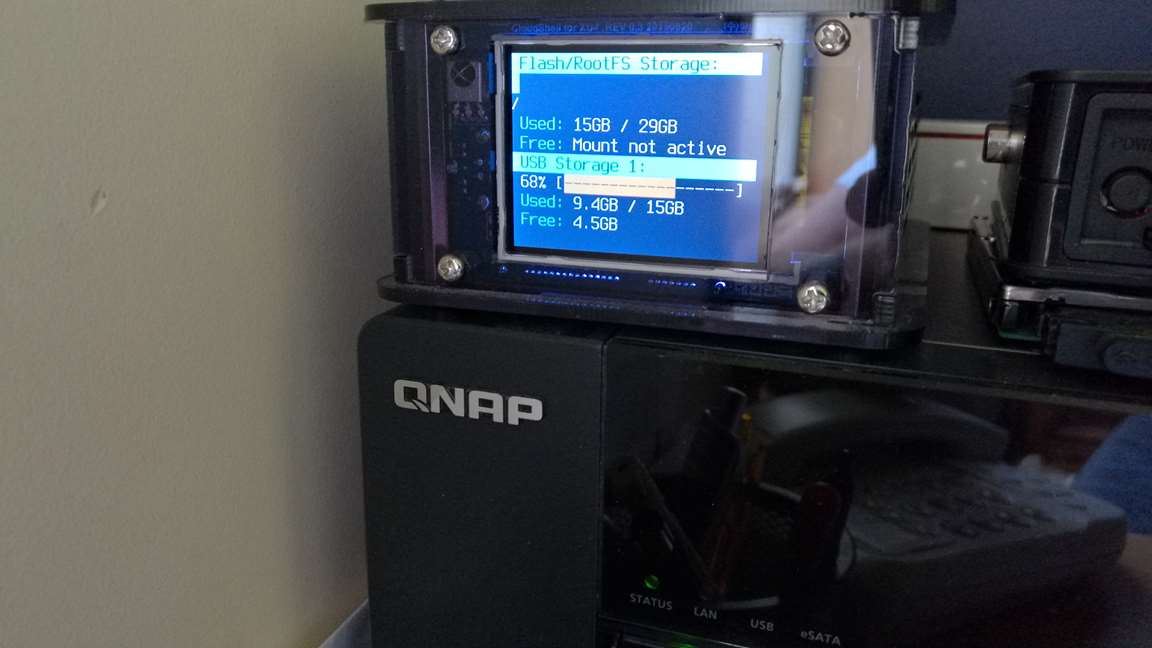
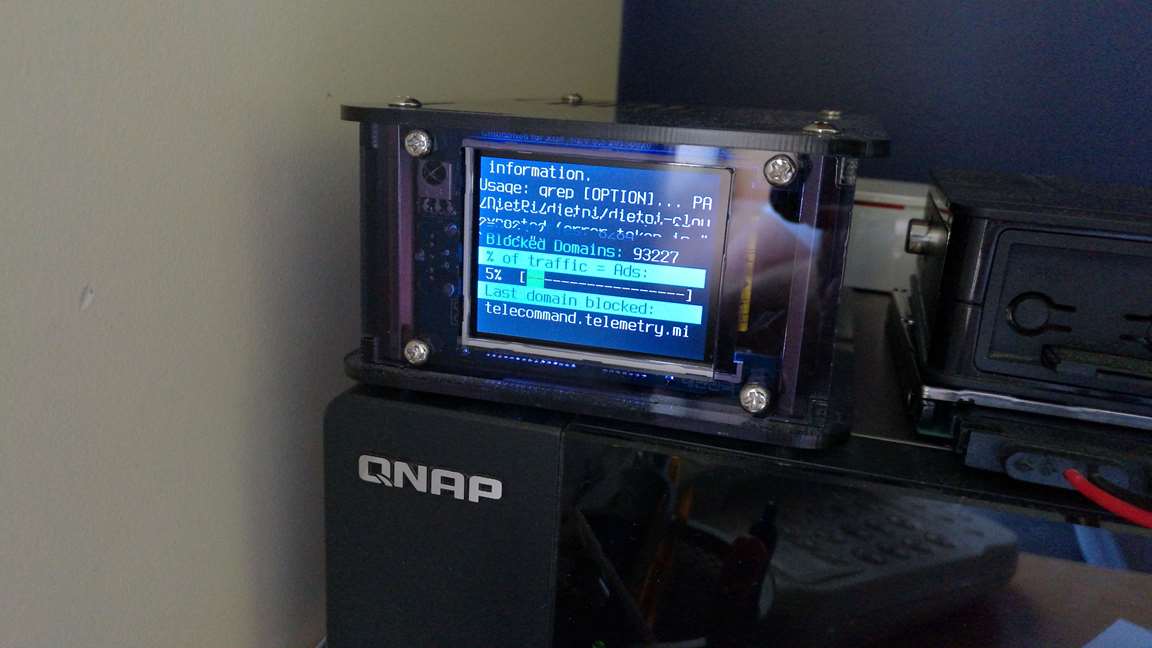
The pictures show the blue line extending onto the second line - minor I know but I’m sure you’ll want it to look perfect - and the “mount not active message”.
The next shows some screen garbage - an error that is quickly overwritten.
John
---
### Author:  [@Fourdee](https://dietpi.com/forum/u/Fourdee)
#### Post date: [3 November 2016 13:05 UTC](https://dietpi.com/forum/t/feature-request-cloudshell-xu4/647/16 "2016-11-03T13:05:40Z")
Thanks John,
I’ll take a look.
---
### Author:  [@Fourdee](https://dietpi.com/forum/u/Fourdee)
#### Post date: [4 November 2016 15:54 UTC](https://dietpi.com/forum/t/feature-request-cloudshell-xu4/647/17 "2016-11-04T15:54:44Z")
Hi John,
Image 1 is fixed.
Image 2, cant seem to replicate this on mine. If you can remember, does it flash before the PiHole scene is displayed or after?
Changing names of drives, throught you’d ask so I coded it to allow that 😉
```nohighlight
nano /DietPi/dietpi/.dietpi-cloudshell
```
- Scroll to bottom
- Change the STORAGE\_NAME values as needed
- Add spaces at the end of the name to line up with the other entries (or it will spill over to next line)
Example, USB\_5:
```nohighlight
STORAGE_NAME[5]='Epic drive 1! '
```
---
### Author:  [@johnvick](https://dietpi.com/forum/u/johnvick)
#### Post date: [4 November 2016 18:22 UTC](https://dietpi.com/forum/t/feature-request-cloudshell-xu4/647/18 "2016-11-04T18:22:00Z")
HI Fourdee,
Thanks for the update - the line fixed as you say - I have changed the drive names - the garbage text doesn’t happen any more for some reason.
I still get the “mount not active” message for the eMMC and the SSD - but not consistently. A reboot doesn’t make any difference. Some cycles they are reported OK, some not.
Any idea why this is?
John
---
### Author:  [@Fourdee](https://dietpi.com/forum/u/Fourdee)
#### Post date: [4 November 2016 19:14 UTC](https://dietpi.com/forum/t/feature-request-cloudshell-xu4/647/19 "2016-11-04T19:14:13Z")
> [@johnvick](#):
>
> I still get the “mount not active” message for the eMMC and the SSD - but not consistently. A reboot doesn’t make any difference. Some cycles they are reported OK, some not.
>
> Any idea why this is?
Hi John,
Mount not active is triggered when df | grep drive mount (eg: /mnt/usb\_1) returns no results. So either its being temporarily dismounted, or something else.
Let me monitor my XU4 over the next few days and see if I can replicate.
Next time you see mount not active and your connected to the system over SSH, run df -h and see if your drive is listed.
---
### Author:  [@johnvick](https://dietpi.com/forum/u/johnvick)
#### Post date: [5 November 2016 02:37 UTC](https://dietpi.com/forum/t/feature-request-cloudshell-xu4/647/20 "2016-11-05T02:37:09Z")
Hi Fourdee,
Still intermittently getting this message and all drives present with df -h. Sometimes the root fs drive is reported as “Mount not active” which is a bit of a paradox.
John
[Next page](https://dietpi.com/forum/t/feature-request-cloudshell-xu4/647.md?page=2)