# Failed to boot and to mount drives after update to 10.0.1
**URL:** https://dietpi.com/forum/t/failed-to-boot-and-to-mount-drives-after-update-to-10-0-1/24950
**Category:** Troubleshooting
**Created:** [7 February 2026 14:31 UTC](https://dietpi.com/forum/t/failed-to-boot-and-to-mount-drives-after-update-to-10-0-1/24950 "2026-02-07T14:31:53Z")
**Posts on this page:** 18
**Page:** 1
### Author:  [@MaHarder](https://dietpi.com/forum/u/MaHarder)
#### Post date: [7 February 2026 14:31 UTC](https://dietpi.com/forum/t/failed-to-boot-and-to-mount-drives-after-update-to-10-0-1/24950/1 "2026-02-07T14:31:53Z")
### Creating a bug report/issue
I have searched the existing open and closed issues
#### Required Information
- Date | 2026-02-07 15:19:24
- Program name | DietPi-Drive\_Manager
- Command | `mount -o noatime,lazytime,rw,permissions,big_writes /dev/sda4 /mnt/F40E7C7B0E7C3926`
- Exit code | 255
- DietPi version | v10.0.1 (MichaIng/master)
- Distro version | bookworm (ID=7,RASPBIAN=0)
- Kernel version | `Linux HarderPi 6.12.62+rpt-rpi-2712 #1 SMP PREEMPT Debian 1:6.12.62-1+rpt1~bookworm (2026-01-19) aarch64 GNU/Linux`
- Architecture | `arm64`
- Hardware model | RPi 5 Model B (aarch64) (ID=5)
- Power supply | (EG: RAVPower 5V 1A)
- SD card | (EG: SanDisk Ultra 16 GB)
#### Steps to reproduce:
1. Update from 9.x to 10.0.1
2. reboot
3. get notice about maintance mode (see [Help with booting problem Rpi4 and Ssd](https://dietpi.com/forum/t/help-with-booting-problem-rpi4-and-ssd/3589))
4. continue with Ctrl-D
5. try to mount drives with Drive\_Manager
#### Expected behaviour:
- after reboot it should start normally and auto login without me going to raspi and manually put the device out of maintance mode
- auto mount drives without problems
#### Actual behaviour:
- after reboot my pi tells me that it started in maintance mode
- drives can’t be mounted, nor with Drive Manger, nor per command line
#### Extra details:
- I have paperless and ownfoil running as docker service by other user
#### Additional logs:
```auto
```
---
### Author:  [@Joulinar](https://dietpi.com/forum/u/Joulinar)
#### Post date: [7 February 2026 14:45 UTC](https://dietpi.com/forum/t/failed-to-boot-and-to-mount-drives-after-update-to-10-0-1/24950/2 "2026-02-07T14:45:15Z")
> [@MaHarder](#):
>
> after reboot my pi tells me that it started in maintance mode
Can you share a picture or error message? DietPi don’t have a maintenance mode. Mean’s, it’s something else.
---
### Author:  [@MaHarder](https://dietpi.com/forum/u/MaHarder)
#### Post date: [7 February 2026 15:20 UTC](https://dietpi.com/forum/t/failed-to-boot-and-to-mount-drives-after-update-to-10-0-1/24950/3 "2026-02-07T15:20:45Z")
[https://photos.app.goo.gl/wvkN1C1oFP83NoPk6](https://photos.app.goo.gl/wvkN1C1oFP83NoPk6) (with videos)
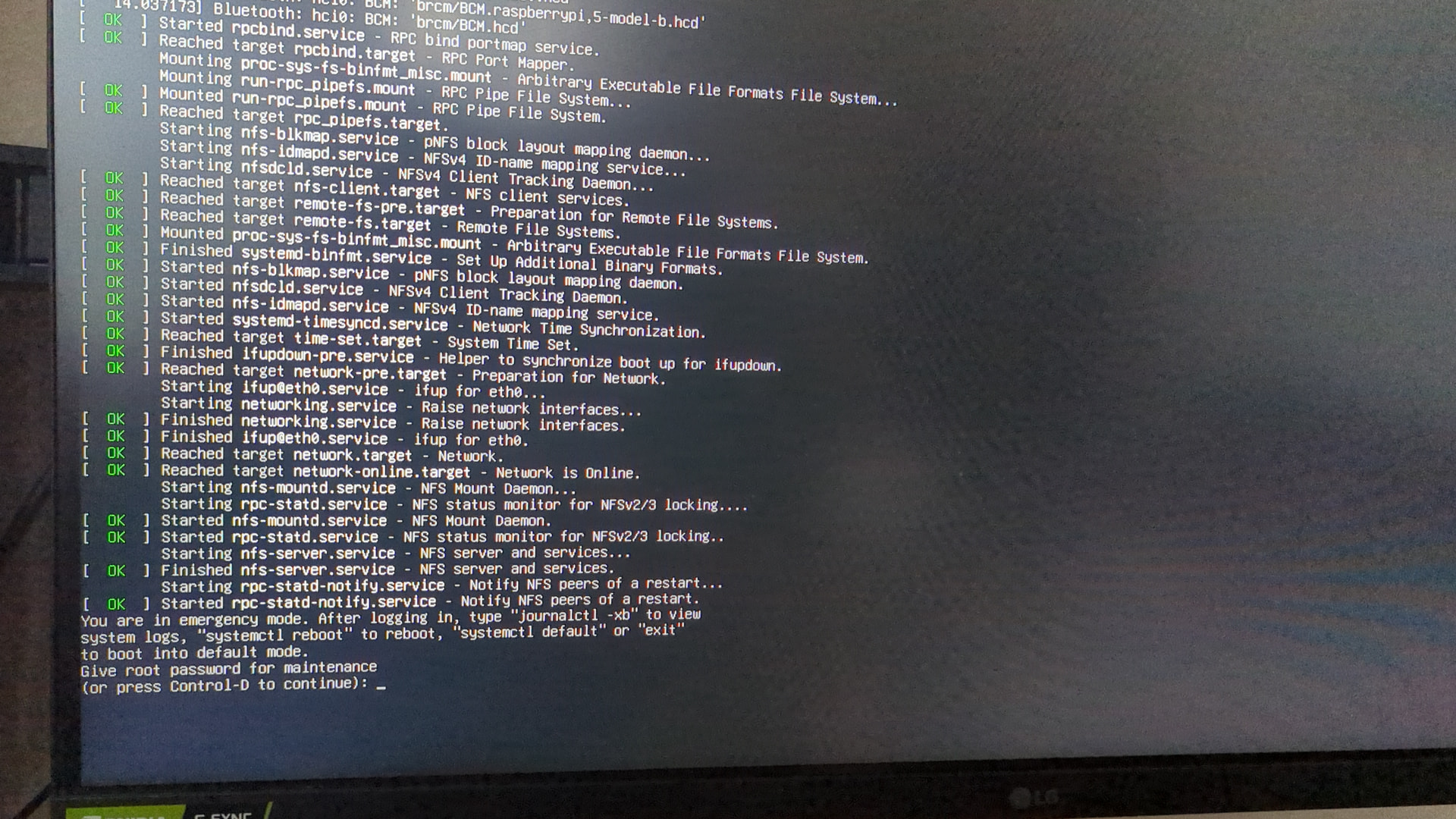
P.S. i have missspelled, not maintaince but emergency mode
---
### Author:  [@Joulinar](https://dietpi.com/forum/u/Joulinar)
#### Post date: [7 February 2026 15:45 UTC](https://dietpi.com/forum/t/failed-to-boot-and-to-mount-drives-after-update-to-10-0-1/24950/4 "2026-02-07T15:45:51Z")
are there any red / failed messaged above? Probably there are issues to read the external drive, hence system is not able to boot up correctly
---
### Author:  [@MaHarder](https://dietpi.com/forum/u/MaHarder)
#### Post date: [7 February 2026 15:57 UTC](https://dietpi.com/forum/t/failed-to-boot-and-to-mount-drives-after-update-to-10-0-1/24950/5 "2026-02-07T15:57:25Z")
i had unplugged all drives and rebooted - same behavior.
but this ist the failed line:
`failed to start systemd-fsck-root.service - File System Check on Root Device`
Details:
```bash
root@HarderPi:~# systemctl status systemd-fsck-root.service
× systemd-fsck-root.service - File System Check on Root Device
Loaded: loaded (/lib/systemd/system/systemd-fsck-root.service; enabled-runtime; preset: enabled)
Active: failed (Result: exit-code) since Thu 2025-06-26 16:58:50 CEST; 7 months 12 days ago
Condition: start condition failed at Sat 2026-02-07 16:11:47 CET; 47min ago
└─ ConditionPathIsReadWrite=!/ was not met
Docs: man:systemd-fsck-root.service(8)
Main PID: 172 (code=exited, status=1/FAILURE)
CPU: 393ms
Jun 26 16:58:48 HarderPi systemd-fsck[196]: /dev/mmcblk0p2 contains a file system with errors, check forced.
Jun 26 16:58:50 HarderPi systemd-fsck[196]: /dev/mmcblk0p2: Inodes that were part of a corrupted orphan linked list found.
Jun 26 16:58:50 HarderPi systemd-fsck[196]: /dev/mmcblk0p2: UNEXPECTED INCONSISTENCY; RUN fsck MANUALLY.
Jun 26 16:58:50 HarderPi systemd-fsck[196]: (i.e., without -a or -p options)
Jun 26 16:58:50 HarderPi systemd-fsck[172]: fsck failed with exit status 4.
Jun 26 16:58:50 HarderPi systemd[1]: systemd-fsck-root.service: Main process exited, code=exited, status=1/FAILURE
Jun 26 16:58:50 HarderPi systemd[1]: systemd-fsck-root.service: Failed with result 'exit-code'.
Jun 26 16:58:50 HarderPi systemd[1]: Failed to start systemd-fsck-root.service - File System Check on Root Device.
Jun 26 16:58:50 HarderPi systemd[1]: systemd-fsck-root.service: Triggering OnFailure= dependencies.
Feb 07 16:11:47 HarderPi systemd[1]: systemd-fsck-root.service - File System Check on Root Device was skipped because of an unmet condition check (ConditionPathIsReadWrite=!/).
```
and sometimes i had the issue that even basic commands got an error: `bash: /usr/bin/ls: Input/Output error`. i had to pull power cable cus i couldn’t reboot it with command
---
### Author:  [@Joulinar](https://dietpi.com/forum/u/Joulinar)
#### Post date: [7 February 2026 16:12 UTC](https://dietpi.com/forum/t/failed-to-boot-and-to-mount-drives-after-update-to-10-0-1/24950/6 "2026-02-07T16:12:06Z")
you are using SD card to boot the system? Looks like this one has some damage
You can check for kernel error messages
```auto
dmesg -l 0,1,2,3
```
---
### Author:  [@MaHarder](https://dietpi.com/forum/u/MaHarder)
#### Post date: [7 February 2026 16:22 UTC](https://dietpi.com/forum/t/failed-to-boot-and-to-mount-drives-after-update-to-10-0-1/24950/7 "2026-02-07T16:22:06Z")
```bash
root@HarderPi:~# dmesg -l 0,1,2,3
[13.709496] Bluetooth: hci0: BCM: firmware Patch file not found, tried:
[13.709507] Bluetooth: hci0: BCM: 'brcm/BCM4345C0.raspberrypi,5-model-b.hcd'
[13.709510] Bluetooth: hci0: BCM: 'brcm/BCM4345C0.hcd'
[13.709512] Bluetooth: hci0: BCM: 'brcm/BCM.raspberrypi,5-model-b.hcd'
[13.709515] Bluetooth: hci0: BCM: 'brcm/BCM.hcd'
```
> [@Joulinar](#):
>
> you are using SD card to boot the system?
yes
---
### Author:  [@WarHawk](https://dietpi.com/forum/u/WarHawk)
#### Post date: [9 February 2026 03:23 UTC](https://dietpi.com/forum/t/failed-to-boot-and-to-mount-drives-after-update-to-10-0-1/24950/8 "2026-02-09T03:23:25Z")
should be able to run fsck on the SD partition from that root login
`sudo fsck -y /dev/sd*`
(or whatever the partition the SD card is mounted under)
or if you have a separate running linux machine, put the SD card into that…then use gparted to scan the linux formatted partition and fix any errors
[https://linuxconfig.org/welcome-to-emergency-mode-boot-error-understanding-and-resolving-fsck-issues](https://linuxconfig.org/welcome-to-emergency-mode-boot-error-understanding-and-resolving-fsck-issues)
This works for almost all linux systems if something during boot is borked
that is more or less kernel emergency mode
---
### Author:  [@MaHarder](https://dietpi.com/forum/u/MaHarder)
#### Post date: [9 February 2026 06:46 UTC](https://dietpi.com/forum/t/failed-to-boot-and-to-mount-drives-after-update-to-10-0-1/24950/9 "2026-02-09T06:46:09Z")
> [@WarHawk](#):
>
> should be able to run fsck on the SD partition from that root login
I couldn’t
> **fdisk output**
>
> ```bash
> fdisk -l
> Disk /dev/ram0: 4 MiB, 4194304 bytes, 8192 sectors
> Units: sectors of 1 * 512 = 512 bytes
> Sector size (logical/physical): 512 bytes / 16384 bytes
> I/O size (minimum/optimal): 16384 bytes / 16384 bytes
>
> Disk /dev/ram1: 4 MiB, 4194304 bytes, 8192 sectors
> Units: sectors of 1 * 512 = 512 bytes
> Sector size (logical/physical): 512 bytes / 16384 bytes
> I/O size (minimum/optimal): 16384 bytes / 16384 bytes
>
> Disk /dev/ram2: 4 MiB, 4194304 bytes, 8192 sectors
> Units: sectors of 1 * 512 = 512 bytes
> Sector size (logical/physical): 512 bytes / 16384 bytes
> I/O size (minimum/optimal): 16384 bytes / 16384 bytes
>
> Disk /dev/ram3: 4 MiB, 4194304 bytes, 8192 sectors
> Units: sectors of 1 * 512 = 512 bytes
> Sector size (logical/physical): 512 bytes / 16384 bytes
> I/O size (minimum/optimal): 16384 bytes / 16384 bytes
>
> Disk /dev/ram4: 4 MiB, 4194304 bytes, 8192 sectors
> Units: sectors of 1 * 512 = 512 bytes
> Sector size (logical/physical): 512 bytes / 16384 bytes
> I/O size (minimum/optimal): 16384 bytes / 16384 bytes
>
> Disk /dev/ram5: 4 MiB, 4194304 bytes, 8192 sectors
> Units: sectors of 1 * 512 = 512 bytes
> Sector size (logical/physical): 512 bytes / 16384 bytes
> I/O size (minimum/optimal): 16384 bytes / 16384 bytes
>
> Disk /dev/ram6: 4 MiB, 4194304 bytes, 8192 sectors
> Units: sectors of 1 * 512 = 512 bytes
> Sector size (logical/physical): 512 bytes / 16384 bytes
> I/O size (minimum/optimal): 16384 bytes / 16384 bytes
>
> Disk /dev/ram7: 4 MiB, 4194304 bytes, 8192 sectors
> Units: sectors of 1 * 512 = 512 bytes
> Sector size (logical/physical): 512 bytes / 16384 bytes
> I/O size (minimum/optimal): 16384 bytes / 16384 bytes
>
> Disk /dev/ram8: 4 MiB, 4194304 bytes, 8192 sectors
> Units: sectors of 1 * 512 = 512 bytes
> Sector size (logical/physical): 512 bytes / 16384 bytes
> I/O size (minimum/optimal): 16384 bytes / 16384 bytes
>
> Disk /dev/ram9: 4 MiB, 4194304 bytes, 8192 sectors
> Units: sectors of 1 * 512 = 512 bytes
> Sector size (logical/physical): 512 bytes / 16384 bytes
> I/O size (minimum/optimal): 16384 bytes / 16384 bytes
>
> Disk /dev/ram10: 4 MiB, 4194304 bytes, 8192 sectors
> Units: sectors of 1 * 512 = 512 bytes
> Sector size (logical/physical): 512 bytes / 16384 bytes
> I/O size (minimum/optimal): 16384 bytes / 16384 bytes
>
> Disk /dev/ram11: 4 MiB, 4194304 bytes, 8192 sectors
> Units: sectors of 1 * 512 = 512 bytes
> Sector size (logical/physical): 512 bytes / 16384 bytes
> I/O size (minimum/optimal): 16384 bytes / 16384 bytes
>
> Disk /dev/ram12: 4 MiB, 4194304 bytes, 8192 sectors
> Units: sectors of 1 * 512 = 512 bytes
> Sector size (logical/physical): 512 bytes / 16384 bytes
> I/O size (minimum/optimal): 16384 bytes / 16384 bytes
>
> Disk /dev/ram13: 4 MiB, 4194304 bytes, 8192 sectors
> Units: sectors of 1 * 512 = 512 bytes
> Sector size (logical/physical): 512 bytes / 16384 bytes
> I/O size (minimum/optimal): 16384 bytes / 16384 bytes
>
> Disk /dev/ram14: 4 MiB, 4194304 bytes, 8192 sectors
> Units: sectors of 1 * 512 = 512 bytes
> Sector size (logical/physical): 512 bytes / 16384 bytes
> I/O size (minimum/optimal): 16384 bytes / 16384 bytes
>
> Disk /dev/ram15: 4 MiB, 4194304 bytes, 8192 sectors
> Units: sectors of 1 * 512 = 512 bytes
> Sector size (logical/physical): 512 bytes / 16384 bytes
> I/O size (minimum/optimal): 16384 bytes / 16384 bytes
>
> Disk /dev/mmcblk0: 116,48 GiB, 125069950976 bytes, 244277248 sectors
> Units: sectors of 1 * 512 = 512 bytes
> Sector size (logical/physical): 512 bytes / 512 bytes
> I/O size (minimum/optimal): 512 bytes / 512 bytes
> Disklabel type: dos
> Disk identifier: 0xe7672f1c
>
> Device Boot Start End Sectors Size Id Type
> /dev/mmcblk0p1 * 2048 264191 262144 128M c W95 FAT32 (LBA)
> /dev/mmcblk0p2 264192 244277247 244013056 116,4G 83 Linux
>
> Disk /dev/sda: 931,51 GiB, 1000204886016 bytes, 1953525168 sectors
> Disk model: Super Speed
> Units: sectors of 1 * 512 = 512 bytes
> Sector size (logical/physical): 512 bytes / 4096 bytes
> I/O size (minimum/optimal): 4096 bytes / 4096 bytes
> Disklabel type: gpt
> Disk identifier: 6DFCEAB3-3499-4A81-9296-6DD456D19C99
>
> Device Start End Sectors Size Type
> /dev/sda1 2048 1023999 1021952 499M Windows recovery environment
> /dev/sda2 1024000 1228799 204800 100M EFI System
> /dev/sda3 1228800 1261567 32768 16M Microsoft reserved
> /dev/sda4 1261568 1953523711 1952262144 930,9G Microsoft basic data
>
> Disk /dev/sdb: 931,51 GiB, 1000204886016 bytes, 1953525168 sectors
> Disk model: Super Speed
> Units: sectors of 1 * 512 = 512 bytes
> Sector size (logical/physical): 512 bytes / 4096 bytes
> I/O size (minimum/optimal): 4096 bytes / 4096 bytes
> Disklabel type: gpt
> Disk identifier: 08DB7B4F-79B6-4509-A538-8A6D2D907BB0
>
> Device Start End Sectors Size Type
> /dev/sdb1 2048 206847 204800 100M EFI System
> /dev/sdb2 206848 239615 32768 16M Microsoft reserved
> /dev/sdb3 239616 1952284671 1952045056 930,8G Microsoft basic data
> /dev/sdb4 1952284672 1953521663 1236992 604M Windows recovery environment
>
> Disk /dev/sdc: 931,51 GiB, 1000204886016 bytes, 1953525168 sectors
> Disk model: External USB 3.0
> Units: sectors of 1 * 512 = 512 bytes
> Sector size (logical/physical): 512 bytes / 4096 bytes
> I/O size (minimum/optimal): 4096 bytes / 4096 bytes
> Disklabel type: gpt
> Disk identifier: 2CBEF941-4200-4D70-BC09-D2951AF2CDA7
>
> Device Start End Sectors Size Type
> /dev/sdc1 2048 1953523711 1953521664 931,5G Microsoft basic data
> root@HarderPi:~# sudo fsck -y /dev/mmcblk0
> fsck from util-linux 2.38.1
> e2fsck 1.47.0 (5-Feb-2023)
> /dev/mmcblk0 is in use.
> e2fsck: Cannot continue, aborting.
>
> root@HarderPi:~# sudo fsck -y /dev/mmcblk0p2
> fsck from util-linux 2.38.1
> e2fsck 1.47.0 (5-Feb-2023)
> /dev/mmcblk0p2 is mounted.
> e2fsck: Cannot continue, aborting.
>
> root@HarderPi:~#
>
> ```
i will try to check to do the check on wsl
---
### Author:  [@WarHawk](https://dietpi.com/forum/u/WarHawk)
#### Post date: [9 February 2026 09:11 UTC](https://dietpi.com/forum/t/failed-to-boot-and-to-mount-drives-after-update-to-10-0-1/24950/10 "2026-02-09T09:11:09Z")
unmount first, fsck cannot run on mounted unless you -f (force) which is not safe to do…unmount first
```auto
sudo umount /dev/mmcblk0p2
sudo fsck -y /dev/mmcblk0p2
sudo reboot
```
This is your SD card
The “fat32” is the boot partition…notice the \* flag on boot
the “linux” is the RootFS aka “/” if that partition is corrupted it can’t read /etc/fstab in order to initiate the startup of the rest of the system
> Disk /dev/mmcblk0: 116,48 GiB, 125069950976 bytes, 244277248 sectors
> Units: sectors of 1 \* 512 = 512 bytes
> Sector size (logical/physical): 512 bytes / 512 bytes
> I/O size (minimum/optimal): 512 bytes / 512 bytes
> Disklabel type: dos
> Disk identifier: 0xe7672f1c
>
> Device Boot Start End Sectors Size Id Type
> /dev/mmcblk0p1 \* 2048 264191 262144 128M c W95 FAT32 (LBA)
> /dev/mmcblk0p2 264192 244277247 244013056 116,4G 83 Linux
---
### Author:  [@MaHarder](https://dietpi.com/forum/u/MaHarder)
#### Post date: [9 February 2026 09:33 UTC](https://dietpi.com/forum/t/failed-to-boot-and-to-mount-drives-after-update-to-10-0-1/24950/11 "2026-02-09T09:33:03Z")
> [@WarHawk](#):
>
> `sudo umount /dev/mmcblk0p2`
```auto
root@HarderPi:~# sudo umount /dev/mmcblk0p2
umount: /: target is busy.
```
i can’t locate sd card with wsl or vmbox…
i will try to load debian with live image
---
### Author:  [@WarHawk](https://dietpi.com/forum/u/WarHawk)
#### Post date: [9 February 2026 09:41 UTC](https://dietpi.com/forum/t/failed-to-boot-and-to-mount-drives-after-update-to-10-0-1/24950/12 "2026-02-09T09:41:16Z")
So it’s not a bare metal setup (aka dietpi is running on a SBC or in a virtualbox setup?
Is it in virtualbox?
These commands are for bare metal…in a virtualbox…unknown…sorry
---
### Author:  [@MaHarder](https://dietpi.com/forum/u/MaHarder)
#### Post date: [9 February 2026 09:45 UTC](https://dietpi.com/forum/t/failed-to-boot-and-to-mount-drives-after-update-to-10-0-1/24950/13 "2026-02-09T09:45:03Z")
> [@WarHawk](#):
>
> a bare metal setup
it’s running on sd card. i tried to locate this card on my windows through wsl and vmbox with debian), but i couldn’t. i will try now with live image of debian on my separate notebook to see if i can get it worked
---
### Author:  [@MaHarder](https://dietpi.com/forum/u/MaHarder)
#### Post date: [9 February 2026 10:23 UTC](https://dietpi.com/forum/t/failed-to-boot-and-to-mount-drives-after-update-to-10-0-1/24950/14 "2026-02-09T10:23:06Z")
it didnt helped
> **log**
>
> ```bash
> sudo e2fsck -fy /dev/sdd2
> e2fsck 1.47.2 (1-Jan-2025)
> /dev/sdd2: recovering journal
> Pass 1: Checking inodes, blocks, and sizes
> Pass 2: Checking directory structure
> Directory inode 1152007, block #0, offset 0: directory corrupted
> Salvage? yes
>
> Missing '.' in directory inode 1152007.
> Fix? yes
>
> Entry '..' in ??? (1152007) has invalid inode #: 2147620395.
> Clear? yes
>
> Entry '15' in ??? (1152007) references inode 5355590 in group 669 where _INODE_UNINIT is set.
> Fix? yes
>
> Entry '15' in ??? (1152007) has an incorrect filetype (was 34, should be 0).
> Fix? yes
>
> Directory inode 1159608, block #0, offset 0: directory corrupted
> Salvage? yes
>
> Missing '.' in directory inode 1159608.
> Fix? yes
>
> Missing '..' in directory inode 1159608.
> Fix? yes
>
> Directory inode 1159609, block #0, offset 0: directory corrupted
> Salvage? yes
>
> First entry '>' (inode=1159577) in directory inode 1159609 (???) should be '.'
> Fix? yes
>
> Entry '..' in ??? (1159609) has invalid inode #: 2148774332.
> Clear? yes
>
> Entry '{Sh' in ??? (1159609) references inode 5354461 found in group 669's unused inodes area.
> Fix? yes
>
> Entry '{Sh' in ??? (1159609) has an incorrect filetype (was 7, should be 0).
> Fix? yes
>
> Entry '' in ??? (1159609) has invalid inode #: 2147483652.
> Clear? yes
>
> Directory inode 1159609, block #0, offset 3720: directory corrupted
> Salvage? yes
>
> Entry '@^@' in ??? (1159609) has rec_len of 2, should be 14.
> Fix? yes
>
> Directory inode 1159611, block #0, offset 0: directory corrupted
> Salvage? yes
>
> First entry 'M-.' (inode=1151419) in directory inode 1159611 (???) should be '.'
> Fix? yes
>
> Missing '..' in directory inode 1159611.
> Fix? yes
>
> Directory entry for '.' in ... (1299120) is big.
> Split? yes
>
> Directory inode 1299120, block #0, offset 12: directory corrupted
> Salvage? yes
>
> Entry '..' in ... (1299120) has rec_len of 33008, should be 33020.
> Fix? yes
>
> Directory entry for '.' in ... (1300738) is big.
> Split? yes
>
> Directory inode 1300738, block #0, offset 12: directory corrupted
> Salvage? yes
>
> Entry '..' in ... (1300738) has rec_len of 17504, should be 17516.
> Fix? yes
>
> Restarting e2fsck from the beginning...
> Pass 1: Checking inodes, blocks, and sizes
> Pass 2: Checking directory structure
> Missing '..' in directory inode 1152007.
> Fix? yes
>
> Entry '15' in ... (1152007) has deleted/unused inode 5355590. Clear? yes
>
> Missing '..' in directory inode 1159609.
> Fix? yes
>
> Entry '{Sh' in ... (1159609) has deleted/unused inode 5354461. Clear? yes
>
> Directory entry for '.' in ... (1299120) is big.
> Split? yes
>
> Directory inode 1299120, block #0, offset 12: directory corrupted
> Salvage? yes
>
> Entry '..' in ... (1299120) has rec_len of 33020, should be 33032.
> Fix? yes
>
> Directory entry for '.' in ... (1300738) is big.
> Split? yes
>
> Directory inode 1300738, block #0, offset 12: directory corrupted
> Salvage? yes
>
> Entry '..' in ... (1300738) has rec_len of 17516, should be 17528.
> Fix? yes
>
> Pass 3: Checking directory connectivity
> '..' in /mnt/dietpi_userdata/postgresql (1152007) is (0), should be /mnt/dietpi_userdata (24107).
> Fix? yes
>
> '..' in /etc/runit/runsvdir (1159608) is / (2), should be /etc/runit (1159607).
> Fix? yes
>
> Unconnected directory inode 1159609 (was in /)
> Connect to /lost+found? yes
>
> '..' in /etc/ssh/sshd_config.d (1159611) is / (2), should be /etc/ssh (1157797).
> Fix? yes
>
> Unconnected directory inode 1161539 (was in /mnt/dietpi_userdata/postgresql)
> Connect to /lost+found? yes
>
> '..' in /lost+found/#1299120 (1299120) is (0), should be /lost+found (11).
> Fix? yes
>
> Couldn't fix parent of inode 1299120: Couldn't find parent directory entry
>
> '..' in /var/www/phpmyadmin/themes/metro/scss (1300738) is (0), should be /var/www/phpmyadmin/themes/metro (1300461).
> Fix? yes
>
> Couldn't fix parent of inode 1300738: Couldn't find parent directory entry
>
> Pass 4: Checking reference counts
> Inode 2 ref count is 15, should be 19. Fix? yes
>
> Inode 24107 ref count is 18, should be 17. Fix? yes
>
> Unattached inode 1152001
> Connect to /lost+found? yes
>
> Inode 1152001 ref count is 2, should be 1. Fix? yes
>
> Inode 1157797 ref count is 5, should be 4. Fix? yes
>
> Inode 1159607 ref count is 4, should be 3. Fix? yes
>
> Inode 1159608 ref count is 3, should be 2. Fix? yes
>
> Inode 1159609 ref count is 3, should be 2. Fix? yes
>
> Unattached inode 1159641
> Connect to /lost+found? yes
>
> Inode 1159641 ref count is 2, should be 1. Fix? yes
>
> Inode 1161539 ref count is 4, should be 3. Fix? yes
>
> Pass 5: Checking group summary information
> Free blocks count wrong (22005540, counted=22005542).
> Fix? yes
>
> Inode bitmap differences: -(5352001--5360000)
> Fix? yes
>
> Free inodes count wrong (6993804, counted=6993806).
> Fix? yes
>
> /dev/sdd2: *****FILE SYSTEM WAS MODIFIED*****
>
> /dev/sdd2: **********WARNING: Filesystem still has errors**********
>
> /dev/sdd2: 454194/7448000 files (0.2% non-contiguous), 8496090/30501632 blocks
>
> ```
> **log2**
>
> ```bash
> user@debian:~$ sudo fsck -y /dev/sdd2
> fsck from util-linux 2.41
> e2fsck 1.47.2 (1-Jan-2025)
> /dev/sdd2 contains a file system with errors, check forced.
> Pass 1: Checking inodes, blocks, and sizes
> Pass 2: Checking directory structure
> Directory entry for '.' in ... (1299120) is big.
> Split? yes
>
> Directory inode 1299120, block #0, offset 12: directory corrupted
> Salvage? yes
>
> Entry '..' in ... (1299120) has rec_len of 33032, should be 33044.
> Fix? yes
>
> Directory entry for '.' in ... (1300738) is big.
> Split? yes
>
> Directory inode 1300738, block #0, offset 12: directory corrupted
> Salvage? yes
>
> Entry '..' in ... (1300738) has rec_len of 17528, should be 17540.
> Fix? yes
>
> Pass 3: Checking directory connectivity
> '..' in /lost+found/#1299120 (1299120) is (0), should be /lost+found (11).
> Fix? yes
>
> Couldn't fix parent of inode 1299120: Couldn't find parent directory entry
>
> '..' in /var/www/phpmyadmin/themes/metro/scss (1300738) is (0), should be /var/www/phpmyadmin/themes/metro (1300461).
> Fix? yes
>
> Couldn't fix parent of inode 1300738: Couldn't find parent directory entry
>
> Pass 4: Checking reference counts
> Pass 5: Checking group summary information
>
> /dev/sdd2: *****FILE SYSTEM WAS MODIFIED*****
>
> /dev/sdd2: **********WARNING: Filesystem still has errors**********
>
> /dev/sdd2: 454194/7448000 files (0.2% non-contiguous), 8496090/30501632 blocks
>
> ```
---
### Author:  [@WarHawk](https://dietpi.com/forum/u/WarHawk)
#### Post date: [10 February 2026 03:06 UTC](https://dietpi.com/forum/t/failed-to-boot-and-to-mount-drives-after-update-to-10-0-1/24950/15 "2026-02-10T03:06:38Z")
Defective SD card…wipe, and re-flash…
might attempt to see if badblocks are present on the SD card
> **[Checking SD Card Health in Linux: A Comprehensive Guide](https://linuxvox.com/blog/check-sd-card-health-linux/)**
>
> SD cards are ubiquitous in modern computing, used in a wide range of devices such as cameras, smartphones, and single-board computers like the Raspberry Pi. Over time, these cards can experience wear and tear, which may lead to data loss or system...
It’s a Sandisk…should be a good card..unless it was sold as a sandisk but is a cheap chinese clone in disugise (it does happen)
---
### Author:  [@MaHarder](https://dietpi.com/forum/u/MaHarder)
#### Post date: [10 February 2026 08:54 UTC](https://dietpi.com/forum/t/failed-to-boot-and-to-mount-drives-after-update-to-10-0-1/24950/16 "2026-02-10T08:54:39Z")
> [@WarHawk](#):
>
> Defective SD card…wipe, and re-flash…
I will get a new one from seller. only 6 months of working 24/7… i will separate some services to my old notebook as homeserver
---
### Author:  [@MaHarder](https://dietpi.com/forum/u/MaHarder)
#### Post date: [10 February 2026 11:43 UTC](https://dietpi.com/forum/t/failed-to-boot-and-to-mount-drives-after-update-to-10-0-1/24950/17 "2026-02-10T11:43:14Z")
Fresh reinstalled and checked - no problems so far
---
### Author:  [@system](https://dietpi.com/forum/u/system)
#### Post date: [7 August 2026 23:43 UTC](https://dietpi.com/forum/t/failed-to-boot-and-to-mount-drives-after-update-to-10-0-1/24950/18 "2026-08-07T23:43:48Z")
This topic was automatically closed 178 days after the last reply. New replies are no longer allowed.