# External SSD with urbackup
**URL:** https://dietpi.com/forum/t/external-ssd-with-urbackup/16303
**Category:** General Discussion
**Created:** [21 March 2023 09:10 UTC](https://dietpi.com/forum/t/external-ssd-with-urbackup/16303 "2023-03-21T09:10:12Z")
**Posts on this page:** 13
**Page:** 2
### Author:  [@dieterpi](https://dietpi.com/forum/u/dieterpi)
#### Post date: [23 March 2023 17:09 UTC](https://dietpi.com/forum/t/external-ssd-with-urbackup/16303/21 "2023-03-23T17:09:34Z")
so no solution for NTFS?
---
### Author:  [@Joulinar](https://dietpi.com/forum/u/Joulinar)
#### Post date: [23 March 2023 18:26 UTC](https://dietpi.com/forum/t/external-ssd-with-urbackup/16303/22 "2023-03-23T18:26:56Z")
Did you already tried to format your external disk using drive manager? There is an option to format the whole drive with NTFS file system?
Or as an alternative you could try to do all steps manually.
1. delete partition [How to Delete Partition in Linux {Using the fdisk Utility}](https://phoenixnap.com/kb/delete-partition-linux#ftoc-heading-1)
2. create new partition [How to Create Partitions in Linux {Using parted and fdisk Commands}](https://phoenixnap.com/kb/linux-create-partition#ftoc-heading-7)
3. format partition with NTFS file system [How to Format Disk Partitions in Linux {ext4, NTFS and FAT32}](https://phoenixnap.com/kb/linux-format-disk#ftoc-heading-5)
---
### Author:  [@dieterpi](https://dietpi.com/forum/u/dieterpi)
#### Post date: [23 March 2023 22:18 UTC](https://dietpi.com/forum/t/external-ssd-with-urbackup/16303/23 "2023-03-23T22:18:17Z")
> [@Joulinar](#):
>
> Did you already tried to format your external disk using drive manager? There is an option to format the whole drive with NTFS file system?
So I tried to format the whole drive (sdc) within the drive manager and got an error with exit code 127.
```auto
/boot/dietpi/func/dietpi-globals: line 858: mkfs.ntfs: command not found
```
I try to make it manually.
---
### Author:  [@Joulinar](https://dietpi.com/forum/u/Joulinar)
#### Post date: [23 March 2023 22:29 UTC](https://dietpi.com/forum/t/external-ssd-with-urbackup/16303/24 "2023-03-23T22:29:02Z")
> [@dieterpi](#):
>
> `mkfs.ntfs: command not found`
usually this is part of `ntfs-3g` package, which is installed by drive manager as well. Could be done manually as well
```auto
apt install ntfs-3g
```
---
### Author:  [@dieterpi](https://dietpi.com/forum/u/dieterpi)
#### Post date: [23 March 2023 22:33 UTC](https://dietpi.com/forum/t/external-ssd-with-urbackup/16303/25 "2023-03-23T22:33:13Z")
> [@Joulinar](#):
>
> `apt install ntfs-3g`
crazy! I thought about that, but I also thought, that dietpi already has this package. Ok, So I can now format it manually. It seems to last a while.
Try to mount it after that and write with urbackup. Thanks so far!
---
### Author:  [@Joulinar](https://dietpi.com/forum/u/Joulinar)
#### Post date: [23 March 2023 22:39 UTC](https://dietpi.com/forum/t/external-ssd-with-urbackup/16303/26 "2023-03-23T22:39:09Z")
> [@dieterpi](#):
>
> but I also thought, that dietpi already has this package.
only if needed, it’s installed by drive manager automatically while detecting a NTFS drive.
---
### Author:  [@dieterpi](https://dietpi.com/forum/u/dieterpi)
#### Post date: [24 March 2023 08:29 UTC](https://dietpi.com/forum/t/external-ssd-with-urbackup/16303/27 "2023-03-24T08:29:11Z")
> [@Joulinar](#):
>
> only if needed, it’s installed by drive manager automatically while detecting a NTFS drive.
as it seems, it did not install in automatically on my raspi.
So my urbackup runs now.
The only problem is… it’s VERY slow. But I make a new thread for that.
Thanks!
---
### Author:  [@rpwong](https://dietpi.com/forum/u/rpwong)
#### Post date: [18 May 2023 04:41 UTC](https://dietpi.com/forum/t/external-ssd-with-urbackup/16303/28 "2023-05-18T04:41:26Z")
Hi all, I’m new to DietPi after hearing good things about it in the openHAB Community. So far I really like it, but I struggled to set UrBackup to use my external SSD.
After mounting my SSD, I followed these instructions in the [DietPi docs](https://dietpi.com/docs/software/cloud/#urbackup):
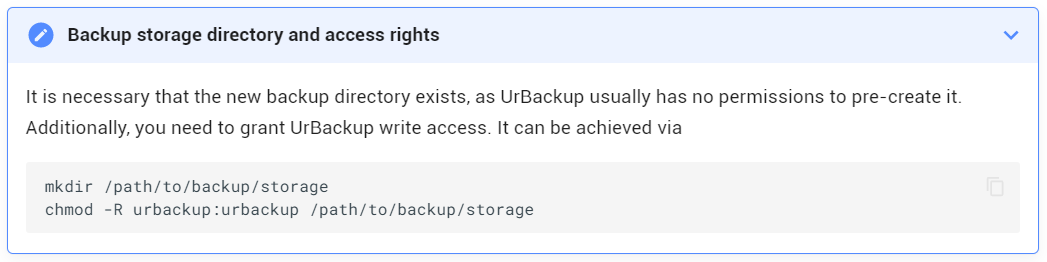
But no matter what I did, `chmod` would give me an `invalid mode` error. After learning a bit more about `chmod`, I realized that I needed to do this:
`mkdir /path/to/backup/storage`
`chmod -R 777 /path/to/backup/storage`
This granted read/write/change permissions to all users, and now UrBackup has stopped complaining.
I’m wondering if the docs should be edited to this? I don’t see how `urbackup:urbackup` makes any sense for `chmod`, unless that’s just something I haven’t learned yet.
---
### Author:  [@Joulinar](https://dietpi.com/forum/u/Joulinar)
#### Post date: [18 May 2023 06:27 UTC](https://dietpi.com/forum/t/external-ssd-with-urbackup/16303/29 "2023-05-18T06:27:49Z")
> [@rpwong](#):
>
> /path/to/backup/storage
is just an example directory/patch and you would need to replace it with your own backup target location.
> [@rpwong](#):
>
> This granted read/write/change permissions to all users, and now UrBackup has stopped complaining.
>
> I’m wondering if the docs should be edited to this? I don’t see how `urbackup:urbackup` makes any sense for `chmod`, unless that’s just something I haven’t learned yet.
You don’t need to give everyone write access to the backup target location. It’s enough to enable urbackup user to write backup data into target location.
---
### Author:  [@rpwong](https://dietpi.com/forum/u/rpwong)
#### Post date: [18 May 2023 16:17 UTC](https://dietpi.com/forum/t/external-ssd-with-urbackup/16303/30 "2023-05-18T16:17:05Z")
> [@Joulinar](#):
>
> is just an example directory/patch
Ah, I wasn’t questioning that. I just used the example path since I referenced the screenshot. My actual path was `/mnt/crucial/urbackup`.
> [@Joulinar](#):
>
> You don’t need to give everyone write access to the backup target location. It’s enough to enable urbackup user to write backup data into target location.
Right, but the command `chmod -r urbackup:urbackup /mnt/crucial/urbackup` didn’t do that. It threw an error and complained that `urbackup:urbackup` is an invalid mode.
Maybe a better question would be: what is the correct command to give the urbackup user access to the target location? Because the command in the screenshot didn’t work.
---
### Author:  [@Jappe](https://dietpi.com/forum/u/Jappe)
#### Post date: [18 May 2023 16:30 UTC](https://dietpi.com/forum/t/external-ssd-with-urbackup/16303/31 "2023-05-18T16:30:04Z")
> [@rpwong](#):
>
> Right, but the command `chmod -r urbackup:urbackup /mnt/crucial/urbackup` didn’t do that. It threw an error and complained that `urbackup:urbackup` is an invalid mode.
What you’ve tried is a mix of the syntax for `chown` (change ownsership) and `chmod` (change permissions).
Seems like there is a typo in the docs. I will create a [PR](https://github.com/MichaIng/DietPi-Docs/pull/889) for correction.
# chmod:
```auto
chmod -R 777 /path/to/backup/storage
```
# chown:
```auto
chown -R urbackup:urbackup /path/to/backup/storage
```
---
### Author:  [@rpwong](https://dietpi.com/forum/u/rpwong)
#### Post date: [18 May 2023 17:30 UTC](https://dietpi.com/forum/t/external-ssd-with-urbackup/16303/32 "2023-05-18T17:30:29Z")
> [@Jappe](#):
>
> What you’ve tried is a mix of the syntax for `chown` (change ownsership) and `chmod` (change permissions).
> Seems like there is a typo in the docs. I will create a [PR](https://github.com/MichaIng/DietPi-Docs/pull/889) for correction.
Thanks, that’s what I thought, but I didn’t explain it well.
Is it recommended to also change the ownership to urbackup? I left it as root since 777 granted permissions to all.
EDIT: I get it now after reading the PR. Instead of `chmod`, it should have been `chown` to reassign the ownership, while leaving the permissions as they were. So, I think I should do that and then revert the permissions with `chmod 744`, correct?
---
### Author:  [@Jappe](https://dietpi.com/forum/u/Jappe)
#### Post date: [18 May 2023 17:35 UTC](https://dietpi.com/forum/t/external-ssd-with-urbackup/16303/33 "2023-05-18T17:35:56Z")
Depends on your usecase.
But I would own it to urbackup:urbackup, and set 740 permission. So you could add users to the group `urbackup`, they would be able to read the data and the app itself can do anything and other users can’t do nothing.
# edit:
Yea just do 744, so you don’t need to add any users to groups.
[Previous page](https://dietpi.com/forum/t/external-ssd-with-urbackup/16303.md?page=1)