# Every Sunday, SSH and some other services not working
**URL:** https://dietpi.com/forum/t/every-sunday-ssh-and-some-other-services-not-working/22030
**Category:** Troubleshooting
**Created:** [26 November 2024 10:02 UTC](https://dietpi.com/forum/t/every-sunday-ssh-and-some-other-services-not-working/22030 "2024-11-26T10:02:38Z")
**Posts on this page:** 20
**Page:** 1
### Author:  [@amibumpin](https://dietpi.com/forum/u/amibumpin)
#### Post date: [26 November 2024 10:02 UTC](https://dietpi.com/forum/t/every-sunday-ssh-and-some-other-services-not-working/22030/1 "2024-11-26T10:02:38Z")
### Creating a bug report/issue
I have searched the existing open and closed issues
#### Required Information
- DietPi version | `9.8.0`
- Distro version | `bookworm`
- Kernel version | `Linux DietPi 6.6.54-current-meson64 #1 SMP PREEMPT Fri Oct 4 14:30:05 UTC 2024 aarch64 GNU/Linux`
- Architecture | `arm64`
- SBC model | Odroid HC4
- Power supply used | (EG: 5V 1A RAVpower)
- SD card used | (EG: SanDisk ultra)
Every Monday night about 02:00h as I’ve seen in Pi-hole, every DNS requests stops, and I can’t access through SSH, VPN also doesn’t work, and the leds of the Odroid are blinking very fast. In the morning when I wake up I reboot, and everything starts working for a time, because sometimes it happens again, and that’s it, the rest of the week everything goes fine.
I’ve checked cron folders, and I have a cron that updates cloudflared and I had another that maybe was giving an error because it called a script that doesn’t exist anymore and I have alredy removed but this week it happened again…
Can you help me where to look to try to find that mystery??
Thank you as always!
---
### Author:  [@Joulinar](https://dietpi.com/forum/u/Joulinar)
#### Post date: [26 November 2024 16:59 UTC](https://dietpi.com/forum/t/every-sunday-ssh-and-some-other-services-not-working/22030/2 "2024-11-26T16:59:21Z")
you can try to enable persistent system logs to check what happen around that specific timeframe
persistent system logs:
```auto
dietpi-software uninstall 103 # uninstalls DIetPi-RAMlog
mkdir /var/log/journal # triggers systemd-journald logs to disk
reboot # required to finalise the RAMlog uninstall
```
Then you can check system logs via:
```auto
journalctl
```
which will then show as well logs from previous boot sessions. To limit the size, you can additionally e.g. apply the following:
```auto
mkdir -p /etc/systemd/journald.conf.d
cat << '_EOF_' > /etc/systemd/journald.conf.d/99-custom.conf
[Journal]
SystemMaxFiles=2
MaxFileSec=7day
_EOF_
```
This will limit logs to 14 days split across two journal files, so that with rotation you will always have between 7 and 14 days of logs available.
---
### Author:  [@amibumpin](https://dietpi.com/forum/u/amibumpin)
#### Post date: [1 December 2024 21:36 UTC](https://dietpi.com/forum/t/every-sunday-ssh-and-some-other-services-not-working/22030/3 "2024-12-01T21:36:33Z")
Thank you Joulinar, and sorry for the late answer…
Everything is set, let’s see tomorror what says the log.
---
### Author:  [@amibumpin](https://dietpi.com/forum/u/amibumpin)
#### Post date: [2 December 2024 08:30 UTC](https://dietpi.com/forum/t/every-sunday-ssh-and-some-other-services-not-working/22030/4 "2024-12-02T08:30:32Z")
Hi @Joulinar I check the log, and it started at Dec 02 00:17:18 I have no logs before that, and at that time I didn’t reboot the Odroid.
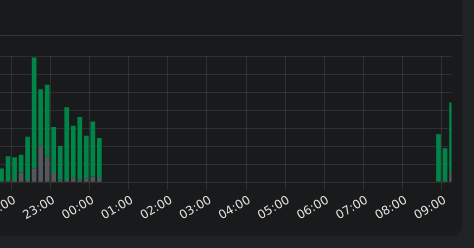
This morning I had the same ssh error when I try to log in, also pihole was not working as you can see on the screenshot:
I upload the log to chatgpt and it says this:
- **Hardware and services** :
- `meson-pcie fc000000.pcie: error: wait linkup timeout`
- `rtc-pcf8563: probe of 0-0051 failed with error -5`
- `panfrost ffe40000.gpu: error -ENODEV: _opp_set_regulators: no regulator (mali) found`
- **Related messages for Pi-hole** :
- `CRON[1564]: (root) CMD (/usr/sbin/logrotate --state /var/lib/logrotate/pihole /etc/pihole/logrotate)`
- `CRON[1563]: (root) CMD (PATH="$PATH:/usr/sbin:/usr/local/bin/" pihole updatechecker reboot)`
- El servicio `pihole-FTL.service` inició correctamente: `Started pihole-FTL.service - Pi-hole FTL.`
- **Related messages for SSH** :
- `Started dropbear.service - Lightweight SSH server.`
- `dropbear[1883]: Failed loading /etc/dropbear/dropbear_dss_host_key`
- **Related messages for XRDP** :
- `Starting xrdp-sesman.service - xrdp session manager...`
- `xrdp-sesman[1905]: [DEBUG] Testing if xrdp-sesman can listen on 127.0.0.1 port 3350.`
- **Errores de complementos del sistema** :
- `udisksd[1506]: failed to load module crypto: libbd_crypto.so.2: cannot open shared object file`
- `udisksd[1506]: Failed to load the 'crypto' libblockdev plugin`
I upload the log…
[registro.log](https://dietpi.com/forum/uploads/short-url/4iY4pfGmpooZRrwZwIj6QzqK5XS.log) (233.2 KB)
Thank you.
---
### Author:  [@Jappe](https://dietpi.com/forum/u/Jappe)
#### Post date: [2 December 2024 09:12 UTC](https://dietpi.com/forum/t/every-sunday-ssh-and-some-other-services-not-working/22030/5 "2024-12-02T09:12:58Z")
This is the wrong log file, it’s from the boot process from today 9AM. We need the log from the prior boot, to see what happened before you booted again.
It starts at around 00:17 because this is the time your device failed. You then rebooted it this morning, the device still thinks it’s 00:17 until it makes the timesync to get the actual time.
Do you have cronjobs which are getting executed every sunday? Something is happening and it freezes your whole system.
---
### Author:  [@amibumpin](https://dietpi.com/forum/u/amibumpin)
#### Post date: [2 December 2024 10:00 UTC](https://dietpi.com/forum/t/every-sunday-ssh-and-some-other-services-not-working/22030/6 "2024-12-02T10:00:52Z")
where I find the other log, to get the log i did
`journalctl > registro.log`
On the cron.weekly folder I have just a cloudflared update script, that I remove one week and the Odroid got stuck again.
This is the content of the script:
```auto
#!/bin/sh
# Asegurarse de que el cron tenga las rutas adecuadas al entorno
PATH=/usr/local/sbin:/usr/local/bin:/sbin:/bin:/usr/sbin:/usr/bin
# Detener el script si ocurre un error
set -e
# Definir variables
BIN_PATH="/usr/local/bin/cloudflared"
BACKUP_BIN_PATH="/usr/local/bin/cloudflared.bak"
TEMP_BIN_PATH="/tmp/cloudflared-linux-arm"
CLOUDFLARED_URL="https://github.com/cloudflare/cloudflared/releases/latest/download/cloudflared-linux-arm"
# Descargar la última versión de cloudflared en un directorio temporal
echo "Descargando la última versión de cloudflared..."
wget -O $TEMP_BIN_PATH $CLOUDFLARED_URL
# Verificar si la descarga fue exitosa
if [! -f $TEMP_BIN_PATH]; then
echo "Error: No se pudo descargar cloudflared."
exit 1
fi
# Verificar si el binario actual está en uso
if lsof $BIN_PATH; then
echo "Error: El binario cloudflared está en uso, no se puede reemplazar."
exit 1
fi
# Hacer una copia de seguridad del binario actual
if [-f $BIN_PATH]; then
echo "Creando copia de seguridad del binario actual..."
sudo cp $BIN_PATH $BACKUP_BIN_PATH
fi
# Detener el servicio de cloudflared
echo "Deteniendo el servicio cloudflared..."
sudo systemctl stop cloudflared
# Reemplazar el binario antiguo con el nuevo
echo "Reemplazando el binario de cloudflared..."
sudo mv -f $TEMP_BIN_PATH $BIN_PATH
sudo chmod +x $BIN_PATH
# Iniciar el servicio de cloudflared
echo "Iniciando el servicio cloudflared..."
sudo systemctl start cloudflared
# Verificar la versión de cloudflared
echo "Verificando la versión de cloudflared..."
cloudflared -v
# Comprobar el estado del servicio
echo "Comprobando el estado del servicio cloudflared..."
sudo systemctl status cloudflared
# Verificar que el servicio haya iniciado correctamente
if ! systemctl is-active --quiet cloudflared; then
echo "Error: El servicio cloudflared no se inició correctamente. Restaurando el binario anterior..."
sudo mv -f $BACKUP_BIN_PATH $BIN_PATH
sudo chmod +x $BIN_PATH
sudo systemctl start cloudflared
exit 1
fi
echo "Actualización de cloudflared completada exitosamente."
```
---
### Author:  [@Joulinar](https://dietpi.com/forum/u/Joulinar)
#### Post date: [2 December 2024 14:23 UTC](https://dietpi.com/forum/t/every-sunday-ssh-and-some-other-services-not-working/22030/7 "2024-12-02T14:23:16Z")
To avoid any misunderstandings why the initial system time is set to the 17th minute. This is due to an hourly cron job that saves the current system time. This time stamp is used as the initial time when booting until a time synchronisation is successful.
In this case in particular, this means that the system is stuck between 00:17 and 1:17. You can see this even better on the PiHole screenshot. By default, PiHole writes something to its log every 10 minutes. And it looks like the log is still written at 0:20 and not after that. This suggests that the crash must have happened between 0:20 and 0:30. Unfortunately, the log does not provide any information on this, as it does not contain any data from before the crash.
Can you please check whether there is a weekly cron job that starts between 0:20 and 0:30?
```auto
dietpi-cron
```
---
### Author:  [@amibumpin](https://dietpi.com/forum/u/amibumpin)
#### Post date: [2 December 2024 14:43 UTC](https://dietpi.com/forum/t/every-sunday-ssh-and-some-other-services-not-working/22030/8 "2024-12-02T14:43:22Z")
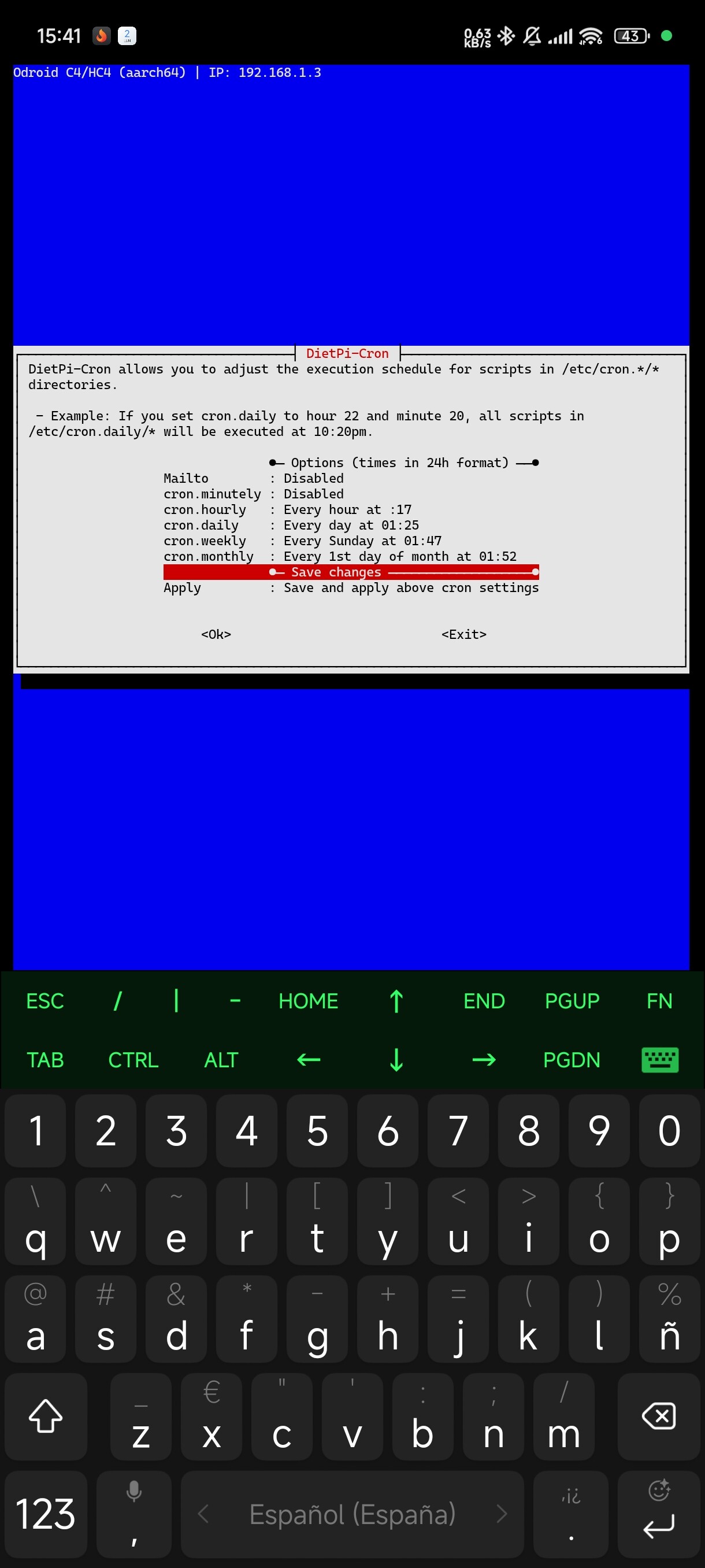
This is the output of dietpi-cron
---
### Author:  [@Joulinar](https://dietpi.com/forum/u/Joulinar)
#### Post date: [2 December 2024 16:56 UTC](https://dietpi.com/forum/t/every-sunday-ssh-and-some-other-services-not-working/22030/9 "2024-12-02T16:56:02Z")
At least nothing scheduled from that point. Did you check `crontab` already?
---
### Author:  [@amibumpin](https://dietpi.com/forum/u/amibumpin)
#### Post date: [2 December 2024 17:17 UTC](https://dietpi.com/forum/t/every-sunday-ssh-and-some-other-services-not-working/22030/10 "2024-12-02T17:17:28Z")
Nothing everything is commented:
```auto
root@DietPi:~# crontab -l
# Edit this file to introduce tasks to be run by cron.
#
# Each task to run has to be defined through a single line
# indicating with different fields when the task will be run
# and what command to run for the task
#
# To define the time you can provide concrete values for
# minute (m), hour (h), day of month (dom), month (mon),
# and day of week (dow) or use '*' in these fields (for 'any').
#
# Notice that tasks will be started based on the cron's system
# daemon's notion of time and timezones.
#
# Output of the crontab jobs (including errors) is sent through
# email to the user the crontab file belongs to (unless redirected).
#
# For example, you can run a backup of all your user accounts
# at 5 a.m every week with:
# 0 5 * * 1 tar -zcf /var/backups/home.tgz /home/
#
# For more information see the manual pages of crontab(5) and cron(8)
#
# m h dom mon dow command
root@DietPi:~#
```
On cron.d there ares this files:
certbot:
```auto
0 */12 * * * root test -x /usr/bin/certbot -a \! -d /run/systemd/system && perl -e 'sleep int(rand(43200))' && certbot -q renew --no-random-sleep-on-renew
```
e2scrub\_all
```auto
30 3 * * 0 root test -e /run/systemd/system || SERVICE_MODE=1 /usr/lib/aarch64-linux-gnu/e2fsprogs/e2scrub_all_cron
10 3 * * * root test -e /run/systemd/system || SERVICE_MODE=1 /sbin/e2scrub_all -A -r
```
php
```auto
09,39 * * * * root [-x /usr/lib/php/sessionclean] && if [! -d /run/systemd/system]; then /usr/lib/php/sessionclean; fi
```
pihole
```auto
44 3 * * 7 root PATH="$PATH:/usr/sbin:/usr/local/bin/" pihole updateGravity >/var/log/pihole/pihole_updateGravity.log || cat /var/log/pihole/pihole_updateGravity.log
00 00 * * * root PATH="$PATH:/usr/sbin:/usr/local/bin/" pihole flush once quiet
39 13 * * * root PATH="$PATH:/usr/sbin:/usr/local/bin/" pihole updatechecker
```
I was going to list every cron on every file of every folder on cron folder, and wathching pihole file I see some reboots, for example:
Pi-hole: Grab remote and local version every 24 hours
```auto
39 13 * * * root PATH="$PATH:/usr/sbin:/usr/local/bin/" pihole updatechecker
@reboot root PATH="$PATH:/usr/sbin:/usr/local/bin/" pihole updatechecker reboot
```
That last reboor means that is going to reboot my Odroid?? because if the answer is yes, that’s the problem, because odroid hc4 does not reboot, Ihad to power off and back on.
Some work around? it’s that reboot needed?
---
### Author:  [@hmtec99](https://dietpi.com/forum/u/hmtec99)
#### Post date: [2 December 2024 17:27 UTC](https://dietpi.com/forum/t/every-sunday-ssh-and-some-other-services-not-working/22030/11 "2024-12-02T17:27:07Z")
I have similar problems. Since Update to 9.8?!
After some time most services stop to respond (including ssh) and i need to kill the server.
---
### Author:  [@hmtec99](https://dietpi.com/forum/u/hmtec99)
#### Post date: [2 December 2024 17:31 UTC](https://dietpi.com/forum/t/every-sunday-ssh-and-some-other-services-not-working/22030/12 "2024-12-02T17:31:52Z")
While all other services seam to be dead, I can still login to dietpi-dashboard…
P.S. I don’t run pihole service AND I do not have an odroid (radxa 5b).
---
### Author:  [@Joulinar](https://dietpi.com/forum/u/Joulinar)
#### Post date: [2 December 2024 17:44 UTC](https://dietpi.com/forum/t/every-sunday-ssh-and-some-other-services-not-working/22030/13 "2024-12-02T17:44:40Z")
@hmtec99 I guess your issue is different. Pls open an own topic providing all necessary information.
---
### Author:  [@hmtec99](https://dietpi.com/forum/u/hmtec99)
#### Post date: [2 December 2024 17:51 UTC](https://dietpi.com/forum/t/every-sunday-ssh-and-some-other-services-not-working/22030/14 "2024-12-02T17:51:24Z")
Why do you think that? We are both on the same version and the symtoms are the same?!
I didn’t install anything new in the last time (only dietpi-upates or updates by apt and squeezebox server updates)…
@amibumpin
Maybe since update to 9.8?
---
### Author:  [@Joulinar](https://dietpi.com/forum/u/Joulinar)
#### Post date: [2 December 2024 18:31 UTC](https://dietpi.com/forum/t/every-sunday-ssh-and-some-other-services-not-working/22030/15 "2024-12-02T18:31:57Z")
> [@amibumpin](#):
>
> ```auto
> 39 13 * * * root PATH="$PATH:/usr/sbin:/usr/local/bin/" pihole updatechecker
> @reboot root PATH="$PATH:/usr/sbin:/usr/local/bin/" pihole updatechecker
> reboot
>
> ```
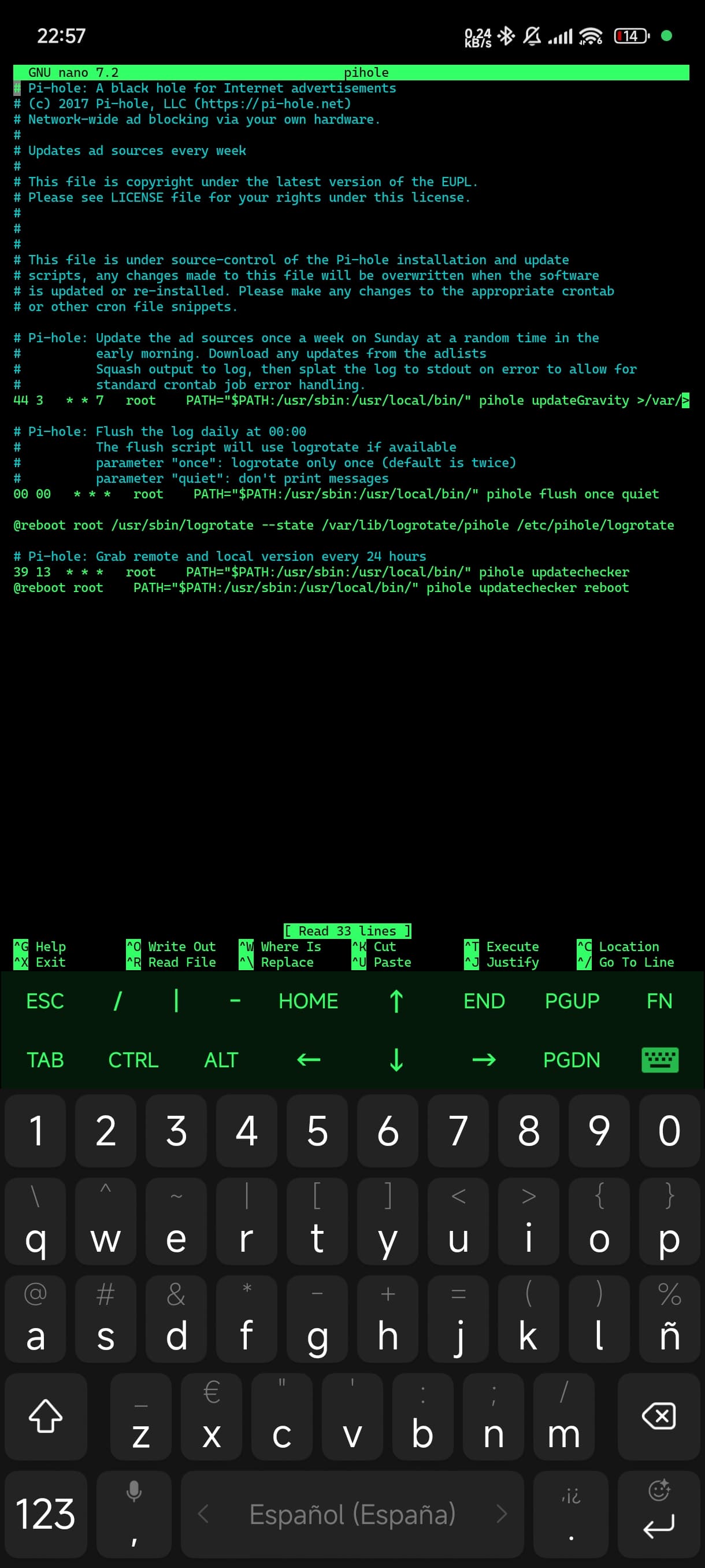
where do you see that? Just a word `reboot` seems to be quite strange as there is no schedule for this
---
### Author:  [@amibumpin](https://dietpi.com/forum/u/amibumpin)
#### Post date: [2 December 2024 21:58 UTC](https://dietpi.com/forum/t/every-sunday-ssh-and-some-other-services-not-working/22030/16 "2024-12-02T21:58:27Z")
In pihole find under /etc/cron.d folder
---
### Author:  [@Joulinar](https://dietpi.com/forum/u/Joulinar)
#### Post date: [3 December 2024 19:20 UTC](https://dietpi.com/forum/t/every-sunday-ssh-and-some-other-services-not-working/22030/17 "2024-12-03T19:20:32Z")
> [@amibumpin](#):
>
> ```auto
> pihole updatechecker reboot
>
> ```
OK, that makes it clearer now. I think the ‘reboot’ is more of a misunderstanding. It is not a separate command that reboots the server but belongs to the line before it and refers to the `pihole updatechecker` command.
If you look at the line, you can see that the command is only executed during system startup with `@reboot`. This means that there is no further execution at runtime. Also the command that is executed is `pihole updatechecker reboot`. I have not checked the script now, but I assume that the `pihole updatechecker` is told that the system has been rebooted by the `reboot` variable.
Conversely, this also means that this `cron` entry is not executed on Saturday mornings between 0:20 and 0:30. So there must be something else on the system.
---
### Author:  [@amibumpin](https://dietpi.com/forum/u/amibumpin)
#### Post date: [3 December 2024 21:29 UTC](https://dietpi.com/forum/t/every-sunday-ssh-and-some-other-services-not-working/22030/18 "2024-12-03T21:29:01Z")
What else can i check @Joulinar, do you know?
---
### Author:  [@Joulinar](https://dietpi.com/forum/u/Joulinar)
#### Post date: [3 December 2024 22:27 UTC](https://dietpi.com/forum/t/every-sunday-ssh-and-some-other-services-not-working/22030/19 "2024-12-03T22:27:23Z")
Maybe best to sit next to the device on upcoming weekend to watch resource consumption and running processes
---
### Author:  [@hmtec99](https://dietpi.com/forum/u/hmtec99)
#### Post date: [4 December 2024 18:19 UTC](https://dietpi.com/forum/t/every-sunday-ssh-and-some-other-services-not-working/22030/20 "2024-12-04T18:19:06Z")
@Joulinar
Maybe you’re right. After some futher research i opened a new topic:
> [@Almost all services dead after some time](https://dietpi.com/forum/t/almost-all-services-dead-after-some-time/22095):
>
> Maybe this the problem… but whats the cause? Dez 04 18:53:25 praenas kernel: EXT4-fs warning (device mmcblk1p2): ext4\_dirblock\_csum\_verify:379: inode #140261: comm squeezeboxserve: No space for directory leaf checksum. Please run e2fsck -D. Dez 04 18:53:25 praenas kernel: EXT4-fs error (device mmcblk1p2): \_\_ext4\_find\_entry:1622: inode #140261: comm squeezeboxserve: checksumming directory block 0 Dez 04 18:53:25 praenas kernel: EXT4-fs warning (device mmcblk1p2): ext4\_dirblock\_csum\_verify:379:…
[Next page](https://dietpi.com/forum/t/every-sunday-ssh-and-some-other-services-not-working/22030.md?page=2)