# ERR\_CONNECTION\_REFUSED
**URL:** https://dietpi.com/forum/t/err-connection-refused/1873
**Category:** Troubleshooting
**Created:** [29 January 2018 18:36 UTC](https://dietpi.com/forum/t/err-connection-refused/1873 "2018-01-29T18:36:00Z")
**Posts on this page:** 3
**Page:** 1
### Author:  [@refthoom](https://dietpi.com/forum/u/refthoom)
#### Post date: [29 January 2018 18:36 UTC](https://dietpi.com/forum/t/err-connection-refused/1873/1 "2018-01-29T18:36:00Z")
Hi, just new here, have been trying some stuff with dietpi. Great concept, really love it. However, I do seem to run into some issues. Maybe I’m overlooking something. BTW, I’m no Linux guru so please be gentle 🙂
Yesterday I was configuring an Rpi 3 with dietpi. Installed pihole, pivpn, everything went fine. Then I went on to install raspcontrol. Installation gave no errors but the dashboard was unreachable. Installed rpimonitor on top, same thing. What is going on here, is it me? LOL
Today, to isolate things, I started a fresh. Downloaded the latest dietpi image, etched it to a 16GB SD. Hooked up the rpi to a monitor, just for information sake. Powered on, installation went fine. Time sync was a bit slow, nothing else. Initial updates and reboots were ok. Connected with putty, again initial updates and reboot, all ok.
After that, connected again with putty, selected raspcontrol under optimized software and ran install. No errors, just a reboot at the end. Now I go to the dashboard at: /raspcontrol and I get the following:
This site can’t be reached
refused to connect.
Search Google for raspcontrol
ERR\_CONNECTION\_REFUSED
I checked /etc/raspcontrol/database.aptmnt and it contains user and pwd root/dietpi.
Also checked /var/www/raspcontrol/ and there is all the raspcontrol stuff including an index.php file.
The network is fine I guess since I can connect to the console with putty.
What am I overlooking here?
EDIT: I removed raspcontrol and then installed linuxdash, which should also install LASP (just in case that failed whit the install of raspcontrol). After this the Linuxdash page showed but it was not rendering any graphs or anything. Just empty boxes.
Then I re-installed raspcontrol. Now instead of a refused connection, I get a 403 forbidden (/raspcontrol).
Ok, so uninstalled both of those and rebooted.
Now installed rpimonitor. So now I get a ‘placeholder page’ (/rpimonitor)
Is it me?
---
### Author:  [@k-plan](https://dietpi.com/forum/u/k-plan)
#### Post date: [31 January 2018 18:51 UTC](https://dietpi.com/forum/t/err-connection-refused/1873/2 "2018-01-31T18:51:31Z")
> [@refthoom](#):
>
> I checked /etc/raspcontrol/database.aptmnt and it contains user and pwd root/dietpi.
> Also checked /var/www/raspcontrol/ and there is all the raspcontrol stuff including an index.php file.
> The network is fine I guess since I can connect to the console with putty.
>
> What am I overlooking here?
[https://dietpi.com/forum/t/dietpi-survey-information/32/1](https://dietpi.com/forum/t/dietpi-survey-information/32/1)
> No page?:
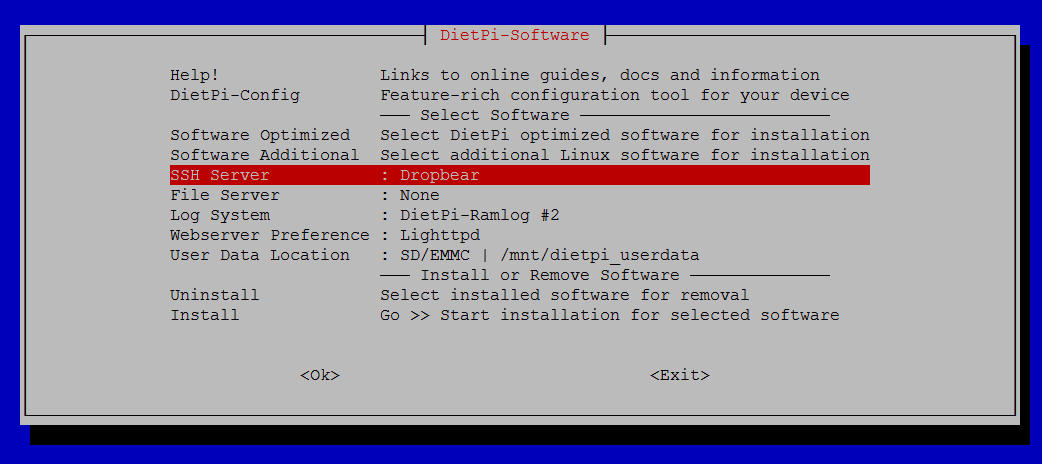
> Raspcontrol will only work if OpenSSH-Server is installed. Run \> dietpi-software \> and use SSH server from the menu to change. (Dropbear is default)
## 
> [@refthoom](#):
>
> then installed linuxdash, which should also install LASP (just in case that failed whit the install of raspcontrol). After this the Linuxdash page showed but it was not rendering any graphs or anything. Just empty boxes.
[https://dietpi.com/forum/t/dietpi-survey-information/32/1](https://dietpi.com/forum/t/dietpi-survey-information/32/1)
> ([http:///linuxdash/app](https://http))
* * *
> [@refthoom](#):
>
> Now installed rpimonitor. So now I get a ‘placeholder page’ (/rpimonitor)
> [@Support the DietPi Project (Donations, Contribution)](https://dietpi.com/forum/t/support-the-dietpi-project-donations-contribution/53/1):
>
> Donate and support the DietPi Project DietPi is a free and open source product which relies solely on your donations for funding. If you found DietPi useful and want to support future development, please donate. [Become a Patron](https://www.patreon.com/DietPi) to support us on a regular basis [Donate with PayPal [paypal-donate-button-2]](https://www.paypal.com/donate?hosted_button_id=6DVBECXRW3TAA) How donations will be used: Future development. Allowing us to continue working on DietPi and make it better and better with each update. Micro SD cards. We go through a vast amount of m…
> ([http://:8888](https://http))
* * *
> [@refthoom](#):
>
> Is it me?
[DietPi-Software | Details for ALL installation options](https://dietpi.com/forum/t/dietpi-software-details-for-all-installation-options/22/1)
---
### Author:  [@refthoom](https://dietpi.com/forum/u/refthoom)
#### Post date: [2 February 2018 19:42 UTC](https://dietpi.com/forum/t/err-connection-refused/1873/3 "2018-02-02T19:42:04Z")
@k-plan: Thx for these answers 🙂 I see most support is coming from you, that’s awesome!
> No page?:
> Raspcontrol will only work if OpenSSH-Server is installed. Run \> dietpi-software \> and use SSH server from the menu to change. (Dropbear is default)
Somewhere in the install it is mentioned that Dropbear is the default install for SSH so I assumed it was already there/running. Also, I assumed if it was needed it would be installed as a depency of LASP.
> [@refthoom](#):
>
> Now installed rpimonitor. So now I get a ‘placeholder page’ (/rpimonitor)
Later, I did a fresh dietpi install and directly installed rpimonitor, it all worked fine (port 8888 of course, silly me 🙂 )
> [@refthoom](#):
>
> Is it me?
→ Yes definitely LOL
Reading more I found ‘dietpi-services’ which is a great help troubleshooting. Also found that ‘cpu’ and ‘htop’ give me all the info I need so no need for rpimonitor, raspcontrol or linuxdash, keeping it lightweight.
Running a DietPi now with pihole, pivpn, fail2ban. Took a little time to get the hang of it but now that I know my way around DietPi, I’m sold! Really really good stuff! I have an extra pi so if you need help with testing stuff just send me an email.
Thanks again 🙂