DietPi version | root@DietPi:~# cat /boot/dietpi/.version
G_DIETPI_VERSION_CORE=9
G_DIETPI_VERSION_SUB=15
G_DIETPI_VERSION_RC=2
G_GITBRANCH=‘master’
G_GITOWNER=‘MichaIng’
Distro version | bookworm 0
Kernel version | Linux DietPi 6.12.34+rpt-rpi-v8 #1 SMP PREEMPT Debian 1:6.12.34-1+rpt1~bookworm (2025-06-26) aarch64 GNU/Linux
Architecture | dpkg --print-architecture
arm64
SBC model | RPi 4 Model B (aarch64)
Power supply used | Original
SD card used | SanDisk
Off on holiday and keen to know if/how I can remotely download media file to my iPad for offline viewing. I have a Tailscale VPN set up, and can access the DietPi’s file manager via VNC, but wondering how I can instruct the DiepPi to send file to iPad.
Many thanks. File Browser seems to be doing the job well, however I’m trying to access a particular folder on the Pi and it’s saying I don’t have permission to access it.
What do I do to change that (I get easily confused with permissions!). Its the folder I’ve told sonarr to place TV Shows, and where Jellyfin is pointing to, so I don’t want to mess any of those permissions up (neither of which I specifically set permission up for as such).
This is the folder path: /mnt/dietpi_userdata/Video
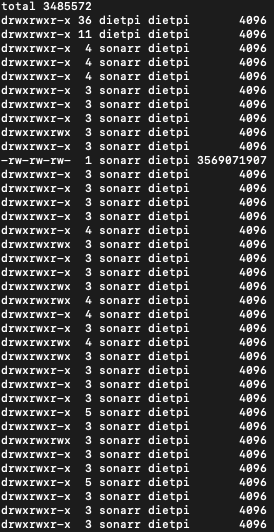
I think its saying that the user permissions are sonarr dietpi 4096, but I’m reading that having Googled how to get permissions data and used the ls -l command.
Assuming Sonarr is a member of the dietpi group (knowledge here from my Google search!) how do I add File Browser?
did some testing, and user filebrowser should be member of group dietpi already. Means, on a default system, access to /mnt/dietpi_userdata/Video should be possible