# Disabling dietpi-boot service?
**URL:** https://dietpi.com/forum/t/disabling-dietpi-boot-service/1462
**Category:** General Discussion
**Created:** [19 August 2017 06:10 UTC](https://dietpi.com/forum/t/disabling-dietpi-boot-service/1462 "2017-08-19T06:10:48Z")
**Posts on this page:** 16
**Page:** 1
### Author:  [@NJS](https://dietpi.com/forum/u/NJS)
#### Post date: [19 August 2017 06:10 UTC](https://dietpi.com/forum/t/disabling-dietpi-boot-service/1462/1 "2017-08-19T06:10:48Z")
I am developing a headless IoT device (wireless wildlife camera) on Dietpi and would like to optimize and strip down the boot sequence. Iam trying to disable the dietpi-boot, which I assume is generating all the colorful information that is displayed E.g.:
```nohighlight
DietPi-CPU_Set
DietPi-Set_Hardware
DietPi-Services
...
DietPi-Process_Tool
Default Login
```
I tried to disable it with :
```nohighlight
systemctl disable dietpi-boot
```
But it still starts. I also tried to mask it, but that fails.
How can I disable it?
Thanks.
---
### Author:  [@Fourdee](https://dietpi.com/forum/u/Fourdee)
#### Post date: [19 August 2017 14:50 UTC](https://dietpi.com/forum/t/disabling-dietpi-boot-service/1462/2 "2017-08-19T14:50:57Z")
Boot script and service is critical to basic DietPi operation. It initializes the global variables shared in all DietPi scripts. Modifying or removing dietpi-boot and /DietPi/dietpi/boot is not supported.
I assume you are trying to reduce the boot time on system? What is the current boot time?
```nohighlight
cat /var/log/boottime
```
If no value, reboot system (due to ramlog clearing every 1 hour)
What is the device you are using?
If no network:
- disable both eth and wlan in dietpi-config.
- disable “boot net wait” in “8 Network Options: NAS/Misc”
If network:
- Set static IP to reduce boot upto 5+ seconds (on wifi)
---
### Author:  [@NJS](https://dietpi.com/forum/u/NJS)
#### Post date: [19 August 2017 15:22 UTC](https://dietpi.com/forum/t/disabling-dietpi-boot-service/1462/3 "2017-08-19T15:22:36Z")
FWIW, result of cat /var/log/boottime is currently 33.6 sec and, yes, I do want to reduce overall boot time, but its much more than just that…
I also want to eliminate unneeded CPU cycles (power consumption) and complexity (which is inversely related to reliability) of having unnecessary services running. Also, the output of the standard DietPi boot scripts is cluttering the stdio when I am trying to see messages from my main application, which is being launched as a service right after the file system is ready see: [https://dietpi.com/forum/t/fast-boot-to-python-script-without-networking/1167/1](https://dietpi.com/forum/t/fast-boot-to-python-script-without-networking/1167/1)
Networking is already disabled during boot.
Even if not officially supported, how would I disable dietpi-boot and the other scripts it runs? Although many of the DietPi features are great on my development platform, I really don’t want or need any DietPi scripts going when I deploy the device. Just a tightly-wound minimal OS.
Thanks.
---
### Author:  [@NJS](https://dietpi.com/forum/u/NJS)
#### Post date: [19 August 2017 17:29 UTC](https://dietpi.com/forum/t/disabling-dietpi-boot-service/1462/4 "2017-08-19T17:29:32Z")
I forgot to answer your other question… It’s running on Pi Zero
---
### Author:  [@Fourdee](https://dietpi.com/forum/u/Fourdee)
#### Post date: [19 August 2017 18:25 UTC](https://dietpi.com/forum/t/disabling-dietpi-boot-service/1462/5 "2017-08-19T18:25:11Z")
> [@NJS](#):
>
> of having unnecessary services running.
DietPi services/scripts only run once, when needed (eg: during boot, or when user runs a dietpi-\* script). No background processing. Boot time may be slightly longer (due to RAMdisk creation, process tool apply, device identification, network wait to ensure service launch successfully, etc), but overall much lighter post init.
> 33.6 sec
Should be sub 25 seconds for Pi Zero, even with network. Which SD card? 17.5MB/s R/W is max regardless of card, however, If no network, and UHS-3 card, overclock SD bus [RPi | Double SDcard IO (Read/Write speeds)](https://dietpi.com/forum/t/rpi-double-sdcard-io-read-write-speeds/279/1) This will vastly improve boot times 35MB/s~.
> Although many of the DietPi features are great on my development platform, I really don’t want or need any DietPi scripts going when I deploy the device. Just a tightly-wound minimal OS.
As the services/scripts you want to exclude are critical to DietPi, I decline to offer assistance in their removal. You would be better of with Raspbian stock, then customize it to how you want it for your project.
> Just a tightly-wound minimal OS.
DietPi is exactly this.
---
### Author:  [@NJS](https://dietpi.com/forum/u/NJS)
#### Post date: [21 August 2017 05:08 UTC](https://dietpi.com/forum/t/disabling-dietpi-boot-service/1462/6 "2017-08-21T05:08:16Z")
> DietPi services/scripts only run once, when needed (eg: during boot, or when user runs a dietpi-\* script). No background processing. Boot time may be slightly longer (due to RAMdisk creation, process tool apply, device identification, network wait to ensure service launch successfully, etc), but overall much lighter post init.
The problem in my case is that the Pi will boot potentially 100s of times per day. It spends most of its time powered off until awoken (i.e. powered up) by arduino supervisor (which is also sleeping, but wakes on interrupt from passive IR). It boots, typically just takes a photo, and then goes back to sleep. It has to work this way to conserve battery. So all the extra stuff (over and above the file system) that runs every boot is just wasting CPU cycles (energy).
> Should be sub 25 seconds for Pi Zero, even with network. Which SD card? 17.5MB/s R/W is max regardless of card, however, If no network, and UHS-3 card, overclock SD bus \> [RPi | Double SDcard IO (Read/Write speeds)](https://dietpi.com/forum/t/rpi-double-sdcard-io-read-write-speeds/279/1) . This will vastly improve boot times 35MB/s~.
I am using Samsung EVO+ 32GB, which I specifically selected to reduce boot time since it is supposed to be one of the fastest available. But for some reason I am only getting read speed of 21.3 MB/s and write speeds from 4 to 10 MB/s (write speed is different every time I run the benchmark). This is with a fresh install of DietPi which boots in 26.5 sec.
After adding dtoverlay=sdhost,overclock\_50=84 to \DietPi\config.txt read speed increases modestly to 28 MB/s but boot time is still over 26 sec (and the Pi Zero W onboard wifi stops working)
---
### Author:  [@NJS](https://dietpi.com/forum/u/NJS)
#### Post date: [24 August 2017 22:28 UTC](https://dietpi.com/forum/t/disabling-dietpi-boot-service/1462/7 "2017-08-24T22:28:50Z")
Any thoughts on this?
---
### Author:  [@Fourdee](https://dietpi.com/forum/u/Fourdee)
#### Post date: [25 August 2017 13:32 UTC](https://dietpi.com/forum/t/disabling-dietpi-boot-service/1462/8 "2017-08-25T13:32:41Z")
> [@NJS](#):
>
> am only getting read speed of 21.3 MB/s and write speeds from 4 to 10 MB/s (write speed is different every time I run the benchmark). This is with a fresh install of DietPi which boots in 26.5 sec.
>
> After adding dtoverlay=sdhost,overclock\_50=84 to \DietPi\config.txt read speed increases modestly to 28 MB/s
>
> Any thoughts on this?
It is not possible to achieve 17.5MB/s+ without overclocking SD bus.
I use Sandisk extreme UHS-3, caps out 35MB’s R/W when overclocked.
Use official power supply.
Did you solder the GPIO on RPi Zero? Can damage the board if excessive heat transferred for long periods.
---
### Author:  [@NJS](https://dietpi.com/forum/u/NJS)
#### Post date: [25 August 2017 14:19 UTC](https://dietpi.com/forum/t/disabling-dietpi-boot-service/1462/9 "2017-08-25T14:19:04Z")
> It is not possible to achieve 17.5MB/s+ without overclocking SD bus.
Well, that doesn’t seem consistent with my results… I’m getting read speed of 21.3 MB/s with fresh install and read speed of 28 MB/s when I overclock. However there is virtually no change in boot time (26 secs).
Writes results are much slower and less consistent from test to test 4 to 10 MB/s.
Could there be an issue with the benchmark utility?
> Use official power supply.
>
> Did you solder the GPIO on RPi Zero? Can damage the board if excessive heat transferred for long periods.
I’ve tested this on two Pi zeros (one original and one brand new “W” that has not been soldered) with two identical SD cards and with various power supplies (including 7AH battery)
---
### Author:  [@NJS](https://dietpi.com/forum/u/NJS)
#### Post date: [14 October 2017 15:23 UTC](https://dietpi.com/forum/t/disabling-dietpi-boot-service/1462/10 "2017-10-14T15:23:45Z")
FWIW, **none** of the usual pi overclocking setting make any difference in boot time…
I’ve tried the following settings in /DietPi/config.txt
```nohighlight
temp_limit=65
initial_turbo=30
arm_freq=1000
gpu_freq=500
core_freq=500
sdram_freq=500
sdram_schmoo=0x02000020
over_voltage=2
sdram_over_voltage=2
```
And whether they are all commented or all uncommitted, I get identical boot time of ~25 sec (per /var/log/boottime) with dmesg ending as follows…
```nohighlight
[3.486860] systemd[1]: Listening on Journal Socket.
[3.493561] systemd[1]: Starting System Slice.
[3.507882] systemd[1]: Created slice System Slice.
[3.514644] systemd[1]: Starting File System Check on Root Device...
[3.534336] systemd[1]: Starting system-systemd\x2dfsck.slice.
[3.560703] systemd[1]: Created slice system-systemd\x2dfsck.slice.
[3.571560] systemd[1]: Starting system-getty.slice.
[3.596157] systemd[1]: Created slice system-getty.slice.
[3.603989] systemd[1]: Starting Nameserver information manager...
[3.635376] systemd[1]: Mounting POSIX Message Queue File System...
[3.678156] systemd[1]: Mounted Huge Pages File System.
[3.715903] systemd[1]: Mounting Debug File System...
[3.750469] systemd[1]: Starting Create list of required static device nodes for the current kernel...
[3.913660] systemd[1]: Started Set Up Additional Binary Formats.
[3.940740] systemd[1]: Starting Load Kernel Modules...
[3.987038] systemd[1]: Starting udev Coldplug all Devices...
[4.067408] systemd[1]: Starting LSB: Set keymap...
[4.133578] fuse init (API version 7.23)
[4.153447] systemd[1]: Starting Journal Service...
[4.229576] systemd[1]: Started Journal Service.
[4.278682] bcm2708_i2c 20804000.i2c: BSC1 Controller at 0x20804000 (irq 77) (baudrate 100000)
[4.319622] i2c /dev entries driver
[6.054366] systemd-udevd[135]: starting version 215
[7.526692] rtc-pcf8523 1-0068: rtc core: registered rtc-pcf8523 as rtc0
[7.693995] bcm2835-wdt 20100000.watchdog: Broadcom BCM2835 watchdog timer
[7.741191] gpiomem-bcm2835 20200000.gpiomem: Initialised: Registers at 0x20200000
[8.126068] EXT4-fs (mmcblk0p2): re-mounted. Opts: discard
[9.334761] usbcore: registered new interface driver brcmfmac
[9.547133] brcmfmac: brcmf_c_preinit_dcmds: Firmware version = wl0: May 27 2016 00:13:38 version 7.45.41.26 (r640327) FWID 01-df77e4a7
[9.571770] random: nonblocking pool is initialized
[9.596586] brcmfmac: brcmf_cfg80211_reg_notifier: not a ISO3166 code
[10.393194] systemd-journald[97]: Received request to flush runtime journal from PID 1
[12.258605] brcmfmac: brcmf_cfg80211_reg_notifier: not a ISO3166 code
[12.258661] cfg80211: World regulatory domain updated:
[12.258678] cfg80211: DFS Master region: unset
[12.258694] cfg80211: (start_freq - end_freq @ bandwidth), (max_antenna_gain, max_eirp), (dfs_cac_time)
[12.258715] cfg80211: (2402000 KHz - 2472000 KHz @ 40000 KHz), (N/A, 2000 mBm), (N/A)
[12.258737] cfg80211: (2457000 KHz - 2482000 KHz @ 20000 KHz, 92000 KHz AUTO), (N/A, 2000 mBm), (N/A)
[12.258753] cfg80211: (2474000 KHz - 2494000 KHz @ 20000 KHz), (N/A, 2000 mBm), (N/A)
[12.258774] cfg80211: (5170000 KHz - 5250000 KHz @ 80000 KHz, 160000 KHz AUTO), (N/A, 2000 mBm), (N/A)
[12.258793] cfg80211: (5250000 KHz - 5330000 KHz @ 80000 KHz, 160000 KHz AUTO), (N/A, 2000 mBm), (0 s)
[12.258810] cfg80211: (5490000 KHz - 5730000 KHz @ 160000 KHz), (N/A, 2000 mBm), (0 s)
[12.258826] cfg80211: (5735000 KHz - 5835000 KHz @ 80000 KHz), (N/A, 2000 mBm), (N/A)
[12.258842] cfg80211: (57240000 KHz - 63720000 KHz @ 2160000 KHz), (N/A, 0 mBm), (N/A)
[12.917421] cfg80211: Regulatory domain changed to country: US
[12.917465] cfg80211: DFS Master region: FCC
[12.917483] cfg80211: (start_freq - end_freq @ bandwidth), (max_antenna_gain, max_eirp), (dfs_cac_time)
[12.917507] cfg80211: (2402000 KHz - 2472000 KHz @ 40000 KHz), (N/A, 3000 mBm), (N/A)
[12.917529] cfg80211: (5170000 KHz - 5250000 KHz @ 80000 KHz, 160000 KHz AUTO), (N/A, 2300 mBm), (N/A)
[12.917549] cfg80211: (5250000 KHz - 5330000 KHz @ 80000 KHz, 160000 KHz AUTO), (N/A, 2300 mBm), (0 s)
[12.917567] cfg80211: (5490000 KHz - 5730000 KHz @ 160000 KHz), (N/A, 2300 mBm), (0 s)
[12.917583] cfg80211: (5735000 KHz - 5835000 KHz @ 80000 KHz), (N/A, 3000 mBm), (N/A)
[12.917600] cfg80211: (57240000 KHz - 63720000 KHz @ 2160000 KHz), (N/A, 4000 mBm), (N/A)
[13.769960] brcmfmac: brcmf_add_if: ERROR: netdev:wlan0 already exists
[13.770003] brcmfmac: brcmf_add_if: ignore IF event
[13.780044] IPv6: ADDRCONF(NETDEV_UP): wlan0: link is not ready
[13.780124] brcmfmac: power management disabled
[14.093267] brcmfmac: power management disabled
[16.278037] Adding 102396k swap on /var/swap. Priority:-1 extents:3 across:106492k SSFS
[17.869005] IPv6: ADDRCONF(NETDEV_CHANGE): wlan0: link becomes ready
[34.407252] brcmfmac: power management disabled
```
---
### Author:  [@Fourdee](https://dietpi.com/forum/u/Fourdee)
#### Post date: [15 October 2017 12:17 UTC](https://dietpi.com/forum/t/disabling-dietpi-boot-service/1462/11 "2017-10-15T12:17:35Z")
> [@NJS](#):
>
> FWIW, **none** of the usual pi overclocking setting make any difference in boot time…
I believe its more a case of increase SD speeds during boot, that will make the most difference:
> [@RPi | Double SDcard IO (Read/Write speeds)](https://dietpi.com/forum/t/rpi-double-sdcard-io-read-write-speeds/279/1):
>
> I love Raspberry Pi’s and I have been using them for years. Its also the very 1st DietPi image I created. One of my major gripes with the RPi, is the limited performance of the SDcard IO (read and write) speed: This is a known limitation with all Raspberry Pi’s and only 17.5mb/s read and write can be achieved. Whereas, other SBC’s (eg: Odroid C1/2) can offer SDcard IO performance at 40+mb/s You can double the read and write performance to 35mb/s on all Raspberry Pi’s: Ho…
---
### Author:  [@k-plan](https://dietpi.com/forum/u/k-plan)
#### Post date: [15 October 2017 14:24 UTC](https://dietpi.com/forum/t/disabling-dietpi-boot-service/1462/12 "2017-10-15T14:24:56Z")
Hi,
I think, their is a lot of mystic here, about speed-up boot-time.
So I have done same testing on a:
```plaintext
───────────────────────────────────────
DietPi | 14:58 | Sun 15/10/17
───────────────────────────────────────
V156 | RPi Zero W (armv6l)
───────────────────────────────────────
```
First of all, I think @NJS is using a very old DietPi RPi Zero W image version.
> [@NJS](#):
>
> ```plaintext
> ...
> [9.334761] usbcore: registered new interface driver brcmfmac
> [9.547133] brcmfmac: brcmf_c_preinit_dcmds: Firmware version = wl0: May 27 2016 00:13:38 version 7.45.41.26 (r640327) FWID 01-df77e4a7
> ...
>
> ```
DietPi v156 have after fresh installation out-of-the-box:
```plaintext
root@RPi-Zero_W:~# uname -a
Linux RPi-Zero_W 4.9.52+ #1 Mon Oct 2 21:14:49 UTC 2017 armv6l GNU/Linux
root@RPi-Zero_W:~# dmesg | grep wl0
[8.017884] brcmfmac: Firmware version = wl0: Aug 7 2017 00:46:29 version 7.45.41.46 (r666254 CY) FWID 01-f8a78378
```
But let’s start testing with a fresh installed image (DietPi\_v150\_RPi-armv6-(Jessie).img) on a [SanDisk Extreme 32GB microSDHC, Class 10, UHS-3](https://www.amazon.de/SanDisk-Extreme-microSDHC-Speicherkarte-Adapter/dp/B013CP5HCK/) with default settings, which will be auto-updated to DietPi v156 during first boot-up.
We using a [Official Raspberry Pi Power Supply](https://www.welectron.com/Raspberry-Pi-Offizielles-Steckernetzteil-microUSB-51V-25A), because it will have a out of _ **5.2 V** _ with **_2.5 A_** and no significant powerloss on cable (18 AWG) and micro usb plug (only pin 1 and 5 connected)
Settings:
- Wifi enabled
- IPv4 addess via DHCP
- IPv6 enabled
- Swapfile size : auto (1567 MB)
- no overclocking or tweaking CPU, RAM, GPU or sd card
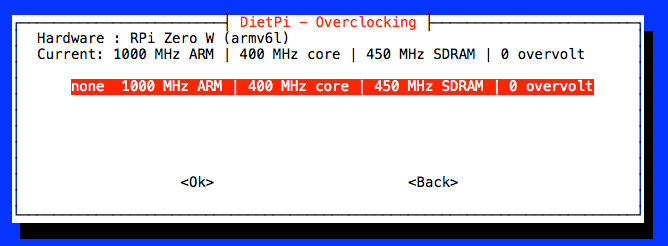
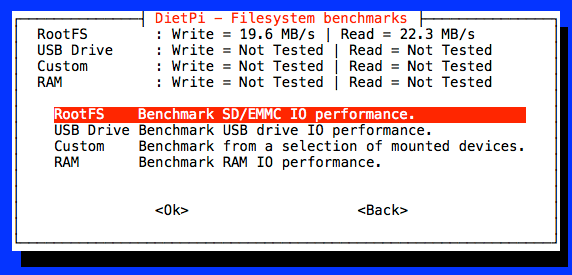
```plaintext
root@RPi-Zero_W:~# cat /var/log/boottime
27.17 Seconds
```
* * *
Lets tweak the setting to speed up:
Device Network: IP address
- Wifi enabled
- IPv4 static addess
- IPv6 enabled _(leave it enabled, disable will increase boot-up time!)_
```plaintext
root@RPi-Zero_W:~# cat /var/log/boottime
20.01 Seconds
```
* * *
Swapfile settings:
- Swapfile size : 100 MB
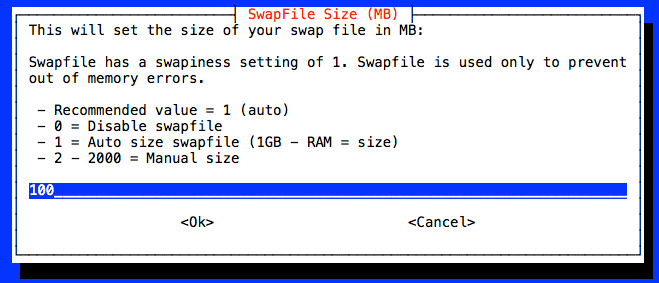
```plaintext
root@RPi-Zero_W:~# cat /var/log/boottime
19.60 Seconds
```
* * *
Swapfile disable:
- Swapfile size : disable (0 MB)
```plaintext
root@RPi-Zero_W:~# cat /var/log/boottime
19.28 Seconds
```
* * *
Tweaking sd card **_without breaking WiFi_** :
- ##—SD-CARD\_Overclock------
dtoverlay=sdtweak,overclock\_50=100
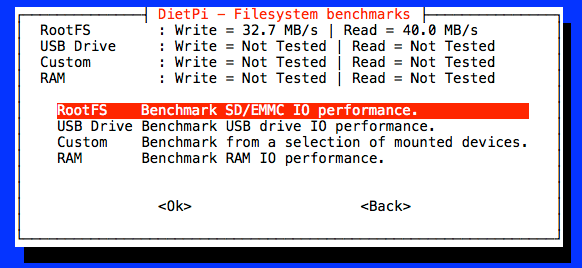
```plaintext
root@RPi-Zero_W:~# cat /var/log/boottime
19.18 Seconds
```
* * *
Overclocking CPU, SDRAM, GPU, Voltage :
- ##----for RPi Zero----
arm\_freq=1050
gpu\_freq=500
core\_freq=500
sdram\_freq=500
## sdram\_schmoo=0x02000020 (don’t do this!)
over\_voltage=2
sdram\_over\_voltage=2
```plaintext
root@RPi-Zero_W:~# cat /var/log/boottime
18.79 Seconds
```
* * *
27.17 Seconds vs. 18.79 Seconds
- Static ip-address configuration and swapflie size make the greatest difference in boot-up time.
- Overclocking and sd card tweak increase the system performace much, but not as much for boot-up time.
And that is it!
---
### Author:  [@NJS](https://dietpi.com/forum/u/NJS)
#### Post date: [15 October 2017 14:34 UTC](https://dietpi.com/forum/t/disabling-dietpi-boot-service/1462/13 "2017-10-15T14:34:34Z")
> [@Fourdee](#):
>
> > [@NJS](#):
> >
> > FWIW, **none** of the usual pi overclocking setting make any difference in boot time…
>
> I believe its more a case of increase SD speeds during boot, that will make the most difference:
> [RPi | Double SDcard IO (Read/Write speeds)](https://dietpi.com/forum/t/rpi-double-sdcard-io-read-write-speeds/279/1)
I had tried that but it actually made no difference at all. See my prior post above: [Disabling dietpi-boot service?](https://dietpi.com/forum/t/disabling-dietpi-boot-service/1462/1)
---
### Author:  [@NJS](https://dietpi.com/forum/u/NJS)
#### Post date: [15 October 2017 14:50 UTC](https://dietpi.com/forum/t/disabling-dietpi-boot-service/1462/14 "2017-10-15T14:50:43Z")
> [@k-plan](#):
>
> Hi,
> I think, their is a lot of mystic here, about speed-up boot-time.
> So I have done same testing
Thanks! This was badly needed!
> [@k-plan](#):
>
> First of all, I think @NJS is using a very old DietPi RPi Zero W image version.
Yes, I had upgraded to the latest but could not get python smbus to work with it (I tried three different versions lost several days and finally just gave up).
> [@k-plan](#):
>
> [\*] IPv6 enabled _(leave it enabled, disable will increase boot-up time!)_[/list]
Interesting, why is that? In my case I don’t even initialize WLAN until later from within my App. I wonder if I could remove the network manager entirely from the boot sequence and load it later when needed.
> [@k-plan](#):
>
> ## sdram\_schmoo=0x02000020 (don’t do this!)
Just curious, what is the problem with this (I’ve seen it suggested in many places)?
> [@k-plan](#):
>
> 27.17 Seconds vs. 18.79 Seconds
>
> - Static ip-address configuration and swapflie size make the greatest difference in boot-up time.
> - Overclocking and sd card tweak increase the system performace much, but not as much for boot-up time.
>
> And that is it!
I’ll try some of this and see what happens. If I can get it under 19 seconds that would be a huge improvement!
---
### Author:  [@Fourdee](https://dietpi.com/forum/u/Fourdee)
#### Post date: [15 October 2017 15:44 UTC](https://dietpi.com/forum/t/disabling-dietpi-boot-service/1462/15 "2017-10-15T15:44:50Z")
> [@NJS](#):
>
> > [@k-plan](#):
> >
> > Hi,
> > I think, their is a lot of mystic here, about speed-up boot-time.
> > So I have done same testing
>
> Thanks! This was badly needed!
Yep, great write up K-Plan, many thanks 🙂
100ms only for SD card overclock. Would of expected more, maybe only benefits multi-core RPi’s. Hmm.
---
### Author:  [@k-plan](https://dietpi.com/forum/u/k-plan)
#### Post date: [15 October 2017 15:58 UTC](https://dietpi.com/forum/t/disabling-dietpi-boot-service/1462/16 "2017-10-15T15:58:36Z")
> [@NJS](#):
>
> Interesting, why is that?
As far as I noticed, many networking functions a directly implement into the kernel.
So, if you will disable functions by config, it will not speed up things, it will cause only time lag.
Have tested to disable IPv6 support and it will increase boot time.
> [@NJS](#):
>
> In my case I don’t even initialize WLAN until later from within my App.
I will say, it’s not a good idea. Better let’s Debian/DietPi do this for you, if boot time is important.
If you will set it after boot-up, you have to wait for reinitialize the hole network stack.
> [@NJS](#):
>
> I wonder if I could remove the network manager entirely from the boot sequence and load it later when needed.
Hmm, DietPi does it in the [old Debian style](https://www.debian.org/doc/manuals/debian-reference/ch05.en.html) with a single config file. I personally like this much more then using a network manager or the Rasbian way.
Sense of speed, DietPi approach is a good to go.
> [@NJS](#):
>
> Just curious, what is the problem with this (I’ve seen it suggested in many places)?
Have tested it. In some rare chases, with tweaked sd card settings, it will fuckup the hole overclock setting on some of my RPi devices.
In short, it only make sense to set SDRAM schmoo to get more than 500MHz SDRAM frequency (default is unset).
And bullshit is all over the internet. Many people creating content only by copy-and-paste without trying it seriously out or understand the background.
Here some good informations, but always keep a eye on it, you have a RPi Zero and not a RPi 3 or RPi 2:
> **[GitHub - aikoncwd/rpi-benchmark: Script to run some benchmark test for Raspberry Pi](https://github.com/aikoncwd/rpi-benchmark)**
>
> Script to run some benchmark test for Raspberry Pi
> **[Home](https://github.com/RetroPie/RetroPie-Setup/wiki/)**
>
> Shell script to set up a Raspberry Pi/Odroid/PC with RetroArch emulator and various cores - RetroPie/RetroPie-Setup
> [@NJS](#):
>
> I am using Samsung EVO+ 32GB, which I specifically selected to reduce boot time since it is supposed to be one of the fastest available.
It’s the picky sd card I ever own. With some devices this card will not boot up (timing problem on Odroid C1 and C2). And the speed is only at the very most ordinary.
I don’t use Samsung EVO+ in my SBC any more now. For mobile phone, as storage device, it will be okay. So all my get in there.
> [@NJS](#):
>
> After adding dtoverlay=sdhost,overclock\_50=84 to \DietPi\config.txt read speed increases modestly to 28 MB/s but boot time is still over 26 sec (and the Pi Zero W onboard wifi stops working)
It correct. It the wrong parameter and the wrong overlay for newer kernel.
> [@RPi | Double SDcard IO (Read/Write speeds)](https://dietpi.com/forum/t/rpi-double-sdcard-io-read-write-speeds/279/1):
>
> I love Raspberry Pi’s and I have been using them for years. Its also the very 1st DietPi image I created. One of my major gripes with the RPi, is the limited performance of the SDcard IO (read and write) speed: This is a known limitation with all Raspberry Pi’s and only 17.5mb/s read and write can be achieved. Whereas, other SBC’s (eg: Odroid C1/2) can offer SDcard IO performance at 40+mb/s You can double the read and write performance to 35mb/s on all Raspberry Pi’s: Ho…
```plaintext
##---SD-CARD_Overclock_(RPi3,RPi2,RPiZero)------
dtoverlay=sdtweak,overclock_50=100
```
And please have a look at the output of:
```plaintext
root@RPi-Zero_W:~# dmesg | grep mmc
....
[0.823936] mmc-bcm2835 20300000.mmc: could not get clk, deferring probe
[0.974521] mmc0: sdhost-bcm2835 loaded - DMA enabled (>1)
[0.980984] mmc-bcm2835 20300000.mmc: mmc_debug:0 mmc_debug2:0
[0.984939] mmc-bcm2835 20300000.mmc: DMA channel allocated
[1.092000] mmc0: host does not support reading read-only switch, assuming write-enable
[1.098577] mmc0: overclocking to 100000000Hz
[1.102668] mmc0: new high speed SDHC card at address aaaa
[1.111696] mmcblk0: mmc0:aaaa SE32G 29.7 GiB
.....
```
## so you can see, if it work correct with your sd card. \
> [@Fourdee](#):
>
> 100ms only for SD card overclock. Would of expected more, maybe only benefits multi-core RPi’s. Hmm.
Yes correct. On RPi2 and RPi3 (multi-core) it will be work much better.
And if you have a huge swapfile like in default config, you will get a significant drop on boot time.
But the main goal is overall system performance and response.
BTW: - have you notice the typo in dietpi-config dialog and dietpi.txt?
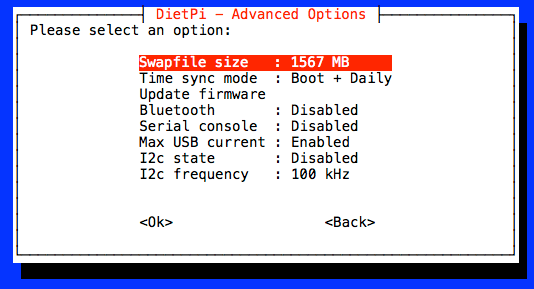

```plaintext
# >> Misc Options -----------------------------------
#Size of dphys-swapfile to generate (MB)
# 0=Disabled | 1=auto (1GB-RAM = size) | 2+=manual
Swapfile_Size=1567
```
😉
Don’t think to make a github issue for this. 😃