# Dietpi will Be Great Choice For Surface RT Your Helpe Is Needed
**URL:** https://dietpi.com/forum/t/dietpi-will-be-great-choice-for-surface-rt-your-helpe-is-needed/13526
**Category:** Requests
**Created:** [25 June 2022 22:08 UTC](https://dietpi.com/forum/t/dietpi-will-be-great-choice-for-surface-rt-your-helpe-is-needed/13526 "2022-06-25T22:08:26Z")
**Posts on this page:** 20
**Page:** 1
### Author:  [@mazjed](https://dietpi.com/forum/u/mazjed)
#### Post date: [25 June 2022 22:08 UTC](https://dietpi.com/forum/t/dietpi-will-be-great-choice-for-surface-rt-your-helpe-is-needed/13526/1 "2022-06-25T22:08:26Z")
Hi to all DietPi Developers And Members its my first post her.
i have tested your OS on my raspberry pi and its one off the best
And Since The first time i have visited the [Open Surface RT Home](https://openrt.gitbook.io/open-surfacert/)
And found out that the Raspberry Pi OS is one of the best os to work on the old windows Rt devices i knew That DietPi OS will Do Better .
My knowledge in this matter is week But im a good learner and i have one surface RT
first generation in good condition i can do the testing and video capture
So please please Can someone Help me to make this Happen it’s only the boot section
that will be edited i thik viste the link [Raspberry Pi OS](https://openrt.gitbook.io/open-surfacert/surface-rt/linux/root-filesystem/distros/raspberry-pi-os)
Please
---
### Author:  [@Joulinar](https://dietpi.com/forum/u/Joulinar)
#### Post date: [26 June 2022 05:20 UTC](https://dietpi.com/forum/t/dietpi-will-be-great-choice-for-surface-rt-your-helpe-is-needed/13526/2 "2022-06-26T05:20:46Z")
Welcome to our community.
You could try using our installation scripts on top of a working Raspberry OS installation [Supported hardware - DietPi.com Docs](https://dietpi.com/docs/hardware/#make-your-own-distribution)
---
### Author:  [@MichaIng](https://dietpi.com/forum/u/MichaIng)
#### Post date: [27 June 2022 16:45 UTC](https://dietpi.com/forum/t/dietpi-will-be-great-choice-for-surface-rt-your-helpe-is-needed/13526/3 "2022-06-27T16:45:01Z")
Did I understand right that there is a Raspberry Pi OS version which runs on the ARM Surface RT? I’m only aware of the one for RPi itself and one for x86. However, if there is any Debian based distro running on it, in case just the regular Debian, you can convert it to DietPi with the linked guide.
---
### Author:  [@mazjed](https://dietpi.com/forum/u/mazjed)
#### Post date: [29 June 2022 23:41 UTC](https://dietpi.com/forum/t/dietpi-will-be-great-choice-for-surface-rt-your-helpe-is-needed/13526/4 "2022-06-29T23:41:53Z")
Hi everyone im so thankful for your contribution
ok to give more explanation all the work was done by the group at [Open Surface RT]
and they are ho made this happen
i went by their expectations and now i can run the normal raspian os with disktop on
my MS Surface RT
But out off my experience with Dietpi i knew that Dietpi will be the best on this device
if i was able to run the wifi on clean minimal Debian/Raspbian installation
then i will try what [Joulinar](https://dietpi.com/forum/u/Joulinar) thankful suggested
But if Someone would help to create a ready to flash img it would be perfect
iw will add the link for the working image of the raspian os made By [nope](https://www.youtube.com/watch?v=AOyLU4nQdO8)
on youtube to make it more clear
thanks again
---
### Author:  [@MichaIng](https://dietpi.com/forum/u/MichaIng)
#### Post date: [30 June 2022 06:37 UTC](https://dietpi.com/forum/t/dietpi-will-be-great-choice-for-surface-rt-your-helpe-is-needed/13526/5 "2022-06-30T06:37:09Z")
Okay that like a highly customised image that has nothing to do with Raspberry Pi OS (in it’s core) aside of using the RPi desktop which is a customised LXDE.
That one doesn’t seem like a good basis to create a DietPi from. I suggest to check whether there is a plain Debian image for it or whether even the official Debian installer works. That will be much cleaner and trustworthy.
EDIT: I might be wrong. Raspberry Pi OS is somehow listed as officially supported OS but I’m pretty much confused why since it’s an entirely different SoC, the RPi bootloader and kernel cannot work, of course. This doesn’t make sense to me at all 😄. Using plain Debian should be a much cleaner result.
---
### Author:  [@mazjed](https://dietpi.com/forum/u/mazjed)
#### Post date: [30 June 2022 17:28 UTC](https://dietpi.com/forum/t/dietpi-will-be-great-choice-for-surface-rt-your-helpe-is-needed/13526/6 "2022-06-30T17:28:03Z")
Dear [MichaIng](https://dietpi.com/forum/u/MichaIng)
IF you just visited this link [How to](https://openrt.gitbook.io/open-surfacert/surface-rt/linux/root-filesystem/distros/raspberry-pi-os)
you will see
that they are adding some files to the boot section of the sd card(usb device)
and injecting the kernel inside the root filesystem
but this process didn’t work for Diet pi i don’t know why
---
### Author:  [@Joulinar](https://dietpi.com/forum/u/Joulinar)
#### Post date: [30 June 2022 17:35 UTC](https://dietpi.com/forum/t/dietpi-will-be-great-choice-for-surface-rt-your-helpe-is-needed/13526/7 "2022-06-30T17:35:38Z")
because DietPi installer will remove all software that is unexpected and will try to use plain RPi OS 😉
---
### Author:  [@mazjed](https://dietpi.com/forum/u/mazjed)
#### Post date: [30 June 2022 19:32 UTC](https://dietpi.com/forum/t/dietpi-will-be-great-choice-for-surface-rt-your-helpe-is-needed/13526/8 "2022-06-30T19:32:02Z")
Okay that’s like a didend i will try it the hard way .
---
### Author:  [@mazjed](https://dietpi.com/forum/u/mazjed)
#### Post date: [10 July 2022 08:46 UTC](https://dietpi.com/forum/t/dietpi-will-be-great-choice-for-surface-rt-your-helpe-is-needed/13526/9 "2022-07-10T08:46:49Z")
Hi everyone i have managed to make it happens
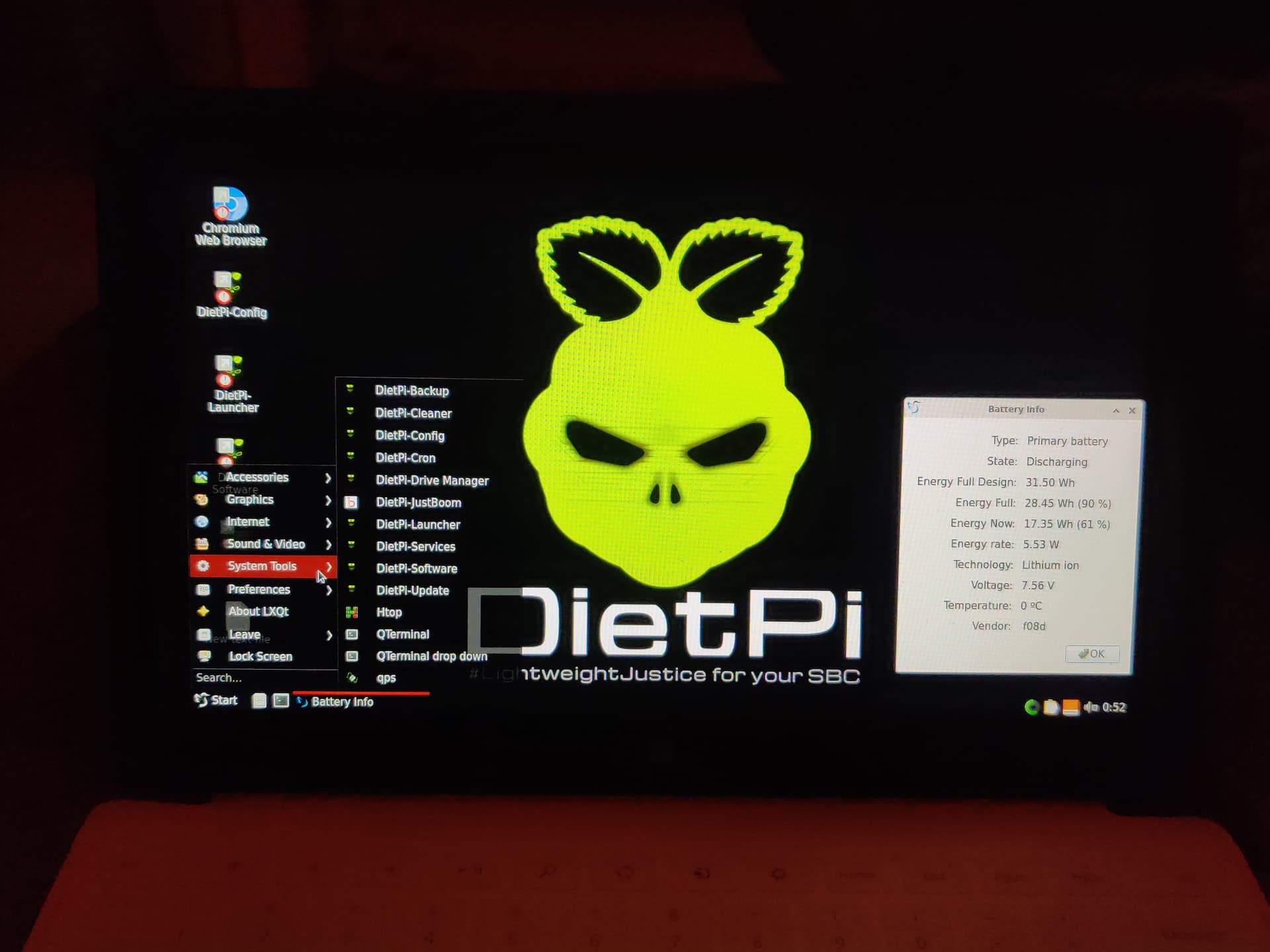
now the only thing missing is wifi because i had to miss the first boot wifi setup
---
### Author:  [@mazjed](https://dietpi.com/forum/u/mazjed)
#### Post date: [10 July 2022 08:51 UTC](https://dietpi.com/forum/t/dietpi-will-be-great-choice-for-surface-rt-your-helpe-is-needed/13526/10 "2022-07-10T08:51:23Z")
iam having the same problem
> [@Unable to scan and connect to wifi with dietpi-config](https://dietpi.com/forum/t/unable-to-scan-and-connect-to-wifi-with-dietpi-config/13644):
>
> Raspberry Pi 4, DietPi 8.6.1. aarch64 5.15.32-v8+ #1538 same thing on RPi 3B+, 8.6.1, also aarch64. When I try to scan for wifi networks with dietpi-config, I get this error message: [FAILED] DietPi-WifiDB | An interface of type “wlan” does not exist. Error: argument “” is wrong: “dev” not a valid ifname. [OK] DietPi-WifiDB | Scanning SSID, please wait… Interface doesn’t support scanning. it also does not connect when set SSID and password manually. The country code is set, but in…
---
### Author:  [@mazjed](https://dietpi.com/forum/u/mazjed)
#### Post date: [10 July 2022 08:53 UTC](https://dietpi.com/forum/t/dietpi-will-be-great-choice-for-surface-rt-your-helpe-is-needed/13526/11 "2022-07-10T08:53:17Z")
as soon that trouble is fixed i well upload the image her
---
### Author:  [@Joulinar](https://dietpi.com/forum/u/Joulinar)
#### Post date: [10 July 2022 10:40 UTC](https://dietpi.com/forum/t/dietpi-will-be-great-choice-for-surface-rt-your-helpe-is-needed/13526/12 "2022-07-10T10:40:40Z")
> [@mazjed](#):
>
> iam having the same problem
I guess your case is different as you are running a complete different hardware. Maybe there as some drivers missing for your device
---
### Author:  [@mazjed](https://dietpi.com/forum/u/mazjed)
#### Post date: [10 July 2022 11:06 UTC](https://dietpi.com/forum/t/dietpi-will-be-great-choice-for-surface-rt-your-helpe-is-needed/13526/13 "2022-07-10T11:06:12Z")
thanks for reply
nothing is missing i have managed to start wifi using
```auto
sudo apt install network-manager network-manager-gnome
sudo service dhcpcd stop
sudo service network-manager restart
```
but what im looking for is to make it happens with default Diet pi first time setup
to build as clean as possible image for others to use
---
### Author:  [@Joulinar](https://dietpi.com/forum/u/Joulinar)
#### Post date: [10 July 2022 11:10 UTC](https://dietpi.com/forum/t/dietpi-will-be-great-choice-for-surface-rt-your-helpe-is-needed/13526/14 "2022-07-10T11:10:01Z")
> [@mazjed](#):
>
> `apt install network-manager`
Network Manager is a conflicting tool and will not work together with DietPi config scripts. Because we use `ifupdown` to manage network connections. Means, from now on, you need to use Network Manager instead of `dietpi-config`
---
### Author:  [@mazjed](https://dietpi.com/forum/u/mazjed)
#### Post date: [10 July 2022 11:14 UTC](https://dietpi.com/forum/t/dietpi-will-be-great-choice-for-surface-rt-your-helpe-is-needed/13526/15 "2022-07-10T11:14:22Z")
Because the Surface RT dose not have lan card . its only has the sd8797\_uapsta wifi
and if i want to Give people a warking image it should have the default wifi card working from the first setup
---
### Author:  [@Joulinar](https://dietpi.com/forum/u/Joulinar)
#### Post date: [10 July 2022 11:15 UTC](https://dietpi.com/forum/t/dietpi-will-be-great-choice-for-surface-rt-your-helpe-is-needed/13526/16 "2022-07-10T11:15:53Z")
it is just to keep in mind. `ifupdown` is conflicting software title for `network-manager`. Usually you should have got a warning during `apt install`
---
### Author:  [@mazjed](https://dietpi.com/forum/u/mazjed)
#### Post date: [10 July 2022 11:19 UTC](https://dietpi.com/forum/t/dietpi-will-be-great-choice-for-surface-rt-your-helpe-is-needed/13526/17 "2022-07-10T11:19:03Z")
ok would you please advice how to make it works withe `ifupdown` without the need for other pkg
the dietpi-config show that ther are no wifi card
---
### Author:  [@Jappe](https://dietpi.com/forum/u/Jappe)
#### Post date: [10 July 2022 13:28 UTC](https://dietpi.com/forum/t/dietpi-will-be-great-choice-for-surface-rt-your-helpe-is-needed/13526/18 "2022-07-10T13:28:30Z")
They write in the tutorial:
> # Wifi doesn’t work
>
> Make sure that you copied the modules forlder to /lib/modules
> Make sure that the kernel version and the modules version do match
> Get the modules folder name and compare it to `uname -r`
Did you do that? The question is, will the module version match the current kernel version?
---
### Author:  [@mazjed](https://dietpi.com/forum/u/mazjed)
#### Post date: [10 July 2022 17:04 UTC](https://dietpi.com/forum/t/dietpi-will-be-great-choice-for-surface-rt-your-helpe-is-needed/13526/19 "2022-07-10T17:04:20Z")
yes i did it’s from the same version .
and i have used the latest DietPi\_RPi-ARMv6-Bullseye .
---
### Author:  [@MichaIng](https://dietpi.com/forum/u/MichaIng)
#### Post date: [11 July 2022 06:17 UTC](https://dietpi.com/forum/t/dietpi-will-be-great-choice-for-surface-rt-your-helpe-is-needed/13526/20 "2022-07-11T06:17:40Z")
For customers of course you cannot make WiFi working OOTB without knowing their SSIDs and WiFi passwords, which is what you can enter into `dietpi-wifi.txt` to have it working on first boot. You could enable WiFi modules/firmware already, but the final setup would then need to be done by end user via `dietpi-config`.
So if you have customers which need desktop/GUI-integrated tools to do that, indeed NetworkManager is the choice. For preparing the image, enable WiFi once, so the modules are not blacklisted and in case of RPi onboard WiFi is enabled. Then remove the respective line in `/etc/network/interfaces` and/or purge `ifupdown` so that it doesn’t interfere.
[Next page](https://dietpi.com/forum/t/dietpi-will-be-great-choice-for-surface-rt-your-helpe-is-needed/13526.md?page=2)