` loop through every matching dir by prefix should cover almost all cases.
EDIT2: Or we add the `--fstab` argument to the `findmnt` call, which includes unmounted drives listed in `/etc/fstab`. It does not include any mounts outside of `/etc/fstab`, i.e. skips temporary direct `mount`s, such automounted via `udisks2`, or if systemd mount units are created directly, bypassing `/etc/fstab`. But those are probably exotic cases.
---
### Author:  [@TRHH](https://dietpi.com/forum/u/TRHH)
#### Post date: [9 August 2026 14:18 UTC](https://dietpi.com/forum/t/dietpi-v10-6-2-disk-usage-mnt/25387/4 "2026-08-09T14:18:39Z")
Thanks @MichaIng
It is getting more and exotic 🙂
Now this showup:

after X at “terra” and “tor” than this:
```auto
Disk Usage :
- / : 45.5% : 417.2 GiB of 916.8 GiB
- terra : 45.5% : 416.4 GiB of 915.8 GiB
- tor : 45.5% : 416.3 GiB of 915.8 GiB
```
After reboot:
```auto
Disk Usage :
- / : 45.5% : 417.1 GiB of 916.8 GiB
- terra : ??? : ??? GiB of ??? GiB
- tor : ??? : ??? GiB of ??? GiB
```
Torben
---
### Author:  [@MichaIng](https://dietpi.com/forum/u/MichaIng)
#### Post date: [9 August 2026 14:21 UTC](https://dietpi.com/forum/t/dietpi-v10-6-2-disk-usage-mnt/25387/5 "2026-08-09T14:21:34Z")
Yes, this is also expected: If a mount was added explicitly, rather than as glob/regex pattern, it is always shown. But if the values cannot be obtained (as it is not mounted), they are replaced with `???`. A “not mounted” text instead would be better.
---
### Author:  [@TRHH](https://dietpi.com/forum/u/TRHH)
#### Post date: [9 August 2026 14:26 UTC](https://dietpi.com/forum/t/dietpi-v10-6-2-disk-usage-mnt/25387/6 "2026-08-09T14:26:46Z")
Thanks @MichaIng
It how shows this:
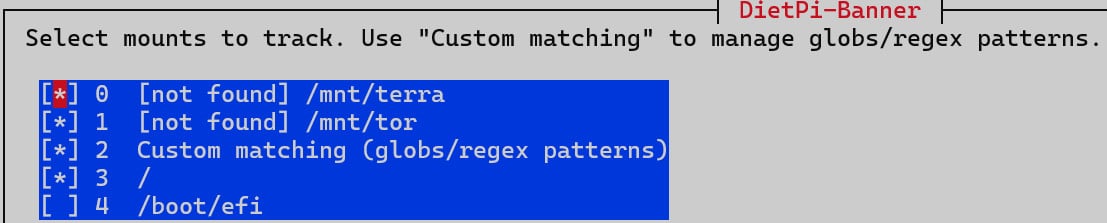
Both - “terra” and “tor” has been mounted to the server long time ago.
Torben
---
### Author:  [@TRHH](https://dietpi.com/forum/u/TRHH)
#### Post date: [9 August 2026 14:59 UTC](https://dietpi.com/forum/t/dietpi-v10-6-2-disk-usage-mnt/25387/7 "2026-08-09T14:59:52Z")
@MichaIng - Sorry, I can’t find any pattern in this. How it shows:
```auto
Disk Usage :
- / : 45.5% : 417.0 GiB of 916.8 GiB
- terra : 45.5% : 416.4 GiB of 915.8 GiB
- tor : 45.5% : 416.3 GiB of 915.8 GiB
```
Sometimes it works and something not. Strange 🙂
Torben
PS: When it works, it is a nice service (information) about “Disk Usage”. Thanks
---
### Author:  [@MichaIng](https://dietpi.com/forum/u/MichaIng)
#### Post date: [9 August 2026 16:11 UTC](https://dietpi.com/forum/t/dietpi-v10-6-2-disk-usage-mnt/25387/8 "2026-08-09T16:11:32Z")
As said, the important factor is whether a disk has been actually mounted or not. If they are defined in `/etc/fstab` with `x-systemd.automount` (default for external drives mounted with `dietpi-drive_manager`), they are not mounted automatically at boot. They are mounted instead once anything is trying to access them.
Do a reboot, then check `df` or `findmnt --real`, and you won’t see those drives listed there either. But as fast as you do e.g. `ls /mnt/terra`, the drive will be mounted almost instantly. From that point on it appears in `df` and `findmnt` as well.
So what we need to do in the banner, is triggering the automount for at best all mountpoints which match the selection and pattern. The question is how to do this as cheaply as possible (regarding processing time and I/O). And `findmnt --fstab` actually seems the best solution to me right now. It can even query size and usage for unmounted drives, and I am not even sure how it does this:
```sh
findmnt --fstab -no TARGET,SIZE,USED,USE%
```
EDIT: Ah, `findmnt` actually mounts and unmounts again the filesystems, to read this information. And doing so, it is not even significantly slower. Very nice!
EDIT2: Nope, I misinterpreted the output. It shows the rootfs size+usage for unmounted drives. The mounts+unmounts in `dmesg` I saw were from past cron jobs, not from the `findmnt` call 😅. So back to the `test -e` loop.
---
### Author:  [@TRHH](https://dietpi.com/forum/u/TRHH)
#### Post date: [9 August 2026 16:23 UTC](https://dietpi.com/forum/t/dietpi-v10-6-2-disk-usage-mnt/25387/9 "2026-08-09T16:23:09Z")
> [@MichaIng](#):
>
> But as fast as you do e.g. `ls /mnt/terra`, the drive will be mounted almost instantly. From that point on it appears in `df` and `findmnt` as well
Your right, when using ls `ls /mnt/terra` and `ls /mnt/tor` it shows up again:
```auto
Disk Usage :
- / : 45.5% : 417.0 GiB of 916.8 GiB
- terra : 45.5% : 416.4 GiB of 915.8 GiB
- tor : 45.5% : 416.3 GiB of 915.8 GiB
```
Torben
---
### Author:  [@TRHH](https://dietpi.com/forum/u/TRHH)
#### Post date: [9 August 2026 16:26 UTC](https://dietpi.com/forum/t/dietpi-v10-6-2-disk-usage-mnt/25387/10 "2026-08-09T16:26:33Z")
> [@MichaIng](#):
>
> EDIT: Ah, `findmnt` actually mounts and unmounts again the filesystems, to read this information. And doing so, it is not even significantly slower. Very nice!
Yes 🙂
```auto
root@DietPi:~# findmnt --fstab -no TARGET,SIZE,USED,USE%
/tmp 7.6G 4K 0%
/var/log 50M 16K 0%
/ 916.8G 417G 45%
/boot/efi 63M 46.1M 73%
/mnt/tor 915.8G 416.3G 45%
/mnt/terra 915.8G 416.4G 45%
root@DietPi:~#
```
Torben
PS: But it still would be very nice to have in the banner 🙂
---
### Author:  [@MichaIng](https://dietpi.com/forum/u/MichaIng)
#### Post date: [9 August 2026 16:54 UTC](https://dietpi.com/forum/t/dietpi-v10-6-2-disk-usage-mnt/25387/11 "2026-08-09T16:54:26Z")
I actually misinterpreted the `findmnt --fstab` output, and mistook the mount+unmount logs in my `dmesg` from past backup cron jobs for such triggered by `findmnt`. As you can see from your output, it does list unmounted drives, but size + usage data is from the rootfs, not from the unmounted filesystem/drive.
Back to the `test -e` loop for matches.