# Dietpi installation worked but now after reboot won't boot
**URL:** https://dietpi.com/forum/t/dietpi-installation-worked-but-now-after-reboot-wont-boot/18699
**Category:** Troubleshooting
**Created:** [20 December 2023 11:27 UTC](https://dietpi.com/forum/t/dietpi-installation-worked-but-now-after-reboot-wont-boot/18699 "2023-12-20T11:27:34Z")
**Posts on this page:** 20
**Page:** 1
### Author:  [@Biggapizzapi](https://dietpi.com/forum/u/Biggapizzapi)
#### Post date: [20 December 2023 11:27 UTC](https://dietpi.com/forum/t/dietpi-installation-worked-but-now-after-reboot-wont-boot/18699/1 "2023-12-20T11:27:34Z")
Hi
I just installed diet pi LXDE on my rp4b 8gb
And my machine booted but then the next thing I did was Google the commands to make sure everything is fully updated and after it was all completed it asked me to reboot and afterwards it stopped booting and gave me the option of loading pi launcher to install software?
I am new I have been searching if anyone else has had other issues and can’t seem to find the solution.
Does anyone know what I’ve done ? How I can fix it ? I haven’t touched anything else other than terminal after fresh install.
---
### Author:  [@Joulinar](https://dietpi.com/forum/u/Joulinar)
#### Post date: [20 December 2023 13:00 UTC](https://dietpi.com/forum/t/dietpi-installation-worked-but-now-after-reboot-wont-boot/18699/2 "2023-12-20T13:00:35Z")
> [@Biggapizzapi](#):
>
> afterwards it stopped booting and gave me the option of loading pi launcher to install software?
can you share a picture of the message?
> [@Biggapizzapi](#):
>
> next thing I did was Google the commands to make sure everything is fully updated
What exactly you have done? Which commands did you execute?
---
### Author:  [@Biggapizzapi](https://dietpi.com/forum/u/Biggapizzapi)
#### Post date: [20 December 2023 13:22 UTC](https://dietpi.com/forum/t/dietpi-installation-worked-but-now-after-reboot-wont-boot/18699/3 "2023-12-20T13:22:05Z")
I used a bunch of them , at present I’m not currently with my pi but will post as soon as I’m able to but here’s the ones I put through because I thought based on the forums it’s what I needed to do.
```auto
# apt update && apt upgrade -y
apt list --upgradable
apt upgrade
sudo apt update
sudo apt full-upgrade
sudo reboot
```
Thanks for your reply!
---
### Author:  [@Joulinar](https://dietpi.com/forum/u/Joulinar)
#### Post date: [20 December 2023 13:52 UTC](https://dietpi.com/forum/t/dietpi-installation-worked-but-now-after-reboot-wont-boot/18699/4 "2023-12-20T13:52:05Z")
usually on a new fresh install, system should be up-to-date already 😉
Anyway let’s check the message you see during reboot
---
### Author:  [@Biggapizzapi](https://dietpi.com/forum/u/Biggapizzapi)
#### Post date: [20 December 2023 22:47 UTC](https://dietpi.com/forum/t/dietpi-installation-worked-but-now-after-reboot-wont-boot/18699/5 "2023-12-20T22:47:12Z")

I just updated but now I’m not sure how to launch it
---
### Author:  [@Joulinar](https://dietpi.com/forum/u/Joulinar)
#### Post date: [20 December 2023 23:03 UTC](https://dietpi.com/forum/t/dietpi-installation-worked-but-now-after-reboot-wont-boot/18699/6 "2023-12-20T23:03:53Z")
What exactly you like to start? You are with the standard command line now.
---
### Author:  [@Biggapizzapi](https://dietpi.com/forum/u/Biggapizzapi)
#### Post date: [20 December 2023 23:05 UTC](https://dietpi.com/forum/t/dietpi-installation-worked-but-now-after-reboot-wont-boot/18699/7 "2023-12-20T23:05:26Z")
I want it to automatically boot up to the OS instead of this screen , I can’t seem to get back to what I had before I rebooted it.
---
### Author:  [@Joulinar](https://dietpi.com/forum/u/Joulinar)
#### Post date: [20 December 2023 23:10 UTC](https://dietpi.com/forum/t/dietpi-installation-worked-but-now-after-reboot-wont-boot/18699/8 "2023-12-20T23:10:49Z")
You are on the OS. This is the regular command line of a Linux based system. This is the shell. Therefore my question, what are you trying to launch? Are you looking for a desktop application?
---
### Author:  [@Biggapizzapi](https://dietpi.com/forum/u/Biggapizzapi)
#### Post date: [20 December 2023 23:12 UTC](https://dietpi.com/forum/t/dietpi-installation-worked-but-now-after-reboot-wont-boot/18699/9 "2023-12-20T23:12:14Z")
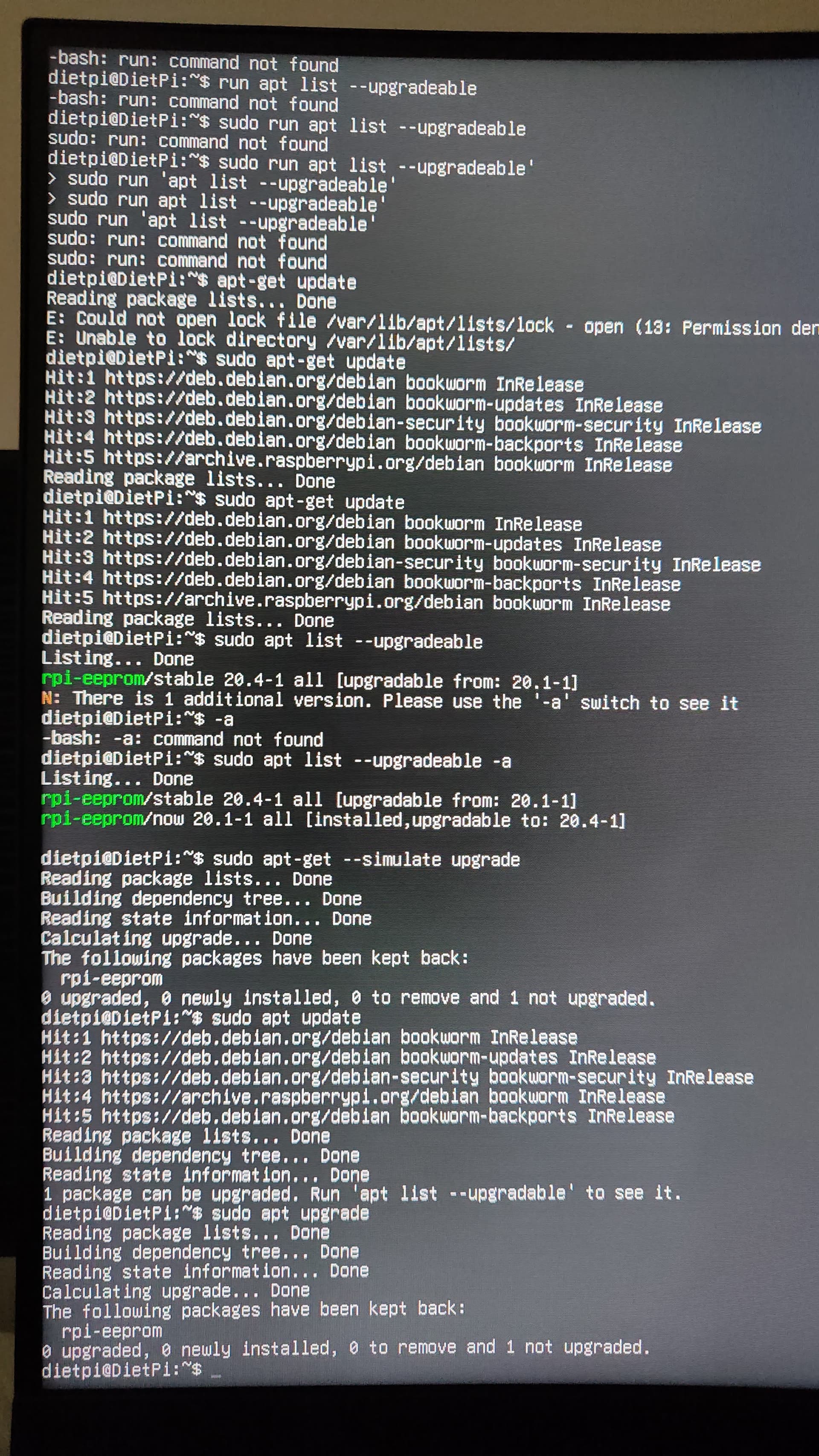
Yeah sorry I’m trying to get to the desktop, and for some reason one upgrade doesn’t want to work
---
### Author:  [@Joulinar](https://dietpi.com/forum/u/Joulinar)
#### Post date: [20 December 2023 23:15 UTC](https://dietpi.com/forum/t/dietpi-installation-worked-but-now-after-reboot-wont-boot/18699/10 "2023-12-20T23:15:28Z")
The update is working and has nothing to do with the desktop you are looking for. Just one package has been put on hold. Usually it should have been set to unhold already. Anyway, try
```auto
apt-mark unhold rpi-eeprom
apt update
apt upgrade
```
To get the desktop try
```auto
sudo startx
```
Or to get it on reboot automatically, select the appropriate entry from
```auto
dietpi-autostart
```
---
### Author:  [@Biggapizzapi](https://dietpi.com/forum/u/Biggapizzapi)
#### Post date: [20 December 2023 23:21 UTC](https://dietpi.com/forum/t/dietpi-installation-worked-but-now-after-reboot-wont-boot/18699/11 "2023-12-20T23:21:45Z")
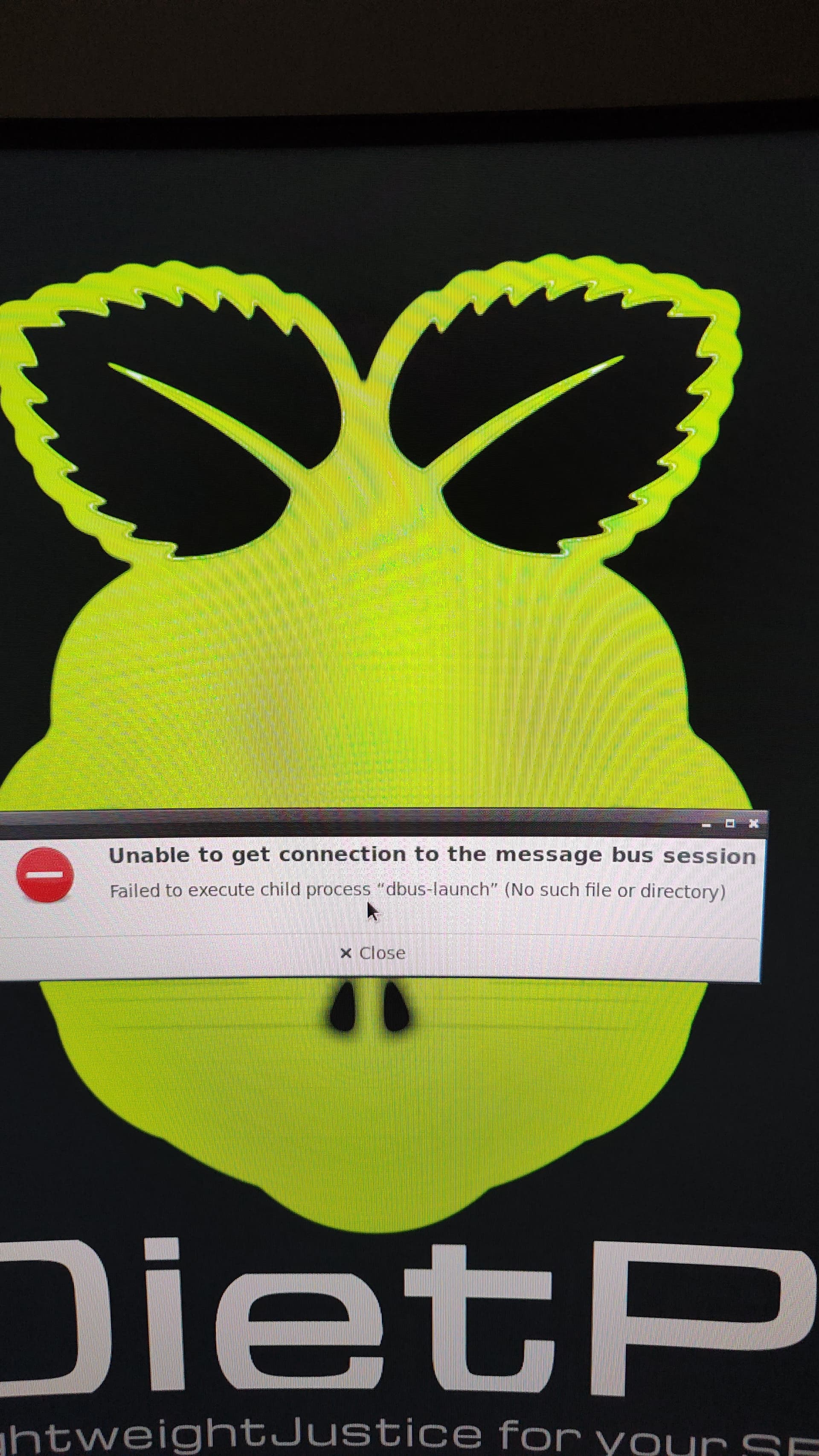
Wow it worked !!! Thanks , I’m not sure if this is for concern ?
---
### Author:  [@Biggapizzapi](https://dietpi.com/forum/u/Biggapizzapi)
#### Post date: [20 December 2023 23:55 UTC](https://dietpi.com/forum/t/dietpi-installation-worked-but-now-after-reboot-wont-boot/18699/12 "2023-12-20T23:55:03Z")
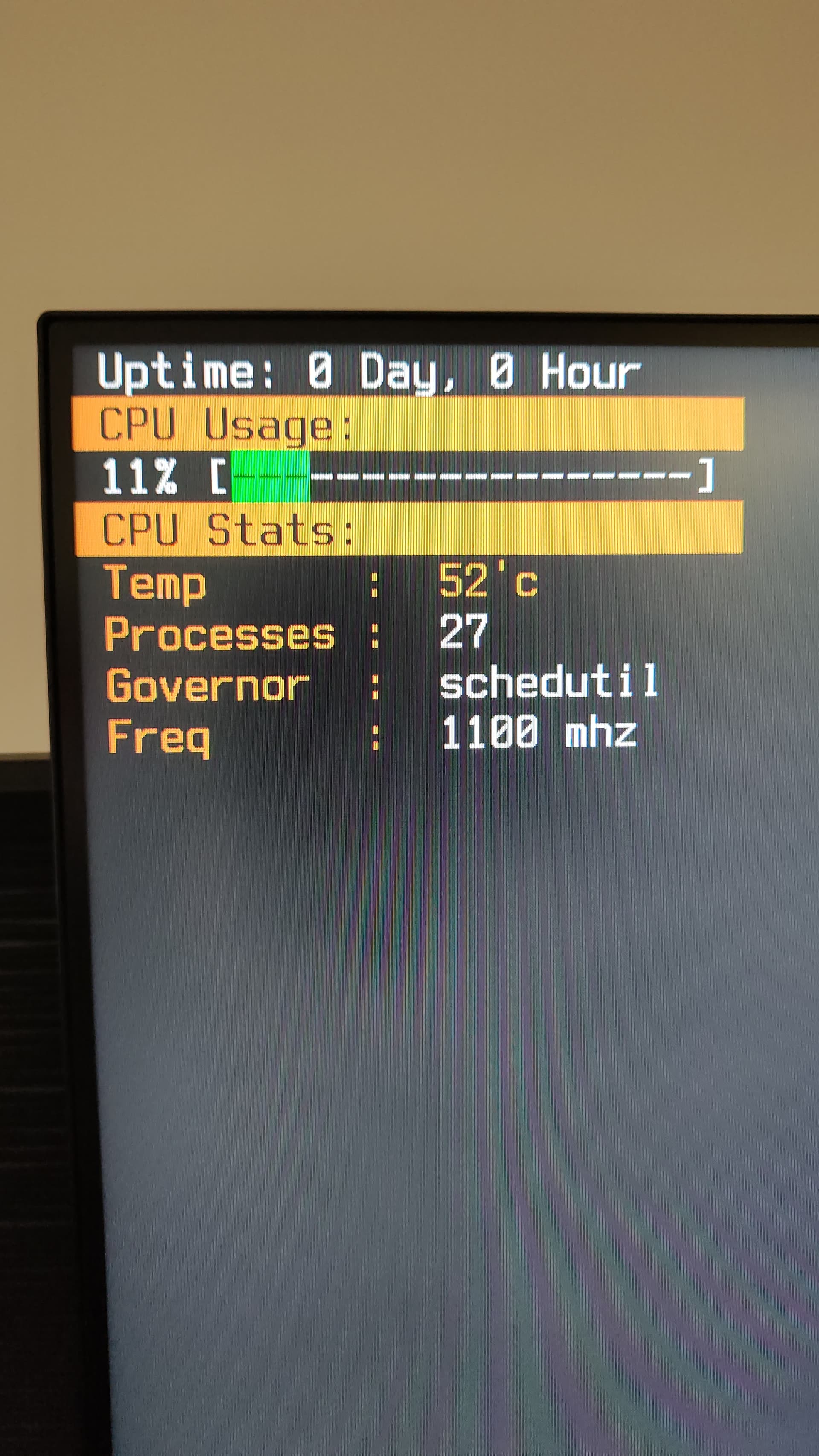
I reboot it again and this endless cycle screen I can’t avoid
---
### Author:  [@Joulinar](https://dietpi.com/forum/u/Joulinar)
#### Post date: [21 December 2023 00:21 UTC](https://dietpi.com/forum/t/dietpi-installation-worked-but-now-after-reboot-wont-boot/18699/13 "2023-12-21T00:21:30Z")
What do you select as autostart option? Connect via SSH and select desktop for autostart.
---
### Author:  [@Biggapizzapi](https://dietpi.com/forum/u/Biggapizzapi)
#### Post date: [21 December 2023 08:16 UTC](https://dietpi.com/forum/t/dietpi-installation-worked-but-now-after-reboot-wont-boot/18699/14 "2023-12-21T08:16:21Z")
As far as I know I only selected auto start desktop and then exited and then got it to boot but then as I rebooted , it loads this text that keeps changing and you can type but as soon as the text changes it deletes what you write and if you were to complete the text commands it won’t process anything.
Every time I turn power off it keeps coming back to this screen 😅
So does this screen mean ssh?
---
### Author:  [@Joulinar](https://dietpi.com/forum/u/Joulinar)
#### Post date: [21 December 2023 08:49 UTC](https://dietpi.com/forum/t/dietpi-installation-worked-but-now-after-reboot-wont-boot/18699/15 "2023-12-21T08:49:05Z")
> [@Biggapizzapi](#):
>
> Every time I turn power off it keeps coming back to this screen 😅
Well it seems you selected `DietPi-CloudShell` instead of a `Desktops` option-
can you try to cancel using `ctrl c` or similar? As an alternative, get a SSH client like putty on your windows desktop and try to connect via SSH. This way you should be able to adjust autostart setting.
---
### Author:  [@Biggapizzapi](https://dietpi.com/forum/u/Biggapizzapi)
#### Post date: [21 December 2023 09:08 UTC](https://dietpi.com/forum/t/dietpi-installation-worked-but-now-after-reboot-wont-boot/18699/16 "2023-12-21T09:08:15Z")
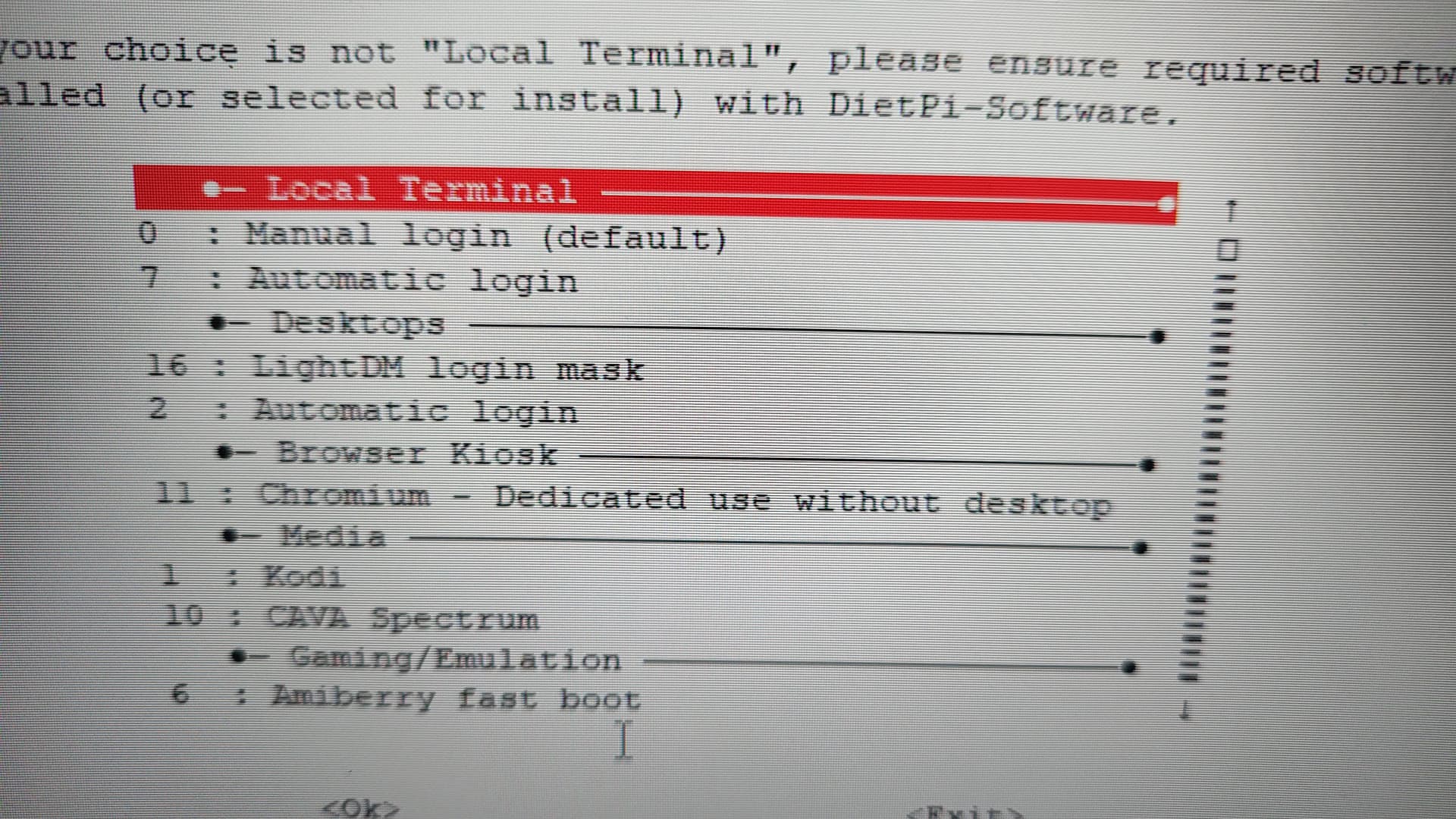
Which is the entry I need to change ??
Just got putty working
---
### Author:  [@Biggapizzapi](https://dietpi.com/forum/u/Biggapizzapi)
#### Post date: [21 December 2023 09:09 UTC](https://dietpi.com/forum/t/dietpi-installation-worked-but-now-after-reboot-wont-boot/18699/17 "2023-12-21T09:09:58Z")

---
### Author:  [@Joulinar](https://dietpi.com/forum/u/Joulinar)
#### Post date: [21 December 2023 09:28 UTC](https://dietpi.com/forum/t/dietpi-installation-worked-but-now-after-reboot-wont-boot/18699/18 "2023-12-21T09:28:55Z")
Option 16 or 2
---
### Author:  [@Biggapizzapi](https://dietpi.com/forum/u/Biggapizzapi)
#### Post date: [21 December 2023 09:39 UTC](https://dietpi.com/forum/t/dietpi-installation-worked-but-now-after-reboot-wont-boot/18699/19 "2023-12-21T09:39:54Z")
Wow it boots and I think I did something now it automatically asks for login at boot of desktop which is a little inconvenient is there a way to easily stop this at terminal?
Now I don’t seem to have my CPU speed over clocked by the Dietpi os to 1.8 for my 4b is that not possible on this ? Simple update? Or just have to follow a tutorial for overclocking
Thanks you’ve been so helpful I really appreciate your patience with me being new and I am so grateful people like you exist , world truly is a better place because of people like you.
---
### Author:  [@Joulinar](https://dietpi.com/forum/u/Joulinar)
#### Post date: [21 December 2023 10:19 UTC](https://dietpi.com/forum/t/dietpi-installation-worked-but-now-after-reboot-wont-boot/18699/20 "2023-12-21T10:19:16Z")
> [@Biggapizzapi](#):
>
> now it automatically asks for login
If you like to automatically login to desktop, simply choose autostart option 2.
> [@Biggapizzapi](#):
>
> I don’t seem to have my CPU speed over clocked
Can be changed as follow
`dietpi-config` \> `3 : Performance Options` \> `CPU Governor` or `CPU limits`
BTW: does the issue with `dbus-launch` still exists?