# DietPi doesn't boot | ProxMox
**URL:** https://dietpi.com/forum/t/dietpi-doesnt-boot-proxmox/18813
**Category:** Troubleshooting
**Created:** [1 January 2024 19:55 UTC](https://dietpi.com/forum/t/dietpi-doesnt-boot-proxmox/18813 "2024-01-01T19:55:48Z")
**Posts on this page:** 10
**Page:** 1
### Author:  [@Whiteman](https://dietpi.com/forum/u/Whiteman)
#### Post date: [1 January 2024 19:55 UTC](https://dietpi.com/forum/t/dietpi-doesnt-boot-proxmox/18813/1 "2024-01-01T19:55:48Z")
### Creating a bug report/issue
I have searched the existing open and closed issues
#### Required Information
ProxMox 8.1.3
#### Additional Information (if applicable)
#### Steps to reproduce
Installation on proxmox:
> **[DietPi.com Docs - How to install DietPi](https://dietpi.com/docs/install/#__tabbed_1_5)**
>
> Easy to follow tutorial to install & initially configure DietPi
#### Expected behaviour
Boot DietPC
#### Actual behaviour
DietPC won’t boot. After 30min still in console:
“Booting from Hard Disk…” but nothing is going on.
Does anyone has an idea?

#### Extra details
- …
---
### Author:  [@Whiteman](https://dietpi.com/forum/u/Whiteman)
#### Post date: [1 January 2024 19:56 UTC](https://dietpi.com/forum/t/dietpi-doesnt-boot-proxmox/18813/2 "2024-01-01T19:56:23Z")
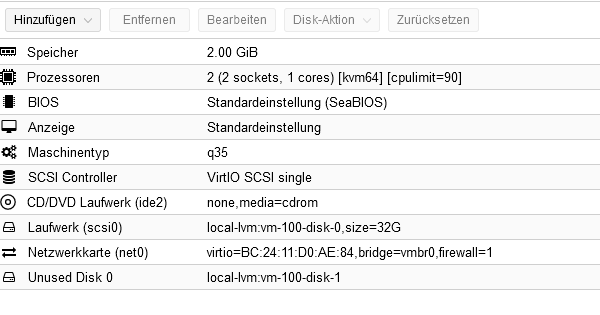
Hardwareconfig in Proxmox:
---
### Author:  [@Jappe](https://dietpi.com/forum/u/Jappe)
#### Post date: [1 January 2024 19:56 UTC](https://dietpi.com/forum/t/dietpi-doesnt-boot-proxmox/18813/3 "2024-01-01T19:56:48Z")
@StephanStS can maybe assist?!
---
### Author:  [@Joulinar](https://dietpi.com/forum/u/Joulinar)
#### Post date: [1 January 2024 20:18 UTC](https://dietpi.com/forum/t/dietpi-doesnt-boot-proxmox/18813/4 "2024-01-01T20:18:28Z")
you could try to use the following bash script to setup a Proxmox system [Install DietPi on Proxmox BASH script](https://dietpi.com/forum/t/install-dietpi-on-proxmox-bash-script/15679)
---
### Author:  [@StephanStS](https://dietpi.com/forum/u/StephanStS)
#### Post date: [1 January 2024 22:16 UTC](https://dietpi.com/forum/t/dietpi-doesnt-boot-proxmox/18813/5 "2024-01-01T22:16:38Z")
I see two disks, what is the unused disk?
That schould not appear if you follow the DietPi docu.
Another remark: I never use several CPU sockets, I rather use one socket and several cores.
Can you also show your VM’s option page?
What is the ID of your VM?
Maybe you did not change the ID in these part of the installation docu?
_ID=100_
_qm importdisk “$ID” DietPi\_Proxmox-x86\_64-Bookworm.qcow2 local-lvm_
_qm set “$ID” --scsi0 “local-lvm:vm-$ID-disk-0”_
_qm set “$ID” --boot order=scsi0_
---
### Author:  [@Ludger.Kuehm](https://dietpi.com/forum/u/Ludger.Kuehm)
#### Post date: [1 January 2024 23:59 UTC](https://dietpi.com/forum/t/dietpi-doesnt-boot-proxmox/18813/6 "2024-01-01T23:59:19Z")
Try create a EFI-VM
---
### Author:  [@Whiteman](https://dietpi.com/forum/u/Whiteman)
#### Post date: [3 January 2024 21:51 UTC](https://dietpi.com/forum/t/dietpi-doesnt-boot-proxmox/18813/7 "2024-01-03T21:51:54Z")
Hi Joulinar,
thanks for this hint.
With this procedure, dietpi is booting.
---
### Author:  [@Whiteman](https://dietpi.com/forum/u/Whiteman)
#### Post date: [3 January 2024 21:56 UTC](https://dietpi.com/forum/t/dietpi-doesnt-boot-proxmox/18813/8 "2024-01-03T21:56:03Z")
Hi Stephan Sts,
here is the option page.
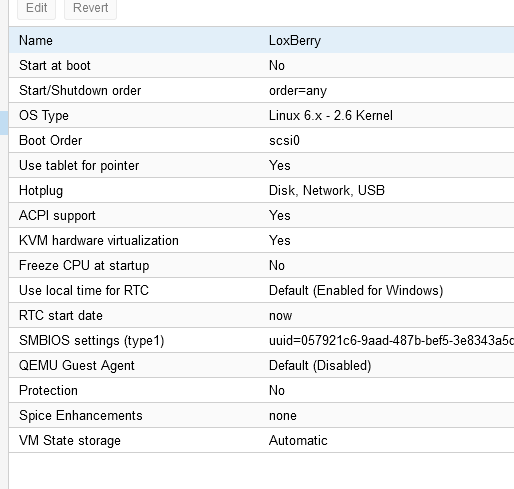
I also changed the number of sockets and deleted the unused storage as recommended.
I’m gonna try to set a new machine, to be sure, that the id really is set the right way.
Meanwhile, I set up a new machine and installed dietpi via uefi installer.
=\> The installation procedure ist working. But the OS isn’t booting.
---
### Author:  [@Whiteman](https://dietpi.com/forum/u/Whiteman)
#### Post date: [3 January 2024 21:59 UTC](https://dietpi.com/forum/t/dietpi-doesnt-boot-proxmox/18813/9 "2024-01-03T21:59:41Z")
Hi Ludger,
I changed the bios to “uefi”:
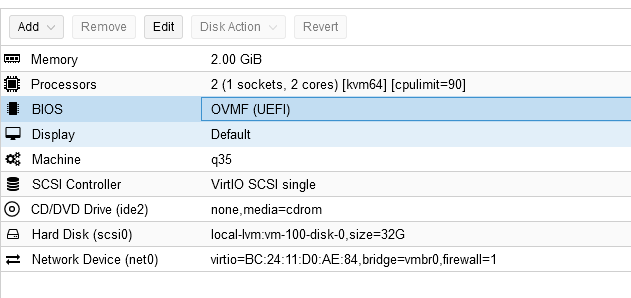
Now it is booting!
---
### Author:  [@system](https://dietpi.com/forum/u/system)
#### Post date: [2 April 2024 22:00 UTC](https://dietpi.com/forum/t/dietpi-doesnt-boot-proxmox/18813/10 "2024-04-02T22:00:27Z")
This topic was automatically closed 90 days after the last reply. New replies are no longer allowed.