# Changing DNS on Dietpi
**URL:** https://dietpi.com/forum/t/changing-dns-on-dietpi/14347
**Category:** Troubleshooting
**Created:** [17 September 2022 15:42 UTC](https://dietpi.com/forum/t/changing-dns-on-dietpi/14347 "2022-09-17T15:42:36Z")
**Posts on this page:** 16
**Page:** 1
### Author:  [@sigmatec](https://dietpi.com/forum/u/sigmatec)
#### Post date: [17 September 2022 15:42 UTC](https://dietpi.com/forum/t/changing-dns-on-dietpi/14347/1 "2022-09-17T15:42:36Z")
### Creating a bug report/issue
#### Required Information
- DietPi version | `G_DIETPI_VERSION_CORE=8 G_DIETPI_VERSION_SUB=7 G_DIETPI_VERSION_RC=1 G_GITBRANCH='master' G_GITOWNER='MichaIng G_LIVE_PATCH_STATUS[0]='not applicable'`
- Distro version | `bullseye 0`
- Kernel version | `Linux DietPi 5.15.56-v8+ #1575 SMP PREEMPT Fri Jul 22 20:31:26 BST 2022 aarch64 GNU/Linux`
- SBC model | RPi 4 Model B (aarch64)
- Power supply used | (EG: 5V 2A )
- SD card used | (EG: Blank Brand)
#### Additional Information (if applicable)
#### Steps to reproduce
1. dietpi-config → network options → adapter options → change wired network settings
2. dietpiChange DNS from 8.8.8.8 to Cloudfare (1.1.1.1 1.0.0.1)
3. Apply settings
#### Expected behaviour
Change the DNS
#### Actual behaviour
prints: “rtnetlink answers no such process” and can’t connect to the network
Don´t know if I’m missing something.
Thank you in advance
---
### Author:  [@Joulinar](https://dietpi.com/forum/u/Joulinar)
#### Post date: [17 September 2022 16:21 UTC](https://dietpi.com/forum/t/changing-dns-on-dietpi/14347/2 "2022-09-17T16:21:21Z")
Can you share following
```auto
cat /etc/resolv.conf
```
---
### Author:  [@sigmatec](https://dietpi.com/forum/u/sigmatec)
#### Post date: [17 September 2022 16:55 UTC](https://dietpi.com/forum/t/changing-dns-on-dietpi/14347/3 "2022-09-17T16:55:54Z")
> [@Joulinar](#):
>
> `cat /etc/resolv.conf`
I flashed the sd card because I didn’t had any acess via ssh or hdmi (I don’t have a micro-hdmi adpter). So I couldn’t have any visual feedback.
cat /etc/resolv.conf:
```auto
domain lan
search lan
nameserver 192.168.1.1
```
---
### Author:  [@BluishHumility](https://dietpi.com/forum/u/BluishHumility)
#### Post date: [17 September 2022 17:34 UTC](https://dietpi.com/forum/t/changing-dns-on-dietpi/14347/4 "2022-09-17T17:34:36Z")
> [@sigmatec](#):
>
> rtnetlink answers no such process
One thing that can cause this error is specifying a gateway or other network value on an invalid subnet. For example, it looks like your gateway is on the `192.168.1.0/24` subnet; if you try to set a static IP for your device on the `192.168.0.0/24` subnet by mistake that could cause this.
Copy and paste the rest of the DietPi-Config page into the thread so we can take a look and maybe help you spot a misconfiguration. This is the page I mean:
```auto
┌────────────────────────────┤ DietPi-Config ├─────────────────────────────┐
│ Ethernet Details: │
│ Usage : Sent = 21742 MiB | Recieved = 34595 MiB │
│ Address : IP = 192.168.0.10 | Mask = 255.255.255.0 | Gateway = │
│ 192.168.0.1 | DNS = 192.168.0.14 │
│ │
│ ●─ DHCP/STATIC IP ──────────────────────● │
│ Change Mode : [STATIC] │
│ Copy : Copy current address to "Static" │
│ Static IP : [192.168.0.100] │
│ Static Mask : [255.255.255.0] │
│ Static Gateway : [192.168.0.1] │
│ Static DNS : [192.168.0.14] │
│ ●─ Additional Options ──────────────────● │
│ Link Speed : [auto (default)] │
│ Disable : Disable Ethernet adapter │
│ ●─ Apply ───────────────────────────────● │
│ Apply : Save all changes and restart networking │
│ │
│ │
│ │
│ │
└──────────────────────────────────────────────────────────────────────────┘
```
---
### Author:  [@sigmatec](https://dietpi.com/forum/u/sigmatec)
#### Post date: [18 September 2022 03:19 UTC](https://dietpi.com/forum/t/changing-dns-on-dietpi/14347/5 "2022-09-18T03:19:44Z")
# 1st try
```auto
+------------------------------¦ DietPi-Config +-------------------------------+
¦ Ethernet Details: ¦
¦ Usage : Sent = 56 MiB | Recieved = 204 MiB ¦
¦ Address : IP = 192.168.1.111 | Mask = 255.255.255.0 | Gateway = 192.168.1.1 ¦
¦ | DNS = 192.168.1.1 ¦
¦ ¦
¦ ?- DHCP/STATIC IP ----------------------? ¦
¦ Change Mode : [STATIC] ¦
¦ Copy : Copy current address to "Static" ¦
¦ Static IP : [192.168.0.100] ¦
¦ Static Mask : [255.255.255.0] ¦
¦ Static Gateway : [192.168.0.1] ¦
¦ Static DNS : [192.168.1.1] ¦
¦ ?- Additional Options ------------------? ¦
¦ Link Speed : [auto (default)] ¦
¦ Disable : Disable Ethernet adapter ¦
¦ ?- Apply -------------------------------? ¦
¦ Apply : Save all changes and restart networking ¦
¦ ¦
¦ ¦
¦ ¦
¦ ¦
+------------------------------------------------------------------------------+
```
Tested with backup raspberry pi 3 and got the same result!
Output:
```auto
[INFO] DietPi-WiFiDB | Applied WiFi DB slot 0 with SSID ""
[INFO] DietPi-WiFiDB | Applied WiFi DB slot 1 with SSID ""
[INFO] DietPi-WiFiDB | Applied WiFi DB slot 2 with SSID ""
[INFO] DietPi-WiFiDB | Applied WiFi DB slot 3 with SSID ""
[INFO] DietPi-WiFiDB | Applied WiFi DB slot 4 with SSID ""
[SUB1] DietPi-Services > stop
[OK] DietPi-Services | stop : cron
[SUB1] DietPi-Set_hardware > wifimodules (disable)
[OK] DietPi-Set_hardware | Desired setting in /boot/config.txt was already set: dtoverlay=disable-wifi
[OK] wifimodules disable | Completed
[OK] DietPi-Config | Dropping connections, please wait...
RTNETLINK answers: No such process
```
And /etc/resolv.conf had these values. But I flashed the drive and tried again.
```auto
nameserver 8.8.8.8
nameserver 8.8.4.4
```
* * *
# 2nd try
I tried to change it manually but no progress goes back to even if I remove and wrote it back:
```auto
domain lan
search lan
nameserver 192.168.1.1
```
I edited the /etc/network/interfaces and changed the dns-nameservers, and on the interface got this after the change:
```auto
┌──────────────────────────────┤ DietPi-Config ├───────────────────────────────┐
│ Ethernet Details: │
│ Usage : Sent = 0 MiB | Recieved = 0 MiB │
│ Address : IP = 192.168.1.218 | Mask = 255.255.255.0 | Gateway = 192.168.1.1 │
│ | DNS = 192.168.1.1 │
│ │
│ ●─ DHCP/STATIC IP ──────────────────────● │
│ Change Mode : [STATIC] │
│ Copy : Copy current address to "Static" │
│ Static IP : [192.168.0.100] │
│ Static Mask : [255.255.255.0] │
│ Static Gateway : [192.168.0.1] │
│ Static DNS : [8.8.8.8 8.8.4.4] │
│ ●─ Additional Options ──────────────────● │
│ Link Speed : [auto (default)] │
│ Disable : Disable Ethernet adapter │
│ ●─ Apply ───────────────────────────────● │
│ Apply : Save all changes and restart networking │
│ │
│ │
│ │
│ │
└──────────────────────────────────────────────────────────────────────────────┘
```
but /etc/resolv.conf this has this info:
```auto
domain lan
search lan
nameserver 192.168.1.1
```
Don’t know if it changes the dns or is just a visual change.
---
### Author:  [@trendy](https://dietpi.com/forum/u/trendy)
#### Post date: [18 September 2022 09:57 UTC](https://dietpi.com/forum/t/changing-dns-on-dietpi/14347/6 "2022-09-18T09:57:22Z")
Try the following and post the output:
`ip -4 ad; ip -4 ro; nslookup dietpi.com 192.168.0.1; nslookup dietpi.com 192.168.1.1; nslookup dietpi.com 8.8.8.8; ping -c 4 8.8.8.8`
---
### Author:  [@sigmatec](https://dietpi.com/forum/u/sigmatec)
#### Post date: [18 September 2022 10:11 UTC](https://dietpi.com/forum/t/changing-dns-on-dietpi/14347/7 "2022-09-18T10:11:53Z")
Fresh image
```auto
root@DietPi:~# ip -4 ad; ip -4 ro; nslookup dietpi.com 192.168.0.1; nslookup dietpi.com 192.168.1.1; nslookup dietpi.com 8.8.8.8; ping -c 4 8.8.8.8
1: lo: mtu 65536 qdisc noqueue state UNKNOWN group default qlen 1000
inet 127.0.0.1/8 scope host lo
valid_lft forever preferred_lft forever
2: eth0: mtu 1500 qdisc pfifo_fast state UP group default qlen 1000
inet 192.168.1.218/24 brd 192.168.1.255 scope global dynamic eth0
valid_lft 3262sec preferred_lft 3262sec
default via 192.168.1.1 dev eth0
192.168.1.0/24 dev eth0 proto kernel scope link src 192.168.1.218
-bash: nslookup: command not found
-bash: nslookup: command not found
-bash: nslookup: command not found
PING 8.8.8.8 (8.8.8.8) 56(84) bytes of data.
64 bytes from 8.8.8.8: icmp_seq=1 ttl=60 time=16.4 ms
64 bytes from 8.8.8.8: icmp_seq=2 ttl=60 time=16.3 ms
64 bytes from 8.8.8.8: icmp_seq=3 ttl=60 time=16.1 ms
64 bytes from 8.8.8.8: icmp_seq=4 ttl=60 time=16.4 ms
--- 8.8.8.8 ping statistics ---
4 packets transmitted, 4 received, 0% packet loss, time 3005ms
rtt min/avg/max/mdev = 16.108/16.310/16.443/0.132 ms
```
It pings!
---
### Author:  [@Joulinar](https://dietpi.com/forum/u/Joulinar)
#### Post date: [18 September 2022 10:25 UTC](https://dietpi.com/forum/t/changing-dns-on-dietpi/14347/8 "2022-09-18T10:25:57Z")
This is DHCP or STATIC? I guess DHCP right?
---
### Author:  [@trendy](https://dietpi.com/forum/u/trendy)
#### Post date: [18 September 2022 10:27 UTC](https://dietpi.com/forum/t/changing-dns-on-dietpi/14347/9 "2022-09-18T10:27:51Z")
> [@sigmatec](#):
>
> `-bash: nslookup: command not found`
That can be an issue.
Is there `host` or `dig` ?
---
### Author:  [@Joulinar](https://dietpi.com/forum/u/Joulinar)
#### Post date: [18 September 2022 10:40 UTC](https://dietpi.com/forum/t/changing-dns-on-dietpi/14347/10 "2022-09-18T10:40:24Z")
`nslookup` should not be installed by default. It can be installed using `apt install dnsutils`
---
### Author:  [@sigmatec](https://dietpi.com/forum/u/sigmatec)
#### Post date: [18 September 2022 10:50 UTC](https://dietpi.com/forum/t/changing-dns-on-dietpi/14347/11 "2022-09-18T10:50:52Z")
> [@Joulinar](#):
>
> `nslookup` should not be installed by default. It can be installed using `apt install dnsutils`
```auto
root@DietPi:~# ip -4 ad; ip -4 ro; nslookup dietpi.com 192.168.0.1; nslookup dietpi.com 192.168.1.1; nslookup dietpi.com 8.8.8.8; ping -c 4 8.8.8.8
1: lo: mtu 65536 qdisc noqueue state UNKNOWN group default qlen 1000
inet 127.0.0.1/8 scope host lo
valid_lft forever preferred_lft forever
2: eth0: mtu 1500 qdisc pfifo_fast state UP group default qlen 1000
inet 192.168.1.218/24 brd 192.168.1.255 scope global dynamic eth0
valid_lft 3372sec preferred_lft 3372sec
default via 192.168.1.1 dev eth0
192.168.1.0/24 dev eth0 proto kernel scope link src 192.168.1.218
;; connection timed out; no servers could be reached
Server: 192.168.1.1
Address: 192.168.1.1#53
Non-authoritative answer:
Name: dietpi.com
Address: 172.67.170.219
Name: dietpi.com
Address: 104.21.28.141
Name: dietpi.com
Address: 2606:4700:3030::6815:1c8d
Name: dietpi.com
Address: 2606:4700:3032::ac43:aadb
Server: 8.8.8.8
Address: 8.8.8.8#53
Non-authoritative answer:
Name: dietpi.com
Address: 188.114.97.5
Name: dietpi.com
Address: 188.114.96.5
Name: dietpi.com
Address: 2a06:98c1:3120::5
Name: dietpi.com
Address: 2a06:98c1:3121::5
PING 8.8.8.8 (8.8.8.8) 56(84) bytes of data.
64 bytes from 8.8.8.8: icmp_seq=1 ttl=60 time=15.8 ms
64 bytes from 8.8.8.8: icmp_seq=2 ttl=60 time=16.1 ms
64 bytes from 8.8.8.8: icmp_seq=3 ttl=60 time=16.1 ms
64 bytes from 8.8.8.8: icmp_seq=4 ttl=60 time=16.4 ms
--- 8.8.8.8 ping statistics ---
4 packets transmitted, 4 received, 0% packet loss, time 3004ms
rtt min/avg/max/mdev = 15.770/16.107/16.445/0.239 ms
```
* * *
> [@trendy](#):
>
> Is there `host` or `dig` ?
```auto
root@DietPi:~# dig 8.8.8.8
; <<>> DiG 9.16.27-Debian <<>> 8.8.8.8
;; global options: +cmd
;; Got answer:
;; ->>HEADER<<- opcode: QUERY, status: NXDOMAIN, id: 36926
;; flags: qr rd ra; QUERY: 1, ANSWER: 0, AUTHORITY: 1, ADDITIONAL: 1
;; OPT PSEUDOSECTION:
; EDNS: version: 0, flags:; udp: 4096
;; QUESTION SECTION:
;8.8.8.8. IN A
;; AUTHORITY SECTION:
. 1116 IN SOA a.root-servers.net. nstld.verisign-grs.com. 2022091800 1800 900 604800 86400
;; Query time: 11 msec
;; SERVER: 192.168.1.1#53(192.168.1.1)
;; WHEN: Sun Sep 18 11:45:48 BST 2022
;; MSG SIZE rcvd: 111
```
```auto
root@DietPi:~# host 8.8.8.8
8.8.8.8.in-addr.arpa domain name pointer dns.google.
```
---
### Author:  [@trendy](https://dietpi.com/forum/u/trendy)
#### Post date: [18 September 2022 10:57 UTC](https://dietpi.com/forum/t/changing-dns-on-dietpi/14347/12 "2022-09-18T10:57:59Z")
Alright, it works fine now.
Either edit the `/etc/network/interfaces` or use `dietpi-config`, just keep in mind that the second will overwrite the first. It would be safer option to use DHCP though if you are not sure what to use. However the gateway and dns is `192.168.1.1` which should be your ISP router.
---
### Author:  [@sigmatec](https://dietpi.com/forum/u/sigmatec)
#### Post date: [18 September 2022 11:16 UTC](https://dietpi.com/forum/t/changing-dns-on-dietpi/14347/13 "2022-09-18T11:16:30Z")
Thank you all. I only use DHCP. So changing the /etc/network/interfaces it will update the DNS and ignores /etc/resolv.conf ?
I’m asking this because it doesn’t took effect. I ping to 1337x.to and I get blocked by ISP because I’m using their DNS. If I change to another DNS it bypasses the block. I have in multiple devices with the google DNS and its working.
```auto
root@DietPi:~# dig 1337x.to
; <<>> DiG 9.16.27-Debian <<>> 1337x.to
;; global options: +cmd
;; Got answer:
;; ->>HEADER<<- opcode: QUERY, status: NOERROR, id: 48831
;; flags: qr rd ra; QUERY: 1, ANSWER: 4, AUTHORITY: 3, ADDITIONAL: 19
;; OPT PSEUDOSECTION:
; EDNS: version: 0, flags:; udp: 4096
;; QUESTION SECTION:
;1337x.to. IN A
;; ANSWER SECTION:
1337x.to. 3 IN CNAME 1337x.to.legal.vodafone.pt.
1337x.to.legal.vodafone.pt. 86 IN CNAME legal.vodafone.pt.
legal.vodafone.pt. 18 IN CNAME kju8m5a.impervadns.net.
kju8m5a.impervadns.net. 30 IN A 45.60.74.62
;; AUTHORITY SECTION:
impervadns.net. 3709 IN NS ns1.impervadns.net.
impervadns.net. 3709 IN NS ns3.impervadns.net.
impervadns.net. 3709 IN NS ns2.impervadns.net.
;; ADDITIONAL SECTION:
ns1.impervadns.net. 2905 IN A 198.143.61.164
ns1.impervadns.net. 2905 IN A 198.143.61.165
ns1.impervadns.net. 2905 IN A 198.143.61.166
ns1.impervadns.net. 2905 IN A 198.143.61.64
ns1.impervadns.net. 2905 IN A 198.143.61.65
ns1.impervadns.net. 2905 IN A 198.143.61.66
ns2.impervadns.net. 2905 IN A 198.143.62.165
ns2.impervadns.net. 2905 IN A 198.143.62.166
ns2.impervadns.net. 2905 IN A 198.143.62.64
ns2.impervadns.net. 2905 IN A 198.143.62.65
ns2.impervadns.net. 2905 IN A 198.143.62.66
ns2.impervadns.net. 2905 IN A 198.143.62.164
ns3.impervadns.net. 1240 IN A 198.143.63.165
ns3.impervadns.net. 1240 IN A 198.143.63.166
ns3.impervadns.net. 1240 IN A 198.143.63.64
ns3.impervadns.net. 1240 IN A 198.143.63.65
ns3.impervadns.net. 1240 IN A 198.143.63.66
ns3.impervadns.net. 1240 IN A 198.143.63.164
;; Query time: 16 msec
;; SERVER: 192.168.1.1#53(192.168.1.1)
;; WHEN: Sun Sep 18 12:33:13 BST 2022
;; MSG SIZE rcvd: 485
```
---
### Author:  [@Joulinar](https://dietpi.com/forum/u/Joulinar)
#### Post date: [18 September 2022 11:55 UTC](https://dietpi.com/forum/t/changing-dns-on-dietpi/14347/14 "2022-09-18T11:55:46Z")
> [@sigmatec](#):
>
> Thank you all. I only use DHCP.
This is your issue. DNS Server settings will be provided by your DHCP server. Changing them manually on the system will not have any effect. You would need to switch to STATIC IP to be able to set own DNS server on your system.
---
### Author:  [@BluishHumility](https://dietpi.com/forum/u/BluishHumility)
#### Post date: [18 September 2022 13:35 UTC](https://dietpi.com/forum/t/changing-dns-on-dietpi/14347/15 "2022-09-18T13:35:57Z")
> [@sigmatec](#):
>
> `RTNETLINK answers: No such process`
You are getting this error because when you are setting up the static IP configuration, you are specifying a gateway that is on a different subnet:
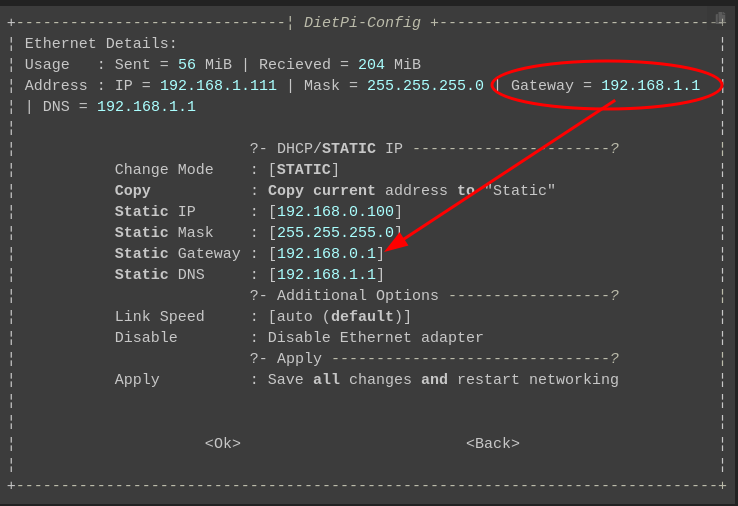
This basically kicks you off the network. If you want to use this configuration option for setting the DNS servers, you need to change the other network options as well (Static IP and Static Gateway IP) because the default settings are not correct.
An easy way to do this is to use the “copy” function to set the values you already have as the values used in your new static configuration. Otherwise just change them manually.
> [@Joulinar](#):
>
> DNS Server settings will be provided by your DHCP server.
I agree with Joulinar, if possible the best way to set the DNS server for your network is on the gateway (I’m assuming your gateway is the DHCP server). Log in to your router admin portal and change the DNS server there. This has the additional benefit of setting the nameserver you prefer on any other devices connected to your network.
If you want to change the DNS server on _only_ the DietPi system, or changing the nameserver on the gateway is not possible or otherwise undesirable, you can go ahead with setting the static IP configuration as you are doing–but you should _still_ log in to your router’s admin portal to set a DHCP reservation for the DietPi’s IP address to ensure you don’t run into an address conflict down the road.
---
### Author:  [@sigmatec](https://dietpi.com/forum/u/sigmatec)
#### Post date: [26 September 2022 13:08 UTC](https://dietpi.com/forum/t/changing-dns-on-dietpi/14347/16 "2022-09-26T13:08:01Z")
Thank you for your help! And sorry! 😆