# change the power-on temperature of the pwm-fan
**URL:** https://dietpi.com/forum/t/change-the-power-on-temperature-of-the-pwm-fan/23228
**Category:** General Discussion
**Created:** [9 April 2025 16:02 UTC](https://dietpi.com/forum/t/change-the-power-on-temperature-of-the-pwm-fan/23228 "2025-04-09T16:02:13Z")
**Posts on this page:** 4
**Page:** 1
### Author:  [@alrus63](https://dietpi.com/forum/u/alrus63)
#### Post date: [9 April 2025 16:02 UTC](https://dietpi.com/forum/t/change-the-power-on-temperature-of-the-pwm-fan/23228/1 "2025-04-09T16:02:13Z")
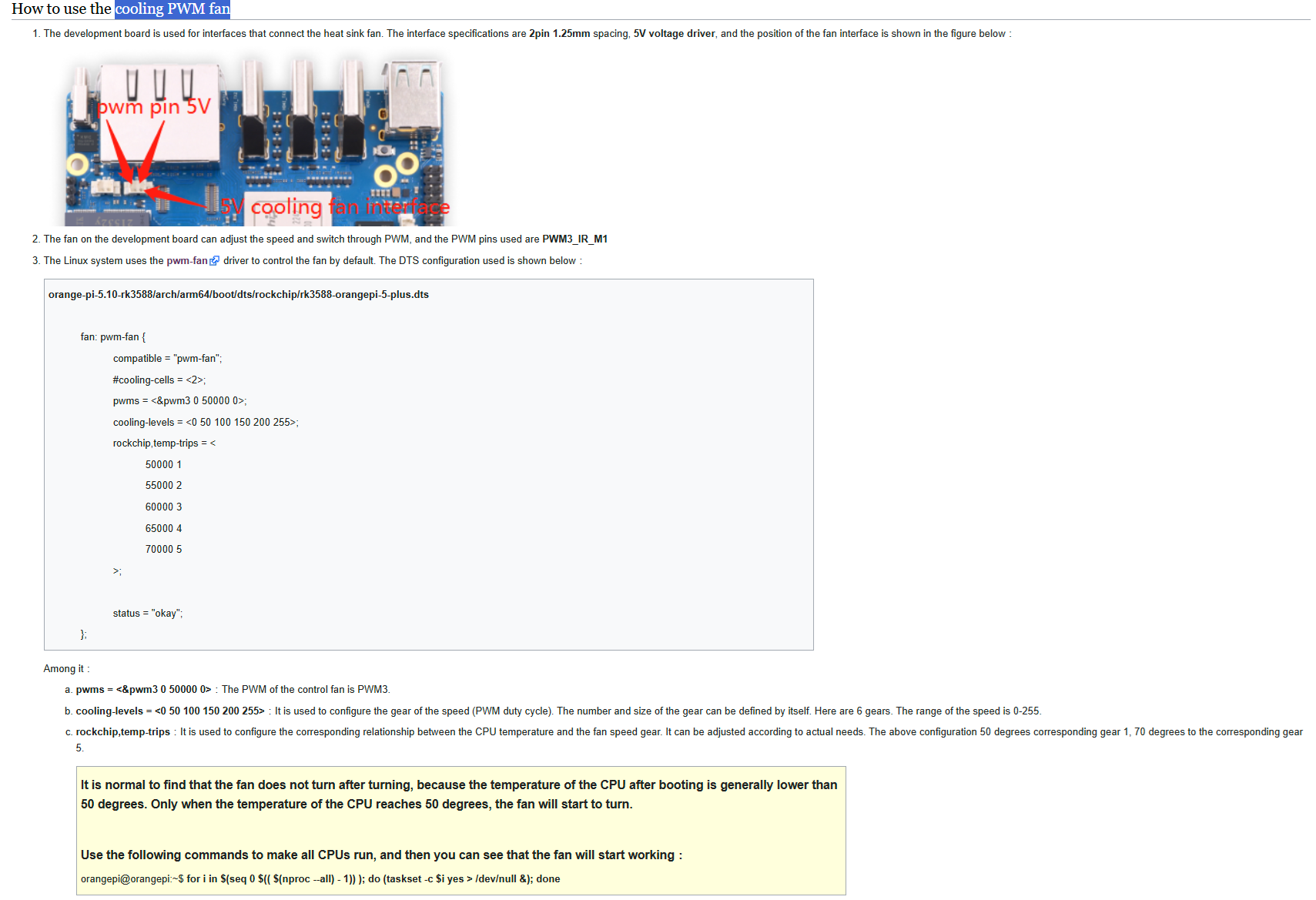
good afternoon. I’m really asking for help, I connected the cooling fan to the pwm-fan port on orangepi5plus with the dietpi operating system, but I can’t find a file anywhere where I can change the processor temperature at which it turns on. presumably, it turns on at 55 degrees Celsius, measured experimentally, including a stress test. There are a lot of instructions on the Internet, but every time I can’t find the right file to make changes to. the screenshot shows the description of the port from the official instructions.
---
### Author:  [@Jappe](https://dietpi.com/forum/u/Jappe)
#### Post date: [9 April 2025 16:54 UTC](https://dietpi.com/forum/t/change-the-power-on-temperature-of-the-pwm-fan/23228/2 "2025-04-09T16:54:14Z")
THe image you posted is from:
[http://www.orangepi.org/orangepiwiki/index.php/Orange\_Pi\_5\_Plus#How\_to\_use\_the\_cooling\_PWM\_fan](http://www.orangepi.org/orangepiwiki/index.php/Orange_Pi_5_Plus#How_to_use_the_cooling_PWM_fan)
- So you would need to decompile the file,
- edit this section to your needs:
```auto
rockchip,temp-trips = <
60000 1
65000 2
70000 3
75000 4
80000 5
>;
```
- recompile it and replace the old one
First of all you make a backup of your system before we trying to edit this.
Assuming the dtb is in `/boot/dtb/rockchip/` you do following:
```auto
sudo apt install device-tree-compiler
sudo dtc -I dtb -O dts -o /tmp/orangepi5plus.dts /boot/dtb/rockchip/rk3588-orangepi-5-plus.dtb
```
Then edit the file `/tmp/orangepi5plus.dts`, e.g. with `nano`.
Then copy it back and reboot
```auto
sudo dtc -I dts -O dtb -o /boot/dtb/rockchip/rk3588-orangepi-5-plus.dtb /tmp/orangepi5plus.dts
sudo reboot
```
---
### Author:  [@alrus63](https://dietpi.com/forum/u/alrus63)
#### Post date: [11 April 2025 10:09 UTC](https://dietpi.com/forum/t/change-the-power-on-temperature-of-the-pwm-fan/23228/3 "2025-04-11T10:09:46Z")
Thank you, you helped me.
---
### Author:  [@system](https://dietpi.com/forum/u/system)
#### Post date: [10 July 2025 10:10 UTC](https://dietpi.com/forum/t/change-the-power-on-temperature-of-the-pwm-fan/23228/4 "2025-07-10T10:10:32Z")
This topic was automatically closed 90 days after the last reply. New replies are no longer allowed.