# Can't access nextcloud from LAN
**URL:** https://dietpi.com/forum/t/cant-access-nextcloud-from-lan/16701
**Category:** Troubleshooting
**Created:** [26 April 2023 14:08 UTC](https://dietpi.com/forum/t/cant-access-nextcloud-from-lan/16701 "2023-04-26T14:08:53Z")
**Posts on this page:** 20
**Page:** 1
### Author:  [@chipotledonut](https://dietpi.com/forum/u/chipotledonut)
#### Post date: [26 April 2023 14:08 UTC](https://dietpi.com/forum/t/cant-access-nextcloud-from-lan/16701/1 "2023-04-26T14:08:54Z")
#### Required Information
- DietPi version | 8.16.2
- Distro version | `bullseye`
- Kernel version | `Linux Home 6.1.21-v8+`
- SBC model | `RPI4`
#### Additional Information (if applicable)
- Software title | Nextcloud and Lighttpd
- Was the software title installed freshly or updated/migrated? Freshly
- Can this issue be replicated on a fresh installation of DietPi? Yes
## Can’t access Nextcloud from LAN
Beacuse I’m new at this home server stuff, I’ll try to explain everything clearly, sorry if it’s too much.
### Steps
1. I followed this [guide](https://dietpi.com/forum/t/how-can-i-secure-connection-to-nextcloud/3820/4) to install Nextcloud but without noip config and I didn’t install Nextcloud yet as I can get it working.
2. I have my ddns.domain. com in my shared hosting with my own domain in their dynamic DNS. I have a script on my RPI4 that runs hourly that calls to the URL of the dynamic DNS cPanel in case my public IP changes (it doesn’t unless I restart the router but just in case). Let’s encrypt is done via cerbot on Dietpi.
3. My router when I try to open and redirect ports 80 and 443 I get this error: _The input external ports conflicts with service control ports. Please input another one_. For what I read about my ISP they do use that ports for some admin related stuff. I read that I could ask for the admin password of my router and that should give me access to free those ports but It’s not sure they would give it to me or that I could actually free those ports.
### What I tried
1. Change Lighttpd to listen on ports 8080 8443 as I read in another topic.
2. Open ports this way:
TCP 8080 - 80 8433 - 433 IP of my Dietpi
2.1. Outside LAN (my phone on mobile data):
- ddns.domain. com:8443:
Connection is not secure.
I tap continue to site and get connection refused.
- ddns.domain. com: connection refused.
2.2. Inside LAN
- ddns.domain. com:8443: connection timed out
- ddns.domain. com: it goes to my router login page
1. Open ports this way
TCP 8080 - 8080 8433 - 8433 IP of my Dietpi
4.1. Outside LAN (my phone on mobile data):
- ddns.domain. com:8443: ligthtpd webpage SSL.
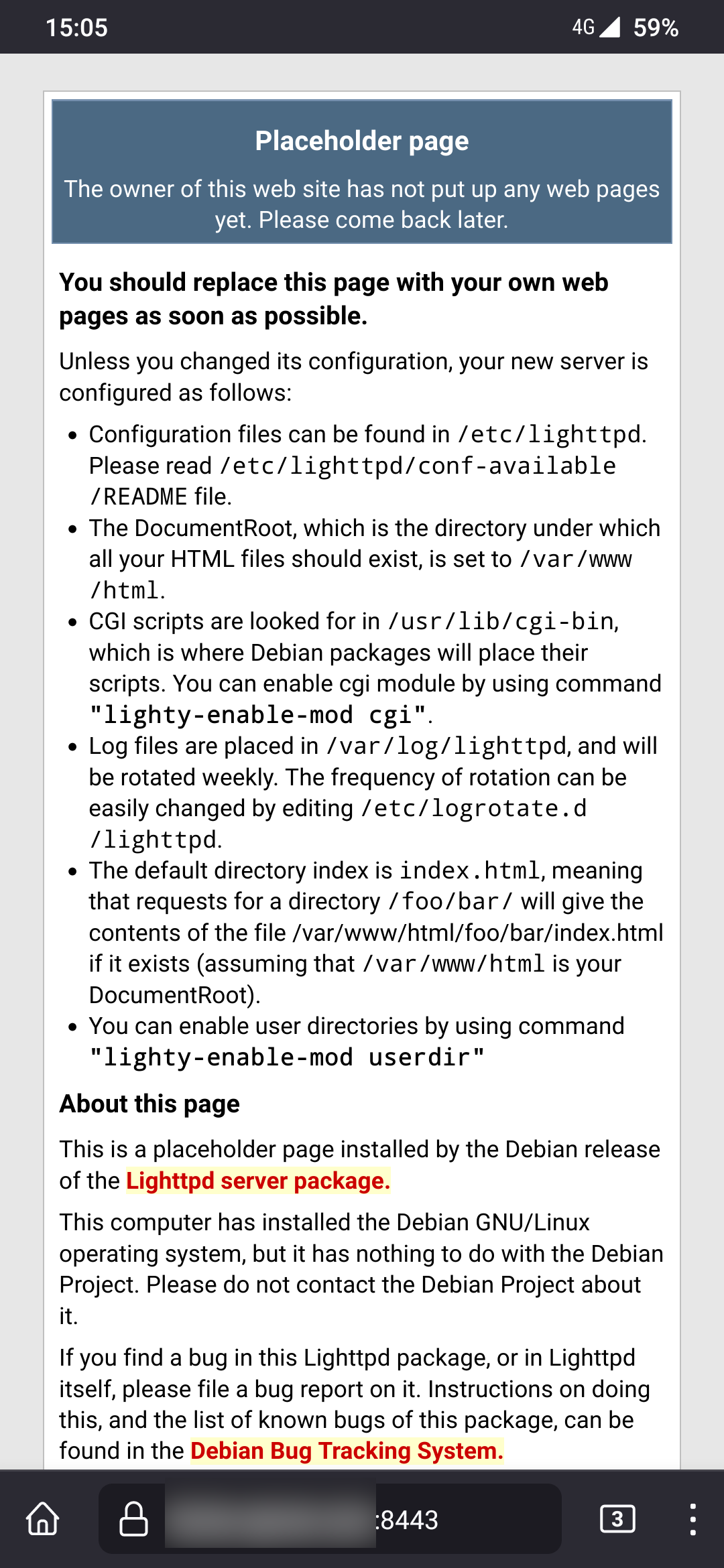
- ddns.domain. com:
Secure site not avilable.
Tap continue to HTTP site and unable to connect.
4.2. Inside LAN
- ddns.domain. com:8443:
Secure site not avilable.
Tap continue to HTTP site and unable to connect
- ddns.domain. com: it goes to my router login page
**I read that NAT loockup could solve this and when I open my ports there’s an option to activate it but for what I read on forums in my router it’s cosmetic, it doesn’t do anything. ISP disabled it.**
### Conclusion
I’m at a loss. I don’t know (in a don’t have the knowledge) what to do.
- reverse proxy? how?
- try other ports
😕
### Edit
In my cPanel in the Dynamic DNS settings I can see there’s a SSL certificate issued for my ddns.domain .com. Beacuse I don’t know, maybe when I created a new SSL with dietpi-encrypt there’s confilct there?
---
### Author:  [@Joulinar](https://dietpi.com/forum/u/Joulinar)
#### Post date: [26 April 2023 14:43 UTC](https://dietpi.com/forum/t/cant-access-nextcloud-from-lan/16701/2 "2023-04-26T14:43:10Z")
Not sure if I understood your configuration and setup fully.
Who is managing the certificate? Is this done by `dietpi-encrypt`? Or some other tool?
Can you share your Lighttpd configuration files? I would like to understood where you changed what.
---
### Author:  [@chipotledonut](https://dietpi.com/forum/u/chipotledonut)
#### Post date: [26 April 2023 14:48 UTC](https://dietpi.com/forum/t/cant-access-nextcloud-from-lan/16701/3 "2023-04-26T14:48:52Z")
I changed /etc/lighttpd/lighttpd.conf
server.port = 8080
/etc/lighttpd/conf-enabled/50-dietpi-https.conf
$SERVER[“socket”] == “:8443” {
This is the info for [SSL Dynamic DNS on cPanel.](https://docs.cpanel.net/cpanel/domains/dynamic-dns/#/) but I didn’t use that one.
I used dietpi-letsencrtyp and generate a new one.
---
### Author:  [@Joulinar](https://dietpi.com/forum/u/Joulinar)
#### Post date: [26 April 2023 14:51 UTC](https://dietpi.com/forum/t/cant-access-nextcloud-from-lan/16701/4 "2023-04-26T14:51:22Z")
and connecting to [https://my.domain.com:8443](https://my.domain.com:8443) is giving certificate errors within the browser?
**EDIT**
can you review your port settings. You configured port `8433` but should be `8443` according your config
> [@chipotledonut](#):
>
> TCP 8080 - 8080 8433 - 8433 IP of my Dietpi
---
### Author:  [@chipotledonut](https://dietpi.com/forum/u/chipotledonut)
#### Post date: [26 April 2023 14:52 UTC](https://dietpi.com/forum/t/cant-access-nextcloud-from-lan/16701/5 "2023-04-26T14:52:51Z")
On mobile data I get to the lighttpd webserver page without problems.
on my LAN, connected to my wifi i get continue to http, tap and then coneection timed out
---
### Author:  [@Joulinar](https://dietpi.com/forum/u/Joulinar)
#### Post date: [26 April 2023 14:54 UTC](https://dietpi.com/forum/t/cant-access-nextcloud-from-lan/16701/6 "2023-04-26T14:54:07Z")
> [@chipotledonut](#):
>
> on my LAN, connected to my wifi i get continue to http, tap and then coneection timed out
how do you call the webserver from inside your local network? which url you are using?
---
### Author:  [@chipotledonut](https://dietpi.com/forum/u/chipotledonut)
#### Post date: [26 April 2023 14:55 UTC](https://dietpi.com/forum/t/cant-access-nextcloud-from-lan/16701/7 "2023-04-26T14:55:50Z")
```
Nextcloud TCP 8443-8443 8443-8443 That's fine, that was a typo here.
```
in my local network I’m using the same: [ddns.domain.com:8443](http://ddns.domain.com:8443) to have the same URL everywhere for configs.
---
### Author:  [@trendy](https://dietpi.com/forum/u/trendy)
#### Post date: [26 April 2023 14:57 UTC](https://dietpi.com/forum/t/cant-access-nextcloud-from-lan/16701/8 "2023-04-26T14:57:09Z")
If you are trying to access the lan server with a ddns domain name, it will most likely not work. This requires hairpin NAT and not all routers support it. You should use the internal IP address or internal hostname.
From outside you need to forward the port on the router. One problem can be CGNAT from your provider. Another problem can be provider blocking ingress traffic.
---
### Author:  [@Joulinar](https://dietpi.com/forum/u/Joulinar)
#### Post date: [26 April 2023 14:58 UTC](https://dietpi.com/forum/t/cant-access-nextcloud-from-lan/16701/9 "2023-04-26T14:58:48Z")
yes quite some routers don’t support NAT from inside the local network. You could work around if you have something like PiHole or AGH running.
---
### Author:  [@chipotledonut](https://dietpi.com/forum/u/chipotledonut)
#### Post date: [26 April 2023 14:59 UTC](https://dietpi.com/forum/t/cant-access-nextcloud-from-lan/16701/10 "2023-04-26T14:59:56Z")
> [@trendy](#):
>
> One problem can be CGNAT from your provider
Nope, I’m out.
> [@trendy](#):
>
> Another problem can be provider blocking ingress traffic
I can connect outside the network with no problems.
> [@trendy](#):
>
> You should use the internal IP address or internal hostname.
Then, If i take my laptop to another place with another network i will have to chnage the URL back and for.
---
### Author:  [@chipotledonut](https://dietpi.com/forum/u/chipotledonut)
#### Post date: [26 April 2023 15:01 UTC](https://dietpi.com/forum/t/cant-access-nextcloud-from-lan/16701/11 "2023-04-26T15:01:17Z")
> [@Joulinar](#):
>
> You could work around if you have something like PiHole or AGH running.
is there no other solution? reverse proxy?
EDIT:
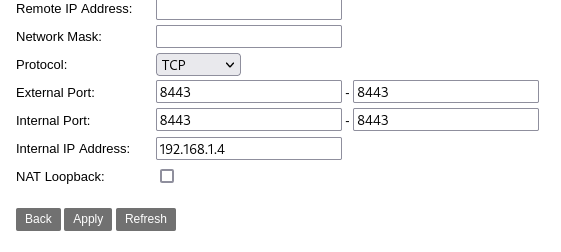
There’s a NAT loopback option what like I said it doesn’t make any difference on or off. I read it is cosmetic, ISP disabled it but forgot to hide it.
---
### Author:  [@Joulinar](https://dietpi.com/forum/u/Joulinar)
#### Post date: [26 April 2023 15:03 UTC](https://dietpi.com/forum/t/cant-access-nextcloud-from-lan/16701/12 "2023-04-26T15:03:36Z")
> [@chipotledonut](#):
>
> is there no other solution? reverse proxy?
The issue might be your router, even a revers proxy will not fix this. Your router will need to handle the network traffic. Can you share the error you are receiving on your local computer if trying to access `https://my.domain.com:8443`. Ensure it’s `https` within the URL and not `http`
BTW: Lighttpd can be used as revers proxy. This is a functionality of modern web server.
---
### Author:  [@Joulinar](https://dietpi.com/forum/u/Joulinar)
#### Post date: [26 April 2023 15:06 UTC](https://dietpi.com/forum/t/cant-access-nextcloud-from-lan/16701/13 "2023-04-26T15:06:34Z")
> [@chipotledonut](#):
>
> There’s a NAT loopback option what like I said it doesn’t make any difference on or off. I read it is cosmetic, ISP disabled it but forgot to hide it.
You mean your ISP disabled NAT loopback? If yes, you need a different solution like a lokal DNS server or a new/different router.
---
### Author:  [@chipotledonut](https://dietpi.com/forum/u/chipotledonut)
#### Post date: [26 April 2023 15:10 UTC](https://dietpi.com/forum/t/cant-access-nextcloud-from-lan/16701/14 "2023-04-26T15:10:32Z")
> [@Joulinar](#):
>
> Can you share the error you are receiving on your local computer
The connection has timed out
> [@Joulinar](#):
>
> you need a different solution like a lokal DNS server or a new/different router.
That would be the easy way but rigth now ONT - ROUTER - SWTICH - ETHERNET CABLES. I can’t replace the ISP router if they don´t give me the conection details and they won´t. Any company in my country. I can´t connect ONT - ISP ROUTER (bridge) - ROUTER - SWITCH because is inside of my wall. There’s no room for another router.
---
### Author:  [@Joulinar](https://dietpi.com/forum/u/Joulinar)
#### Post date: [26 April 2023 15:12 UTC](https://dietpi.com/forum/t/cant-access-nextcloud-from-lan/16701/15 "2023-04-26T15:12:39Z")
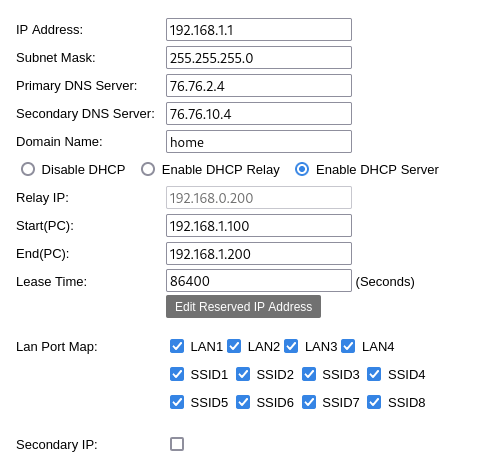
Question, as your router seems to be customer unfriendly. Are you able to change/adjust anything on DHCP configuration? Like adjust local DNS server that is published to clients?
---
### Author:  [@chipotledonut](https://dietpi.com/forum/u/chipotledonut)
#### Post date: [26 April 2023 15:16 UTC](https://dietpi.com/forum/t/cant-access-nextcloud-from-lan/16701/16 "2023-04-26T15:16:31Z")
> [@Joulinar](#):
>
> Are you able to change/adjust anything on DHCP configuration? Like adjust local DNS server that is published to clients?
this is what i can change.
---
### Author:  [@Joulinar](https://dietpi.com/forum/u/Joulinar)
#### Post date: [26 April 2023 15:20 UTC](https://dietpi.com/forum/t/cant-access-nextcloud-from-lan/16701/17 "2023-04-26T15:20:24Z")
can you check on your client which DNS server is used?
On Windows it would be `ipconfig -all`
---
### Author:  [@chipotledonut](https://dietpi.com/forum/u/chipotledonut)
#### Post date: [26 April 2023 15:22 UTC](https://dietpi.com/forum/t/cant-access-nextcloud-from-lan/16701/18 "2023-04-26T15:22:58Z")
/etc/resolv.conf
nameserver 9.9.9.9
nameserver 149.112.112.112
the default for the DietPi installation.
Sorry,
eth0: flags=4163\ mtu 1500
inet 192.168.1.4 netmask 255.255.255.0 broadcast 192.168.1.255
inet6 fe80::e65f:1ff:fe06:5e0f prefixlen 64 scopeid 0x20
ether e4:5f:01:06:5e:0f txqueuelen 1000 (Ethernet)
RX packets 1945238 bytes 2756529336 (2.5 GiB)
RX errors 0 dropped 62 overruns 0 frame 0
TX packets 366267 bytes 67003804 (63.8 MiB)
TX errors 0 dropped 0 overruns 0 carrier 0 collisions 0
lo: flags=73\ mtu 65536
inet 127.0.0.1 netmask 255.0.0.0
inet6 ::1 prefixlen 128 scopeid 0x10
loop txqueuelen 1000 (Local Loopback)
RX packets 8024 bytes 2738538 (2.6 MiB)
RX errors 0 dropped 0 overruns 0 frame 0
TX packets 8024 bytes 2738538 (2.6 MiB)
TX errors 0 dropped 0 overruns 0 carrier 0 collisions 0
wg0: flags=209\ mtu 1420
inet 10.238.27.1 netmask 255.255.255.0 destination 10.238.27.1
unspec 00-00-00-00-00-00-00-00-00-00-00-00-00-00-00-00 txqueuelen 1000 (UNSPEC)
RX packets 11810 bytes 1551720 (1.4 MiB)
RX errors 154 dropped 0 overruns 0 frame 154
TX packets 14843 bytes 13826720 (13.1 MiB)
TX errors 2 dropped 342 overruns 0 carrier 0 collisions 0
---
### Author:  [@Joulinar](https://dietpi.com/forum/u/Joulinar)
#### Post date: [26 April 2023 15:26 UTC](https://dietpi.com/forum/t/cant-access-nextcloud-from-lan/16701/19 "2023-04-26T15:26:39Z")
I don’t need this information from DietPi system. It’s needed from a client that will access Nextcloud.
---
### Author:  [@chipotledonut](https://dietpi.com/forum/u/chipotledonut)
#### Post date: [26 April 2023 15:28 UTC](https://dietpi.com/forum/t/cant-access-nextcloud-from-lan/16701/20 "2023-04-26T15:28:39Z")
lo: flags=73\ mtu 65536
inet 127.0.0.1 netmask 255.0.0.0
inet6 ::1 prefixlen 128 scopeid 0x10
loop txqueuelen 1000 (Local Loopback)
RX packets 191 bytes 20672 (20.1 KiB)
RX errors 0 dropped 0 overruns 0 frame 0
TX packets 191 bytes 20672 (20.1 KiB)
TX errors 0 dropped 0 overruns 0 carrier 0 collisions 0
wlp3s0: flags=4163\ mtu 1500
inet 192.168.1.130 netmask 255.255.255.0 broadcast 192.168.1.255
inet6 fe80::2e5a:3497:8fc6:cd04 prefixlen 64 scopeid 0x20
ether f4:96:34:ea:c8:56 txqueuelen 1000 (Ethernet)
RX packets 131588 bytes 156873077 (149.6 MiB)
RX errors 0 dropped 10 overruns 0 frame 0
TX packets 45741 bytes 13256465 (12.6 MiB)
TX errors 0 dropped 0 overruns 0 carrier 0 collisions 0
from my laptop
[Next page](https://dietpi.com/forum/t/cant-access-nextcloud-from-lan/16701.md?page=2)