# Cannot update portainer due to container being used?
**URL:** https://dietpi.com/forum/t/cannot-update-portainer-due-to-container-being-used/19686
**Category:** General Discussion
**Created:** [20 March 2024 11:34 UTC](https://dietpi.com/forum/t/cannot-update-portainer-due-to-container-being-used/19686 "2024-03-20T11:34:39Z")
**Posts on this page:** 6
**Page:** 1
### Author:  [@naddel91](https://dietpi.com/forum/u/naddel91)
#### Post date: [20 March 2024 11:34 UTC](https://dietpi.com/forum/t/cannot-update-portainer-due-to-container-being-used/19686/1 "2024-03-20T11:34:39Z")
hi at all,
I just get this error here:
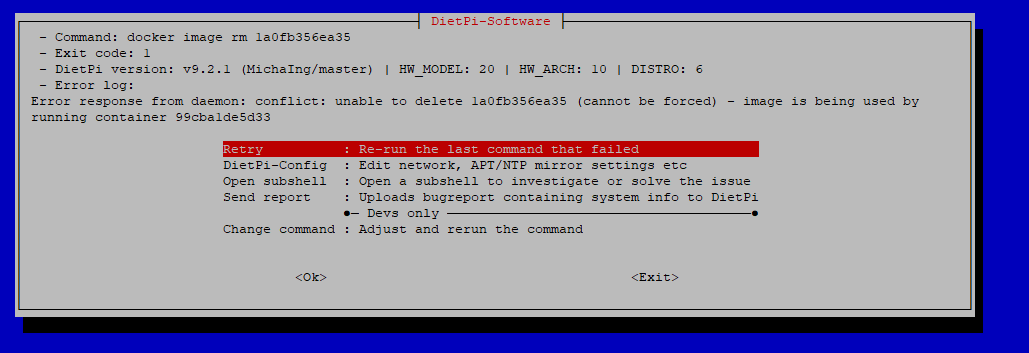
maybe you can give me a hint, please. best wishes
---
### Author:  [@Jappe](https://dietpi.com/forum/u/Jappe)
#### Post date: [20 March 2024 11:45 UTC](https://dietpi.com/forum/t/cannot-update-portainer-due-to-container-being-used/19686/2 "2024-03-20T11:45:02Z")
What are you trying to do? Reinstall docker or somehting?
You need to sop all containers first, a running container is preventing the `docker img rm` command.
---
### Author:  [@naddel91](https://dietpi.com/forum/u/naddel91)
#### Post date: [20 March 2024 11:51 UTC](https://dietpi.com/forum/t/cannot-update-portainer-due-to-container-being-used/19686/3 "2024-03-20T11:51:27Z")
I just want to update portainer to 2.20 (newest release). nothing else.
---
### Author:  [@Jappe](https://dietpi.com/forum/u/Jappe)
#### Post date: [20 March 2024 11:57 UTC](https://dietpi.com/forum/t/cannot-update-portainer-due-to-container-being-used/19686/4 "2024-03-20T11:57:18Z")
You need to stop the container first
~~
docker stop 99cbalde5d33
~~
---
### Author:  [@Joulinar](https://dietpi.com/forum/u/Joulinar)
#### Post date: [20 March 2024 11:58 UTC](https://dietpi.com/forum/t/cannot-update-portainer-due-to-container-being-used/19686/5 "2024-03-20T11:58:19Z")
latest version is 2.19.4 isn’t it? At least that’s the one marked as stable. Even if 2.20. have been released yesterday

anyway. From the error menu, open a subshell and stop the container
```auto
docker stop portainer
```
Btw: I did a simple test an it was working without issues
```auto
DietPi-Software
─────────────────────────────────────────────────────
Step: Installing Portainer: Simplifies container management in Docker (standalone host)
[OK] DietPi-Software | docker container rm -f 109306cda45e
[OK] DietPi-Software | docker image rm f12f1fd2694d
[INFO] DietPi-Software | Portainer will be deployed now. This could take a while...
[INFO] DietPi-Software | docker run -d -p 9002:9000 --name=portainer --restart=always -v /run/docker.sock:/var/run/docker.sock -v portainer_data:/data portainer/portainer-ce, please wait...
Unable to find image 'portainer/portainer-ce:latest' locally
latest: Pulling from portainer/portainer-ce
```
---
### Author:  [@system](https://dietpi.com/forum/u/system)
#### Post date: [16 September 2024 11:58 UTC](https://dietpi.com/forum/t/cannot-update-portainer-due-to-container-being-used/19686/6 "2024-09-16T11:58:44Z")
This topic was automatically closed 180 days after the last reply. New replies are no longer allowed.