# After uninstall crash /mnt/dietpi no longer exists
**URL:** https://dietpi.com/forum/t/after-uninstall-crash-mnt-dietpi-no-longer-exists/6594
**Category:** Troubleshooting
**Created:** [7 May 2022 12:55 UTC](https://dietpi.com/forum/t/after-uninstall-crash-mnt-dietpi-no-longer-exists/6594 "2022-05-07T12:55:20Z")
**Posts on this page:** 20
**Page:** 1
### Author:  [@Ian](https://dietpi.com/forum/u/Ian)
#### Post date: [7 May 2022 12:55 UTC](https://dietpi.com/forum/t/after-uninstall-crash-mnt-dietpi-no-longer-exists/6594/1 "2022-05-07T12:55:20Z")
Hello,
Just before updating to 8.4 and after a backup. I started to uninstall “pinhole” by the second dependancy php7.3-fpm (I think) and after a very long wait, the Pi became unresponsive. after rebooting some “important” services no longer work due to not finding /mnt/dietpi.
I tried a restore on a fresh SD Card but the problem is the same.
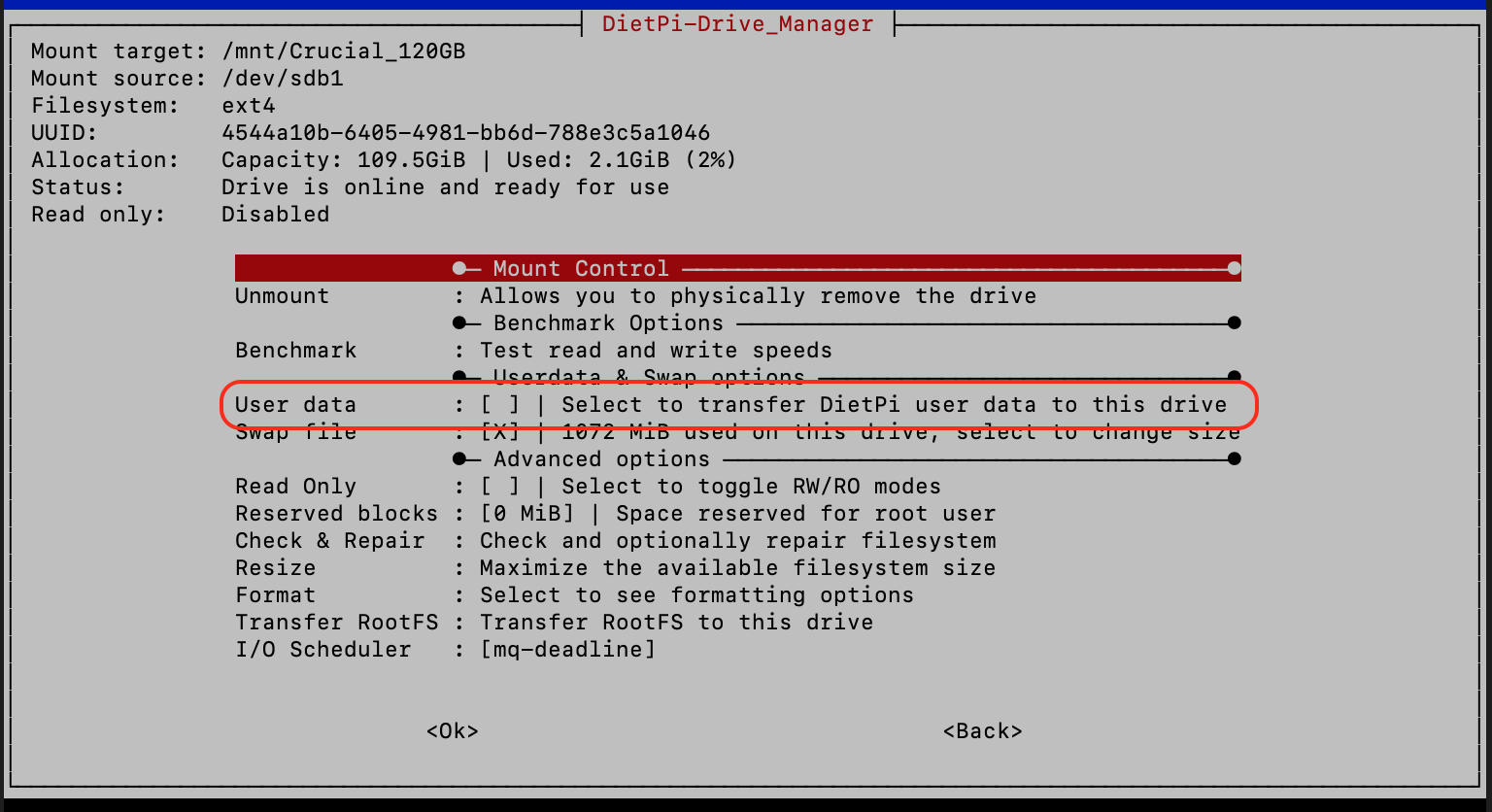
I have an external Crucial 120GB SSD attached which I previously set to save the user data to and I can’t remember if after this it change the drive name to /mnt/dietpi as the system now see’s it as /mnt/Crucial\_120GB. (on the old system it shows as being mounted and Selected to transfer DietPi user data to the drive, the "fresh restored system shows it mounted but NOT Selected to transfer DietPi user data to the drive.
Is this the problem?
Can I rename the SSD to “dietpi” and the problem is solved?
If so how do I rename the SSD?
on the fresh system where it is not selected for user data and I select it, will it erase the data already on it?
Could I somehow backup this data 2.1GB (no other Linux machine ext4)?
─────────────────────────────────────────────────────
DietPi v8.3.1 : Update available
─────────────────────────────────────────────────────
- Device model : RPi 3 Model B (armv7l)
- Uptime : up 1 minute
- CPU temp : 55 °C / 131 °F : Running warm, but safe
- LAN IP : 192.168.0.3 (eth0)
- Freespace (RootFS) : 53G
**df: /mnt/dietpi\_userdata: No such file or directory**
- Freespace (userdata) :
- MOTD : DietPi v8.4 is here, check out the release notes:
[https://dietpi.com/docs/releases/v8\_4/](https://dietpi.com/docs/releases/v8_4/)
─────────────────────────────────────────────────────
Thanks
Ian
---
### Author:  [@Joulinar](https://dietpi.com/forum/u/Joulinar)
#### Post date: [7 May 2022 14:08 UTC](https://dietpi.com/forum/t/after-uninstall-crash-mnt-dietpi-no-longer-exists/6594/2 "2022-05-07T14:08:52Z")
Did you moved mnt/dietpi\_userdata to an external disk?
---
### Author:  [@Ian](https://dietpi.com/forum/u/Ian)
#### Post date: [7 May 2022 14:37 UTC](https://dietpi.com/forum/t/after-uninstall-crash-mnt-dietpi-no-longer-exists/6594/3 "2022-05-07T14:37:15Z")
Apart from selecting the SSD for user data many moons ago no I didn’t, everything was working fine “as is” before the “crash”.
---
### Author:  [@Joulinar](https://dietpi.com/forum/u/Joulinar)
#### Post date: [7 May 2022 14:41 UTC](https://dietpi.com/forum/t/after-uninstall-crash-mnt-dietpi-no-longer-exists/6594/4 "2022-05-07T14:41:24Z")
So you /mnt/dietpi\_userdata is located on a SSD? Does the drive is still working and connected?
```nohighlight
ls -la /mnt
df -h
lsblk -o name,fstype,label,size,ro,type,mountpoint,partuuid,uuid
```
---
### Author:  [@Ian](https://dietpi.com/forum/u/Ian)
#### Post date: [7 May 2022 14:48 UTC](https://dietpi.com/forum/t/after-uninstall-crash-mnt-dietpi-no-longer-exists/6594/5 "2022-05-07T14:48:57Z")
Yes it works and is mounted
root@DietPi:~# ls -la /mnt
total 40
drwxr-xr-x 10 root root 4096 Apr 9 18:54 .
drwxr-xr-x 21 root root 4096 Apr 3 00:03 …
drwxr-xr-x 4 root root 4096 May 6 19:01 Crucial\_120GB
drwxr-xr-x 2 root root 4096 Apr 9 18:54 Dietpi
drwxr-xr-x 2 root root 4096 May 7 14:09 dietpi-backup0
drwxr-xr-x 2 root root 4096 May 7 14:09 dietpi-backup1
drwxr-xr-x 2 root root 4096 May 7 14:09 dietpi-backup2
drwxrwxr-x 2 dietpi dietpi 4096 May 2 19:01 ftp\_client
drwxrwxr-x 2 dietpi dietpi 4096 May 2 19:02 nfs\_client
drwxrwxr-x 2 dietpi dietpi 4096 May 2 19:02 samba
root@DietPi:~# df -h
Filesystem Size Used Avail Use% Mounted on
/dev/root 59G 3.4G 53G 7% /
devtmpfs 339M 0 339M 0% /dev
tmpfs 468M 1.1M 467M 1% /dev/shm
tmpfs 468M 15M 453M 4% /run
tmpfs 5.0M 0 5.0M 0% /run/lock
tmpfs 468M 0 468M 0% /sys/fs/cgroup
/dev/mmcblk0p1 127M 27M 100M 21% /boot
/dev/sdb1 110G 2.2G 108G 2% /mnt/Crucial\_120GB
tmpfs 1023M 20K 1023M 1% /tmp
tmpfs 50M 124K 50M 1% /var/log
tmpfs 94M 0 94M 0% /run/user/998
tmpfs 94M 0 94M 0% /run/user/0
tmpfs 94M 0 94M 0% /run/user/112
tmpfs 94M 0 94M 0% /run/user/113
root@DietPi:~# lsblk -o name,fstype,label,size,ro,type,mountpoint,partuuid,uuid
NAME FSTYPE LABEL SIZE RO TYPE MOUNTPOINT PARTUUID UUID
sda 14.9G 0 disk
├─sda1 vfat boot 43.9M 0 part b8ef7a27-01 9304-D9FD
└─sda2 ext4 rootfs 14.9G 0 part b8ef7a27-02 29075e46-f0d4-44e2-a9e7-55ac02d6e6cc
sdb 111.8G 0 disk
└─sdb1 ext4 111.8G 0 part /mnt/Crucial\_120GB 7010a712-73a6-453a-b0c8-c56982f39723 4544a10b-6405-4981-bb6d-788e3c5a1046
mmcblk0 59.5G 0 disk
├─mmcblk0p1 vfat 128M 0 part /boot b291b770-01 9FF1-1FFB
└─mmcblk0p2 ext4 59.4G 0 part / b291b770-02 9e3d6239-
---
### Author:  [@Joulinar](https://dietpi.com/forum/u/Joulinar)
#### Post date: [7 May 2022 14:57 UTC](https://dietpi.com/forum/t/after-uninstall-crash-mnt-dietpi-no-longer-exists/6594/6 "2022-05-07T14:57:58Z")
There is a 16GB USB pen drive attached. What is it used for?
---
### Author:  [@Ian](https://dietpi.com/forum/u/Ian)
#### Post date: [7 May 2022 15:01 UTC](https://dietpi.com/forum/t/after-uninstall-crash-mnt-dietpi-no-longer-exists/6594/7 "2022-05-07T15:01:17Z")
Sorry that’s the original sys SD Card that I restored to the “fresh” SD from
---
### Author:  [@Joulinar](https://dietpi.com/forum/u/Joulinar)
#### Post date: [7 May 2022 15:03 UTC](https://dietpi.com/forum/t/after-uninstall-crash-mnt-dietpi-no-longer-exists/6594/8 "2022-05-07T15:03:59Z")
What is the folder Dietpi within /mnt used for? It is not part of a standard install.
---
### Author:  [@Ian](https://dietpi.com/forum/u/Ian)
#### Post date: [7 May 2022 15:10 UTC](https://dietpi.com/forum/t/after-uninstall-crash-mnt-dietpi-no-longer-exists/6594/9 "2022-05-07T15:10:19Z")
Unfortunately I don’t know and don’t remember creating it 😬
---
### Author:  [@Joulinar](https://dietpi.com/forum/u/Joulinar)
#### Post date: [7 May 2022 15:15 UTC](https://dietpi.com/forum/t/after-uninstall-crash-mnt-dietpi-no-longer-exists/6594/10 "2022-05-07T15:15:34Z")
Sorry for the many questions but I need to understand your setup first 😉
Is there something inside the Dietpi folder?
What is on the SSD?
```nohighlight
ls -la /mnt/Crucial_120GB
```
---
### Author:  [@Ian](https://dietpi.com/forum/u/Ian)
#### Post date: [7 May 2022 15:39 UTC](https://dietpi.com/forum/t/after-uninstall-crash-mnt-dietpi-no-longer-exists/6594/11 "2022-05-07T15:39:30Z")
No problem I understand.
I just thought of that while I was out, the user data is on there
root@DietPi:~# ls -la /mnt/Crucial\_120GB
total 1097760
drwxr-xr-x 4 root root 4096 May 6 19:01 .
drwxr-xr-x 10 root root 4096 Apr 9 18:54 …
drwxrwxr-x 10 dietpi dietpi 4096 May 5 19:41 dietpi\_userdata
drwx------ 2 root root 16384 Apr 17 2019 lost+found
-rw------- 1 root root 1124073472 Apr 17 2019 .swapfile
---
### Author:  [@Joulinar](https://dietpi.com/forum/u/Joulinar)
#### Post date: [7 May 2022 15:52 UTC](https://dietpi.com/forum/t/after-uninstall-crash-mnt-dietpi-no-longer-exists/6594/12 "2022-05-07T15:52:27Z")
Not sure why but you are missing the symbolic link to point the user data to your SSD. Following should create it
```nohighlight
ln -s /mnt/Crucial_120GB/dietpi_userdata /mnt/dietpi_userdata
```
---
### Author:  [@Ian](https://dietpi.com/forum/u/Ian)
#### Post date: [7 May 2022 16:00 UTC](https://dietpi.com/forum/t/after-uninstall-crash-mnt-dietpi-no-longer-exists/6594/13 "2022-05-07T16:00:28Z")
Before I try that, I’m running on the “Fresh” sys where the SSD is Not designated to store the user data.
Shall I assign it first, hoping not to loose data.
---
### Author:  [@Joulinar](https://dietpi.com/forum/u/Joulinar)
#### Post date: [7 May 2022 16:02 UTC](https://dietpi.com/forum/t/after-uninstall-crash-mnt-dietpi-no-longer-exists/6594/14 "2022-05-07T16:02:17Z")
Well the user data is already missing inside/mnt. You should be able to create the link manually.
---
### Author:  [@Ian](https://dietpi.com/forum/u/Ian)
#### Post date: [7 May 2022 16:04 UTC](https://dietpi.com/forum/t/after-uninstall-crash-mnt-dietpi-no-longer-exists/6594/15 "2022-05-07T16:04:50Z")
Which is
```nohighlight
ln -s /mnt/Crucial_120GB/dietpi_userdata /mnt/dietpi_userdata
```
---
### Author:  [@Joulinar](https://dietpi.com/forum/u/Joulinar)
#### Post date: [7 May 2022 16:05 UTC](https://dietpi.com/forum/t/after-uninstall-crash-mnt-dietpi-no-longer-exists/6594/16 "2022-05-07T16:05:53Z")
Yes that should create the link
---
### Author:  [@Ian](https://dietpi.com/forum/u/Ian)
#### Post date: [7 May 2022 16:20 UTC](https://dietpi.com/forum/t/after-uninstall-crash-mnt-dietpi-no-longer-exists/6594/17 "2022-05-07T16:20:27Z")
We are back in business 🤘🏼
Yes it did make the link
Thanks so much for your help.
I’m so happy I’ll make a donation!
---
### Author:  [@Ian](https://dietpi.com/forum/u/Ian)
#### Post date: [7 May 2022 17:31 UTC](https://dietpi.com/forum/t/after-uninstall-crash-mnt-dietpi-no-longer-exists/6594/18 "2022-05-07T17:31:33Z")
I’m afraid I’m back to square one, just tried to remove pinhole and dependancies and after a very long time removing iproute2 it’s crashed again 😩
Step: Uninstalling Pi-hole: block adverts for any device on your network
[INFO] DietPi-Software | pihole uninstall, please wait…
[?] Are you sure you would like to remove Pi-hole? [y/N] y
[✓] Root user check
[✓] Update local cache of available packages
_Existing PHP installation detected : PHP version 7.3.31-1~deb10u1
Be sure to confirm if any dependencies should not be removed
The following dependencies may have been added by the Pi-hole install:
git iproute2 whiptail ca-certificates cron curl iputils-ping lsof psmisc sudo unzip idn2 sqlite3 libcap2-bin dns-root-data libcap2
[?] Do you wish to go through each dependency for removal? (Choosing No will leave all dependencies installed) [Y/n] y_
_[?] Do you wish to remove git from your system? [Y/N] y
Removed git
[?] Do you wish to remove iproute2 from your system? [Y/N] y
Removing iproute2…client\_loop: send disconnect: Broken pipe_
---
### Author:  [@Joulinar](https://dietpi.com/forum/u/Joulinar)
#### Post date: [7 May 2022 17:49 UTC](https://dietpi.com/forum/t/after-uninstall-crash-mnt-dietpi-no-longer-exists/6594/19 "2022-05-07T17:49:18Z")
Well you run into a trap of the PiHole uninstall script. You removed the critical system dependency and cut-off the network. Don’t worry you are not the first one. We ask PiHole guys to change their uninstall script. They acknowledge the issue but no change so far information.
Theoretically there might be a way to install some package offline. But this would require physical access and a screen. Btw what system you are running?
---
### Author:  [@Ian](https://dietpi.com/forum/u/Ian)
#### Post date: [7 May 2022 17:59 UTC](https://dietpi.com/forum/t/after-uninstall-crash-mnt-dietpi-no-longer-exists/6594/20 "2022-05-07T17:59:45Z")
Don’t they try these things out first 🙄
Other than waiting for them to update the uninstall script, is it possible to have a fresh install with the apps I’m mainly using node red / influx db / grafana and ref their data from my /mnt/dietpi\_userdata?
[Next page](https://dietpi.com/forum/t/after-uninstall-crash-mnt-dietpi-no-longer-exists/6594.md?page=2)