# After a few moments the time is outdated
**URL:** https://dietpi.com/forum/t/after-a-few-moments-the-time-is-outdated/16886
**Category:** Troubleshooting
**Created:** [18 May 2023 17:23 UTC](https://dietpi.com/forum/t/after-a-few-moments-the-time-is-outdated/16886 "2023-05-18T17:23:16Z")
**Posts on this page:** 15
**Page:** 1
### Author:  [@Libi](https://dietpi.com/forum/u/Libi)
#### Post date: [18 May 2023 17:23 UTC](https://dietpi.com/forum/t/after-a-few-moments-the-time-is-outdated/16886/1 "2023-05-18T17:23:17Z")
### Creating a bug report/issue
#### Required Information
- DietPi version | v8.17.2
- Distro version | bullseye
- Kernel version | 6.1.21-v8+ #1642 SMP PREEMPT Mon Apr 3 17:24:16 BST 2023 aarch64 GNU/Linux
- Architecture | `arm64`
- SBC model | RPi 4 Model B (aarch64)
- Power supply used | (EG: 5V 1A RAVpower)
- SD card used | SSD
I have been running this OS for a few days. It has made my life much easier.
I run my smartHome as Docker here.
However, I have noticed that the time deviates massively. After only a few moments, the time is outdated again.
I do not know now if this is related, but I use [debian.pool.ntp.org](http://debian.pool.ntp.org) as NTP Mirror. But even the Gateway option doesn’t work for me.
Here an extract from ‘journalctl -u systemd-timesyncd.service’:
```auto
-- Journal begins at Thu 2023-05-18 18:39:06 CEST, ends at Thu 2023-05-18 19:16:26 CEST. --
Mai 18 18:39:07 SmartHome systemd[1]: Starting Network Time Synchronization...
Mai 18 18:39:07 SmartHome systemd[1]: Started Network Time Synchronization.
Mai 18 18:41:11 SmartHome systemd-timesyncd[280]: Initial synchronization to time server 116.202.14.29:123 (2.debian.pool.ntp.org).
Mai 18 18:41:11 SmartHome systemd[1]: Stopping Network Time Synchronization...
Mai 18 18:41:11 SmartHome systemd[1]: systemd-timesyncd.service: Succeeded.
Mai 18 18:41:11 SmartHome systemd[1]: Stopped Network Time Synchronization.
```
I hope this helps. Would be very happy about a feedback or solution.
---
### Author:  [@Joulinar](https://dietpi.com/forum/u/Joulinar)
#### Post date: [19 May 2023 07:20 UTC](https://dietpi.com/forum/t/after-a-few-moments-the-time-is-outdated/16886/2 "2023-05-19T07:20:11Z")
we have seen such behaviour if CPU frequency was set to a too low value. Can you share
```auto
cat /boot/config.txt
```
---
### Author:  [@Libi](https://dietpi.com/forum/u/Libi)
#### Post date: [19 May 2023 11:34 UTC](https://dietpi.com/forum/t/after-a-few-moments-the-time-is-outdated/16886/3 "2023-05-19T11:34:03Z")
```auto
# Docs: https://www.raspberrypi.com/documentation/computers/config_txt.html
# Overlays: https://github.com/raspberrypi/firmware/blob/b150147d0135e5ba4bed7e30cda8ff96ce7d92f8/boot/overlays/README
#-------Display---------
# Max allocated framebuffers: Set to "0" in headless mode to reduce memory usage
# - Defaults to "2" on RPi4 and "1" on earlier RPi models
max_framebuffers=0
# If you get no picture, set the following to "1" to apply most compatible HDMI settings.
#hdmi_safe=1
# Uncomment to adjust the HDMI signal strength if you have interferences, blanking, or no display.
# - Ranges from "0" to "11", use values above "7" only if required, e.g. with very long HDMI cable.
# - Default on first RPi1 A/B is "2", else "5", on RPi4 this setting is ignored.
#config_hdmi_boost=5
# Uncomment if HDMI display is not detected and composite is being outputted.
#hdmi_force_hotplug=1
# Uncomment to disable HDMI even if plugged, e.g. to force composite output.
hdmi_ignore_hotplug=1
# Uncomment to force a console size. By default it will be display's size minus overscan.
#framebuffer_width=1280
#framebuffer_height=720
# Uncomment to enable SDTV/composite output on RPi4. This has no effect on previous RPi models.
#enable_tvout=0
# SDTV mode
#sdtv_mode=0
# Uncomment to force a specific HDMI mode (this will force VGA).
#hdmi_group=1
#hdmi_mode=1
# Uncomment to force an HDMI mode rather than DVI. This enables HDMI audio in DMT modes.
#hdmi_drive=2
# Set "hdmi_blanking=1" to allow the display going into standby after 10 minutes without input.
# With default value "0", the display shows a blank screen instead, but will not go into standby.
# NB: Some legacy OpenMAX applications (OMXPlayer) cannot wake screens from real standby.
hdmi_blanking=1
# Set to "1" if your display has a black border of unused pixels visible.
disable_overscan=1
# Uncomment the following to adjust overscan.
# Use positive numbers if console goes off screen, and negative if there is too much border.
#overscan_left=16
#overscan_right=16
#overscan_top=16
#overscan_bottom=16
# Rotation
#display_hdmi_rotate=0
#lcd_rotate=0
#-------RPi camera module-------
#start_x=1
#disable_camera_led=1
#-------GPU memory splits-------
gpu_mem_256=16
gpu_mem_512=16
gpu_mem_1024=16
#-------Boot splash screen------
disable_splash=1
#-------Onboard sound-----------
dtparam=audio=off
#-------I2C-------------
#dtparam=i2c_arm=off
#dtparam=i2c_arm_baudrate=100000
#-------SPI-------------
#dtparam=spi=off
#-------Serial/UART-----
# NB: "enable_uart=1" will enforce "core_freq=250" on RPi models with onboard WiFi.
enable_uart=0
#-------SD card HPD-----
# Comment to enable SD card hot-plug detection, while booting via USB or network.
# NB: This causes constant CPU load and kernel errors when no SD card is inserted.
dtparam=sd_poll_once
#-------Overclock-------
temp_limit=65
initial_turbo=20
over_voltage=4
arm_freq=1900
core_freq=600
#over_voltage_min=0
arm_freq_min=300
#core_freq_min=250
#sdram_freq_min=400
arm_64bit=1
dtoverlay=disable-wifi
```
---
### Author:  [@Jappe](https://dietpi.com/forum/u/Jappe)
#### Post date: [19 May 2023 11:44 UTC](https://dietpi.com/forum/t/after-a-few-moments-the-time-is-outdated/16886/4 "2023-05-19T11:44:09Z")
> [@Libi](#):
>
> `arm_freq_min=300`
This should be the culprit, I have the same problems on my RPi 4, when the frequency is below 600MHz.
---
### Author:  [@Joulinar](https://dietpi.com/forum/u/Joulinar)
#### Post date: [19 May 2023 11:52 UTC](https://dietpi.com/forum/t/after-a-few-moments-the-time-is-outdated/16886/5 "2023-05-19T11:52:05Z")
Yes don’t set it below 600. Its know for RPI4 to not work correctly if min value has been set too low. I recommend to hash # the value and restart your system.
---
### Author:  [@Libi](https://dietpi.com/forum/u/Libi)
#### Post date: [19 May 2023 15:17 UTC](https://dietpi.com/forum/t/after-a-few-moments-the-time-is-outdated/16886/6 "2023-05-19T15:17:55Z")
I changed it in the dietpi-config menu. Now it is
`arm_freq_min=600`
Looks good so far. Thanks for your help.
Is it planned to fix this issue in the near future ?
---
### Author:  [@Joulinar](https://dietpi.com/forum/u/Joulinar)
#### Post date: [19 May 2023 15:40 UTC](https://dietpi.com/forum/t/after-a-few-moments-the-time-is-outdated/16886/7 "2023-05-19T15:40:35Z")
This has nothing to do with DietPi. It’s related to RPi device and how CPU frequency is working there. Maybe @MichaIng could be more specific on this. If I’m not mistaken it is a known limitation of RPi4.
---
### Author:  [@MichaIng](https://dietpi.com/forum/u/MichaIng)
#### Post date: [24 May 2023 16:22 UTC](https://dietpi.com/forum/t/after-a-few-moments-the-time-is-outdated/16886/8 "2023-05-24T16:22:52Z")
> [@Joulinar](#):
>
> If I’m not mistaken it is a known limitation of RPi4.
It is actually a known limitation on most other RPi models, which is why on those the minimum frequency cannot be lowered below 600 MHz anymore: [[Kernel5.4] Lowering arm\_freq\_min leads to system hang/crash · Issue #1431 · raspberrypi/firmware · GitHub](https://github.com/raspberrypi/firmware/issues/1431)
On RPi 4 this _mostly_ works, but we saw it by times that also the RPi 4 becomes unstable. Depends on the individual chip, it seems: [https://github.com/MichaIng/DietPi/issues/4455](https://github.com/MichaIng/DietPi/issues/4455)
---
### Author:  [@derebo](https://dietpi.com/forum/u/derebo)
#### Post date: [27 May 2023 09:36 UTC](https://dietpi.com/forum/t/after-a-few-moments-the-time-is-outdated/16886/9 "2023-05-27T09:36:37Z")
> [@Libi](#):
>
> I changed it in the dietpi-config menu
Could you please elaborate? DietPi-Performance \> Overclocking ? DietPi-Performance \> Overclocking \> CPU Governor ? Default values in a RPi3B are default and schedutil respectively. ondemand and conservative CPU Governor settings seems to set a mininum of 600, whichever is more suited for your SBC. Thank you in advance.
---
### Author:  [@Jappe](https://dietpi.com/forum/u/Jappe)
#### Post date: [27 May 2023 12:07 UTC](https://dietpi.com/forum/t/after-a-few-moments-the-time-is-outdated/16886/10 "2023-05-27T12:07:58Z")
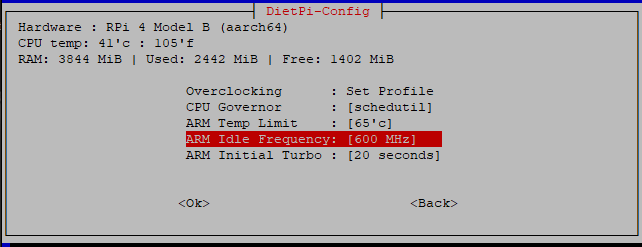
I think he’s talkin about `dietpi-config > 4 : Advanced Options > ARM Idle Frequency: [600 MHz]`
---
### Author:  [@Libi](https://dietpi.com/forum/u/Libi)
#### Post date: [27 May 2023 14:36 UTC](https://dietpi.com/forum/t/after-a-few-moments-the-time-is-outdated/16886/11 "2023-05-27T14:36:11Z")
Exactly.
---
### Author:  [@MichaIng](https://dietpi.com/forum/u/MichaIng)
#### Post date: [27 May 2023 17:07 UTC](https://dietpi.com/forum/t/after-a-few-moments-the-time-is-outdated/16886/12 "2023-05-27T17:07:18Z")
And you did reboot after changing it?
---
### Author:  [@Libi](https://dietpi.com/forum/u/Libi)
#### Post date: [28 May 2023 01:50 UTC](https://dietpi.com/forum/t/after-a-few-moments-the-time-is-outdated/16886/13 "2023-05-28T01:50:30Z")
yes
---
### Author:  [@MichaIng](https://dietpi.com/forum/u/MichaIng)
#### Post date: [28 May 2023 14:28 UTC](https://dietpi.com/forum/t/after-a-few-moments-the-time-is-outdated/16886/14 "2023-05-28T14:28:45Z")
Probably the issue is not the CPU frequency then. Could you test whether the same happens with `performance` governor?
---
### Author:  [@Libi](https://dietpi.com/forum/u/Libi)
#### Post date: [28 May 2023 15:47 UTC](https://dietpi.com/forum/t/after-a-few-moments-the-time-is-outdated/16886/15 "2023-05-28T15:47:53Z")
I think there’s an misunderstanding. f
It works for me. Therefore, my post can actually be marked as “solved”. My answer was rather @derebo , who apparently also has the problem.