# AdguardHome + Unbound unstable connections and cannot load websites sometimes
**URL:** https://dietpi.com/forum/t/adguardhome-unbound-unstable-connections-and-cannot-load-websites-sometimes/23592
**Category:** General Discussion
**Created:** [6 June 2025 22:56 UTC](https://dietpi.com/forum/t/adguardhome-unbound-unstable-connections-and-cannot-load-websites-sometimes/23592 "2025-06-06T22:56:15Z")
**Posts on this page:** 20
**Page:** 3
### Author:  [@Joulinar](https://dietpi.com/forum/u/Joulinar)
#### Post date: [21 June 2025 12:08 UTC](https://dietpi.com/forum/t/adguardhome-unbound-unstable-connections-and-cannot-load-websites-sometimes/23592/42 "2025-06-21T12:08:42Z")
> [@MichaIng](#):
>
> Here is the reason why a reinstall did not update it:
we never tried to update as we did the opposite, a downgrade 😉
The reinstall was a try to get back missing files after running `AdGuardHome -s uninstal` as I was not sure what exactly it will do.
---
### Author:  [@MichaIng](https://dietpi.com/forum/u/MichaIng)
#### Post date: [21 June 2025 12:21 UTC](https://dietpi.com/forum/t/adguardhome-unbound-unstable-connections-and-cannot-load-websites-sometimes/23592/43 "2025-06-21T12:21:30Z")
Yes I got that. Seems `AdGuardHome -s uninstall` did not remove the executable, so the reinstall did not install a new one either.
So question remains what it actually does 😅, and why extracting the `v0.107.57` tarball into `/mnt/dietpi_userdata/adguardhome` (which should include the executable, of course) did not change something about `v0.167.62` running. Maybe `AdGuardHome -s install` implies an update to the latest version?
Something to experiment with, and add to our docs whether/how to (not) use them. Reminds me of the mess `tailscale -up` is creating.
---
### Author:  [@w0rtez](https://dietpi.com/forum/u/w0rtez)
#### Post date: [21 June 2025 16:03 UTC](https://dietpi.com/forum/t/adguardhome-unbound-unstable-connections-and-cannot-load-websites-sometimes/23592/44 "2025-06-21T16:03:22Z")
These are my DNS-Settings/Encryption in AdguardHome:
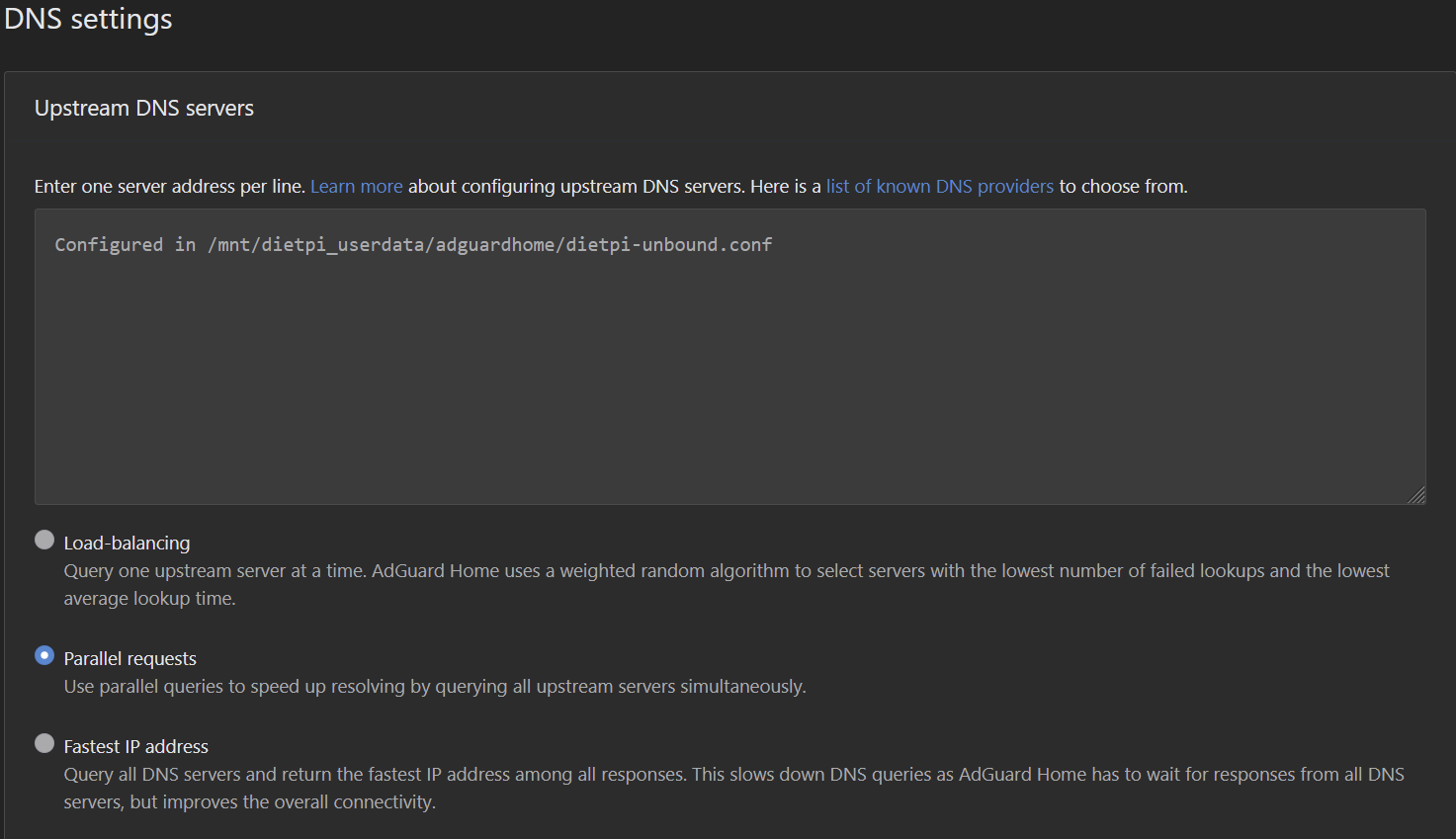
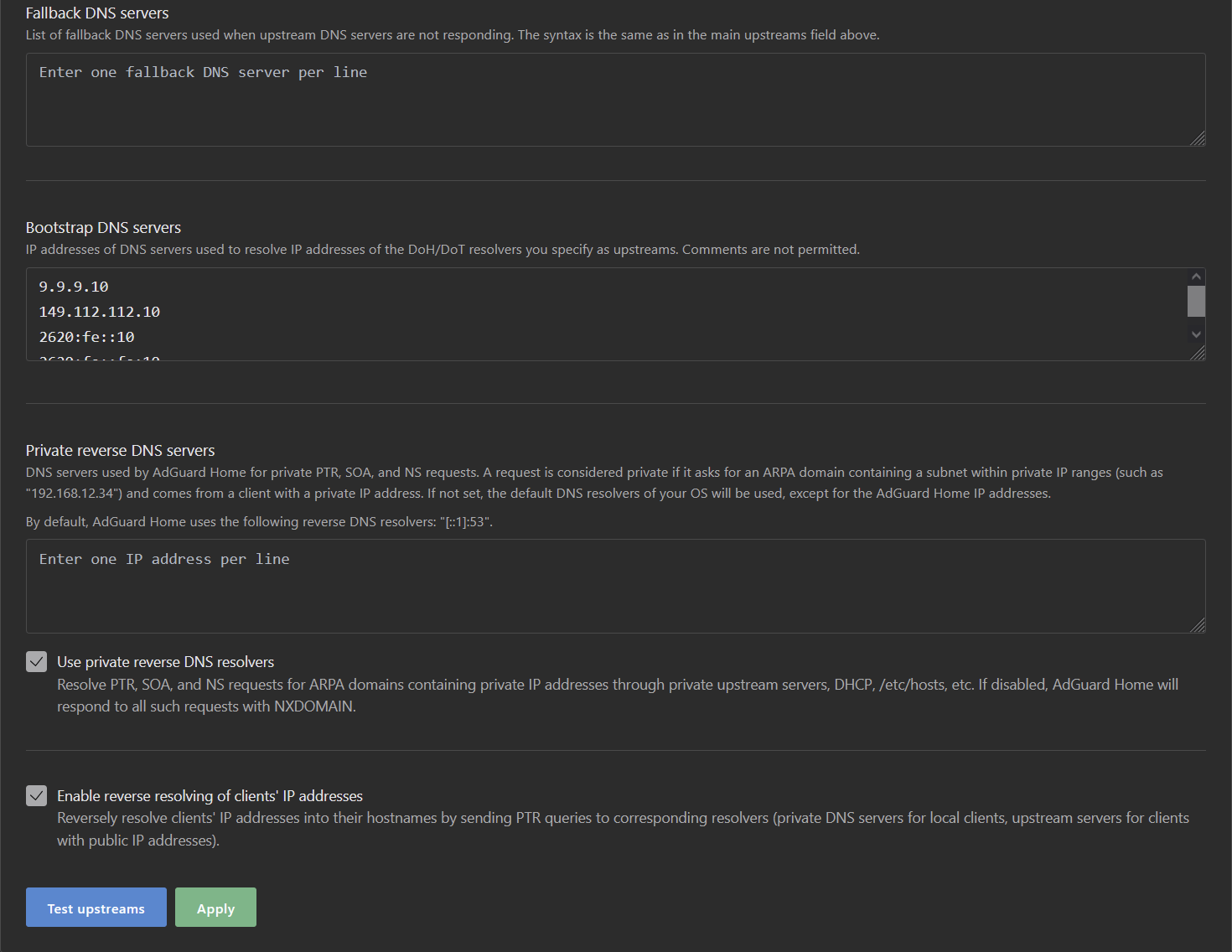
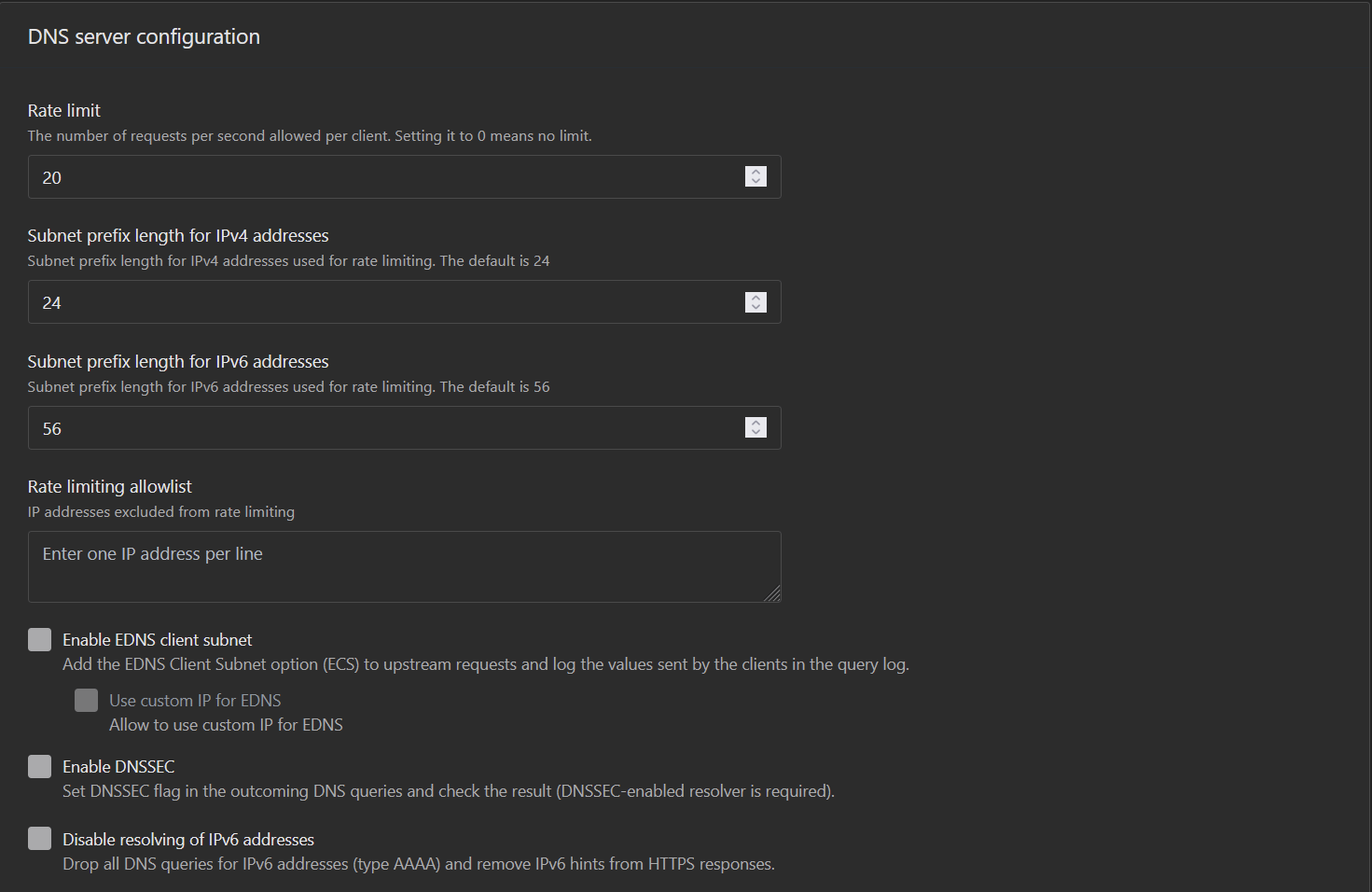
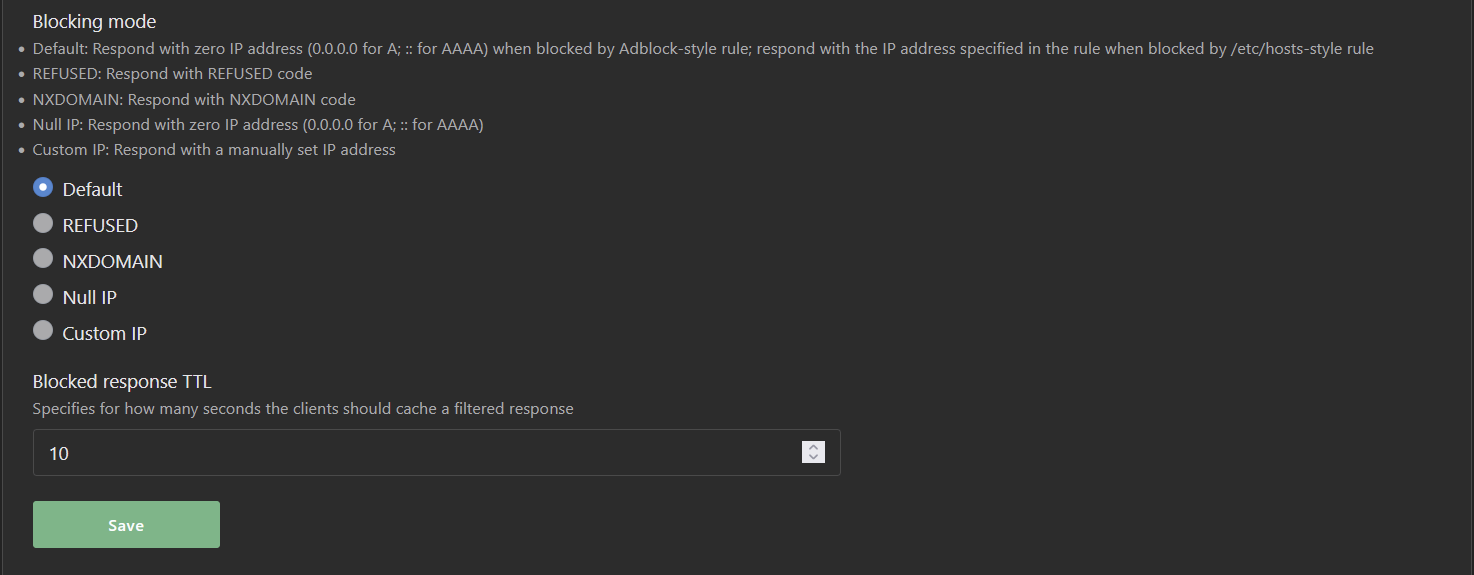
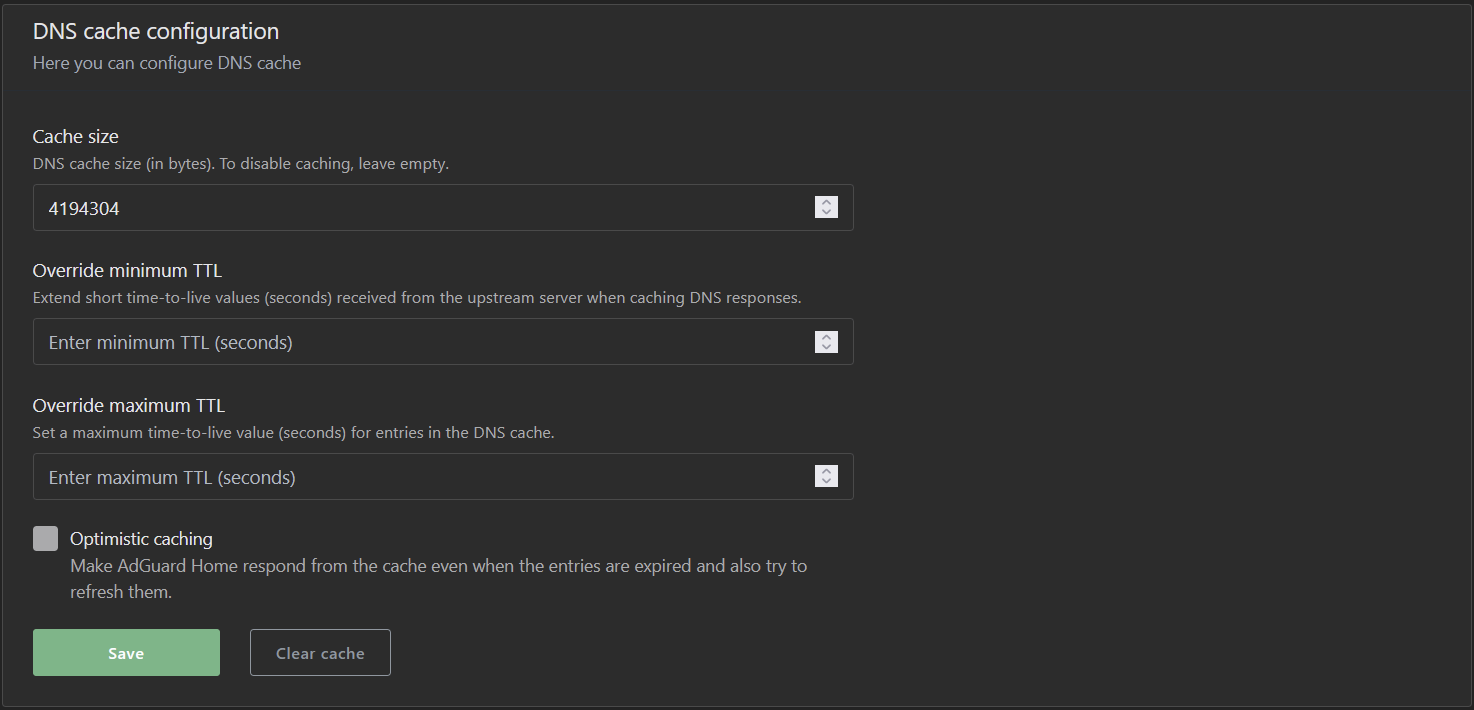
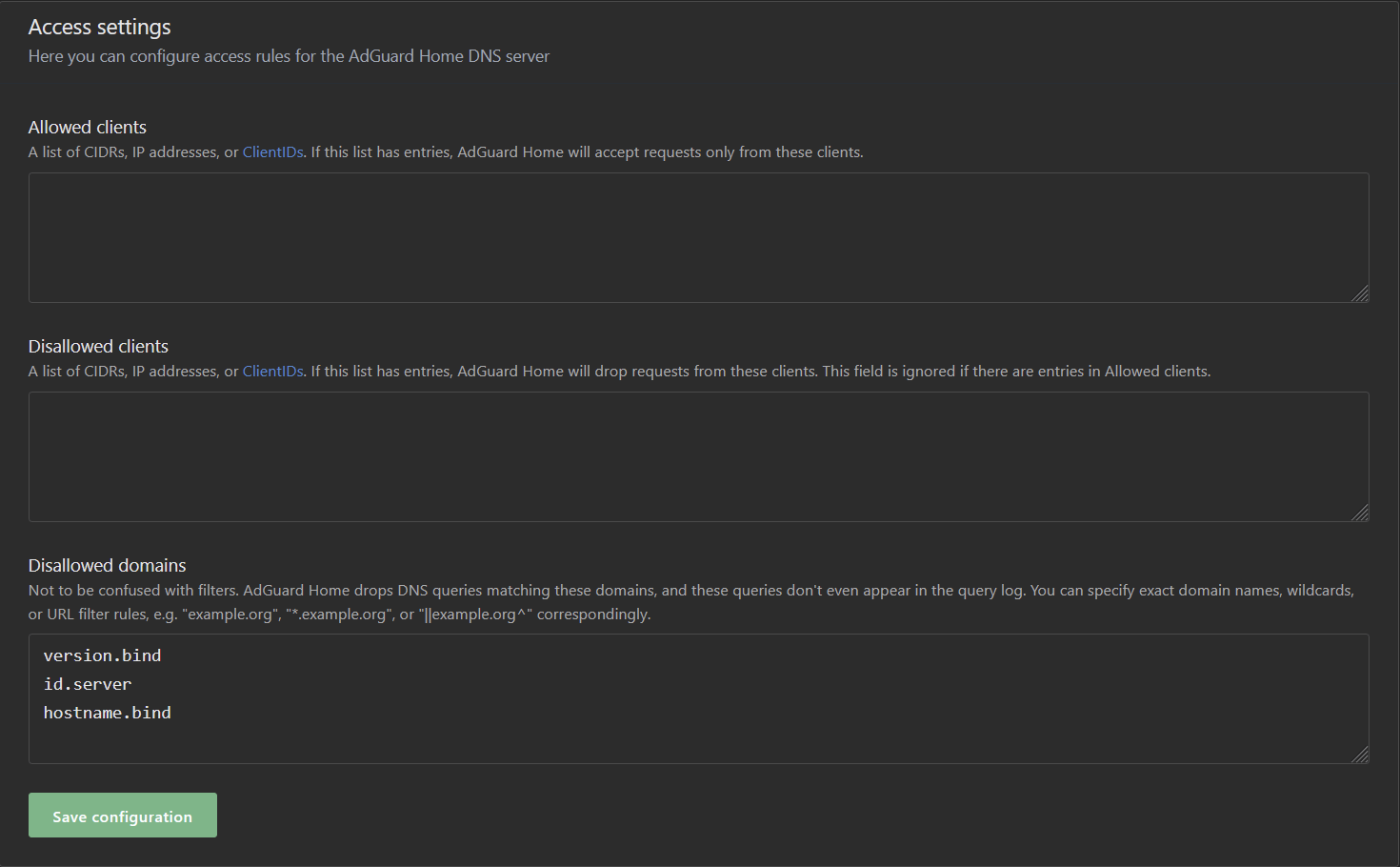
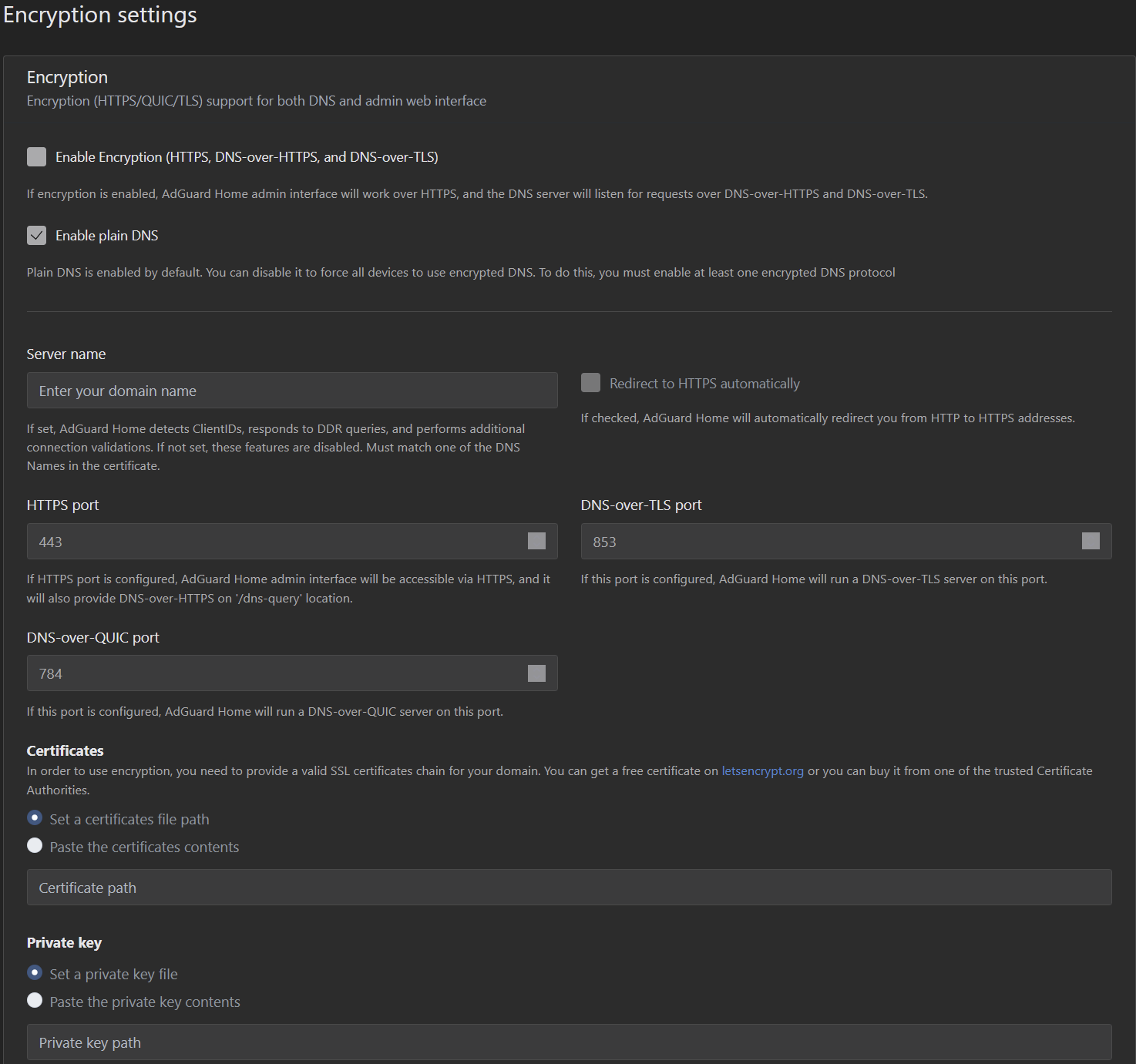
---
### Author:  [@Joulinar](https://dietpi.com/forum/u/Joulinar)
#### Post date: [21 June 2025 18:27 UTC](https://dietpi.com/forum/t/adguardhome-unbound-unstable-connections-and-cannot-load-websites-sometimes/23592/45 "2025-06-21T18:27:17Z")
Doesn’t looks like upstream DoH is enabled
---
### Author:  [@MichaIng](https://dietpi.com/forum/u/MichaIng)
#### Post date: [22 June 2025 14:24 UTC](https://dietpi.com/forum/t/adguardhome-unbound-unstable-connections-and-cannot-load-websites-sometimes/23592/46 "2025-06-22T14:24:06Z")
What is this “Configured in …” entry in upstream DNS? Is this even valid? Also AGH should not use the upstream DNS servers used by Unbound, but should use Unbound. I would expect this entry instead, for AGH to use Unbound (only):
```sh
127.0.0.1:5335
```
---
### Author:  [@w0rtez](https://dietpi.com/forum/u/w0rtez)
#### Post date: [22 June 2025 16:51 UTC](https://dietpi.com/forum/t/adguardhome-unbound-unstable-connections-and-cannot-load-websites-sometimes/23592/47 "2025-06-22T16:51:21Z")
This is whats inside that conf file:
```auto
cat /mnt/dietpi_userdata/adguardhome/dietpi-unbound.conf
127.0.0.1:5335
```
If I uninstall Unbound for example it will appear there as that entry + Quad9. For example the upstream would have been:
127.0.0.1:5335
9.9.9.9
---
### Author:  [@MichaIng](https://dietpi.com/forum/u/MichaIng)
#### Post date: [22 June 2025 18:32 UTC](https://dietpi.com/forum/t/adguardhome-unbound-unstable-connections-and-cannot-load-websites-sometimes/23592/48 "2025-06-22T18:32:35Z")
Ah right makes sense. So this is how the GUI shows a drop-in config. Checked our code, so it is the `upstream_dns_file` setting which makes it look like this.
So if despite this setup, `https://family.adguard-dns.com:443/dns-query` is queried, then something is wrong with AdGuard Home indeed: [GitHub · Where software is built](https://github.com/AdguardTeam/AdGuardHome/issues)
This sounds similar: [High CPU Usage and Service Crash in v0.107.61 Under TLS Handshake Failures and DNS Upstream Timeouts · Issue #7800 · AdguardTeam/AdGuardHome · GitHub](https://github.com/AdguardTeam/AdGuardHome/issues/7800)
They also have a `family.adguard-dns` query in the logs. Can you check whether you see high CPU load in `htop` as well? Usually a DNS server should use almost no CPU time at all. A Raspberry Pi Zero (1) is supposed to serve up to 250 clients without problems … at least this is the one, in the meantime old, Pi-hole case I still have in mind 😅.
---
### Author:  [@w0rtez](https://dietpi.com/forum/u/w0rtez)
#### Post date: [22 June 2025 20:27 UTC](https://dietpi.com/forum/t/adguardhome-unbound-unstable-connections-and-cannot-load-websites-sometimes/23592/49 "2025-06-22T20:27:07Z")
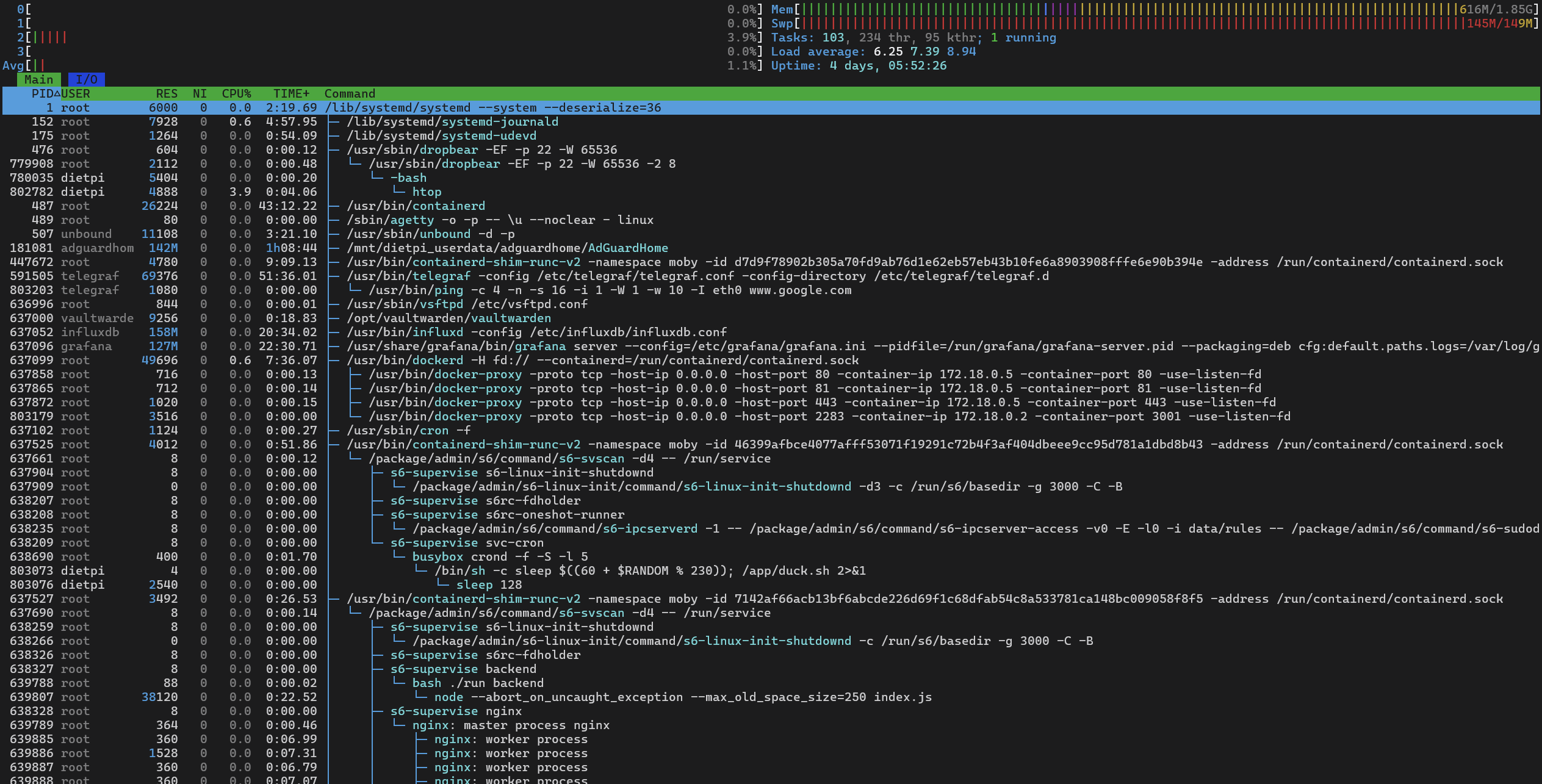
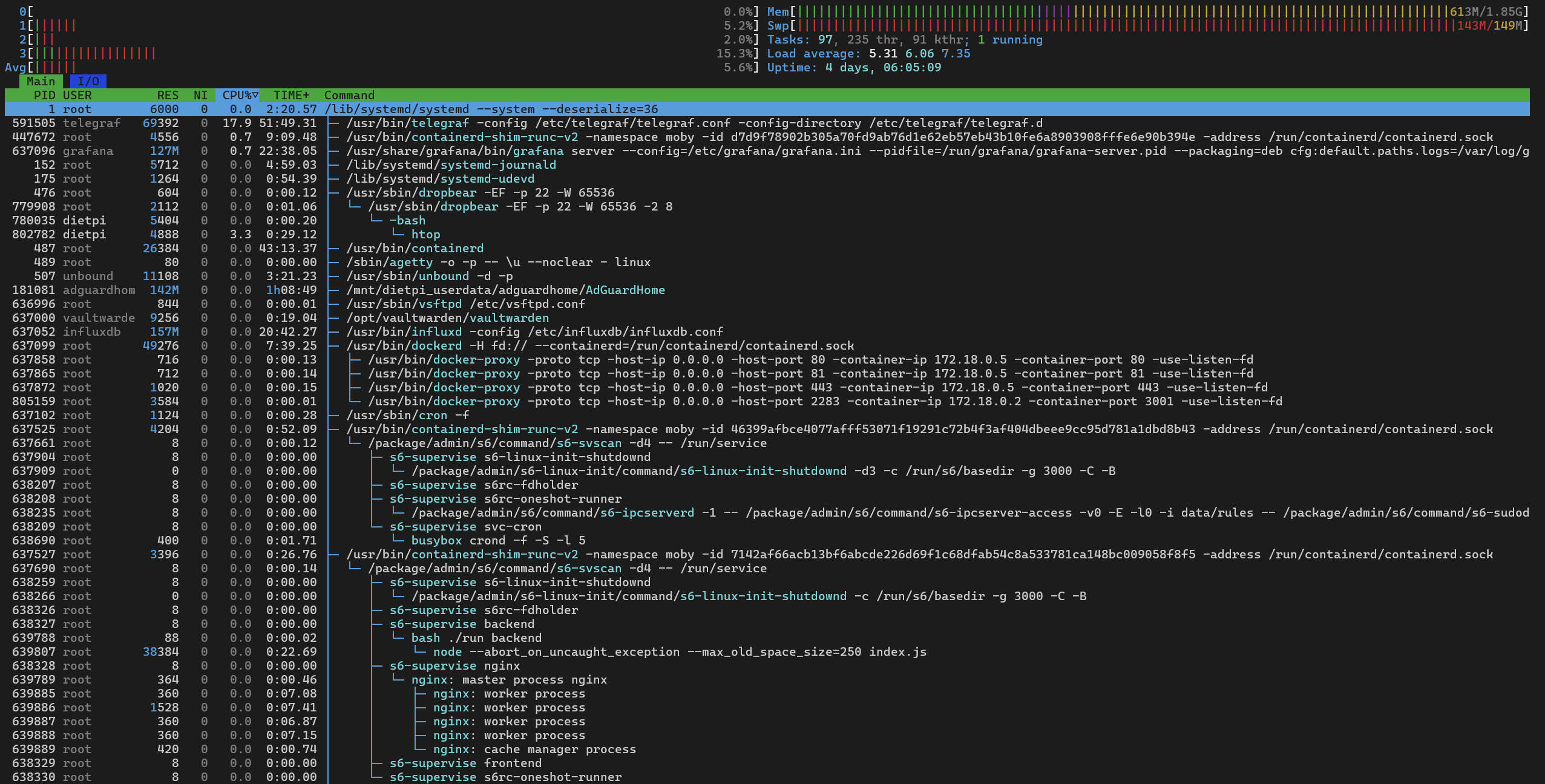
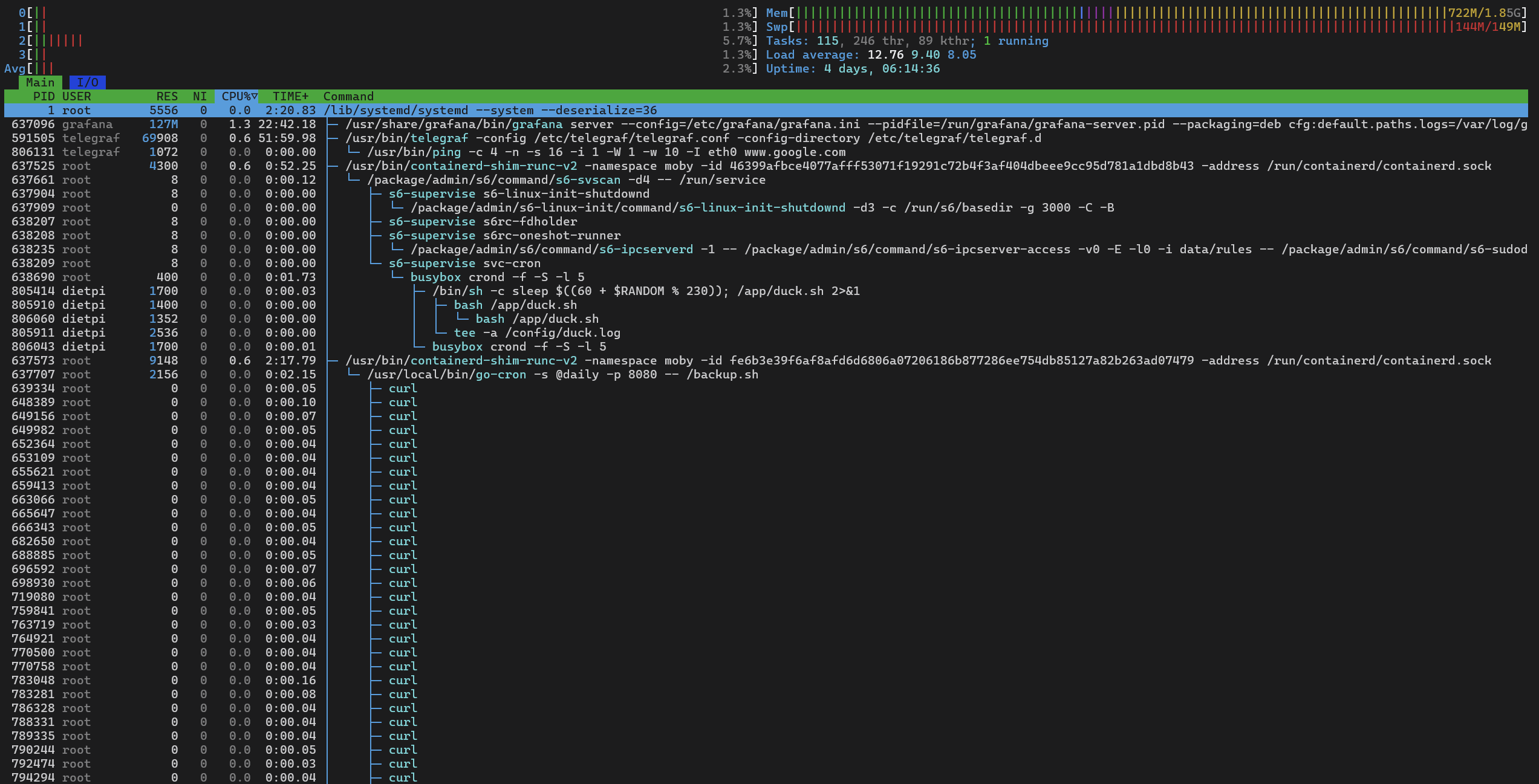
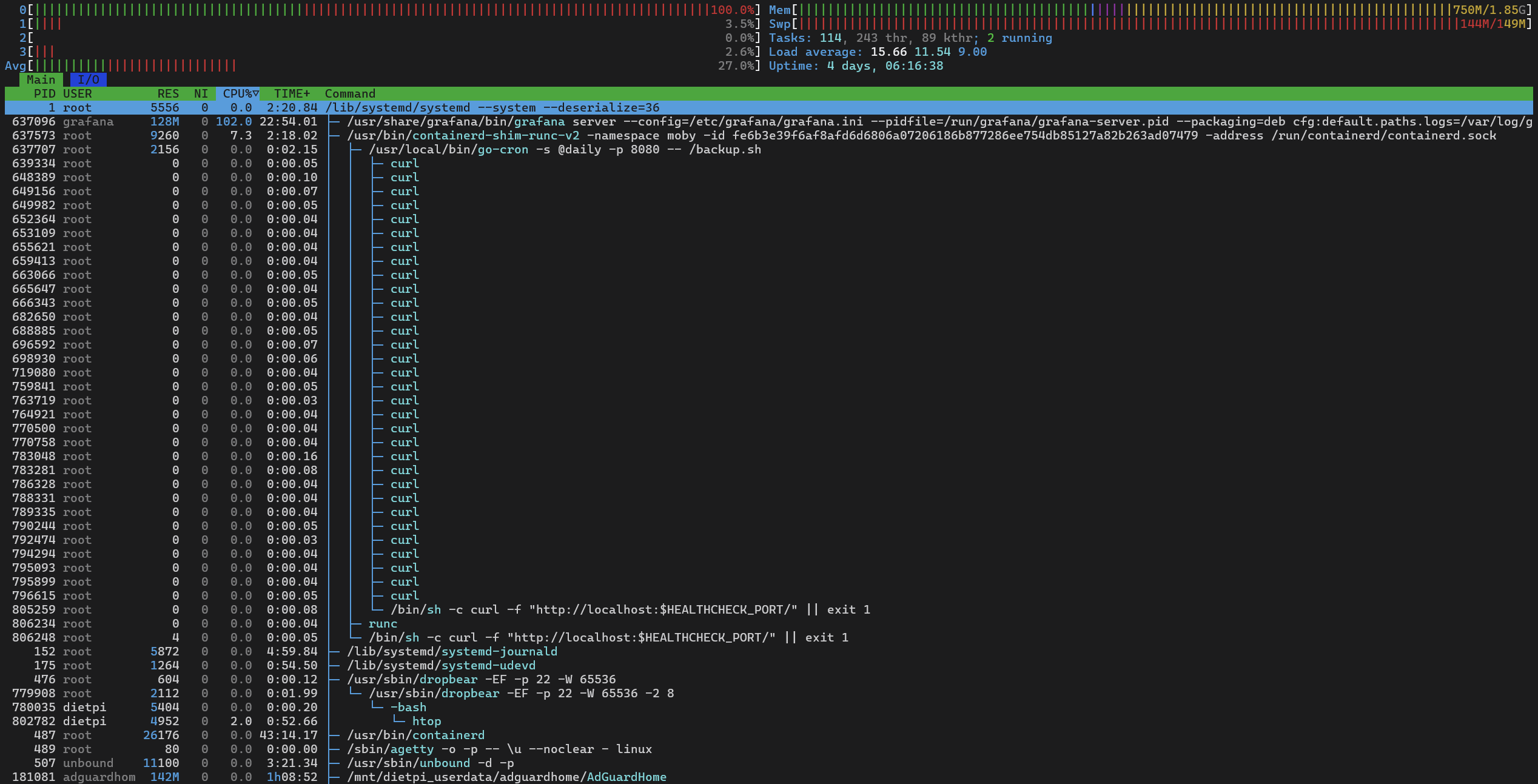
Check a few htop SS.
---
### Author:  [@MichaIng](https://dietpi.com/forum/u/MichaIng)
#### Post date: [22 June 2025 21:31 UTC](https://dietpi.com/forum/t/adguardhome-unbound-unstable-connections-and-cannot-load-websites-sometimes/23592/50 "2025-06-22T21:31:01Z")
Okay, CPU usage is normal in your case. While you have \>50% of RAM usable, the swap file is nearly full. Looks like there are some RAM usage peaks. Not sure whether related, but you could raise the swap file size and check back in a day or two whether that additional space has been used at all or not. E.g. for 1 GiB size (currently it is 149 MiB, filling the gab to 2 GiB overall memory):
```sh
/boot/dietpi/func/dietpi-set_swapfile 1024
```
---
### Author:  [@w0rtez](https://dietpi.com/forum/u/w0rtez)
#### Post date: [23 June 2025 00:05 UTC](https://dietpi.com/forum/t/adguardhome-unbound-unstable-connections-and-cannot-load-websites-sometimes/23592/51 "2025-06-23T00:05:58Z")
I have also noticed a laggy ssh. Tried to ping from other machine inside network and response is fine. raspberry is connected through lan not wifi.
```auto
ping 10.0.0.150
Pinging 10.0.0.150 with 32 bytes of data:
Reply from 10.0.0.150: bytes=32 time=1ms TTL=63
Reply from 10.0.0.150: bytes=32 time<1ms TTL=63
Reply from 10.0.0.150: bytes=32 time<1ms TTL=63
Reply from 10.0.0.150: bytes=32 time<1ms TTL=63
Ping statistics for 10.0.0.150:
Packets: Sent = 4, Received = 4, Lost = 0 (0% loss),
Approximate round trip times in milli-seconds:
Minimum = 0ms, Maximum = 1ms, Average = 0ms
```
Ok. done. Will wait and see.
```auto
sudo /boot/dietpi/func/dietpi-set_swapfile 1024
DietPi-Set_swapfile
─────────────────────────────────────────────────────
Mode: Applying 1024 /var/swap
[INFO] DietPi-Set_swapfile | Disabling and deleting all existing swap files
[OK] DietPi-Set_swapfile | swapoff -a
removed '/var/swap'
[OK] DietPi-Set_swapfile | Free space check: path=/var/ | available=13804 MiB | required=1024 MiB
[OK] DietPi-Set_swapfile | Generating new swap space
[INFO] DietPi-Set_swapfile | Size = 1024 MiB
[INFO] DietPi-Set_swapfile | Path = /var/swap
[OK] DietPi-Set_swapfile | fallocate -l 1024M /var/swap
[OK] DietPi-Set_swapfile | mkswap /var/swap
[OK] DietPi-Set_swapfile | swapon /var/swap
[OK] DietPi-Set_swapfile | chmod 0600 /var/swap
[OK] DietPi-Set_swapfile | eval echo '/var/swap none swap sw' >> /etc/fstab
[OK] DietPi-Set_swapfile | Setting in /boot/dietpi.txt adjusted: AUTO_SETUP_SWAPFILE_SIZE=1024
[OK] DietPi-Set_swapfile | Desired setting in /boot/dietpi.txt was already set: AUTO_SETUP_SWAPFILE_LOCATION=/var/swap
[INFO] DietPi-Set_swapfile | Setting /tmp tmpfs size: 1461 MiB
[OK] DietPi-Set_swapfile | Setting in /etc/fstab adjusted: tmpfs /tmp tmpfs size=1461M,noatime,lazytime,nodev,nosuid,mode=1777
[OK] DietPi-Set_swapfile | systemctl daemon-reload
[OK] DietPi-Set_swapfile | mount -o remount /tmp
```
---
### Author:  [@Joulinar](https://dietpi.com/forum/u/Joulinar)
#### Post date: [23 June 2025 08:39 UTC](https://dietpi.com/forum/t/adguardhome-unbound-unstable-connections-and-cannot-load-websites-sometimes/23592/52 "2025-06-23T08:39:22Z")
I wonder where all the physical memory is being used. Maybe you can check following
```auto
ps -eo pid,comm,rss --sort=-rss | awk 'NR==1 {printf "%-8s %-20s %-10s\n", $1, $2, "RSS_MB"} NR>1 {printf "%-8s %-20s %-10.2f\n", $1, $2, $3/1024}' | head -n 10
```
---
### Author:  [@w0rtez](https://dietpi.com/forum/u/w0rtez)
#### Post date: [23 June 2025 14:40 UTC](https://dietpi.com/forum/t/adguardhome-unbound-unstable-connections-and-cannot-load-websites-sometimes/23592/53 "2025-06-23T14:40:37Z")
> [@Joulinar](#):
>
> `ps -eo pid,comm,rss --sort=-rss | awk 'NR==1 {printf "%-8s %-20s %-10s\n", $1, $2, "RSS_MB"} NR>1 {printf "%-8s %-20s %-10.2f\n", $1, $2, $3/1024}' | head -n 10`
Here is goes:
```auto
ps -eo pid,comm,rss --sort=-rss | awk 'NR==1 {printf "%-8s %-20s %-10s\n", $1, $2, "RSS_MB"} NR>1 {printf "%-8s %-20s %-10.2f\n", $1, $2, $3/1024}' | head -n 10
PID COMMAND RSS_MB
181081 AdGuardHome 185.71
828096 influxd 174.53
829109 grafana 124.34
591505 telegraf 55.83
830279 node 43.61
828143 dockerd 41.89
828760 postgres 34.48
487 containerd 20.33
925635 postgres 20.25
```
---
### Author:  [@MichaIng](https://dietpi.com/forum/u/MichaIng)
#### Post date: [23 June 2025 22:05 UTC](https://dietpi.com/forum/t/adguardhome-unbound-unstable-connections-and-cannot-load-websites-sometimes/23592/54 "2025-06-23T22:05:49Z")
Btw, what I missed yesterday: what is this container which seems to accumulate zombie `curl` processes for a daily health check or so? 😄. Not a big problem, they consume no memory, but looks like the `curl` process is not terminated properly, hence remains in the process list as zombie, a new one every time it runs. Something the maintainers of this container should have a look into.
---
### Author:  [@w0rtez](https://dietpi.com/forum/u/w0rtez)
#### Post date: [24 June 2025 17:52 UTC](https://dietpi.com/forum/t/adguardhome-unbound-unstable-connections-and-cannot-load-websites-sometimes/23592/55 "2025-06-24T17:52:57Z")
That’s probably one of the docker containers if I have to guess its immich as its the most new one and almost beta testing it:
```auto
sudo docker ps
CONTAINER ID IMAGE COMMAND CREATED STATUS PORTS NAMES
46399afbce40 lscr.io/linuxserver/duckdns:latest "/init" 7 months ago Up 15 hours duckdns
dbab70baef6e ghcr.io/immich-app/immich-server:release "tini -- /bin/bash s…" 9 months ago Up About a minute (health: starting) 0.0.0.0:2283->3001/tcp immich_server
fe6b3e39f6af prodrigestivill/postgres-backup-local:14 "/init.sh" 9 months ago Up 15 hours (healthy) 5432/tcp immich_db_dumper
70130235e812 tensorchord/pgvecto-rs:pg14-v0.2.0 "docker-entrypoint.s…" 9 months ago Up 15 hours (healthy) 5432/tcp immich_postgres
7142af66acb1 jc21/nginx-proxy-manager:latest "/init" 10 months ago Up 15 hours 0.0.0.0:80-81->80-81/tcp, 0.0.0.0:443->443/tcp nginxproxymanager
```
---
### Author:  [@MichaIng](https://dietpi.com/forum/u/MichaIng)
#### Post date: [24 June 2025 21:11 UTC](https://dietpi.com/forum/t/adguardhome-unbound-unstable-connections-and-cannot-load-websites-sometimes/23592/56 "2025-06-24T21:11:07Z")
From the container ID, it is `prodrigestivill/postgres-backup-local`.
Here it is: [docker-postgres-backup-local/debian.Dockerfile at 8181772cbe50ebaaa1950f585b915035a2c02128 · prodrigestivill/docker-postgres-backup-local · GitHub](https://github.com/prodrigestivill/docker-postgres-backup-local/blob/8181772cbe50ebaaa1950f585b915035a2c02128/debian.Dockerfile#L62-L63)
So it uses the native Docker health check feature and basically a copy&paste from its official docs: [Dockerfile reference | Docker Docs](https://docs.docker.com/reference/dockerfile/#healthcheck)
In so far it is surprising that the native feature used with an example from the official docs with a standard tool leads to such zombies, in this case potentially one added every 5 minutes.
Also note that this contains is, same as `tensorchord/pgvecto-rs` marked as “unhealthy”, so that `curl` request fails or times out.
The only difference is the added port as variable … and that might be the issue:
- In `htop` you seen the variable name in the call, while there should clearly be the port number `8080` shown.
- Not sure whether it should show up expended as “8080” already, as then the URL would be currently invalid.
- In any case, the container logs should contain some logs about the failed `curl` calls.
- If really the variable is not expanded as expected, probably overriding things in the docker compose file fixes this:
```yaml
pgbackups:
...
healthcheck:
test: curl -f http://localhost:8080/ || exit 1
interval: 5m
timeout: 3s
```
in the hope it overwrites of what is defined in the Docker file. Maybe @Joulinar knows better how this is supposed to work.
---
### Author:  [@w0rtez](https://dietpi.com/forum/u/w0rtez)
#### Post date: [24 June 2025 21:48 UTC](https://dietpi.com/forum/t/adguardhome-unbound-unstable-connections-and-cannot-load-websites-sometimes/23592/57 "2025-06-24T21:48:43Z")
And do you think that’s what’s happening in the end, or the cause of the problem? Because Im sure everything was still as it is/was and the only thing I did was to update Adguardhome from the UI and then everything got slower in general… SSH console connection, DNS not processing well and having lots of disconnects, etc.
---
### Author:  [@Joulinar](https://dietpi.com/forum/u/Joulinar)
#### Post date: [25 June 2025 12:14 UTC](https://dietpi.com/forum/t/adguardhome-unbound-unstable-connections-and-cannot-load-websites-sometimes/23592/58 "2025-06-25T12:14:46Z")
I am not sure if there is one single cause or if it is a combination of several factors. What we see, the RAM consumption is sometimes very high, so that the system also starts to swap. The use of swap has quite a high impact on performance and should generally be avoided. Since the swap is also completely occupied in the screenshots, a situation can arise in which the system is no longer able to answer requests and then simply runs out of memory. How does the system behave after the swap area has been increased to 1GB? Is it still slow? Maybe also try temporarily stopping the 3 Docker containers from `immich`. What is the `duckdns` container actually used for?
---
### Author:  [@MichaIng](https://dietpi.com/forum/u/MichaIng)
#### Post date: [25 June 2025 16:12 UTC](https://dietpi.com/forum/t/adguardhome-unbound-unstable-connections-and-cannot-load-websites-sometimes/23592/59 "2025-06-25T16:12:13Z")
> [@Joulinar](#):
>
> What is the `duckdns` container actually used for?
If for DDNS, better use `dietpi-ddns`, which should be _much_ lighter than a dedicated Docker container for simple DDNS updates 😉.
---
### Author:  [@Joulinar](https://dietpi.com/forum/u/Joulinar)
#### Post date: [25 June 2025 16:14 UTC](https://dietpi.com/forum/t/adguardhome-unbound-unstable-connections-and-cannot-load-websites-sometimes/23592/60 "2025-06-25T16:14:43Z")
> [@MichaIng](#):
>
> If for DDNS
I thought so too, but wanted to be on the safe side so I asked. And I agree, you don’t need a container for that. A waste of system resources in that case.
---
### Author:  [@w0rtez](https://dietpi.com/forum/u/w0rtez)
#### Post date: [25 June 2025 21:42 UTC](https://dietpi.com/forum/t/adguardhome-unbound-unstable-connections-and-cannot-load-websites-sometimes/23592/61 "2025-06-25T21:42:20Z")
yeah just did it… I was testing when I was using my docker compose… and I left it there… I think my problem was immich\_server as it was consuming probably the whole resources of my raspberry. I’m still testing with all the dockers down and only nginx up… I think I need a better machine for immich
[Previous page](https://dietpi.com/forum/t/adguardhome-unbound-unstable-connections-and-cannot-load-websites-sometimes/23592.md?page=2)
[Next page](https://dietpi.com/forum/t/adguardhome-unbound-unstable-connections-and-cannot-load-websites-sometimes/23592.md?page=4)