# AdguardHome + Unbound unstable connections and cannot load websites sometimes
**URL:** https://dietpi.com/forum/t/adguardhome-unbound-unstable-connections-and-cannot-load-websites-sometimes/23592
**Category:** General Discussion
**Created:** [6 June 2025 22:56 UTC](https://dietpi.com/forum/t/adguardhome-unbound-unstable-connections-and-cannot-load-websites-sometimes/23592 "2025-06-06T22:56:15Z")
**Posts on this page:** 20
**Page:** 1
### Author:  [@w0rtez](https://dietpi.com/forum/u/w0rtez)
#### Post date: [6 June 2025 22:56 UTC](https://dietpi.com/forum/t/adguardhome-unbound-unstable-connections-and-cannot-load-websites-sometimes/23592/1 "2025-06-06T22:56:16Z")
After latest AdguardHome update im having some hiccups and not connecting to website unless refreshing them a few times… the only thing i did was update AdguardHome… This is what im getting through investigating…
```auto
unbound.service - Unbound DNS server
Loaded: loaded (/lib/systemd/system/unbound.service; enabled; preset: enabled)
Drop-In: /etc/systemd/system/unbound.service.d
└─dietpi.conf
Active: active (running) since Sat 2025-03-29 18:17:05 GMT; 2 months 8 days ago
Docs: man:unbound(8)
Main PID: 502 (unbound)
Tasks: 1 (limit: 2197)
Memory: 43.8M
CPU: 1h 32min 53.292s
CGroup: /system.slice/unbound.service
└─502 /usr/sbin/unbound -d -p
```
```auto
journalctl -u unbound
-- No entries --
```
```auto
dig @127.0.0.1 -p 5335 dietpi.com
; <<>> DiG 9.18.28-1~deb12u2-Debian <<>> @127.0.0.1 -p 5335 dietpi.com
; (1 server found)
;; global options: +cmd
;; Got answer:
;; ->>HEADER<<- opcode: QUERY, status: NOERROR, id: 13413
;; flags: qr rd ra ad; QUERY: 1, ANSWER: 2, AUTHORITY: 0, ADDITIONAL: 1
;; OPT PSEUDOSECTION:
; EDNS: version: 0, flags:; udp: 1232
;; QUESTION SECTION:
;dietpi.com. IN A
;; ANSWER SECTION:
dietpi.com. 249 IN A 104.21.12.65
dietpi.com. 249 IN A 172.67.193.183
;; Query time: 0 msec
;; SERVER: 127.0.0.1#5335(127.0.0.1) (UDP)
;; WHEN: Fri Jun 06 23:35:20 BST 2025
;; MSG SIZE rcvd: 71
```
```auto
ss -tulpn | grep LISTEN
tcp LISTEN 0 4096 0.0.0.0:443 0.0.0.0:*
tcp LISTEN 0 4096 127.0.0.1:8088 0.0.0.0:*
tcp LISTEN 0 4096 0.0.0.0:2283 0.0.0.0:*
tcp LISTEN 0 4096 0.0.0.0:81 0.0.0.0:*
tcp LISTEN 0 4096 0.0.0.0:80 0.0.0.0:*
tcp LISTEN 0 32 0.0.0.0:21 0.0.0.0:*
tcp LISTEN 0 1000 0.0.0.0:22 0.0.0.0:*
tcp LISTEN 0 1024 0.0.0.0:8001 0.0.0.0:*
tcp LISTEN 0 4096 0.0.0.0:9002 0.0.0.0:*
tcp LISTEN 0 256 127.0.0.1:5335 0.0.0.0:*
tcp LISTEN 0 1000 [::]:22 [::]:*
tcp LISTEN 0 4096 *:53 *:*
tcp LISTEN 0 4096 *:8083 *:*
tcp LISTEN 0 4096 *:8086 *:*
tcp LISTEN 0 4096 *:3001 *:*
```
```auto
journalctl -u adguardhome
Jun 06 20:03:04 indaRaspberry AdGuardHome[472]: 2025/06/06 20:03:04.840460 ERROR response received addr=127.0.0.1:5335 proto=udp status="dialing 127.0.0.1:5335 over udp: dial udp 127.0.0.1:5335: i/o timeout"
Jun 06 20:03:04 indaRaspberry AdGuardHome[472]: 2025/06/06 20:03:04.840618 ERROR response received addr=127.0.0.1:5335 proto=udp status="dialing 127.0.0.1:5335 over udp: dial udp 127.0.0.1:5335: i/o timeout"
Jun 06 20:03:04 indaRaspberry AdGuardHome[472]: 2025/06/06 20:03:04.840693 ERROR response received addr=https://family.adguard-dns.com:443/dns-query proto=tcp status="requesting https://family.adguard-dns.com:443/dns-query: Get \"https://family.adguard-dns.com:443/dns-query?dns=AAABAAABAAAAAAAABGFlNmUEMjQyOQJzYgNkbnMHYWRndWFyZANjb20AABAAAQ\": context deadline exceeded"
Jun 06 20:03:04 indaRaspberry AdGuardHome[472]: 2025/06/06 20:03:04.841117 ERROR response received addr=https://family.adguard-dns.com:443/dns-query proto=tcp status="requesting https://family.adguard-dns.com:443/dns-query: Get \"https://family.adguard-dns.com:443/dns-query?dns=AAABAAABAAAAAAAABGJiNWIEMmZjNwQ0OTFlAnNiA2RucwdhZGd1YXJkA2NvbQAAEAAB\": context deadline exceeded (Client.Timeout exceeded while awaiting headers)"
Jun 06 20:03:04 indaRaspberry AdGuardHome[472]: 2025/06/06 20:03:04.841151 ERROR response received addr=https://family.adguard-dns.com:443/dns-query proto=tcp status="requesting https://family.adguard-dns.com:443/dns-query: Get \"https://family.adguard-dns.com:443/dns-query?dns=AAABAAABAAAAAAAABDAzOWECc2IDZG5zB2FkZ3VhcmQDY29tAAAQAAE\": context deadline exceeded"
Jun 06 20:03:04 indaRaspberry AdGuardHome[472]: 2025/06/06 20:03:04.841180 ERROR response received addr=https://family.adguard-dns.com:443/dns-query proto=tcp status="requesting https://family.adguard-dns.com:443/dns-query: Get \"https://family.adguard-dns.com:443/dns-query?dns=AAABAAABAAAAAAAABDVkY2IEYWRjMQJzYgNkbnMHYWRndWFyZANjb20AABAAAQ\": context deadline exceeded"
Jun 06 20:03:04 indaRaspberry AdGuardHome[472]: 2025/06/06 20:03:04.841116 ERROR response received addr=https://family.adguard-dns.com:443/dns-query proto=tcp status="requesting https://family.adguard-dns.com:443/dns-query: Get \"https://family.adguard-dns.com:443/dns-query?dns=AAABAAABAAAAAAAABGJiNWIEMmZjNwQ0OTFlAnNiA2RucwdhZGd1YXJkA2NvbQAAEAAB\": context deadline exceeded (Client.Timeout exceeded while awaiting headers)"
Jun 06 20:03:04 indaRaspberry AdGuardHome[472]: 2025/06/06 20:03:04.841220 ERROR response received addr=https://family.adguard-dns.com:443/dns-query proto=tcp status="requesting https://family.adguard-dns.com:443/dns-query: Get \"https://family.adguard-dns.com:443/dns-query?dns=AAABAAABAAAAAAAABDVkY2IEYWRjMQJzYgNkbnMHYWRndWFyZANjb20AABAAAQ\": net/http: request canceled while waiting for connection (Client.Timeout exceeded while awaiting headers)"
Jun 06 20:03:04 indaRaspberry AdGuardHome[472]: 2025/06/06 20:03:04.841816 ERROR response received addr=https://family.adguard-dns.com:443/dns-query proto=tcp status="requesting https://family.adguard-dns.com:443/dns-query: Get \"https://family.adguard-dns.com:443/dns-query?dns=AAABAAABAAAAAAAABDAzOWECc2IDZG5zB2FkZ3VhcmQDY29tAAAQAAE\": net/http: request canceled while waiting for connection (Client.Timeout exceeded while awaiting headers)"
Jun 06 20:57:37 indaRaspberry AdGuardHome[472]: 2025/06/06 20:57:37.547821 ERROR response received addr=127.0.0.1:5335 proto=udp status="exchanging with 127.0.0.1:5335 over udp: read udp 127.0.0.1:46222->127.0.0.1:5335: i/o timeout"
Jun 06 19:51:32 indaRaspberry AdGuardHome[472]: 2025/06/06 19:51:32.854715 ERROR response received addr=https://family.adguard-dns.com:443/dns-query proto=tcp status="requesting https://family.adguard-dns.com:443/dns-query: Get \"https://family.adguard-dns.com:443/dns-query?dns=AAABAAABAAAAAAAABGMxMDkENGU0OARmN2EwAnNiA2RucwdhZGd1YXJkA2NvbQAAEAAB\": net/http: request canceled (Client.Timeout exceeded while awaiting headers)"
Jun 06 19:51:32 indaRaspberry AdGuardHome[472]: 2025/06/06 19:51:32.854850 ERROR response received addr=https://family.adguard-dns.com:443/dns-query proto=tcp status="requesting https://family.adguard-dns.com:443/dns-query: Get \"https://family.adguard-dns.com:443/dns-query?dns=AAABAAABAAAAAAAABDNkZjYEODkzMgJzYgNkbnMHYWRndWFyZANjb20AABAAAQ\": context deadline exceeded (Client.Timeout exceeded while awaiting headers)"
Jun 06 19:51:32 indaRaspberry AdGuardHome[472]: 2025/06/06 19:51:32.854919 ERROR response received addr=https://family.adguard-dns.com:443/dns-query proto=tcp status="requesting https://family.adguard-dns.com:443/dns-query: Get \"https://family.adguard-dns.com:443/dns-query?dns=AAABAAABAAAAAAAABDE5ZGYCc2IDZG5zB2FkZ3VhcmQDY29tAAAQAAE\": context deadline exceeded (Client.Timeout exceeded while awaiting headers)"
Jun 06 19:51:32 indaRaspberry AdGuardHome[472]: 2025/06/06 19:51:32.855114 ERROR response received addr=https://family.adguard-dns.com:443/dns-query proto=tcp status="requesting https://family.adguard-dns.com:443/dns-query: Get \"https://family.adguard-dns.com:443/dns-query?dns=AAABAAABAAAAAAAABDJhZGMCc2IDZG5zB2FkZ3VhcmQDY29tAAAQAAE\": net/http: request canceled (Client.Timeout exceeded while awaiting headers)"
Jun 06 19:51:32 indaRaspberry AdGuardHome[472]: 2025/06/06 19:51:32.855211 ERROR response received addr=https://family.adguard-dns.com:443/dns-query proto=tcp status="requesting https://family.adguard-dns.com:443/dns-query: Get \"https://family.adguard-dns.com:443/dns-query?dns=AAABAAABAAAAAAAABDJhZGMCc2IDZG5zB2FkZ3VhcmQDY29tAAAQAAE\": context deadline exceeded (Client.Timeout exceeded while awaiting headers)"
Jun 06 19:51:32 indaRaspberry AdGuardHome[472]: 2025/06/06 19:51:32.855289 ERROR response received addr=https://family.adguard-dns.com:443/dns-query proto=tcp status="requesting https://family.adguard-dns.com:443/dns-query: Get \"https://family.adguard-dns.com:443/dns-query?dns=AAABAAABAAAAAAAABDkzZGUCc2IDZG5zB2FkZ3VhcmQDY29tAAAQAAE\": net/http: request canceled (Client.Timeout exceeded while awaiting headers)"
Jun 06 19:51:32 indaRaspberry AdGuardHome[472]: 2025/06/06 19:51:32.855362 ERROR response received addr=https://family.adguard-dns.com:443/dns-query proto=tcp status="requesting https://family.adguard-dns.com:443/dns-query: Get \"https://family.adguard-dns.com:443/dns-query?dns=AAABAAABAAAAAAAABDE5ZGYCc2IDZG5zB2FkZ3VhcmQDY29tAAAQAAE\": context deadline exceeded (Client.Timeout exceeded while awaiting headers)"
Jun 06 19:51:32 indaRaspberry AdGuardHome[472]: 2025/06/06 19:51:32.855483 ERROR response received addr=https://family.adguard-dns.com:443/dns-query proto=tcp status="requesting https://family.adguard-dns.com:443/dns-query: Get \"https://family.adguard-dns.com:443/dns-query?dns=AAABAAABAAAAAAAABDkzZGUCc2IDZG5zB2FkZ3VhcmQDY29tAAAQAAE\": context deadline exceeded (Client.Timeout exceeded while awaiting headers)"
Jun 06 19:51:32 indaRaspberry AdGuardHome[472]: 2025/06/06 19:51:32.855607 ERROR response received addr=https://family.adguard-dns.com:443/dns-query proto=tcp status="requesting https://family.adguard-dns.com:443/dns-query: Get \"https://family.adguard-dns.com:443/dns-query?dns=AAABAAABAAAAAAAABDJhZGMCc2IDZG5zB2FkZ3VhcmQDY29tAAAQAAE\": context deadline exceeded (Client.Timeout exceeded while awaiting headers)"
Jun 06 19:51:32 indaRaspberry AdGuardHome[472]: 2025/06/06 19:51:32.855695 ERROR response received addr=https://family.adguard-dns.com:443/dns-query proto=tcp status="requesting https://family.adguard-dns.com:443/dns-query: Get \"https://family.adguard-dns.com:443/dns-query?dns=AAABAAABAAAAAAAABDVmMmYCc2IDZG5zB2FkZ3VhcmQDY29tAAAQAAE\": context deadline exceeded (Client.Timeout exceeded while awaiting headers)"
Jun 06 19:52:02 indaRaspberry AdGuardHome[472]: 2025/06/06 19:52:02.606597 ERROR response received addr=https://family.adguard-dns.com:443/dns-query proto=tcp status="requesting https://family.adguard-dns.com:443/dns-query: Get \"https://family.adguard-dns.com:443/dns-query?dns=AAABAAABAAAAAAAABGFkYzgEM2VlZQJzYgNkbnMHYWRndWFyZANjb20AABAAAQ\": net/http: request canceled (Client.Timeout exceeded while awaiting headers)"
Jun 06 19:49:38 indaRaspberry AdGuardHome[472]: 2025/06/06 19:49:38.319556 ERROR response received addr=https://family.adguard-dns.com:443/dns-query proto=tcp status="requesting https://family.adguard-dns.com:443/dns-query: Get \"https://family.adguard-dns.com:443/dns-query?dns=AAABAAABAAAAAAAABGQzOWUENDFlZARiY2MxAnNiA2RucwdhZGd1YXJkA2NvbQAAEAAB\": net/http: request canceled while waiting for connection (Client.Timeout exceeded while awaiting headers)"
Jun 06 19:51:03 indaRaspberry AdGuardHome[472]: 2025/06/06 19:51:02.658578 ERROR response received addr=127.0.0.1:5335 proto=udp status="dialing 127.0.0.1:5335 over udp: dial udp 127.0.0.1:5335: i/o timeout"
Jun 06 19:51:03 indaRaspberry AdGuardHome[472]: 2025/06/06 19:51:02.729466 ERROR response received addr=127.0.0.1:5335 proto=udp status="dialing 127.0.0.1:5335 over udp: dial udp 127.0.0.1:5335: i/o timeout"
Jun 06 19:51:03 indaRaspberry AdGuardHome[472]: 2025/06/06 19:51:02.982895 ERROR response received addr=127.0.0.1:5335 proto=udp status="dialing 127.0.0.1:5335 over udp: dial udp 127.0.0.1:5335: i/o timeout"
Jun 06 19:51:03 indaRaspberry AdGuardHome[472]: 2025/06/06 19:51:03.099876 ERROR response received addr=127.0.0.1:5335 proto=udp status="dialing 127.0.0.1:5335 over udp: dial udp 127.0.0.1:5335: i/o timeout"
Jun 06 19:51:03 indaRaspberry AdGuardHome[472]: 2025/06/06 19:51:03.099897 ERROR response received addr=127.0.0.1:5335 proto=udp status="dialing 127.0.0.1:5335 over udp: dial udp 127.0.0.1:5335: i/o timeout"
Jun 06 19:51:03 indaRaspberry AdGuardHome[472]: 2025/06/06 19:51:03.153645 ERROR response received addr=127.0.0.1:5335 proto=udp status="dialing 127.0.0.1:5335 over udp: dial udp 127.0.0.1:5335: i/o timeout"
Jun 06 19:51:03 indaRaspberry AdGuardHome[472]: 2025/06/06 19:51:03.154528 ERROR response received addr=127.0.0.1:5335 proto=udp status="dialing 127.0.0.1:5335 over udp: dial udp 127.0.0.1:5335: i/o timeout"
Jun 06 19:51:32 indaRaspberry AdGuardHome[472]: 2025/06/06 19:51:32.677325 ERROR response received addr=https://family.adguard-dns.com:443/dns-query proto=tcp status="requesting https://family.adguard-dns.com:443/dns-query: Get \"https://family.adguard-dns.com:443/dns-query?dns=AAABAAABAAAAAAAABDkwY2UCc2IDZG5zB2FkZ3VhcmQDY29tAAAQAAE\": context deadline exceeded"
```
```auto
cat /etc/resolv.conf
# Dynamic resolv.conf(5) file for glibc resolver(3) generated by resolvconf(8)
# DO NOT EDIT THIS FILE BY HAND -- YOUR CHANGES WILL BE OVERWRITTEN
# 127.0.0.53 is the systemd-resolved stub resolver.
# run "resolvectl status" to see details about the actual nameservers.
```
Anything Im missing or something broken…
Thanks
---
### Author:  [@Jappe](https://dietpi.com/forum/u/Jappe)
#### Post date: [7 June 2025 15:51 UTC](https://dietpi.com/forum/t/adguardhome-unbound-unstable-connections-and-cannot-load-websites-sometimes/23592/3 "2025-06-07T15:51:22Z")
Hello w0rtez.
Yea, something is off.
DNS requests are normally done via UDP, but as you can see on port 5335 runs something which listens for TCP only.
By default unbound should listen for both protocols. But idk if AdGuard creates it’s own config for unbound, but I doubt it.
```auto
tcp LISTEN 0 256 127.0.0.1:5335 0.0.0.0:*
```
```auto
Jun 06 20:03:04 indaRaspberry AdGuardHome[472]: 2025/06/06 20:03:04.840460 ERROR response received addr=127.0.0.1:5335 proto=udp status="dialing 127.0.0.1:5335 over udp: dial udp 127.0.0.1:5335: i/o timeout"
```
Can you run the ss command with sudo, so we can see more details.
```auto
sudo ss -tulpn
```
And did you mess with the unbound config?
There are some settings, like
```auto
do-udp: yes
do-tcp: yes
```
You can check the config with `cat /etc/unbound/unbound.conf.d/dietpi.conf`
Also check what config files are present: `ls -la /etc/unbound/unbound.conf.d`
---
### Author:  [@w0rtez](https://dietpi.com/forum/u/w0rtez)
#### Post date: [7 June 2025 18:22 UTC](https://dietpi.com/forum/t/adguardhome-unbound-unstable-connections-and-cannot-load-websites-sometimes/23592/4 "2025-06-07T18:22:35Z")
Heres the output:
```auto
sudo ss -tulpn
Netid State Recv-Q Send-Q Local Address:Port Peer Address:Port Process
udp UNCONN 0 0 0.0.0.0:51820 0.0.0.0:*
udp UNCONN 0 0 127.0.0.1:5335 0.0.0.0:* users:(("unbound",pid=502,fd=3))
udp UNCONN 0 0 *:51820 *:*
udp UNCONN 0 0 *:53 *:* users:(("AdGuardHome",pid=472,fd=10))
tcp LISTEN 0 4096 0.0.0.0:443 0.0.0.0:* users:(("docker-proxy",pid=281613,fd=4))
tcp LISTEN 0 4096 127.0.0.1:8088 0.0.0.0:* users:(("influxd",pid=281212,fd=7))
tcp LISTEN 0 4096 0.0.0.0:2283 0.0.0.0:* users:(("docker-proxy",pid=281584,fd=4))
tcp LISTEN 0 4096 0.0.0.0:81 0.0.0.0:* users:(("docker-proxy",pid=281604,fd=4))
tcp LISTEN 0 4096 0.0.0.0:80 0.0.0.0:* users:(("docker-proxy",pid=281596,fd=4))
tcp LISTEN 0 32 0.0.0.0:21 0.0.0.0:* users:(("vsftpd",pid=281162,fd=3))
tcp LISTEN 0 1000 0.0.0.0:22 0.0.0.0:* users:(("dropbear",pid=475,fd=3))
tcp LISTEN 0 1024 0.0.0.0:8001 0.0.0.0:* users:(("vaultwarden",pid=281166,fd=36))
tcp LISTEN 0 4096 0.0.0.0:9002 0.0.0.0:* users:(("docker-proxy",pid=281559,fd=4))
tcp LISTEN 0 256 127.0.0.1:5335 0.0.0.0:* users:(("unbound",pid=502,fd=4))
tcp LISTEN 0 1000 [::]:22 [::]:* users:(("dropbear",pid=475,fd=4))
tcp LISTEN 0 4096 *:53 *:* users:(("AdGuardHome",pid=472,fd=11))
tcp LISTEN 0 4096 *:8083 *:* users:(("AdGuardHome",pid=472,fd=31))
tcp LISTEN 0 4096 *:8086 *:* users:(("influxd",pid=281212,fd=28))
tcp LISTEN 0 4096 *:3001 *:* users:(("grafana",pid=281254,fd=9))
```
> And did you mess with the unbound config?
No… Has been like that since day 1.
```auto
cat /etc/unbound/unbound.conf.d/dietpi.conf
# https://nlnetlabs.nl/documentation/unbound/unbound.conf/
server:
# Do not daemonize, to allow proper systemd service control and status estimation.
do-daemonize: no
# A single thread is pretty sufficient for home or small office instances.
num-threads: 1
# Logging: For the sake of privacy and performance, keep logging at a minimum!
# - Verbosity 2 and up practically contains query and reply logs.
verbosity: 0
log-queries: no
log-replies: no
# - If required, uncomment to log to a file, else logs are available via "journalctl -u unbound".
#logfile: "/var/log/unbound.log"
# Set interface to "0.0.0.0" to make Unbound listen on all network interfaces.
# Set it to "127.0.0.1" to listen on requests from the same machine only, useful in combination with Pi-hole.
interface: 127.0.0.1
# Default DNS port is "53". When used with Pi-hole, set this to e.g. "5335", since "5353" is used by mDNS already.
port: 5335
# Control IP ranges which should be able to use this Unbound instance.
# The DietPi defaults permit access from official local network IP ranges only, hence requests from www are denied.
access-control: 0.0.0.0/0 refuse
access-control: 10.0.0.0/8 allow
access-control: 127.0.0.1/8 allow
access-control: 172.16.0.0/12 allow
access-control: 192.168.0.0/16 allow
access-control: ::/0 refuse
access-control: ::1/128 allow
access-control: fd00::/8 allow
access-control: fe80::/10 allow
# Private IP ranges, which shall never be returned or forwarded as public DNS response.
# NB: 127.0.0.1/8 is sometimes used by adblock lists, hence DietPi by default allows those as response.
private-address: 10.0.0.0/8
private-address: 172.16.0.0/12
private-address: 192.168.0.0/16
private-address: 169.254.0.0/16
private-address: fd00::/8
private-address: fe80::/10
private-domain: duckdns.org
# Define protocols for connections to and from Unbound.
# NB: Disabling IPv6 does not disable IPv6 IP resolving, which depends on the clients request.
do-udp: yes
do-tcp: yes
do-ip4: yes
do-ip6: no
# DNS root server information file. Updated monthly via cron job: /etc/cron.monthly/dietpi-unbound
root-hints: "/var/lib/unbound/root.hints"
# Maximum number of queries per second
ratelimit: 1000
# Defend against and print warning when reaching unwanted reply limit.
unwanted-reply-threshold: 10000
# Set EDNS reassembly buffer size to match new upstream default, as of DNS Flag Day 2020 recommendation.
edns-buffer-size: 1232
# Increase incoming and outgoing query buffer size to cover traffic peaks.
so-rcvbuf: 4m
so-sndbuf: 4m
# Hardening
harden-glue: yes
harden-dnssec-stripped: yes
harden-algo-downgrade: yes
harden-large-queries: yes
harden-short-bufsize: yes
# Privacy
use-caps-for-id: yes # Spoof protection by randomising capitalisation
rrset-roundrobin: yes
qname-minimisation: yes
minimal-responses: yes
hide-identity: yes
identity: "Server" # Purposefully a dummy identity name
hide-version: yes
# Caching
cache-min-ttl: 300
cache-max-ttl: 86400
serve-expired: yes
neg-cache-size: 4M
prefetch: yes
prefetch-key: yes
msg-cache-size: 50m
rrset-cache-size: 100m
```
```auto
ls -la /etc/unbound/unbound.conf.d
total 20
drwxr-xr-x 2 root root 4096 Jun 6 15:18 .
drwxr-xr-x 3 root root 4096 Aug 4 2024 ..
-rw-r--r-- 1 root root 3151 Aug 5 2024 dietpi.conf
-rw-r--r-- 1 root root 195 Feb 13 2024 remote-control.conf
-rw-r--r-- 1 root root 190 Feb 13 2024 root-auto-trust-anchor-file.conf
```
---
### Author:  [@Jappe](https://dietpi.com/forum/u/Jappe)
#### Post date: [7 June 2025 19:27 UTC](https://dietpi.com/forum/t/adguardhome-unbound-unstable-connections-and-cannot-load-websites-sometimes/23592/5 "2025-06-07T19:27:27Z")
OK, unbound listens for TCP and UDP, config looks good and also no extra configs which could override something.
I found this about the errors `context deadline exceeded`:
[https://github.com/AdguardTeam/AdGuardHome/discussions/7026](https://github.com/AdguardTeam/AdGuardHome/discussions/7026)
> A timeout, basically. You can either change the upstream or increase the upstream timeout in the configuration.
So the root servers do not answer in time for you. So maybe a temporary problem, maybe not. You could ask your ISP, maybe they can check what’s going on.
But I found also other solutions for similiar problems (timeouts, but with pihole + unbound) and disabling DNSSEC in unbound was a solution (via `root-auto-trust-anchor-file.conf`).
Maybe somebody else has another ideas?!
---
### Author:  [@Joulinar](https://dietpi.com/forum/u/Joulinar)
#### Post date: [8 June 2025 08:20 UTC](https://dietpi.com/forum/t/adguardhome-unbound-unstable-connections-and-cannot-load-websites-sometimes/23592/6 "2025-06-08T08:20:16Z")
for testing, you could remove unbound to see how it goes.
---
### Author:  [@w0rtez](https://dietpi.com/forum/u/w0rtez)
#### Post date: [8 June 2025 16:34 UTC](https://dietpi.com/forum/t/adguardhome-unbound-unstable-connections-and-cannot-load-websites-sometimes/23592/7 "2025-06-08T16:34:20Z")
Just uninstall it or what would be the best way to do it as I don’t want to redo everything in the config after I put unbound back
---
### Author:  [@Joulinar](https://dietpi.com/forum/u/Joulinar)
#### Post date: [8 June 2025 16:52 UTC](https://dietpi.com/forum/t/adguardhome-unbound-unstable-connections-and-cannot-load-websites-sometimes/23592/8 "2025-06-08T16:52:19Z")
> [@w0rtez](#):
>
> redo everything in the config
What configuration you mean?
---
### Author:  [@w0rtez](https://dietpi.com/forum/u/w0rtez)
#### Post date: [8 June 2025 17:02 UTC](https://dietpi.com/forum/t/adguardhome-unbound-unstable-connections-and-cannot-load-websites-sometimes/23592/9 "2025-06-08T17:02:42Z")
unbound… I believe not everything is at default in
```auto
/etc/unbound/unbound.conf.d/dietpi.conf
```
I disabled ipv6 i think initially
---
### Author:  [@Gravesy](https://dietpi.com/forum/u/Gravesy)
#### Post date: [8 June 2025 17:06 UTC](https://dietpi.com/forum/t/adguardhome-unbound-unstable-connections-and-cannot-load-websites-sometimes/23592/10 "2025-06-08T17:06:23Z")
So… make a .txt file, copy the contents of the config, and paste it back after reinstall.
Not sure why you’d turn off IPV6 to begin with, unless your ISP doesn’t support it.
---
### Author:  [@Joulinar](https://dietpi.com/forum/u/Joulinar)
#### Post date: [8 June 2025 19:17 UTC](https://dietpi.com/forum/t/adguardhome-unbound-unstable-connections-and-cannot-load-websites-sometimes/23592/11 "2025-06-08T19:17:35Z")
Well as long as IPv6 has been disabled within `dietpi-config`, it will be disabled on Unbound reinstall as well.
---
### Author:  [@w0rtez](https://dietpi.com/forum/u/w0rtez)
#### Post date: [9 June 2025 23:45 UTC](https://dietpi.com/forum/t/adguardhome-unbound-unstable-connections-and-cannot-load-websites-sometimes/23592/12 "2025-06-09T23:45:02Z")
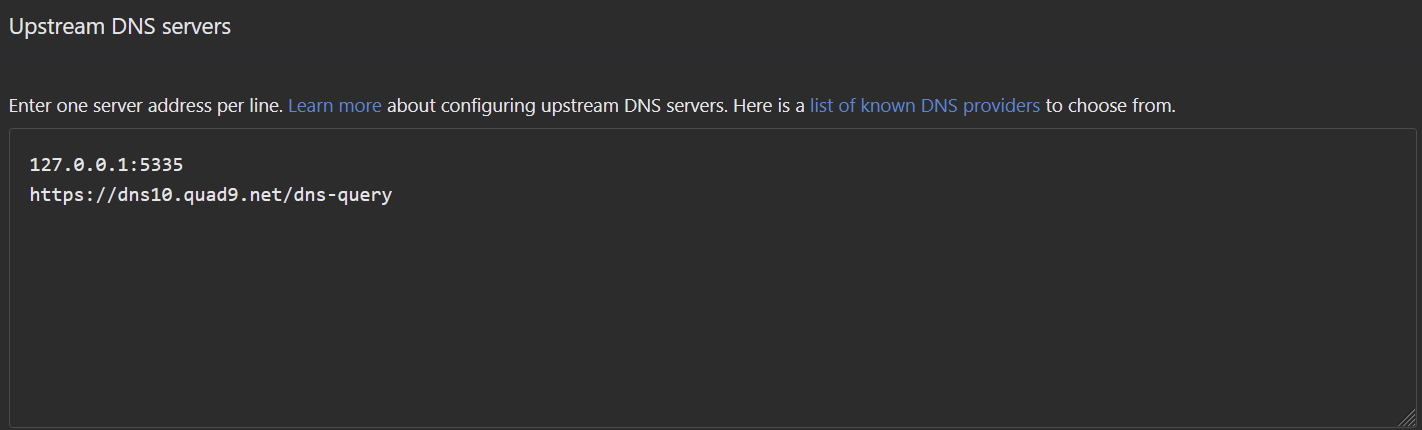
So far everything seems to be fine without unbound. The upstream is set to these now… Whats next..
---
### Author:  [@Joulinar](https://dietpi.com/forum/u/Joulinar)
#### Post date: [10 June 2025 05:28 UTC](https://dietpi.com/forum/t/adguardhome-unbound-unstable-connections-and-cannot-load-websites-sometimes/23592/13 "2025-06-10T05:28:03Z")
Install Unbound again or continue running without
---
### Author:  [@w0rtez](https://dietpi.com/forum/u/w0rtez)
#### Post date: [10 June 2025 16:02 UTC](https://dietpi.com/forum/t/adguardhome-unbound-unstable-connections-and-cannot-load-websites-sometimes/23592/14 "2025-06-10T16:02:34Z")
Today started some disconnections from websites again…
These are all the errors I see from adguardhome… had to upload it to txt… too many errors
[journalAdguardhome.txt](https://dietpi.com/forum/uploads/short-url/A52YSf24XP8XXCujP0zrNc5mcpk.txt) (719.6 KB)
---
### Author:  [@Joulinar](https://dietpi.com/forum/u/Joulinar)
#### Post date: [10 June 2025 16:15 UTC](https://dietpi.com/forum/t/adguardhome-unbound-unstable-connections-and-cannot-load-websites-sometimes/23592/15 "2025-06-10T16:15:34Z")
Maybe you would need to contact AGH developer directly if you are using AGH without anything else. Probably they are able to point into a specific direction.
---
### Author:  [@w0rtez](https://dietpi.com/forum/u/w0rtez)
#### Post date: [10 June 2025 18:57 UTC](https://dietpi.com/forum/t/adguardhome-unbound-unstable-connections-and-cannot-load-websites-sometimes/23592/16 "2025-06-10T18:57:02Z")
Do you know if i can rollback to a previous version of AGH… Maybe I could go back and check if its a newer version having problems
---
### Author:  [@Joulinar](https://dietpi.com/forum/u/Joulinar)
#### Post date: [10 June 2025 19:35 UTC](https://dietpi.com/forum/t/adguardhome-unbound-unstable-connections-and-cannot-load-websites-sometimes/23592/17 "2025-06-10T19:35:08Z")
AGH is a single file application and not that complex to download. Select the version in question, download the archive and copy the AGH executable in place. [Releases · AdguardTeam/AdGuardHome · GitHub](https://github.com/AdguardTeam/AdGuardHome/releases)
We store AGH at `/mnt/dietpi_userdata/adguardhome/`
---
### Author:  [@w0rtez](https://dietpi.com/forum/u/w0rtez)
#### Post date: [11 June 2025 15:32 UTC](https://dietpi.com/forum/t/adguardhome-unbound-unstable-connections-and-cannot-load-websites-sometimes/23592/18 "2025-06-11T15:32:33Z")
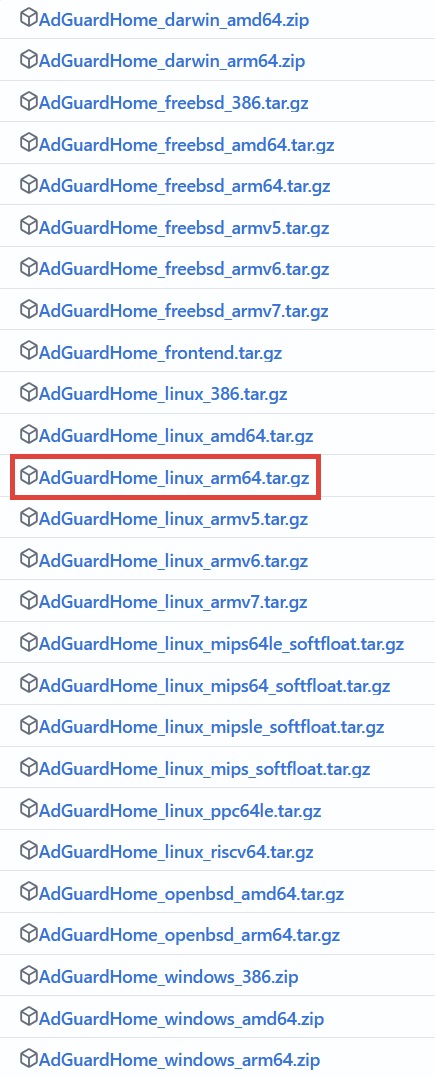
Just to be sure the correct version for raspberry would be the AdGuardHome\_linux\_arm64.tar.gz right?
---
### Author:  [@Joulinar](https://dietpi.com/forum/u/Joulinar)
#### Post date: [11 June 2025 16:20 UTC](https://dietpi.com/forum/t/adguardhome-unbound-unstable-connections-and-cannot-load-websites-sometimes/23592/19 "2025-06-11T16:20:21Z")
let’s check your system details
- Distro version | `echo $G_DISTRO_NAME $G_RASPBIAN`
- Kernel version | `uname -a`
- Architecture | `dpkg --print-architecture`
- SBC model | `echo $G_HW_MODEL_NAME`
---
### Author:  [@w0rtez](https://dietpi.com/forum/u/w0rtez)
#### Post date: [11 June 2025 16:26 UTC](https://dietpi.com/forum/t/adguardhome-unbound-unstable-connections-and-cannot-load-websites-sometimes/23592/20 "2025-06-11T16:26:26Z")
```auto
echo $G_DISTRO_NAME $G_RASPBIAN
bookworm 0
```
```auto
uname -a
Linux indaRaspberry 6.1.21-v8+ #1642 SMP PREEMPT Mon Apr 3 17:24:16 BST 2023 aarch64 GNU/Linux
```
```auto
dpkg --print-architecture
arm64
```
```auto
echo $G_HW_MODEL_NAME
RPi 4 Model B (aarch64)
```
---
### Author:  [@MichaIng](https://dietpi.com/forum/u/MichaIng)
#### Post date: [11 June 2025 16:34 UTC](https://dietpi.com/forum/t/adguardhome-unbound-unstable-connections-and-cannot-load-websites-sometimes/23592/21 "2025-06-11T16:34:06Z")
The linux\_arm64 is the correct one for your board then.
[Next page](https://dietpi.com/forum/t/adguardhome-unbound-unstable-connections-and-cannot-load-websites-sometimes/23592.md?page=2)