# ACPI shutdown does nothing
**URL:** https://dietpi.com/forum/t/acpi-shutdown-does-nothing/3340
**Category:** Troubleshooting
**Created:** [13 July 2019 23:00 UTC](https://dietpi.com/forum/t/acpi-shutdown-does-nothing/3340 "2019-07-13T23:00:38Z")
**Posts on this page:** 20
**Page:** 1
### Author:  [@ingenium](https://dietpi.com/forum/u/ingenium)
#### Post date: [13 July 2019 23:00 UTC](https://dietpi.com/forum/t/acpi-shutdown-does-nothing/3340/1 "2019-07-13T23:00:38Z")
I have DietPi installed in qemu / kvm, and everything seems to work except ACPI events. I cannot initiate a clean shutdown from the VM host, the only way to do it is to SSH in and issue a shutdown command. I have tried installed qemu guest additions and setting that up as a workaround, but it didn’t help.
Installing and running evtest on DietPi shows “Power Button” as /dev/input/event4". Monitoring this input and issuing a shutdown command from the VM host shows that DietPi is receiving it:
```nohighlight
root@DietPi:~# evtest
No device specified, trying to scan all of /dev/input/event*
Available devices:
/dev/input/event0: AT Translated Set 2 keyboard
/dev/input/event1: VirtualPS/2 VMware VMMouse
/dev/input/event2: VirtualPS/2 VMware VMMouse
/dev/input/event3: QEMU QEMU USB Tablet
/dev/input/event4: Power Button
/dev/input/event5: PC Speaker
Select the device event number [0-5]: 4
Input driver version is 1.0.1
Input device ID: bus 0x19 vendor 0x0 product 0x1 version 0x0
Input device name: "Power Button"
Supported events:
Event type 0 (EV_SYN)
Event type 1 (EV_KEY)
Event code 116 (KEY_POWER)
Properties:
Testing ... (interrupt to exit)
Event: time 1563058630.608071, type 1 (EV_KEY), code 116 (KEY_POWER), value 1
Event: time 1563058630.608071, -------------- SYN_REPORT ------------
Event: time 1563058630.608073, type 1 (EV_KEY), code 116 (KEY_POWER), value 0
Event: time 1563058630.608073, -------------- SYN_REPORT ------------
```
However it does not initiate a shutdown. Is there a way to fix this so that DietPi properly shuts down when I receives an ACPI shutdown command?
---
### Author:  [@hd888](https://dietpi.com/forum/u/hd888)
#### Post date: [13 July 2019 23:29 UTC](https://dietpi.com/forum/t/acpi-shutdown-does-nothing/3340/2 "2019-07-13T23:29:41Z")
It’s essentially a RPi, which doesn’t even have an on/off switch - and no acpi shutdown. I just use shutdown -h now on my VM.
---
### Author:  [@ingenium](https://dietpi.com/forum/u/ingenium)
#### Post date: [13 July 2019 23:33 UTC](https://dietpi.com/forum/t/acpi-shutdown-does-nothing/3340/3 "2019-07-13T23:33:56Z")
That doesn’t help though. As it is now, when the host shuts down or restarts, the dietpi VM makes the host wait 2 minutes before it times out force destroys the VM to continue shutting down. That’s the issue I’m ultimately trying to solve.
Is there a way to install ACPI? Or perhaps setup a udev rule to shutdown when the “power button” is pressed? I’m just not sure how to setup the appropriate udev rule to match the button press
---
### Author:  [@hd888](https://dietpi.com/forum/u/hd888)
#### Post date: [13 July 2019 23:39 UTC](https://dietpi.com/forum/t/acpi-shutdown-does-nothing/3340/4 "2019-07-13T23:39:58Z")
I created a vm.service file in my systemd to handle this (improperly) to keep me from waiting. I probably need to look at it a little harder cause it’s “yanking the plug” however I dont have to wait. It’s not a huge deal to me because if it corrupts I usually have a recent backup… That’s what VMs are good at anyway!
```nohighlight
[Unit]
Description=Dietpi VM service
After=network.target virtualbox.service
[Service]
User=xxx
ExecStart=/usr/lib/virtualbox/VBoxHeadless -s DietPi2
ExecStop=/usr/lib/virtualbox/VBoxManage controlvm DietPi2 poweroff
[Install]
WantedBy=multi-user.target
```
Then you can just enable the service file and it will shut it down when the machine shuts down and boot it when it boots without having to worry about it.
---
### Author:  [@ingenium](https://dietpi.com/forum/u/ingenium)
#### Post date: [14 July 2019 01:54 UTC](https://dietpi.com/forum/t/acpi-shutdown-does-nothing/3340/5 "2019-07-14T01:54:35Z")
I solved it. Make sure acpid is installed, then create /etc/acpi/events/power\_button with the following:
```nohighlight
event=button/power PBTN 00000080 00000000
action=/sbin/poweroff
```
Your event may differ, but you can look it up by running acpi\_listen and then sending the ACPI shutdown command.
---
### Author:  [@hd888](https://dietpi.com/forum/u/hd888)
#### Post date: [14 July 2019 13:24 UTC](https://dietpi.com/forum/t/acpi-shutdown-does-nothing/3340/6 "2019-07-14T13:24:39Z")
Thanks that’s fantastic! Works for me and better than my solution. FYI I’m going to keep my service file and change it to send a acpi signal to properly shut my VM down on restarts now.
---
### Author:  [@Audiophile](https://dietpi.com/forum/u/Audiophile)
#### Post date: [14 March 2023 00:24 UTC](https://dietpi.com/forum/t/acpi-shutdown-does-nothing/3340/7 "2023-03-14T00:24:35Z")
Hi,
I’n new to dietpi. I have just successfully installed dietpi on my PC (Intel DN2800DT mobo, with Atom N2800 cpu), running Roon Bridge.
Can you explain how to create the /etc/acpi/events/power\_button ?
I tried to enter what you have posted after logging in:
_event=button/power PBTN 00000080 00000000_
_action=/sbin/poweroff_
but got an error message (PBTN: command not found)
Any help would be much appreciated.
---
### Author:  [@Jappe](https://dietpi.com/forum/u/Jappe)
#### Post date: [14 March 2023 07:26 UTC](https://dietpi.com/forum/t/acpi-shutdown-does-nothing/3340/8 "2023-03-14T07:26:55Z")
```auto
sudo touch /etc/acpi/events/power_button
cat < /etc/acpi/events/power_button
event=button/power PBTN 00000080 00000000
action=/sbin/poweroff
EOF
```
---
### Author:  [@Audiophile](https://dietpi.com/forum/u/Audiophile)
#### Post date: [14 March 2023 08:53 UTC](https://dietpi.com/forum/t/acpi-shutdown-does-nothing/3340/9 "2023-03-14T08:53:40Z")
> [@Jappe](#):
>
> `sudo touch /etc/acpi/events/power_button`
Thank you for getting back to me. Tried this command, but unfortunatley I got the following error message:
touch: cannot touch `/etc/acpi/events/power_button`: No such file or directory
---
### Author:  [@Jappe](https://dietpi.com/forum/u/Jappe)
#### Post date: [14 March 2023 08:56 UTC](https://dietpi.com/forum/t/acpi-shutdown-does-nothing/3340/10 "2023-03-14T08:56:05Z")
I think you have also to create the paths, if not existing.
---
### Author:  [@Audiophile](https://dietpi.com/forum/u/Audiophile)
#### Post date: [14 March 2023 19:59 UTC](https://dietpi.com/forum/t/acpi-shutdown-does-nothing/3340/11 "2023-03-14T19:59:49Z")
I’m sorry I know this is a lame question, but I’m a first time Linux user (and 35+ years PC user):
do you know a command to create this path?
Is there some kind of Norton/Total Commander equivalnet I can download to do this?
---
### Author:  [@Joulinar](https://dietpi.com/forum/u/Joulinar)
#### Post date: [14 March 2023 20:00 UTC](https://dietpi.com/forum/t/acpi-shutdown-does-nothing/3340/12 "2023-03-14T20:00:40Z")
```auto
mkdir -p /etc/acpi/events/
```
---
### Author:  [@Audiophile](https://dietpi.com/forum/u/Audiophile)
#### Post date: [15 March 2023 08:20 UTC](https://dietpi.com/forum/t/acpi-shutdown-does-nothing/3340/13 "2023-03-15T08:20:12Z")
I did all of this but nothing happened:
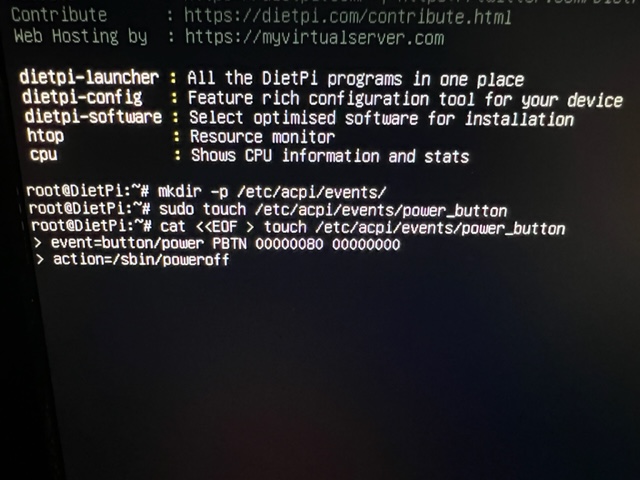
After I hit enter, I got the “\>” symbol. I have rebooted the system, but the power button still doesn’t work as power off as if nothing happened.
Any ideas?
---
### Author:  [@Jappe](https://dietpi.com/forum/u/Jappe)
#### Post date: [15 March 2023 08:22 UTC](https://dietpi.com/forum/t/acpi-shutdown-does-nothing/3340/14 "2023-03-15T08:22:46Z")
> [@Jappe](#):
>
> ```auto
> cat < /etc/acpi/events/power_button
> event=button/power PBTN 00000080 00000000
> action=/sbin/poweroff
> EOF
>
> ```
You missed the last line of the cat command
---
### Author:  [@Audiophile](https://dietpi.com/forum/u/Audiophile)
#### Post date: [15 March 2023 09:51 UTC](https://dietpi.com/forum/t/acpi-shutdown-does-nothing/3340/15 "2023-03-15T09:51:11Z")
> [@ingenium](#):
>
> acpid
Thanks! The EOF command brought me back to root@DietPi:~#, but otherwise had no effect on the power button.
I have installed the ACPID package, as I figured it might not have been installed, using this command:
_apt -y install acpid_
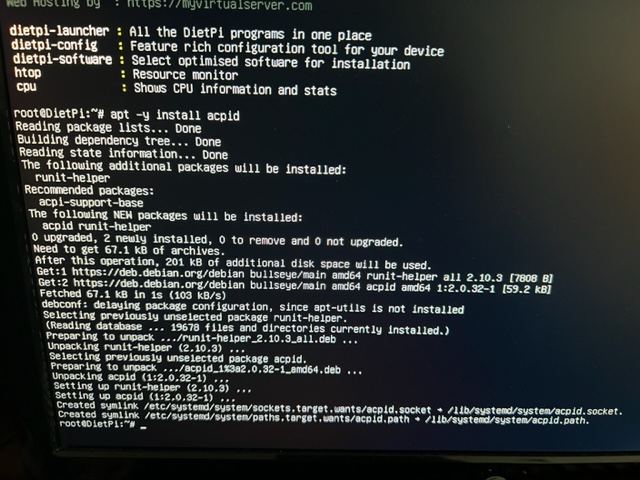
It seems it got installed successfully.
I then re run this command:
_sudo t/etc/acpi/events/power\_button_
_cat \< /etc/acpi/events/power\_button_
_event=button/power PBTN 00000080 00000000_
_action=/sbin/poweroff_
_EOF_
But again - no effect.
---
### Author:  [@Jappe](https://dietpi.com/forum/u/Jappe)
#### Post date: [15 March 2023 10:01 UTC](https://dietpi.com/forum/t/acpi-shutdown-does-nothing/3340/16 "2023-03-15T10:01:30Z")
```auto
sudo touch /etc/acpi/events/power_button
cat < /etc/acpi/events/power_button
event=button/power PBTN 00000080 00000000
action=/sbin/poweroff
EOF
```
This command creates the file `/etc/acpi/events/power_button` and puts the two lines into it, there is no need to run it multiple times.
ACPID is of course a requirement to get this working, like said [here](https://dietpi.com/forum/t/acpi-shutdown-does-nothing/3340/5).
Can you show us `cat /etc/acpi/events/power_button`?!
Maybe a reboot is needed for the changes to take effect, idk.
---
### Author:  [@Audiophile](https://dietpi.com/forum/u/Audiophile)
#### Post date: [24 March 2023 21:43 UTC](https://dietpi.com/forum/t/acpi-shutdown-does-nothing/3340/17 "2023-03-24T21:43:15Z")
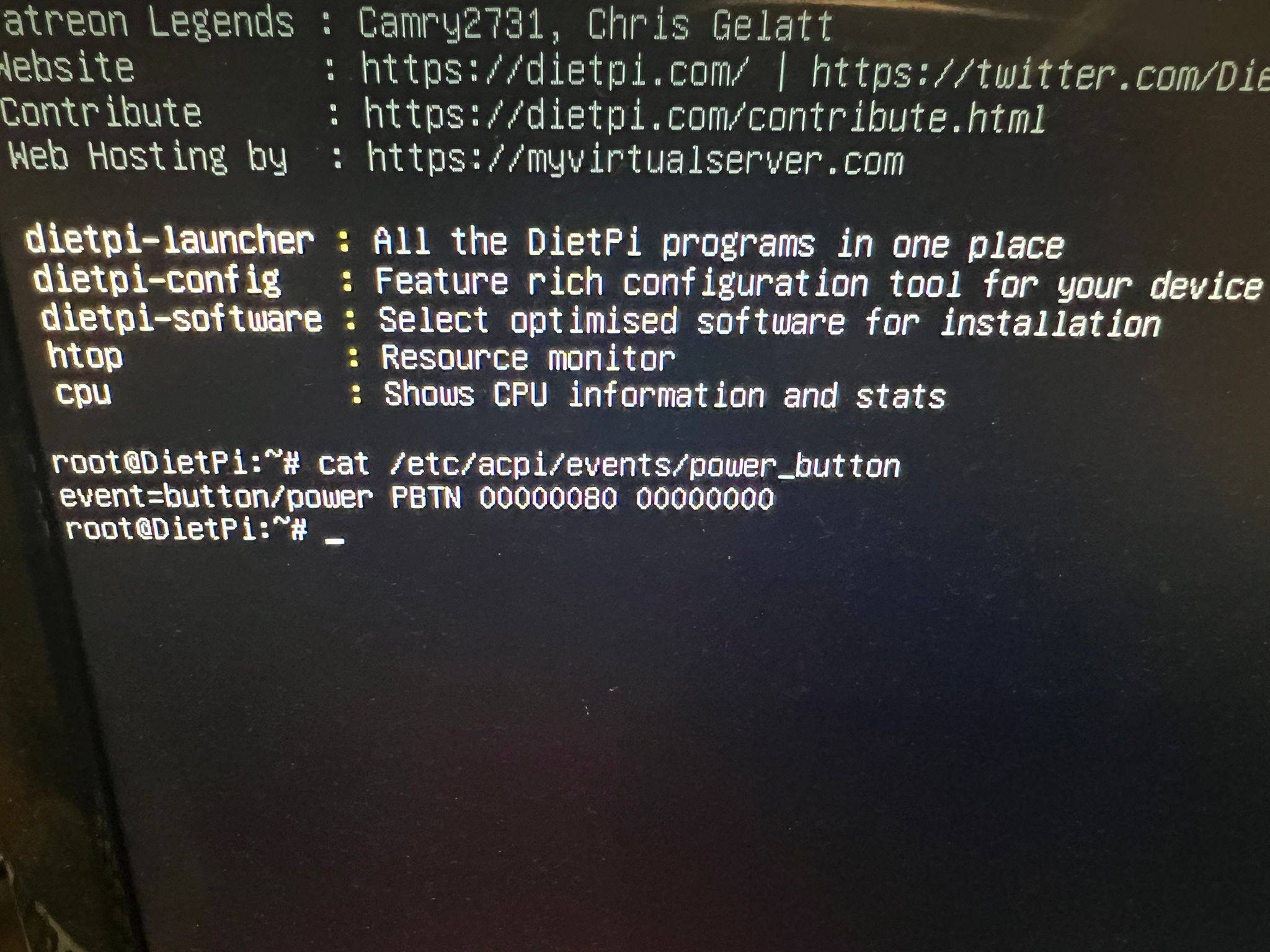
---
### Author:  [@MichaIng](https://dietpi.com/forum/u/MichaIng)
#### Post date: [25 March 2023 15:30 UTC](https://dietpi.com/forum/t/acpi-shutdown-does-nothing/3340/18 "2023-03-25T15:30:14Z")
Instead of manually creating that file, try to remove it and install the related package instead:
```sh
apt install acpi-support-base
```
---
### Author:  [@Audiophile](https://dietpi.com/forum/u/Audiophile)
#### Post date: [26 March 2023 20:27 UTC](https://dietpi.com/forum/t/acpi-shutdown-does-nothing/3340/19 "2023-03-26T20:27:32Z")
I did install it using this command:
_apt -y install acpid_
See screenshot a few posts back.
---
### Author:  [@Joulinar](https://dietpi.com/forum/u/Joulinar)
#### Post date: [26 March 2023 20:41 UTC](https://dietpi.com/forum/t/acpi-shutdown-does-nothing/3340/20 "2023-03-26T20:41:15Z")
`acpi-support-base` is a different package
[Next page](https://dietpi.com/forum/t/acpi-shutdown-does-nothing/3340.md?page=2)